
CRM automation agent Status: Live

CRM automation for sales teams: how Oliv AI's CRM Manager updates every record
CRM automation with Oliv AI's CRM Manager agent: what it writes after every activity, how reps review its updates, when to switch to Auto-Pilot, and how it compares with other CRM automation tools.
On this page
- At a glance
- What the CRM Manager agent is
- Why the CRM Manager agent matters
- The Oliv AI approach to the CRM Manager agent
- Set up CRM Manager
- How CRM records get updated
- Review updates, then switch to Auto-Pilot
- Direct a clean-up job
- What RevOps gets each week
- How to measure CRM field accuracy
- How to check CRM automation before you trust it
- How CRM Manager works with other agents
- Who uses CRM Manager, and how
- How Oliv AI compares for CRM automation
- Limits and things to know
- Common questions
- Further reading
- Related
Your reps stop typing and every record stays accurate after each call, email and meeting: that's the test for CRM automation. Oliv AI's CRM Manager agent, a layer on top of your CRM, works out what changed after every activity and writes it to Salesforce, HubSpot or Zoho. Each suggested change waits on the deal's CRM Updates tab beside the field's current value, so reps can accept or reject it. Once the team trusts the results, you can switch it to fully automatic updates.
At a glance
| What it does | Updates accounts, contacts, opportunities, activities and tasks from every activity |
| Who it's for | RevOps first, plus account executives, sales managers and CS managers |
| CRMs | Salesforce, HubSpot and Zoho out of the box; others on request |
| Fields it fills | Standard fields, methodology fields and your custom fields |
| Where you review | The deal's CRM Updates tab: AI Suggestions, AI Updates and Updates History |
| Control modes | Ask First or Auto-Pilot |
| On-demand jobs | Duplicates, broken hierarchies, unassigned contacts, methodology backfills |
| Weekly output | A governance digest for RevOps and a report of what changed |
What the CRM Manager agent is
Oliv AI's CRM Manager agent is an always-on agent that sits on top of your CRM. It isn't a CRM itself. It works with Salesforce, HubSpot or Zoho, and its updates flow into your existing workflows, reports and dashboards.
It runs after every activity, so nobody has to ask. Oliv AI's Deal Insights layer works out what a conversation means, and CRM Manager applies the result to your records.
What it keeps current
- Accounts and contacts. When an activity involves a company or person not yet in the CRM, it creates the record and enriches it straight away.
- Account structure. It maps activity to the right account and opportunity, keeps parent and subsidiary links current, and resolves duplicates.
- Stakeholder roles. It tracks each contact's role on each opportunity, such as economic buyer, champion or blocker, and updates Opportunity Contact Roles.
- Opportunities. It creates the opportunity once there are enough activity signals, then moves the stage as the deal progresses.
- Activities and tasks. It logs every meeting, call and email, and creates tasks from the next steps it hears.
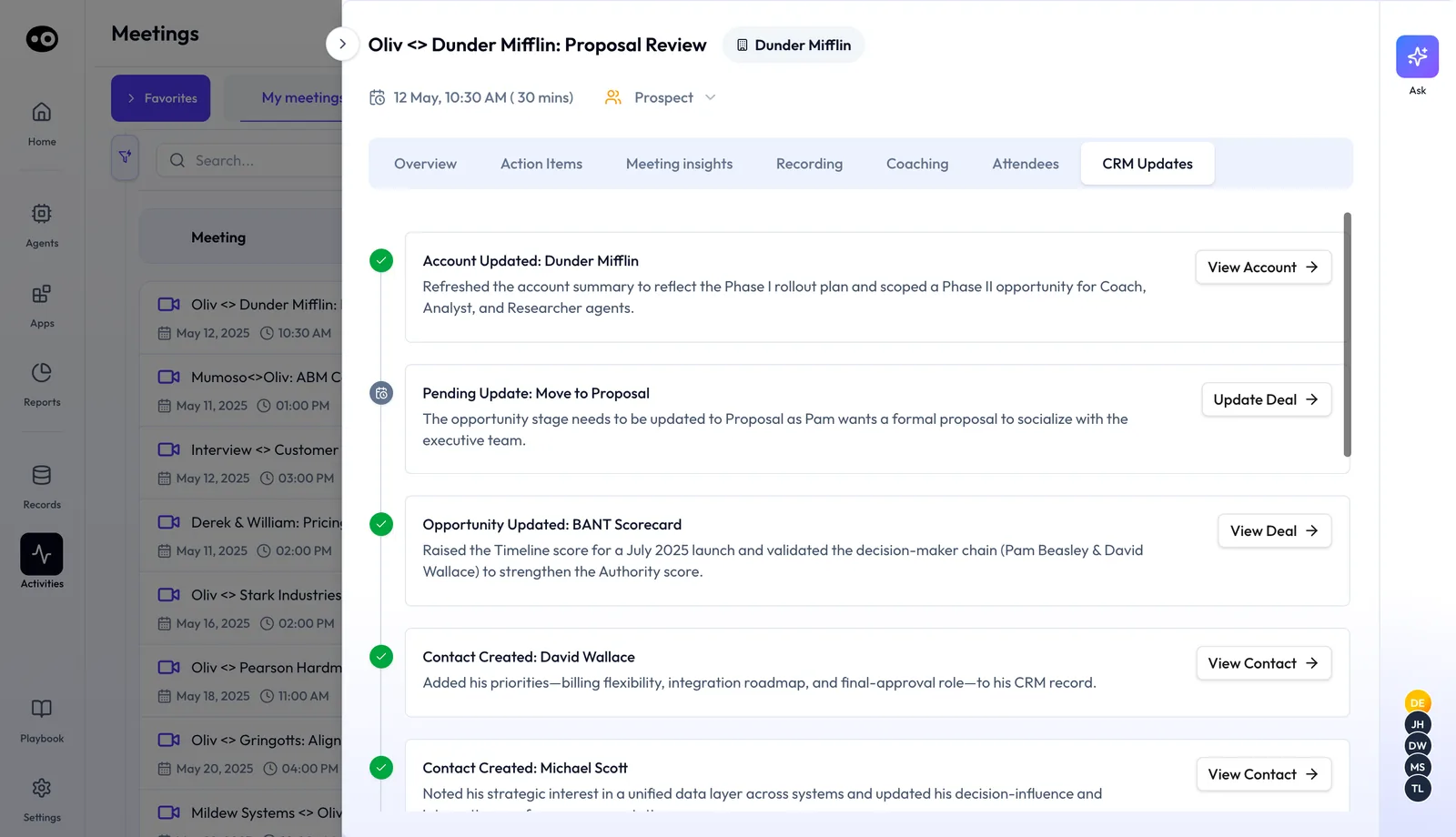
After a meeting, that meeting's CRM Updates tab shows each write as a card: Account Updated, Opportunity Updated, Contact Created. A change that waits for you, such as a stage move, shows as Pending Update with Update Deal.
Three kinds of fields
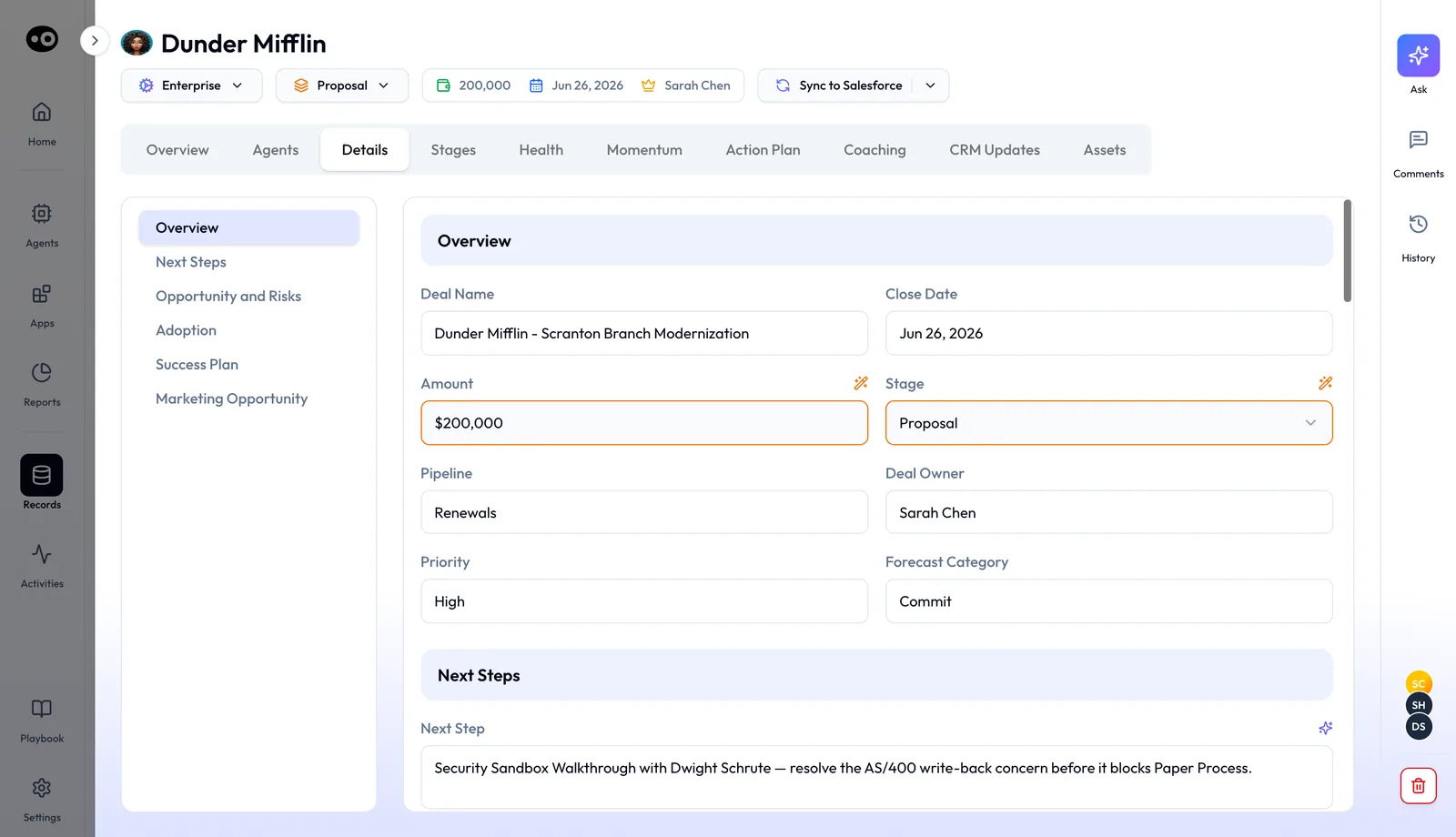
- Standard fields. Close date, deal amount, stage, next steps and last activity date. These are pre-mapped when you connect your CRM.
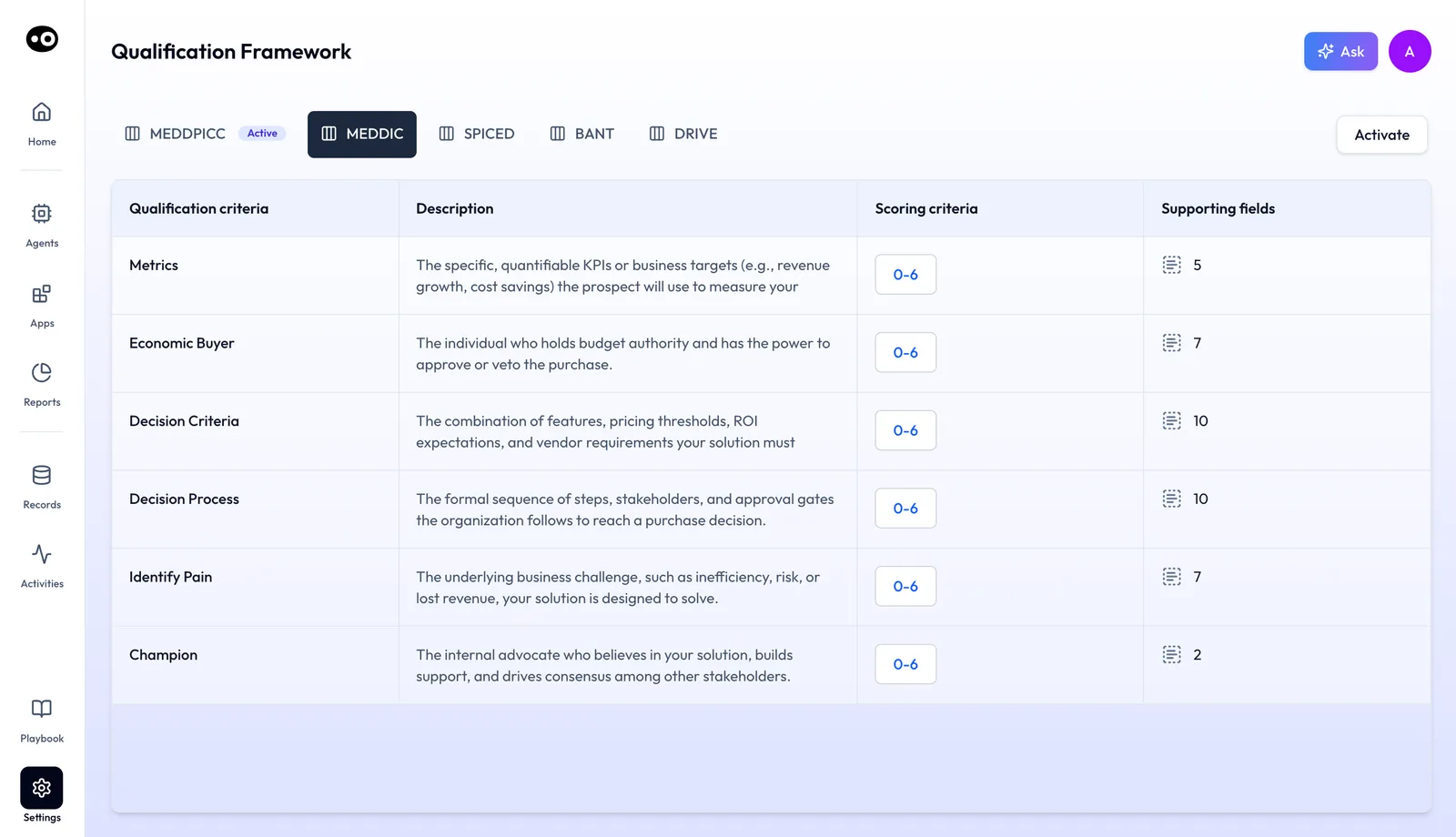
- Methodology fields. The criteria of the framework marked Active in Settings › Qualification Framework: MEDDPICC, MEDDIC, SPICED, BANT or DRIVE. Each criterion lists how many supporting fields back it.
- Custom fields. Anything unique to your process, such as use case, competition or integration type. Oliv AI's team configures these during onboarding.
On a deal, the Details tab groups these fields into sections such as Overview, Next Steps and Opportunity and Risks.
Why the CRM Manager agent matters
What it's for
Oliv AI's CRM Manager agent is for teams whose CRM shows what got logged rather than what happened. It turns every conversation into current records, so nobody has to type them.
How it helps
- Fields fill themselves. Stage, close date, next steps and methodology fields come from what was said.
- No clean-up first. It works with messy data and tidies it as it goes.
- Every change sits beside the old value. Each suggestion shows the field's current value, so a rep sees exactly what would change.
- Other agents get better data. Forecasts, deal alerts and coaching all read the records it keeps current.
What happens without it
Managers spend one-on-ones policing the CRM. Customer success managers work from stale account records. RevOps runs pipeline reports on fields that nobody has touched in weeks, and forecasts inherit those gaps.
Why buyers care
A RevOps lead usually buys CRM Manager, with a VP of Sales or VP of CS joining in mid-market teams. It tends to come up when a forecast misses or a CRM clean-up project starts, because that is when the cost of stale data shows.
The Oliv AI approach to the CRM Manager agent
Imagine an account executive on a Friday afternoon after eleven customer calls this week. Next steps, new names and revised close dates for half her deals are still in her notebook. Her manager reviews the pipeline first thing Monday.
The common fix is an hour or two of copying notes into fields, deal by deal. Some fields get rushed and others get skipped. The record ends up showing whatever she had time to type, which may not match what buyers actually said.
Every one of those calls was recorded, so the facts already exist. The missing step is moving them into the right fields. A rep shouldn't have to retype a conversation, only check that the record matches it.
Oliv AI gives that step to its CRM Manager agent. After every meeting, call and email, it proposes values for standard, methodology and custom fields. Each one appears on the deal's CRM Updates tab with the suggested value above the current one. The AE accepts or rejects each field. On Monday, her manager reviews the pipeline from records she has checked, not retyped.
Teams on the weekly cadence get pending suggestions on Friday morning, and anything left unreviewed is accepted automatically on Sunday night. RevOps then receives a summary that includes how often each rep accepted the suggestions. The section below, How Oliv AI compares for CRM automation, shows how that digest stacks up.
Set up CRM Manager
- Connect your CRM. Use the one-click integration for Salesforce, HubSpot or Zoho. Your pipeline and fields sync straight away.
- Let Oliv AI map your custom fields. Oliv AI's team configures them during onboarding as a service, so RevOps has nothing to build.
- Run your first meeting, call or email. CRM Manager starts working from that first activity.
- Review updates as they arrive. Reps check suggestions while the team builds confidence in them.
- Switch to Auto-Pilot when you're ready. Once accuracy thresholds are met, RevOps confirms the move.
Adding email and phone integrations widens what it sees beyond meetings. The integrations directory lists what you can connect.
How CRM records get updated
There are four common ways a field gets its value after a call, and each one fails in a different place.
Reps type it in
The rep who ran the call updates stage, close date and next steps by hand. This catches judgment that only the rep holds. It misses whatever the rep has no time to type, and quality drops in the busiest weeks.
Rules and workflows
The CRM sets some values from events. HubSpot, for example, sets the last activity date automatically from the most recent logged activity. Rules like this catch timestamps and counts well. They miss what was said, so a stage or a close date that changed on the call stays where it was.
A stale stage spreads further than one field. In HubSpot, stage probability sets the weighted amount shown in board view, so a deal left in the wrong stage skews the pipeline total too.
Extraction from calls, reviewed first
A tool reads the conversation and proposes values, and a person approves each one. You get what was actually said, with a human check on every write. The cost is a few clicks per call, and a backlog builds if reps ignore it.
Extraction from calls, written straight away
The same proposals go into the CRM with no review. Records stay current with no rep effort. A wrong value lands in reports until someone spots it, so this mode needs a track record first.
Which of these CRM Manager does
Oliv AI's CRM Manager agent does the last two. It starts in Ask First, where each value waits for Accept or Reject, and RevOps confirms the switch to Auto-Pilot once accuracy thresholds are met. It works alongside your CRM's own rules rather than replacing them. The CRM automation guide for RevOps leaders compares these approaches in more depth.
Review updates, then switch to Auto-Pilot
CRM Manager runs in one of two control modes:
- Ask First. You review each update before it's written. Suggestions wait under AI Suggestions on the deal's CRM Updates tab.
- Auto-Pilot. Unreviewed updates apply automatically, so the pipeline stays current without anyone acting. Applied changes are listed under AI Updates.
What a rep sees
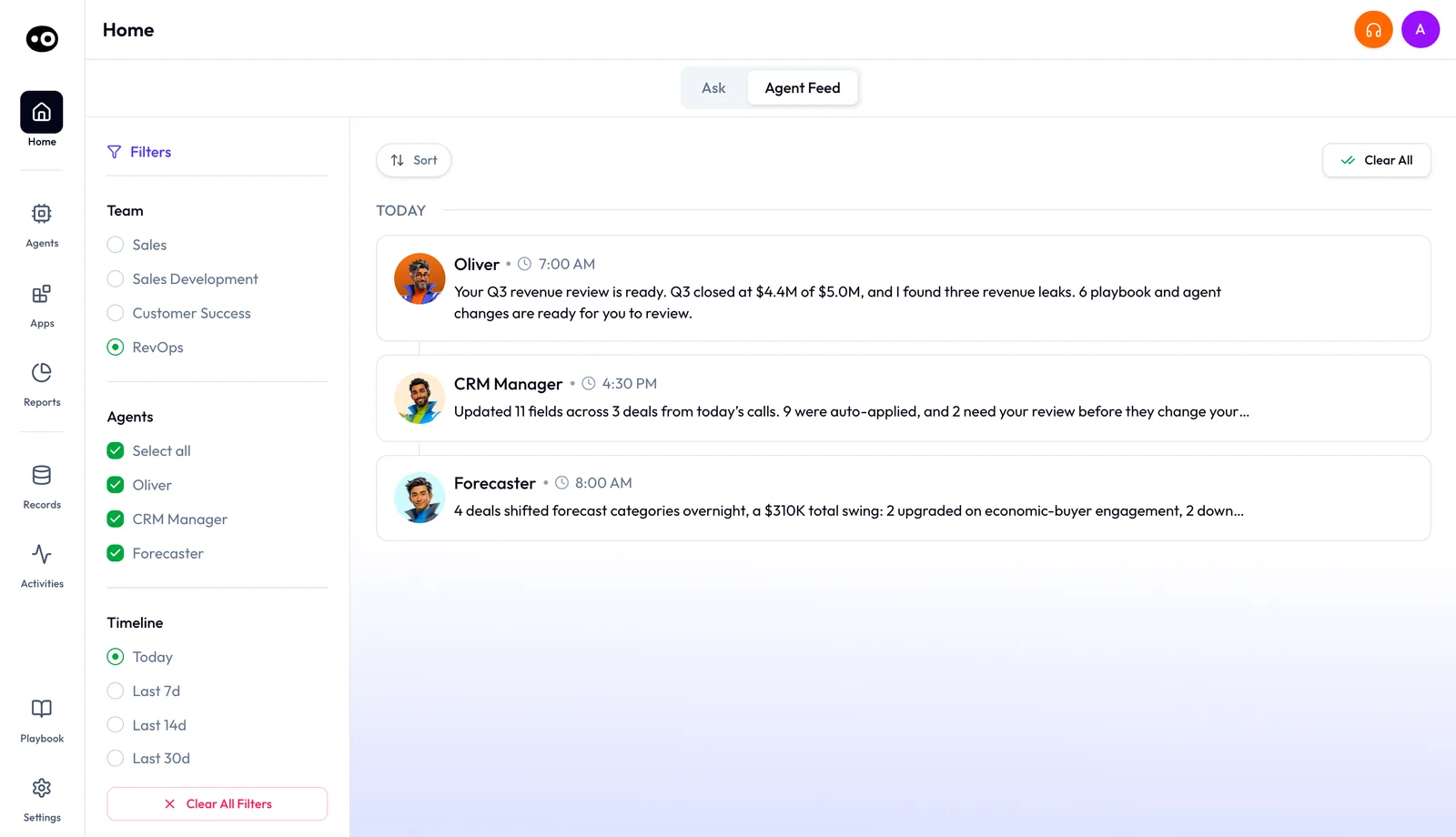
After every activity, CRM Manager sends a message in Slack or your preferred channel: "I found updates for X fields, review here." On Home, its Agent Feed row says how many fields it updated and how many need your review.
Open the deal from Records › Deals and pick the CRM Updates tab. Its index has three lists, each with a count: AI Suggestions, AI Updates and Updates History. Each suggestion card names the field, holds the suggested value in a text box or dropdown, and shows "Current Value" below. Press Accept or Reject. For a rep's view of the same deals, see running deals as an account executive.
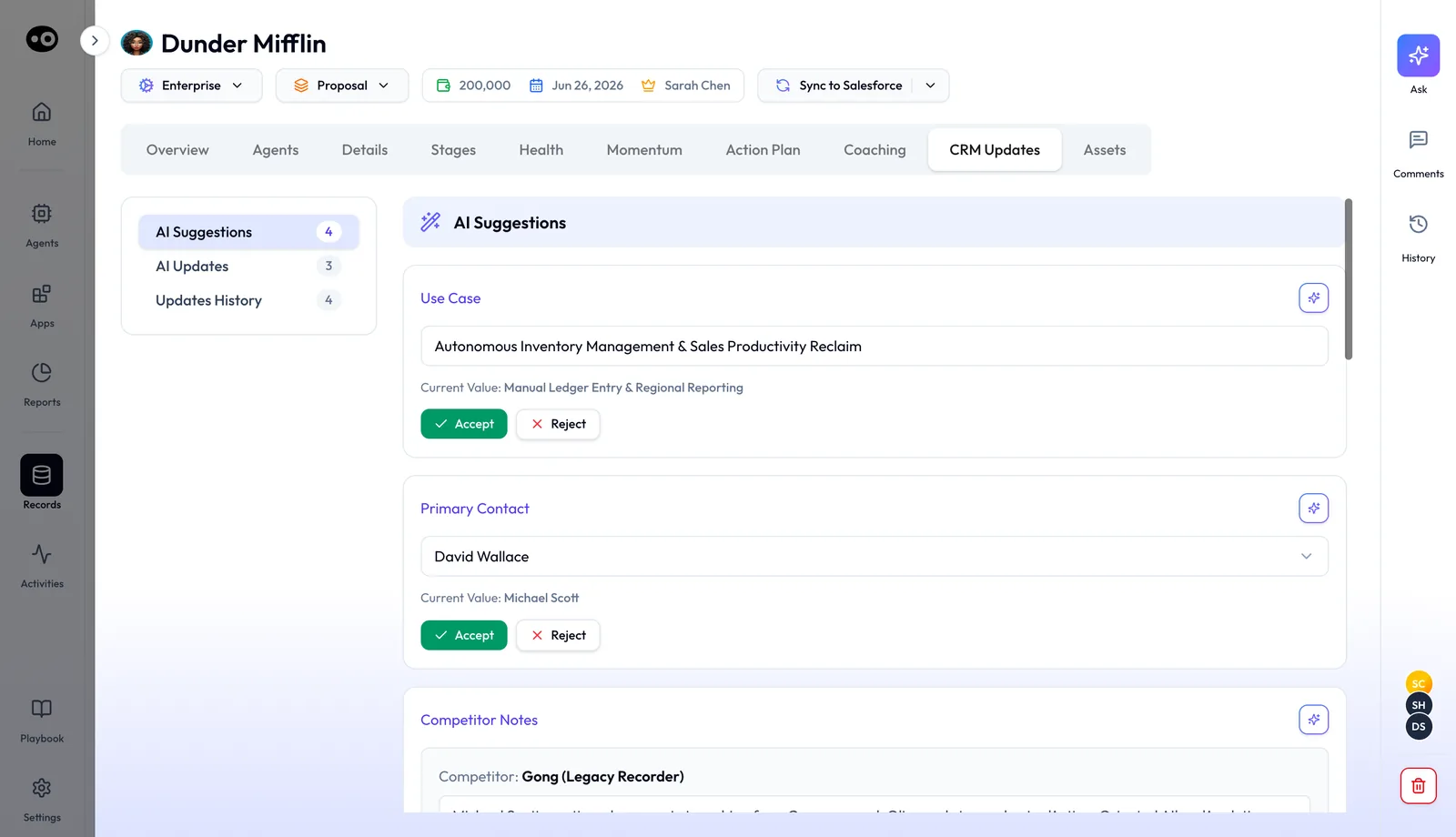
The count beside AI Suggestions shows managers what is waiting on each deal. Updates History keeps the record of how each field changed.
The weekly cadence
Some teams prefer one review window a week. Reps get their pending CRM suggestions on Friday morning, and an auto-acceptance confirmation on Sunday night. If a rep doesn't complete updates within a set window, deals can be deferred automatically or flagged as closed-lost, depending on how your org configures it.
Direct a clean-up job
CRM Manager works in the background, but RevOps can give it a job at any time in plain language:
- "Find all duplicate accounts from last quarter."
- "Rebuild broken account hierarchies."
- "Clean unassigned contacts."
- "Backfill MEDDPICC fields across the pipeline."
These batch jobs replace the rule-heavy clean-up work that older tools need, with no configuration to maintain. The guide to autonomous CRM hygiene shows how RevOps teams plan these jobs.
What RevOps gets each week
- A weekly report. Newly created deals, accounts and contacts, fields updated and enriched, and records cleaned or de-duplicated.
- A governance summary. Suggestions made, fields updated, reverts, time saved, acceptance rate by rep and flags that need review.
- Stale data flags. CRM objects with missing or stale data.
- A usage and ROI tab. It shows in the product, with an estimate of the time saved on manual CRM work.
How to measure CRM field accuracy
Before you trust automatic updates, you need a number that says how often the suggested values are right. Two measures matter for this job.
- Acceptance rate. Accepted suggestions divided by all suggestions in a period. Track it per rep and per field type, because standard fields and custom fields rarely score the same.
- Revert rate. Accepted or applied changes that someone later changed back, divided by all applied changes. It catches errors that slipped past review.
Both have weak spots. A rep who accepts everything without reading inflates the acceptance rate. Updates accepted automatically at the end of a review window aren't a rep's judgment, so leave them out of the count. A CRM's own change stamp won't help here: HubSpot's last modified date moves when any property changes, whatever the source, so it shows activity, not accuracy.
Where CRM Manager shows these numbers
The weekly governance summary for RevOps lists suggestions made, fields updated, reverts and acceptance rate by rep. On each deal, the AI Suggestions count shows what is still waiting, and Updates History shows how each field changed. Start with the rep whose acceptance rate is lowest, then open their deals' Updates History to see which fields changed.
How to check CRM automation before you trust it
You can run this check by hand on any CRM automation tool. It takes four weeks of normal selling.
- Pick two or three reps with a steady call volume.
- Keep every suggested update in review mode, so nothing writes without a person.
- Each week, count the suggestions, the ones accepted and the ones rejected. Leave out any accepted automatically.
- Split the rejects by field type: standard, methodology and custom.
- Write down the acceptance rate you need before you switch on automatic writes, and agree it with sales leadership.
- Switch on automatic writes only for the field types that clear that rate, and keep checking reverts.
The same check with CRM Manager
With CRM Manager, steps 2 and 3 are already done. Ask First holds every update for review, and the weekly governance summary counts suggestions, reverts and acceptance rate by rep. You set the bar, read the summary each week, and RevOps confirms the switch to Auto-Pilot when the numbers hold.
Worked example: four weeks of suggested updates
This is an illustrative calculation with sample figures, not an Oliv AI output. A pilot team of three reps keeps every update in review for four weeks. The team chose a 90% acceptance bar before it started.
| Week | Suggestions | Accepted | Rejected | Acceptance rate |
|---|---|---|---|---|
| 1 | 200 | 150 | 50 | 150 ÷ 200 = 75% |
| 2 | 200 | 164 | 36 | 164 ÷ 200 = 82% |
| 3 | 200 | 178 | 22 | 178 ÷ 200 = 89% |
| 4 | 200 | 186 | 14 | 186 ÷ 200 = 93% |
| Total | 800 | 678 | 122 | 678 ÷ 800 = 84.75% |
The four-week average is under the bar, but the trend is what matters. Week 4 clears 90% for the first time, so the team waits one more week. If week 5 holds above 90%, RevOps switches to automatic updates and keeps watching the revert rate.
How CRM Manager works with other agents
CRM Manager doesn't direct other agents. They read the data it produces.
Meeting Assistant
Oliv AI's Meeting Assistant agent proposes field updates from every call. CRM Manager reviews the same call context and pushes approved changes into the CRM. Before the next call, briefs pull from the contact and account records it keeps current, as shown in preparing for a meeting.
Deal Driver and Forecaster
Oliv AI's Deal Driver agent uses CRM field values and stage history for pipeline review and risk flags. Oliv AI's Forecaster agent uses stage, close date and amount for its projections.
Portfolio Manager
Oliv AI's Portfolio Manager agent works from account records that CRM Manager keeps current from QBRs and check-in calls. Its signals reflect this week, not last month.
Oliver
Oliv AI's Oliver agent maintains the field definitions that decide what CRM Manager tracks and updates. When a process change needs a new field, Oliver works through CRM Manager. An Oliver proposal in Playbook can add a new Opportunity field that CRM Manager fills from meeting and email activity, with a 90-day backfill.
Olivia
Oliv AI's Olivia agent answers reps' questions about deals and accounts. Her answers are only as current as the records CRM Manager maintains. When she drafts an email, her follow-up plan names CRM Manager to log the touch on the deal.
Who uses CRM Manager, and how
Account executives
An account executive gets a message after each call and reviews proposed updates in a few clicks. The record stays current without an end-of-week typing session.
Revenue operations
Revenue operations owns CRM Manager. The team confirms the switch to Auto-Pilot, runs batch clean-up jobs and reads the weekly governance digest. The RevOps view of the Agent Feed lists CRM Manager beside Oliver and Forecaster.
Sales managers
Sales managers check the AI Suggestions count on each deal's CRM Updates tab, so one-on-ones start from clean data instead of CRM police work.
Customer success managers
For customer success, CRM Manager covers onboarding, QBRs and renewals. When a champion mentions a reorg in passing, the stakeholder map changes and the champion is flagged at risk.
How Oliv AI compares for CRM automation
Several tools in this table write fields from calls. CRM Manager also resolves duplicate accounts as activity touches them and sends RevOps a weekly digest with each rep's acceptance rate. Oliv AI is the only platform in this table that does all three.
CRM automation features, from each platform's public documentation:
| Platform | CRM fields updated from calls | Duplicates resolved as it goes | Weekly digest with acceptance rate by rep |
|---|---|---|---|
| Oliv AI | Yes | Yes | Yes |
| Gong | Yes (AI Data Extractor writes CRM fields) | Partly (filters to skip duplicate records) | Not in docs |
| Outreach | Yes (Deal Agent field recommendations) | Partly (dedupe rules set by admins) | Not in docs |
| Avoma | Yes (bi-directional Salesforce sync) | Not in docs | Not in docs |
| Fireflies | Yes (Autofill CRM drafts field updates) | Not in docs | Not in docs |
| Fathom | Yes (call summaries written to Salesforce) | Not in docs | Not in docs |
Yes: documented and built in. Partly: documented with a limit, shown in brackets. Not in docs: not found in the vendor's public documentation.
Why Oliv AI is the stronger choice for CRM automation
- One value per field, beside the old one. CRM Manager shows each suggested value above the current value and waits for Accept or Reject. Gong notes that when several Data Extractors map to one field, they all update it and overwrite the existing value. Compare Oliv AI vs Gong.
- Duplicates handled for you. CRM Manager resolves duplicates in real time and in batch jobs. Outreach documents deduping criteria that Outreach Admins customize per field mapping. Read how Gong and Outreach compare.
- Set-up without two admins. You connect the CRM and Oliv AI's team maps your custom fields. Avoma's Salesforce sync says you must be both an Avoma admin and a Salesforce admin. Compare Oliv AI vs Avoma.
Competitor details checked against each vendor's public documentation on 21 October 2026. Features and plans change, so confirm with the vendor before you decide.
Limits and things to know
- It isn't a CRM. It works on top of Salesforce, HubSpot or Zoho, and your reports stay where they are.
- It writes what Deal Insights produces. CRM Manager doesn't score deals or decide field values from scratch.
- It isn't for pipeline risk. Pipeline risk signals belong to Deal Driver. CRM Manager surfaces data quality issues.
- It isn't a forecast. Forecaster handles projections.
- Auto-Pilot needs a decision. RevOps confirms the switch once accuracy thresholds are met.
- If it can't tell where an activity belongs, it asks. The seller confirms the right account or opportunity.
Common questions
Does CRM Manager write directly to my CRM, or do I approve updates first?
Both. By default, every suggested update waits under AI Suggestions before anything reaches your CRM. Once your team trusts it, switch to Auto-Pilot for hands-free updates.
What if it makes a wrong update?
Each suggestion shows the current value next to the suggested one, so you can reject it before it's written. Updates History keeps the record of the changes made.
Our CRM data is already a mess. Will it still work?
Yes. It fixes issues as new activity comes in, and a batch job cleans what's already there. You don't need a clean CRM to start.
Which CRMs does it support?
Salesforce, HubSpot and Zoho out of the box. Additional CRMs are available on request.
Who configures the custom fields?
Oliv AI's team handles this during onboarding as a service. It isn't a RevOps task on your side.
Does it understand account hierarchy?
Yes. It maps parent and subsidiary relationships and keeps them current. RevOps can also run a full hierarchy rebuild as a batch job.
Does it cover customer success, or just sales?
Both. It tracks activity across the full revenue lifecycle: pre-sale, active sales, CS onboarding, QBRs and renewals.
Does it only log meetings that Oliv AI joined?
No. It logs any activity on the platform, including calls and emails, against the right account, contact and opportunity.
Does it create new contacts?
Yes. When a new person joins a meeting, call or email thread, CRM Manager creates the contact and enriches it with title, LinkedIn and email. The meeting's CRM Updates tab shows it as Contact Created, with View Contact.
Can I see what changed on a field over time?
Yes. Each deal's CRM Updates tab has an Updates History list of the changes made.
Should AI update the CRM without approval?
Only after it has earned it. CRM Manager starts in Ask First, where every value waits for a rep. RevOps confirms the switch to Auto-Pilot once accuracy thresholds are met.
How do you test CRM automation before trusting it?
Keep every update in review for a few weeks and track the acceptance rate per rep and per field type. The weekly governance summary gives you those counts, along with reverts.
Which CRM fields can it update automatically?
Standard fields such as stage, close date, amount and next steps, the criteria of your active methodology, and custom fields that Oliv AI's team maps during onboarding.
Further reading
Related
Updated 2 November 2026: added how CRM records get updated, how to measure field accuracy, a four-week worked example, a manual check and three new questions.