
AI sales coaching agent Status: Live

Sales coaching software: how Oliv AI's Coach scores recorded calls and recommends goals
How sales coaching software lets you coach from recorded calls: Oliv AI's Coach agent scores them, recommends three goals per rep each month for you to set, tracks progress every week, and how it compares.
On this page
- At a glance
- What the Coach agent is
- Why the Coach agent matters
- The Oliv AI approach to the Coach agent
- Set up Coach
- How reps get coached without hearing every recording
- Run the coaching cadence
- How to tell whether sales coaching is working
- How to coach sales reps from recorded calls by hand
- How Coach works with other agents
- Who uses Coach, and how
- How Oliv AI compares for sales coaching software
- Limits and things to know
- Common questions
- Further reading
- Related
No manager can listen to every recording, yet coaching has to rest on evidence from real calls. Sales coaching software has to do that listening for you, and Oliv AI's Coach agent does it by scoring every recorded call, meeting and deal, then recommending the three behaviors most likely to improve each rep's results that month. You set one goal, and the agent tracks the rep's progress every week until the next monthly cycle begins.
At a glance
| What it does | Finds where coaching moves revenue for each rep and tracks progress weekly |
| Who it's for | Sales managers and BDR leads, plus VPs of Sales, enablement managers and account managers |
| Scores | 100% of recorded activity, against your scorecards |
| Monthly | A review report per rep with three recommended goals, one marked Recommended |
| Weekly | A progress report for each rep on the active goal |
| Before the 1:1 | A brief with goal progress, call highlights and one coaching question |
| Where you see it | Apps › Enable › People, Reports › My Reports and the Coaching tab on meetings and deals |
| Needs | About 10 recorded calls per rep, plus deal outcome data |
What the Coach agent is
Oliv AI's Coach agent ties its goals to close rates, stage conversion and deal size, not to communication style or compliance. The manager doesn't have to watch a single recording, and the rep doesn't wait for a quarterly review.
Scoring across four dimensions
| Dimension | What it covers |
|---|---|
| Pipeline Coverage | Whether the rep is building enough pipeline to hit their number |
| Deal Execution | How well active deals are run: qualification, stakeholder mapping, next-step discipline |
| Meeting Management | Discovery quality, positioning, objection handling, agenda control and follow-through |
| Foundational Skills | Presence, active listening, questioning, relating, positioning and checking |
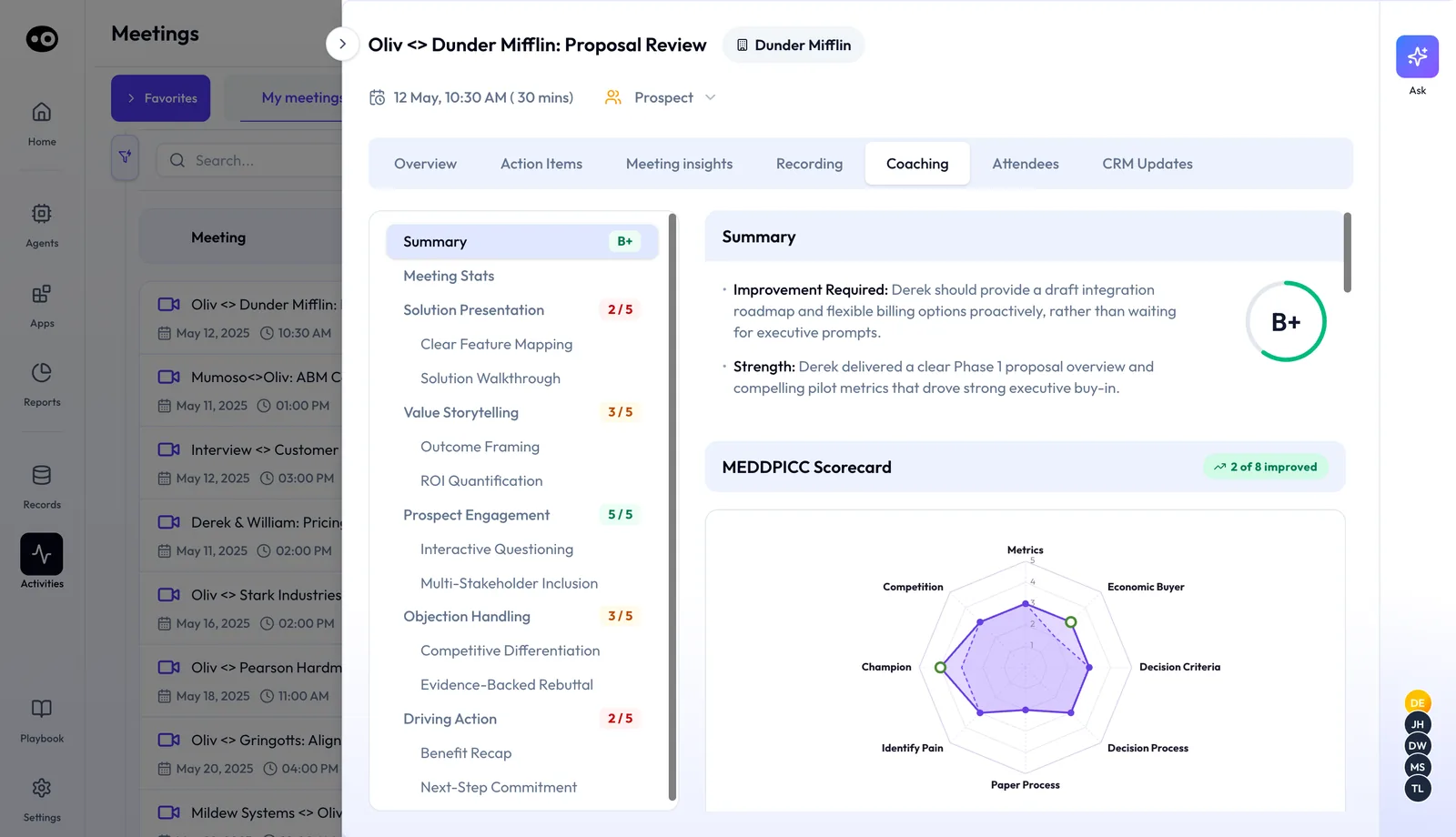
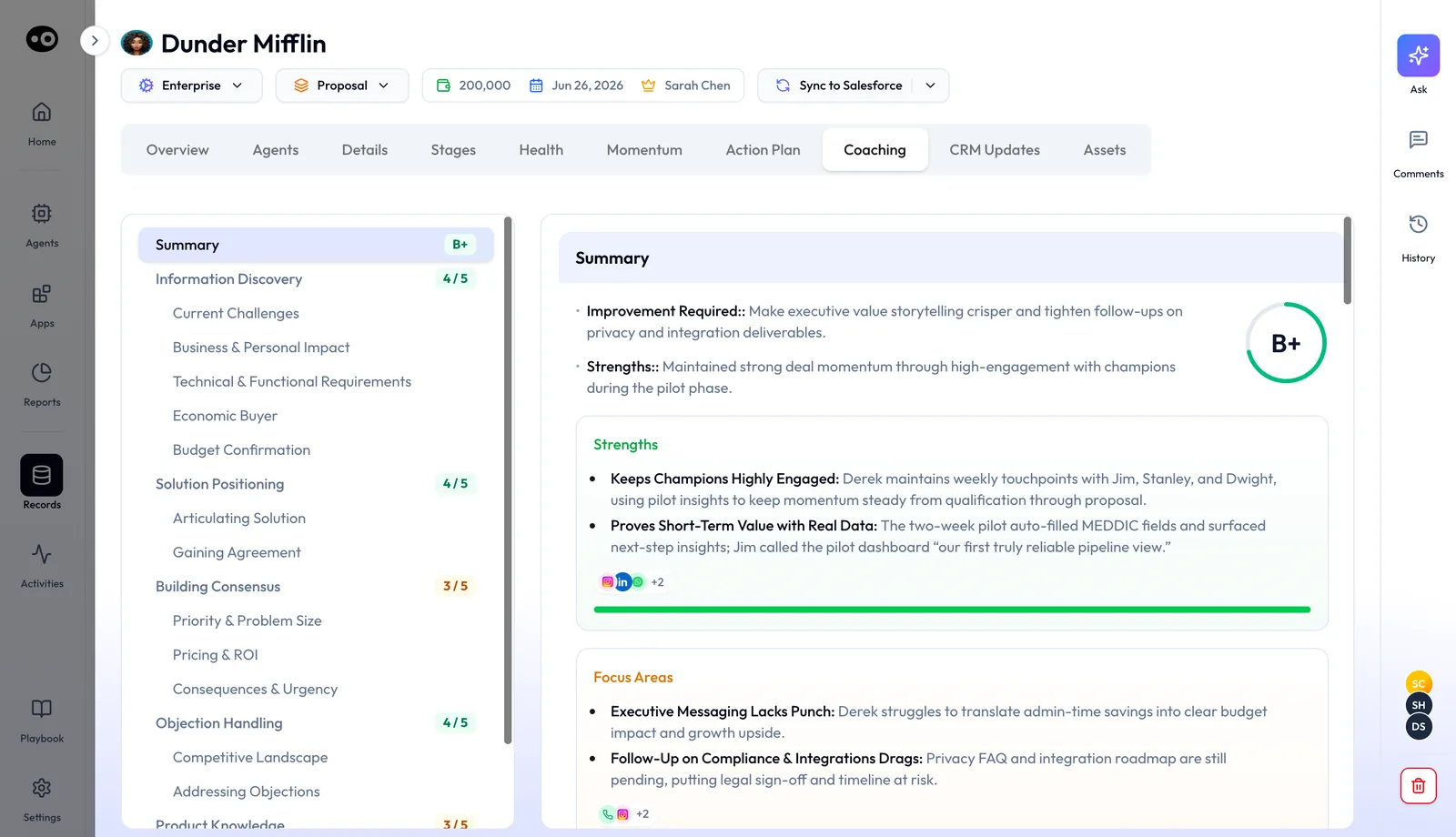
Each meeting's Coaching tab shows the call's grade, a score out of 5 for each skill and a radar of your qualification criteria. A deal's Coaching tab grades how the rep ran that whole deal, with Strengths and Focus Areas.
The monthly review and the weekly report
Once a month, Coach analyzes each rep's full performance data and produces a review report. It surfaces three focus areas, ranked by expected impact, each grounded in evidence from that rep's calls and deals.
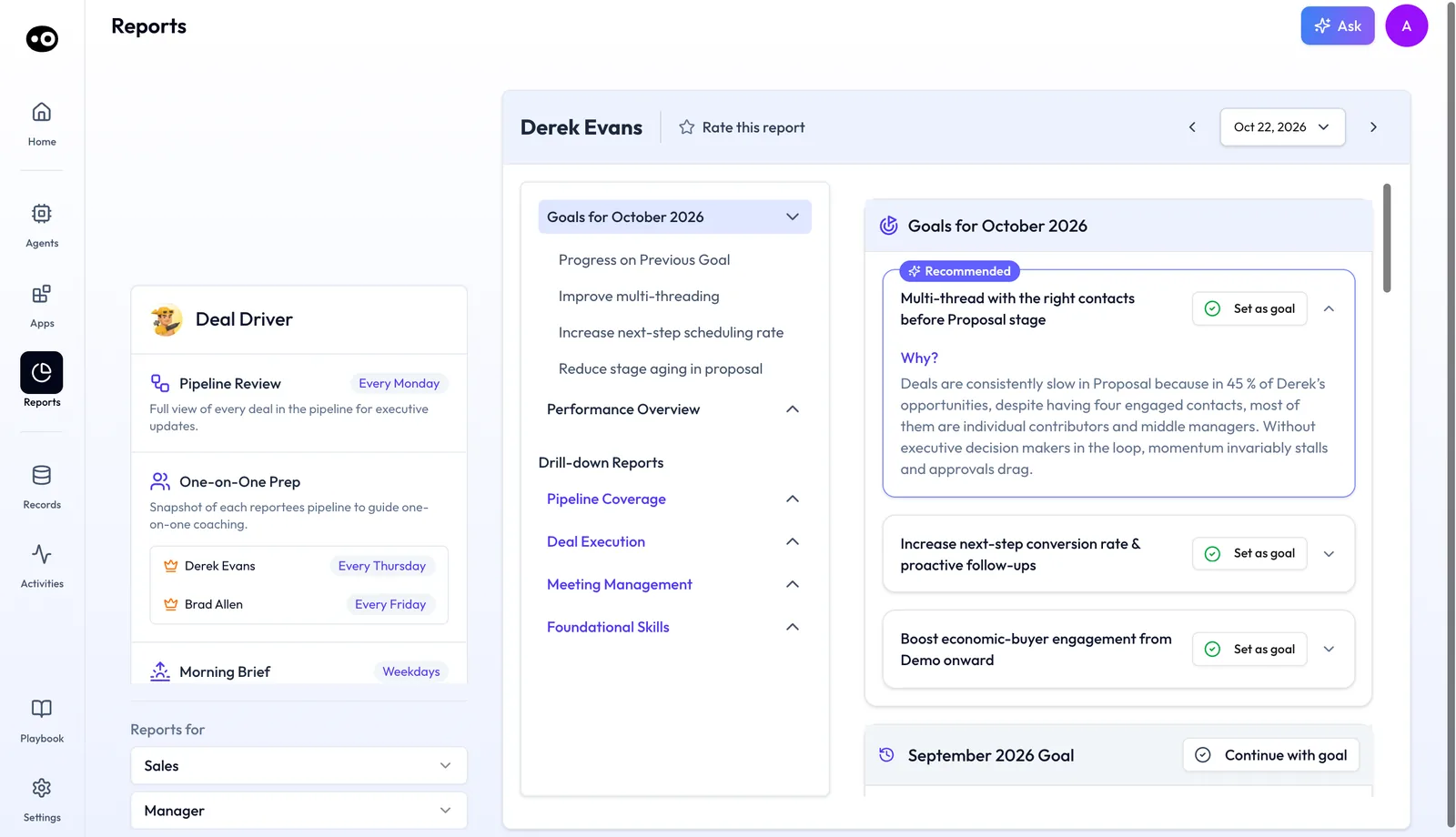
The review opens with Goals for the month: three goals, the first marked Recommended, each with a Why? that gives the evidence. Below sit last month's goal with its progress and metric cards against targets, then Coaching Tasks with due dates. Performance Overview scores the four dimensions, each with a Strength, a Gap and the change in points. Drill Down Reports compare last month with this month against a top performer.
The manager picks the goal that fits and sets it. Coach then breaks the goal into weekly sub-goals. At the end of each week the rep gets a progress report: progress on the goal, wins from last week, and one focus for next week.
Why the Coach agent matters
What it's for
Oliv AI's Coach agent is for teams that want every rep to get better each month, not each quarter. It runs a simple loop: find one gap per rep, reinforce it weekly, and track whether it moves.
How it helps
- Every recorded call counts. Coach scores all recorded activity, so no manager has to sample calls by hand.
- Goals come with proof. The three monthly recommendations cite the rep's own calls and deals.
- The goal stays visible. A weekly report keeps it in front of the rep between conversations.
- 1:1s open on coaching. The brief lands before the meeting, so nobody starts with a pipeline recap.
What happens without it
Most calls are never reviewed at all. Feedback stays generic, and nothing tracks whether it lands. By week two, the rep drifts back to old habits. A struggling rep often surfaces only after missing quota.
Why buyers care
Sales managers, BDR leads and VPs of Sales are the buyers. Sales managers benefit most directly, with better 1:1 prep and no manual call review. Enablement managers care because they can see which skills drive revenue and which training isn't sticking.
The Oliv AI approach to the Coach agent
Picture an enablement manager ramping five new account executives through their first month. They've finished onboarding and are now running real discovery calls every day. She needs to know who is struggling, and with what, before early habits harden.
The common fallback is sitting in on a few calls per hire and scoring them against a rubric by hand. With five people, that might mean a couple of calls each per week. The picture stays thin, and feedback can land after the habit has already formed.
But every one of those calls is already recorded. The patterns that matter, like skipped next steps or a single contact per deal, only show across many calls. What's missing is scoring at full volume and one clear goal per person drawn from it.
Oliv AI handles this with its Coach agent. It scores every recorded call against the team's scorecards and looks for each new hire's real pattern. Their sales manager reviews three ranked recommendations per person and sets one goal. Every week after that, each new hire gets a progress report, and the enablement manager can see who is advancing.
Coach needs about ten calls per rep to find a pattern. Most teams see their first monthly review within two weeks of connecting their call stack. Until a new hire reaches that volume, keep sitting in on a few of their calls so early habits don't go unseen.
Set up Coach
- Connect your call stack. Use Zoom, your existing call recorder or Oliv AI's own call recording. Coach starts scoring as soon as calls start flowing in. It also connects to your CRM and Slack, with more than 70 integrations in all.
- Set your scorecards. Start with the pre-built scorecards for enterprise, mid-market and SMB motions, or bring your own criteria. No engineering is required. The library lives in Settings › Coaching Scorecard.
- Let the first monthly review land. Coach needs about ten calls per rep to find a real pattern. Most teams see their first monthly review within two weeks.
No rep training is needed.
Pre-built scorecards
Coach ships with fourteen pre-built scorecards, grouped under Deals, Customers, Meetings and Phone calls. Each one has a description and a count of Evaluations (Last 30 days), so you can see which scorecards are in use.
| Group | Scorecards |
|---|---|
| Deals | Enterprise Deal, Mid-Market Deal, SMB Deal, Upsell Opportunity |
| Customers | Customer Retention, Customer Onboarding, Renewal Readiness |
| Meetings | Discovery, Demo Meeting, POC Kickoff Meeting, POC Review Meeting |
| Phone calls | Qualification Call, Cold-Call, Event Follow-Up Call |
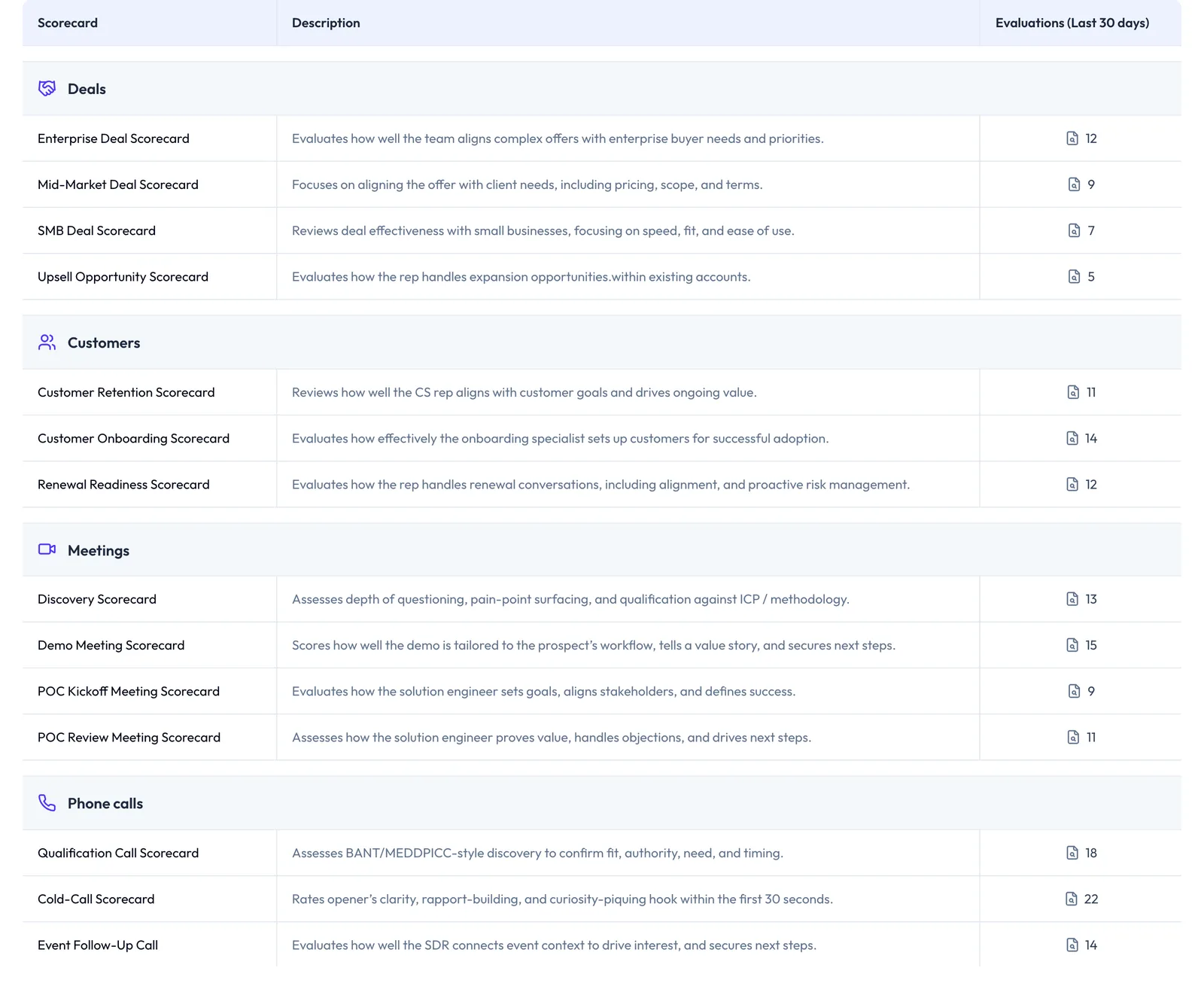
Some scorecards are written for a role, such as the solution engineer on a POC or the SDR on an event follow-up call. Every scorecard draws on a library of more than 100 criteria in six categories: Discovery & Qualification, Solution & Value, Stakeholder Alignment, Commercial & Negotiation, Risk & Competitive, and Foundational Skills. Managers add, remove or weight criteria to match their sales methodology, such as a SPICED scorecard.
How reps get coached without hearing every recording
Say you have one free afternoon for coaching this week and eight reps to think about. There are four ways to spend it, and each shows you something different. The afternoon is worth protecting, because Sales Executive Council research reported in Harvard Business Review in January 2011 ranked coaching ahead of every other productivity investment for improving rep performance.
Sitting in on live calls
You join a rep's call and debrief straight after. This catches how the rep handles a live buyer, and your feedback arrives while the call is fresh. It misses every call you didn't join, and one call can't tell you whether a slip is a habit or a bad day.
Sampling recordings against a scorecard
You pick a few recordings per rep and score each one by hand. Your call tool may already allow this: in HubSpot, any user recording calls from HubSpot can review and coach on the recording. This catches the detail of a call and gives you a specific moment to discuss. It misses patterns, because a few calls can't show what happens consistently, and the sample leans toward the calls you chose.
Searching transcripts for tracked terms
You list the words that matter, such as a competitor's name or "budget", and jump to where they come up. HubSpot's tracked terms work this way, on its Enterprise subscriptions. This catches every mention across many calls without any listening. It misses what was never said, such as a next step the rep didn't set, and it can't tell you whether the rep handled the moment well.
Scoring every recording automatically
Software scores each recording against set criteria, so coverage stops depending on your calendar. This catches patterns across many calls per rep, which is what a coaching goal needs. It misses anything that wasn't recorded, and a score is only as useful as the scorecard behind it. It also leaves you to decide which gap matters most for this rep this month.
Which of these Coach uses
Oliv AI's Coach agent uses the last way. It scores 100% of a rep's recorded activity against your scorecards and looks for patterns once it has about ten calls per rep. It then recommends three goals, ranked by expected impact, and you set one. Live calls stay with you, because the agent works on recordings after the fact.
Run the coaching cadence
| When | What happens |
|---|---|
| Start of the month | The monthly review is ready. The manager picks a goal per rep and sets it in about twenty minutes. |
| Every week | The progress report lands without the manager sending it: wins, the current gap and one focus for next week. |
| Thursday, or your configured day | The 1:1 brief arrives before the meeting, with goal progress, call highlights and one coaching question. |
| The 1:1 | The conversation opens on what's getting in the way of the goal, not on a pipeline recap. |
Each rep's Monthly Review is listed under Coach in Reports › My Reports, scheduled every 30 days. The same review sits in Apps › Enable › People, under the rep's Coach section, with a list of past months.
Review and set the goal
Read each goal's Why?, then click Set as goal on the one that fits. It doesn't have to be the Recommended one. Continue with goal carries last month's goal forward instead. Nothing reaches the rep until the manager has reviewed it. The monthly review is for the manager only, and reps see their weekly progress reports, scoped to the goal already set.
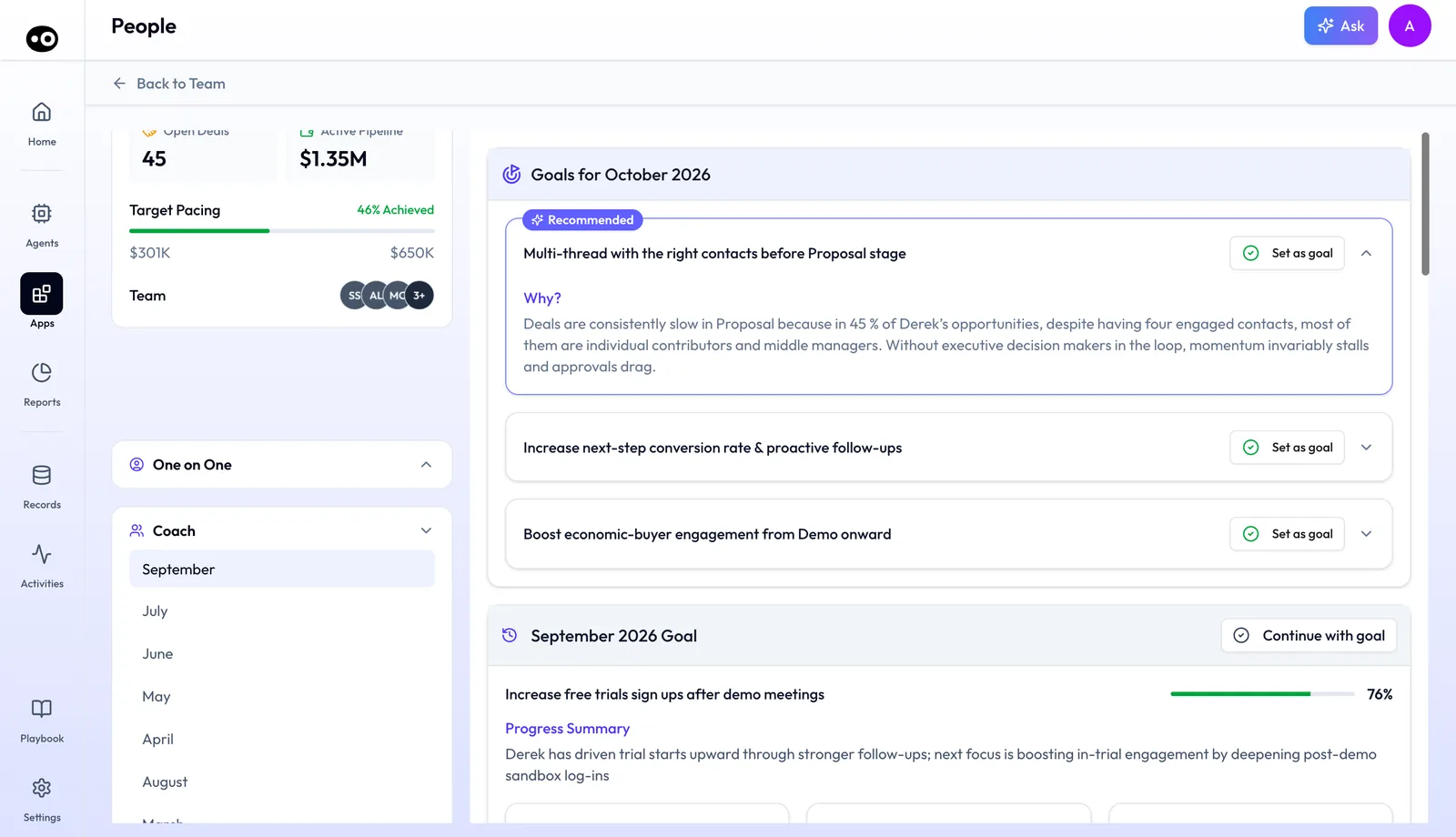
Add Coaching Tasks with due dates to break the goal into steps.
How to choose a coaching goal for a rep
The goals arrive ranked, but the choice is yours, and it should fit the rep's current stage and situation. Work through each rep in this order:
- Read the evidence first. Open each goal's Why? and ask whether it matches what you know about this rep.
- Check last month's goal. If the rep is partway there and that gap still costs the most, use Continue with goal.
- Pick what the rep can act on this month. A goal about Proposal-stage contacts won't move if none of the rep's deals are near Proposal.
- Set one goal and be ready to defend it. If the rep pushes back in the 1:1, go through the evidence from their own calls and deals together.
The mistake to avoid is clicking Set as goal on the Recommended goal without reading the Why?. You then own a goal you can't explain when the rep asks why it was chosen.
Read the weekly progress report
Coach sends the rep this report at the end of each week, and you can pull up the same report before any 1:1. It has three parts:
- Progress on the goal: where the rep is trending against the monthly target, with specific metrics.
- Wins from last week: examples from the rep's calls or deals where the target behavior appeared.
- Focus for next week: one clear area, based on where the gaps remain.
Check that the metric and the wins agree. A rising number with no win behind it is worth a question in the 1:1. If the metric stays flat, have the direct conversation now rather than waiting for the monthly cycle to close.
Watch progress across the team
Managers see a dashboard of every rep's active goal, weekly progress and improvement trajectory. It shows who's advancing, who's stalling and who needs a direct conversation. In Apps › Enable › People, My Team cards show each rep's target pacing, open deals, active pipeline and forecast. A rep's card opens their report, where the One on One report carries a Coaching block with the goal's progress and View Coaching.
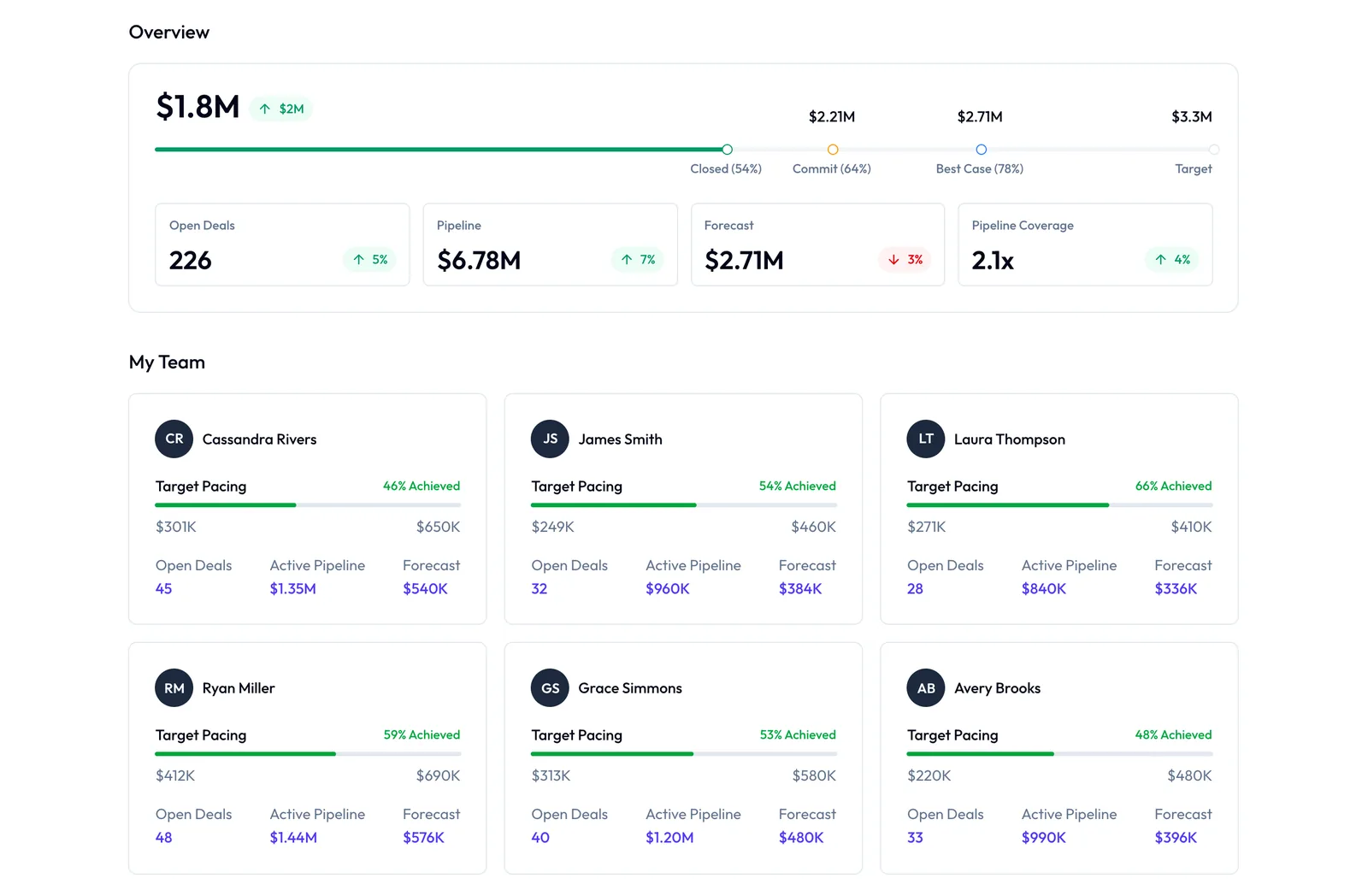
Sales leaders see coaching performance at team and org level, including skill gaps that repeat across reps. For a leader's view of this, read about coaching at scale for VPs of Sales.
How to tell whether sales coaching is working
Two measures sit closest to this job: how many of your recorded calls get scored, and how far each rep has moved toward the month's goal. Check both, because either one alone can mislead you.
Call coverage is recorded calls scored, divided by recorded calls. Its weak spot is that a call nobody recorded never counts. A score also tells you nothing about whether the rep changed, so high coverage is a starting point rather than a result.
Goal progress is the goal's metric against its target. With a sample goal of 20 decision makers engaged and 11 reached so far, the rep is at 11 / 20 = 55%. The weak spot is that an activity count can rise while deals don't. Look at close rates and stage conversion over several months before you call a goal a success.
Where Coach shows these measures
For coverage, open Settings › Coaching Scorecard and read Evaluations (Last 30 days) on each scorecard. Compare the total with the calls your team recorded in that period, and look into any large gap. For goal progress, the monthly review from Oliv AI's Coach agent shows last month's goal, with its progress and metric cards against targets. Performance Overview gives the change in points for each dimension, and the weekly report keeps the metric in view between reviews.
How to coach sales reps from recorded calls by hand
If you're coaching without any software, this is the job. It works, and it's a useful way to see what you'd be handing over.
- Pick the calls. Choose the same call type for each rep, such as discovery. In HubSpot, for example, the call index lists each call's outcome and associated deal, which helps you find them.
- Score each call against one scorecard. Use the same criteria for every rep, and note the moment behind each score.
- Look for what repeats. One miss might be a bad day. The same miss across many calls is a habit.
- Tie the habit to deal outcomes. Compare the deals where the behavior appeared with those where it didn't.
- Set one goal in the 1:1. Name the behavior, the metric and the target for the month.
- Check it every week. Listen to new calls, note the wins and the remaining gap, and send the rep one focus for next week.
- Close the month and start again. Record where the rep landed, then choose the next goal.
Step 6 is where this tends to break. Coaching is often the first thing cut when the pipeline review runs long.
The same job with Coach
Oliv AI's Coach agent takes on steps 1 to 4: it scores all recorded activity and brings you three ranked goals with the evidence attached. Step 5 stays yours, and it becomes reading the Why? and clicking Set as goal. For step 6, the agent sends the weekly report on wins, the gap and one focus. For step 7, the next monthly review arrives with last month's progress already in it. You still make the decision and hold the 1:1.
Worked example: how much of your team's recordings you can hear
This is an illustrative calculation with sample figures, not an Oliv AI output. A manager has 8 reps who each record 12 calls a month at 35 minutes each, and has 6 hours a month to listen.
| Step | Arithmetic | Result |
|---|---|---|
| Recorded calls a month | 8 reps × 12 calls | 96 calls |
| Recording time a month | 96 calls × 35 minutes = 3,360 minutes | 56 hours |
| Share the manager can cover | 6 hours / 56 hours | 11% |
| Full calls heard in 6 hours | 360 minutes / 35 minutes | About 10 calls, or about 1 per rep |
| Time to hear 10 calls per rep | 8 reps × 10 calls × 35 minutes = 2,800 minutes | About 47 hours |
At 11%, this manager hears about one call per rep, which can show a moment but not a habit. Hearing ten calls per rep, the volume Coach needs to find a pattern, would take about 47 hours against the 6 available. The table claims no saving from Oliv AI. It shows why a review by ear can't find patterns at this volume. Run it with your own team's numbers.
How Coach works with other agents
Deal Driver
Oliv AI's Deal Driver agent handles the pipeline context before each 1:1. Coach has already surfaced the rep's highest-impact goal, so the conversation starts there. Deal Driver removes the status check, and Coach drives the development conversation.
Content Curator
When the goal is something like handling pricing objections, Oliv AI's Content Curator agent supplies clips from the call library as coaching examples. The manager shows what good looks like from the team's own calls.
Oliver
Oliv AI's Oliver agent updates the methodology and process definitions that feed Coach's scoring criteria. When your process changes, the scoring follows.
Olivia
Oliv AI's Olivia agent is the front-facing master agent for reps. Coach's weekly reports reach reps through Slack, email or the Oliv AI platform.
Who uses Coach, and how
Sales managers and BDR leads
Managers set one goal per rep each month in about twenty minutes and walk into every 1:1 with the brief. Many pair it with the pipeline view in the Deal Driver agent docs. Read more on Oliv AI for sales managers and the skill gap questions managers should ask.
Enablement managers
Enablement sees which skills are actually winning deals and which training isn't sticking. Read how coaching can cut new-hire ramp time and how sales enablement software differs.
VPs of Sales
Leaders see which managers are consistently developing their reps and where improvement is stalling. The coaching system lives in the platform, so it doesn't leave when a strong manager does.
Reps
Account executives, account managers and CSMs get a weekly progress report and a goal grounded in their own calls. They self-coach between conversations. The rest of a rep's week is in Run deals as an account executive, and customer-facing teams can read about Oliv AI for customer success.
How Oliv AI compares for sales coaching software
Coach scores every recorded call against a pre-built scorecard library and turns the scores into one evidence-backed goal per rep each month. Each week, the rep gets a progress report on that goal. Oliv AI is the only platform in this table that does all four.
Sales coaching software features, from each platform's public documentation:
| Platform | Auto-scores every recorded call | Monthly goal recommended per rep | Weekly progress report for the rep | Pre-built scorecard library |
|---|---|---|---|---|
| Oliv AI | Yes | Yes | Yes | Yes |
| Gong | Yes (AI Call Reviewer scores whole calls) | Partly (Whisper tips from best practices) | Not in docs | Yes (Gong scorecard templates) |
| Avoma | Yes (AI Coaching Assistant auto-scores) | Partly (coaching recommendations in Slack) | Not in docs | Three default AI scorecards |
| Outreach | Partly (2 Amplify credits per card) | Partly (tracks managers' coaching goals) | Not in docs | Not in docs |
| Fathom | Partly (AI Scorecards on Business or Pro) | Not in docs | Not in docs | Partly (example templates to copy) |
| Fireflies | Partly (scorecards through AI Skills) | Not in docs | Not in docs | Partly (AI Skill templates, incl. BANT) |
Yes: documented and built in. Partly: documented with a limit, shown in brackets. Not in docs: not found in the vendor's public documentation.
Why Oliv AI is the stronger choice for sales coaching software
- Goals come from your reps' own deals. Coach ranks three recommendations per rep by expected impact, with evidence from that rep's calls and deals. Gong's Whisper notes that its recommendations are based on industry best practices. Compare Oliv AI vs Gong.
- The goal is tracked every week. Once the manager sets a goal, Coach sends the rep a weekly report on wins, the remaining gap and one focus. Avoma sends coaching recommendations as Slack alerts, with its Revenue Intelligence add-on. Compare Oliv AI vs Avoma.
- Full-volume scoring is part of the cadence. Coach scores 100% of recorded activity before it recommends anything. In Outreach, each automatically scored coaching card uses 2 Amplify credits. Read how Gong and Outreach compare.
Competitor details checked against each vendor's public documentation on 21 October 2026. Features and plans change, so confirm with the vendor before you decide.
Limits and things to know
- It needs call volume. About 10 calls per rep give enough data for a meaningful pattern. More calls raise confidence.
- It isn't real-time. Coach works on recorded calls after the fact. Live, in-call guidance needs a different tool.
- It isn't a QA or compliance tool. Goals are tied to revenue outcomes, not script adherence, tone or legal review.
- It doesn't queue calls to watch. Coach surfaces conclusions, not a list of recordings to review.
- It doesn't replace the 1:1. It gives managers better material for the conversation.
- One goal at a time. Each month the manager sets one goal per rep from the three recommended, or continues the last one.
Common questions
How do you coach sales reps without listening to all their calls?
Score every recording automatically and coach from the patterns. Oliv AI's Coach agent scores all recorded activity against your scorecards, then gives you three ranked goals per rep with evidence. You read the evidence, not the recordings, and set one goal.
How do you choose a coaching goal for a sales rep?
Read the evidence for each recommended goal, check progress on last month's goal, and pick the one the rep can act on this month. The choice should fit the rep's current stage and situation, even when that isn't the goal marked Recommended.
How many calls does Coach need before it can find patterns?
Typically 10 or more calls per rep. More calls improve the quality and confidence of the goal recommendations.
Can the manager choose a different goal from the one Coach recommends?
Yes. Any of the three goals can be set, not only the one marked Recommended. The manager can also continue last month's goal. Nothing reaches the rep until the manager sets it.
Does the rep see the monthly review?
No. The monthly review is for the manager only. Reps see their weekly progress reports, scoped to the goal the manager has set.
Does Coach work for BDRs?
The scorecard library includes phone call scorecards written for SDR work, such as the Cold-Call Scorecard and the Event Follow-Up Call scorecard. BDR leads use the same cadence as sales managers.
What if a rep disagrees with the coaching goal?
The goal is grounded in their own call data and deal outcomes, so the evidence is there to discuss. Open the goal's Why? and go through it together in the 1:1.
Can I use my own scoring framework?
Yes. Start from the pre-built scorecards or build your own from a library of more than 100 criteria. No engineering is required.
Where do I find a rep's monthly review?
In Reports › My Reports under Coach, or in Apps › Enable › People from the rep's card. Both show the same goals, scores and drill-downs.
How does setup work?
Connect your call recording stack and CRM. Most teams have their first monthly review within two weeks, with no rep training.
Does Coach replace Deal Driver?
No. Deal Driver gives managers pipeline visibility across active deals. Coach shows them how each rep is developing. They're often bought together.
Where do reps get their weekly report?
In their usual channel: Slack, email or the Oliv AI platform.
Is Coach a communication style coach?
No. A goal like "be more confident" isn't a Coach goal. Goals tie a specific behavior to a measurable deal outcome.
Further reading
Related
Updated 3 November 2026: added how reps get coached without hearing every recording, how to choose a goal, how to read the weekly report, how to measure coaching, the manual method with a worked example, two more questions and further reading.