
Getting started Live
How to roll out AI sales agents: a 30-day plan from admin access to the day-30 review
A 30-day plan for an AI sales agent rollout across sales and customer success, from choosing who runs the setup and lining up admin access to the first brief, the process handbook and the day-30 review.
On this page
- At a glance
- Before you begin
- Step 1: Choose who runs the setup
- Step 2: Line up admin access
- Step 3: Connect the stack in week one
- Step 4: Build the process handbook
- Step 5: Switch on first value for reps
- Step 6: Add managers and customer success
- Step 7: Review at day 30
- What a deployment plan for Oliv AI is
- Why a deployment plan matters
- The Oliv AI approach to deployment
- How AI sales agent rollouts get run
- How to measure a rollout at day 30
- How to run a 30-day rollout by hand
- How the deployment plan works with other features
- Who uses the deployment plan, and how
- How Oliv AI compares for AI sales agent rollouts
- Limits and things to know
- Common questions
- Further reading
- Related
You've bought AI sales agents or you're piloting them, and now you need a plan for the first 30 days of the AI sales agent rollout: who sets it up, what to connect, what the team sees first and how to judge success. Oliv AI, a layer on top of your CRM, answers that with a rollout of about a month, and most of it runs in parallel. Reps get their first brief before their next meeting, while your process handbook and the manager agents come online over the following weeks. This guide gives revenue operations a week-by-week plan, ending with what to check at day 30.
At a glance
| Who plans it | A revenue operations lead, with a sales or CS leader to sign off the handbook |
| Set-up paths | You Run It (2 to 4 sessions) or We Run It (live in 2 weeks) |
| First value | A brief 30 minutes before the next meeting on the calendar |
| Process handbook | Built with Oliv AI's onboarding team in 1 to 2 weeks |
| Tailored models | Live within 1 day of the proof of value kickoff |
| Admins you need | CRM, calendar or Microsoft 365, Zoom and Slack |
| Where you configure it | Settings: stages, qualification framework, coaching scorecards, targets, measurements and forecast cadences |
| Rep training | None for forecasting or deal alerts; reps keep working as they do now |
| Day-30 check | The share of reps with a brief, connections live and handbook sections approved |
Before you begin
- Name an owner. One revenue operations lead runs the plan. A sales or leadership stakeholder checks the handbook for accuracy during onboarding.
- Gather what you have. Bring your existing handbook, playbooks and methodology decks, even if they're messy or incomplete. Oliv AI's onboarding team works from them.
- Find your admins. Some connections need an admin on the other side. The table in Step 2 lists who to book.
- Decide your seat roles. Each person gets the plan that fits their work. Plans and seat roles helps you map your team before you invite anyone.
- Don't clean the CRM first. Oliv AI reads what's already there, messy data included.
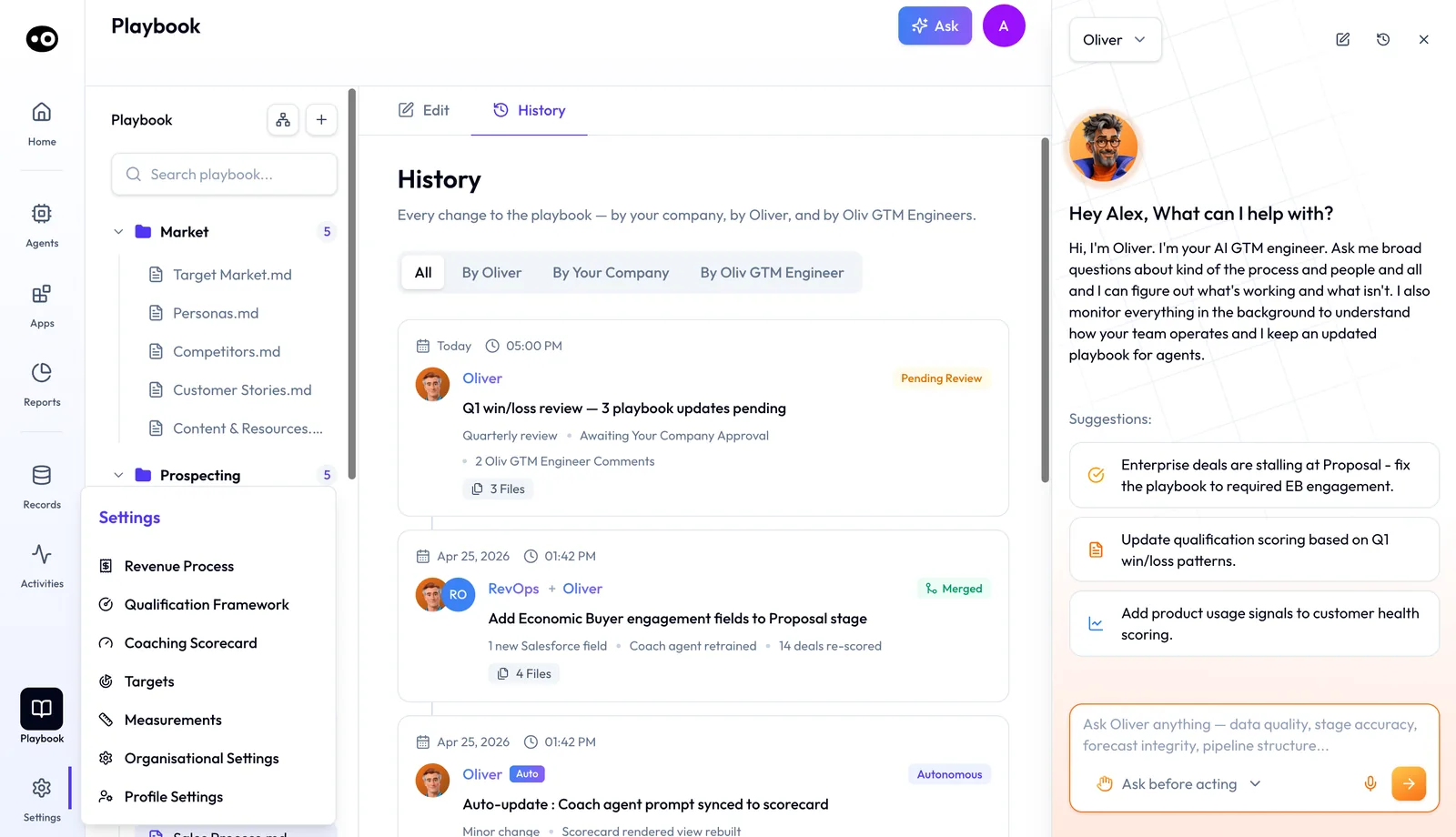
- Know where Settings lives. Settings, at the bottom of the sidebar, opens Revenue Process, Qualification Framework, Coaching Scorecard, Targets, Measurements, Organisational Settings and Profile Settings. Steps 4 and 6 use most of them.
Step 1: Choose who runs the setup
Oliv AI offers two set-up paths. Pick one before kickoff, because it decides how much of your team's time the rollout takes.
| You Run It | We Run It | |
|---|---|---|
| Time to onboard | 2 to 4 sessions | Live in 2 weeks |
| Who maintains the playbooks | Your revenue operations team, working with Oliver directly | Oliv AI's operators, on your behalf |
| Prompts to write | Yours to write and change | None |
| Control | Full control over every update | Updates handled for you |
Choose You Run It if your revenue operations team wants to own every rule change. Choose We Run It if the team is stretched and you'd rather review than build. Either way, the rules end up in Oliv AI's Oliver agent.
Step 2: Line up admin access
Book the admins you need in week one, so no connection waits on a calendar invite.
| Connection | Who you need | Why |
|---|---|---|
| Salesforce | A Salesforce admin | Installs the Oliv AI package for all users from the admin install link |
| HubSpot | Whoever connects the HubSpot integration | Connects it in the Oliv AI web app and shares the HubSpot URL |
| Calendar | Each user, by logging in to the Oliv AI web app | Required: without it, Oliv AI can't take notes in meetings |
| Outlook add-in | Your Microsoft 365 administrator, if add-ins are off | Add-ins for Outlook must be activated before people can install them |
| Zoom | A Zoom admin | Grants the permission that lets meetings record when the host isn't there |
| Slack | A Slack workspace admin, if your workspace needs approval | Approves the Oliv AI app or a Slack Connect channel |
If the Slack app or Slack Connect can't be approved in time, onboarding carries on and messages go by email until Slack is connected. The Salesforce guide and the Zoom guide cover those two installs step by step.
Step 3: Connect the stack in week one
Connect the CRM first. Oliver needs it for schema alignment, and every agent reads pipeline and deal history from it. Salesforce, HubSpot and Zoho are supported.
Then connect calendars, your call recorder and Slack or Teams. Calendars tell Oliv AI which meetings are coming. The recorder is the main source of live context, whether that's Oliv AI's own notetaker or a tool you already use. Email is optional but adds context between meetings. Most teams are connected within a week, and the integrations overview shows how each connection fits.
Step 4: Build the process handbook
Oliv AI's onboarding team works with your revenue operations lead to translate existing playbooks, CRM configuration and methodology into Oliver's structured format. This typically takes one to two weeks. The handbook covers:
- Who you sell to. Your ICP and the signals that qualify an account.
- Who you sell to inside each account. Your persona library.
- How you qualify. The framework your team uses, such as MEDDPICC, BANT or SPICED, and the fields each stage requires.
- Who approves what. Pricing desk triggers and the deal size where manager sign-off starts.
- How proofs of concept run. What makes one eligible, what success looks like and how long it should last.
- How proposals and territories work. Review steps, approvals and who owns which pipeline.
Your stakeholder checks each section for accuracy. Once it's in place, every agent works inside those rules. Oliver's proposed changes wait as Pending Review until your company approves them, and minor ones that apply on their own are still logged in the Playbook's History.
Set your stages and qualification framework
While the handbook is built, set the two definitions every deal is measured against.
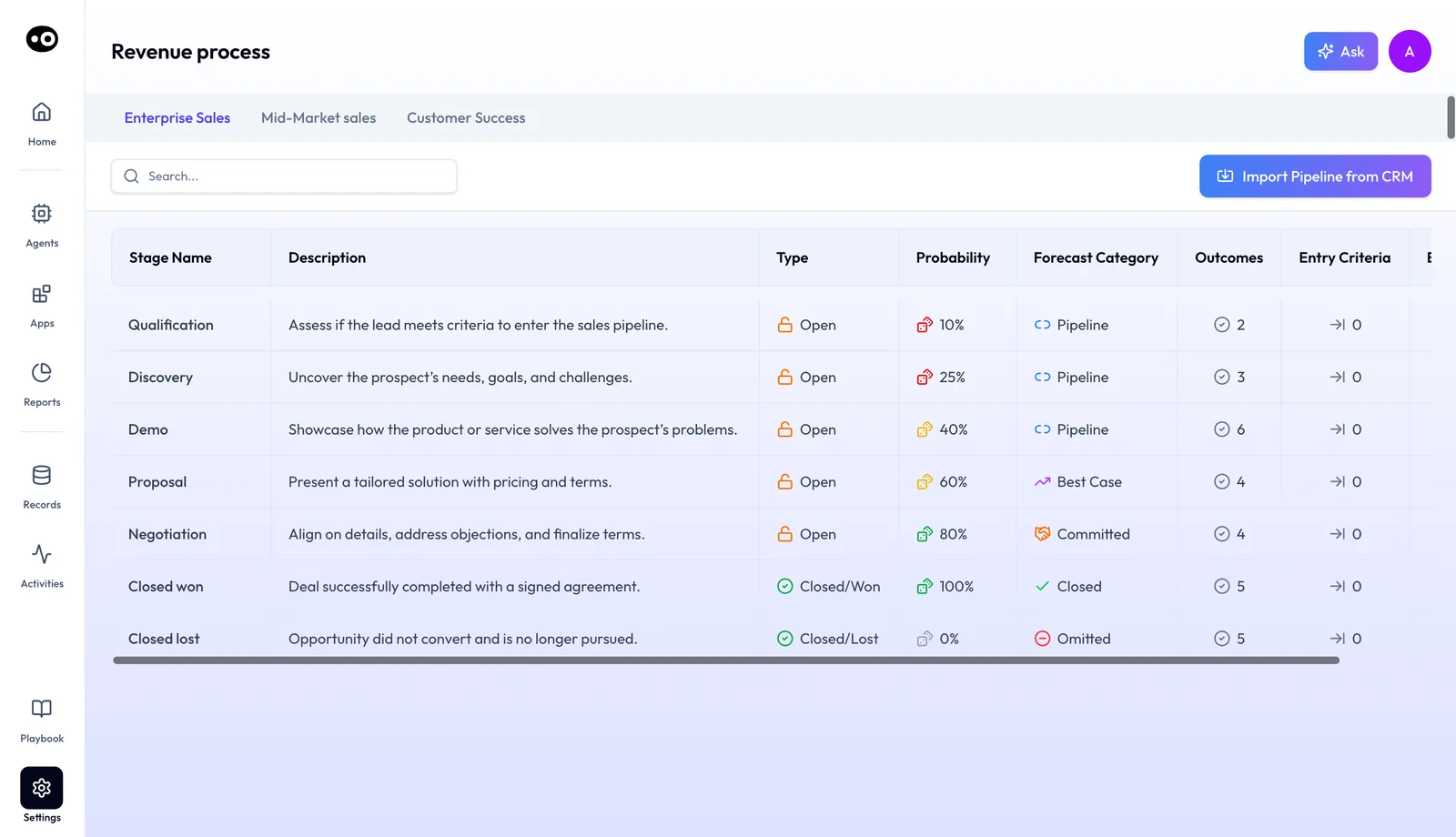
- Open Settings › Revenue Process. Each sales motion has its own tab, such as Enterprise Sales, Mid-Market sales and Customer Success.
- Bring in your stages. Click Import Pipeline from CRM to pull the existing stages from the connected CRM.
- Check each stage. The table shows Type (Open, Closed/Won or Closed/Lost), Probability and the Forecast Category it rolls into, plus counts of Outcomes and Entry Criteria.
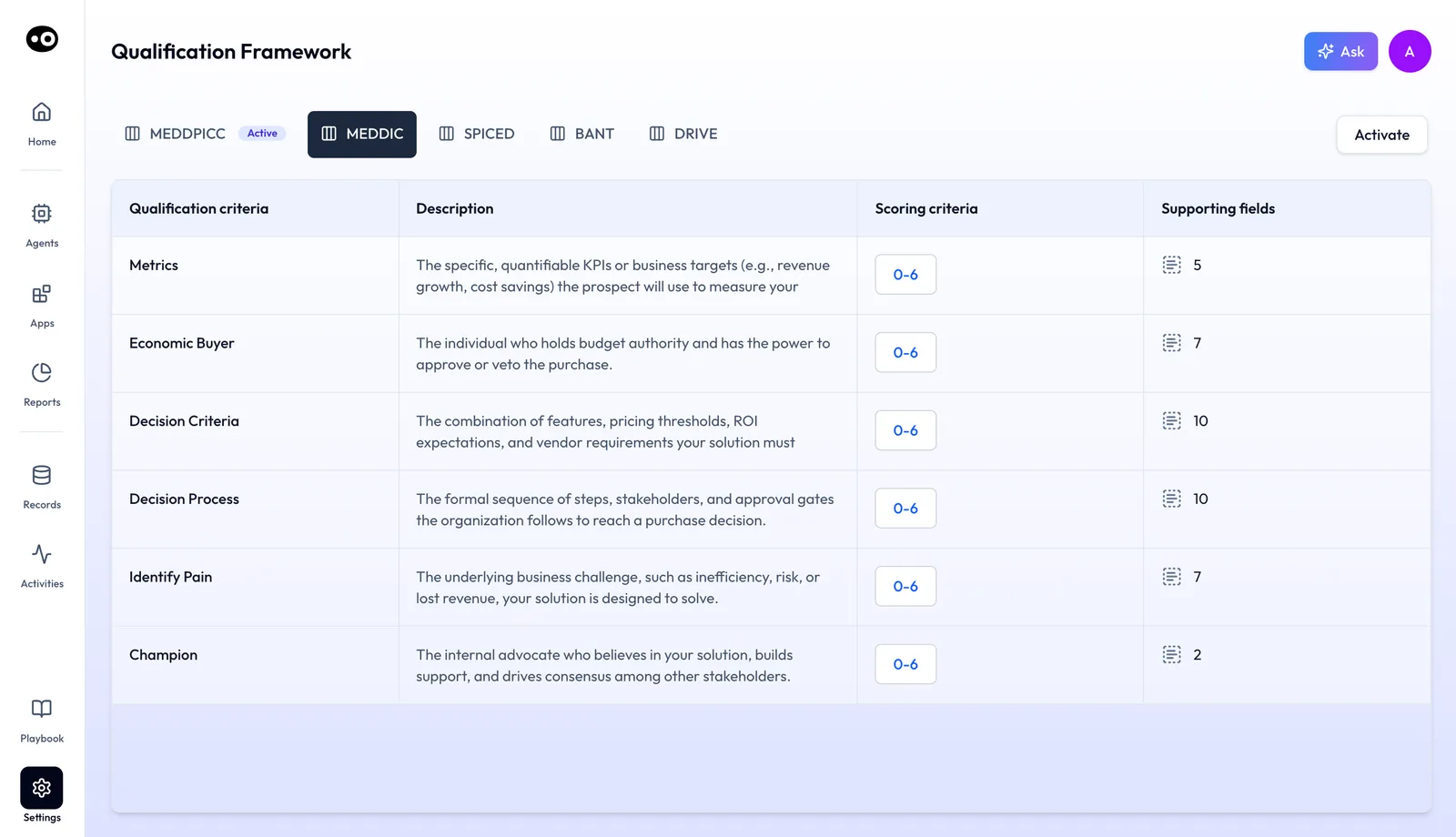
- Open Settings › Qualification Framework. The tabs are MEDDPICC, MEDDIC, SPICED, BANT and DRIVE, and the one in use carries an Active badge.
- Preview, then activate. Click a tab to see its criteria, scoring range and supporting fields, then click Activate to switch your organization to it. Agents then score meetings and deals against that framework.
Step 5: Switch on first value for reps
Reps don't wait for the handbook to finish. Oliv AI's Olivia agent delivers deal context, risk and next steps 30 minutes before the next meeting on the calendar, with no waiting period. For meetings on an active deal, Oliv AI's Meeting Assistant agent adds qualification status and a recommended agenda, as the meeting preparation guide shows.
At the same time, start Oliv AI's CRM Manager agent in Ask First mode. From the first meeting, call or email, it proposes updates, and each one waits for review before anything reaches the CRM. Your reps see what it gets right, and nothing changes without them.
Step 6: Add managers and customer success
In weeks two to four, bring the manager agents online. Each has its own set-up time:
| Agent | What you set | Typical time to live |
|---|---|---|
| Deal Driver | Connect the CRM and team calendar, then set alert thresholds | Most managers are live within a week |
| Forecaster | Set targets, measurements and your forecast cadence in Settings | Most teams are live within two weeks |
| Coach | Pick scorecards in Settings › Coaching Scorecard or bring your own criteria | First monthly review within two weeks |
| Portfolio Manager | Connect CRM, recordings, email, calendar and engagement data | Depends on your integrations |
Oliv AI's Deal Driver agent works in the background, so reps don't need to change anything. Oliv AI's Forecaster agent needs no rep training; reps see a pre-drafted view where they'd normally submit by hand. Oliv AI's Coach agent needs about ten calls per rep to find a real pattern. For customer success, Oliv AI's Portfolio Manager agent builds a briefing of each CSM's book before every scheduled 1:1.
Set up the forecast
The Forecaster agent works from four settings. Set them in this order:
- Targets. In Settings › Targets, click Create Target, assign the users it applies to and track Overall Progress. Finished targets move to Completed Targets.
- Measurements. In Settings › Measurements, click Create Measurement. A Basic measurement sums or counts deals, and a Formula measurement combines others, as Pipeline Coverage does.
- Boards. In Organisational Settings › Monitoring › Boards, group your forecast boards into collections, each with its target and users.
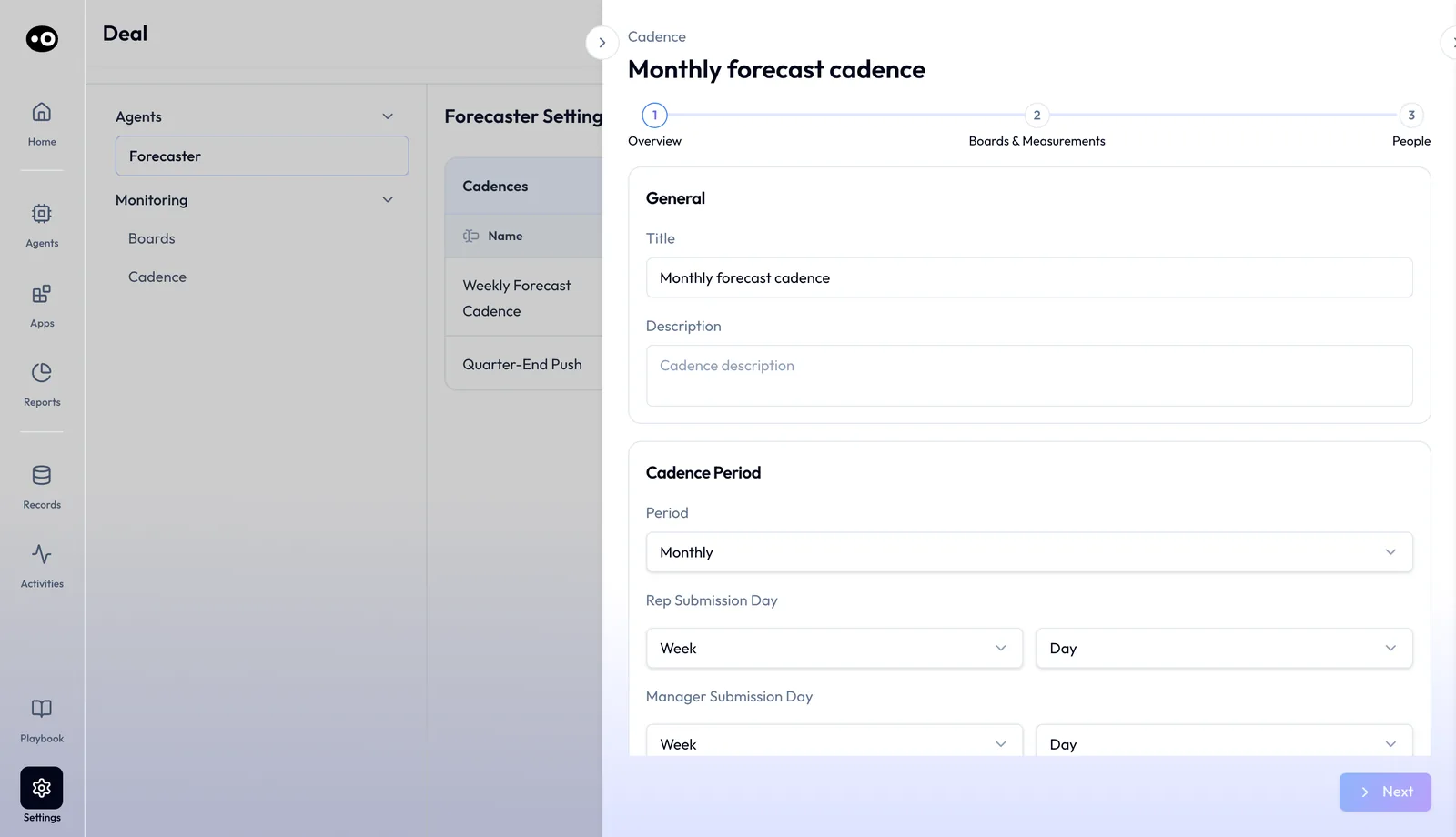
- Cadence. In Organisational Settings › Agents › Forecaster, the Cadences table shows each cadence's board and the days reps and managers submit. Click Add to create one.
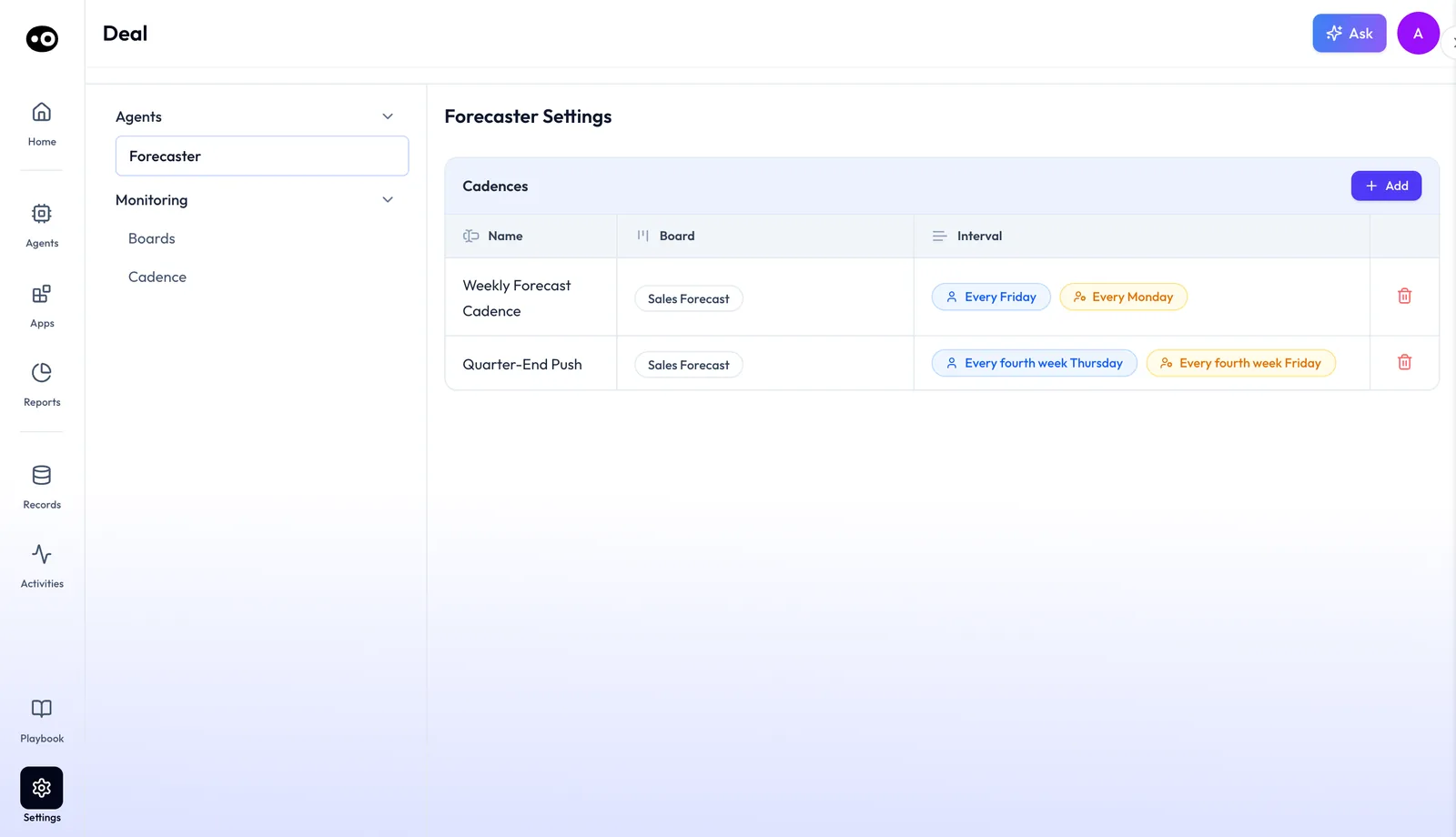
Add opens the New Cadence wizard in three steps: Overview, Boards & Measurements and People. On Overview, type a Title and Description, then pick a Period: Weekly, Monthly or Quarterly. With Monthly, you set a Rep Submission Day and a Manager Submission Day, each by week and day. Click Next to choose boards and measurements, then people.
Monitoring › Cadence then shows the submission plan week by week. Switch Period between Quarterly and Monthly, expand a period and tick which measurements are due in each week.
Choose Coach's scorecards
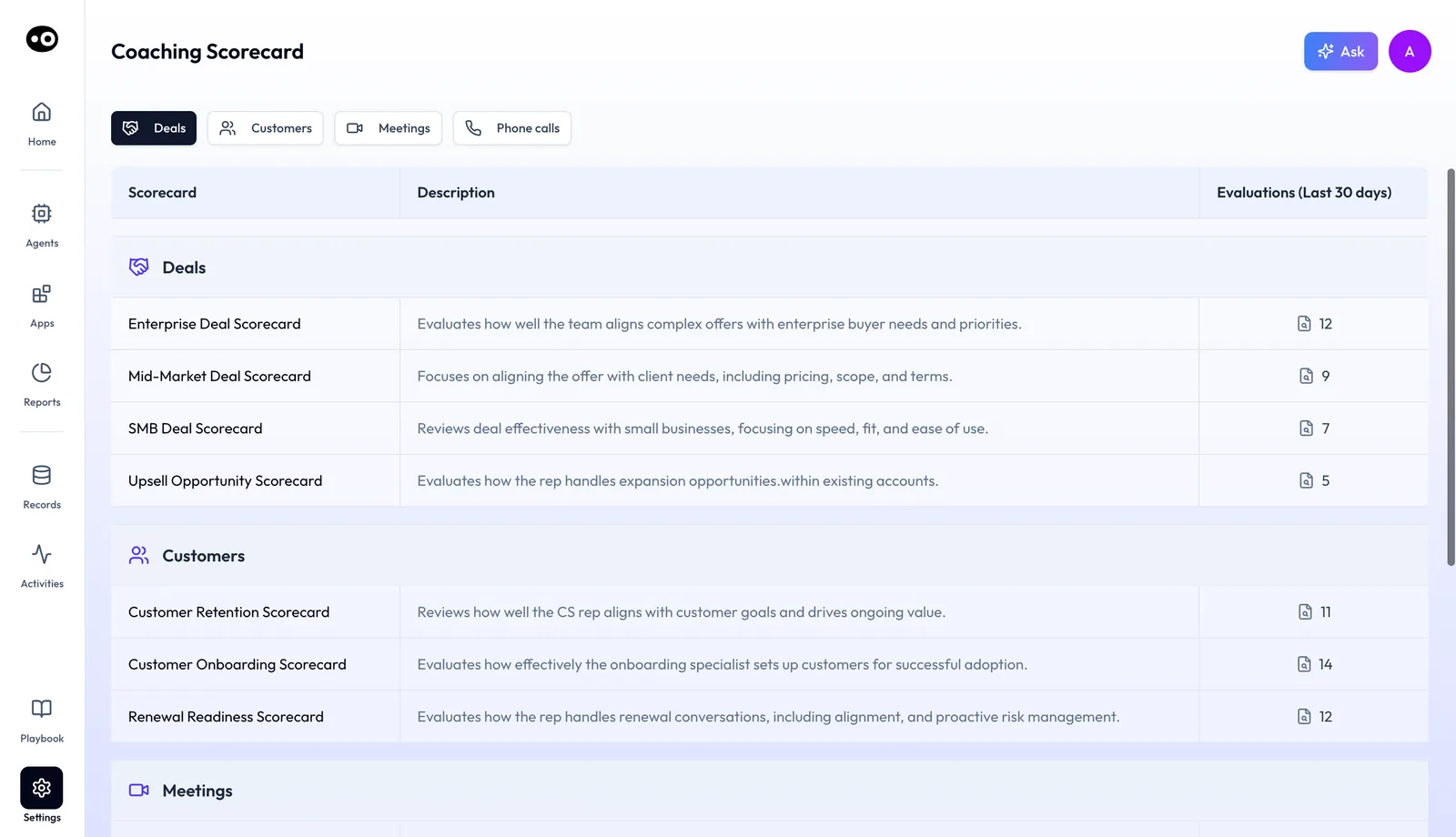
Settings › Coaching Scorecard is the library Coach applies, grouped into Deals, Customers, Meetings and Phone calls. Each scorecard has a description and its Evaluations (Last 30 days), so you can see which ones are already in use before the first monthly review.
Step 7: Review at day 30
Score the rollout first, using the three counts in How to measure a rollout at day 30, below. Then work through these checks with your stakeholder.
- Check the CRM updates. Look at what reps accepted and rejected. Once accuracy thresholds are met, revenue operations confirms the switch to auto mode, as the CRM upkeep guide explains.
- Read the first coaching review. Coach's monthly review shows whether the scorecards match how you want calls run.
- Watch a pipeline review. Managers should open their 1:1s with Deal Driver's report, as in the pipeline review workflow.
- Tell Oliver what changed. Anything you learned in the month goes to Oliver as a process update. It waits as Pending Review until you approve it, then every connected agent picks it up.
What a deployment plan for Oliv AI is
Your Oliv AI rollout runs as two tracks at once, so reps get value while the rules are still being built.
| Track | What happens | Who's involved | When |
|---|---|---|---|
| Value track | Briefs, follow-ups and proposed CRM updates start flowing | Reps, from their first meeting | Week one |
| Process track | The handbook is built, models are tailored, manager agents switch on | Revenue operations, Oliv AI's onboarding team, managers | Weeks one to four |
The tracks meet in the handbook. Oliv AI's Oliver agent keeps the rules, and Oliv AI's Olivia agent runs inside them for every rep. Behind both, Oliv AI tailors its signal models to your company. It researches what you sell, takes in your enablement materials and writes tailored prompts, so each model surfaces only the signals that matter to your motion. A tailored version is live within 1 day of the proof of value kickoff. For the wider architecture, read the RevOps guide to agentic AI.
Why a deployment plan matters
What it's for
Use the plan to decide which team gets which agent in which week, and who you need to book to make that happen. Reps see value early, and managers get agents built on rules you've agreed.
How it helps
- Reps feel it first. The first brief lands before the next meeting, so reps have something to use before the handbook is finished.
- Admins are booked early. CRM, Zoom and Slack approvals don't stall the rollout in week three.
- Rules come before scale. Managers get alerts and forecasts that follow one agreed process.
- CRM updates stay supervised. Updates start in review, and auto mode waits until accuracy thresholds are met.
What happens without it
Without a plan, a rollout tends to switch everything on at once. Managers get alerts before the rules behind them are agreed, and forecasts built on fields nobody mapped.
Why buyers care
Revenue operations leads own the rollout and answer for its results, and sales and CS leaders need their teams working in it within the month. If the contract starts close to a quarter or renewal season, there's no slack for a slow start, so book your admins on day one.
The Oliv AI approach to deployment
Say a revenue operations lead has just signed with Oliv AI for 25 account executives and a customer success team of eight. Leadership wants both teams using it by the end of the month. She has a methodology deck from last year, a CRM full of half-filled fields and one free afternoon a week.
The usual route is to clean the CRM, write the playbook down properly and then train everyone at once. Each of those steps can take weeks on its own. By the time they're done, the quarter has moved on and the team has lost interest.
Reps don't need a finished playbook to start, because the first brief has no waiting period. The rules can be built alongside, as long as someone owns them and reviews each change.
With Oliv AI, both tracks run at once. Reps get their first brief before their next meeting, while Oliv AI's onboarding team turns her deck into Oliver's handbook in one to two weeks. If she picks We Run It, Oliv AI's operators maintain the playbooks on her behalf.
The proof of value adds one more piece: a tailored version of Oliv AI is live within 1 day of kickoff. How other platforms handle setup and tailoring is covered in How Oliv AI compares for AI sales agent rollouts, below.
How AI sales agent rollouts get run
Rollouts tend to follow one of four orders. Pick yours before kickoff, because each one fails in a different place and at a different team.
Everything on at once
You connect every tool, switch on every agent and invite every team in the same week. This catches broken connections fast, because every gap shows up together. The weak point is trust: managers can read alerts and forecasts before anyone has agreed the rules behind them.
One team first
You run the whole plan with one pod or region, then widen it. This catches what only real use shows, such as a stage nobody uses or a scorecard that doesn't fit. It misses anything that needs scale, like a leader's rollup across teams. Your rules also get tested on one team's habits, and the next team may work differently.
Rules first, then people
You clean the CRM, write the playbook and then train everyone. This catches disagreements about process before a rep sees any output. The cost is time, because nobody gets value until the rules are done.
Cleaning has a blind spot too, since a filled field isn't always a person's view. In HubSpot, a deal created in an open stage with no close date gets the last day of the month or your chosen default. A tidy close date column can still hold guesses, and only use shows you which ones.
Two tracks at once
Reps start on what works straight away, while the rules get built beside them. This catches problems early, because reps and your stakeholder react to real outputs from week one. It can miss rule problems for a while, because reps see outputs before the rules are final. It also depends on one named owner, or the rules track drifts while reps carry on.
Which order Oliv AI follows
Oliv AI follows the two-track order, and the steps above are written for it. Oliv AI's Olivia agent delivers a first brief with no waiting period, and the handbook takes one to two weeks with the onboarding team. CRM Manager starts in Ask First mode, so each update waits for review in the early weeks.
How to measure a rollout at day 30
Count three things on day 30, each as a plain share. Write down what you're counting in week one, so nobody argues about the planned totals later. Each count answers one question: did reps get value, are the tools connected and are the rules agreed.
| Count | How to work it out | Its weak spot |
|---|---|---|
| Brief coverage | Reps who have received a brief, divided by reps in the rollout | Received isn't read. A rep whose calendar isn't connected won't appear, so check that before you blame the rep. |
| Connections live | Connections working, divided by connections planned | Each user connects their own calendar, so one working login says little about the rest of the team. |
| Handbook sections approved | Sections your stakeholder has approved, divided by sections planned | Every section counts the same, so a short proposal section weighs as much as your ICP. |
Where Oliv AI shows these counts
The handbook count comes from the Playbook. Oliver's proposed changes wait as Pending Review, and History logs every change. Keep the brief and connection counts in your tracker, using confirmations from your admins and a quick question to each rep.
Two other places help you read the counts. CRM Manager's weekly digest gives acceptance rate by rep, so you can see who needs attention. In Settings › Coaching Scorecard, Evaluations (Last 30 days) shows which scorecards are in use.
How to run a 30-day rollout by hand
Without a vendor team, the rollout runs from one shared tracker. It can stall when one admin on leave blocks later steps, so name people and dates from the start.
- List the reps. Put everyone in the rollout on one sheet, with team and role. This is your planned total for brief coverage.
- List the connections. Give each one an owner and a booked date. In HubSpot, the person changing pipelines or stages needs Edit property settings permissions, so check that before the session.
- List the handbook sections. Name one approver per section, and don't start writing until each has agreed.
- Copy your stage rules. Note each stage's meaning and probability. HubSpot asks for both Won and Lost stages so that its sales reports process deals correctly, and a missing one will skew your first reports.
- Update every Friday. Refresh the three counts and chase the oldest blocked item first.
- Score on day 30. Work out each share, rank them and give the lowest one next week's attention.
The same job in Oliv AI
You still name the people, book the admins and make the day-30 call. Oliv AI takes on some of the steps in between. Import Pipeline from CRM pulls your existing stages into Revenue Process, so you check them rather than copy them. Oliv AI's onboarding team builds the handbook with your revenue operations lead, working from your existing decks.
Oliv AI's Olivia agent sends briefs without anyone scheduling them. If you choose We Run It, Oliv AI's operators maintain the playbooks too. For the admin's view of the same work, read the RevOps implementation guide.
Worked example: scoring a rollout at day 30
This is an illustrative calculation with sample figures, not an Oliv AI output or a customer result. A revenue operations lead scores a rollout of 25 reps on the three counts.
| Count | Done | Planned | Arithmetic | Share |
|---|---|---|---|---|
| Reps who have received a brief | 22 | 25 | 22 ÷ 25 | 88% |
| Connections live | 6 | 7 | 6 ÷ 7 | 86% (rounded) |
| Handbook sections approved | 9 | 12 | 9 ÷ 12 | 75% |
The handbook is lowest at 75%, so it gets the next week's attention. The lead books the stakeholder to review the three open sections, because every agent works inside those rules. The three reps without a brief and the one missing connection stay on the tracker for the same week.
How the deployment plan works with other features
Seat roles
Plans are sold by role, so the rollout order often follows them. Account executives and CSMs on the deal apps come first, and managers follow as their agents switch on. Seat roles explained shows which apps each person gets.
Field mapping
Custom fields on your opportunity record need a home before CRM Manager can fill them. CRM field mapping is set up during onboarding, alongside the handbook.
Approval settings
Agents that write to your CRM, calendar or mailbox can ask before acting. Agent tools and run modes explains how to keep early rollouts on approval and relax it later.
Recording
When your company organizes a meeting, Oliv AI can record without a visible bot. Bot and botless recording explains what customers see, which helps when you brief the team.
Who uses the deployment plan, and how
These are typical patterns, shown to illustrate how teams roll Oliv AI out.
Revenue operations
A revenue operations lead owns the plan end to end. She books the admins, works with Oliv AI's onboarding team on the handbook and decides when CRM Manager moves to auto mode. Afterwards she keeps the rules current through Oliver.
Sales leaders
A VP of Sales signs off the qualification rules in the handbook. Two weeks later, first-line managers open their 1:1s with Deal Driver's report, and the forecast follows within the month.
Customer success leaders
A head of customer success brings the CSMs on in week one for briefs and follow-ups. Portfolio Manager's 1:1 briefings follow once recordings and CRM data are flowing.
Enablement
An enablement manager picks Coach's starting scorecards and reads the first monthly review. It's a quick way to see where new hires need help, as covered in cutting new-hire ramp time.
How Oliv AI compares for AI sales agent rollouts
Oliv AI's onboarding team builds your process handbook with your revenue operations lead, and you can hand ongoing upkeep to Oliv AI's operators. Signal models are tailored to your company within a day of the proof of value kickoff. Oliv AI is the only platform in this table that does all three.
Setup and onboarding, from each platform's public documentation:
| Platform | Vendor team builds your process setup with you | Vendor-run option for ongoing upkeep | Tailored to your company within a day |
|---|---|---|---|
| Oliv AI | Yes | Yes | Yes |
| Gong | Partly (onboarding consultant for data import) | Not in docs | Partly (AI trackers you build yourself) |
| Outreach | Partly (billable services projects) | Not in docs | Not in docs |
| Fireflies.ai | Partly (guided onboarding on Enterprise) | Not in docs | Not in docs |
| Avoma | Partly (designated CSM on higher plans) | Not in docs | Not in docs |
Yes: documented and built in. Partly: documented with a limit, shown in brackets. Not in docs: not found in the vendor's public documentation.
Why Oliv AI is the stronger choice for AI sales agent rollouts
- Your process, built with you. Oliv AI's onboarding team turns your playbooks and methodology into Oliver's handbook in one to two weeks. Gong documents working with an onboarding consultant to bring in historical CRM data. See Gong vs Oliv AI.
- Upkeep you can hand off. On the We Run It path, Oliv AI's operators maintain the playbooks for you. Outreach describes its professional services as billable projects. See Gong vs Outreach, and where Oliv AI fits.
- Tailored on day one. Oliv AI tailors its signal models within 1 day of the proof of value kickoff. Gong documents AI trackers that you write and publish yourself. See Oliv AI as a Gong alternative.
- Support that sets things up. Oliv AI's onboarding team builds the handbook with your revenue operations lead. Avoma documents a designated customer success manager on its Organization and Enterprise plans. See Oliv AI vs Avoma.
Competitor details checked against each vendor's public documentation on 22 October 2026. Features and plans change, so confirm with the vendor before you decide.
Limits and things to know
- Calendars are required. Oliv AI can't take notes in meetings until each user connects their calendar, so don't let that step slip.
- Some steps need an admin. Salesforce, Zoom recording without the host and, in some workspaces, Slack all need an admin on your side.
- Handbook changes are reviewed or logged. Oliver's proposals wait for your company's approval. Minor changes can apply on their own, and every change appears in the Playbook's History.
- Reps don't work with Oliver. Revenue operations and leaders do. Reps work with Olivia, who follows Oliver's rules.
- Coaching needs call volume. Coach looks for about ten calls per rep before it reports a pattern.
- Auto mode is a decision. CRM Manager starts in review. Revenue operations confirms the switch to auto mode once accuracy thresholds are met.
Common questions
How long does an Oliv AI rollout take?
About a month, and most of it runs in parallel. Reps get value in the first week, from their first brief. The handbook takes one to two weeks, and Deal Driver and Forecaster are typically live within one to two weeks of being connected.
When do reps see something useful?
Before their next meeting. Oliv AI's Olivia agent delivers deal context, risk and next steps 30 minutes before the next meeting on the calendar, with no waiting period.
How much of my team's time does setup take?
On the You Run It path, onboarding takes 2 to 4 sessions with your revenue operations team. On We Run It, there are no prompts to write and Oliv AI's operators maintain the playbooks.
Do we need to clean the CRM before we start?
No. Oliv AI reads what's already there, messy data included. Oliv AI's CRM Manager agent proposes values for missing or stale fields from call history, and in Ask First mode each one waits for review.
Which admin access do we need?
A Salesforce admin for the package install, a Zoom admin for recording without the host, and a Slack admin if your workspace needs approval. Each user connects their own calendar by logging in.
Is there a proof of value?
Yes. A tailored version of Oliv AI is live within 1 day of the proof of value kickoff. Oliv AI researches your company and writes tailored prompts for each signal model.
Do reps need training?
Not for forecasting or deal alerts. Reps see a pre-drafted forecast view where they'd normally submit by hand, and Deal Driver works in the background.
Can we use our own sales methodology?
Yes. In Settings › Qualification Framework, preview MEDDPICC, MEDDIC, SPICED, BANT or DRIVE, then click Activate. Agents then score meetings and deals against the framework you chose.
When should CRM updates go automatic?
When the team trusts them. Updates start in review, and revenue operations confirms the switch to auto mode once accuracy thresholds are met.
Do the models keep up after launch?
Yes. Human feedback and quarterly re-research track new offerings, positioning and buyer personas as your company changes.
Who should run an AI sales agent rollout?
One revenue operations lead should own it, with a sales or leadership stakeholder who checks the handbook for accuracy. Reps don't own any part of it, because they work with Oliv AI's Olivia agent and not Oliver.
How do you review an AI sales agent rollout after 30 days?
Work out three shares: reps who have received a brief, connections live and handbook sections approved. Give the lowest one next week's attention, then check CRM updates, the first coaching review and a pipeline review.
What happens if Slack approval runs late?
The rollout carries on. If the Slack app or Slack Connect can't be approved in time, onboarding continues and Oliv AI sends messages by email until Slack is connected.
Further reading
Related
Updated 3 November 2026: added the rollout orders, day-30 measures, by-hand tracker, worked example, three FAQs and further reading.