How the Context Graph Enriches (and Never Replaces) Your Existing Salesforce and HubSpot CRM
Written by
Ishan Chhabra
Last Updated :
September 21, 2026
Skim in :
13
mins
In this article
Still got questions?
Come discuss this article with me.
Hi, I'm Ishan, Founder and CEO of Oliv.
I'm always up for a conversation about revenue intelligence, AI agents, or what's actually working (and what's not) across revenue teams.
I'd love to hear your perspective.
Thank you! Your submission has been received!
Oops! Something went wrong while submitting the form.
Meet Oliv’s AI Agents
Hi! I’m, Deal Driver
I track deals, flag risks, send weekly pipeline updates and give sales managers full visibility into deal progress
Hi! I’m, CRM Manager
I maintain CRM hygiene by updating core, custom and qualification fields all without your team lifting a finger
Hi! I’m, Forecaster
I build accurate forecasts based on real deal movement and tell you which deals to pull in to hit your number
Hi! I’m, Coach
I believe performance fuels revenue. I spot skill gaps, score calls and build coaching plans to help every rep level up
Hi! I’m, Prospector
I dig into target accounts to surface the right contacts, tailor and time outreach so you always strike when it counts
Hi! I’m, Pipeline tracker
I call reps to get deal updates, and deliver a real-time, CRM-synced roll-up view of deal progress
Hi! I’m, Analyst
I answer complex pipeline questions, uncover deal patterns, and build reports that guide strategic decisions
TL;DR
Bi-directional CRM sync means an AI layer reads your records and writes structured values back into mapped fields, with explicit conflict rules, while the CRM stays the system of record.
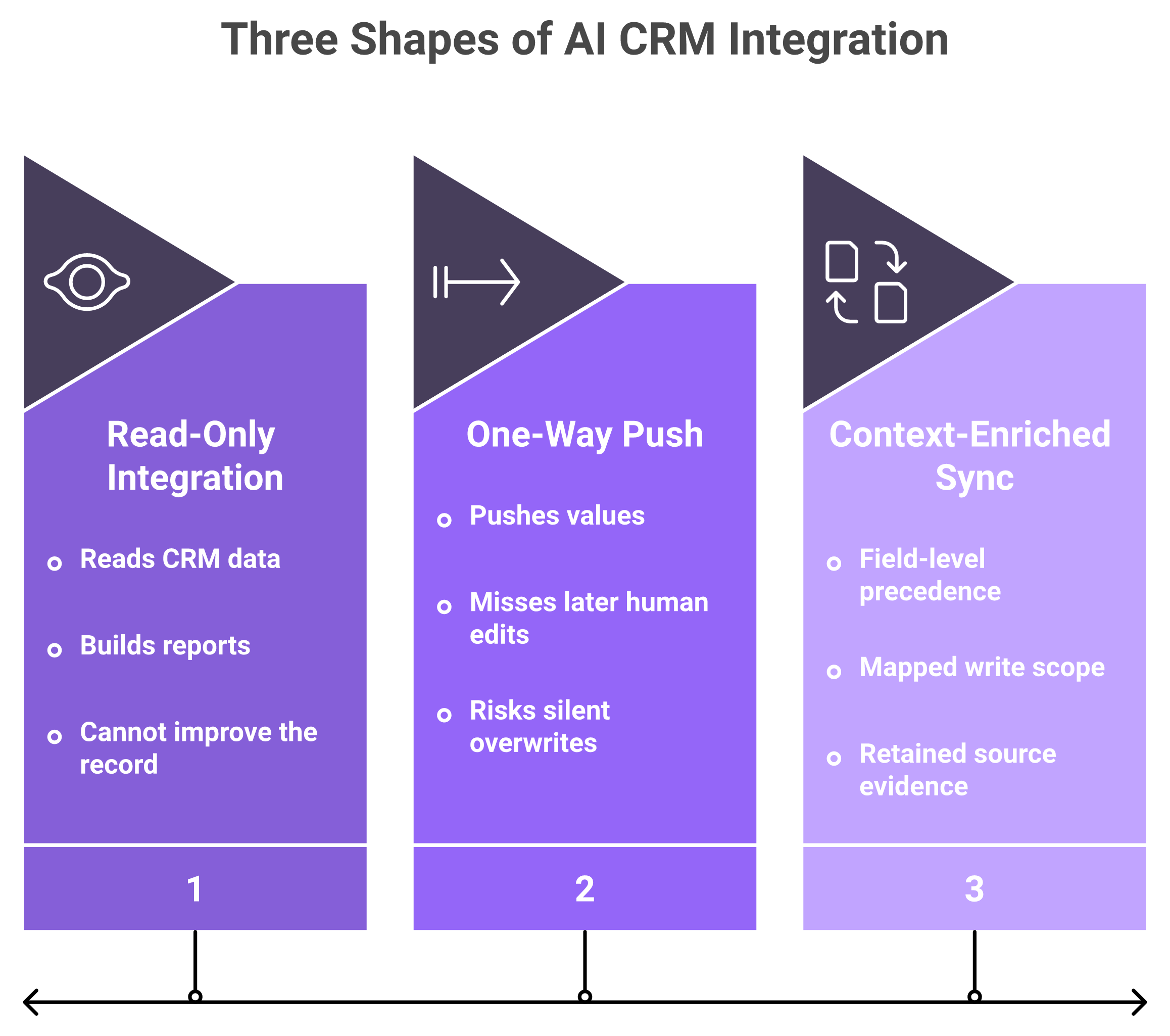
There are three shapes, not two: read-only, one-way push, and context enriched sync that retains the evidence for why a value changed.
An AI layer should write to five object types only: accounts, contacts, opportunities, activities, and tasks, through a configured field list rather than object-wide edit.
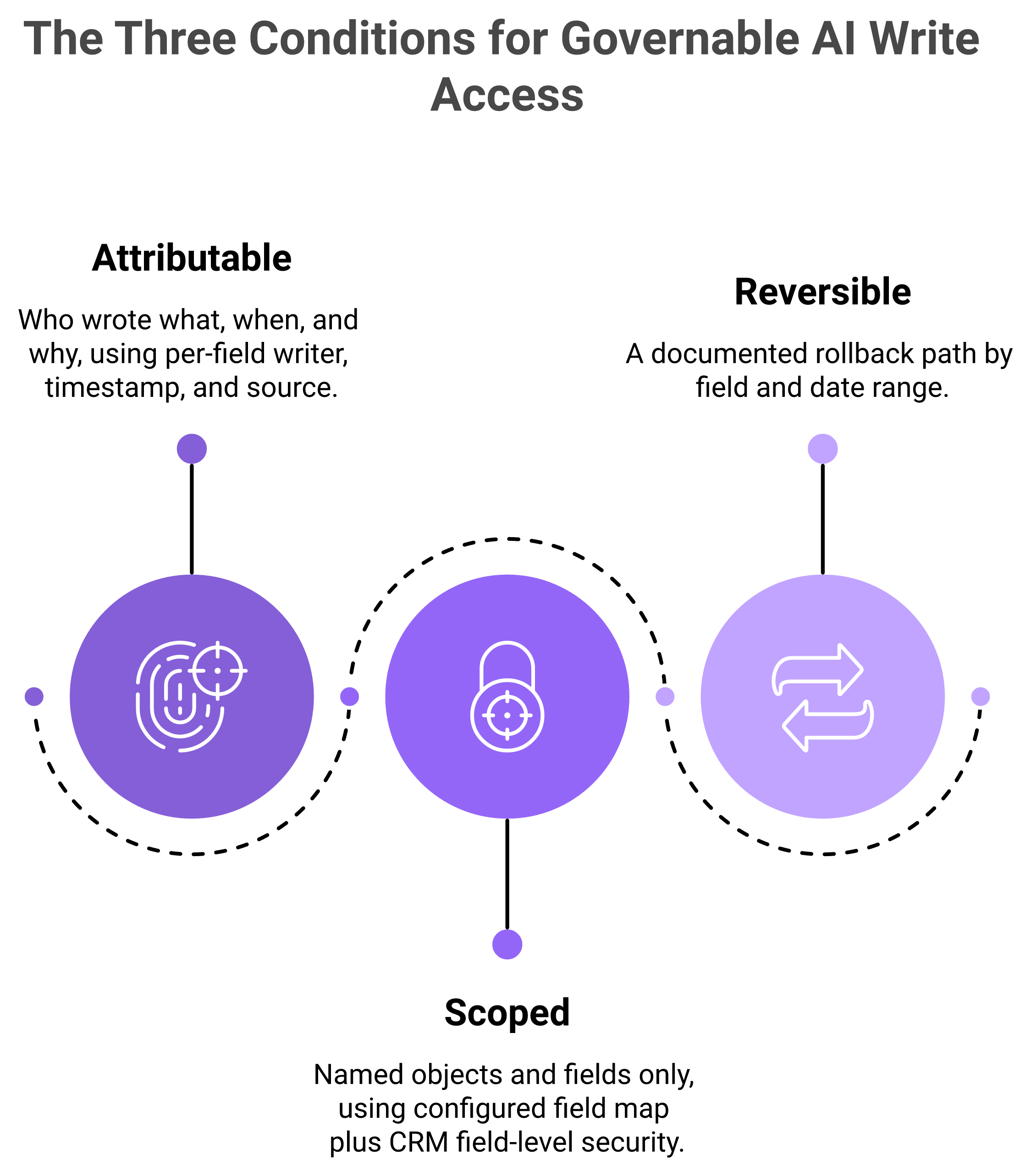
Write access is earned by being attributable, scoped, and reversible, not by being accurate, because an ungovernable writer cannot be audited.
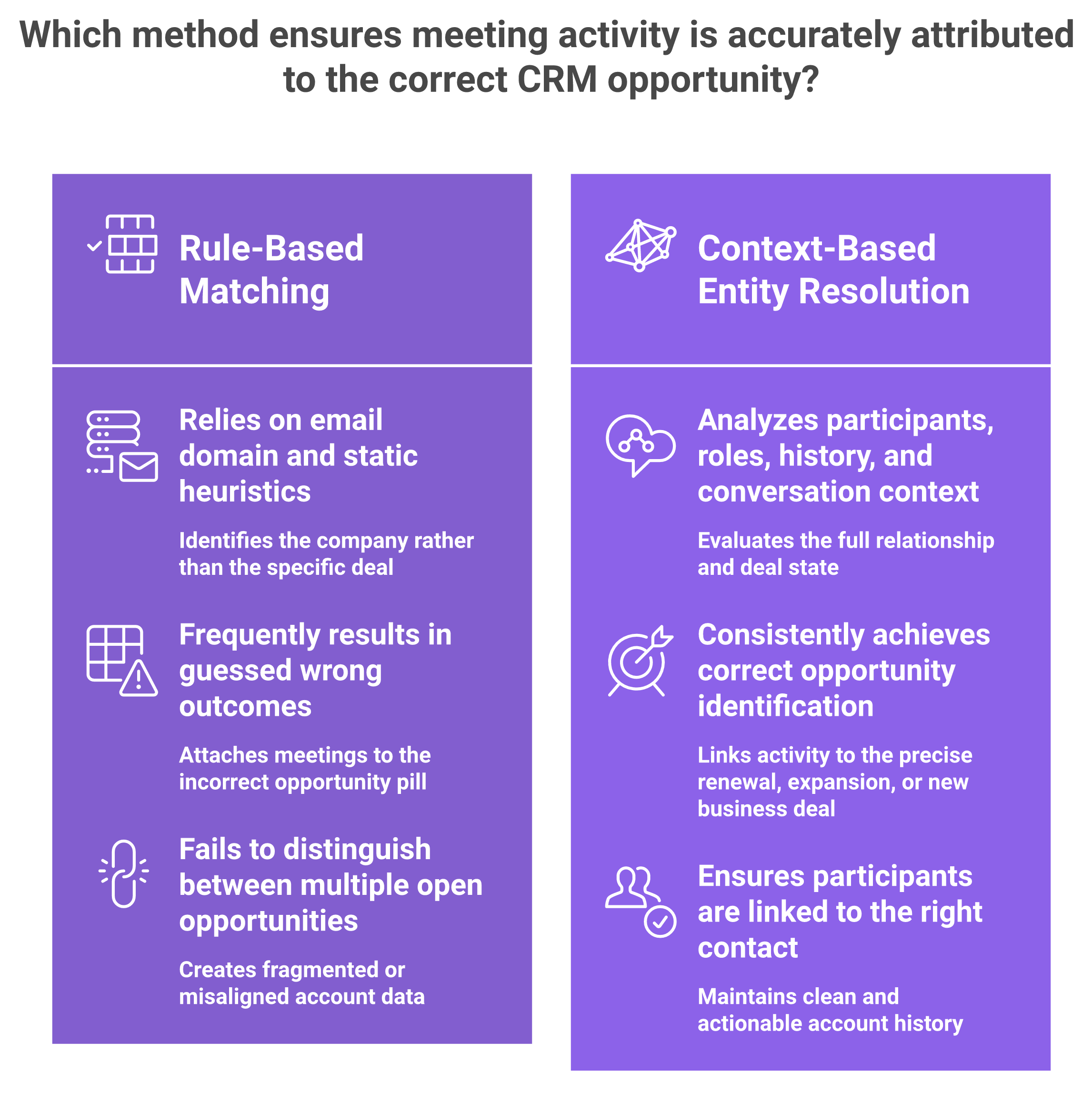
Association is the real differentiator: rule-based tools match on email domain and misfile meetings when one account has several open opportunities.
Ask ten written questions before granting access, pilot on activities first, and confirm how your data exits before anything writes.
Q1. What is bi-directional CRM sync in an AI context layer, and how is it different from a read-only integration? [toc=1. Bi-Directional Sync Defined]
Bi-directional CRM sync means an AI layer both reads records from Salesforce or HubSpot and writes structured values back into mapped fields, with explicit conflict rules, while the CRM stays the system of record. A read-only integration reads and reports. A one-way push writes but never reconciles. A context enriched sync does a third thing. It writes the value, and it keeps the evidence for why the value changed, because a CRM field holds current state only.
⭐ There are three shapes here, not two
Most vendor pages describe two options. In practice there are three, and admins get burned by the gap between them.
Read-only is the safest and the least useful. The tool subscribes to your records, builds reports, and never touches a field. Nothing in your org changes, so nothing in your org improves either. This is the ceiling most revenue intelligence platforms were built to reach.
A one-way push is where the trouble starts. The tool writes into your fields but does not read back the human edit that followed. Your rep corrects the close date on Tuesday. The push overwrites it on Wednesday. Nobody can explain which system was right.
Bi-directional sync is not one capability. Context-enriched sync adds field-level reconciliation and evidence while the CRM stays authoritative.
✅ What each direction actually does to your records
True bi-directional sync reconciles. It reads the record, compares, and applies a rule about which side wins per field. The word that matters in that sentence is "per field", not "sync".
Oliv AI's Context Graph runs as a layer on Salesforce, HubSpot, and Zoho, reading those records and writing back into a mapped field set rather than the whole object. That is the shape of the third column below, and it is the same architecture behind autonomous CRM hygiene for RevOps.
⚠️ A field holds state, and nothing else
Here is the structural fact this whole article rests on. A CRM field stores the current value. It does not store the reasoning that produced the value, and on the next overwrite that reasoning is gone for good.
So "stage moved to Negotiation" survives. "Stage moved because the economic buyer joined the call and asked for legal" does not. Third party analysis of context graphs makes the same point, describing them as a layer of explanation sitting on top of CRM and BI rather than a replacement for either, which is also why AI deal intelligence needs more than field values.
Read-Only vs Two-Way vs Context Enriched CRM Sync
Property
Read-only integration
Two-way sync
Context enriched sync
Data direction
Reads only
Reads and writes
Reads, writes, and retains source evidence
Conflict handling
Not applicable
Precedence rule per field
Precedence rule plus evidence for the disputed value
Custom object support
Usually read
Requires explicit mapping
Requires explicit mapping
Overwrite risk to rep input
None
Real, depends on field scoping
Real, but checkable against the evidence
Provenance
None
Usually the integration user only
Per field source, subject to vendor documentation
System of record
Your CRM
Your CRM
Your CRM
🔁 Where this leaves the definition
Ask a vendor which of those three columns they sit in, and make them answer per object. I have watched teams buy column two while believing they bought column three.
Oliv AI reads the CRM, writes to a mapped field set, and retains the evidence behind each value, with the object model and reporting layer staying in Salesforce or HubSpot (CRM Manager). The argument for why that matters comes later on this page.
Q2. What does an AI layer actually write into Salesforce or HubSpot, at object level? [toc=2. What Gets Written]
An AI context layer writes to five object types: accounts, contacts, opportunities, activities, and tasks. Oliv AI's CRM Manager agent operates across those objects, is triggered by every logged activity, and syncs fields with the evidence that produced them rather than an unsourced value. The distinction that matters is scope, not coverage. The write set is a configured field list, not the whole object. Your object model, record types, validation rules, and reporting layer stay in Salesforce or HubSpot. What gets removed is the manual update dependency, not the CRM.
📋 Start at the object model, not the AI
If you own the data model, your first question is not what the tool does. It is which objects it can touch, and with what permissions.
That instinct is correct, and it is the right place to start a vendor conversation. You are accountable for a system somebody else now wants write access to. Accountability without visibility is the thing you are actually refusing, and you should keep refusing it. The same gate applies to any agentic AI implementation on RevOps data architecture.
❌ What the old enrichment era cost you
The previous generation of enrichment tools wrote values with no source attached. A field changed, the integration user's name sat in the audit log, and that was the end of the trail.
You could see that something wrote. You could not see why. So when a number looked wrong in a pipeline review, the only available fix was manual, and the tool quietly lost its credibility.
Gartner now puts the consequence in numbers. Around 40% of agentic AI CRM projects are expected to fail or stall by 2028, and the cause named is data quality rather than model quality.
✅ What changed: the write carries its source
The shift worth paying attention to is small and specific. The write stops being a value and starts being a value plus its origin.
That converts a field update into something closer to a citation. A disputed close date becomes checkable in the record instead of arguable in a meeting, which is the foundation of evidence-based forecast commits.
Oliv AI's documentation describes CRM Manager as syncing fields with evidence, and states that CRM Manager is the operator applying the analyst's work wherever it needs to go. Confirm with any vendor, including us, whether that evidence is visible inside the CRM record or only inside their own interface. The two are not the same claim.
🗂️ The write inventory, by object
Oliv AI's CRM Manager operates on accounts, contacts, opportunities, activities, and tasks across the revenue lifecycle, triggered by activity rather than a nightly job (CRM Manager agent). The point of that list is that it is finite.
What an AI Context Layer Writes, by CRM Object
Object
Typical write surface
Trigger
Activities
Logged meetings and calls, participants, summaries
Every activity
Tasks
Follow up actions and owners
Every activity
Opportunities
Derived qualification and stage support fields
Activity on a linked opportunity
Contacts
Role and stakeholder attributes
Participant detected on activity
Accounts
Relationship level attributes
Activity on a linked account
⚠️ One honest caveat before you map anything
Rep authored free text should not be on that surface by default. Notes, next steps, and close reasoning are judgment, and judgment is the part you want a human to own.
Oliv AI's read is that the write surface should be structured and derived fields, with free text read only until you deliberately decide otherwise. Ask for the field list in writing before you enable anything on opportunities, and treat auto-scored MEDDIC, BANT, and SPICED fields as the derived class rather than the human class.
Q3. Any automated writer degrades data quality eventually, so why would this be different? [toc=3. The Data-Quality Objection]
It is different only if three things are true, and none of them is accuracy. Writes must be attributable, so you can see what wrote a field and why. They must be scoped, meaning a configurable field set rather than everything. And they must be reversible. A model that is right 95% of the time and ungovernable is worse for an administrator than one that is right 80% of the time and fully traceable, because the first cannot be audited. Judge any AI writer on provenance, scope, and rollback before you judge its output.
⚠️ The objection is earned, and I am not going to talk you out of it
You have seen what AI enrichment does to a clean org. You expect to spend a year undoing it. That position comes from experience, and reassurance makes it worse, not better.
So I will concede the whole thing. Automated writers have a poor track record in mature Salesforce orgs. Starting from no is the correct default, and any vendor who acts offended by that has not implemented into a real managed package estate.
💸 What the old model actually cost
The cost was never a wrong value. Wrong values happen with humans too. The cost was that nobody could reconstruct the change.
Once a field is overwritten without a source, the debate moves from the record into the room. Salesforce's 2026 State of Sales research found only 35% of sales professionals completely trust their CRM data, with 47% saying accuracy got harder year over year. That is a governance number, not a model number, and it is why CRM data strategy drives revenue predictability.
✅ Move the test from accuracy to governance
Here is the reframe I would use in your own vendor review. Stop asking whether the model is right. Ask whether its writes can be governed.
Three properties decide that, and each is a mechanism rather than a promise:
Accuracy does not make an automated writer governable. Write access requires attribution, field-level scope, and a rollback path working together.
Attributable. Every written field shows what wrote it, when, and on what basis.
Scoped. The field set is configured and enforced, ideally by your field level security rather than the vendor's settings.
Reversible. There is a documented path to undo a write set, not a support ticket.
Auditors already work this way. SOC 2's Processing Integrity criterion is the one applied to agent driven writes, and it asks whether processing is complete, valid, accurate, and timely, typically enforced through API idempotency and queue checks. Regulators are converging on the same ground, with EU AI Act transparency obligations for agents enforceable from 2 August 2026.
🔍 Where I hold this loosely
Oliv AI's read is that the category has been optimising the wrong variable, selling accuracy when administrators were asking for auditability. I might be overweighting that, because the admins who reach us are self selected for scepticism.
What I am confident about is the direction of authority. Your CRM is the system of record. A context layer is a contributor to it, and a contributor does not get to be unaccountable. That is the whole argument in can you trust AI with your CRM.
📌 The part that costs us the sale
Oliv AI is SOC 2 Type II certified, GDPR and CCPA compliant, and publishes its posture at trust.oliv.ai, with an open export policy and no data lock in. Even so, do not grant write access on the strength of that paragraph. Ask for the field scoping surface, the provenance artefact, and the rollback path in writing, from us and from everyone else on your shortlist, and where a vendor's answer is partial, make them say which part. The mid-market revenue AI buyer's guide to governance and SOC 2 lists those questions in full.
Q4. When does the sync run, on webhook triggers or scheduled batch? [toc=4. Triggers and Sync Cadence]
Two legs, two mechanisms. Inbound, the layer pulls records on connection, then subscribes to change events so CRM edits propagate without a full re-read. Outbound, writes fire either on an event (a call ends, a field is derived) or on a batch cycle, and vendor cycles range from real time to two or three hours. Cadence matters operationally, because event driven writes surface validation errors immediately while batch writes surface them in bulk later. Ask which leg is event driven and which is polled, since vendors tend to describe the faster one.
🔌 The inbound leg
Initial backfill. On connection, the layer reads your objects and builds its map. This is the heaviest API moment in the whole lifecycle, so schedule it outside close week.
Change subscription. After backfill, it listens for record level change events rather than re-reading. Integration documentation names these per platform, including record created, record updated, and record deleted triggers for Salesforce and HubSpot.
Reconciliation pass. A periodic read catches anything the event stream missed, which is normal and should be documented rather than hidden.
⏰ The outbound leg
Event driven writes. A meeting ends, a field is derived, the write attempts immediately. Errors from validation rules appear within minutes, attached to that one record.
Batch writes. Updates queue and flush on a cycle. Published vendor cadences vary widely, with some sales engagement tools documenting a two to three hour two-way cycle as their standard.
Retry and backfill. Ask what happens after an outage. A queue that drops writes silently is a data quality problem wearing an uptime badge.
Sync Trigger Types, Latency, and API Impact
Trigger type
Typical latency
How errors surface
API limit implication
Event driven write
Seconds to minutes
One record at a time, immediately
Volume tracks activity volume
Batch write
Minutes to hours
In bulk, after the fact
Predictable, spikes at flush
Full reconciliation read
Scheduled
As a job level failure
Heaviest consumption, schedule deliberately
⚠️ The capacity question nobody puts on a pricing page
If writes are activity triggered, write volume scales with meeting volume, not seat count. A 60 rep team in a heavy quarter generates a very different API load than the same team in July.
Salesforce enforces daily API request limits per org, and those limits are what actually bound this design, so model the busy month rather than the average one. I have seen this become a surprise in week three, and it is a completely avoidable surprise. Anyone planning sales automation inside the CRM should size this first.
✅ What to ask before you sign
Put it in three questions. Which leg is event driven and which is polled. What is the documented cadence for each. What is the retry behaviour after a failed write.
Oliv AI's CRM Manager is triggered by every activity across the revenue lifecycle rather than running on a nightly schedule, so write volume tracks meeting volume and API headroom should be planned against your busiest month (integrations). We would rather you size that with us during a scoped pilot than discover it in production, and the RevOps implementation admin guide sets out how that pilot runs.
Q5. How do you map fields, handle custom objects, and restrict what the AI can write to? [toc=5. Field Mapping and Scoping]
Scope is set in two places, and you should use both. In the CRM, the integration user gets a dedicated profile or permission set with field level security limiting write access to a named list rather than object wide edit. In the AI layer, the configured field map decides what it attempts at all. Field level security is the enforceable boundary, because it holds even if the vendor changes their own configuration. Custom objects and custom properties need explicit mapping, so confirm support per object rather than per platform, and start the map with activities and tasks.
🔧 The setup sequence, in the order that protects you
Create a dedicated integration user. Never reuse an admin login. You want one identity in the audit log that means "the AI wrote this".
Apply field level security first. In Salesforce, a permission set controls read and edit per field. Set this before the connection, not after.
Run the schema scan. The layer reads your objects and fields. Review what it discovered, including custom objects, before you approve anything.
Define the map explicitly. Name each source value and its target field. Leave rep authored free text out of the map.
Test in a sandbox with real record types. Validation rules and required fields behave differently on live records than on demo data.
Enable one object. Activities first. Opportunities last.
⚠️ Custom objects are a per object question
A vendor saying "we support custom objects" is not an answer. Salesforce custom objects and HubSpot custom properties behave differently, and support is usually uneven across them. Anyone comparing connector depth should read our breakdown of revenue intelligence integration across CRM, Slack, and email.
So ask the question object by object. Which custom objects can be read. Which can be written. What happens when a required custom field is empty. RevOps teams with two hundred custom fields have watched tools break on exactly this, which is a recurring theme in Gong's Salesforce integration behaviour.
"limitations of getting data back into salesforce" — Verified reviewer, Gong G2 Verified Review (21 May 2026)
"The UX is horrible, the features don't work, it's not clear, I waste a lot of time on the software, and I am extremely frustrated. The initial setup of Salesloft was not easy." — Verified reviewer, Salesloft G2 Verified Review (05 Jan 2026)
✅ A pilot order that keeps blast radius small
Recommended Pilot Order by CRM Object
Order
Object
Why start here
Risk if wrong
1
Activities
Additive records, nothing overwritten
Low, delete the records
2
Tasks
Owner and due date only
Low, reassign or close
3
Contacts
Roles and stakeholder attributes
Medium, affects routing
4
Accounts
Relationship attributes
Medium, affects reporting
5
Opportunities
Forecast facing fields
High, affects the number
📌 What to settle before you switch anything on
Get the permissions list in writing. Ask which specific profile or permission set the integration user needs, and why each permission is required. If a vendor cannot produce that list, that is your answer for now.
Oliv AI defines the field map at connection and publishes its connector catalogue at integrations, and one reviewer describes the setup as straightforward in five to fifteen minutes. Even so, confirm the scoping surface in writing before you enable opportunity writes, from us and from every other vendor on your list. The sequence is set out step by step in the RevOps implementation admin guide.
Q6. What happens on a conflict, and will the AI overwrite a value a rep entered? [toc=6. Conflicts and Overwrites]
Conflict handling is what separates real bi-directional sync from a push. Three rules govern it: a precedence policy naming which system is authoritative per field, a changed fields only write so untouched values are never rewritten, and a duplicate check that resolves entities before creating records. Ask for the precedence policy in writing. Rep authored free text, meaning next steps, notes, and close reasoning, should be read only to the agent by default, with structured and derived fields as the write surface. Only 35% of sales professionals completely trust CRM data, and an unannounced overwrite is how the rest of that trust goes.
❌ The moment that breaks adoption
An AE writes three lines of context into Next Steps after a hard call. On Thursday it reads like something a machine produced. They stop writing notes that week, and nobody tells you why.
That is the real cost of a conflict rule you never published. The field value is recoverable. The rep's belief that the CRM is theirs is not, and that belief is what autonomous CRM hygiene actually depends on.
⚠️ Last write wins is the default, and it is the problem
Most rule based integrations resolve conflicts by timestamp. Whichever system wrote last is treated as correct, which is a scheduling decision masquerading as a data decision.
Gong's own reviewers point at the same class of friction from the other direction, where getting data back into Salesforce is where things stall. We catalogue that pattern in our review of Gong's limitations and challenges.
"Real Time integrations can be time consuming" — Verified reviewer, Gong G2 Verified Review (21 Apr 2026)
✅ What a real precedence policy looks like
Three mechanisms replace the timestamp:
Per field authority. Each field is assigned to either the human, the agent, or the CRM automation.
Changed fields only. If a derived value matches what is already there, no write is attempted at all.
Entity resolution before creation. The layer resolves whether a contact already exists instead of inserting a near duplicate.
Oliv AI writes derived and structured fields with the evidence that produced them attached, which turns a disputed close date into something you can inspect rather than argue about. Ask us for the field level precedence list, and if a published policy does not exist yet for your configuration, insist on it before enabling opportunity writes. The governance framing sits in can you trust AI with your CRM.
🗂️ The precedence table I would ask every vendor to fill in
Field Precedence Policy Template for AI CRM Writes
Field class
Authoritative system
Agent permission
Next steps, notes, close reasoning
Human
Read only
Stage, close date
Human, with agent flagging
Suggest, do not write
Derived qualification fields (MEDDPICC, BANT)
Agent
Write with evidence
Activity and participant records
Agent
Create
Amount, quantities, quote data
CRM automation
Read only
⭐ Where reviewers land on this in practice
Oliv AI's G2 reviews describe CRM records updating after calls without manual effort, and they also record honest friction, which is the balance you should expect from any tool that writes. Derived qualification fields are covered further in auto-scoring MEDDIC, BANT, and SPICED from calls.
"It automatically updates CRM records after calls and meetings, keeping the data clean and accurate without manual effort... It's a lil slow" — Verified reviewer, Oliv AI G2 Verified Review (23 Jun 2026)
"The only downside is that the platform can be a bit glitchy at times, but the support team is always quick to address and resolve any bugs." — Verified reviewer, Oliv AI G2 Verified Review (02 Jul 2026)
Q7. How does the AI decide which opportunity an activity belongs to? [toc=7. Activity Association]
Rule based integrations match activity to records by email domain and open opportunity heuristics, which is why meetings land on the wrong opportunity when one account has several open. An AI context layer resolves the entity instead, reading participants, thread history, and deal context to decide which account, contact, and opportunity an activity belongs to. Oliv AI's documentation states that activity is connected to the right accounts, contacts, and opportunities, including when one account has multiple opportunities. That claim is checkable in a week. Pick a multi opportunity account and audit where the activities actually landed.
❌ Every admin has seen this one
An enterprise account has a renewal, an expansion, and a new business opportunity open at once. A meeting with two stakeholders gets logged against whichever one the rule liked.
The manager reviews the wrong record. The activity count on the real deal looks thin. Most teams stop trying to fix it, because fixing it by hand is a full time job, and that gap shows up directly in cross-channel pipeline visibility.
⚠️ Why domain matching cannot get there
Email domain tells you the company. It does not tell you the deal. A shared domain plus a heuristic like "attach to the newest open opportunity" is a guess dressed as logic.
Layer a model on top of that, and the guess gets faster, not better. Gartner expects around 40% of agentic AI CRM projects to fail or stall by 2028, with data quality named as the cause rather than the model. Association is where that data quality problem starts, and it is the foundation issue in agentic AI implementation on RevOps data architecture.
Email domains identify companies, not deals. Correct association requires participant, relationship, conversation, and opportunity context before the write.
✅ What entity resolution changes inside the record
Resolution asks a different question. Not "which domain is this", but "which opportunity is this conversation actually about".
It reads the participants, their roles, the thread history, and the deal state before writing anything. The consequence in your org is narrow and specific: the activity lands on one opportunity, and the participant is linked to the right contact record.
🔍 The audit that settles it in a week
Oliv AI's Object Graph resolves association before any write happens, which is why an activity lands on one opportunity rather than the newest open one (Object Graph). I would still make us prove it on your data, not ours.
Run this test with any vendor. Pick your three messiest multi opportunity accounts. Export activities for thirty days. Count how many landed where a human would have put them.
"Oliv.ai helps me with pipeline visibility and deal overview, keeping my CRM updated and automating contact creation." — Verified reviewer, Oliv AI G2 Verified Review (17 Jun 2026)
"I appreciate that it integrates well with platforms like HubSpot and Salesforce, allowing us to capture insights from calls and maintain a complete view of customer interactions." — Verified reviewer, Oliv AI G2 Verified Review (23 Jun 2026)
📌 The honest boundary
Association is the one capability where a rules based integration genuinely cannot catch up, and it is also the hardest thing to verify from a demo. Oliv AI's read is that this is the right place to spend your evaluation time, because everything downstream, including forecast accuracy, inherits whatever association decides. If we get it wrong on your accounts, you will see it inside a week, and that is the point. The downstream effect is quantified in sales forecast accuracy for CROs.
Q8. If the AI holds the context and writes the fields, in what sense is Salesforce still the system of record? [toc=8. System of Record]
Salesforce or HubSpot remains where records are created, governed, reported, and audited. The context layer contributes values into those records and can be disconnected without the records leaving. That is the test. If the integration is removed tomorrow, does the org still function as the system of record? It does. What stops is the enrichment, and the manual update dependency returns. A contributor with write access is not a system of record. A system of record is whatever survives the contributor being switched off.
⚠️ The version of this question that blocks deals
Admins ask it plainly. If the AI holds the object model, resolves the associations, and writes the fields, what exactly is Salesforce doing anymore?
It deserves a real answer rather than a slogan. I have watched this question stall evaluations for a quarter, usually because the vendor answered it with reassurance instead of function.
✅ Define the system of record by function, not by feeling
A system of record does four things. It creates records, governs them through validation rules and record types, reports on them, and holds the audit trail.
A contributor does one thing. It supplies values into records that something else governs. Third party analysis of context graphs reaches the same conclusion, describing them as a layer of explanation over the CRM rather than a replacement for it, which is the distinction we draw in revenue intelligence versus conversation intelligence.
System of Record Functions vs Contributor Functions
Function
Salesforce or HubSpot
AI context layer
Record creation and ownership
Yes
No
Validation rules and record types
Yes
No
Reporting and dashboards of record
Yes
No
Audit trail of field changes
Yes
Contributes entries
Derived field values with evidence
No
Yes
Retains why a value changed
No
Yes
⏰ Run the disconnection test
Ask what happens the day you revoke the integration user. In a healthy architecture, the answer is unexciting.
Your records stay. Your reports stay. Your history stays. Enrichment stops, derived fields go stale, and your team goes back to updating opportunities by hand, which is a real loss but not an existential one. That dependency question is the core of build versus buy for revenue AI.
❌ What would make the answer a lie
If disconnecting the layer took your records with it, or left your reports unrunnable, then the layer was the system of record all along. That is the architecture to walk away from.
Oliv AI's stated position is that it plugs into Salesforce, HubSpot, and Zoho and makes them accurate, which means CRM Manager removes the manual update dependency rather than the CRM itself. We also publish an open export policy with no data lock in at trust.oliv.ai, and an admin who knows exactly how to leave is the only kind who should let a writer in. The buyer-side checklist for that posture sits in the mid-market revenue AI buyer's guide to governance and SOC 2.
Q9. Is there an audit trail for AI-written CRM data, and can the changes be reversed? [toc=9. Audit Trail and Rollback]
Ask for three artefacts rather than a promise: a per field record of what wrote the value and when, the evidence behind it, and a documented rollback path. In Salesforce, field history tracking plus the integration user's identity gives you the first even if the vendor gives you nothing. Regulation now pushes the same way. EU AI Act Article 50 transparency obligations became enforceable on 2 August 2026, with the grace period for systems already in market ending 2 December 2026, and agents must disclose that they are AI and on whose behalf they act.
🔍 Artefact one: attributability
Attributability means you can name the writer of any field. Request it in this order.
Ask which identity performs writes. It should be the dedicated integration user, never a shared admin.
Ask whether the vendor logs per field, or only per job. Per job logging tells you a sync ran. It does not tell you what changed.
Turn on field history tracking yourself. Salesforce tracks history on up to twenty fields per object, retained for eighteen months by default. Pick your forecast fields.
This is the part that converts a field update into something closer to a citation. A close date with a linked source is checkable. A close date on its own is a rumour with a timestamp, which is why evidence-based forecast commits depend on provenance rather than confidence.
Oliv AI's documentation describes CRM Manager as syncing fields with the evidence that produced them, and the governance detail is unpacked further in its write up on trusting AI with your CRM. Make every vendor, including us, answer one follow up precisely. Is that evidence visible inside the CRM record, or only inside the vendor's own interface? Those are different claims, and only one of them survives an audit run by your finance team.
⏰ Artefact three: reversibility
Reversibility is the weakest area across this whole category, and I would treat vague answers here as a red flag. Ask three questions.
Can a specific write set be reverted, scoped by date range and field?
Is that a self serve action, or a support ticket?
What happens to downstream automation that already fired on the changed value?
The last one is where teams get hurt. A reverted field does not un send the alert or un trigger the workflow. Anyone auditing this should read how we frame CRM data quality automation for RevOps.
Audit Artefacts for AI-Written CRM Data
Property
Artefact that proves it
Your CRM side fallback
Attributable
Per field write log naming the writer
Field history tracking plus integration user
Evidenced
Source link visible in the record
Note or custom field holding the source reference
Reversible
Documented rollback, scoped by date and field
Weekly data export before enabling writes
Auditable end to end
SOC 2 report section on Processing Integrity
Your own quarterly field sample review
✅ What I would not accept from any vendor
SOC 2's Processing Integrity criterion is the one auditors apply to automated writes, asking whether processing is complete, valid, accurate, and timely. Ask for that section of the report specifically, and use the mid-market revenue AI buyer's guide to governance and SOC 2 as your scoring sheet.
Oliv AI is SOC 2 Type II certified and publishes its posture at trust.oliv.ai, and we would rather you read the report than take the sentence. Where a rollback capability is only partially documented for your configuration, make us say so in writing, and hold every other vendor to the same standard.
Q10. How does this behave with validation rules and managed packages, and is HubSpot at parity with Salesforce? [toc=10. Mature Org Realities]
Validation rules fire on API writes exactly as they do on user writes, so a failed rule surfaces as a sync error rather than silent success. That is correct behaviour, and it is also why mature orgs see error volume in week one. Platform parity should never be assumed, because Salesforce and HubSpot differ in object model, custom property behaviour, and API limits, so confirm feature support per platform. An org with heavy validation, complex record types, and a managed package estate should pilot on a single object, activities first, and budget real integration work.
⚠️ The four failure modes you will actually meet
Common AI CRM Write Failure Modes and Fixes
Failure mode
What you see
What to do
Validation rule blocks the write
API error on one record, field unchanged
Decide if the rule or the map is wrong, then fix one of them
Required field empty
Insert fails, nothing logged to the record
Add a default, or drop that object from the map for now
Managed package trigger cascade
One write fires three automations
Test in sandbox with the package installed, not without
Salesforce and HubSpot are not the same target. Object models differ, custom properties behave differently, and the permission surfaces are not equivalent.
So do not accept a single feature list covering both. Ask for the map per platform, and ask which capabilities are documented on HubSpot today rather than planned. I would rather lose a deal on that answer than win one and spend your Q4 apologising. For a worked comparison of platform-specific behaviour, see Gong's HubSpot integration.
"I found the AI tracker setup to be quite difficult, especially concerning the user interface when setting up keywords or smart trackers." — Verified reviewer, Gong G2 Verified Review (03 Oct 2025)
"The initial setup was really easy because the team provided FDE engineers who set everything up, and within less than a week, we were good to go." — Verified reviewer, Oliv AI G2 Verified Review (17 Jun 2026)
✅ The pilot sequence for a complex org
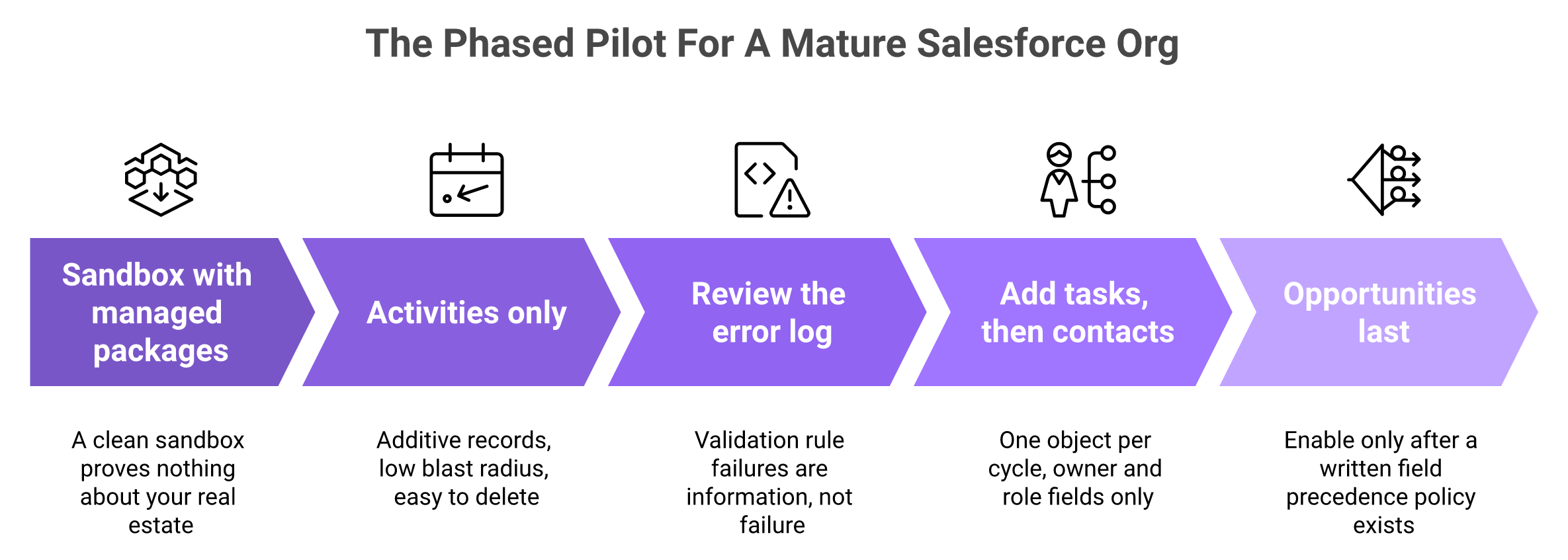
Sandbox with the managed packages installed. A clean sandbox proves nothing.
Activities only, two weeks. Additive records, low blast radius.
Review the error log line by line. Errors are information, not failure.
Add tasks, then contacts. One object per cycle.
Opportunities last, after a written precedence policy. Forecast fields are the highest risk surface you own.
Activities first and opportunities last is how you keep the blast radius small while the error log settles down.
💰 Where the cost actually lands
The integration work is the cost, not the licence. Budget engineering hours in weeks one and two, and expect a conversation about validation rules you forgot existed. Teams sizing that trade-off usually start with revenue tech stack consolidation costs.
Oliv AI deploys with in house forward deployed engineers rather than a third party implementation partner, which is the only credible answer to a managed package estate. Expect a scoped pilot from us rather than a switch, and treat any vendor promising zero configuration on a mature org as someone who has not seen one.
Q11. What should you ask any AI vendor before granting CRM write access? [toc=11. Vendor Interrogation List]
Ask ten questions: which objects and fields are written; what triggers each write; whether the inbound and outbound legs are event driven or polled; what the field precedence policy is; which fields the agent will never overwrite; whether evidence is visible inside the CRM record; what permissions the integration user needs; whether scoping is enforced on the CRM side; how a write is reversed; and where the data lives, for how long, and how it exits. Grant write access on documentation, never on assurance.
📋 The list, in the order that saves you time
Run it in that sequence, because the early answers tell you whether the later ones matter. A vendor who cannot name the object list will not have a precedence policy either.
Put it in an email and ask for written replies. Verbal answers in a demo are not artefacts, and the person answering usually is not the person who built it. The same discipline applies across a full revenue intelligence platform comparison for RevOps.
🚪 The last question is the most revealing
Ask how your data leaves. An admin who knows exactly how to exit is the only kind who should let a writer in, which is the architecture question behind build versus buy for revenue AI.
Oliv AI publishes MCP access along with Snowflake and Databricks sync as documented egress paths, plus an open export policy with no data lock in at trust.oliv.ai. Compare that with what happens on exit elsewhere, because reviewers raise it as a real concern.
"The fact that you can't edit a recording (to only share a portion with a client), and the fact that if you stop working with the tool you lose the data." — Verified reviewer, Gong G2 Verified Review (19 Mar 2026)
⚠️ The concession, stated plainly
Any automated writer carries data quality risk, and that includes ours. Do not grant write access because a founder wrote a reassuring article.
Oliv AI's public verification footprint is also thinner than the incumbents you are comparing us against. We have verified G2 reviews from mid 2026, and no Capterra or TrustRadius presence, with several case studies still gated behind a form. So audit the mechanism and the documentation, because that is what is actually available to you, and read the Gong versus Oliv comparison with the same scepticism.
"It doesn't just record meetings; it automatically captures key insights, updates systems of record, identifies next steps, and helps keep teams aligned. As a result, we've seen better CRM hygiene, less administrative overhead, and more consistent execution." — Verified reviewer, Oliv AI G2 Verified Review (23 Jun 2026)
✅ Where this leaves you on Monday
Take the ten questions into your next three vendor calls. Score the written answers, not the demo.
Oliv AI's entry tier is priced at $0, which means an administrator can hold a seat and watch exactly what the agent writes before any budget conversation starts. That is the sequence I would want if I were in your chair: inspect first, scope second, expand only after the error log is boring. If you want to run that pilot against your real org, book a demo and bring your messiest multi opportunity account, then compare what you see against our AI agents for sales teams.
Q1. What is bi-directional CRM sync in an AI context layer, and how is it different from a read-only integration? [toc=1. Bi-Directional Sync Defined]
Bi-directional CRM sync means an AI layer both reads records from Salesforce or HubSpot and writes structured values back into mapped fields, with explicit conflict rules, while the CRM stays the system of record. A read-only integration reads and reports. A one-way push writes but never reconciles. A context enriched sync does a third thing. It writes the value, and it keeps the evidence for why the value changed, because a CRM field holds current state only.
⭐ There are three shapes here, not two
Most vendor pages describe two options. In practice there are three, and admins get burned by the gap between them.
Read-only is the safest and the least useful. The tool subscribes to your records, builds reports, and never touches a field. Nothing in your org changes, so nothing in your org improves either. This is the ceiling most revenue intelligence platforms were built to reach.
A one-way push is where the trouble starts. The tool writes into your fields but does not read back the human edit that followed. Your rep corrects the close date on Tuesday. The push overwrites it on Wednesday. Nobody can explain which system was right.
Bi-directional sync is not one capability. Context-enriched sync adds field-level reconciliation and evidence while the CRM stays authoritative.
✅ What each direction actually does to your records
True bi-directional sync reconciles. It reads the record, compares, and applies a rule about which side wins per field. The word that matters in that sentence is "per field", not "sync".
Oliv AI's Context Graph runs as a layer on Salesforce, HubSpot, and Zoho, reading those records and writing back into a mapped field set rather than the whole object. That is the shape of the third column below, and it is the same architecture behind autonomous CRM hygiene for RevOps.
⚠️ A field holds state, and nothing else
Here is the structural fact this whole article rests on. A CRM field stores the current value. It does not store the reasoning that produced the value, and on the next overwrite that reasoning is gone for good.
So "stage moved to Negotiation" survives. "Stage moved because the economic buyer joined the call and asked for legal" does not. Third party analysis of context graphs makes the same point, describing them as a layer of explanation sitting on top of CRM and BI rather than a replacement for either, which is also why AI deal intelligence needs more than field values.
Read-Only vs Two-Way vs Context Enriched CRM Sync
Property
Read-only integration
Two-way sync
Context enriched sync
Data direction
Reads only
Reads and writes
Reads, writes, and retains source evidence
Conflict handling
Not applicable
Precedence rule per field
Precedence rule plus evidence for the disputed value
Custom object support
Usually read
Requires explicit mapping
Requires explicit mapping
Overwrite risk to rep input
None
Real, depends on field scoping
Real, but checkable against the evidence
Provenance
None
Usually the integration user only
Per field source, subject to vendor documentation
System of record
Your CRM
Your CRM
Your CRM
🔁 Where this leaves the definition
Ask a vendor which of those three columns they sit in, and make them answer per object. I have watched teams buy column two while believing they bought column three.
Oliv AI reads the CRM, writes to a mapped field set, and retains the evidence behind each value, with the object model and reporting layer staying in Salesforce or HubSpot (CRM Manager). The argument for why that matters comes later on this page.
Q2. What does an AI layer actually write into Salesforce or HubSpot, at object level? [toc=2. What Gets Written]
An AI context layer writes to five object types: accounts, contacts, opportunities, activities, and tasks. Oliv AI's CRM Manager agent operates across those objects, is triggered by every logged activity, and syncs fields with the evidence that produced them rather than an unsourced value. The distinction that matters is scope, not coverage. The write set is a configured field list, not the whole object. Your object model, record types, validation rules, and reporting layer stay in Salesforce or HubSpot. What gets removed is the manual update dependency, not the CRM.
📋 Start at the object model, not the AI
If you own the data model, your first question is not what the tool does. It is which objects it can touch, and with what permissions.
That instinct is correct, and it is the right place to start a vendor conversation. You are accountable for a system somebody else now wants write access to. Accountability without visibility is the thing you are actually refusing, and you should keep refusing it. The same gate applies to any agentic AI implementation on RevOps data architecture.
❌ What the old enrichment era cost you
The previous generation of enrichment tools wrote values with no source attached. A field changed, the integration user's name sat in the audit log, and that was the end of the trail.
You could see that something wrote. You could not see why. So when a number looked wrong in a pipeline review, the only available fix was manual, and the tool quietly lost its credibility.
Gartner now puts the consequence in numbers. Around 40% of agentic AI CRM projects are expected to fail or stall by 2028, and the cause named is data quality rather than model quality.
✅ What changed: the write carries its source
The shift worth paying attention to is small and specific. The write stops being a value and starts being a value plus its origin.
That converts a field update into something closer to a citation. A disputed close date becomes checkable in the record instead of arguable in a meeting, which is the foundation of evidence-based forecast commits.
Oliv AI's documentation describes CRM Manager as syncing fields with evidence, and states that CRM Manager is the operator applying the analyst's work wherever it needs to go. Confirm with any vendor, including us, whether that evidence is visible inside the CRM record or only inside their own interface. The two are not the same claim.
🗂️ The write inventory, by object
Oliv AI's CRM Manager operates on accounts, contacts, opportunities, activities, and tasks across the revenue lifecycle, triggered by activity rather than a nightly job (CRM Manager agent). The point of that list is that it is finite.
What an AI Context Layer Writes, by CRM Object
Object
Typical write surface
Trigger
Activities
Logged meetings and calls, participants, summaries
Every activity
Tasks
Follow up actions and owners
Every activity
Opportunities
Derived qualification and stage support fields
Activity on a linked opportunity
Contacts
Role and stakeholder attributes
Participant detected on activity
Accounts
Relationship level attributes
Activity on a linked account
⚠️ One honest caveat before you map anything
Rep authored free text should not be on that surface by default. Notes, next steps, and close reasoning are judgment, and judgment is the part you want a human to own.
Oliv AI's read is that the write surface should be structured and derived fields, with free text read only until you deliberately decide otherwise. Ask for the field list in writing before you enable anything on opportunities, and treat auto-scored MEDDIC, BANT, and SPICED fields as the derived class rather than the human class.
Q3. Any automated writer degrades data quality eventually, so why would this be different? [toc=3. The Data-Quality Objection]
It is different only if three things are true, and none of them is accuracy. Writes must be attributable, so you can see what wrote a field and why. They must be scoped, meaning a configurable field set rather than everything. And they must be reversible. A model that is right 95% of the time and ungovernable is worse for an administrator than one that is right 80% of the time and fully traceable, because the first cannot be audited. Judge any AI writer on provenance, scope, and rollback before you judge its output.
⚠️ The objection is earned, and I am not going to talk you out of it
You have seen what AI enrichment does to a clean org. You expect to spend a year undoing it. That position comes from experience, and reassurance makes it worse, not better.
So I will concede the whole thing. Automated writers have a poor track record in mature Salesforce orgs. Starting from no is the correct default, and any vendor who acts offended by that has not implemented into a real managed package estate.
💸 What the old model actually cost
The cost was never a wrong value. Wrong values happen with humans too. The cost was that nobody could reconstruct the change.
Once a field is overwritten without a source, the debate moves from the record into the room. Salesforce's 2026 State of Sales research found only 35% of sales professionals completely trust their CRM data, with 47% saying accuracy got harder year over year. That is a governance number, not a model number, and it is why CRM data strategy drives revenue predictability.
✅ Move the test from accuracy to governance
Here is the reframe I would use in your own vendor review. Stop asking whether the model is right. Ask whether its writes can be governed.
Three properties decide that, and each is a mechanism rather than a promise:
Accuracy does not make an automated writer governable. Write access requires attribution, field-level scope, and a rollback path working together.
Attributable. Every written field shows what wrote it, when, and on what basis.
Scoped. The field set is configured and enforced, ideally by your field level security rather than the vendor's settings.
Reversible. There is a documented path to undo a write set, not a support ticket.
Auditors already work this way. SOC 2's Processing Integrity criterion is the one applied to agent driven writes, and it asks whether processing is complete, valid, accurate, and timely, typically enforced through API idempotency and queue checks. Regulators are converging on the same ground, with EU AI Act transparency obligations for agents enforceable from 2 August 2026.
🔍 Where I hold this loosely
Oliv AI's read is that the category has been optimising the wrong variable, selling accuracy when administrators were asking for auditability. I might be overweighting that, because the admins who reach us are self selected for scepticism.
What I am confident about is the direction of authority. Your CRM is the system of record. A context layer is a contributor to it, and a contributor does not get to be unaccountable. That is the whole argument in can you trust AI with your CRM.
📌 The part that costs us the sale
Oliv AI is SOC 2 Type II certified, GDPR and CCPA compliant, and publishes its posture at trust.oliv.ai, with an open export policy and no data lock in. Even so, do not grant write access on the strength of that paragraph. Ask for the field scoping surface, the provenance artefact, and the rollback path in writing, from us and from everyone else on your shortlist, and where a vendor's answer is partial, make them say which part. The mid-market revenue AI buyer's guide to governance and SOC 2 lists those questions in full.
Q4. When does the sync run, on webhook triggers or scheduled batch? [toc=4. Triggers and Sync Cadence]
Two legs, two mechanisms. Inbound, the layer pulls records on connection, then subscribes to change events so CRM edits propagate without a full re-read. Outbound, writes fire either on an event (a call ends, a field is derived) or on a batch cycle, and vendor cycles range from real time to two or three hours. Cadence matters operationally, because event driven writes surface validation errors immediately while batch writes surface them in bulk later. Ask which leg is event driven and which is polled, since vendors tend to describe the faster one.
🔌 The inbound leg
Initial backfill. On connection, the layer reads your objects and builds its map. This is the heaviest API moment in the whole lifecycle, so schedule it outside close week.
Change subscription. After backfill, it listens for record level change events rather than re-reading. Integration documentation names these per platform, including record created, record updated, and record deleted triggers for Salesforce and HubSpot.
Reconciliation pass. A periodic read catches anything the event stream missed, which is normal and should be documented rather than hidden.
⏰ The outbound leg
Event driven writes. A meeting ends, a field is derived, the write attempts immediately. Errors from validation rules appear within minutes, attached to that one record.
Batch writes. Updates queue and flush on a cycle. Published vendor cadences vary widely, with some sales engagement tools documenting a two to three hour two-way cycle as their standard.
Retry and backfill. Ask what happens after an outage. A queue that drops writes silently is a data quality problem wearing an uptime badge.
Sync Trigger Types, Latency, and API Impact
Trigger type
Typical latency
How errors surface
API limit implication
Event driven write
Seconds to minutes
One record at a time, immediately
Volume tracks activity volume
Batch write
Minutes to hours
In bulk, after the fact
Predictable, spikes at flush
Full reconciliation read
Scheduled
As a job level failure
Heaviest consumption, schedule deliberately
⚠️ The capacity question nobody puts on a pricing page
If writes are activity triggered, write volume scales with meeting volume, not seat count. A 60 rep team in a heavy quarter generates a very different API load than the same team in July.
Salesforce enforces daily API request limits per org, and those limits are what actually bound this design, so model the busy month rather than the average one. I have seen this become a surprise in week three, and it is a completely avoidable surprise. Anyone planning sales automation inside the CRM should size this first.
✅ What to ask before you sign
Put it in three questions. Which leg is event driven and which is polled. What is the documented cadence for each. What is the retry behaviour after a failed write.
Oliv AI's CRM Manager is triggered by every activity across the revenue lifecycle rather than running on a nightly schedule, so write volume tracks meeting volume and API headroom should be planned against your busiest month (integrations). We would rather you size that with us during a scoped pilot than discover it in production, and the RevOps implementation admin guide sets out how that pilot runs.
Q5. How do you map fields, handle custom objects, and restrict what the AI can write to? [toc=5. Field Mapping and Scoping]
Scope is set in two places, and you should use both. In the CRM, the integration user gets a dedicated profile or permission set with field level security limiting write access to a named list rather than object wide edit. In the AI layer, the configured field map decides what it attempts at all. Field level security is the enforceable boundary, because it holds even if the vendor changes their own configuration. Custom objects and custom properties need explicit mapping, so confirm support per object rather than per platform, and start the map with activities and tasks.
🔧 The setup sequence, in the order that protects you
Create a dedicated integration user. Never reuse an admin login. You want one identity in the audit log that means "the AI wrote this".
Apply field level security first. In Salesforce, a permission set controls read and edit per field. Set this before the connection, not after.
Run the schema scan. The layer reads your objects and fields. Review what it discovered, including custom objects, before you approve anything.
Define the map explicitly. Name each source value and its target field. Leave rep authored free text out of the map.
Test in a sandbox with real record types. Validation rules and required fields behave differently on live records than on demo data.
Enable one object. Activities first. Opportunities last.
⚠️ Custom objects are a per object question
A vendor saying "we support custom objects" is not an answer. Salesforce custom objects and HubSpot custom properties behave differently, and support is usually uneven across them. Anyone comparing connector depth should read our breakdown of revenue intelligence integration across CRM, Slack, and email.
So ask the question object by object. Which custom objects can be read. Which can be written. What happens when a required custom field is empty. RevOps teams with two hundred custom fields have watched tools break on exactly this, which is a recurring theme in Gong's Salesforce integration behaviour.
"limitations of getting data back into salesforce" — Verified reviewer, Gong G2 Verified Review (21 May 2026)
"The UX is horrible, the features don't work, it's not clear, I waste a lot of time on the software, and I am extremely frustrated. The initial setup of Salesloft was not easy." — Verified reviewer, Salesloft G2 Verified Review (05 Jan 2026)
✅ A pilot order that keeps blast radius small
Recommended Pilot Order by CRM Object
Order
Object
Why start here
Risk if wrong
1
Activities
Additive records, nothing overwritten
Low, delete the records
2
Tasks
Owner and due date only
Low, reassign or close
3
Contacts
Roles and stakeholder attributes
Medium, affects routing
4
Accounts
Relationship attributes
Medium, affects reporting
5
Opportunities
Forecast facing fields
High, affects the number
📌 What to settle before you switch anything on
Get the permissions list in writing. Ask which specific profile or permission set the integration user needs, and why each permission is required. If a vendor cannot produce that list, that is your answer for now.
Oliv AI defines the field map at connection and publishes its connector catalogue at integrations, and one reviewer describes the setup as straightforward in five to fifteen minutes. Even so, confirm the scoping surface in writing before you enable opportunity writes, from us and from every other vendor on your list. The sequence is set out step by step in the RevOps implementation admin guide.
Q6. What happens on a conflict, and will the AI overwrite a value a rep entered? [toc=6. Conflicts and Overwrites]
Conflict handling is what separates real bi-directional sync from a push. Three rules govern it: a precedence policy naming which system is authoritative per field, a changed fields only write so untouched values are never rewritten, and a duplicate check that resolves entities before creating records. Ask for the precedence policy in writing. Rep authored free text, meaning next steps, notes, and close reasoning, should be read only to the agent by default, with structured and derived fields as the write surface. Only 35% of sales professionals completely trust CRM data, and an unannounced overwrite is how the rest of that trust goes.
❌ The moment that breaks adoption
An AE writes three lines of context into Next Steps after a hard call. On Thursday it reads like something a machine produced. They stop writing notes that week, and nobody tells you why.
That is the real cost of a conflict rule you never published. The field value is recoverable. The rep's belief that the CRM is theirs is not, and that belief is what autonomous CRM hygiene actually depends on.
⚠️ Last write wins is the default, and it is the problem
Most rule based integrations resolve conflicts by timestamp. Whichever system wrote last is treated as correct, which is a scheduling decision masquerading as a data decision.
Gong's own reviewers point at the same class of friction from the other direction, where getting data back into Salesforce is where things stall. We catalogue that pattern in our review of Gong's limitations and challenges.
"Real Time integrations can be time consuming" — Verified reviewer, Gong G2 Verified Review (21 Apr 2026)
✅ What a real precedence policy looks like
Three mechanisms replace the timestamp:
Per field authority. Each field is assigned to either the human, the agent, or the CRM automation.
Changed fields only. If a derived value matches what is already there, no write is attempted at all.
Entity resolution before creation. The layer resolves whether a contact already exists instead of inserting a near duplicate.
Oliv AI writes derived and structured fields with the evidence that produced them attached, which turns a disputed close date into something you can inspect rather than argue about. Ask us for the field level precedence list, and if a published policy does not exist yet for your configuration, insist on it before enabling opportunity writes. The governance framing sits in can you trust AI with your CRM.
🗂️ The precedence table I would ask every vendor to fill in
Field Precedence Policy Template for AI CRM Writes
Field class
Authoritative system
Agent permission
Next steps, notes, close reasoning
Human
Read only
Stage, close date
Human, with agent flagging
Suggest, do not write
Derived qualification fields (MEDDPICC, BANT)
Agent
Write with evidence
Activity and participant records
Agent
Create
Amount, quantities, quote data
CRM automation
Read only
⭐ Where reviewers land on this in practice
Oliv AI's G2 reviews describe CRM records updating after calls without manual effort, and they also record honest friction, which is the balance you should expect from any tool that writes. Derived qualification fields are covered further in auto-scoring MEDDIC, BANT, and SPICED from calls.
"It automatically updates CRM records after calls and meetings, keeping the data clean and accurate without manual effort... It's a lil slow" — Verified reviewer, Oliv AI G2 Verified Review (23 Jun 2026)
"The only downside is that the platform can be a bit glitchy at times, but the support team is always quick to address and resolve any bugs." — Verified reviewer, Oliv AI G2 Verified Review (02 Jul 2026)
Q7. How does the AI decide which opportunity an activity belongs to? [toc=7. Activity Association]
Rule based integrations match activity to records by email domain and open opportunity heuristics, which is why meetings land on the wrong opportunity when one account has several open. An AI context layer resolves the entity instead, reading participants, thread history, and deal context to decide which account, contact, and opportunity an activity belongs to. Oliv AI's documentation states that activity is connected to the right accounts, contacts, and opportunities, including when one account has multiple opportunities. That claim is checkable in a week. Pick a multi opportunity account and audit where the activities actually landed.
❌ Every admin has seen this one
An enterprise account has a renewal, an expansion, and a new business opportunity open at once. A meeting with two stakeholders gets logged against whichever one the rule liked.
The manager reviews the wrong record. The activity count on the real deal looks thin. Most teams stop trying to fix it, because fixing it by hand is a full time job, and that gap shows up directly in cross-channel pipeline visibility.
⚠️ Why domain matching cannot get there
Email domain tells you the company. It does not tell you the deal. A shared domain plus a heuristic like "attach to the newest open opportunity" is a guess dressed as logic.
Layer a model on top of that, and the guess gets faster, not better. Gartner expects around 40% of agentic AI CRM projects to fail or stall by 2028, with data quality named as the cause rather than the model. Association is where that data quality problem starts, and it is the foundation issue in agentic AI implementation on RevOps data architecture.
Email domains identify companies, not deals. Correct association requires participant, relationship, conversation, and opportunity context before the write.
✅ What entity resolution changes inside the record
Resolution asks a different question. Not "which domain is this", but "which opportunity is this conversation actually about".
It reads the participants, their roles, the thread history, and the deal state before writing anything. The consequence in your org is narrow and specific: the activity lands on one opportunity, and the participant is linked to the right contact record.
🔍 The audit that settles it in a week
Oliv AI's Object Graph resolves association before any write happens, which is why an activity lands on one opportunity rather than the newest open one (Object Graph). I would still make us prove it on your data, not ours.
Run this test with any vendor. Pick your three messiest multi opportunity accounts. Export activities for thirty days. Count how many landed where a human would have put them.
"Oliv.ai helps me with pipeline visibility and deal overview, keeping my CRM updated and automating contact creation." — Verified reviewer, Oliv AI G2 Verified Review (17 Jun 2026)
"I appreciate that it integrates well with platforms like HubSpot and Salesforce, allowing us to capture insights from calls and maintain a complete view of customer interactions." — Verified reviewer, Oliv AI G2 Verified Review (23 Jun 2026)
📌 The honest boundary
Association is the one capability where a rules based integration genuinely cannot catch up, and it is also the hardest thing to verify from a demo. Oliv AI's read is that this is the right place to spend your evaluation time, because everything downstream, including forecast accuracy, inherits whatever association decides. If we get it wrong on your accounts, you will see it inside a week, and that is the point. The downstream effect is quantified in sales forecast accuracy for CROs.
Q8. If the AI holds the context and writes the fields, in what sense is Salesforce still the system of record? [toc=8. System of Record]
Salesforce or HubSpot remains where records are created, governed, reported, and audited. The context layer contributes values into those records and can be disconnected without the records leaving. That is the test. If the integration is removed tomorrow, does the org still function as the system of record? It does. What stops is the enrichment, and the manual update dependency returns. A contributor with write access is not a system of record. A system of record is whatever survives the contributor being switched off.
⚠️ The version of this question that blocks deals
Admins ask it plainly. If the AI holds the object model, resolves the associations, and writes the fields, what exactly is Salesforce doing anymore?
It deserves a real answer rather than a slogan. I have watched this question stall evaluations for a quarter, usually because the vendor answered it with reassurance instead of function.
✅ Define the system of record by function, not by feeling
A system of record does four things. It creates records, governs them through validation rules and record types, reports on them, and holds the audit trail.
A contributor does one thing. It supplies values into records that something else governs. Third party analysis of context graphs reaches the same conclusion, describing them as a layer of explanation over the CRM rather than a replacement for it, which is the distinction we draw in revenue intelligence versus conversation intelligence.
System of Record Functions vs Contributor Functions
Function
Salesforce or HubSpot
AI context layer
Record creation and ownership
Yes
No
Validation rules and record types
Yes
No
Reporting and dashboards of record
Yes
No
Audit trail of field changes
Yes
Contributes entries
Derived field values with evidence
No
Yes
Retains why a value changed
No
Yes
⏰ Run the disconnection test
Ask what happens the day you revoke the integration user. In a healthy architecture, the answer is unexciting.
Your records stay. Your reports stay. Your history stays. Enrichment stops, derived fields go stale, and your team goes back to updating opportunities by hand, which is a real loss but not an existential one. That dependency question is the core of build versus buy for revenue AI.
❌ What would make the answer a lie
If disconnecting the layer took your records with it, or left your reports unrunnable, then the layer was the system of record all along. That is the architecture to walk away from.
Oliv AI's stated position is that it plugs into Salesforce, HubSpot, and Zoho and makes them accurate, which means CRM Manager removes the manual update dependency rather than the CRM itself. We also publish an open export policy with no data lock in at trust.oliv.ai, and an admin who knows exactly how to leave is the only kind who should let a writer in. The buyer-side checklist for that posture sits in the mid-market revenue AI buyer's guide to governance and SOC 2.
Q9. Is there an audit trail for AI-written CRM data, and can the changes be reversed? [toc=9. Audit Trail and Rollback]
Ask for three artefacts rather than a promise: a per field record of what wrote the value and when, the evidence behind it, and a documented rollback path. In Salesforce, field history tracking plus the integration user's identity gives you the first even if the vendor gives you nothing. Regulation now pushes the same way. EU AI Act Article 50 transparency obligations became enforceable on 2 August 2026, with the grace period for systems already in market ending 2 December 2026, and agents must disclose that they are AI and on whose behalf they act.
🔍 Artefact one: attributability
Attributability means you can name the writer of any field. Request it in this order.
Ask which identity performs writes. It should be the dedicated integration user, never a shared admin.
Ask whether the vendor logs per field, or only per job. Per job logging tells you a sync ran. It does not tell you what changed.
Turn on field history tracking yourself. Salesforce tracks history on up to twenty fields per object, retained for eighteen months by default. Pick your forecast fields.
This is the part that converts a field update into something closer to a citation. A close date with a linked source is checkable. A close date on its own is a rumour with a timestamp, which is why evidence-based forecast commits depend on provenance rather than confidence.
Oliv AI's documentation describes CRM Manager as syncing fields with the evidence that produced them, and the governance detail is unpacked further in its write up on trusting AI with your CRM. Make every vendor, including us, answer one follow up precisely. Is that evidence visible inside the CRM record, or only inside the vendor's own interface? Those are different claims, and only one of them survives an audit run by your finance team.
⏰ Artefact three: reversibility
Reversibility is the weakest area across this whole category, and I would treat vague answers here as a red flag. Ask three questions.
Can a specific write set be reverted, scoped by date range and field?
Is that a self serve action, or a support ticket?
What happens to downstream automation that already fired on the changed value?
The last one is where teams get hurt. A reverted field does not un send the alert or un trigger the workflow. Anyone auditing this should read how we frame CRM data quality automation for RevOps.
Audit Artefacts for AI-Written CRM Data
Property
Artefact that proves it
Your CRM side fallback
Attributable
Per field write log naming the writer
Field history tracking plus integration user
Evidenced
Source link visible in the record
Note or custom field holding the source reference
Reversible
Documented rollback, scoped by date and field
Weekly data export before enabling writes
Auditable end to end
SOC 2 report section on Processing Integrity
Your own quarterly field sample review
✅ What I would not accept from any vendor
SOC 2's Processing Integrity criterion is the one auditors apply to automated writes, asking whether processing is complete, valid, accurate, and timely. Ask for that section of the report specifically, and use the mid-market revenue AI buyer's guide to governance and SOC 2 as your scoring sheet.
Oliv AI is SOC 2 Type II certified and publishes its posture at trust.oliv.ai, and we would rather you read the report than take the sentence. Where a rollback capability is only partially documented for your configuration, make us say so in writing, and hold every other vendor to the same standard.
Q10. How does this behave with validation rules and managed packages, and is HubSpot at parity with Salesforce? [toc=10. Mature Org Realities]
Validation rules fire on API writes exactly as they do on user writes, so a failed rule surfaces as a sync error rather than silent success. That is correct behaviour, and it is also why mature orgs see error volume in week one. Platform parity should never be assumed, because Salesforce and HubSpot differ in object model, custom property behaviour, and API limits, so confirm feature support per platform. An org with heavy validation, complex record types, and a managed package estate should pilot on a single object, activities first, and budget real integration work.
⚠️ The four failure modes you will actually meet
Common AI CRM Write Failure Modes and Fixes
Failure mode
What you see
What to do
Validation rule blocks the write
API error on one record, field unchanged
Decide if the rule or the map is wrong, then fix one of them
Required field empty
Insert fails, nothing logged to the record
Add a default, or drop that object from the map for now
Managed package trigger cascade
One write fires three automations
Test in sandbox with the package installed, not without
Salesforce and HubSpot are not the same target. Object models differ, custom properties behave differently, and the permission surfaces are not equivalent.
So do not accept a single feature list covering both. Ask for the map per platform, and ask which capabilities are documented on HubSpot today rather than planned. I would rather lose a deal on that answer than win one and spend your Q4 apologising. For a worked comparison of platform-specific behaviour, see Gong's HubSpot integration.
"I found the AI tracker setup to be quite difficult, especially concerning the user interface when setting up keywords or smart trackers." — Verified reviewer, Gong G2 Verified Review (03 Oct 2025)
"The initial setup was really easy because the team provided FDE engineers who set everything up, and within less than a week, we were good to go." — Verified reviewer, Oliv AI G2 Verified Review (17 Jun 2026)
✅ The pilot sequence for a complex org
Sandbox with the managed packages installed. A clean sandbox proves nothing.
Activities only, two weeks. Additive records, low blast radius.
Review the error log line by line. Errors are information, not failure.
Add tasks, then contacts. One object per cycle.
Opportunities last, after a written precedence policy. Forecast fields are the highest risk surface you own.
Activities first and opportunities last is how you keep the blast radius small while the error log settles down.
💰 Where the cost actually lands
The integration work is the cost, not the licence. Budget engineering hours in weeks one and two, and expect a conversation about validation rules you forgot existed. Teams sizing that trade-off usually start with revenue tech stack consolidation costs.
Oliv AI deploys with in house forward deployed engineers rather than a third party implementation partner, which is the only credible answer to a managed package estate. Expect a scoped pilot from us rather than a switch, and treat any vendor promising zero configuration on a mature org as someone who has not seen one.
Q11. What should you ask any AI vendor before granting CRM write access? [toc=11. Vendor Interrogation List]
Ask ten questions: which objects and fields are written; what triggers each write; whether the inbound and outbound legs are event driven or polled; what the field precedence policy is; which fields the agent will never overwrite; whether evidence is visible inside the CRM record; what permissions the integration user needs; whether scoping is enforced on the CRM side; how a write is reversed; and where the data lives, for how long, and how it exits. Grant write access on documentation, never on assurance.
📋 The list, in the order that saves you time
Run it in that sequence, because the early answers tell you whether the later ones matter. A vendor who cannot name the object list will not have a precedence policy either.
Put it in an email and ask for written replies. Verbal answers in a demo are not artefacts, and the person answering usually is not the person who built it. The same discipline applies across a full revenue intelligence platform comparison for RevOps.
🚪 The last question is the most revealing
Ask how your data leaves. An admin who knows exactly how to exit is the only kind who should let a writer in, which is the architecture question behind build versus buy for revenue AI.
Oliv AI publishes MCP access along with Snowflake and Databricks sync as documented egress paths, plus an open export policy with no data lock in at trust.oliv.ai. Compare that with what happens on exit elsewhere, because reviewers raise it as a real concern.
"The fact that you can't edit a recording (to only share a portion with a client), and the fact that if you stop working with the tool you lose the data." — Verified reviewer, Gong G2 Verified Review (19 Mar 2026)
⚠️ The concession, stated plainly
Any automated writer carries data quality risk, and that includes ours. Do not grant write access because a founder wrote a reassuring article.
Oliv AI's public verification footprint is also thinner than the incumbents you are comparing us against. We have verified G2 reviews from mid 2026, and no Capterra or TrustRadius presence, with several case studies still gated behind a form. So audit the mechanism and the documentation, because that is what is actually available to you, and read the Gong versus Oliv comparison with the same scepticism.
"It doesn't just record meetings; it automatically captures key insights, updates systems of record, identifies next steps, and helps keep teams aligned. As a result, we've seen better CRM hygiene, less administrative overhead, and more consistent execution." — Verified reviewer, Oliv AI G2 Verified Review (23 Jun 2026)
✅ Where this leaves you on Monday
Take the ten questions into your next three vendor calls. Score the written answers, not the demo.
Oliv AI's entry tier is priced at $0, which means an administrator can hold a seat and watch exactly what the agent writes before any budget conversation starts. That is the sequence I would want if I were in your chair: inspect first, scope second, expand only after the error log is boring. If you want to run that pilot against your real org, book a demo and bring your messiest multi opportunity account, then compare what you see against our AI agents for sales teams.
Q1. What is bi-directional CRM sync in an AI context layer, and how is it different from a read-only integration? [toc=1. Bi-Directional Sync Defined]
Bi-directional CRM sync means an AI layer both reads records from Salesforce or HubSpot and writes structured values back into mapped fields, with explicit conflict rules, while the CRM stays the system of record. A read-only integration reads and reports. A one-way push writes but never reconciles. A context enriched sync does a third thing. It writes the value, and it keeps the evidence for why the value changed, because a CRM field holds current state only.
⭐ There are three shapes here, not two
Most vendor pages describe two options. In practice there are three, and admins get burned by the gap between them.
Read-only is the safest and the least useful. The tool subscribes to your records, builds reports, and never touches a field. Nothing in your org changes, so nothing in your org improves either. This is the ceiling most revenue intelligence platforms were built to reach.
A one-way push is where the trouble starts. The tool writes into your fields but does not read back the human edit that followed. Your rep corrects the close date on Tuesday. The push overwrites it on Wednesday. Nobody can explain which system was right.
Bi-directional sync is not one capability. Context-enriched sync adds field-level reconciliation and evidence while the CRM stays authoritative.
✅ What each direction actually does to your records
True bi-directional sync reconciles. It reads the record, compares, and applies a rule about which side wins per field. The word that matters in that sentence is "per field", not "sync".
Oliv AI's Context Graph runs as a layer on Salesforce, HubSpot, and Zoho, reading those records and writing back into a mapped field set rather than the whole object. That is the shape of the third column below, and it is the same architecture behind autonomous CRM hygiene for RevOps.
⚠️ A field holds state, and nothing else
Here is the structural fact this whole article rests on. A CRM field stores the current value. It does not store the reasoning that produced the value, and on the next overwrite that reasoning is gone for good.
So "stage moved to Negotiation" survives. "Stage moved because the economic buyer joined the call and asked for legal" does not. Third party analysis of context graphs makes the same point, describing them as a layer of explanation sitting on top of CRM and BI rather than a replacement for either, which is also why AI deal intelligence needs more than field values.
Read-Only vs Two-Way vs Context Enriched CRM Sync
Property
Read-only integration
Two-way sync
Context enriched sync
Data direction
Reads only
Reads and writes
Reads, writes, and retains source evidence
Conflict handling
Not applicable
Precedence rule per field
Precedence rule plus evidence for the disputed value
Custom object support
Usually read
Requires explicit mapping
Requires explicit mapping
Overwrite risk to rep input
None
Real, depends on field scoping
Real, but checkable against the evidence
Provenance
None
Usually the integration user only
Per field source, subject to vendor documentation
System of record
Your CRM
Your CRM
Your CRM
🔁 Where this leaves the definition
Ask a vendor which of those three columns they sit in, and make them answer per object. I have watched teams buy column two while believing they bought column three.
Oliv AI reads the CRM, writes to a mapped field set, and retains the evidence behind each value, with the object model and reporting layer staying in Salesforce or HubSpot (CRM Manager). The argument for why that matters comes later on this page.
Q2. What does an AI layer actually write into Salesforce or HubSpot, at object level? [toc=2. What Gets Written]
An AI context layer writes to five object types: accounts, contacts, opportunities, activities, and tasks. Oliv AI's CRM Manager agent operates across those objects, is triggered by every logged activity, and syncs fields with the evidence that produced them rather than an unsourced value. The distinction that matters is scope, not coverage. The write set is a configured field list, not the whole object. Your object model, record types, validation rules, and reporting layer stay in Salesforce or HubSpot. What gets removed is the manual update dependency, not the CRM.
📋 Start at the object model, not the AI
If you own the data model, your first question is not what the tool does. It is which objects it can touch, and with what permissions.
That instinct is correct, and it is the right place to start a vendor conversation. You are accountable for a system somebody else now wants write access to. Accountability without visibility is the thing you are actually refusing, and you should keep refusing it. The same gate applies to any agentic AI implementation on RevOps data architecture.
❌ What the old enrichment era cost you
The previous generation of enrichment tools wrote values with no source attached. A field changed, the integration user's name sat in the audit log, and that was the end of the trail.
You could see that something wrote. You could not see why. So when a number looked wrong in a pipeline review, the only available fix was manual, and the tool quietly lost its credibility.
Gartner now puts the consequence in numbers. Around 40% of agentic AI CRM projects are expected to fail or stall by 2028, and the cause named is data quality rather than model quality.
✅ What changed: the write carries its source
The shift worth paying attention to is small and specific. The write stops being a value and starts being a value plus its origin.
That converts a field update into something closer to a citation. A disputed close date becomes checkable in the record instead of arguable in a meeting, which is the foundation of evidence-based forecast commits.
Oliv AI's documentation describes CRM Manager as syncing fields with evidence, and states that CRM Manager is the operator applying the analyst's work wherever it needs to go. Confirm with any vendor, including us, whether that evidence is visible inside the CRM record or only inside their own interface. The two are not the same claim.
🗂️ The write inventory, by object
Oliv AI's CRM Manager operates on accounts, contacts, opportunities, activities, and tasks across the revenue lifecycle, triggered by activity rather than a nightly job (CRM Manager agent). The point of that list is that it is finite.
What an AI Context Layer Writes, by CRM Object
Object
Typical write surface
Trigger
Activities
Logged meetings and calls, participants, summaries
Every activity
Tasks
Follow up actions and owners
Every activity
Opportunities
Derived qualification and stage support fields
Activity on a linked opportunity
Contacts
Role and stakeholder attributes
Participant detected on activity
Accounts
Relationship level attributes
Activity on a linked account
⚠️ One honest caveat before you map anything
Rep authored free text should not be on that surface by default. Notes, next steps, and close reasoning are judgment, and judgment is the part you want a human to own.
Oliv AI's read is that the write surface should be structured and derived fields, with free text read only until you deliberately decide otherwise. Ask for the field list in writing before you enable anything on opportunities, and treat auto-scored MEDDIC, BANT, and SPICED fields as the derived class rather than the human class.
Q3. Any automated writer degrades data quality eventually, so why would this be different? [toc=3. The Data-Quality Objection]
It is different only if three things are true, and none of them is accuracy. Writes must be attributable, so you can see what wrote a field and why. They must be scoped, meaning a configurable field set rather than everything. And they must be reversible. A model that is right 95% of the time and ungovernable is worse for an administrator than one that is right 80% of the time and fully traceable, because the first cannot be audited. Judge any AI writer on provenance, scope, and rollback before you judge its output.
⚠️ The objection is earned, and I am not going to talk you out of it
You have seen what AI enrichment does to a clean org. You expect to spend a year undoing it. That position comes from experience, and reassurance makes it worse, not better.
So I will concede the whole thing. Automated writers have a poor track record in mature Salesforce orgs. Starting from no is the correct default, and any vendor who acts offended by that has not implemented into a real managed package estate.
💸 What the old model actually cost
The cost was never a wrong value. Wrong values happen with humans too. The cost was that nobody could reconstruct the change.
Once a field is overwritten without a source, the debate moves from the record into the room. Salesforce's 2026 State of Sales research found only 35% of sales professionals completely trust their CRM data, with 47% saying accuracy got harder year over year. That is a governance number, not a model number, and it is why CRM data strategy drives revenue predictability.
✅ Move the test from accuracy to governance
Here is the reframe I would use in your own vendor review. Stop asking whether the model is right. Ask whether its writes can be governed.
Three properties decide that, and each is a mechanism rather than a promise:
Accuracy does not make an automated writer governable. Write access requires attribution, field-level scope, and a rollback path working together.
Attributable. Every written field shows what wrote it, when, and on what basis.
Scoped. The field set is configured and enforced, ideally by your field level security rather than the vendor's settings.
Reversible. There is a documented path to undo a write set, not a support ticket.
Auditors already work this way. SOC 2's Processing Integrity criterion is the one applied to agent driven writes, and it asks whether processing is complete, valid, accurate, and timely, typically enforced through API idempotency and queue checks. Regulators are converging on the same ground, with EU AI Act transparency obligations for agents enforceable from 2 August 2026.
🔍 Where I hold this loosely
Oliv AI's read is that the category has been optimising the wrong variable, selling accuracy when administrators were asking for auditability. I might be overweighting that, because the admins who reach us are self selected for scepticism.
What I am confident about is the direction of authority. Your CRM is the system of record. A context layer is a contributor to it, and a contributor does not get to be unaccountable. That is the whole argument in can you trust AI with your CRM.
📌 The part that costs us the sale
Oliv AI is SOC 2 Type II certified, GDPR and CCPA compliant, and publishes its posture at trust.oliv.ai, with an open export policy and no data lock in. Even so, do not grant write access on the strength of that paragraph. Ask for the field scoping surface, the provenance artefact, and the rollback path in writing, from us and from everyone else on your shortlist, and where a vendor's answer is partial, make them say which part. The mid-market revenue AI buyer's guide to governance and SOC 2 lists those questions in full.
Q4. When does the sync run, on webhook triggers or scheduled batch? [toc=4. Triggers and Sync Cadence]
Two legs, two mechanisms. Inbound, the layer pulls records on connection, then subscribes to change events so CRM edits propagate without a full re-read. Outbound, writes fire either on an event (a call ends, a field is derived) or on a batch cycle, and vendor cycles range from real time to two or three hours. Cadence matters operationally, because event driven writes surface validation errors immediately while batch writes surface them in bulk later. Ask which leg is event driven and which is polled, since vendors tend to describe the faster one.
🔌 The inbound leg
Initial backfill. On connection, the layer reads your objects and builds its map. This is the heaviest API moment in the whole lifecycle, so schedule it outside close week.
Change subscription. After backfill, it listens for record level change events rather than re-reading. Integration documentation names these per platform, including record created, record updated, and record deleted triggers for Salesforce and HubSpot.
Reconciliation pass. A periodic read catches anything the event stream missed, which is normal and should be documented rather than hidden.
⏰ The outbound leg
Event driven writes. A meeting ends, a field is derived, the write attempts immediately. Errors from validation rules appear within minutes, attached to that one record.
Batch writes. Updates queue and flush on a cycle. Published vendor cadences vary widely, with some sales engagement tools documenting a two to three hour two-way cycle as their standard.
Retry and backfill. Ask what happens after an outage. A queue that drops writes silently is a data quality problem wearing an uptime badge.
Sync Trigger Types, Latency, and API Impact
Trigger type
Typical latency
How errors surface
API limit implication
Event driven write
Seconds to minutes
One record at a time, immediately
Volume tracks activity volume
Batch write
Minutes to hours
In bulk, after the fact
Predictable, spikes at flush
Full reconciliation read
Scheduled
As a job level failure
Heaviest consumption, schedule deliberately
⚠️ The capacity question nobody puts on a pricing page
If writes are activity triggered, write volume scales with meeting volume, not seat count. A 60 rep team in a heavy quarter generates a very different API load than the same team in July.
Salesforce enforces daily API request limits per org, and those limits are what actually bound this design, so model the busy month rather than the average one. I have seen this become a surprise in week three, and it is a completely avoidable surprise. Anyone planning sales automation inside the CRM should size this first.
✅ What to ask before you sign
Put it in three questions. Which leg is event driven and which is polled. What is the documented cadence for each. What is the retry behaviour after a failed write.
Oliv AI's CRM Manager is triggered by every activity across the revenue lifecycle rather than running on a nightly schedule, so write volume tracks meeting volume and API headroom should be planned against your busiest month (integrations). We would rather you size that with us during a scoped pilot than discover it in production, and the RevOps implementation admin guide sets out how that pilot runs.
Q5. How do you map fields, handle custom objects, and restrict what the AI can write to? [toc=5. Field Mapping and Scoping]
Scope is set in two places, and you should use both. In the CRM, the integration user gets a dedicated profile or permission set with field level security limiting write access to a named list rather than object wide edit. In the AI layer, the configured field map decides what it attempts at all. Field level security is the enforceable boundary, because it holds even if the vendor changes their own configuration. Custom objects and custom properties need explicit mapping, so confirm support per object rather than per platform, and start the map with activities and tasks.
🔧 The setup sequence, in the order that protects you
Create a dedicated integration user. Never reuse an admin login. You want one identity in the audit log that means "the AI wrote this".
Apply field level security first. In Salesforce, a permission set controls read and edit per field. Set this before the connection, not after.
Run the schema scan. The layer reads your objects and fields. Review what it discovered, including custom objects, before you approve anything.
Define the map explicitly. Name each source value and its target field. Leave rep authored free text out of the map.
Test in a sandbox with real record types. Validation rules and required fields behave differently on live records than on demo data.
Enable one object. Activities first. Opportunities last.
⚠️ Custom objects are a per object question
A vendor saying "we support custom objects" is not an answer. Salesforce custom objects and HubSpot custom properties behave differently, and support is usually uneven across them. Anyone comparing connector depth should read our breakdown of revenue intelligence integration across CRM, Slack, and email.
So ask the question object by object. Which custom objects can be read. Which can be written. What happens when a required custom field is empty. RevOps teams with two hundred custom fields have watched tools break on exactly this, which is a recurring theme in Gong's Salesforce integration behaviour.
"limitations of getting data back into salesforce" — Verified reviewer, Gong G2 Verified Review (21 May 2026)
"The UX is horrible, the features don't work, it's not clear, I waste a lot of time on the software, and I am extremely frustrated. The initial setup of Salesloft was not easy." — Verified reviewer, Salesloft G2 Verified Review (05 Jan 2026)
✅ A pilot order that keeps blast radius small
Recommended Pilot Order by CRM Object
Order
Object
Why start here
Risk if wrong
1
Activities
Additive records, nothing overwritten
Low, delete the records
2
Tasks
Owner and due date only
Low, reassign or close
3
Contacts
Roles and stakeholder attributes
Medium, affects routing
4
Accounts
Relationship attributes
Medium, affects reporting
5
Opportunities
Forecast facing fields
High, affects the number
📌 What to settle before you switch anything on
Get the permissions list in writing. Ask which specific profile or permission set the integration user needs, and why each permission is required. If a vendor cannot produce that list, that is your answer for now.
Oliv AI defines the field map at connection and publishes its connector catalogue at integrations, and one reviewer describes the setup as straightforward in five to fifteen minutes. Even so, confirm the scoping surface in writing before you enable opportunity writes, from us and from every other vendor on your list. The sequence is set out step by step in the RevOps implementation admin guide.
Q6. What happens on a conflict, and will the AI overwrite a value a rep entered? [toc=6. Conflicts and Overwrites]
Conflict handling is what separates real bi-directional sync from a push. Three rules govern it: a precedence policy naming which system is authoritative per field, a changed fields only write so untouched values are never rewritten, and a duplicate check that resolves entities before creating records. Ask for the precedence policy in writing. Rep authored free text, meaning next steps, notes, and close reasoning, should be read only to the agent by default, with structured and derived fields as the write surface. Only 35% of sales professionals completely trust CRM data, and an unannounced overwrite is how the rest of that trust goes.
❌ The moment that breaks adoption
An AE writes three lines of context into Next Steps after a hard call. On Thursday it reads like something a machine produced. They stop writing notes that week, and nobody tells you why.
That is the real cost of a conflict rule you never published. The field value is recoverable. The rep's belief that the CRM is theirs is not, and that belief is what autonomous CRM hygiene actually depends on.
⚠️ Last write wins is the default, and it is the problem
Most rule based integrations resolve conflicts by timestamp. Whichever system wrote last is treated as correct, which is a scheduling decision masquerading as a data decision.
Gong's own reviewers point at the same class of friction from the other direction, where getting data back into Salesforce is where things stall. We catalogue that pattern in our review of Gong's limitations and challenges.
"Real Time integrations can be time consuming" — Verified reviewer, Gong G2 Verified Review (21 Apr 2026)
✅ What a real precedence policy looks like
Three mechanisms replace the timestamp:
Per field authority. Each field is assigned to either the human, the agent, or the CRM automation.
Changed fields only. If a derived value matches what is already there, no write is attempted at all.
Entity resolution before creation. The layer resolves whether a contact already exists instead of inserting a near duplicate.
Oliv AI writes derived and structured fields with the evidence that produced them attached, which turns a disputed close date into something you can inspect rather than argue about. Ask us for the field level precedence list, and if a published policy does not exist yet for your configuration, insist on it before enabling opportunity writes. The governance framing sits in can you trust AI with your CRM.
🗂️ The precedence table I would ask every vendor to fill in
Field Precedence Policy Template for AI CRM Writes
Field class
Authoritative system
Agent permission
Next steps, notes, close reasoning
Human
Read only
Stage, close date
Human, with agent flagging
Suggest, do not write
Derived qualification fields (MEDDPICC, BANT)
Agent
Write with evidence
Activity and participant records
Agent
Create
Amount, quantities, quote data
CRM automation
Read only
⭐ Where reviewers land on this in practice
Oliv AI's G2 reviews describe CRM records updating after calls without manual effort, and they also record honest friction, which is the balance you should expect from any tool that writes. Derived qualification fields are covered further in auto-scoring MEDDIC, BANT, and SPICED from calls.
"It automatically updates CRM records after calls and meetings, keeping the data clean and accurate without manual effort... It's a lil slow" — Verified reviewer, Oliv AI G2 Verified Review (23 Jun 2026)
"The only downside is that the platform can be a bit glitchy at times, but the support team is always quick to address and resolve any bugs." — Verified reviewer, Oliv AI G2 Verified Review (02 Jul 2026)
Q7. How does the AI decide which opportunity an activity belongs to? [toc=7. Activity Association]
Rule based integrations match activity to records by email domain and open opportunity heuristics, which is why meetings land on the wrong opportunity when one account has several open. An AI context layer resolves the entity instead, reading participants, thread history, and deal context to decide which account, contact, and opportunity an activity belongs to. Oliv AI's documentation states that activity is connected to the right accounts, contacts, and opportunities, including when one account has multiple opportunities. That claim is checkable in a week. Pick a multi opportunity account and audit where the activities actually landed.
❌ Every admin has seen this one
An enterprise account has a renewal, an expansion, and a new business opportunity open at once. A meeting with two stakeholders gets logged against whichever one the rule liked.
The manager reviews the wrong record. The activity count on the real deal looks thin. Most teams stop trying to fix it, because fixing it by hand is a full time job, and that gap shows up directly in cross-channel pipeline visibility.
⚠️ Why domain matching cannot get there
Email domain tells you the company. It does not tell you the deal. A shared domain plus a heuristic like "attach to the newest open opportunity" is a guess dressed as logic.
Layer a model on top of that, and the guess gets faster, not better. Gartner expects around 40% of agentic AI CRM projects to fail or stall by 2028, with data quality named as the cause rather than the model. Association is where that data quality problem starts, and it is the foundation issue in agentic AI implementation on RevOps data architecture.
Email domains identify companies, not deals. Correct association requires participant, relationship, conversation, and opportunity context before the write.
✅ What entity resolution changes inside the record
Resolution asks a different question. Not "which domain is this", but "which opportunity is this conversation actually about".
It reads the participants, their roles, the thread history, and the deal state before writing anything. The consequence in your org is narrow and specific: the activity lands on one opportunity, and the participant is linked to the right contact record.
🔍 The audit that settles it in a week
Oliv AI's Object Graph resolves association before any write happens, which is why an activity lands on one opportunity rather than the newest open one (Object Graph). I would still make us prove it on your data, not ours.
Run this test with any vendor. Pick your three messiest multi opportunity accounts. Export activities for thirty days. Count how many landed where a human would have put them.
"Oliv.ai helps me with pipeline visibility and deal overview, keeping my CRM updated and automating contact creation." — Verified reviewer, Oliv AI G2 Verified Review (17 Jun 2026)
"I appreciate that it integrates well with platforms like HubSpot and Salesforce, allowing us to capture insights from calls and maintain a complete view of customer interactions." — Verified reviewer, Oliv AI G2 Verified Review (23 Jun 2026)
📌 The honest boundary
Association is the one capability where a rules based integration genuinely cannot catch up, and it is also the hardest thing to verify from a demo. Oliv AI's read is that this is the right place to spend your evaluation time, because everything downstream, including forecast accuracy, inherits whatever association decides. If we get it wrong on your accounts, you will see it inside a week, and that is the point. The downstream effect is quantified in sales forecast accuracy for CROs.
Q8. If the AI holds the context and writes the fields, in what sense is Salesforce still the system of record? [toc=8. System of Record]
Salesforce or HubSpot remains where records are created, governed, reported, and audited. The context layer contributes values into those records and can be disconnected without the records leaving. That is the test. If the integration is removed tomorrow, does the org still function as the system of record? It does. What stops is the enrichment, and the manual update dependency returns. A contributor with write access is not a system of record. A system of record is whatever survives the contributor being switched off.
⚠️ The version of this question that blocks deals
Admins ask it plainly. If the AI holds the object model, resolves the associations, and writes the fields, what exactly is Salesforce doing anymore?
It deserves a real answer rather than a slogan. I have watched this question stall evaluations for a quarter, usually because the vendor answered it with reassurance instead of function.
✅ Define the system of record by function, not by feeling
A system of record does four things. It creates records, governs them through validation rules and record types, reports on them, and holds the audit trail.
A contributor does one thing. It supplies values into records that something else governs. Third party analysis of context graphs reaches the same conclusion, describing them as a layer of explanation over the CRM rather than a replacement for it, which is the distinction we draw in revenue intelligence versus conversation intelligence.
System of Record Functions vs Contributor Functions
Function
Salesforce or HubSpot
AI context layer
Record creation and ownership
Yes
No
Validation rules and record types
Yes
No
Reporting and dashboards of record
Yes
No
Audit trail of field changes
Yes
Contributes entries
Derived field values with evidence
No
Yes
Retains why a value changed
No
Yes
⏰ Run the disconnection test
Ask what happens the day you revoke the integration user. In a healthy architecture, the answer is unexciting.
Your records stay. Your reports stay. Your history stays. Enrichment stops, derived fields go stale, and your team goes back to updating opportunities by hand, which is a real loss but not an existential one. That dependency question is the core of build versus buy for revenue AI.
❌ What would make the answer a lie
If disconnecting the layer took your records with it, or left your reports unrunnable, then the layer was the system of record all along. That is the architecture to walk away from.
Oliv AI's stated position is that it plugs into Salesforce, HubSpot, and Zoho and makes them accurate, which means CRM Manager removes the manual update dependency rather than the CRM itself. We also publish an open export policy with no data lock in at trust.oliv.ai, and an admin who knows exactly how to leave is the only kind who should let a writer in. The buyer-side checklist for that posture sits in the mid-market revenue AI buyer's guide to governance and SOC 2.
Q9. Is there an audit trail for AI-written CRM data, and can the changes be reversed? [toc=9. Audit Trail and Rollback]
Ask for three artefacts rather than a promise: a per field record of what wrote the value and when, the evidence behind it, and a documented rollback path. In Salesforce, field history tracking plus the integration user's identity gives you the first even if the vendor gives you nothing. Regulation now pushes the same way. EU AI Act Article 50 transparency obligations became enforceable on 2 August 2026, with the grace period for systems already in market ending 2 December 2026, and agents must disclose that they are AI and on whose behalf they act.
🔍 Artefact one: attributability
Attributability means you can name the writer of any field. Request it in this order.
Ask which identity performs writes. It should be the dedicated integration user, never a shared admin.
Ask whether the vendor logs per field, or only per job. Per job logging tells you a sync ran. It does not tell you what changed.
Turn on field history tracking yourself. Salesforce tracks history on up to twenty fields per object, retained for eighteen months by default. Pick your forecast fields.
This is the part that converts a field update into something closer to a citation. A close date with a linked source is checkable. A close date on its own is a rumour with a timestamp, which is why evidence-based forecast commits depend on provenance rather than confidence.
Oliv AI's documentation describes CRM Manager as syncing fields with the evidence that produced them, and the governance detail is unpacked further in its write up on trusting AI with your CRM. Make every vendor, including us, answer one follow up precisely. Is that evidence visible inside the CRM record, or only inside the vendor's own interface? Those are different claims, and only one of them survives an audit run by your finance team.
⏰ Artefact three: reversibility
Reversibility is the weakest area across this whole category, and I would treat vague answers here as a red flag. Ask three questions.
Can a specific write set be reverted, scoped by date range and field?
Is that a self serve action, or a support ticket?
What happens to downstream automation that already fired on the changed value?
The last one is where teams get hurt. A reverted field does not un send the alert or un trigger the workflow. Anyone auditing this should read how we frame CRM data quality automation for RevOps.
Audit Artefacts for AI-Written CRM Data
Property
Artefact that proves it
Your CRM side fallback
Attributable
Per field write log naming the writer
Field history tracking plus integration user
Evidenced
Source link visible in the record
Note or custom field holding the source reference
Reversible
Documented rollback, scoped by date and field
Weekly data export before enabling writes
Auditable end to end
SOC 2 report section on Processing Integrity
Your own quarterly field sample review
✅ What I would not accept from any vendor
SOC 2's Processing Integrity criterion is the one auditors apply to automated writes, asking whether processing is complete, valid, accurate, and timely. Ask for that section of the report specifically, and use the mid-market revenue AI buyer's guide to governance and SOC 2 as your scoring sheet.
Oliv AI is SOC 2 Type II certified and publishes its posture at trust.oliv.ai, and we would rather you read the report than take the sentence. Where a rollback capability is only partially documented for your configuration, make us say so in writing, and hold every other vendor to the same standard.
Q10. How does this behave with validation rules and managed packages, and is HubSpot at parity with Salesforce? [toc=10. Mature Org Realities]
Validation rules fire on API writes exactly as they do on user writes, so a failed rule surfaces as a sync error rather than silent success. That is correct behaviour, and it is also why mature orgs see error volume in week one. Platform parity should never be assumed, because Salesforce and HubSpot differ in object model, custom property behaviour, and API limits, so confirm feature support per platform. An org with heavy validation, complex record types, and a managed package estate should pilot on a single object, activities first, and budget real integration work.
⚠️ The four failure modes you will actually meet
Common AI CRM Write Failure Modes and Fixes
Failure mode
What you see
What to do
Validation rule blocks the write
API error on one record, field unchanged
Decide if the rule or the map is wrong, then fix one of them
Required field empty
Insert fails, nothing logged to the record
Add a default, or drop that object from the map for now
Managed package trigger cascade
One write fires three automations
Test in sandbox with the package installed, not without
Salesforce and HubSpot are not the same target. Object models differ, custom properties behave differently, and the permission surfaces are not equivalent.
So do not accept a single feature list covering both. Ask for the map per platform, and ask which capabilities are documented on HubSpot today rather than planned. I would rather lose a deal on that answer than win one and spend your Q4 apologising. For a worked comparison of platform-specific behaviour, see Gong's HubSpot integration.
"I found the AI tracker setup to be quite difficult, especially concerning the user interface when setting up keywords or smart trackers." — Verified reviewer, Gong G2 Verified Review (03 Oct 2025)
"The initial setup was really easy because the team provided FDE engineers who set everything up, and within less than a week, we were good to go." — Verified reviewer, Oliv AI G2 Verified Review (17 Jun 2026)
✅ The pilot sequence for a complex org
Sandbox with the managed packages installed. A clean sandbox proves nothing.
Activities only, two weeks. Additive records, low blast radius.
Review the error log line by line. Errors are information, not failure.
Add tasks, then contacts. One object per cycle.
Opportunities last, after a written precedence policy. Forecast fields are the highest risk surface you own.
Activities first and opportunities last is how you keep the blast radius small while the error log settles down.
💰 Where the cost actually lands
The integration work is the cost, not the licence. Budget engineering hours in weeks one and two, and expect a conversation about validation rules you forgot existed. Teams sizing that trade-off usually start with revenue tech stack consolidation costs.
Oliv AI deploys with in house forward deployed engineers rather than a third party implementation partner, which is the only credible answer to a managed package estate. Expect a scoped pilot from us rather than a switch, and treat any vendor promising zero configuration on a mature org as someone who has not seen one.
Q11. What should you ask any AI vendor before granting CRM write access? [toc=11. Vendor Interrogation List]
Ask ten questions: which objects and fields are written; what triggers each write; whether the inbound and outbound legs are event driven or polled; what the field precedence policy is; which fields the agent will never overwrite; whether evidence is visible inside the CRM record; what permissions the integration user needs; whether scoping is enforced on the CRM side; how a write is reversed; and where the data lives, for how long, and how it exits. Grant write access on documentation, never on assurance.
📋 The list, in the order that saves you time
Run it in that sequence, because the early answers tell you whether the later ones matter. A vendor who cannot name the object list will not have a precedence policy either.
Put it in an email and ask for written replies. Verbal answers in a demo are not artefacts, and the person answering usually is not the person who built it. The same discipline applies across a full revenue intelligence platform comparison for RevOps.
🚪 The last question is the most revealing
Ask how your data leaves. An admin who knows exactly how to exit is the only kind who should let a writer in, which is the architecture question behind build versus buy for revenue AI.
Oliv AI publishes MCP access along with Snowflake and Databricks sync as documented egress paths, plus an open export policy with no data lock in at trust.oliv.ai. Compare that with what happens on exit elsewhere, because reviewers raise it as a real concern.
"The fact that you can't edit a recording (to only share a portion with a client), and the fact that if you stop working with the tool you lose the data." — Verified reviewer, Gong G2 Verified Review (19 Mar 2026)
⚠️ The concession, stated plainly
Any automated writer carries data quality risk, and that includes ours. Do not grant write access because a founder wrote a reassuring article.
Oliv AI's public verification footprint is also thinner than the incumbents you are comparing us against. We have verified G2 reviews from mid 2026, and no Capterra or TrustRadius presence, with several case studies still gated behind a form. So audit the mechanism and the documentation, because that is what is actually available to you, and read the Gong versus Oliv comparison with the same scepticism.
"It doesn't just record meetings; it automatically captures key insights, updates systems of record, identifies next steps, and helps keep teams aligned. As a result, we've seen better CRM hygiene, less administrative overhead, and more consistent execution." — Verified reviewer, Oliv AI G2 Verified Review (23 Jun 2026)
✅ Where this leaves you on Monday
Take the ten questions into your next three vendor calls. Score the written answers, not the demo.
Oliv AI's entry tier is priced at $0, which means an administrator can hold a seat and watch exactly what the agent writes before any budget conversation starts. That is the sequence I would want if I were in your chair: inspect first, scope second, expand only after the error log is boring. If you want to run that pilot against your real org, book a demo and bring your messiest multi opportunity account, then compare what you see against our AI agents for sales teams.
Q1. What is bi-directional CRM sync in an AI context layer, and how is it different from a read-only integration? [toc=1. Bi-Directional Sync Defined]
Bi-directional CRM sync means an AI layer both reads records from Salesforce or HubSpot and writes structured values back into mapped fields, with explicit conflict rules, while the CRM stays the system of record. A read-only integration reads and reports. A one-way push writes but never reconciles. A context enriched sync does a third thing. It writes the value, and it keeps the evidence for why the value changed, because a CRM field holds current state only.
⭐ There are three shapes here, not two
Most vendor pages describe two options. In practice there are three, and admins get burned by the gap between them.
Read-only is the safest and the least useful. The tool subscribes to your records, builds reports, and never touches a field. Nothing in your org changes, so nothing in your org improves either. This is the ceiling most revenue intelligence platforms were built to reach.
A one-way push is where the trouble starts. The tool writes into your fields but does not read back the human edit that followed. Your rep corrects the close date on Tuesday. The push overwrites it on Wednesday. Nobody can explain which system was right.
Bi-directional sync is not one capability. Context-enriched sync adds field-level reconciliation and evidence while the CRM stays authoritative.
✅ What each direction actually does to your records
True bi-directional sync reconciles. It reads the record, compares, and applies a rule about which side wins per field. The word that matters in that sentence is "per field", not "sync".
Oliv AI's Context Graph runs as a layer on Salesforce, HubSpot, and Zoho, reading those records and writing back into a mapped field set rather than the whole object. That is the shape of the third column below, and it is the same architecture behind autonomous CRM hygiene for RevOps.
⚠️ A field holds state, and nothing else
Here is the structural fact this whole article rests on. A CRM field stores the current value. It does not store the reasoning that produced the value, and on the next overwrite that reasoning is gone for good.
So "stage moved to Negotiation" survives. "Stage moved because the economic buyer joined the call and asked for legal" does not. Third party analysis of context graphs makes the same point, describing them as a layer of explanation sitting on top of CRM and BI rather than a replacement for either, which is also why AI deal intelligence needs more than field values.
Read-Only vs Two-Way vs Context Enriched CRM Sync
Property
Read-only integration
Two-way sync
Context enriched sync
Data direction
Reads only
Reads and writes
Reads, writes, and retains source evidence
Conflict handling
Not applicable
Precedence rule per field
Precedence rule plus evidence for the disputed value
Custom object support
Usually read
Requires explicit mapping
Requires explicit mapping
Overwrite risk to rep input
None
Real, depends on field scoping
Real, but checkable against the evidence
Provenance
None
Usually the integration user only
Per field source, subject to vendor documentation
System of record
Your CRM
Your CRM
Your CRM
🔁 Where this leaves the definition
Ask a vendor which of those three columns they sit in, and make them answer per object. I have watched teams buy column two while believing they bought column three.
Oliv AI reads the CRM, writes to a mapped field set, and retains the evidence behind each value, with the object model and reporting layer staying in Salesforce or HubSpot (CRM Manager). The argument for why that matters comes later on this page.
Q2. What does an AI layer actually write into Salesforce or HubSpot, at object level? [toc=2. What Gets Written]
An AI context layer writes to five object types: accounts, contacts, opportunities, activities, and tasks. Oliv AI's CRM Manager agent operates across those objects, is triggered by every logged activity, and syncs fields with the evidence that produced them rather than an unsourced value. The distinction that matters is scope, not coverage. The write set is a configured field list, not the whole object. Your object model, record types, validation rules, and reporting layer stay in Salesforce or HubSpot. What gets removed is the manual update dependency, not the CRM.
📋 Start at the object model, not the AI
If you own the data model, your first question is not what the tool does. It is which objects it can touch, and with what permissions.
That instinct is correct, and it is the right place to start a vendor conversation. You are accountable for a system somebody else now wants write access to. Accountability without visibility is the thing you are actually refusing, and you should keep refusing it. The same gate applies to any agentic AI implementation on RevOps data architecture.
❌ What the old enrichment era cost you
The previous generation of enrichment tools wrote values with no source attached. A field changed, the integration user's name sat in the audit log, and that was the end of the trail.
You could see that something wrote. You could not see why. So when a number looked wrong in a pipeline review, the only available fix was manual, and the tool quietly lost its credibility.
Gartner now puts the consequence in numbers. Around 40% of agentic AI CRM projects are expected to fail or stall by 2028, and the cause named is data quality rather than model quality.
✅ What changed: the write carries its source
The shift worth paying attention to is small and specific. The write stops being a value and starts being a value plus its origin.
That converts a field update into something closer to a citation. A disputed close date becomes checkable in the record instead of arguable in a meeting, which is the foundation of evidence-based forecast commits.
Oliv AI's documentation describes CRM Manager as syncing fields with evidence, and states that CRM Manager is the operator applying the analyst's work wherever it needs to go. Confirm with any vendor, including us, whether that evidence is visible inside the CRM record or only inside their own interface. The two are not the same claim.
🗂️ The write inventory, by object
Oliv AI's CRM Manager operates on accounts, contacts, opportunities, activities, and tasks across the revenue lifecycle, triggered by activity rather than a nightly job (CRM Manager agent). The point of that list is that it is finite.
What an AI Context Layer Writes, by CRM Object
Object
Typical write surface
Trigger
Activities
Logged meetings and calls, participants, summaries
Every activity
Tasks
Follow up actions and owners
Every activity
Opportunities
Derived qualification and stage support fields
Activity on a linked opportunity
Contacts
Role and stakeholder attributes
Participant detected on activity
Accounts
Relationship level attributes
Activity on a linked account
⚠️ One honest caveat before you map anything
Rep authored free text should not be on that surface by default. Notes, next steps, and close reasoning are judgment, and judgment is the part you want a human to own.
Oliv AI's read is that the write surface should be structured and derived fields, with free text read only until you deliberately decide otherwise. Ask for the field list in writing before you enable anything on opportunities, and treat auto-scored MEDDIC, BANT, and SPICED fields as the derived class rather than the human class.
Q3. Any automated writer degrades data quality eventually, so why would this be different? [toc=3. The Data-Quality Objection]
It is different only if three things are true, and none of them is accuracy. Writes must be attributable, so you can see what wrote a field and why. They must be scoped, meaning a configurable field set rather than everything. And they must be reversible. A model that is right 95% of the time and ungovernable is worse for an administrator than one that is right 80% of the time and fully traceable, because the first cannot be audited. Judge any AI writer on provenance, scope, and rollback before you judge its output.
⚠️ The objection is earned, and I am not going to talk you out of it
You have seen what AI enrichment does to a clean org. You expect to spend a year undoing it. That position comes from experience, and reassurance makes it worse, not better.
So I will concede the whole thing. Automated writers have a poor track record in mature Salesforce orgs. Starting from no is the correct default, and any vendor who acts offended by that has not implemented into a real managed package estate.
💸 What the old model actually cost
The cost was never a wrong value. Wrong values happen with humans too. The cost was that nobody could reconstruct the change.
Once a field is overwritten without a source, the debate moves from the record into the room. Salesforce's 2026 State of Sales research found only 35% of sales professionals completely trust their CRM data, with 47% saying accuracy got harder year over year. That is a governance number, not a model number, and it is why CRM data strategy drives revenue predictability.
✅ Move the test from accuracy to governance
Here is the reframe I would use in your own vendor review. Stop asking whether the model is right. Ask whether its writes can be governed.
Three properties decide that, and each is a mechanism rather than a promise:
Accuracy does not make an automated writer governable. Write access requires attribution, field-level scope, and a rollback path working together.
Attributable. Every written field shows what wrote it, when, and on what basis.
Scoped. The field set is configured and enforced, ideally by your field level security rather than the vendor's settings.
Reversible. There is a documented path to undo a write set, not a support ticket.
Auditors already work this way. SOC 2's Processing Integrity criterion is the one applied to agent driven writes, and it asks whether processing is complete, valid, accurate, and timely, typically enforced through API idempotency and queue checks. Regulators are converging on the same ground, with EU AI Act transparency obligations for agents enforceable from 2 August 2026.
🔍 Where I hold this loosely
Oliv AI's read is that the category has been optimising the wrong variable, selling accuracy when administrators were asking for auditability. I might be overweighting that, because the admins who reach us are self selected for scepticism.
What I am confident about is the direction of authority. Your CRM is the system of record. A context layer is a contributor to it, and a contributor does not get to be unaccountable. That is the whole argument in can you trust AI with your CRM.
📌 The part that costs us the sale
Oliv AI is SOC 2 Type II certified, GDPR and CCPA compliant, and publishes its posture at trust.oliv.ai, with an open export policy and no data lock in. Even so, do not grant write access on the strength of that paragraph. Ask for the field scoping surface, the provenance artefact, and the rollback path in writing, from us and from everyone else on your shortlist, and where a vendor's answer is partial, make them say which part. The mid-market revenue AI buyer's guide to governance and SOC 2 lists those questions in full.
Q4. When does the sync run, on webhook triggers or scheduled batch? [toc=4. Triggers and Sync Cadence]
Two legs, two mechanisms. Inbound, the layer pulls records on connection, then subscribes to change events so CRM edits propagate without a full re-read. Outbound, writes fire either on an event (a call ends, a field is derived) or on a batch cycle, and vendor cycles range from real time to two or three hours. Cadence matters operationally, because event driven writes surface validation errors immediately while batch writes surface them in bulk later. Ask which leg is event driven and which is polled, since vendors tend to describe the faster one.
🔌 The inbound leg
Initial backfill. On connection, the layer reads your objects and builds its map. This is the heaviest API moment in the whole lifecycle, so schedule it outside close week.
Change subscription. After backfill, it listens for record level change events rather than re-reading. Integration documentation names these per platform, including record created, record updated, and record deleted triggers for Salesforce and HubSpot.
Reconciliation pass. A periodic read catches anything the event stream missed, which is normal and should be documented rather than hidden.
⏰ The outbound leg
Event driven writes. A meeting ends, a field is derived, the write attempts immediately. Errors from validation rules appear within minutes, attached to that one record.
Batch writes. Updates queue and flush on a cycle. Published vendor cadences vary widely, with some sales engagement tools documenting a two to three hour two-way cycle as their standard.
Retry and backfill. Ask what happens after an outage. A queue that drops writes silently is a data quality problem wearing an uptime badge.
Sync Trigger Types, Latency, and API Impact
Trigger type
Typical latency
How errors surface
API limit implication
Event driven write
Seconds to minutes
One record at a time, immediately
Volume tracks activity volume
Batch write
Minutes to hours
In bulk, after the fact
Predictable, spikes at flush
Full reconciliation read
Scheduled
As a job level failure
Heaviest consumption, schedule deliberately
⚠️ The capacity question nobody puts on a pricing page
If writes are activity triggered, write volume scales with meeting volume, not seat count. A 60 rep team in a heavy quarter generates a very different API load than the same team in July.
Salesforce enforces daily API request limits per org, and those limits are what actually bound this design, so model the busy month rather than the average one. I have seen this become a surprise in week three, and it is a completely avoidable surprise. Anyone planning sales automation inside the CRM should size this first.
✅ What to ask before you sign
Put it in three questions. Which leg is event driven and which is polled. What is the documented cadence for each. What is the retry behaviour after a failed write.
Oliv AI's CRM Manager is triggered by every activity across the revenue lifecycle rather than running on a nightly schedule, so write volume tracks meeting volume and API headroom should be planned against your busiest month (integrations). We would rather you size that with us during a scoped pilot than discover it in production, and the RevOps implementation admin guide sets out how that pilot runs.
Q5. How do you map fields, handle custom objects, and restrict what the AI can write to? [toc=5. Field Mapping and Scoping]
Scope is set in two places, and you should use both. In the CRM, the integration user gets a dedicated profile or permission set with field level security limiting write access to a named list rather than object wide edit. In the AI layer, the configured field map decides what it attempts at all. Field level security is the enforceable boundary, because it holds even if the vendor changes their own configuration. Custom objects and custom properties need explicit mapping, so confirm support per object rather than per platform, and start the map with activities and tasks.
🔧 The setup sequence, in the order that protects you
Create a dedicated integration user. Never reuse an admin login. You want one identity in the audit log that means "the AI wrote this".
Apply field level security first. In Salesforce, a permission set controls read and edit per field. Set this before the connection, not after.
Run the schema scan. The layer reads your objects and fields. Review what it discovered, including custom objects, before you approve anything.
Define the map explicitly. Name each source value and its target field. Leave rep authored free text out of the map.
Test in a sandbox with real record types. Validation rules and required fields behave differently on live records than on demo data.
Enable one object. Activities first. Opportunities last.
⚠️ Custom objects are a per object question
A vendor saying "we support custom objects" is not an answer. Salesforce custom objects and HubSpot custom properties behave differently, and support is usually uneven across them. Anyone comparing connector depth should read our breakdown of revenue intelligence integration across CRM, Slack, and email.
So ask the question object by object. Which custom objects can be read. Which can be written. What happens when a required custom field is empty. RevOps teams with two hundred custom fields have watched tools break on exactly this, which is a recurring theme in Gong's Salesforce integration behaviour.
"limitations of getting data back into salesforce" — Verified reviewer, Gong G2 Verified Review (21 May 2026)
"The UX is horrible, the features don't work, it's not clear, I waste a lot of time on the software, and I am extremely frustrated. The initial setup of Salesloft was not easy." — Verified reviewer, Salesloft G2 Verified Review (05 Jan 2026)
✅ A pilot order that keeps blast radius small
Recommended Pilot Order by CRM Object
Order
Object
Why start here
Risk if wrong
1
Activities
Additive records, nothing overwritten
Low, delete the records
2
Tasks
Owner and due date only
Low, reassign or close
3
Contacts
Roles and stakeholder attributes
Medium, affects routing
4
Accounts
Relationship attributes
Medium, affects reporting
5
Opportunities
Forecast facing fields
High, affects the number
📌 What to settle before you switch anything on
Get the permissions list in writing. Ask which specific profile or permission set the integration user needs, and why each permission is required. If a vendor cannot produce that list, that is your answer for now.
Oliv AI defines the field map at connection and publishes its connector catalogue at integrations, and one reviewer describes the setup as straightforward in five to fifteen minutes. Even so, confirm the scoping surface in writing before you enable opportunity writes, from us and from every other vendor on your list. The sequence is set out step by step in the RevOps implementation admin guide.
Q6. What happens on a conflict, and will the AI overwrite a value a rep entered? [toc=6. Conflicts and Overwrites]
Conflict handling is what separates real bi-directional sync from a push. Three rules govern it: a precedence policy naming which system is authoritative per field, a changed fields only write so untouched values are never rewritten, and a duplicate check that resolves entities before creating records. Ask for the precedence policy in writing. Rep authored free text, meaning next steps, notes, and close reasoning, should be read only to the agent by default, with structured and derived fields as the write surface. Only 35% of sales professionals completely trust CRM data, and an unannounced overwrite is how the rest of that trust goes.
❌ The moment that breaks adoption
An AE writes three lines of context into Next Steps after a hard call. On Thursday it reads like something a machine produced. They stop writing notes that week, and nobody tells you why.
That is the real cost of a conflict rule you never published. The field value is recoverable. The rep's belief that the CRM is theirs is not, and that belief is what autonomous CRM hygiene actually depends on.
⚠️ Last write wins is the default, and it is the problem
Most rule based integrations resolve conflicts by timestamp. Whichever system wrote last is treated as correct, which is a scheduling decision masquerading as a data decision.
Gong's own reviewers point at the same class of friction from the other direction, where getting data back into Salesforce is where things stall. We catalogue that pattern in our review of Gong's limitations and challenges.
"Real Time integrations can be time consuming" — Verified reviewer, Gong G2 Verified Review (21 Apr 2026)
✅ What a real precedence policy looks like
Three mechanisms replace the timestamp:
Per field authority. Each field is assigned to either the human, the agent, or the CRM automation.
Changed fields only. If a derived value matches what is already there, no write is attempted at all.
Entity resolution before creation. The layer resolves whether a contact already exists instead of inserting a near duplicate.
Oliv AI writes derived and structured fields with the evidence that produced them attached, which turns a disputed close date into something you can inspect rather than argue about. Ask us for the field level precedence list, and if a published policy does not exist yet for your configuration, insist on it before enabling opportunity writes. The governance framing sits in can you trust AI with your CRM.
🗂️ The precedence table I would ask every vendor to fill in
Field Precedence Policy Template for AI CRM Writes
Field class
Authoritative system
Agent permission
Next steps, notes, close reasoning
Human
Read only
Stage, close date
Human, with agent flagging
Suggest, do not write
Derived qualification fields (MEDDPICC, BANT)
Agent
Write with evidence
Activity and participant records
Agent
Create
Amount, quantities, quote data
CRM automation
Read only
⭐ Where reviewers land on this in practice
Oliv AI's G2 reviews describe CRM records updating after calls without manual effort, and they also record honest friction, which is the balance you should expect from any tool that writes. Derived qualification fields are covered further in auto-scoring MEDDIC, BANT, and SPICED from calls.
"It automatically updates CRM records after calls and meetings, keeping the data clean and accurate without manual effort... It's a lil slow" — Verified reviewer, Oliv AI G2 Verified Review (23 Jun 2026)
"The only downside is that the platform can be a bit glitchy at times, but the support team is always quick to address and resolve any bugs." — Verified reviewer, Oliv AI G2 Verified Review (02 Jul 2026)
Q7. How does the AI decide which opportunity an activity belongs to? [toc=7. Activity Association]
Rule based integrations match activity to records by email domain and open opportunity heuristics, which is why meetings land on the wrong opportunity when one account has several open. An AI context layer resolves the entity instead, reading participants, thread history, and deal context to decide which account, contact, and opportunity an activity belongs to. Oliv AI's documentation states that activity is connected to the right accounts, contacts, and opportunities, including when one account has multiple opportunities. That claim is checkable in a week. Pick a multi opportunity account and audit where the activities actually landed.
❌ Every admin has seen this one
An enterprise account has a renewal, an expansion, and a new business opportunity open at once. A meeting with two stakeholders gets logged against whichever one the rule liked.
The manager reviews the wrong record. The activity count on the real deal looks thin. Most teams stop trying to fix it, because fixing it by hand is a full time job, and that gap shows up directly in cross-channel pipeline visibility.
⚠️ Why domain matching cannot get there
Email domain tells you the company. It does not tell you the deal. A shared domain plus a heuristic like "attach to the newest open opportunity" is a guess dressed as logic.
Layer a model on top of that, and the guess gets faster, not better. Gartner expects around 40% of agentic AI CRM projects to fail or stall by 2028, with data quality named as the cause rather than the model. Association is where that data quality problem starts, and it is the foundation issue in agentic AI implementation on RevOps data architecture.
Email domains identify companies, not deals. Correct association requires participant, relationship, conversation, and opportunity context before the write.
✅ What entity resolution changes inside the record
Resolution asks a different question. Not "which domain is this", but "which opportunity is this conversation actually about".
It reads the participants, their roles, the thread history, and the deal state before writing anything. The consequence in your org is narrow and specific: the activity lands on one opportunity, and the participant is linked to the right contact record.
🔍 The audit that settles it in a week
Oliv AI's Object Graph resolves association before any write happens, which is why an activity lands on one opportunity rather than the newest open one (Object Graph). I would still make us prove it on your data, not ours.
Run this test with any vendor. Pick your three messiest multi opportunity accounts. Export activities for thirty days. Count how many landed where a human would have put them.
"Oliv.ai helps me with pipeline visibility and deal overview, keeping my CRM updated and automating contact creation." — Verified reviewer, Oliv AI G2 Verified Review (17 Jun 2026)
"I appreciate that it integrates well with platforms like HubSpot and Salesforce, allowing us to capture insights from calls and maintain a complete view of customer interactions." — Verified reviewer, Oliv AI G2 Verified Review (23 Jun 2026)
📌 The honest boundary
Association is the one capability where a rules based integration genuinely cannot catch up, and it is also the hardest thing to verify from a demo. Oliv AI's read is that this is the right place to spend your evaluation time, because everything downstream, including forecast accuracy, inherits whatever association decides. If we get it wrong on your accounts, you will see it inside a week, and that is the point. The downstream effect is quantified in sales forecast accuracy for CROs.
Q8. If the AI holds the context and writes the fields, in what sense is Salesforce still the system of record? [toc=8. System of Record]
Salesforce or HubSpot remains where records are created, governed, reported, and audited. The context layer contributes values into those records and can be disconnected without the records leaving. That is the test. If the integration is removed tomorrow, does the org still function as the system of record? It does. What stops is the enrichment, and the manual update dependency returns. A contributor with write access is not a system of record. A system of record is whatever survives the contributor being switched off.
⚠️ The version of this question that blocks deals
Admins ask it plainly. If the AI holds the object model, resolves the associations, and writes the fields, what exactly is Salesforce doing anymore?
It deserves a real answer rather than a slogan. I have watched this question stall evaluations for a quarter, usually because the vendor answered it with reassurance instead of function.
✅ Define the system of record by function, not by feeling
A system of record does four things. It creates records, governs them through validation rules and record types, reports on them, and holds the audit trail.
A contributor does one thing. It supplies values into records that something else governs. Third party analysis of context graphs reaches the same conclusion, describing them as a layer of explanation over the CRM rather than a replacement for it, which is the distinction we draw in revenue intelligence versus conversation intelligence.
System of Record Functions vs Contributor Functions
Function
Salesforce or HubSpot
AI context layer
Record creation and ownership
Yes
No
Validation rules and record types
Yes
No
Reporting and dashboards of record
Yes
No
Audit trail of field changes
Yes
Contributes entries
Derived field values with evidence
No
Yes
Retains why a value changed
No
Yes
⏰ Run the disconnection test
Ask what happens the day you revoke the integration user. In a healthy architecture, the answer is unexciting.
Your records stay. Your reports stay. Your history stays. Enrichment stops, derived fields go stale, and your team goes back to updating opportunities by hand, which is a real loss but not an existential one. That dependency question is the core of build versus buy for revenue AI.
❌ What would make the answer a lie
If disconnecting the layer took your records with it, or left your reports unrunnable, then the layer was the system of record all along. That is the architecture to walk away from.
Oliv AI's stated position is that it plugs into Salesforce, HubSpot, and Zoho and makes them accurate, which means CRM Manager removes the manual update dependency rather than the CRM itself. We also publish an open export policy with no data lock in at trust.oliv.ai, and an admin who knows exactly how to leave is the only kind who should let a writer in. The buyer-side checklist for that posture sits in the mid-market revenue AI buyer's guide to governance and SOC 2.
Q9. Is there an audit trail for AI-written CRM data, and can the changes be reversed? [toc=9. Audit Trail and Rollback]
Ask for three artefacts rather than a promise: a per field record of what wrote the value and when, the evidence behind it, and a documented rollback path. In Salesforce, field history tracking plus the integration user's identity gives you the first even if the vendor gives you nothing. Regulation now pushes the same way. EU AI Act Article 50 transparency obligations became enforceable on 2 August 2026, with the grace period for systems already in market ending 2 December 2026, and agents must disclose that they are AI and on whose behalf they act.
🔍 Artefact one: attributability
Attributability means you can name the writer of any field. Request it in this order.
Ask which identity performs writes. It should be the dedicated integration user, never a shared admin.
Ask whether the vendor logs per field, or only per job. Per job logging tells you a sync ran. It does not tell you what changed.
Turn on field history tracking yourself. Salesforce tracks history on up to twenty fields per object, retained for eighteen months by default. Pick your forecast fields.
This is the part that converts a field update into something closer to a citation. A close date with a linked source is checkable. A close date on its own is a rumour with a timestamp, which is why evidence-based forecast commits depend on provenance rather than confidence.
Oliv AI's documentation describes CRM Manager as syncing fields with the evidence that produced them, and the governance detail is unpacked further in its write up on trusting AI with your CRM. Make every vendor, including us, answer one follow up precisely. Is that evidence visible inside the CRM record, or only inside the vendor's own interface? Those are different claims, and only one of them survives an audit run by your finance team.
⏰ Artefact three: reversibility
Reversibility is the weakest area across this whole category, and I would treat vague answers here as a red flag. Ask three questions.
Can a specific write set be reverted, scoped by date range and field?
Is that a self serve action, or a support ticket?
What happens to downstream automation that already fired on the changed value?
The last one is where teams get hurt. A reverted field does not un send the alert or un trigger the workflow. Anyone auditing this should read how we frame CRM data quality automation for RevOps.
Audit Artefacts for AI-Written CRM Data
Property
Artefact that proves it
Your CRM side fallback
Attributable
Per field write log naming the writer
Field history tracking plus integration user
Evidenced
Source link visible in the record
Note or custom field holding the source reference
Reversible
Documented rollback, scoped by date and field
Weekly data export before enabling writes
Auditable end to end
SOC 2 report section on Processing Integrity
Your own quarterly field sample review
✅ What I would not accept from any vendor
SOC 2's Processing Integrity criterion is the one auditors apply to automated writes, asking whether processing is complete, valid, accurate, and timely. Ask for that section of the report specifically, and use the mid-market revenue AI buyer's guide to governance and SOC 2 as your scoring sheet.
Oliv AI is SOC 2 Type II certified and publishes its posture at trust.oliv.ai, and we would rather you read the report than take the sentence. Where a rollback capability is only partially documented for your configuration, make us say so in writing, and hold every other vendor to the same standard.
Q10. How does this behave with validation rules and managed packages, and is HubSpot at parity with Salesforce? [toc=10. Mature Org Realities]
Validation rules fire on API writes exactly as they do on user writes, so a failed rule surfaces as a sync error rather than silent success. That is correct behaviour, and it is also why mature orgs see error volume in week one. Platform parity should never be assumed, because Salesforce and HubSpot differ in object model, custom property behaviour, and API limits, so confirm feature support per platform. An org with heavy validation, complex record types, and a managed package estate should pilot on a single object, activities first, and budget real integration work.
⚠️ The four failure modes you will actually meet
Common AI CRM Write Failure Modes and Fixes
Failure mode
What you see
What to do
Validation rule blocks the write
API error on one record, field unchanged
Decide if the rule or the map is wrong, then fix one of them
Required field empty
Insert fails, nothing logged to the record
Add a default, or drop that object from the map for now
Managed package trigger cascade
One write fires three automations
Test in sandbox with the package installed, not without
Salesforce and HubSpot are not the same target. Object models differ, custom properties behave differently, and the permission surfaces are not equivalent.
So do not accept a single feature list covering both. Ask for the map per platform, and ask which capabilities are documented on HubSpot today rather than planned. I would rather lose a deal on that answer than win one and spend your Q4 apologising. For a worked comparison of platform-specific behaviour, see Gong's HubSpot integration.
"I found the AI tracker setup to be quite difficult, especially concerning the user interface when setting up keywords or smart trackers." — Verified reviewer, Gong G2 Verified Review (03 Oct 2025)
"The initial setup was really easy because the team provided FDE engineers who set everything up, and within less than a week, we were good to go." — Verified reviewer, Oliv AI G2 Verified Review (17 Jun 2026)
✅ The pilot sequence for a complex org
Sandbox with the managed packages installed. A clean sandbox proves nothing.
Activities only, two weeks. Additive records, low blast radius.
Review the error log line by line. Errors are information, not failure.
Add tasks, then contacts. One object per cycle.
Opportunities last, after a written precedence policy. Forecast fields are the highest risk surface you own.
Activities first and opportunities last is how you keep the blast radius small while the error log settles down.
💰 Where the cost actually lands
The integration work is the cost, not the licence. Budget engineering hours in weeks one and two, and expect a conversation about validation rules you forgot existed. Teams sizing that trade-off usually start with revenue tech stack consolidation costs.
Oliv AI deploys with in house forward deployed engineers rather than a third party implementation partner, which is the only credible answer to a managed package estate. Expect a scoped pilot from us rather than a switch, and treat any vendor promising zero configuration on a mature org as someone who has not seen one.
Q11. What should you ask any AI vendor before granting CRM write access? [toc=11. Vendor Interrogation List]
Ask ten questions: which objects and fields are written; what triggers each write; whether the inbound and outbound legs are event driven or polled; what the field precedence policy is; which fields the agent will never overwrite; whether evidence is visible inside the CRM record; what permissions the integration user needs; whether scoping is enforced on the CRM side; how a write is reversed; and where the data lives, for how long, and how it exits. Grant write access on documentation, never on assurance.
📋 The list, in the order that saves you time
Run it in that sequence, because the early answers tell you whether the later ones matter. A vendor who cannot name the object list will not have a precedence policy either.
Put it in an email and ask for written replies. Verbal answers in a demo are not artefacts, and the person answering usually is not the person who built it. The same discipline applies across a full revenue intelligence platform comparison for RevOps.
🚪 The last question is the most revealing
Ask how your data leaves. An admin who knows exactly how to exit is the only kind who should let a writer in, which is the architecture question behind build versus buy for revenue AI.
Oliv AI publishes MCP access along with Snowflake and Databricks sync as documented egress paths, plus an open export policy with no data lock in at trust.oliv.ai. Compare that with what happens on exit elsewhere, because reviewers raise it as a real concern.
"The fact that you can't edit a recording (to only share a portion with a client), and the fact that if you stop working with the tool you lose the data." — Verified reviewer, Gong G2 Verified Review (19 Mar 2026)
⚠️ The concession, stated plainly
Any automated writer carries data quality risk, and that includes ours. Do not grant write access because a founder wrote a reassuring article.
Oliv AI's public verification footprint is also thinner than the incumbents you are comparing us against. We have verified G2 reviews from mid 2026, and no Capterra or TrustRadius presence, with several case studies still gated behind a form. So audit the mechanism and the documentation, because that is what is actually available to you, and read the Gong versus Oliv comparison with the same scepticism.
"It doesn't just record meetings; it automatically captures key insights, updates systems of record, identifies next steps, and helps keep teams aligned. As a result, we've seen better CRM hygiene, less administrative overhead, and more consistent execution." — Verified reviewer, Oliv AI G2 Verified Review (23 Jun 2026)
✅ Where this leaves you on Monday
Take the ten questions into your next three vendor calls. Score the written answers, not the demo.
Oliv AI's entry tier is priced at $0, which means an administrator can hold a seat and watch exactly what the agent writes before any budget conversation starts. That is the sequence I would want if I were in your chair: inspect first, scope second, expand only after the error log is boring. If you want to run that pilot against your real org, book a demo and bring your messiest multi opportunity account, then compare what you see against our AI agents for sales teams.
FAQ's
Does an AI context graph replace Salesforce or HubSpot?
No. Your CRM remains where records are created, governed through validation rules and record types, reported on, and audited. A context layer contributes values into those records and can be disconnected without the records leaving.
That gives you a clean test to run in any vendor evaluation. If the integration is removed tomorrow, does the org still function as the system of record? It should. What stops is the enrichment, and the manual update dependency returns.
Stays with the CRM: record creation, ownership, validation rules, reporting, and the audit trail.
Comes from the context layer: derived field values with evidence, and the reasoning a single field cannot store.
Walk away if: disconnecting the layer takes your records with it or leaves reports unrunnable.
Oliv AI plugs into Salesforce, HubSpot, and Zoho and works to keep those records accurate, which means the CRM Manager agent removes the manual update dependency rather than the CRM itself. We treat the direction of authority as non-negotiable: the CRM is the system of record, and the context layer is a contributor to it. If you want the governance framing in full, read our breakdown of whether you can trust AI with your CRM.
What fields and objects does an AI agent actually write to in the CRM?
An AI context layer writes to five object types: accounts, contacts, opportunities, activities, and tasks. The distinction that matters to an administrator is scope rather than coverage, because the write set should be a configured field list and never object-wide edit.
Activities: logged meetings and calls, participants, and summaries.
Tasks: follow-up actions and owners.
Opportunities: derived qualification and stage support fields.
Contacts: role and stakeholder attributes.
Accounts: relationship level attributes.
Rep-authored free text should stay off that surface by default. Notes, next steps, and close reasoning are judgment, and judgment is the part a human should own.
Oliv AI's CRM Manager agent operates across those five objects, is triggered by every logged activity rather than a nightly job, and syncs fields with the evidence that produced them. We would still tell you to get the field list in writing before enabling anything on opportunities, from us and from every other vendor. Derived qualification fields are the safest place to start, and we explain how they are generated in our guide to auto-scoring MEDDIC, BANT, and SPICED from calls.
Will the AI overwrite a value that a sales rep entered manually?
It should not, and the safeguard is a published field precedence policy rather than a vendor assurance. Three rules govern conflict handling in real bi-directional sync.
Per field authority: each field is assigned to the human, the agent, or CRM automation.
Changed fields only: if a derived value matches what is already there, no write is attempted.
Entity resolution before creation: the layer checks whether a contact exists instead of inserting a near duplicate.
Most rule-based integrations resolve conflicts by timestamp instead. Last write wins is a scheduling decision dressed up as a data decision, and it is how an AE's carefully written next steps disappear on a Thursday.
The stakes are not theoretical. Salesforce's 2026 State of Sales research found only 35% of sales professionals completely trust their CRM data, with 47% saying accuracy got harder year over year. An unannounced overwrite is how the remaining trust goes.
Oliv AI writes derived and structured fields with the evidence that produced them attached, which turns a disputed close date into something you can inspect rather than argue about. Ask us for the field-level precedence list, and if a published policy does not exist for your configuration, insist on it. The reporting consequences are covered in CRM data quality automation for RevOps.
How does AI decide which opportunity an activity belongs to?
Rule-based integrations match activity to records using email domain and open-opportunity heuristics. That is why a meeting lands on the wrong opportunity whenever one account has a renewal, an expansion, and a new business deal open at the same time.
An AI context layer resolves the entity instead. It reads the participants, their roles, the thread history, and the deal state before writing anything, then attaches the activity to one opportunity and links the participant to the correct contact record.
This matters more than sync frequency. Gartner expects around 40% of agentic AI CRM projects to fail or stall by 2028, with data quality named as the cause rather than the model, and association is where that data quality problem begins.
Oliv AI's Object Graph resolves association before any write happens, and the documentation states that activity is connected to the right accounts, contacts, and opportunities, including when one account has multiple opportunities. That claim is checkable in a week: pick your three messiest multi-opportunity accounts, export thirty days of activities, and count how many landed where a human would have put them. The downstream effect on the number is quantified in sales forecast accuracy for CROs.
Can we restrict which objects and fields the AI is allowed to write to?
Yes, and scope should be set in two places at once. Use both, because only one of them is genuinely enforceable.
In the CRM: create a dedicated integration user with a profile or permission set, then use field-level security to limit write access to a named field list rather than object-wide edit.
In the AI layer: the configured field map decides what the layer attempts to write at all.
Field-level security is the boundary that holds even if a vendor changes their own configuration, so it should never be the second line of defence. Custom objects and custom properties need explicit mapping, and support is usually uneven, so confirm it object by object rather than platform by platform.
A sensible pilot order keeps the blast radius small: activities, then tasks, then contacts, then accounts, and opportunities last because forecast-facing fields are the highest risk surface you own.
Oliv AI defines the field map at connection and publishes its connector catalogue on the integrations page, with forward deployed engineers configuring it against your stack. Get the required permissions list in writing before anything connects, and follow the sequence in our RevOps implementation admin guide.
Is there an audit trail for AI-written CRM data, and can the changes be reversed?
Ask for three artefacts rather than a promise: a per-field record of what wrote the value and when, the evidence behind it, and a documented rollback path scoped by date range and field.
Attributability: writes should come from a dedicated integration user, never a shared admin login. Ask whether the vendor logs per field or only per job.
Your own fallback: Salesforce field history tracking covers up to twenty fields per object, retained for eighteen months by default. Turn it on for your forecast fields.
Reversibility: ask whether a rollback is self-serve or a support ticket, and what happens to automation that already fired on the changed value.
Regulation now pushes the same way. EU AI Act Article 50 transparency obligations became enforceable on 2 August 2026, with the grace period for systems already in market ending 2 December 2026. SOC 2's Processing Integrity criterion is the section auditors apply to automated writes, so request it specifically.
Oliv AI is SOC 2 Type II certified, GDPR and CCPA compliant, and publishes its posture at its public trust centre, and we would rather you read the report than take the sentence. Score every vendor the same way using the mid-market revenue AI buyer's guide to governance and SOC 2.
What should we ask a vendor before granting CRM write access?
Put ten questions in an email and score the written replies rather than the demo, because a verbal answer is not an artefact.
Which objects and fields are written?
What triggers each write?
Are the inbound and outbound legs event driven or polled?
What is the field precedence policy?
Which fields will the agent never overwrite?
Is the evidence visible inside the CRM record or only in your interface?
What permissions does the integration user need?
Is scoping enforced on the CRM side?
How is a write reversed?
Where does the data live, for how long, and how does it exit?
The last question is the most revealing. An admin who knows exactly how to leave is the only kind who should let a writer in, so ask for documented egress before signing.
Oliv AI publishes MCP access along with Snowflake and Databricks sync as documented egress paths, plus an open export policy with no data lock-in. Our verification footprint is also thinner than the incumbents on your shortlist, with G2 reviews from mid-2026 and no Capterra or TrustRadius presence, so audit the mechanism and the documentation. Compare us openly using the Gong versus Oliv comparison.
Enjoyed the read? Join our founder for a quick 7-minute chat — no pitch, just a real conversation on how we’re rethinking RevOps with AI.
Still got questions?
Come discuss this article with me.
Hi, I'm Ishan, Founder and CEO of Oliv.
I'm always up for a conversation about revenue intelligence, AI agents, or what's actually working (and what's not) across revenue teams.
I'd love to hear your perspective.
Thank you! Your submission has been received!
Oops! Something went wrong while submitting the form.
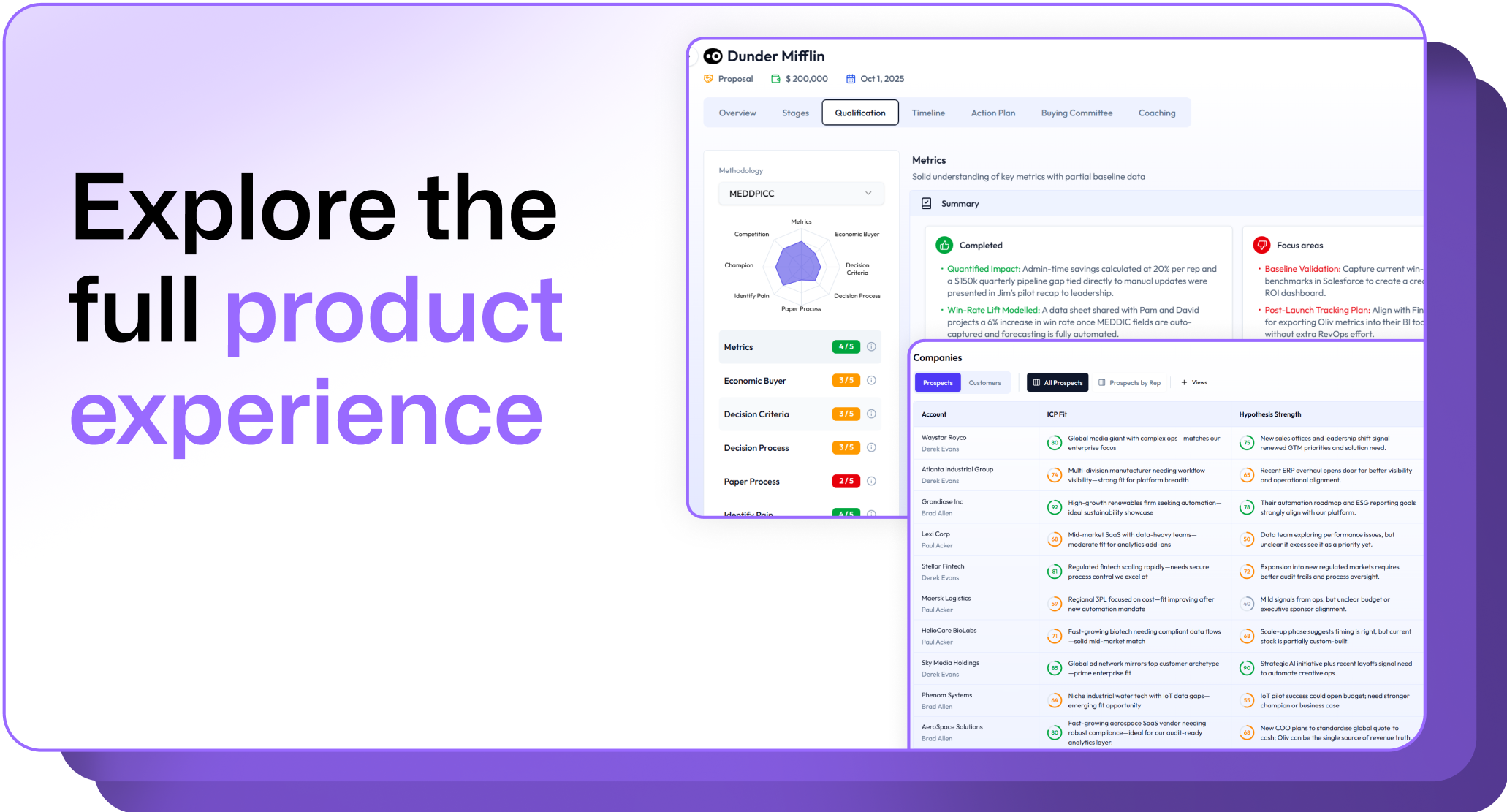
.avif)