How to Automate CRM Data Entry for Sales Teams (Without Manual Work)?
Written by
Ishan Chhabra
Last Updated :
July 21, 2026
Skim in :
15
mins
In this article
Revenue teams love Oliv
Here’s why:
All your deal data unified (from 30+ tools and tabs).
Insights are delivered to you directly, no digging.
AI agents automate tasks for you.
Thank you! Your submission has been received!
Oops! Something went wrong while submitting the form.
Meet Oliv’s AI Agents
Hi! I’m, Deal Driver
I track deals, flag risks, send weekly pipeline updates and give sales managers full visibility into deal progress
Hi! I’m, CRM Manager
I maintain CRM hygiene by updating core, custom and qualification fields all without your team lifting a finger
Hi! I’m, Forecaster
I build accurate forecasts based on real deal movement and tell you which deals to pull in to hit your number
Hi! I’m, Coach
I believe performance fuels revenue. I spot skill gaps, score calls and build coaching plans to help every rep level up
Hi! I’m, Prospector
I dig into target accounts to surface the right contacts, tailor and time outreach so you always strike when it counts
Hi! I’m, Pipeline tracker
I call reps to get deal updates, and deliver a real-time, CRM-synced roll-up view of deal progress
Hi! I’m, Analyst
I answer complex pipeline questions, uncover deal patterns, and build reports that guide strategic decisions
TL;DR
Manual CRM entry costs reps about 5.5 hours weekly and leaves only around 40% of the week for actual selling, while roughly 79% of call insight never reaches the record.
Legacy automation is a vending machine of rigid if-then rules; modern AI agents reason across messy calls and emails, then write structured fields back to the CRM.
A zero-touch setup follows seven steps: clean first, auto-log, parse calls, enrich, verify and dedupe, trigger stages, and write back as structured data.
Automation can cut entry effort by up to 70%, reclaim 8 to 12 hours per rep weekly, and lift data quality from 60 to 70% toward 95%+.
Compliance now matters at purchase: disclosure, human oversight, audit logging, two-party consent, and SOC 2 are non-negotiable as EU AI Act transparency rules take effect.
The real prize is not more logged activity but structured write-back that makes deal data retrievable, forecast-grade, and useful for clean AE-to-CSM handoffs.
Q1: Why does CRM data entry still eat 70 to 80% of your reps' week in 2026? [toc=1. The Data-Entry Tax]
Sales reps still lose most of their week to admin. Salesforce's 2026 State of Sales report finds the average seller spends only about 40% of their time actually selling. Practitioners report roughly 5.5 hours a week lost to CRM data entry alone. The problem isn't lazy reps. It's a CRM built as a passive database that quietly taxes every deal.
💸 The tax nobody put on the invoice
Picture a Friday at 4 p.m. An account executive, coffee cold, is back-filling ten opportunities before the pipeline review. She already ran those calls. Now she's retyping them.
That scene repeats across every mid-market floor I've seen. And the numbers behind it are brutal. Salesforce puts selling time at around 40% of the week. Independent benchmarks peg pure CRM entry at about 5.5 hours per rep, per week.
Here's my blunt take. CRM as a product has failed the seller. It didn't remove work. It added structure that piled more admin onto the SDR and the AE. The tool meant to track selling now competes with selling. This is exactly why teams start hunting for the best sales intelligence platform to escape the drag.
⏰ Manual entry doesn't just cost time, it loses data
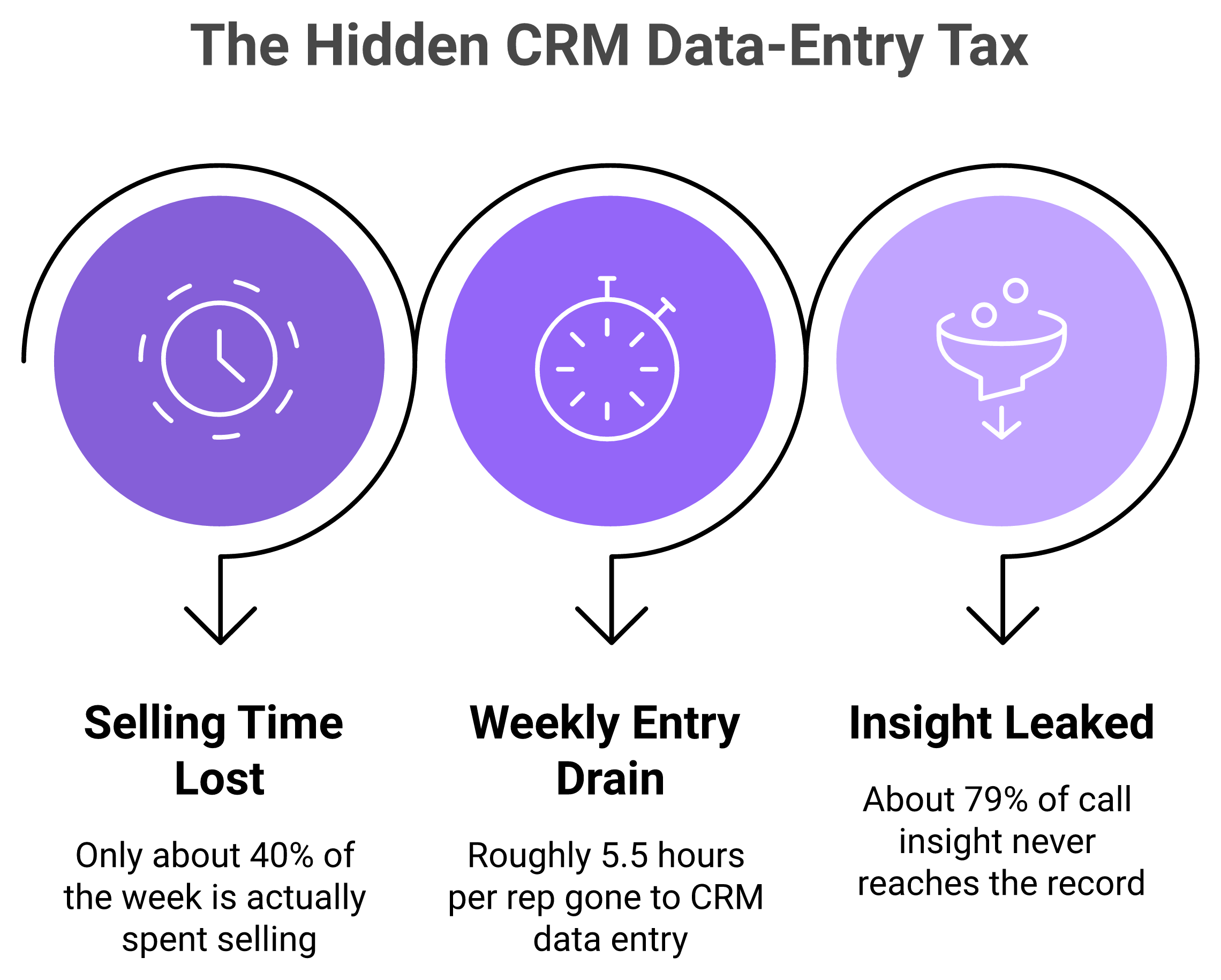
The data-entry tax quantified: lost selling time, drained hours, and call insight that never reaches the CRM.
The deeper cost is silent. Data you never capture can't help you.
Roughly 79% of opportunity insight from calls never makes it into the CRM. Reps forget most of the rest by end of day. So managers spend Thursday and Friday reconstructing what actually happened on deals.
Time lost: about 5.5 hours per rep weekly on entry.
Selling time: about 40% of the week, per Salesforce.
Insight lost: about 79% of call detail never reaches the record.
That's not a discipline problem. That's a design problem. When updating the CRM is a separate chore from doing the work, the chore loses.
⚠️ What operators keep telling me
A RevOps lead once described her CRM to me as "a place data goes to die." She wasn't being dramatic. She was describing a system of record that reps update out of duty, not because it helps them close.
That gap between duty and usefulness is the whole story. Reps don't resist logging because they're careless. They resist because the payoff lands on the manager's dashboard, not on their number. Better AI sales forecasting software starts by closing that gap.
🔎 The reframe: from passive repository to active layer
So what changes the math? Not another mandate. Not another field.
The shift is treating capture as something the system does, not something the rep does. When the tool listens to calls, reads emails, and writes structured fields itself, the tax drops toward zero. That's the open question this guide answers next: what "no manual work" actually looks like in practice.
At Oliv, we think about this as bringing the CRM into the current century, an AI-native data layer that captures the work instead of asking reps to describe it. I'll show exactly how that pipeline runs in the next sections. For now, the point stands: the reps aren't the problem, the passive CRM is.
Q2: What does zero-touch CRM automation mean, and can AI fully automate data entry? [toc=2. Zero-Touch, Defined]
Zero-touch automation means your CRM fills itself. Contacts, activities, deal stages, and next steps get captured and written back from emails, calendar, and calls, with no rep typing. Modern AI agents can automate most CRM data entry for typical sales teams. Full autonomy still benefits from human review on high-stakes fields. Here's the simple test: if a rep still opens the CRM to update it, it isn't zero-touch.
✅ What "zero-touch" actually means
Let me define it plainly. Zero-touch data entry is when the system records the deal, not the seller.
An AI layer sits on your calls, inbox, and calendar. It pulls out who spoke, what they need, and what happens next. Then it writes those into structured CRM fields automatically.
The keyword is structured. Not a wall of notes. Actual fields you can filter, report on, and forecast against. The strongest AI sales tools are built around this idea.
🧩 A concrete example: a call that fills MEDDIC by itself
Say your team runs MEDDIC, a common qualification checklist covering Metrics, Economic buyer, Decision criteria, and more. Today a rep listens, then types those fields after the call.
With zero-touch capture, the agent hears "our CFO signs anything over $50k" and writes that to the Economic Buyer field on the opportunity. No form. No retyping. The rep just talked to the customer.
That's the difference between recording a call and understanding it. One gives you audio. The other gives you a filled-in deal. If you want the mechanics, our breakdown of the MEDDIC sales methodology walks through each field.
🤖 Can AI fully automate it? Mostly, with a guardrail
Here's my honest answer. Yes, AI can automate the vast majority of entry, and I could be slightly conservative here.
For everyday fields, contacts, activities, next steps, and stage nudges, automation handles it end to end. Salesforce even names AI agents the top growth tactic for sales teams in 2026. But for high-stakes calls, like moving a deal to "commit," keep a human in the loop. The agent proposes; the rep confirms.
⚠️ AI agents versus legacy automation: the real 2026 split
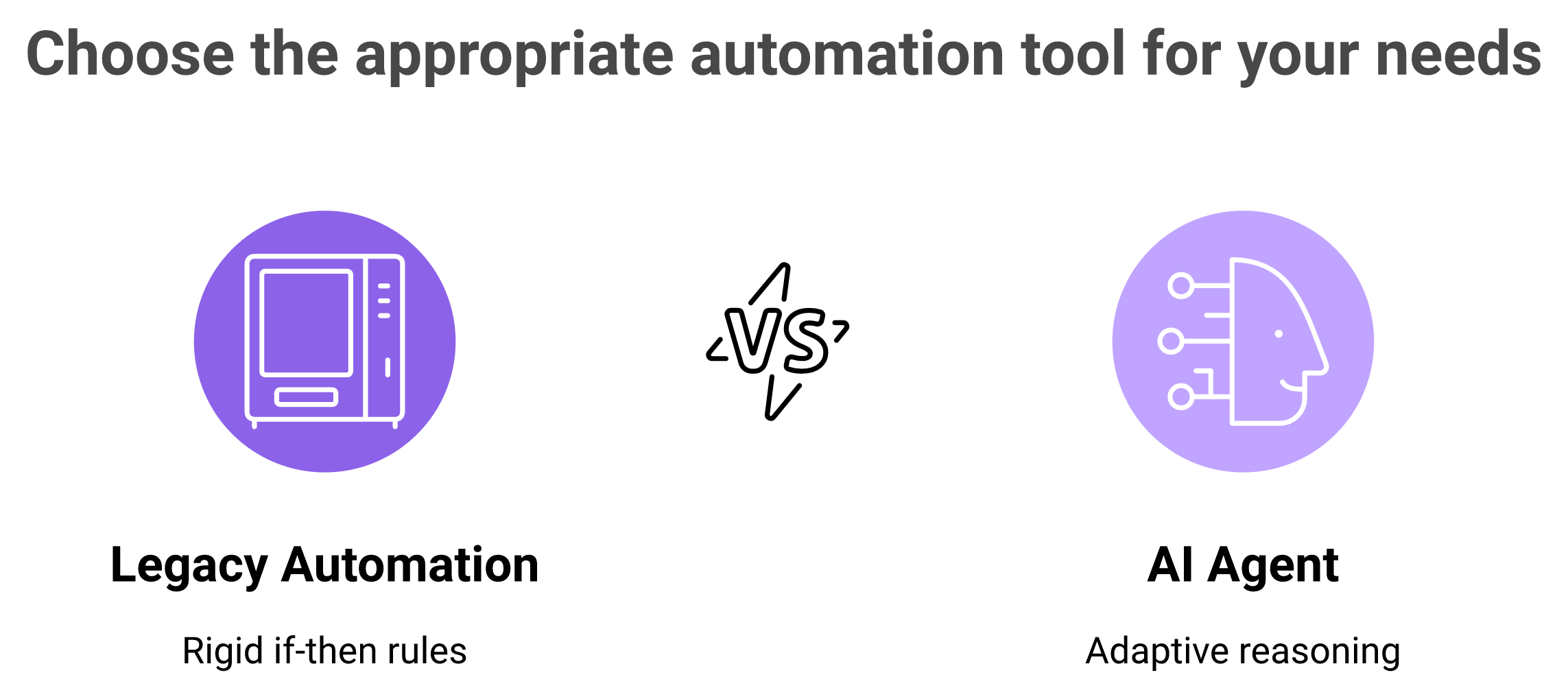
Legacy automation is a vending machine; an AI agent is a smart employee that reasons across messy inputs.
This is where people get confused. Old "automation" and new AI agents are not the same thing.
Think of a vending machine. Fixed input, fixed output. That's legacy rules-based automation, useful, but rigid. If A happens, do B.
An AI agent is more like a sharp new employee. It reads context, picks a goal, and works toward it across messy inputs. That's the shift under way right now, from static rules to agents that reason. You can see this play out across the best revenue intelligence software platforms.
Legacy automation: triggers, if-then rules, moves existing records around.
AI agents: parse unstructured calls and emails into structured fields.
The trap: dumping everything in as raw "activities" isn't intelligence, it's noise you can't retrieve later.
🧠 The takeaway you can act on
Judge any tool with one question. Does it hand you retrievable, structured data, or just more activity logs?
Activity without analysis of results is close to meaningless. A pile of logged calls doesn't tell you why a deal slipped. Structured fields do.
At Oliv, we build agents named for the job they do, capturing deal fields, drafting follow-ups, and flagging risk, so the output lands as clean, structured data in your CRM, not a dump you'll never read. That "smart employee" model is exactly what separates zero-touch capture from old automation. Next, let's get tactical on how to set it up.
Q3: How do you automate CRM data entry step by step, including Salesforce and HubSpot setup? [toc=3. Step-by-Step Setup]
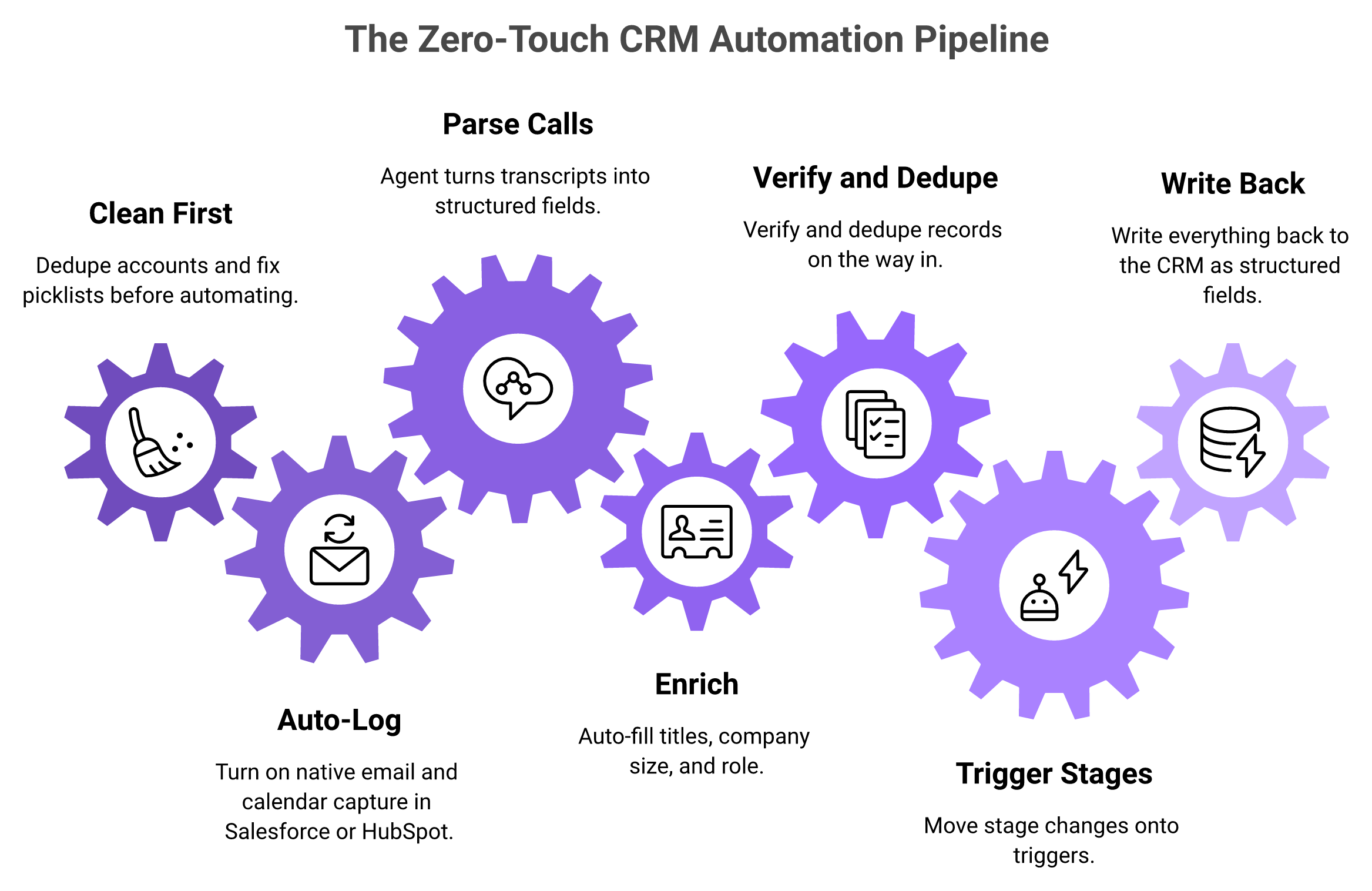
Here's the short version you can start Monday. First, clean your existing data. Then: (1) turn on native email and calendar auto-logging in Salesforce or HubSpot, (2) deploy an AI agent to parse calls and emails into structured fields, (3) auto-enrich contacts, (4) verify and dedupe, (5) move stage changes onto triggers, and (6) write everything back automatically. Start with native auto-logging. It's the fastest zero-cost win.
🧹 Step 0: Clean before you automate
Skip this and you'll automate a mess faster. Bad data in, bad data out.
The data backs it up. About 74% of sales pros are focused on data cleansing to get better returns from AI. And 79% of high performers prioritize data hygiene, versus just 54% of underperformers.
So before anything, dedupe your accounts and fix your picklists. An hour here saves weeks later.
⚙️ Steps 1 to 3: Capture, parse, enrich
The end-to-end setup: clean your data first, then automate capture, enrichment, and structured write-back.
Now build the intake. This is where typing disappears.
Turn on native auto-logging. In Salesforce, enable Einstein Activity Capture; in HubSpot, connect the inbox and calendar. Emails and meetings log themselves. Zero cost, same day.
Deploy an AI agent on your calls. Let it parse transcripts into structured fields, next steps, pain, and budget, not just a summary blob.
Auto-enrich contacts. Pull titles, company size, and role from a data provider so reps never fill those by hand.
Verify and dedupe on the way in. Match new records against existing ones so you don't create a third "Acme Corp."
Move stage changes onto triggers. When a proposal is sent, the stage advances automatically. No rep clicks required.
Write everything back to the CRM. Structured fields, not raw activities, so the data stays retrievable and report-ready.
💡 Two hard-won tips most guides skip
Setup is easy to overthink. Two moves matter more than the rest.
First, train the AI on your best person. Take your top rep's discovery calls and your best marketer's email copy. Use those as the template. The AI should imitate your winners, not a generic playbook. This is the same principle behind the best sales coaching softwares.
Second, nudge where reps actually live. That's Slack, not just email. A nudge to update a deal, delivered in the channel they already have open, gets acted on. Buried in the inbox, it dies.
⏰ A realistic timeline
Let me be straight about deployment. The core setup can run in a day or two for a standard Salesforce or HubSpot org.
Full customization, custom fields, methodology tuning, and complex triggers, takes longer, often two to four weeks. Anyone promising instant enterprise magic is selling. Plan for a narrow pilot first, then expand. For a reference point, look at a typical Gong implementation timeline.
At Oliv, one detail changes onboarding: our "three-meeting rule." Feed the agent three of your real sales calls, and it learns your methodology and starts mapping fields to how your team actually sells. That's why a working pilot lands in days, not quarters, while the deeper tuning happens in parallel. Setup done, the next question is what to avoid, because more data isn't the goal.
Q4: Why do activity logs and "data dumps" make your CRM worse, not better? [toc=4. The Data-Dump Trap]
Pumping every call and email into the CRM as raw "activities" doesn't fix data entry. It buries you. Unstructured logs aren't retrievable or analyzable, so managers still spend Thursday and Friday reconstructing what reps did. The goal isn't more data in the CRM. It's structured, queryable intelligence that answers "what changed on this deal, and why," without a human digging.
❌ The popular playbook gets this backwards
Everyone cheers "capture everything." More recordings, more logged emails, and more activity. It feels like progress.
It isn't. A CRM stuffed with unstructured activity is a landfill, not a library. You can pour data in, but you can't pull insight out.
The standard read treats capture as the win. From what surfaces when you actually run this, capture is the easy part. Retrieval is where value lives, and raw activity logs fail retrieval. This is a recurring theme across revenue intelligence platforms.
⚠️ The one-way trap
Here's the structural flaw I keep seeing. Some tools pull all your data in, then make it painful to get the useful parts back out into your CRM, where deals actually get worked.
That mismatch is exactly what buried teams describe. And the export limits are not hypothetical, as our review of Gong integrations shows.
"While Gong offers valuable insights into call data and sales interactions, our experience has been impacted by significant data access limitations, especially concerning data portability and bulk export capabilities. Their current solution is far from convenient or accessible, it requires downloading calls individually, which is impractical and inefficient for a large volume of data." Neel P., Sales Operations ManagerGong G2 Verified Review
When "we own the data" and "we can use the data" drift apart, the CRM stops being a system of record. It becomes a holding cell.
💬 What reviewers say about being buried
The overload shows up again and again in verified reviews. Powerful, yes. Usable at a glance, not always.
"There's so much in Gong, that we don't use everything. Gong's deal forecasting we don't use." Karel Bos, Head of SalesGong TrustRadius Verified Review
"It's too complicated, and not intuitive at all. Searching for calls is not easy, moving around in the calls is not easy, and understanding the pipeline management portion of it is almost impossible." John S., Senior Account ExecutiveGong G2 Verified Review
Notice the pattern. The complaint isn't "too few features." It's "too much noise, too little retrievable signal." That's the data-dump trap in the users' own words.
✅ The better model: structured write-back
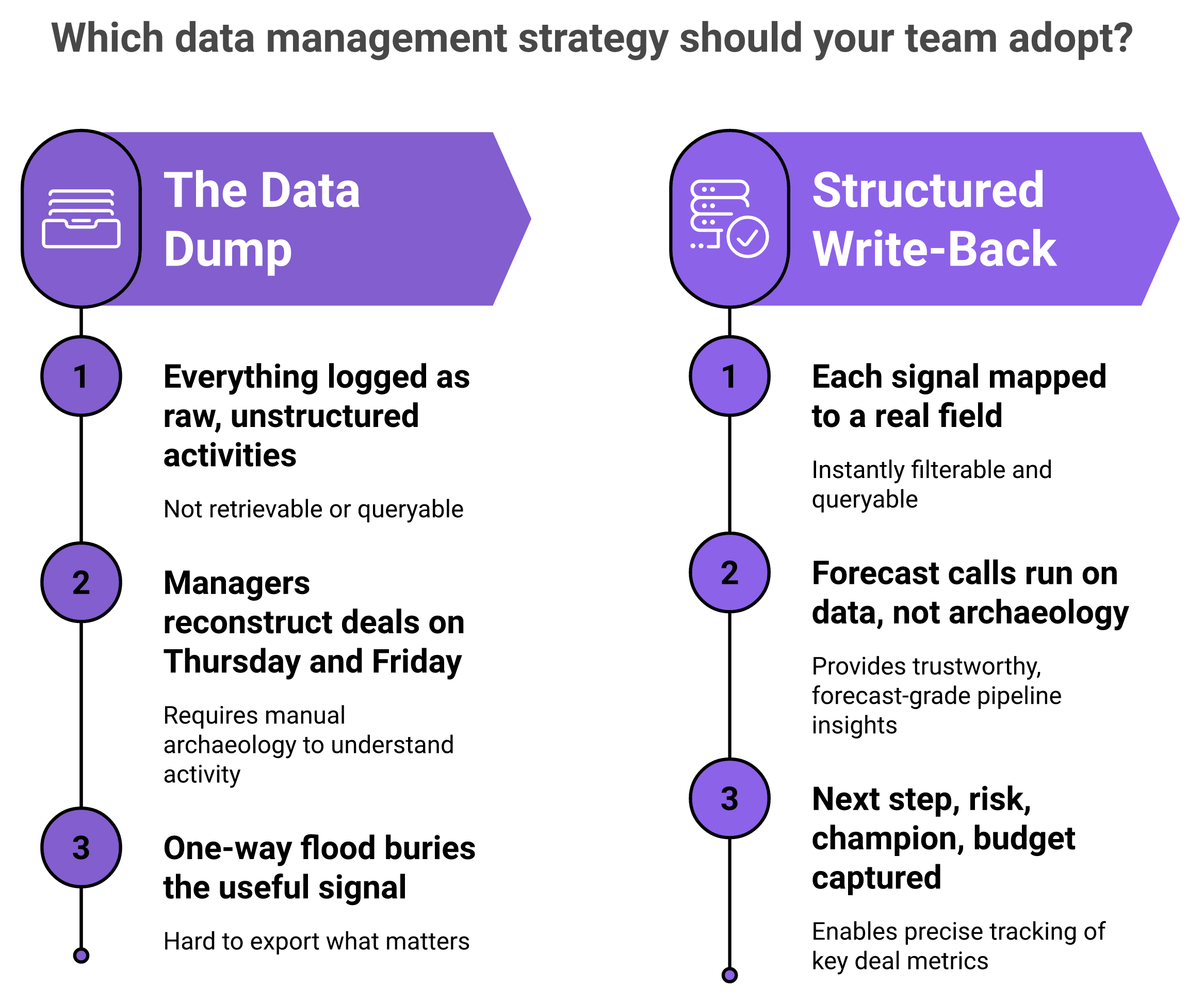
The contrarian fix: not more logged activity, but structured write-back that makes deal data retrievable and forecast-ready.
So flip the goal. Don't measure how much you captured. Measure how much you can retrieve and act on.
Structured write-back means each meaningful signal lands in a real field. Next step. Risk. Champion. Budget. Now a manager can ask "which deals lost their champion this week" and get an answer, not a reading assignment.
Data dump: everything logged as activities, nothing queryable.
Structured write-back: signals mapped to fields, instantly filterable.
The payoff: forecast calls run on data, not on Friday-night archaeology.
This is the line we hold at Oliv. Instead of a one-way flood, our agents write structured, retrievable fields back into your CRM, so the intelligence shows up at the right time in the tool you already run deals in. Gong-style capture buries you in data; the fix is delivering the right intelligence, in the right field, when it matters. That structural difference is exactly why "more data" was never the goal.
Q5: What do reps and RevOps leaders say about Gong, Clari, and Oliv in 2026? [toc=5. 2026 Tool Reviews]
In 2026 reviews, Gong (4.7/5, 6,500+ G2 reviews) earns praise for call capture but takes heat for cost and data portability. Clari (4.6/5) wins on forecasting, yet reads as "a glorified Salesforce overlay" to some reps. Oliv (4.8/5 on early G2 reviews) is the AI-native challenger, with users citing 5-to-15-minute CRM updates and auto-logging that "keeps everything up to date." Buyers now weigh time-to-value over raw recording volume.
📊 The 2026 scorecard at a glance
I'll let the reviewers do the talking. Here's how the three stack up on verified feedback, and you can go deeper in our full Gong reviews breakdown.
2026 Tool Review Scorecard: Gong, Clari, and Oliv
Tool
G2 Rating
Praised for
Top complaint
Gong
4.7/5 (6,504)
Call recording, coaching
Data export limits, price
Clari
4.6/5 (5,503)
Forecasting, exec views
"Glorified SFDC overlay"
Oliv
4.8/5 (9)
Auto CRM updates, fast setup
Occasional slowness
Note the review counts. Gong and Clari have years of scale. Oliv is newer, so read its 4.8 as early signal, not settled proof. For a head-to-head, see our Gong vs Clari comparison.
💬 What Gong users actually say
Gong is genuinely strong at conversation intelligence. But the friction shows up around getting your own data out and around cost, as our review of Gong pricing details.
"Its too complicated, and not intuitive at all. Searching for calls is not easy, understanding the pipeline management portion of it is almost impossible." John S., Senior Account ExecutiveGong G2 Verified Review
"It was a big mistake on our part to commit to a two year term. Gong is a really powerful tool, but its probably the highest end option on the market." Iris P., Head of MarketingGong G2 Verified Review
⚠️ Clari: great for leaders, thinner for reps
Clari's forecasting draws real love from RevOps. The pushback is that value skews to leadership, not the individual rep, a theme we explore in our Clari features analysis.
"It is really just a glorified SFDC overlay. Actually, Salesforce has built most of the forecasting functionality by now anyway, definitely overkill for most companies." conaldinho11, r/SalesOperationsReddit Thread
That said, plenty of reps warm up once it speeds their Salesforce updates. It depends heavily on your config, so weigh the best Clari alternatives before renewing.
⭐ Where Oliv lands with early users
Oliv's early reviews cluster around one theme: the CRM updates itself. Users frame it as admin disappearing, not another dashboard to check.
"The automatic CRM update feature is the most valuable to me. Using Oliv.ai feels like second nature, it's fast, and very easy to set up." Prashant S., Mid-MarketOliv G2 Verified Review
"The Driver agent watches all my deals and flags any that are at risk, so I don't have to spend hours listening to recordings in tools like Gong and Clari." Verified User, EnterpriseOliv G2 Verified Review
Here's my honest read, and I could be early on this. The category is shifting from "record everything" to "update the record for me." At Oliv, that's the whole design: users report CRM writes landing in 5 to 15 minutes after a call, versus the longer lag they describe elsewhere, and the data lands as structured fields, not a pile of activity logs. If you want the direct matchup, our Gong vs Oliv comparison covers it.
Q6: How much time and money does automating CRM data entry actually save? [toc=6. ROI and Cost Model]
Automating CRM data entry can cut entry time by up to 70% and reclaim 8 to 12 hours per rep each week. Data quality climbs from a manual 60 to 70% up to 95%+. For a 15-person team, manual entry can cost roughly $321K a year in lost selling time. Automation converts that waste back into pipeline.
💰 The headline savings
Let me start with the numbers that move a budget conversation. The wins are time, quality, and money, in that order.
Time: up to 70% less data-entry effort, 8 to 12 hours back per rep weekly.
Quality: data accuracy rising from 60 to 70% toward 95%+.
Cost: about $321K a year for a 15-rep team stuck doing it by hand.
Those aren't soft "efficiency" gains. They translate directly into more selling hours and cleaner forecasts, which is the promise of the best AI sales forecasting software.
🧮 A simple model you can run today
You don't need a consultant for this. The math fits on a napkin.
Take your rep count, multiply by hours lost weekly, then by their loaded hourly cost. So 15 reps, 5.5 hours each, at roughly $75 loaded per hour, is about $6,200 a week. Over a year, that's the $321K figure. Cut it by 70%, and you've freed real money.
⚠️ The stacking tax nobody prices in
Here's the cost most teams miss. It's not the entry, it's the tools you buy to fix the entry.
Stacking Gong plus Clari plus a sequencer can quietly push past $500 per user, per month for a 25-to-200-rep team. Credit-based bundles make it worse, with plans creeping toward $600 to $700 as usage climbs. You end up paying premium prices for a data lake nobody queries, which is why teams review Gong alternatives.
💸 The hidden cost of not automating
The scariest number is the one that never shows on an invoice. It's the deal you lost to bad data.
When 79% of call insight never reaches the CRM, your forecast runs on fiction. Managers over-commit, reps chase stale contacts, and pipeline reviews become guesswork. That erosion costs far more than any subscription, a point we make across the best revenue intelligence software platforms.
At Oliv, we price against exactly that stacking tax. The notetaker starts at $19 per user, per month, with modular agents you add only as you prove ROI, so a full team stack often lands near $77 per user versus the roughly $250 per user teams report for Gong. The point isn't just cheaper, it's that you stop paying $500 a user for data you can't use.
Q7: Is your AI CRM automation compliant? EU AI Act, GDPR, and SOC 2 in 2026 [toc=7. Compliance and Governance]
If an AI agent writes to your CRM on its own, it counts as an "AI system" under the EU AI Act. Article 50 transparency rules for AI agents take effect August 2, 2026. Compliant automation needs disclosure, human review on high-stakes fields, audit logging, two-party consent for call capture, and SOC 2. Skip these, and you risk enterprise trust, and fines.
⚠️ The deadline most vendors aren't discussing
Here's what changed. An AI agent isn't a gray area anymore, it's regulated software.
Under the EU AI Act, an agent is an "AI system" classified by its purpose. Article 50 transparency obligations for AI agents kick in August 2, 2026. If your tool records calls and writes to Salesforce, that clock is already running, so review your data-processing and security posture now.
✅ Your five-point compliance checklist
Keep this simple. Run any CRM-writing AI through these five checks before you trust it.
Disclosure. Tell people an AI is processing the interaction (Article 50).
Human oversight. Keep a person in the loop on high-stakes fields, per Articles 9 to 15.
Audit logging. Log what the agent read and wrote, so you can prove it later.
Two-party consent. Get consent before recording calls, which varies by region.
SOC 2. Confirm the vendor holds an independent security attestation.
🤖 Why human oversight isn't optional
This is where I get opinionated. Fully autonomous CRM writing, with no human check, is a bad idea today.
Subject-matter expertise is getting more important, not less. The expert is the one who knows whether the agent's output is actually right. Ungoverned AI drifts, and I've seen tools "protect" data by hallucinating problems, as our Salesforce Einstein reviews document.
A cautionary example: some Salesforce Einstein users report it redacting emails as "sensitive" when they weren't, quietly dropping real information. That's the cost of automation without a reviewer watching the edges, and it's a gap we track across Salesforce Einstein alternatives.
🔐 Why this is now a buying criterion
Compliance used to be a legal afterthought. In 2026, it's a purchase question on the first call.
Enterprise buyers now ask how your agent discloses itself and where a human signs off. A tool that can't answer that loses the deal. At Oliv, we treat governance as part of the product, with SOC 2 and HIPAA posture plus human-in-the-loop review built into the agent workflow, so the reviewer approves the high-stakes write instead of the agent acting blind. Compliance-ready by design beats bolting it on after the deadline.
Q8: What happens after handoff: can automation kill the AE-to-CSM data gap? [toc=8. Automated Handoffs]
When an AI layer captures every deal detail automatically, the AE-to-CSM handoff stops being a lossy manual ritual. Deal data copies straight to the case object, so there's no re-briefing meeting and nothing slips through the cracks. The side effect is total transparency, because managers instantly see who actually did the work.
📉 The handoff where deals go to die
Picture the classic scene. An AE closes a deal, then schedules a "handoff call" to brief the customer success manager, or CSM.
Half the context never makes it. The promises made on the sales call, the champion's real motivation, and the tricky stakeholder, all of it lives in the AE's head. The CSM inherits a clean logo and a foggy story, a problem the revenue intelligence platforms category keeps trying to solve.
✅ How automated capture closes the gap
Now flip it. When the AI has logged every call, email, and next step as structured data, the handoff becomes a copy, not a conversation.
All that deal context copies straight into the case or CS object. There's no re-briefing meeting, because the record already tells the story. The CSM opens the account and sees exactly what was promised and why, the kind of workflow the best AI sales tools now enable.
⚠️ The transparency shock nobody warns you about
Here's the part that surprises leaders. Automated capture doesn't just help handoffs, it reveals the truth about activity.
I've watched a rollout where one rep quit the day AI-driven RevOps went live. Why? He hadn't done anything in 30 days, and suddenly the record showed it. The gig was up.
That's uncomfortable, and I won't pretend otherwise. But for your real performers, transparency is a gift, because their work finally shows without them building a slide about it, which is why coaching leaders lean on the best sales coaching softwares.
🔎 What it means for the operator
So what do you do with this on Monday? Stop treating the handoff as a meeting to schedule.
Treat it as data that should already exist. If your system captured the deal properly, the CSM shouldn't need a briefing at all. At Oliv, this is exactly how the workflow runs: when sales works the opportunity, the context is documented automatically and carries into the customer success object, so the AE-to-CSM handoff becomes a non-event instead of a lossy ritual.
Q9: Should you build, buy, or switch tools to automate CRM data entry? [toc=9. Build vs Buy vs Switch]
Ask four questions before you build or buy: Is this how we win? Do we have unique data? How fast do we need it? Can we maintain it? Most teams should buy an AI-native platform rather than bolt automation onto a legacy CRM or build from scratch. But only if the tool writes structured data back and deploys fast. If your current tool buries you in data, switch.
🧭 The four-question filter
Before you spec a build or sign a contract, run this filter. It cuts most debates short.
Is this how we win? If CRM entry is core to your edge, consider building. It rarely is.
Do we have unique data? Custom data may justify custom tooling. Standard sales data doesn't.
How fast do we need it? A build takes quarters. A bought tool takes days.
Can we maintain it? Whatever you choose, you must keep it running. Most teams underestimate this.
Whether you buy or build, that last question decides survival. Unmaintained automation rots fast, which is why the best revenue intelligence software platforms win on low maintenance.
💰 Why "just build it" usually loses
I've watched teams try to build CRM automation in-house. The demo works. The maintenance kills it.
An internal script breaks the moment Salesforce changes a field, or a rep joins a new call platform. Now an engineer owns your pipeline hygiene, forever. That's a hidden salary, not a saved subscription, and it's why many teams weigh the Gong alternatives instead.
⚠️ Match the move to your stage
There's no universal answer. Your stage decides. Here's how I'd steer each team.
Build vs Buy vs Switch by Team Stage
Team stage
Best move
Why
Startup (under 25 reps)
Buy AI-native
No RevOps team to build or maintain
Mid-market (25 to 200)
Switch, don't stack
Stacking Gong plus Clari drifts past $500/user
Enterprise (200+)
Buy, pilot first
Start narrow, expand once ROI is proven
For a mid-market comparison point, our Gong vs Clari breakdown shows how fast stacked costs climb.
💬 What "fed up" buyers actually do
The switch usually starts with pricing pain. Reviewers say it plainly, and our review of Gong pricing backs it up.
"It was a big mistake on our part to commit to a two year term. Its probably the highest end option on the market, and now were stuck." Iris P., Head of MarketingGong G2 Verified Review
"The pricing is probably the biggest obstacle and hence we are looking to change." Miodrag, Enterprise Account ExecutiveGong G2 Verified Review
Here's where my head is right now. If your tool floods the CRM, but you can't get clean data out, that's your signal to switch, not renew.
At Oliv, we make one deliberate choice that fits the "buy" path: we name agents by the job they do, like the Notetaker or the Driver, not by the human role they might replace. That framing matters, because you're buying help, not a headcount cut. For a mid-market team tired of stacking tools past $500 a user, an AI-native platform with structured write-back is usually the switch worth making. If you're weighing it, our Gong vs Oliv comparison lays out where each fits.
Q10: Beyond time saved: how does automation fix data completeness and forecast accuracy? [toc=10. Data Completeness]
The bigger prize isn't saved minutes. It's data that's actually complete. Roughly 79% of opportunity insight from calls never reaches the CRM, and about 64% of details are forgotten by end of day. So manual pipelines forecast on fiction. Automated capture pushes data quality from 60 to 70% up to 95%+, giving managers a forecast they can trust.
📈 Completeness beats speed
Let me state the claim plainly. Faster typing is a small win. Complete data is the real one.
Most automation pitches sell time. But time saved on bad data still leaves you with bad data. The point isn't to log the deal quicker, it's to log the whole deal, which is the foundation of the best AI sales forecasting software.
Here's the contrarian truth. Sales and marketing never really had clean data. Deals close without the CRM being updated, so the record was always partial, always a step behind reality.
🔎 The evidence on lost data
The numbers are worse than most leaders assume. Insight leaks at every stage.
About 79% of opportunity insight from calls never reaches the CRM.
Roughly 64% of call details are forgotten by end of day.
Automated capture lifts data quality from 60 to 70% toward 95%+.
Think of it as digital exhaust. Every call, email, and Slack thread throws off signal. Manual entry catches a fraction, then loses most of that by dinner, a gap the best AI sales tools are built to close.
💰 What complete data does for the forecast
So what changes when the record is actually full? The forecast stops being a guess.
A manager can finally ask "which deals lost their champion this week" and get a real answer. Coaching sharpens too, because you're reviewing what happened, not what a rep half-remembered. That's the difference between a pipeline review and pipeline archaeology, and it's why leaders adopt the best sales coaching softwares.
I'll hedge one thing. No tool hits 100% capture, and anyone claiming that is selling. But moving from 65% to 95% changes how much you can trust your own number, the core promise of modern revenue intelligence platforms.
At Oliv, this completeness is the whole design goal: our agents turn that digital exhaust from calls, emails, and messages into structured, forecast-grade fields, so the record reflects the deal instead of a rep's memory. The question I keep sitting with is this. If your forecast is only as honest as your data, what would you do differently on Monday if you finally trusted it?
Q1: Why does CRM data entry still eat 70 to 80% of your reps' week in 2026? [toc=1. The Data-Entry Tax]
Sales reps still lose most of their week to admin. Salesforce's 2026 State of Sales report finds the average seller spends only about 40% of their time actually selling. Practitioners report roughly 5.5 hours a week lost to CRM data entry alone. The problem isn't lazy reps. It's a CRM built as a passive database that quietly taxes every deal.
💸 The tax nobody put on the invoice
Picture a Friday at 4 p.m. An account executive, coffee cold, is back-filling ten opportunities before the pipeline review. She already ran those calls. Now she's retyping them.
That scene repeats across every mid-market floor I've seen. And the numbers behind it are brutal. Salesforce puts selling time at around 40% of the week. Independent benchmarks peg pure CRM entry at about 5.5 hours per rep, per week.
Here's my blunt take. CRM as a product has failed the seller. It didn't remove work. It added structure that piled more admin onto the SDR and the AE. The tool meant to track selling now competes with selling. This is exactly why teams start hunting for the best sales intelligence platform to escape the drag.
⏰ Manual entry doesn't just cost time, it loses data
The data-entry tax quantified: lost selling time, drained hours, and call insight that never reaches the CRM.
The deeper cost is silent. Data you never capture can't help you.
Roughly 79% of opportunity insight from calls never makes it into the CRM. Reps forget most of the rest by end of day. So managers spend Thursday and Friday reconstructing what actually happened on deals.
Time lost: about 5.5 hours per rep weekly on entry.
Selling time: about 40% of the week, per Salesforce.
Insight lost: about 79% of call detail never reaches the record.
That's not a discipline problem. That's a design problem. When updating the CRM is a separate chore from doing the work, the chore loses.
⚠️ What operators keep telling me
A RevOps lead once described her CRM to me as "a place data goes to die." She wasn't being dramatic. She was describing a system of record that reps update out of duty, not because it helps them close.
That gap between duty and usefulness is the whole story. Reps don't resist logging because they're careless. They resist because the payoff lands on the manager's dashboard, not on their number. Better AI sales forecasting software starts by closing that gap.
🔎 The reframe: from passive repository to active layer
So what changes the math? Not another mandate. Not another field.
The shift is treating capture as something the system does, not something the rep does. When the tool listens to calls, reads emails, and writes structured fields itself, the tax drops toward zero. That's the open question this guide answers next: what "no manual work" actually looks like in practice.
At Oliv, we think about this as bringing the CRM into the current century, an AI-native data layer that captures the work instead of asking reps to describe it. I'll show exactly how that pipeline runs in the next sections. For now, the point stands: the reps aren't the problem, the passive CRM is.
Q2: What does zero-touch CRM automation mean, and can AI fully automate data entry? [toc=2. Zero-Touch, Defined]
Zero-touch automation means your CRM fills itself. Contacts, activities, deal stages, and next steps get captured and written back from emails, calendar, and calls, with no rep typing. Modern AI agents can automate most CRM data entry for typical sales teams. Full autonomy still benefits from human review on high-stakes fields. Here's the simple test: if a rep still opens the CRM to update it, it isn't zero-touch.
✅ What "zero-touch" actually means
Let me define it plainly. Zero-touch data entry is when the system records the deal, not the seller.
An AI layer sits on your calls, inbox, and calendar. It pulls out who spoke, what they need, and what happens next. Then it writes those into structured CRM fields automatically.
The keyword is structured. Not a wall of notes. Actual fields you can filter, report on, and forecast against. The strongest AI sales tools are built around this idea.
🧩 A concrete example: a call that fills MEDDIC by itself
Say your team runs MEDDIC, a common qualification checklist covering Metrics, Economic buyer, Decision criteria, and more. Today a rep listens, then types those fields after the call.
With zero-touch capture, the agent hears "our CFO signs anything over $50k" and writes that to the Economic Buyer field on the opportunity. No form. No retyping. The rep just talked to the customer.
That's the difference between recording a call and understanding it. One gives you audio. The other gives you a filled-in deal. If you want the mechanics, our breakdown of the MEDDIC sales methodology walks through each field.
🤖 Can AI fully automate it? Mostly, with a guardrail
Here's my honest answer. Yes, AI can automate the vast majority of entry, and I could be slightly conservative here.
For everyday fields, contacts, activities, next steps, and stage nudges, automation handles it end to end. Salesforce even names AI agents the top growth tactic for sales teams in 2026. But for high-stakes calls, like moving a deal to "commit," keep a human in the loop. The agent proposes; the rep confirms.
⚠️ AI agents versus legacy automation: the real 2026 split
Legacy automation is a vending machine; an AI agent is a smart employee that reasons across messy inputs.
This is where people get confused. Old "automation" and new AI agents are not the same thing.
Think of a vending machine. Fixed input, fixed output. That's legacy rules-based automation, useful, but rigid. If A happens, do B.
An AI agent is more like a sharp new employee. It reads context, picks a goal, and works toward it across messy inputs. That's the shift under way right now, from static rules to agents that reason. You can see this play out across the best revenue intelligence software platforms.
Legacy automation: triggers, if-then rules, moves existing records around.
AI agents: parse unstructured calls and emails into structured fields.
The trap: dumping everything in as raw "activities" isn't intelligence, it's noise you can't retrieve later.
🧠 The takeaway you can act on
Judge any tool with one question. Does it hand you retrievable, structured data, or just more activity logs?
Activity without analysis of results is close to meaningless. A pile of logged calls doesn't tell you why a deal slipped. Structured fields do.
At Oliv, we build agents named for the job they do, capturing deal fields, drafting follow-ups, and flagging risk, so the output lands as clean, structured data in your CRM, not a dump you'll never read. That "smart employee" model is exactly what separates zero-touch capture from old automation. Next, let's get tactical on how to set it up.
Q3: How do you automate CRM data entry step by step, including Salesforce and HubSpot setup? [toc=3. Step-by-Step Setup]
Here's the short version you can start Monday. First, clean your existing data. Then: (1) turn on native email and calendar auto-logging in Salesforce or HubSpot, (2) deploy an AI agent to parse calls and emails into structured fields, (3) auto-enrich contacts, (4) verify and dedupe, (5) move stage changes onto triggers, and (6) write everything back automatically. Start with native auto-logging. It's the fastest zero-cost win.
🧹 Step 0: Clean before you automate
Skip this and you'll automate a mess faster. Bad data in, bad data out.
The data backs it up. About 74% of sales pros are focused on data cleansing to get better returns from AI. And 79% of high performers prioritize data hygiene, versus just 54% of underperformers.
So before anything, dedupe your accounts and fix your picklists. An hour here saves weeks later.
⚙️ Steps 1 to 3: Capture, parse, enrich
The end-to-end setup: clean your data first, then automate capture, enrichment, and structured write-back.
Now build the intake. This is where typing disappears.
Turn on native auto-logging. In Salesforce, enable Einstein Activity Capture; in HubSpot, connect the inbox and calendar. Emails and meetings log themselves. Zero cost, same day.
Deploy an AI agent on your calls. Let it parse transcripts into structured fields, next steps, pain, and budget, not just a summary blob.
Auto-enrich contacts. Pull titles, company size, and role from a data provider so reps never fill those by hand.
Verify and dedupe on the way in. Match new records against existing ones so you don't create a third "Acme Corp."
Move stage changes onto triggers. When a proposal is sent, the stage advances automatically. No rep clicks required.
Write everything back to the CRM. Structured fields, not raw activities, so the data stays retrievable and report-ready.
💡 Two hard-won tips most guides skip
Setup is easy to overthink. Two moves matter more than the rest.
First, train the AI on your best person. Take your top rep's discovery calls and your best marketer's email copy. Use those as the template. The AI should imitate your winners, not a generic playbook. This is the same principle behind the best sales coaching softwares.
Second, nudge where reps actually live. That's Slack, not just email. A nudge to update a deal, delivered in the channel they already have open, gets acted on. Buried in the inbox, it dies.
⏰ A realistic timeline
Let me be straight about deployment. The core setup can run in a day or two for a standard Salesforce or HubSpot org.
Full customization, custom fields, methodology tuning, and complex triggers, takes longer, often two to four weeks. Anyone promising instant enterprise magic is selling. Plan for a narrow pilot first, then expand. For a reference point, look at a typical Gong implementation timeline.
At Oliv, one detail changes onboarding: our "three-meeting rule." Feed the agent three of your real sales calls, and it learns your methodology and starts mapping fields to how your team actually sells. That's why a working pilot lands in days, not quarters, while the deeper tuning happens in parallel. Setup done, the next question is what to avoid, because more data isn't the goal.
Q4: Why do activity logs and "data dumps" make your CRM worse, not better? [toc=4. The Data-Dump Trap]
Pumping every call and email into the CRM as raw "activities" doesn't fix data entry. It buries you. Unstructured logs aren't retrievable or analyzable, so managers still spend Thursday and Friday reconstructing what reps did. The goal isn't more data in the CRM. It's structured, queryable intelligence that answers "what changed on this deal, and why," without a human digging.
❌ The popular playbook gets this backwards
Everyone cheers "capture everything." More recordings, more logged emails, and more activity. It feels like progress.
It isn't. A CRM stuffed with unstructured activity is a landfill, not a library. You can pour data in, but you can't pull insight out.
The standard read treats capture as the win. From what surfaces when you actually run this, capture is the easy part. Retrieval is where value lives, and raw activity logs fail retrieval. This is a recurring theme across revenue intelligence platforms.
⚠️ The one-way trap
Here's the structural flaw I keep seeing. Some tools pull all your data in, then make it painful to get the useful parts back out into your CRM, where deals actually get worked.
That mismatch is exactly what buried teams describe. And the export limits are not hypothetical, as our review of Gong integrations shows.
"While Gong offers valuable insights into call data and sales interactions, our experience has been impacted by significant data access limitations, especially concerning data portability and bulk export capabilities. Their current solution is far from convenient or accessible, it requires downloading calls individually, which is impractical and inefficient for a large volume of data." Neel P., Sales Operations ManagerGong G2 Verified Review
When "we own the data" and "we can use the data" drift apart, the CRM stops being a system of record. It becomes a holding cell.
💬 What reviewers say about being buried
The overload shows up again and again in verified reviews. Powerful, yes. Usable at a glance, not always.
"There's so much in Gong, that we don't use everything. Gong's deal forecasting we don't use." Karel Bos, Head of SalesGong TrustRadius Verified Review
"It's too complicated, and not intuitive at all. Searching for calls is not easy, moving around in the calls is not easy, and understanding the pipeline management portion of it is almost impossible." John S., Senior Account ExecutiveGong G2 Verified Review
Notice the pattern. The complaint isn't "too few features." It's "too much noise, too little retrievable signal." That's the data-dump trap in the users' own words.
✅ The better model: structured write-back
The contrarian fix: not more logged activity, but structured write-back that makes deal data retrievable and forecast-ready.
So flip the goal. Don't measure how much you captured. Measure how much you can retrieve and act on.
Structured write-back means each meaningful signal lands in a real field. Next step. Risk. Champion. Budget. Now a manager can ask "which deals lost their champion this week" and get an answer, not a reading assignment.
Data dump: everything logged as activities, nothing queryable.
Structured write-back: signals mapped to fields, instantly filterable.
The payoff: forecast calls run on data, not on Friday-night archaeology.
This is the line we hold at Oliv. Instead of a one-way flood, our agents write structured, retrievable fields back into your CRM, so the intelligence shows up at the right time in the tool you already run deals in. Gong-style capture buries you in data; the fix is delivering the right intelligence, in the right field, when it matters. That structural difference is exactly why "more data" was never the goal.
Q5: What do reps and RevOps leaders say about Gong, Clari, and Oliv in 2026? [toc=5. 2026 Tool Reviews]
In 2026 reviews, Gong (4.7/5, 6,500+ G2 reviews) earns praise for call capture but takes heat for cost and data portability. Clari (4.6/5) wins on forecasting, yet reads as "a glorified Salesforce overlay" to some reps. Oliv (4.8/5 on early G2 reviews) is the AI-native challenger, with users citing 5-to-15-minute CRM updates and auto-logging that "keeps everything up to date." Buyers now weigh time-to-value over raw recording volume.
📊 The 2026 scorecard at a glance
I'll let the reviewers do the talking. Here's how the three stack up on verified feedback, and you can go deeper in our full Gong reviews breakdown.
2026 Tool Review Scorecard: Gong, Clari, and Oliv
Tool
G2 Rating
Praised for
Top complaint
Gong
4.7/5 (6,504)
Call recording, coaching
Data export limits, price
Clari
4.6/5 (5,503)
Forecasting, exec views
"Glorified SFDC overlay"
Oliv
4.8/5 (9)
Auto CRM updates, fast setup
Occasional slowness
Note the review counts. Gong and Clari have years of scale. Oliv is newer, so read its 4.8 as early signal, not settled proof. For a head-to-head, see our Gong vs Clari comparison.
💬 What Gong users actually say
Gong is genuinely strong at conversation intelligence. But the friction shows up around getting your own data out and around cost, as our review of Gong pricing details.
"Its too complicated, and not intuitive at all. Searching for calls is not easy, understanding the pipeline management portion of it is almost impossible." John S., Senior Account ExecutiveGong G2 Verified Review
"It was a big mistake on our part to commit to a two year term. Gong is a really powerful tool, but its probably the highest end option on the market." Iris P., Head of MarketingGong G2 Verified Review
⚠️ Clari: great for leaders, thinner for reps
Clari's forecasting draws real love from RevOps. The pushback is that value skews to leadership, not the individual rep, a theme we explore in our Clari features analysis.
"It is really just a glorified SFDC overlay. Actually, Salesforce has built most of the forecasting functionality by now anyway, definitely overkill for most companies." conaldinho11, r/SalesOperationsReddit Thread
That said, plenty of reps warm up once it speeds their Salesforce updates. It depends heavily on your config, so weigh the best Clari alternatives before renewing.
⭐ Where Oliv lands with early users
Oliv's early reviews cluster around one theme: the CRM updates itself. Users frame it as admin disappearing, not another dashboard to check.
"The automatic CRM update feature is the most valuable to me. Using Oliv.ai feels like second nature, it's fast, and very easy to set up." Prashant S., Mid-MarketOliv G2 Verified Review
"The Driver agent watches all my deals and flags any that are at risk, so I don't have to spend hours listening to recordings in tools like Gong and Clari." Verified User, EnterpriseOliv G2 Verified Review
Here's my honest read, and I could be early on this. The category is shifting from "record everything" to "update the record for me." At Oliv, that's the whole design: users report CRM writes landing in 5 to 15 minutes after a call, versus the longer lag they describe elsewhere, and the data lands as structured fields, not a pile of activity logs. If you want the direct matchup, our Gong vs Oliv comparison covers it.
Q6: How much time and money does automating CRM data entry actually save? [toc=6. ROI and Cost Model]
Automating CRM data entry can cut entry time by up to 70% and reclaim 8 to 12 hours per rep each week. Data quality climbs from a manual 60 to 70% up to 95%+. For a 15-person team, manual entry can cost roughly $321K a year in lost selling time. Automation converts that waste back into pipeline.
💰 The headline savings
Let me start with the numbers that move a budget conversation. The wins are time, quality, and money, in that order.
Time: up to 70% less data-entry effort, 8 to 12 hours back per rep weekly.
Quality: data accuracy rising from 60 to 70% toward 95%+.
Cost: about $321K a year for a 15-rep team stuck doing it by hand.
Those aren't soft "efficiency" gains. They translate directly into more selling hours and cleaner forecasts, which is the promise of the best AI sales forecasting software.
🧮 A simple model you can run today
You don't need a consultant for this. The math fits on a napkin.
Take your rep count, multiply by hours lost weekly, then by their loaded hourly cost. So 15 reps, 5.5 hours each, at roughly $75 loaded per hour, is about $6,200 a week. Over a year, that's the $321K figure. Cut it by 70%, and you've freed real money.
⚠️ The stacking tax nobody prices in
Here's the cost most teams miss. It's not the entry, it's the tools you buy to fix the entry.
Stacking Gong plus Clari plus a sequencer can quietly push past $500 per user, per month for a 25-to-200-rep team. Credit-based bundles make it worse, with plans creeping toward $600 to $700 as usage climbs. You end up paying premium prices for a data lake nobody queries, which is why teams review Gong alternatives.
💸 The hidden cost of not automating
The scariest number is the one that never shows on an invoice. It's the deal you lost to bad data.
When 79% of call insight never reaches the CRM, your forecast runs on fiction. Managers over-commit, reps chase stale contacts, and pipeline reviews become guesswork. That erosion costs far more than any subscription, a point we make across the best revenue intelligence software platforms.
At Oliv, we price against exactly that stacking tax. The notetaker starts at $19 per user, per month, with modular agents you add only as you prove ROI, so a full team stack often lands near $77 per user versus the roughly $250 per user teams report for Gong. The point isn't just cheaper, it's that you stop paying $500 a user for data you can't use.
Q7: Is your AI CRM automation compliant? EU AI Act, GDPR, and SOC 2 in 2026 [toc=7. Compliance and Governance]
If an AI agent writes to your CRM on its own, it counts as an "AI system" under the EU AI Act. Article 50 transparency rules for AI agents take effect August 2, 2026. Compliant automation needs disclosure, human review on high-stakes fields, audit logging, two-party consent for call capture, and SOC 2. Skip these, and you risk enterprise trust, and fines.
⚠️ The deadline most vendors aren't discussing
Here's what changed. An AI agent isn't a gray area anymore, it's regulated software.
Under the EU AI Act, an agent is an "AI system" classified by its purpose. Article 50 transparency obligations for AI agents kick in August 2, 2026. If your tool records calls and writes to Salesforce, that clock is already running, so review your data-processing and security posture now.
✅ Your five-point compliance checklist
Keep this simple. Run any CRM-writing AI through these five checks before you trust it.
Disclosure. Tell people an AI is processing the interaction (Article 50).
Human oversight. Keep a person in the loop on high-stakes fields, per Articles 9 to 15.
Audit logging. Log what the agent read and wrote, so you can prove it later.
Two-party consent. Get consent before recording calls, which varies by region.
SOC 2. Confirm the vendor holds an independent security attestation.
🤖 Why human oversight isn't optional
This is where I get opinionated. Fully autonomous CRM writing, with no human check, is a bad idea today.
Subject-matter expertise is getting more important, not less. The expert is the one who knows whether the agent's output is actually right. Ungoverned AI drifts, and I've seen tools "protect" data by hallucinating problems, as our Salesforce Einstein reviews document.
A cautionary example: some Salesforce Einstein users report it redacting emails as "sensitive" when they weren't, quietly dropping real information. That's the cost of automation without a reviewer watching the edges, and it's a gap we track across Salesforce Einstein alternatives.
🔐 Why this is now a buying criterion
Compliance used to be a legal afterthought. In 2026, it's a purchase question on the first call.
Enterprise buyers now ask how your agent discloses itself and where a human signs off. A tool that can't answer that loses the deal. At Oliv, we treat governance as part of the product, with SOC 2 and HIPAA posture plus human-in-the-loop review built into the agent workflow, so the reviewer approves the high-stakes write instead of the agent acting blind. Compliance-ready by design beats bolting it on after the deadline.
Q8: What happens after handoff: can automation kill the AE-to-CSM data gap? [toc=8. Automated Handoffs]
When an AI layer captures every deal detail automatically, the AE-to-CSM handoff stops being a lossy manual ritual. Deal data copies straight to the case object, so there's no re-briefing meeting and nothing slips through the cracks. The side effect is total transparency, because managers instantly see who actually did the work.
📉 The handoff where deals go to die
Picture the classic scene. An AE closes a deal, then schedules a "handoff call" to brief the customer success manager, or CSM.
Half the context never makes it. The promises made on the sales call, the champion's real motivation, and the tricky stakeholder, all of it lives in the AE's head. The CSM inherits a clean logo and a foggy story, a problem the revenue intelligence platforms category keeps trying to solve.
✅ How automated capture closes the gap
Now flip it. When the AI has logged every call, email, and next step as structured data, the handoff becomes a copy, not a conversation.
All that deal context copies straight into the case or CS object. There's no re-briefing meeting, because the record already tells the story. The CSM opens the account and sees exactly what was promised and why, the kind of workflow the best AI sales tools now enable.
⚠️ The transparency shock nobody warns you about
Here's the part that surprises leaders. Automated capture doesn't just help handoffs, it reveals the truth about activity.
I've watched a rollout where one rep quit the day AI-driven RevOps went live. Why? He hadn't done anything in 30 days, and suddenly the record showed it. The gig was up.
That's uncomfortable, and I won't pretend otherwise. But for your real performers, transparency is a gift, because their work finally shows without them building a slide about it, which is why coaching leaders lean on the best sales coaching softwares.
🔎 What it means for the operator
So what do you do with this on Monday? Stop treating the handoff as a meeting to schedule.
Treat it as data that should already exist. If your system captured the deal properly, the CSM shouldn't need a briefing at all. At Oliv, this is exactly how the workflow runs: when sales works the opportunity, the context is documented automatically and carries into the customer success object, so the AE-to-CSM handoff becomes a non-event instead of a lossy ritual.
Q9: Should you build, buy, or switch tools to automate CRM data entry? [toc=9. Build vs Buy vs Switch]
Ask four questions before you build or buy: Is this how we win? Do we have unique data? How fast do we need it? Can we maintain it? Most teams should buy an AI-native platform rather than bolt automation onto a legacy CRM or build from scratch. But only if the tool writes structured data back and deploys fast. If your current tool buries you in data, switch.
🧭 The four-question filter
Before you spec a build or sign a contract, run this filter. It cuts most debates short.
Is this how we win? If CRM entry is core to your edge, consider building. It rarely is.
Do we have unique data? Custom data may justify custom tooling. Standard sales data doesn't.
How fast do we need it? A build takes quarters. A bought tool takes days.
Can we maintain it? Whatever you choose, you must keep it running. Most teams underestimate this.
Whether you buy or build, that last question decides survival. Unmaintained automation rots fast, which is why the best revenue intelligence software platforms win on low maintenance.
💰 Why "just build it" usually loses
I've watched teams try to build CRM automation in-house. The demo works. The maintenance kills it.
An internal script breaks the moment Salesforce changes a field, or a rep joins a new call platform. Now an engineer owns your pipeline hygiene, forever. That's a hidden salary, not a saved subscription, and it's why many teams weigh the Gong alternatives instead.
⚠️ Match the move to your stage
There's no universal answer. Your stage decides. Here's how I'd steer each team.
Build vs Buy vs Switch by Team Stage
Team stage
Best move
Why
Startup (under 25 reps)
Buy AI-native
No RevOps team to build or maintain
Mid-market (25 to 200)
Switch, don't stack
Stacking Gong plus Clari drifts past $500/user
Enterprise (200+)
Buy, pilot first
Start narrow, expand once ROI is proven
For a mid-market comparison point, our Gong vs Clari breakdown shows how fast stacked costs climb.
💬 What "fed up" buyers actually do
The switch usually starts with pricing pain. Reviewers say it plainly, and our review of Gong pricing backs it up.
"It was a big mistake on our part to commit to a two year term. Its probably the highest end option on the market, and now were stuck." Iris P., Head of MarketingGong G2 Verified Review
"The pricing is probably the biggest obstacle and hence we are looking to change." Miodrag, Enterprise Account ExecutiveGong G2 Verified Review
Here's where my head is right now. If your tool floods the CRM, but you can't get clean data out, that's your signal to switch, not renew.
At Oliv, we make one deliberate choice that fits the "buy" path: we name agents by the job they do, like the Notetaker or the Driver, not by the human role they might replace. That framing matters, because you're buying help, not a headcount cut. For a mid-market team tired of stacking tools past $500 a user, an AI-native platform with structured write-back is usually the switch worth making. If you're weighing it, our Gong vs Oliv comparison lays out where each fits.
Q10: Beyond time saved: how does automation fix data completeness and forecast accuracy? [toc=10. Data Completeness]
The bigger prize isn't saved minutes. It's data that's actually complete. Roughly 79% of opportunity insight from calls never reaches the CRM, and about 64% of details are forgotten by end of day. So manual pipelines forecast on fiction. Automated capture pushes data quality from 60 to 70% up to 95%+, giving managers a forecast they can trust.
📈 Completeness beats speed
Let me state the claim plainly. Faster typing is a small win. Complete data is the real one.
Most automation pitches sell time. But time saved on bad data still leaves you with bad data. The point isn't to log the deal quicker, it's to log the whole deal, which is the foundation of the best AI sales forecasting software.
Here's the contrarian truth. Sales and marketing never really had clean data. Deals close without the CRM being updated, so the record was always partial, always a step behind reality.
🔎 The evidence on lost data
The numbers are worse than most leaders assume. Insight leaks at every stage.
About 79% of opportunity insight from calls never reaches the CRM.
Roughly 64% of call details are forgotten by end of day.
Automated capture lifts data quality from 60 to 70% toward 95%+.
Think of it as digital exhaust. Every call, email, and Slack thread throws off signal. Manual entry catches a fraction, then loses most of that by dinner, a gap the best AI sales tools are built to close.
💰 What complete data does for the forecast
So what changes when the record is actually full? The forecast stops being a guess.
A manager can finally ask "which deals lost their champion this week" and get a real answer. Coaching sharpens too, because you're reviewing what happened, not what a rep half-remembered. That's the difference between a pipeline review and pipeline archaeology, and it's why leaders adopt the best sales coaching softwares.
I'll hedge one thing. No tool hits 100% capture, and anyone claiming that is selling. But moving from 65% to 95% changes how much you can trust your own number, the core promise of modern revenue intelligence platforms.
At Oliv, this completeness is the whole design goal: our agents turn that digital exhaust from calls, emails, and messages into structured, forecast-grade fields, so the record reflects the deal instead of a rep's memory. The question I keep sitting with is this. If your forecast is only as honest as your data, what would you do differently on Monday if you finally trusted it?
Q1: Why does CRM data entry still eat 70 to 80% of your reps' week in 2026? [toc=1. The Data-Entry Tax]
Sales reps still lose most of their week to admin. Salesforce's 2026 State of Sales report finds the average seller spends only about 40% of their time actually selling. Practitioners report roughly 5.5 hours a week lost to CRM data entry alone. The problem isn't lazy reps. It's a CRM built as a passive database that quietly taxes every deal.
💸 The tax nobody put on the invoice
Picture a Friday at 4 p.m. An account executive, coffee cold, is back-filling ten opportunities before the pipeline review. She already ran those calls. Now she's retyping them.
That scene repeats across every mid-market floor I've seen. And the numbers behind it are brutal. Salesforce puts selling time at around 40% of the week. Independent benchmarks peg pure CRM entry at about 5.5 hours per rep, per week.
Here's my blunt take. CRM as a product has failed the seller. It didn't remove work. It added structure that piled more admin onto the SDR and the AE. The tool meant to track selling now competes with selling. This is exactly why teams start hunting for the best sales intelligence platform to escape the drag.
⏰ Manual entry doesn't just cost time, it loses data
The data-entry tax quantified: lost selling time, drained hours, and call insight that never reaches the CRM.
The deeper cost is silent. Data you never capture can't help you.
Roughly 79% of opportunity insight from calls never makes it into the CRM. Reps forget most of the rest by end of day. So managers spend Thursday and Friday reconstructing what actually happened on deals.
Time lost: about 5.5 hours per rep weekly on entry.
Selling time: about 40% of the week, per Salesforce.
Insight lost: about 79% of call detail never reaches the record.
That's not a discipline problem. That's a design problem. When updating the CRM is a separate chore from doing the work, the chore loses.
⚠️ What operators keep telling me
A RevOps lead once described her CRM to me as "a place data goes to die." She wasn't being dramatic. She was describing a system of record that reps update out of duty, not because it helps them close.
That gap between duty and usefulness is the whole story. Reps don't resist logging because they're careless. They resist because the payoff lands on the manager's dashboard, not on their number. Better AI sales forecasting software starts by closing that gap.
🔎 The reframe: from passive repository to active layer
So what changes the math? Not another mandate. Not another field.
The shift is treating capture as something the system does, not something the rep does. When the tool listens to calls, reads emails, and writes structured fields itself, the tax drops toward zero. That's the open question this guide answers next: what "no manual work" actually looks like in practice.
At Oliv, we think about this as bringing the CRM into the current century, an AI-native data layer that captures the work instead of asking reps to describe it. I'll show exactly how that pipeline runs in the next sections. For now, the point stands: the reps aren't the problem, the passive CRM is.
Q2: What does zero-touch CRM automation mean, and can AI fully automate data entry? [toc=2. Zero-Touch, Defined]
Zero-touch automation means your CRM fills itself. Contacts, activities, deal stages, and next steps get captured and written back from emails, calendar, and calls, with no rep typing. Modern AI agents can automate most CRM data entry for typical sales teams. Full autonomy still benefits from human review on high-stakes fields. Here's the simple test: if a rep still opens the CRM to update it, it isn't zero-touch.
✅ What "zero-touch" actually means
Let me define it plainly. Zero-touch data entry is when the system records the deal, not the seller.
An AI layer sits on your calls, inbox, and calendar. It pulls out who spoke, what they need, and what happens next. Then it writes those into structured CRM fields automatically.
The keyword is structured. Not a wall of notes. Actual fields you can filter, report on, and forecast against. The strongest AI sales tools are built around this idea.
🧩 A concrete example: a call that fills MEDDIC by itself
Say your team runs MEDDIC, a common qualification checklist covering Metrics, Economic buyer, Decision criteria, and more. Today a rep listens, then types those fields after the call.
With zero-touch capture, the agent hears "our CFO signs anything over $50k" and writes that to the Economic Buyer field on the opportunity. No form. No retyping. The rep just talked to the customer.
That's the difference between recording a call and understanding it. One gives you audio. The other gives you a filled-in deal. If you want the mechanics, our breakdown of the MEDDIC sales methodology walks through each field.
🤖 Can AI fully automate it? Mostly, with a guardrail
Here's my honest answer. Yes, AI can automate the vast majority of entry, and I could be slightly conservative here.
For everyday fields, contacts, activities, next steps, and stage nudges, automation handles it end to end. Salesforce even names AI agents the top growth tactic for sales teams in 2026. But for high-stakes calls, like moving a deal to "commit," keep a human in the loop. The agent proposes; the rep confirms.
⚠️ AI agents versus legacy automation: the real 2026 split
Legacy automation is a vending machine; an AI agent is a smart employee that reasons across messy inputs.
This is where people get confused. Old "automation" and new AI agents are not the same thing.
Think of a vending machine. Fixed input, fixed output. That's legacy rules-based automation, useful, but rigid. If A happens, do B.
An AI agent is more like a sharp new employee. It reads context, picks a goal, and works toward it across messy inputs. That's the shift under way right now, from static rules to agents that reason. You can see this play out across the best revenue intelligence software platforms.
Legacy automation: triggers, if-then rules, moves existing records around.
AI agents: parse unstructured calls and emails into structured fields.
The trap: dumping everything in as raw "activities" isn't intelligence, it's noise you can't retrieve later.
🧠 The takeaway you can act on
Judge any tool with one question. Does it hand you retrievable, structured data, or just more activity logs?
Activity without analysis of results is close to meaningless. A pile of logged calls doesn't tell you why a deal slipped. Structured fields do.
At Oliv, we build agents named for the job they do, capturing deal fields, drafting follow-ups, and flagging risk, so the output lands as clean, structured data in your CRM, not a dump you'll never read. That "smart employee" model is exactly what separates zero-touch capture from old automation. Next, let's get tactical on how to set it up.
Q3: How do you automate CRM data entry step by step, including Salesforce and HubSpot setup? [toc=3. Step-by-Step Setup]
Here's the short version you can start Monday. First, clean your existing data. Then: (1) turn on native email and calendar auto-logging in Salesforce or HubSpot, (2) deploy an AI agent to parse calls and emails into structured fields, (3) auto-enrich contacts, (4) verify and dedupe, (5) move stage changes onto triggers, and (6) write everything back automatically. Start with native auto-logging. It's the fastest zero-cost win.
🧹 Step 0: Clean before you automate
Skip this and you'll automate a mess faster. Bad data in, bad data out.
The data backs it up. About 74% of sales pros are focused on data cleansing to get better returns from AI. And 79% of high performers prioritize data hygiene, versus just 54% of underperformers.
So before anything, dedupe your accounts and fix your picklists. An hour here saves weeks later.
⚙️ Steps 1 to 3: Capture, parse, enrich
The end-to-end setup: clean your data first, then automate capture, enrichment, and structured write-back.
Now build the intake. This is where typing disappears.
Turn on native auto-logging. In Salesforce, enable Einstein Activity Capture; in HubSpot, connect the inbox and calendar. Emails and meetings log themselves. Zero cost, same day.
Deploy an AI agent on your calls. Let it parse transcripts into structured fields, next steps, pain, and budget, not just a summary blob.
Auto-enrich contacts. Pull titles, company size, and role from a data provider so reps never fill those by hand.
Verify and dedupe on the way in. Match new records against existing ones so you don't create a third "Acme Corp."
Move stage changes onto triggers. When a proposal is sent, the stage advances automatically. No rep clicks required.
Write everything back to the CRM. Structured fields, not raw activities, so the data stays retrievable and report-ready.
💡 Two hard-won tips most guides skip
Setup is easy to overthink. Two moves matter more than the rest.
First, train the AI on your best person. Take your top rep's discovery calls and your best marketer's email copy. Use those as the template. The AI should imitate your winners, not a generic playbook. This is the same principle behind the best sales coaching softwares.
Second, nudge where reps actually live. That's Slack, not just email. A nudge to update a deal, delivered in the channel they already have open, gets acted on. Buried in the inbox, it dies.
⏰ A realistic timeline
Let me be straight about deployment. The core setup can run in a day or two for a standard Salesforce or HubSpot org.
Full customization, custom fields, methodology tuning, and complex triggers, takes longer, often two to four weeks. Anyone promising instant enterprise magic is selling. Plan for a narrow pilot first, then expand. For a reference point, look at a typical Gong implementation timeline.
At Oliv, one detail changes onboarding: our "three-meeting rule." Feed the agent three of your real sales calls, and it learns your methodology and starts mapping fields to how your team actually sells. That's why a working pilot lands in days, not quarters, while the deeper tuning happens in parallel. Setup done, the next question is what to avoid, because more data isn't the goal.
Q4: Why do activity logs and "data dumps" make your CRM worse, not better? [toc=4. The Data-Dump Trap]
Pumping every call and email into the CRM as raw "activities" doesn't fix data entry. It buries you. Unstructured logs aren't retrievable or analyzable, so managers still spend Thursday and Friday reconstructing what reps did. The goal isn't more data in the CRM. It's structured, queryable intelligence that answers "what changed on this deal, and why," without a human digging.
❌ The popular playbook gets this backwards
Everyone cheers "capture everything." More recordings, more logged emails, and more activity. It feels like progress.
It isn't. A CRM stuffed with unstructured activity is a landfill, not a library. You can pour data in, but you can't pull insight out.
The standard read treats capture as the win. From what surfaces when you actually run this, capture is the easy part. Retrieval is where value lives, and raw activity logs fail retrieval. This is a recurring theme across revenue intelligence platforms.
⚠️ The one-way trap
Here's the structural flaw I keep seeing. Some tools pull all your data in, then make it painful to get the useful parts back out into your CRM, where deals actually get worked.
That mismatch is exactly what buried teams describe. And the export limits are not hypothetical, as our review of Gong integrations shows.
"While Gong offers valuable insights into call data and sales interactions, our experience has been impacted by significant data access limitations, especially concerning data portability and bulk export capabilities. Their current solution is far from convenient or accessible, it requires downloading calls individually, which is impractical and inefficient for a large volume of data." Neel P., Sales Operations ManagerGong G2 Verified Review
When "we own the data" and "we can use the data" drift apart, the CRM stops being a system of record. It becomes a holding cell.
💬 What reviewers say about being buried
The overload shows up again and again in verified reviews. Powerful, yes. Usable at a glance, not always.
"There's so much in Gong, that we don't use everything. Gong's deal forecasting we don't use." Karel Bos, Head of SalesGong TrustRadius Verified Review
"It's too complicated, and not intuitive at all. Searching for calls is not easy, moving around in the calls is not easy, and understanding the pipeline management portion of it is almost impossible." John S., Senior Account ExecutiveGong G2 Verified Review
Notice the pattern. The complaint isn't "too few features." It's "too much noise, too little retrievable signal." That's the data-dump trap in the users' own words.
✅ The better model: structured write-back
The contrarian fix: not more logged activity, but structured write-back that makes deal data retrievable and forecast-ready.
So flip the goal. Don't measure how much you captured. Measure how much you can retrieve and act on.
Structured write-back means each meaningful signal lands in a real field. Next step. Risk. Champion. Budget. Now a manager can ask "which deals lost their champion this week" and get an answer, not a reading assignment.
Data dump: everything logged as activities, nothing queryable.
Structured write-back: signals mapped to fields, instantly filterable.
The payoff: forecast calls run on data, not on Friday-night archaeology.
This is the line we hold at Oliv. Instead of a one-way flood, our agents write structured, retrievable fields back into your CRM, so the intelligence shows up at the right time in the tool you already run deals in. Gong-style capture buries you in data; the fix is delivering the right intelligence, in the right field, when it matters. That structural difference is exactly why "more data" was never the goal.
Q5: What do reps and RevOps leaders say about Gong, Clari, and Oliv in 2026? [toc=5. 2026 Tool Reviews]
In 2026 reviews, Gong (4.7/5, 6,500+ G2 reviews) earns praise for call capture but takes heat for cost and data portability. Clari (4.6/5) wins on forecasting, yet reads as "a glorified Salesforce overlay" to some reps. Oliv (4.8/5 on early G2 reviews) is the AI-native challenger, with users citing 5-to-15-minute CRM updates and auto-logging that "keeps everything up to date." Buyers now weigh time-to-value over raw recording volume.
📊 The 2026 scorecard at a glance
I'll let the reviewers do the talking. Here's how the three stack up on verified feedback, and you can go deeper in our full Gong reviews breakdown.
2026 Tool Review Scorecard: Gong, Clari, and Oliv
Tool
G2 Rating
Praised for
Top complaint
Gong
4.7/5 (6,504)
Call recording, coaching
Data export limits, price
Clari
4.6/5 (5,503)
Forecasting, exec views
"Glorified SFDC overlay"
Oliv
4.8/5 (9)
Auto CRM updates, fast setup
Occasional slowness
Note the review counts. Gong and Clari have years of scale. Oliv is newer, so read its 4.8 as early signal, not settled proof. For a head-to-head, see our Gong vs Clari comparison.
💬 What Gong users actually say
Gong is genuinely strong at conversation intelligence. But the friction shows up around getting your own data out and around cost, as our review of Gong pricing details.
"Its too complicated, and not intuitive at all. Searching for calls is not easy, understanding the pipeline management portion of it is almost impossible." John S., Senior Account ExecutiveGong G2 Verified Review
"It was a big mistake on our part to commit to a two year term. Gong is a really powerful tool, but its probably the highest end option on the market." Iris P., Head of MarketingGong G2 Verified Review
⚠️ Clari: great for leaders, thinner for reps
Clari's forecasting draws real love from RevOps. The pushback is that value skews to leadership, not the individual rep, a theme we explore in our Clari features analysis.
"It is really just a glorified SFDC overlay. Actually, Salesforce has built most of the forecasting functionality by now anyway, definitely overkill for most companies." conaldinho11, r/SalesOperationsReddit Thread
That said, plenty of reps warm up once it speeds their Salesforce updates. It depends heavily on your config, so weigh the best Clari alternatives before renewing.
⭐ Where Oliv lands with early users
Oliv's early reviews cluster around one theme: the CRM updates itself. Users frame it as admin disappearing, not another dashboard to check.
"The automatic CRM update feature is the most valuable to me. Using Oliv.ai feels like second nature, it's fast, and very easy to set up." Prashant S., Mid-MarketOliv G2 Verified Review
"The Driver agent watches all my deals and flags any that are at risk, so I don't have to spend hours listening to recordings in tools like Gong and Clari." Verified User, EnterpriseOliv G2 Verified Review
Here's my honest read, and I could be early on this. The category is shifting from "record everything" to "update the record for me." At Oliv, that's the whole design: users report CRM writes landing in 5 to 15 minutes after a call, versus the longer lag they describe elsewhere, and the data lands as structured fields, not a pile of activity logs. If you want the direct matchup, our Gong vs Oliv comparison covers it.
Q6: How much time and money does automating CRM data entry actually save? [toc=6. ROI and Cost Model]
Automating CRM data entry can cut entry time by up to 70% and reclaim 8 to 12 hours per rep each week. Data quality climbs from a manual 60 to 70% up to 95%+. For a 15-person team, manual entry can cost roughly $321K a year in lost selling time. Automation converts that waste back into pipeline.
💰 The headline savings
Let me start with the numbers that move a budget conversation. The wins are time, quality, and money, in that order.
Time: up to 70% less data-entry effort, 8 to 12 hours back per rep weekly.
Quality: data accuracy rising from 60 to 70% toward 95%+.
Cost: about $321K a year for a 15-rep team stuck doing it by hand.
Those aren't soft "efficiency" gains. They translate directly into more selling hours and cleaner forecasts, which is the promise of the best AI sales forecasting software.
🧮 A simple model you can run today
You don't need a consultant for this. The math fits on a napkin.
Take your rep count, multiply by hours lost weekly, then by their loaded hourly cost. So 15 reps, 5.5 hours each, at roughly $75 loaded per hour, is about $6,200 a week. Over a year, that's the $321K figure. Cut it by 70%, and you've freed real money.
⚠️ The stacking tax nobody prices in
Here's the cost most teams miss. It's not the entry, it's the tools you buy to fix the entry.
Stacking Gong plus Clari plus a sequencer can quietly push past $500 per user, per month for a 25-to-200-rep team. Credit-based bundles make it worse, with plans creeping toward $600 to $700 as usage climbs. You end up paying premium prices for a data lake nobody queries, which is why teams review Gong alternatives.
💸 The hidden cost of not automating
The scariest number is the one that never shows on an invoice. It's the deal you lost to bad data.
When 79% of call insight never reaches the CRM, your forecast runs on fiction. Managers over-commit, reps chase stale contacts, and pipeline reviews become guesswork. That erosion costs far more than any subscription, a point we make across the best revenue intelligence software platforms.
At Oliv, we price against exactly that stacking tax. The notetaker starts at $19 per user, per month, with modular agents you add only as you prove ROI, so a full team stack often lands near $77 per user versus the roughly $250 per user teams report for Gong. The point isn't just cheaper, it's that you stop paying $500 a user for data you can't use.
Q7: Is your AI CRM automation compliant? EU AI Act, GDPR, and SOC 2 in 2026 [toc=7. Compliance and Governance]
If an AI agent writes to your CRM on its own, it counts as an "AI system" under the EU AI Act. Article 50 transparency rules for AI agents take effect August 2, 2026. Compliant automation needs disclosure, human review on high-stakes fields, audit logging, two-party consent for call capture, and SOC 2. Skip these, and you risk enterprise trust, and fines.
⚠️ The deadline most vendors aren't discussing
Here's what changed. An AI agent isn't a gray area anymore, it's regulated software.
Under the EU AI Act, an agent is an "AI system" classified by its purpose. Article 50 transparency obligations for AI agents kick in August 2, 2026. If your tool records calls and writes to Salesforce, that clock is already running, so review your data-processing and security posture now.
✅ Your five-point compliance checklist
Keep this simple. Run any CRM-writing AI through these five checks before you trust it.
Disclosure. Tell people an AI is processing the interaction (Article 50).
Human oversight. Keep a person in the loop on high-stakes fields, per Articles 9 to 15.
Audit logging. Log what the agent read and wrote, so you can prove it later.
Two-party consent. Get consent before recording calls, which varies by region.
SOC 2. Confirm the vendor holds an independent security attestation.
🤖 Why human oversight isn't optional
This is where I get opinionated. Fully autonomous CRM writing, with no human check, is a bad idea today.
Subject-matter expertise is getting more important, not less. The expert is the one who knows whether the agent's output is actually right. Ungoverned AI drifts, and I've seen tools "protect" data by hallucinating problems, as our Salesforce Einstein reviews document.
A cautionary example: some Salesforce Einstein users report it redacting emails as "sensitive" when they weren't, quietly dropping real information. That's the cost of automation without a reviewer watching the edges, and it's a gap we track across Salesforce Einstein alternatives.
🔐 Why this is now a buying criterion
Compliance used to be a legal afterthought. In 2026, it's a purchase question on the first call.
Enterprise buyers now ask how your agent discloses itself and where a human signs off. A tool that can't answer that loses the deal. At Oliv, we treat governance as part of the product, with SOC 2 and HIPAA posture plus human-in-the-loop review built into the agent workflow, so the reviewer approves the high-stakes write instead of the agent acting blind. Compliance-ready by design beats bolting it on after the deadline.
Q8: What happens after handoff: can automation kill the AE-to-CSM data gap? [toc=8. Automated Handoffs]
When an AI layer captures every deal detail automatically, the AE-to-CSM handoff stops being a lossy manual ritual. Deal data copies straight to the case object, so there's no re-briefing meeting and nothing slips through the cracks. The side effect is total transparency, because managers instantly see who actually did the work.
📉 The handoff where deals go to die
Picture the classic scene. An AE closes a deal, then schedules a "handoff call" to brief the customer success manager, or CSM.
Half the context never makes it. The promises made on the sales call, the champion's real motivation, and the tricky stakeholder, all of it lives in the AE's head. The CSM inherits a clean logo and a foggy story, a problem the revenue intelligence platforms category keeps trying to solve.
✅ How automated capture closes the gap
Now flip it. When the AI has logged every call, email, and next step as structured data, the handoff becomes a copy, not a conversation.
All that deal context copies straight into the case or CS object. There's no re-briefing meeting, because the record already tells the story. The CSM opens the account and sees exactly what was promised and why, the kind of workflow the best AI sales tools now enable.
⚠️ The transparency shock nobody warns you about
Here's the part that surprises leaders. Automated capture doesn't just help handoffs, it reveals the truth about activity.
I've watched a rollout where one rep quit the day AI-driven RevOps went live. Why? He hadn't done anything in 30 days, and suddenly the record showed it. The gig was up.
That's uncomfortable, and I won't pretend otherwise. But for your real performers, transparency is a gift, because their work finally shows without them building a slide about it, which is why coaching leaders lean on the best sales coaching softwares.
🔎 What it means for the operator
So what do you do with this on Monday? Stop treating the handoff as a meeting to schedule.
Treat it as data that should already exist. If your system captured the deal properly, the CSM shouldn't need a briefing at all. At Oliv, this is exactly how the workflow runs: when sales works the opportunity, the context is documented automatically and carries into the customer success object, so the AE-to-CSM handoff becomes a non-event instead of a lossy ritual.
Q9: Should you build, buy, or switch tools to automate CRM data entry? [toc=9. Build vs Buy vs Switch]
Ask four questions before you build or buy: Is this how we win? Do we have unique data? How fast do we need it? Can we maintain it? Most teams should buy an AI-native platform rather than bolt automation onto a legacy CRM or build from scratch. But only if the tool writes structured data back and deploys fast. If your current tool buries you in data, switch.
🧭 The four-question filter
Before you spec a build or sign a contract, run this filter. It cuts most debates short.
Is this how we win? If CRM entry is core to your edge, consider building. It rarely is.
Do we have unique data? Custom data may justify custom tooling. Standard sales data doesn't.
How fast do we need it? A build takes quarters. A bought tool takes days.
Can we maintain it? Whatever you choose, you must keep it running. Most teams underestimate this.
Whether you buy or build, that last question decides survival. Unmaintained automation rots fast, which is why the best revenue intelligence software platforms win on low maintenance.
💰 Why "just build it" usually loses
I've watched teams try to build CRM automation in-house. The demo works. The maintenance kills it.
An internal script breaks the moment Salesforce changes a field, or a rep joins a new call platform. Now an engineer owns your pipeline hygiene, forever. That's a hidden salary, not a saved subscription, and it's why many teams weigh the Gong alternatives instead.
⚠️ Match the move to your stage
There's no universal answer. Your stage decides. Here's how I'd steer each team.
Build vs Buy vs Switch by Team Stage
Team stage
Best move
Why
Startup (under 25 reps)
Buy AI-native
No RevOps team to build or maintain
Mid-market (25 to 200)
Switch, don't stack
Stacking Gong plus Clari drifts past $500/user
Enterprise (200+)
Buy, pilot first
Start narrow, expand once ROI is proven
For a mid-market comparison point, our Gong vs Clari breakdown shows how fast stacked costs climb.
💬 What "fed up" buyers actually do
The switch usually starts with pricing pain. Reviewers say it plainly, and our review of Gong pricing backs it up.
"It was a big mistake on our part to commit to a two year term. Its probably the highest end option on the market, and now were stuck." Iris P., Head of MarketingGong G2 Verified Review
"The pricing is probably the biggest obstacle and hence we are looking to change." Miodrag, Enterprise Account ExecutiveGong G2 Verified Review
Here's where my head is right now. If your tool floods the CRM, but you can't get clean data out, that's your signal to switch, not renew.
At Oliv, we make one deliberate choice that fits the "buy" path: we name agents by the job they do, like the Notetaker or the Driver, not by the human role they might replace. That framing matters, because you're buying help, not a headcount cut. For a mid-market team tired of stacking tools past $500 a user, an AI-native platform with structured write-back is usually the switch worth making. If you're weighing it, our Gong vs Oliv comparison lays out where each fits.
Q10: Beyond time saved: how does automation fix data completeness and forecast accuracy? [toc=10. Data Completeness]
The bigger prize isn't saved minutes. It's data that's actually complete. Roughly 79% of opportunity insight from calls never reaches the CRM, and about 64% of details are forgotten by end of day. So manual pipelines forecast on fiction. Automated capture pushes data quality from 60 to 70% up to 95%+, giving managers a forecast they can trust.
📈 Completeness beats speed
Let me state the claim plainly. Faster typing is a small win. Complete data is the real one.
Most automation pitches sell time. But time saved on bad data still leaves you with bad data. The point isn't to log the deal quicker, it's to log the whole deal, which is the foundation of the best AI sales forecasting software.
Here's the contrarian truth. Sales and marketing never really had clean data. Deals close without the CRM being updated, so the record was always partial, always a step behind reality.
🔎 The evidence on lost data
The numbers are worse than most leaders assume. Insight leaks at every stage.
About 79% of opportunity insight from calls never reaches the CRM.
Roughly 64% of call details are forgotten by end of day.
Automated capture lifts data quality from 60 to 70% toward 95%+.
Think of it as digital exhaust. Every call, email, and Slack thread throws off signal. Manual entry catches a fraction, then loses most of that by dinner, a gap the best AI sales tools are built to close.
💰 What complete data does for the forecast
So what changes when the record is actually full? The forecast stops being a guess.
A manager can finally ask "which deals lost their champion this week" and get a real answer. Coaching sharpens too, because you're reviewing what happened, not what a rep half-remembered. That's the difference between a pipeline review and pipeline archaeology, and it's why leaders adopt the best sales coaching softwares.
I'll hedge one thing. No tool hits 100% capture, and anyone claiming that is selling. But moving from 65% to 95% changes how much you can trust your own number, the core promise of modern revenue intelligence platforms.
At Oliv, this completeness is the whole design goal: our agents turn that digital exhaust from calls, emails, and messages into structured, forecast-grade fields, so the record reflects the deal instead of a rep's memory. The question I keep sitting with is this. If your forecast is only as honest as your data, what would you do differently on Monday if you finally trusted it?
Q1: Why does CRM data entry still eat 70 to 80% of your reps' week in 2026? [toc=1. The Data-Entry Tax]
Sales reps still lose most of their week to admin. Salesforce's 2026 State of Sales report finds the average seller spends only about 40% of their time actually selling. Practitioners report roughly 5.5 hours a week lost to CRM data entry alone. The problem isn't lazy reps. It's a CRM built as a passive database that quietly taxes every deal.
💸 The tax nobody put on the invoice
Picture a Friday at 4 p.m. An account executive, coffee cold, is back-filling ten opportunities before the pipeline review. She already ran those calls. Now she's retyping them.
That scene repeats across every mid-market floor I've seen. And the numbers behind it are brutal. Salesforce puts selling time at around 40% of the week. Independent benchmarks peg pure CRM entry at about 5.5 hours per rep, per week.
Here's my blunt take. CRM as a product has failed the seller. It didn't remove work. It added structure that piled more admin onto the SDR and the AE. The tool meant to track selling now competes with selling. This is exactly why teams start hunting for the best sales intelligence platform to escape the drag.
⏰ Manual entry doesn't just cost time, it loses data
The data-entry tax quantified: lost selling time, drained hours, and call insight that never reaches the CRM.
The deeper cost is silent. Data you never capture can't help you.
Roughly 79% of opportunity insight from calls never makes it into the CRM. Reps forget most of the rest by end of day. So managers spend Thursday and Friday reconstructing what actually happened on deals.
Time lost: about 5.5 hours per rep weekly on entry.
Selling time: about 40% of the week, per Salesforce.
Insight lost: about 79% of call detail never reaches the record.
That's not a discipline problem. That's a design problem. When updating the CRM is a separate chore from doing the work, the chore loses.
⚠️ What operators keep telling me
A RevOps lead once described her CRM to me as "a place data goes to die." She wasn't being dramatic. She was describing a system of record that reps update out of duty, not because it helps them close.
That gap between duty and usefulness is the whole story. Reps don't resist logging because they're careless. They resist because the payoff lands on the manager's dashboard, not on their number. Better AI sales forecasting software starts by closing that gap.
🔎 The reframe: from passive repository to active layer
So what changes the math? Not another mandate. Not another field.
The shift is treating capture as something the system does, not something the rep does. When the tool listens to calls, reads emails, and writes structured fields itself, the tax drops toward zero. That's the open question this guide answers next: what "no manual work" actually looks like in practice.
At Oliv, we think about this as bringing the CRM into the current century, an AI-native data layer that captures the work instead of asking reps to describe it. I'll show exactly how that pipeline runs in the next sections. For now, the point stands: the reps aren't the problem, the passive CRM is.
Q2: What does zero-touch CRM automation mean, and can AI fully automate data entry? [toc=2. Zero-Touch, Defined]
Zero-touch automation means your CRM fills itself. Contacts, activities, deal stages, and next steps get captured and written back from emails, calendar, and calls, with no rep typing. Modern AI agents can automate most CRM data entry for typical sales teams. Full autonomy still benefits from human review on high-stakes fields. Here's the simple test: if a rep still opens the CRM to update it, it isn't zero-touch.
✅ What "zero-touch" actually means
Let me define it plainly. Zero-touch data entry is when the system records the deal, not the seller.
An AI layer sits on your calls, inbox, and calendar. It pulls out who spoke, what they need, and what happens next. Then it writes those into structured CRM fields automatically.
The keyword is structured. Not a wall of notes. Actual fields you can filter, report on, and forecast against. The strongest AI sales tools are built around this idea.
🧩 A concrete example: a call that fills MEDDIC by itself
Say your team runs MEDDIC, a common qualification checklist covering Metrics, Economic buyer, Decision criteria, and more. Today a rep listens, then types those fields after the call.
With zero-touch capture, the agent hears "our CFO signs anything over $50k" and writes that to the Economic Buyer field on the opportunity. No form. No retyping. The rep just talked to the customer.
That's the difference between recording a call and understanding it. One gives you audio. The other gives you a filled-in deal. If you want the mechanics, our breakdown of the MEDDIC sales methodology walks through each field.
🤖 Can AI fully automate it? Mostly, with a guardrail
Here's my honest answer. Yes, AI can automate the vast majority of entry, and I could be slightly conservative here.
For everyday fields, contacts, activities, next steps, and stage nudges, automation handles it end to end. Salesforce even names AI agents the top growth tactic for sales teams in 2026. But for high-stakes calls, like moving a deal to "commit," keep a human in the loop. The agent proposes; the rep confirms.
⚠️ AI agents versus legacy automation: the real 2026 split
Legacy automation is a vending machine; an AI agent is a smart employee that reasons across messy inputs.
This is where people get confused. Old "automation" and new AI agents are not the same thing.
Think of a vending machine. Fixed input, fixed output. That's legacy rules-based automation, useful, but rigid. If A happens, do B.
An AI agent is more like a sharp new employee. It reads context, picks a goal, and works toward it across messy inputs. That's the shift under way right now, from static rules to agents that reason. You can see this play out across the best revenue intelligence software platforms.
Legacy automation: triggers, if-then rules, moves existing records around.
AI agents: parse unstructured calls and emails into structured fields.
The trap: dumping everything in as raw "activities" isn't intelligence, it's noise you can't retrieve later.
🧠 The takeaway you can act on
Judge any tool with one question. Does it hand you retrievable, structured data, or just more activity logs?
Activity without analysis of results is close to meaningless. A pile of logged calls doesn't tell you why a deal slipped. Structured fields do.
At Oliv, we build agents named for the job they do, capturing deal fields, drafting follow-ups, and flagging risk, so the output lands as clean, structured data in your CRM, not a dump you'll never read. That "smart employee" model is exactly what separates zero-touch capture from old automation. Next, let's get tactical on how to set it up.
Q3: How do you automate CRM data entry step by step, including Salesforce and HubSpot setup? [toc=3. Step-by-Step Setup]
Here's the short version you can start Monday. First, clean your existing data. Then: (1) turn on native email and calendar auto-logging in Salesforce or HubSpot, (2) deploy an AI agent to parse calls and emails into structured fields, (3) auto-enrich contacts, (4) verify and dedupe, (5) move stage changes onto triggers, and (6) write everything back automatically. Start with native auto-logging. It's the fastest zero-cost win.
🧹 Step 0: Clean before you automate
Skip this and you'll automate a mess faster. Bad data in, bad data out.
The data backs it up. About 74% of sales pros are focused on data cleansing to get better returns from AI. And 79% of high performers prioritize data hygiene, versus just 54% of underperformers.
So before anything, dedupe your accounts and fix your picklists. An hour here saves weeks later.
⚙️ Steps 1 to 3: Capture, parse, enrich
The end-to-end setup: clean your data first, then automate capture, enrichment, and structured write-back.
Now build the intake. This is where typing disappears.
Turn on native auto-logging. In Salesforce, enable Einstein Activity Capture; in HubSpot, connect the inbox and calendar. Emails and meetings log themselves. Zero cost, same day.
Deploy an AI agent on your calls. Let it parse transcripts into structured fields, next steps, pain, and budget, not just a summary blob.
Auto-enrich contacts. Pull titles, company size, and role from a data provider so reps never fill those by hand.
Verify and dedupe on the way in. Match new records against existing ones so you don't create a third "Acme Corp."
Move stage changes onto triggers. When a proposal is sent, the stage advances automatically. No rep clicks required.
Write everything back to the CRM. Structured fields, not raw activities, so the data stays retrievable and report-ready.
💡 Two hard-won tips most guides skip
Setup is easy to overthink. Two moves matter more than the rest.
First, train the AI on your best person. Take your top rep's discovery calls and your best marketer's email copy. Use those as the template. The AI should imitate your winners, not a generic playbook. This is the same principle behind the best sales coaching softwares.
Second, nudge where reps actually live. That's Slack, not just email. A nudge to update a deal, delivered in the channel they already have open, gets acted on. Buried in the inbox, it dies.
⏰ A realistic timeline
Let me be straight about deployment. The core setup can run in a day or two for a standard Salesforce or HubSpot org.
Full customization, custom fields, methodology tuning, and complex triggers, takes longer, often two to four weeks. Anyone promising instant enterprise magic is selling. Plan for a narrow pilot first, then expand. For a reference point, look at a typical Gong implementation timeline.
At Oliv, one detail changes onboarding: our "three-meeting rule." Feed the agent three of your real sales calls, and it learns your methodology and starts mapping fields to how your team actually sells. That's why a working pilot lands in days, not quarters, while the deeper tuning happens in parallel. Setup done, the next question is what to avoid, because more data isn't the goal.
Q4: Why do activity logs and "data dumps" make your CRM worse, not better? [toc=4. The Data-Dump Trap]
Pumping every call and email into the CRM as raw "activities" doesn't fix data entry. It buries you. Unstructured logs aren't retrievable or analyzable, so managers still spend Thursday and Friday reconstructing what reps did. The goal isn't more data in the CRM. It's structured, queryable intelligence that answers "what changed on this deal, and why," without a human digging.
❌ The popular playbook gets this backwards
Everyone cheers "capture everything." More recordings, more logged emails, and more activity. It feels like progress.
It isn't. A CRM stuffed with unstructured activity is a landfill, not a library. You can pour data in, but you can't pull insight out.
The standard read treats capture as the win. From what surfaces when you actually run this, capture is the easy part. Retrieval is where value lives, and raw activity logs fail retrieval. This is a recurring theme across revenue intelligence platforms.
⚠️ The one-way trap
Here's the structural flaw I keep seeing. Some tools pull all your data in, then make it painful to get the useful parts back out into your CRM, where deals actually get worked.
That mismatch is exactly what buried teams describe. And the export limits are not hypothetical, as our review of Gong integrations shows.
"While Gong offers valuable insights into call data and sales interactions, our experience has been impacted by significant data access limitations, especially concerning data portability and bulk export capabilities. Their current solution is far from convenient or accessible, it requires downloading calls individually, which is impractical and inefficient for a large volume of data." Neel P., Sales Operations ManagerGong G2 Verified Review
When "we own the data" and "we can use the data" drift apart, the CRM stops being a system of record. It becomes a holding cell.
💬 What reviewers say about being buried
The overload shows up again and again in verified reviews. Powerful, yes. Usable at a glance, not always.
"There's so much in Gong, that we don't use everything. Gong's deal forecasting we don't use." Karel Bos, Head of SalesGong TrustRadius Verified Review
"It's too complicated, and not intuitive at all. Searching for calls is not easy, moving around in the calls is not easy, and understanding the pipeline management portion of it is almost impossible." John S., Senior Account ExecutiveGong G2 Verified Review
Notice the pattern. The complaint isn't "too few features." It's "too much noise, too little retrievable signal." That's the data-dump trap in the users' own words.
✅ The better model: structured write-back
The contrarian fix: not more logged activity, but structured write-back that makes deal data retrievable and forecast-ready.
So flip the goal. Don't measure how much you captured. Measure how much you can retrieve and act on.
Structured write-back means each meaningful signal lands in a real field. Next step. Risk. Champion. Budget. Now a manager can ask "which deals lost their champion this week" and get an answer, not a reading assignment.
Data dump: everything logged as activities, nothing queryable.
Structured write-back: signals mapped to fields, instantly filterable.
The payoff: forecast calls run on data, not on Friday-night archaeology.
This is the line we hold at Oliv. Instead of a one-way flood, our agents write structured, retrievable fields back into your CRM, so the intelligence shows up at the right time in the tool you already run deals in. Gong-style capture buries you in data; the fix is delivering the right intelligence, in the right field, when it matters. That structural difference is exactly why "more data" was never the goal.
Q5: What do reps and RevOps leaders say about Gong, Clari, and Oliv in 2026? [toc=5. 2026 Tool Reviews]
In 2026 reviews, Gong (4.7/5, 6,500+ G2 reviews) earns praise for call capture but takes heat for cost and data portability. Clari (4.6/5) wins on forecasting, yet reads as "a glorified Salesforce overlay" to some reps. Oliv (4.8/5 on early G2 reviews) is the AI-native challenger, with users citing 5-to-15-minute CRM updates and auto-logging that "keeps everything up to date." Buyers now weigh time-to-value over raw recording volume.
📊 The 2026 scorecard at a glance
I'll let the reviewers do the talking. Here's how the three stack up on verified feedback, and you can go deeper in our full Gong reviews breakdown.
2026 Tool Review Scorecard: Gong, Clari, and Oliv
Tool
G2 Rating
Praised for
Top complaint
Gong
4.7/5 (6,504)
Call recording, coaching
Data export limits, price
Clari
4.6/5 (5,503)
Forecasting, exec views
"Glorified SFDC overlay"
Oliv
4.8/5 (9)
Auto CRM updates, fast setup
Occasional slowness
Note the review counts. Gong and Clari have years of scale. Oliv is newer, so read its 4.8 as early signal, not settled proof. For a head-to-head, see our Gong vs Clari comparison.
💬 What Gong users actually say
Gong is genuinely strong at conversation intelligence. But the friction shows up around getting your own data out and around cost, as our review of Gong pricing details.
"Its too complicated, and not intuitive at all. Searching for calls is not easy, understanding the pipeline management portion of it is almost impossible." John S., Senior Account ExecutiveGong G2 Verified Review
"It was a big mistake on our part to commit to a two year term. Gong is a really powerful tool, but its probably the highest end option on the market." Iris P., Head of MarketingGong G2 Verified Review
⚠️ Clari: great for leaders, thinner for reps
Clari's forecasting draws real love from RevOps. The pushback is that value skews to leadership, not the individual rep, a theme we explore in our Clari features analysis.
"It is really just a glorified SFDC overlay. Actually, Salesforce has built most of the forecasting functionality by now anyway, definitely overkill for most companies." conaldinho11, r/SalesOperationsReddit Thread
That said, plenty of reps warm up once it speeds their Salesforce updates. It depends heavily on your config, so weigh the best Clari alternatives before renewing.
⭐ Where Oliv lands with early users
Oliv's early reviews cluster around one theme: the CRM updates itself. Users frame it as admin disappearing, not another dashboard to check.
"The automatic CRM update feature is the most valuable to me. Using Oliv.ai feels like second nature, it's fast, and very easy to set up." Prashant S., Mid-MarketOliv G2 Verified Review
"The Driver agent watches all my deals and flags any that are at risk, so I don't have to spend hours listening to recordings in tools like Gong and Clari." Verified User, EnterpriseOliv G2 Verified Review
Here's my honest read, and I could be early on this. The category is shifting from "record everything" to "update the record for me." At Oliv, that's the whole design: users report CRM writes landing in 5 to 15 minutes after a call, versus the longer lag they describe elsewhere, and the data lands as structured fields, not a pile of activity logs. If you want the direct matchup, our Gong vs Oliv comparison covers it.
Q6: How much time and money does automating CRM data entry actually save? [toc=6. ROI and Cost Model]
Automating CRM data entry can cut entry time by up to 70% and reclaim 8 to 12 hours per rep each week. Data quality climbs from a manual 60 to 70% up to 95%+. For a 15-person team, manual entry can cost roughly $321K a year in lost selling time. Automation converts that waste back into pipeline.
💰 The headline savings
Let me start with the numbers that move a budget conversation. The wins are time, quality, and money, in that order.
Time: up to 70% less data-entry effort, 8 to 12 hours back per rep weekly.
Quality: data accuracy rising from 60 to 70% toward 95%+.
Cost: about $321K a year for a 15-rep team stuck doing it by hand.
Those aren't soft "efficiency" gains. They translate directly into more selling hours and cleaner forecasts, which is the promise of the best AI sales forecasting software.
🧮 A simple model you can run today
You don't need a consultant for this. The math fits on a napkin.
Take your rep count, multiply by hours lost weekly, then by their loaded hourly cost. So 15 reps, 5.5 hours each, at roughly $75 loaded per hour, is about $6,200 a week. Over a year, that's the $321K figure. Cut it by 70%, and you've freed real money.
⚠️ The stacking tax nobody prices in
Here's the cost most teams miss. It's not the entry, it's the tools you buy to fix the entry.
Stacking Gong plus Clari plus a sequencer can quietly push past $500 per user, per month for a 25-to-200-rep team. Credit-based bundles make it worse, with plans creeping toward $600 to $700 as usage climbs. You end up paying premium prices for a data lake nobody queries, which is why teams review Gong alternatives.
💸 The hidden cost of not automating
The scariest number is the one that never shows on an invoice. It's the deal you lost to bad data.
When 79% of call insight never reaches the CRM, your forecast runs on fiction. Managers over-commit, reps chase stale contacts, and pipeline reviews become guesswork. That erosion costs far more than any subscription, a point we make across the best revenue intelligence software platforms.
At Oliv, we price against exactly that stacking tax. The notetaker starts at $19 per user, per month, with modular agents you add only as you prove ROI, so a full team stack often lands near $77 per user versus the roughly $250 per user teams report for Gong. The point isn't just cheaper, it's that you stop paying $500 a user for data you can't use.
Q7: Is your AI CRM automation compliant? EU AI Act, GDPR, and SOC 2 in 2026 [toc=7. Compliance and Governance]
If an AI agent writes to your CRM on its own, it counts as an "AI system" under the EU AI Act. Article 50 transparency rules for AI agents take effect August 2, 2026. Compliant automation needs disclosure, human review on high-stakes fields, audit logging, two-party consent for call capture, and SOC 2. Skip these, and you risk enterprise trust, and fines.
⚠️ The deadline most vendors aren't discussing
Here's what changed. An AI agent isn't a gray area anymore, it's regulated software.
Under the EU AI Act, an agent is an "AI system" classified by its purpose. Article 50 transparency obligations for AI agents kick in August 2, 2026. If your tool records calls and writes to Salesforce, that clock is already running, so review your data-processing and security posture now.
✅ Your five-point compliance checklist
Keep this simple. Run any CRM-writing AI through these five checks before you trust it.
Disclosure. Tell people an AI is processing the interaction (Article 50).
Human oversight. Keep a person in the loop on high-stakes fields, per Articles 9 to 15.
Audit logging. Log what the agent read and wrote, so you can prove it later.
Two-party consent. Get consent before recording calls, which varies by region.
SOC 2. Confirm the vendor holds an independent security attestation.
🤖 Why human oversight isn't optional
This is where I get opinionated. Fully autonomous CRM writing, with no human check, is a bad idea today.
Subject-matter expertise is getting more important, not less. The expert is the one who knows whether the agent's output is actually right. Ungoverned AI drifts, and I've seen tools "protect" data by hallucinating problems, as our Salesforce Einstein reviews document.
A cautionary example: some Salesforce Einstein users report it redacting emails as "sensitive" when they weren't, quietly dropping real information. That's the cost of automation without a reviewer watching the edges, and it's a gap we track across Salesforce Einstein alternatives.
🔐 Why this is now a buying criterion
Compliance used to be a legal afterthought. In 2026, it's a purchase question on the first call.
Enterprise buyers now ask how your agent discloses itself and where a human signs off. A tool that can't answer that loses the deal. At Oliv, we treat governance as part of the product, with SOC 2 and HIPAA posture plus human-in-the-loop review built into the agent workflow, so the reviewer approves the high-stakes write instead of the agent acting blind. Compliance-ready by design beats bolting it on after the deadline.
Q8: What happens after handoff: can automation kill the AE-to-CSM data gap? [toc=8. Automated Handoffs]
When an AI layer captures every deal detail automatically, the AE-to-CSM handoff stops being a lossy manual ritual. Deal data copies straight to the case object, so there's no re-briefing meeting and nothing slips through the cracks. The side effect is total transparency, because managers instantly see who actually did the work.
📉 The handoff where deals go to die
Picture the classic scene. An AE closes a deal, then schedules a "handoff call" to brief the customer success manager, or CSM.
Half the context never makes it. The promises made on the sales call, the champion's real motivation, and the tricky stakeholder, all of it lives in the AE's head. The CSM inherits a clean logo and a foggy story, a problem the revenue intelligence platforms category keeps trying to solve.
✅ How automated capture closes the gap
Now flip it. When the AI has logged every call, email, and next step as structured data, the handoff becomes a copy, not a conversation.
All that deal context copies straight into the case or CS object. There's no re-briefing meeting, because the record already tells the story. The CSM opens the account and sees exactly what was promised and why, the kind of workflow the best AI sales tools now enable.
⚠️ The transparency shock nobody warns you about
Here's the part that surprises leaders. Automated capture doesn't just help handoffs, it reveals the truth about activity.
I've watched a rollout where one rep quit the day AI-driven RevOps went live. Why? He hadn't done anything in 30 days, and suddenly the record showed it. The gig was up.
That's uncomfortable, and I won't pretend otherwise. But for your real performers, transparency is a gift, because their work finally shows without them building a slide about it, which is why coaching leaders lean on the best sales coaching softwares.
🔎 What it means for the operator
So what do you do with this on Monday? Stop treating the handoff as a meeting to schedule.
Treat it as data that should already exist. If your system captured the deal properly, the CSM shouldn't need a briefing at all. At Oliv, this is exactly how the workflow runs: when sales works the opportunity, the context is documented automatically and carries into the customer success object, so the AE-to-CSM handoff becomes a non-event instead of a lossy ritual.
Q9: Should you build, buy, or switch tools to automate CRM data entry? [toc=9. Build vs Buy vs Switch]
Ask four questions before you build or buy: Is this how we win? Do we have unique data? How fast do we need it? Can we maintain it? Most teams should buy an AI-native platform rather than bolt automation onto a legacy CRM or build from scratch. But only if the tool writes structured data back and deploys fast. If your current tool buries you in data, switch.
🧭 The four-question filter
Before you spec a build or sign a contract, run this filter. It cuts most debates short.
Is this how we win? If CRM entry is core to your edge, consider building. It rarely is.
Do we have unique data? Custom data may justify custom tooling. Standard sales data doesn't.
How fast do we need it? A build takes quarters. A bought tool takes days.
Can we maintain it? Whatever you choose, you must keep it running. Most teams underestimate this.
Whether you buy or build, that last question decides survival. Unmaintained automation rots fast, which is why the best revenue intelligence software platforms win on low maintenance.
💰 Why "just build it" usually loses
I've watched teams try to build CRM automation in-house. The demo works. The maintenance kills it.
An internal script breaks the moment Salesforce changes a field, or a rep joins a new call platform. Now an engineer owns your pipeline hygiene, forever. That's a hidden salary, not a saved subscription, and it's why many teams weigh the Gong alternatives instead.
⚠️ Match the move to your stage
There's no universal answer. Your stage decides. Here's how I'd steer each team.
Build vs Buy vs Switch by Team Stage
Team stage
Best move
Why
Startup (under 25 reps)
Buy AI-native
No RevOps team to build or maintain
Mid-market (25 to 200)
Switch, don't stack
Stacking Gong plus Clari drifts past $500/user
Enterprise (200+)
Buy, pilot first
Start narrow, expand once ROI is proven
For a mid-market comparison point, our Gong vs Clari breakdown shows how fast stacked costs climb.
💬 What "fed up" buyers actually do
The switch usually starts with pricing pain. Reviewers say it plainly, and our review of Gong pricing backs it up.
"It was a big mistake on our part to commit to a two year term. Its probably the highest end option on the market, and now were stuck." Iris P., Head of MarketingGong G2 Verified Review
"The pricing is probably the biggest obstacle and hence we are looking to change." Miodrag, Enterprise Account ExecutiveGong G2 Verified Review
Here's where my head is right now. If your tool floods the CRM, but you can't get clean data out, that's your signal to switch, not renew.
At Oliv, we make one deliberate choice that fits the "buy" path: we name agents by the job they do, like the Notetaker or the Driver, not by the human role they might replace. That framing matters, because you're buying help, not a headcount cut. For a mid-market team tired of stacking tools past $500 a user, an AI-native platform with structured write-back is usually the switch worth making. If you're weighing it, our Gong vs Oliv comparison lays out where each fits.
Q10: Beyond time saved: how does automation fix data completeness and forecast accuracy? [toc=10. Data Completeness]
The bigger prize isn't saved minutes. It's data that's actually complete. Roughly 79% of opportunity insight from calls never reaches the CRM, and about 64% of details are forgotten by end of day. So manual pipelines forecast on fiction. Automated capture pushes data quality from 60 to 70% up to 95%+, giving managers a forecast they can trust.
📈 Completeness beats speed
Let me state the claim plainly. Faster typing is a small win. Complete data is the real one.
Most automation pitches sell time. But time saved on bad data still leaves you with bad data. The point isn't to log the deal quicker, it's to log the whole deal, which is the foundation of the best AI sales forecasting software.
Here's the contrarian truth. Sales and marketing never really had clean data. Deals close without the CRM being updated, so the record was always partial, always a step behind reality.
🔎 The evidence on lost data
The numbers are worse than most leaders assume. Insight leaks at every stage.
About 79% of opportunity insight from calls never reaches the CRM.
Roughly 64% of call details are forgotten by end of day.
Automated capture lifts data quality from 60 to 70% toward 95%+.
Think of it as digital exhaust. Every call, email, and Slack thread throws off signal. Manual entry catches a fraction, then loses most of that by dinner, a gap the best AI sales tools are built to close.
💰 What complete data does for the forecast
So what changes when the record is actually full? The forecast stops being a guess.
A manager can finally ask "which deals lost their champion this week" and get a real answer. Coaching sharpens too, because you're reviewing what happened, not what a rep half-remembered. That's the difference between a pipeline review and pipeline archaeology, and it's why leaders adopt the best sales coaching softwares.
I'll hedge one thing. No tool hits 100% capture, and anyone claiming that is selling. But moving from 65% to 95% changes how much you can trust your own number, the core promise of modern revenue intelligence platforms.
At Oliv, this completeness is the whole design goal: our agents turn that digital exhaust from calls, emails, and messages into structured, forecast-grade fields, so the record reflects the deal instead of a rep's memory. The question I keep sitting with is this. If your forecast is only as honest as your data, what would you do differently on Monday if you finally trusted it?
FAQ's
How do we actually automate CRM data entry for a sales team?
We start by cleaning the CRM first, because automating on top of duplicate accounts and broken picklists only scales the mess. Once the foundation is clean, we run a repeatable pipeline.
Auto-log: turn on native email and calendar capture so activities record themselves.
Parse calls: deploy an AI agent that turns transcripts into structured fields, not just notes.
Enrich: auto-fill titles, company size, and role.
Verify and dedupe: catch bad records on the way in.
Trigger stages: move stage changes onto rules instead of memory.
Write back: push everything to the CRM as structured, queryable data.
The goal is zero-touch capture, where the record reflects the deal without a rep typing. Modern AI agents make this possible because they reason across messy inputs rather than following fixed if-then logic. We cover the tooling landscape in our guide to the best AI sales tools, which helps you match a platform to your stack and stage.
What is the difference between legacy CRM automation and AI agents?
We think of legacy automation as a vending machine. You give it a fixed input, and it returns a fixed output through rigid if-then rules that simply move existing records around. It cannot handle anything it was not explicitly programmed for.
AI agents work more like a smart employee. They read context, set a goal, and operate across messy, unstructured inputs such as call transcripts, emails, and chat threads.
Legacy: triggers and workflows shuffling data that already exists.
AI agent: parsing raw conversations into structured CRM fields.
This distinction is the real 2026 shift. Static rules are giving way to agents that reason, decide, and write back forecast-grade data. The buying test is simple: does the tool return retrievable, structured fields, or does it just pile up more activity logs you cannot query? For a deeper look at how these platforms are evolving, see our overview of revenue intelligence platforms. The category is moving from recording everything toward updating the record intelligently on your behalf.
How much time and money does automating CRM data entry save?
We see three compounding returns from automation, and they stack quickly.
Time: up to 70% less data-entry effort, returning 8 to 12 hours per rep every week.
Quality: data accuracy climbing from a manual 60 to 70% toward 95%+.
Cost: roughly $321K a year in lost selling time for a 15-rep team stuck doing it by hand.
The math is simple to run. Multiply your rep count by hours lost weekly, then by their loaded hourly cost. A 15-rep team losing 5.5 hours each at about $75 per hour burns roughly $6,200 weekly, or the $321K figure annually. Cut that by 70%, and you free real budget.
The hidden cost most teams miss is the stacking tax, where Gong plus Clari plus a sequencer quietly pushes past $500 per user monthly. We break down that spend in our analysis of the best AI sales forecasting software, so you can price automation against the fiction-based forecasting it replaces.
Is AI-powered CRM data entry compliant with the EU AI Act, GDPR, and SOC 2?
We treat compliance as a purchase question, not a legal afterthought. If an AI agent writes to your CRM on its own, it counts as an AI system under the EU AI Act, and Article 50 transparency obligations for AI agents now apply.
Compliant automation needs five things:
Disclosure: tell people an AI is processing the interaction.
Human oversight: keep a person in the loop on high-stakes fields.
Audit logging: record what the agent read and wrote.
Two-party consent: secure consent before recording calls.
SOC 2: confirm an independent security attestation.
Fully autonomous CRM writing with no human check is risky today, because ungoverned AI drifts and can hallucinate problems. We have documented cases of tools redacting real data as sensitive, which you can read about in our Salesforce Einstein reviews. Enterprise buyers now ask how your agent discloses itself and where a human signs off, so governance built into the product beats bolting it on later.
Should we build, buy, or switch tools to automate CRM data entry?
We run every team through four questions before deciding: Is this how we win? Do we have unique data? How fast do we need it? Can we maintain it? Most teams should buy an AI-native platform rather than build from scratch or bolt automation onto a legacy CRM.
Building in-house usually loses on maintenance. An internal script breaks the moment Salesforce changes a field or a rep adopts a new call platform, and suddenly an engineer owns your pipeline hygiene forever. That is a hidden salary, not a saved subscription.
Startup (under 25 reps): buy AI-native, since there is no RevOps team to maintain a build.
Mid-market (25 to 200): switch rather than stack, because stacking tools drifts past $500 per user.
Enterprise (200+): buy, but pilot narrow first, then expand once ROI is proven.
If your current tool floods the CRM but you cannot get clean data out, that is your signal to switch. Our comparison of Gong alternatives helps you weigh the switch honestly.
Why does automation fix data completeness and forecast accuracy, not just save time?
We believe the bigger prize is not saved minutes, it is data that is actually complete. Time saved on bad data still leaves you with bad data.
The leakage is worse than most leaders assume:
About 79% of opportunity insight from calls never reaches the CRM.
Roughly 64% of call details are forgotten by the end of the day.
Automated capture lifts data quality from 60 to 70% toward 95%+.
Think of every call, email, and message as digital exhaust that throws off signal. Manual entry catches only a fraction, then loses most of that by dinner. When the record is finally full, a manager can ask which deals lost their champion this week and get a real answer, turning pipeline reviews into analysis rather than archaeology.
No tool hits 100% capture, and anyone claiming that is selling. But moving from 65% to 95% changes how much you can trust your own number, which is the core promise behind modern revenue intelligence software platforms.
How does automated CRM data entry improve the AE-to-CSM handoff?
We see the AE-to-CSM handoff as the place where deals quietly lose context. In the manual world, an AE closes, schedules a briefing call, and half the story stays in their head: the promises made, the champion's real motivation, and the tricky stakeholder.
When an AI layer has captured every call, email, and next step as structured data, the handoff becomes a copy, not a conversation.
Deal context copies straight into the case or customer success object.
No re-briefing meeting is needed, because the record already tells the story.
The CSM opens the account and sees exactly what was promised and why.
The side effect is total transparency. Automated capture reveals who actually did the work, which is uncomfortable for coasting reps but a gift for genuine performers. Their effort finally shows without building a slide about it, which is why coaching leaders lean on the best sales coaching softwares. Treat the handoff as data that should already exist, not a meeting to schedule.
Enjoyed the read? Join our founder for a quick 7-minute chat — no pitch, just a real conversation on how we’re rethinking RevOps with AI.
Revenue teams love Oliv
Here’s why:
All your deal data unified (from 30+ tools and tabs).
Insights are delivered to you directly, no digging.
AI agents automate tasks for you.
Thank you! Your submission has been received!
Oops! Something went wrong while submitting the form.
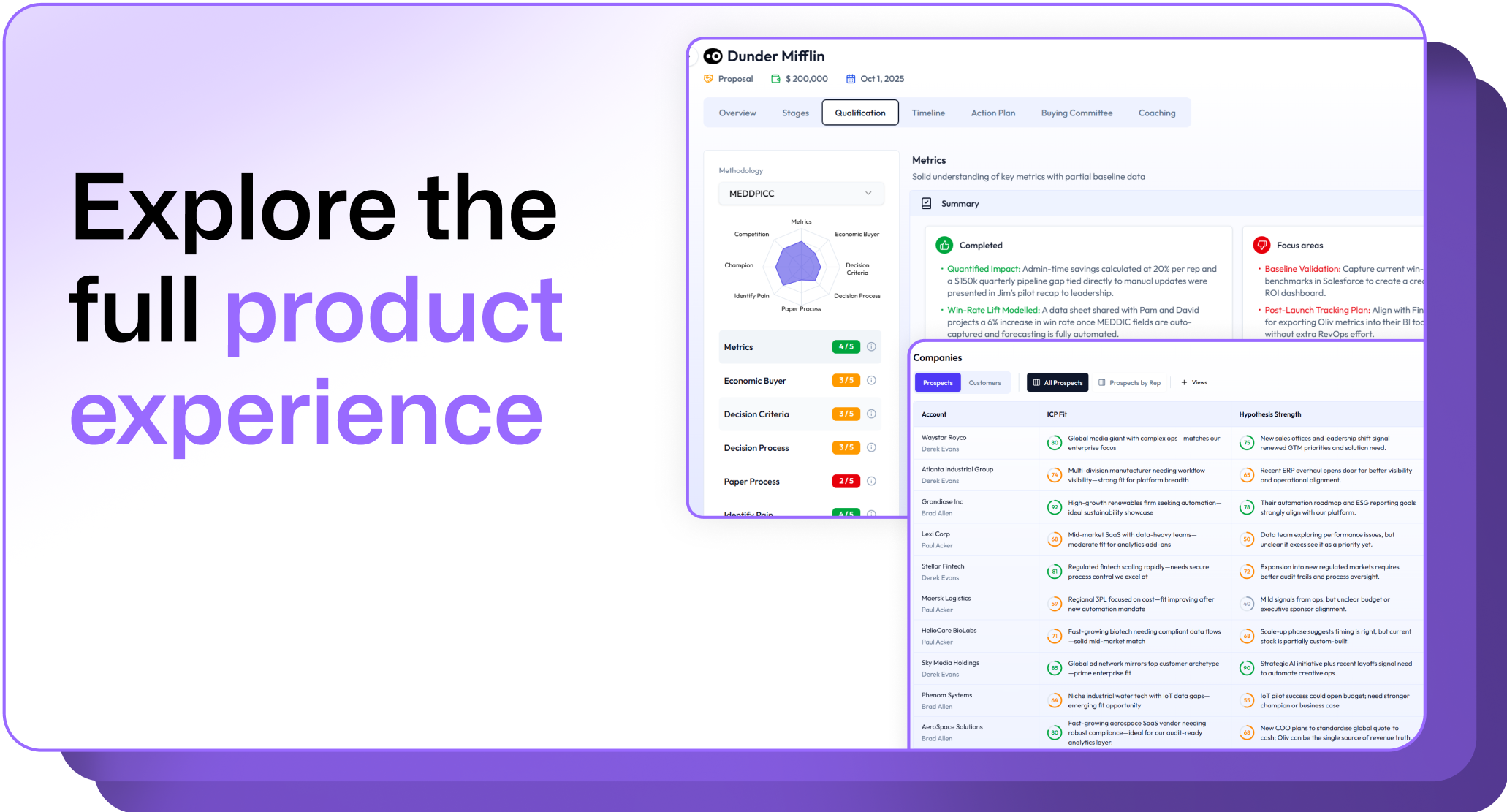
.avif)