Gong Smart Trackers Exposed: 7 Critical Limitations Sales Teams Discover Too Late
Written by
Ishan Chhabra
Last Updated :
November 17, 2026
Skim in :
13
mins
In this article
Still got questions?
Come discuss this article with me.
Hi, I'm Ishan, Founder and CEO of Oliv.
I'm always up for a conversation about revenue intelligence, AI agents, or what's actually working (and what's not) across revenue teams.
I'd love to hear your perspective.
Thank you! Your submission has been received!
Oops! Something went wrong while submitting the form.
Meet Oliv’s AI Agents
Hi! I’m, Deal Driver
I track deals, flag risks, send weekly pipeline updates and give sales managers full visibility into deal progress
Hi! I’m, CRM Manager
I maintain CRM hygiene by updating core, custom and qualification fields all without your team lifting a finger
Hi! I’m, Forecaster
I build accurate forecasts based on real deal movement and tell you which deals to pull in to hit your number
Hi! I’m, Coach
I believe performance fuels revenue. I spot skill gaps, score calls and build coaching plans to help every rep level up
Hi! I’m, Prospector
I dig into target accounts to surface the right contacts, tailor and time outreach so you always strike when it counts
Hi! I’m, Pipeline tracker
I call reps to get deal updates, and deliver a real-time, CRM-synced roll-up view of deal progress
Hi! I’m, Analyst
I answer complex pipeline questions, uncover deal patterns, and build reports that guide strategic decisions
TL;DR
Gong Smart Trackers, now called AI Trackers, flag concepts in calls and emails across three types: keyword, legacy example-based, and the default question-based builder.
Example-based trackers need 500 recorded calls (1,500 recommended), English only, and at least 4 tagging rounds of 25 sentences, about 40 minutes each.
Question-based trackers drop the call minimum but consume Gong credits on every call and email, and they pause at zero balance until an admin resumes them.
Pre-built By Gong trackers cannot be edited and only analyze calls recorded after activation.
A tracker hit confirms a topic came up, not that a deal is qualified; audit precision against Gong's 15 of 20 benchmark and keep hits out of CRM stages.
Oliv AI reads full deal history and writes validated MEDDPICC fields to the CRM, moving from flagging moments to acting on deals.
A sales manager opens Monday's pipeline board and sees a red tag on a $90,000 deal: "Competitor mentioned." She pulls the call, scrubs to the timestamp, and hears the buyer say they dropped that vendor two years ago. The tag was technically right. It was also useless. That gap between "a word was said" and "this deal is at risk" is what this article is about. Gong Smart Trackers find concepts in calls and emails, and Gong's 2025 and 2026 updates made them easier to build. They still read moments, not deals, and the newer ones now draw on Gong credits. Here is what that means for your team in 2027.
Q1: What Are Gong Smart Trackers, and What Changed by 2027? [toc=1. Smart Trackers Defined]
Gong Smart Trackers, now called AI Trackers in Gong's help center, are AI models that flag when a concept appears in recorded calls and emails, even when people use different words [1]. Gong offers three kinds: keyword trackers for exact terms, legacy example-based trackers trained on tagged sentences, and question-based trackers built from a plain-language question [2][3]. Question-based trackers became the default builder and consume Gong credits [4].
How the tracker family fits together
🔎 The three types in plain terms
A keyword tracker matches exact words, like a competitor's name. An example-based tracker learns a concept from sentences you tag as "yes" or "no." A question-based tracker lets you ask something like "Did the buyer push back on price?" and Gong finds matching moments [2].
Gong also ships pre-built "By Gong" trackers. Gong's help center lists 21 you can activate directly, such as Budget, Champion, Pricing, and Timeline, plus 8 more available on request through a Revenue Architect [1].
That is real value. A tracker turns 1,000 hours of calls into a count you can filter.
What changed between 2022 and 2027
⏰ The timeline that matters
October 2022: Gong launched Smart Trackers as a "user-trainable" AI system and claimed up to 3x more accuracy than keyword trackers [5]. That is Gong's own claim.
2025 to 2026: Gong made the question-based builder the default and renamed the old one "example-based" [2][3].
2026: Custom question-based trackers began drawing on Gong credits, a shared pool that runs out [4].
💰 Why the credit change matters
Before, a custom tracker cost admin time. Now it also costs credits on every call it reads [4]. Pre-built trackers and keyword trackers do not use credits [4].
Where Oliv AI fits in this picture
Oliv AI, an AI-native revenue intelligence platform, takes a different starting point. Oliv AI reads the full history of a deal across calls, emails, and CRM fields, then judges what it means for the opportunity. In my experience, that is the question managers were trying to answer with trackers all along.
"Good for tracking deals, account engagement overall, divided transcript and accurate AI highlights for calls." Verified User, Gong - G2 Verified Review, 6/9/2025, 1.5 stars
"The AI surfaces objections, competitor mentions, and budget discussions automatically, providing on-the-spot coaching for my reps." Verified User, Oliv AI G2 - Verified Review, 7/8/2026, 5 stars
Q2: How Do Keyword, Example-Based and Question-Based Trackers Actually Differ? [toc=2. Tracker Types Compared]
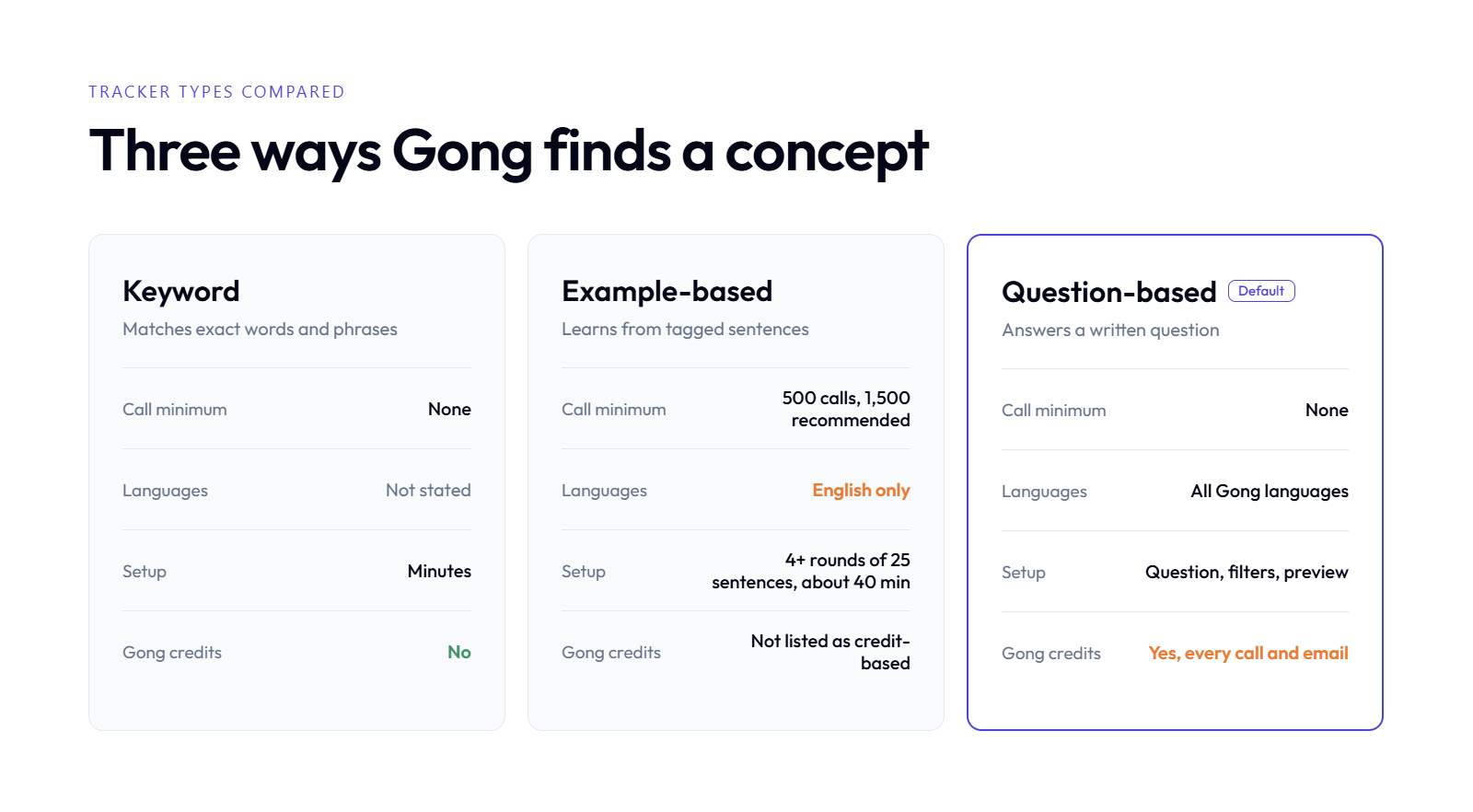
Only question-based trackers use credits, and only example-based ones need 500 calls in English.
Keyword trackers match exact terms and need no training. Example-based trackers need at least 500 recorded calls (1,500 recommended), work in English only, and take at least 4 tagging rounds of 25 sentences [3]. Question-based trackers start from a written question, have no call minimum, work in all Gong languages, and consume Gong credits on every call and email analyzed [2][4].
The side-by-side view
Gong Tracker Types Compared (2027)
Feature
Keyword tracker
Example-based tracker
Question-based tracker
How it detects
Exact words and phrases
Learns from tagged sentences
Answers a written question
Call minimum
None
500 calls, 1,500 recommended; concept in 50+ calls [3]
Deal-level questions answered by fine-tuned models
🧪 How the question-based preview works
When you build a question-based tracker, Gong samples 100 calls and 400 email threads so you can check matches before publishing [2]. You refine the question or filters, then preview again. Gong blocks publishing if your credit balance cannot cover the estimated cost [2].
⚠️ Where example-based trackers still show up
Many teams built trackers before 2025. Those are example-based by definition. Gong caps them at 100 active trackers per workspace [3]. If your tracker library is older, check which builder each one used.
Which one is your team using?
🧭 A quick way to tell
You typed a list of words: keyword tracker.
You tagged sentences for several rounds: example-based tracker.
You wrote a question and watched a credit estimate: question-based tracker.
✅ What reviewers like about the newer approach
Reviewers do value the theme-finding side of trackers, even when setup is hard.
"I also find the AI tracker's ability to identify common themes across different recordings, even those not from my department, very useful." Verified User, Gong - G2 Verified Review, 10/3/2025, 3 stars
Oliv AI skips the builder step entirely. Oliv AI's Intent Graph runs 100+ fine-tuned small language models trained on the recurring questions revenue teams ask, such as budget, decision makers, and decision criteria. You get answers per deal without tagging sentences first.
Q3: Why Do Sales Teams Discover Tracker Limits Only After Rollout? [toc=3. Why Limits Surface Late]
Tracker limits surface late because previews test a small sample, while live trackers run on every call for months. Gong's preview checks 100 calls and 400 email threads before publishing [2]. Errors that look rare in a sample add up across a full quarter. Most managers only notice when a flagged deal does not match what they hear on the recording.
How the rollout usually goes
📋 Week one looks great
RevOps builds a set of trackers for competitors, pricing, and next steps. The preview looks clean. Dashboards fill up within days, and leadership finally has a chart of "pricing mentioned" by rep.
Then the trackers become the source for coaching and pipeline reviews. Nobody re-checks them, because the numbers look tidy.
❌ Week eight tells a different story
A manager opens a flagged call before a forecast meeting. The "competitor risk" was a past vendor. The "next steps confirmed" was the rep saying "let's find time," with no date. One wrong flag is noise. Dozens across a quarter quietly bend the pipeline review.
Why the old model hides its own errors
🧩 Detection without a feedback loop
Traditional conversation intelligence was built to find moments and count them. A count has no way to tell you it is wrong. You only learn that by listening, which is the work trackers were meant to remove.
I have said this on plenty of buyer calls: the tracker is trying to find the name of a competitor in the deal. It does not know if you are really competing, or if the buyer simply mentioned them. Those are very different things.
🔁 Context lives across meetings
A tracker reads one conversation at a time. The real story of a deal sits across six calls, twenty emails, and a CRM record. Other tools in the category share this gap.
"It doesn't always capture the key points of the conversation, and it also doesn't connect previous meetings with the same person." Verified User, Avoma - G2 Verified Review, 3/17/2026, 4 stars
What changed, and what Oliv AI does about it
🚀 From counting moments to reading deals
Generative AI changed what is possible. A model can now read a full deal history and ask, "Is this competitor active in this deal right now?" That is a judgement, not a match.
Oliv AI's Deal Driver Agent watches every open deal, reads the whole thread of calls and emails, and flags real risk with the evidence attached. Oliv AI's published target is "Live by week 2. Results by week 4," and its forward-deployed GTM engineers do the setup, so there is no tracker-building phase to wait through.
"The Driver agent watches all my deals and flags any that are at risk, so I don't have to spend hours listening to recordings in tools like Gong and Clari." Verified User, Oliv AI G2 - Verified Review, 6/17/2026, 4.5 stars
Q4: What Are the 7 Critical Limitations of Gong Smart Trackers? [toc=4. The 7 Limitations]
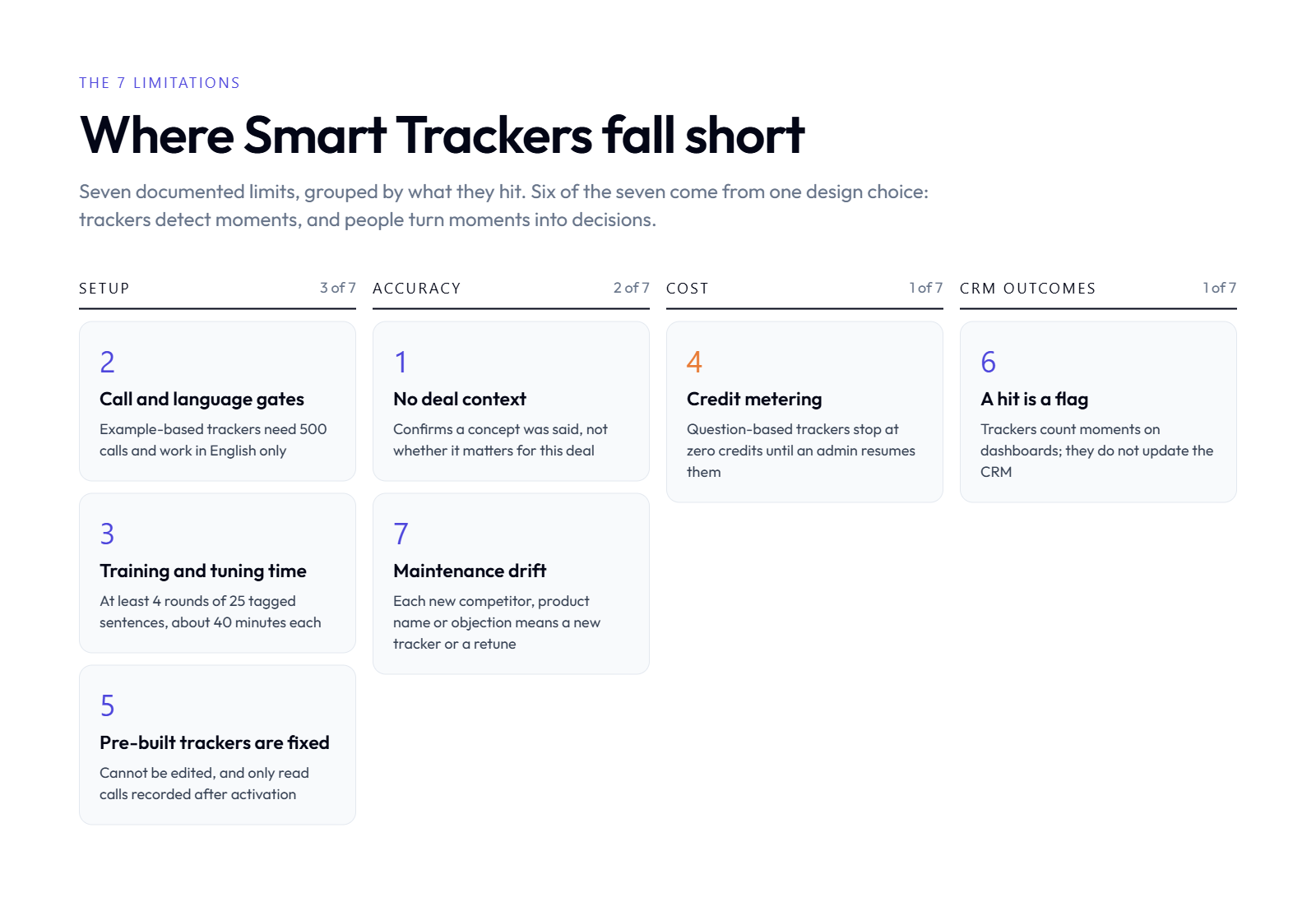
Six of the seven limits trace back to trackers detecting moments, not deals.
The seven limitations are: concept detection without deal context, call and language gates on example-based trackers, training and tuning time, credit metering that can pause trackers, pre-built trackers that cannot be edited, hits that do not update the CRM, and maintenance drift as markets change. Each one is documented in Gong's own help center or in verified user reviews [1][2][3][4].
The seven, one by one
1️⃣ Concept detection without deal context
A tracker confirms a concept was said. It does not judge whether it matters for this opportunity. "We used XYZ three years ago" and "we are evaluating XYZ alongside you" can both trigger the same competitor tracker.
2️⃣ Example-based trackers gate small and global teams
Example-based trackers need 500 recorded calls, ideally 1,500, and the concept must appear in at least 50 calls [3]. They work in English only [3]. A 15-rep team selling in Germany and Brazil is locked out.
3️⃣ Training and tuning take real admin time
Basic training takes at least 4 rounds of 25 tagged sentences, about 40 minutes per tracker, with gains through rounds 5 to 10 [3]. Multiply that across 30 trackers.
"I found the AI tracker setup to be quite difficult, especially concerning the user interface when setting up keywords or smart trackers." Verified User, Gong - G2 Verified Review, 10/3/2025, 3 stars
"By Gong" trackers are fixed; you only choose calls or calls and emails [1]. They analyze conversations recorded after activation, so last quarter is not covered [1].
6️⃣ A hit is a flag, not a CRM update
Trackers count moments on dashboards. As my colleague Rashim Sethi puts it, you can set up keyword or smart trackers, "but no intelligence on the top." Q7 goes deeper.
"limitations of getting data back into salesforce" Verified User, Gong - G2 Verified Review, 5/21/2026, 3 stars
7️⃣ Maintenance drift
New competitors, product names, and objections appear every quarter. Each one means a new tracker or a re-tune.
What these seven have in common
🔍 The pattern under the list
Six of the seven come from one design choice: trackers detect moments, and people turn moments into decisions. That made sense when AI could only match patterns. It costs more now that AI can read a whole deal.
✅ Oliv AI's answer
Oliv AI starts from the deal, not the sentence. Oliv AI's Object Graph maps each call to the right opportunity, its Intent Graph answers deal questions in context, and the CRM Manager Agent writes validated fields back to Salesforce or HubSpot. Oliv AI runs on top of your CRM; it does not replace it.
Q5: What Do Gong Smart Trackers Really Cost Once You Add Credits and Admin Time? [toc=5. True Cost and Credits]
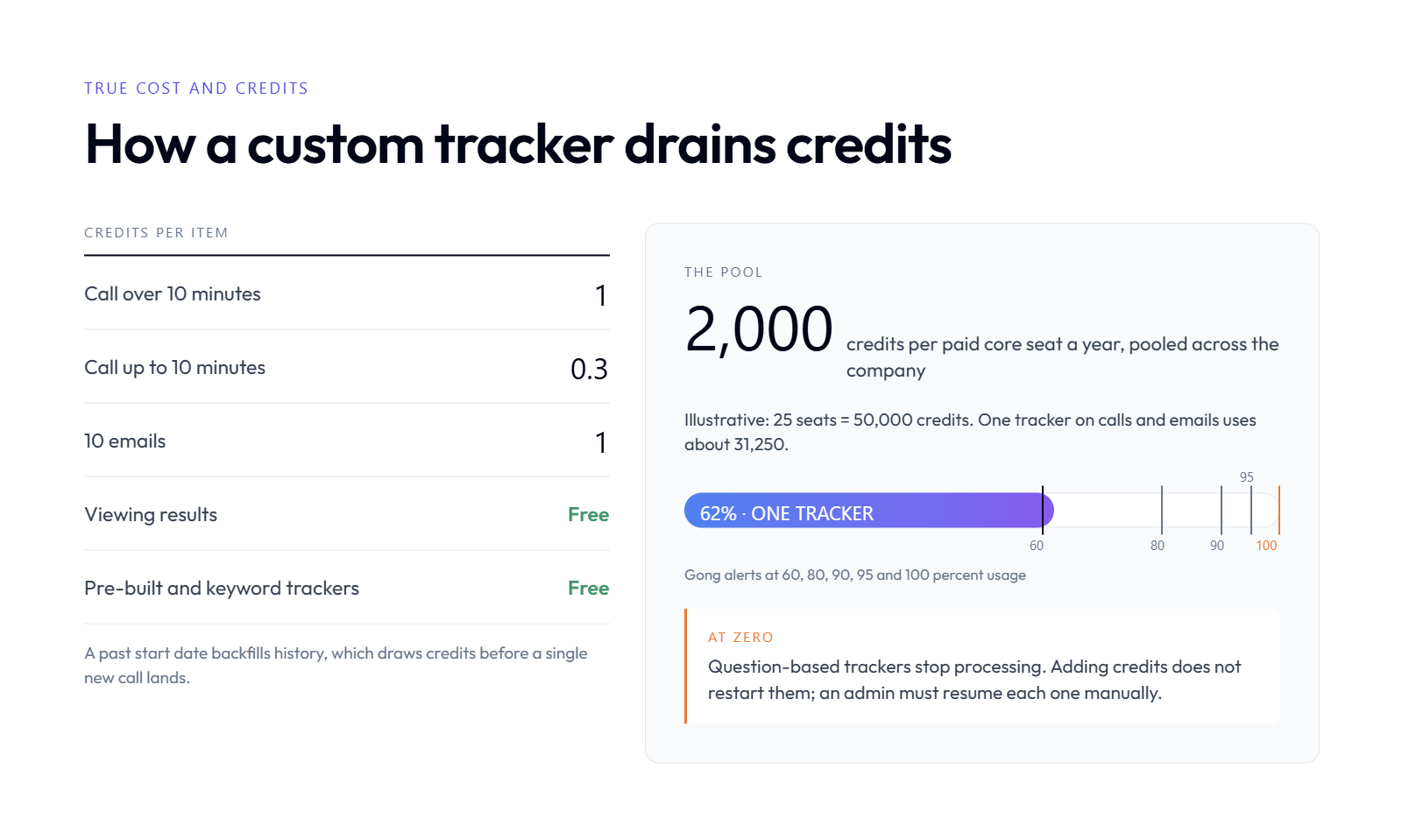
Each paid seat adds 2,000 credits a year, and trackers pause when the pool hits zero.
Gong's custom question-based AI Trackers consume Gong credits as they analyze conversations: 1 credit per call over 10 minutes, 0.3 credits per call up to 10 minutes, and 1 credit per 10 emails [4]. Each paid core seat includes 2,000 credits a year, pooled company-wide and reset each contract year [4]. Pre-built and keyword trackers use no credits [4]. Admin time for training and tuning sits on top.
Historical data counts too. If you set a past start date, the backfill draws credits before a single new call lands [2][4].
⚠️ What happens at zero
When the balance runs out, published question-based trackers stop processing [4]. Existing results stay, but nothing new is added. Adding credits does not restart them; an admin must resume each tracker manually [4]. Gong also blocks publishing a new tracker if the estimate exceeds your balance [2].
Gong sends alerts at 60, 80, 90, 95, and 100 percent usage, and admins can set monthly limits per team [4]. Purchased credits expire at the end of the contract term and do not roll over [4].
A worked example
🧮 One tracker on a 25-rep team
These inputs are illustrative. Swap in your own numbers.
25 paid core seats x 2,000 credits = 50,000 credits a year[4]
Each rep holds 15 calls a week over 10 minutes, for 50 weeks = 18,750 calls = 18,750 credits
Each rep logs 100 emails a week = 125,000 emails = 12,500 credits
One tracker on calls and emails uses about 31,250 credits, or 62 percent of the pool. That assumes each tracker is charged for each conversation it analyzes, as Gong's docs describe [4]. A second tracker at the same scope would push you past zero before the year ends.
⏰ The admin hours nobody budgets
Credits are only part of it. Example-based trackers take about 40 minutes each to set up and train, with at least 4 tagging rounds [3]. A library of 30 trackers is 20 hours before any re-tuning. Question-based trackers add preview cycles and scope decisions for every tracker [2].
What this means for your budget
📊 The budgeting move
Treat each custom tracker like a small metered service. Scope it to the calls where the concept can actually appear. Keep broad, always-on trackers on the free pre-built set where it fits.
Oliv AI takes a different cost path. Oliv AI answers the recurring deal questions, such as budget, pains, and decision makers, through its Intent Graph across all deals by default. There is no per-question tracker to scope, so you do not ration which deals get analyzed.
Q6: How Do You Audit a Gong Tracker's Accuracy Before Trusting It in Pipeline Reviews? [toc=6. Audit Tracker Accuracy]
To audit a Gong tracker, pull 20 recent matches, score each one against the full call, and calculate precision, meaning the share of matches that are correct. Gong's help center treats 15 of 20 correct sentences as good accuracy for an example-based tracker [3]. Then check misses on known deals, tighten scope and filters, re-preview, and keep tracker hits out of CRM stage updates.
The 8-step audit checklist
✅ Steps 1 to 4: measure what you have
Pull 20 recent matches. Use the tracker's results, not the preview sample, so you test live behavior.
Score each match. Mark it correct only if it means what the tracker claims. A past vendor mention is not "competitor in deal."
Calculate precision. Correct matches divided by 20. Gong's own guidance calls 15 of 20 good [3].
Split mention from intent. Tag each competitor hit as past use, passing mention, or active evaluation. Only the last one is a risk.
🔍 Steps 5 to 8: find the gaps
Check for misses. Pick 5 deals where you know pricing pushback happened. Did the tracker catch it?
Review scope and filters. Narrow by team, call type, or stage. Gong notes that narrower scope also lowers credit use [2].
Re-run the preview. Gong's preview samples 100 calls and 400 email threads after each change [2].
Precision tells you how often a flag is right. It says nothing about what the flag means for the deal. A 90 percent accurate "budget discussed" tracker still cannot tell you whether budget exists.
Oliv AI handles this differently. Oliv AI shows the evidence behind each deal judgement, the exact quotes from calls and emails, so a manager checks one answer instead of auditing a tracker library.
Q7: Why Doesn't a Tracker Hit Mean a Deal Is Qualified? [toc=7. Hits vs Qualification]
A tracker hit means a topic came up, not that a qualification criterion was met. In MEDDPICC, a framework that checks Metrics, Economic buyer, Decision criteria, Decision process, Paper process, Identify pain, Champion, and Competition, each box needs the buyer's answer. Oliv AI's CRM Manager Agent fills these fields from what buyers actually said, with the quote attached.
How scorecards used to work
📋 The familiar setup
Most teams run a qualification scorecard in Salesforce or HubSpot. Managers want to see, per deal, which MEDDPICC boxes are filled. Reps hate filling them. So RevOps connects trackers to the scorecard and lets "budget discussed" stand in for "budget confirmed."
It feels like automation. It is a shortcut with a blind spot.
❌ The checked-box illusion
Here is a scenario I see often. A rep asks, "What budget have you set for this?" The buyer says, "We haven't allocated any budget yet." The budget tracker fires, the box turns green, and the forecast now counts an unfunded deal as qualified.
The tracker did its job. It found the word. Nobody asked what the buyer answered.
What changed with generative AI
🧠 Reading the answer, not the question
A model can now read the exchange and classify the buyer's reply: confirmed, unknown, or no budget. That is the difference between detection and understanding. It also means you can stop treating tracker hits as stage evidence.
Other tools hit the same wall when findings do not reach the CRM.
"We don't have the context of the deals against the conversation intelligence findings. There's no custom reporting. The CRM writeback is not good; we cannot send MEDDIC values back to Salesforce." Verified User, Clari - G2 Verified Review, 7/13/2026, 1.5 stars
🧾 What a validated field looks like
Tracker View vs Deal-Level View
Field
Tracker view
Deal-level view
Budget
"Budget mentioned: yes"
"No budget allocated (buyer, call 2)"
Competition
"XYZ mentioned: yes"
"XYZ replaced in 2025, not active"
Champion
"Champion tracker: 3 hits"
"VP Ops asked for internal deck, call 4"
What Oliv AI does about it
✅ Fields filled from the buyer's words
Oliv AI's CRM Manager Agent reads every call and email on the opportunity and writes MEDDPICC, BANT, or custom methodology fields into Salesforce or HubSpot. Oliv AI's Deal Driver Agent then flags deals where key fields are still empty or contradicted. Oliv AI sits on top of your CRM and keeps it accurate; it does not replace it.
"It's incredibly helpful with our custom sales methodologies like MEDIC-BAND, as it helps me fill all of them out." Verified User, Oliv AI G2 - Verified Review, 6/15/2026, 5 stars
Q8: How Do AI-Native Platforms Move From Flagging Moments to Acting on Deals? [toc=8. From Flags to Action]
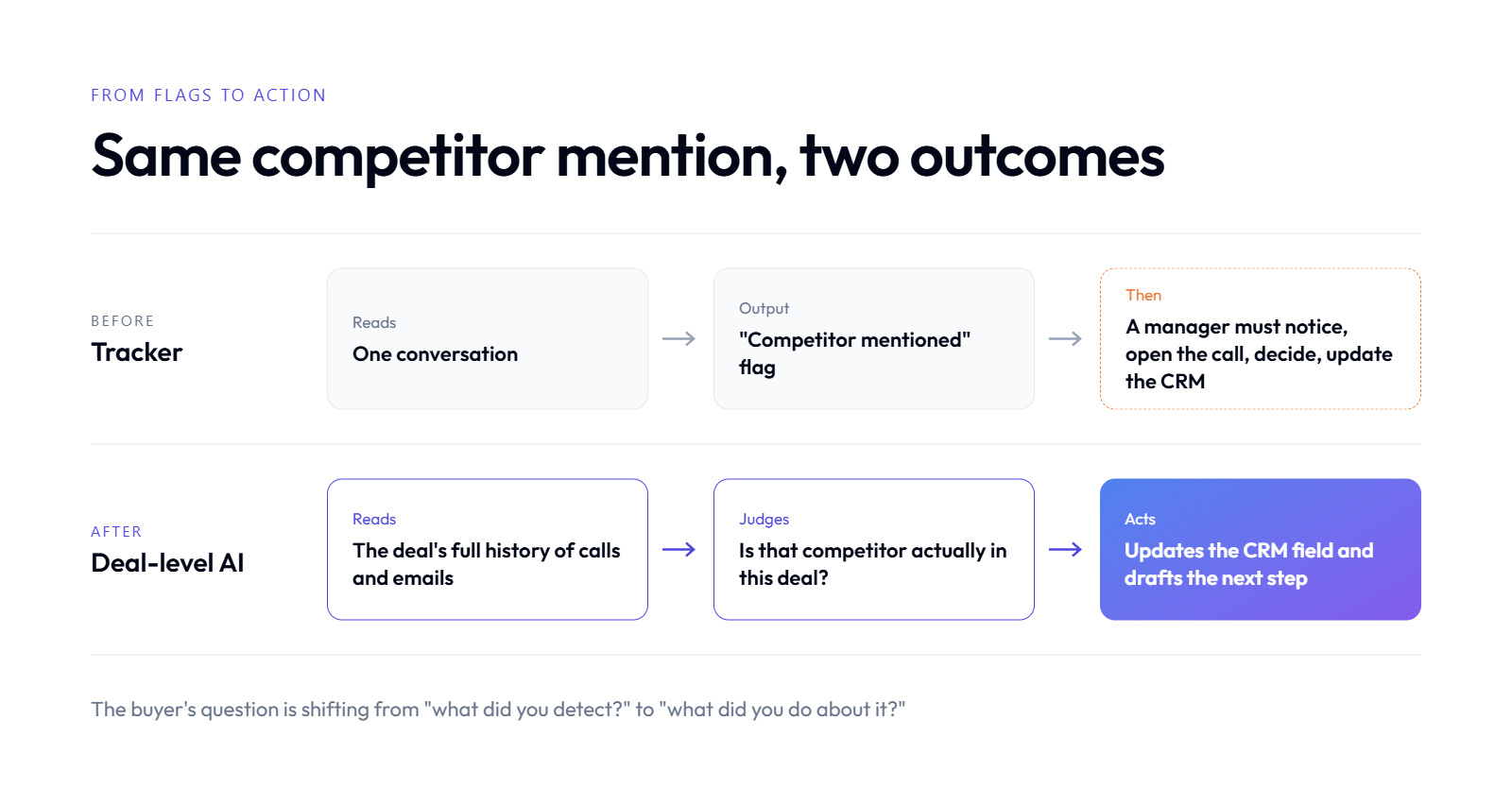
A tracker says a competitor came up; an agent decides if it matters and acts on it.
AI-native platforms move from flagging to acting by reading a deal's full history, judging what it means, and taking the next step, such as updating a CRM field or alerting the owner. Gartner published its first Magic Quadrant for Revenue Action Orchestration in December 2025, a category joining revenue intelligence, sales engagement, and SFA [7]. Oliv AI, an AI-native revenue orchestration platform, runs agents on a context graph of every account and opportunity.
How it was: dashboards that wait for a human
📊 The flag-and-hope model
First-generation revenue intelligence surfaces information and leaves the work to a person. A tracker fires, a dashboard updates, and someone has to notice, open the call, decide, and update the CRM. Every step depends on a manager having time.
Most weeks, they do not. The flag sits there.
💸 What that costs
The cost is not the license. It is the hours managers spend listening to recordings to confirm flags, and the deals that slip while the flag waits.
What changed: analysts now judge action
🔄 The category shift
Gartner's Hype Cycle for Sales Transformation, 2025, published October 30, 2025, highlights AI agents for sales as a key factor in sales transformation [6]. Gartner's Revenue Action Orchestration Magic Quadrant followed in December 2025 [7]. The question buyers ask is shifting from "what did you detect?" to "what did you do about it?"
"It doesn't just record meetings; it automatically captures key insights, updates systems of record, identifies next steps, and helps keep teams aligned." Verified User, Oliv AI G2 - Verified Review, 6/23/2026, 5 stars
What Oliv AI does: synthesis, not retrieval
🧩 Three layers under every judgement
Object Graph: Oliv AI maps each call and email to the right account and opportunity using AI entity resolution, not a simple email-domain lookup.
Intent Graph: Oliv AI runs 100+ fine-tuned small language models on the recurring revenue questions, reading the complete history of transcripts and emails per deal. Oliv AI publishes a figure of under 1 percent hallucinations in production; that is its own measurement.
Process Graph: Oliv AI holds your playbook, qualification rules, and stage criteria in a form agents can read.
🤖 Agents that act on it
Oliv AI's Deal Driver Agent flags real risk with evidence. The CRM Manager Agent writes validated fields. The Forecaster Agent rolls deal judgements into the weekly call. Olivia, Oliv AI's super agent for the frontline, asks before acting, so reps stay in control.
On Oliv AI's own site, the contrast reads: "Gong flags a risk, Oliv saves the opportunity." I would put it more plainly. A tracker tells you a competitor's name came up. An agent tells you whether that competitor is in the deal, updates the field, and drafts the next step.
Q9: When Are Gong Smart Trackers Still the Right Choice? [toc=9. When Trackers Fit]
Gong Smart Trackers remain a good fit for teams that already run Gong, record high call volumes, track stable and well-defined concepts, and mainly need trend views across many calls rather than deal-level judgements. Gong holds a 4.7-star rating across 6,678 reviews on G2 [8]. Teams needing validated CRM fields per deal often add Oliv AI on top of Gong or replace it at renewal.
Where trackers earn their keep
✅ The honest strengths
I want to be fair here, because trackers do real work for the right team. If you record thousands of calls a quarter, a pricing tracker tells you how often pricing comes up, by segment, by rep, and over time. That is useful for enablement and product marketing.
Trackers shine when:
The concept is narrow and stable. "Mentions of our new add-on" changes little week to week.
Gong is already deployed and paid for. The pre-built "By Gong" trackers cost no credits [4].
Your team sells mostly in English at scale. Example-based trackers then clear their 500-call bar easily [3].
🎯 A good example of fit
A 300-rep inside sales team selling one product in English has the volume, the stable vocabulary, and the coaching need. For that team, a tuned tracker library is a sensible tool.
"Design is user friendly and ensure the elements are visible and with no confusion." Verified User, Gong - G2 Verified Review, 4/21/2026, 2.5 stars
Where they stop being enough
⚠️ The line you will cross
Trackers stop being enough the moment leadership asks a deal question instead of a trend question. "How often did pricing come up?" is a tracker question. "Which of my 40 commits has a funded budget?" is not.
The same reviewer who praised the design flagged the friction:
"Real Time integrations can be time consuming" Verified User, Gong - G2 Verified Review, 4/21/2026, 2.5 stars
🔗 Running both, then choosing
Oliv AI can sit on top of Gong, pull in its call data, and run deal-level agents while your Gong contract continues. Oliv AI's published offer for teams mid-contract is to run Oliv AI Conversation Intelligence free until the Gong contract ends. That lets you compare tracker output and deal judgements on the same deals before deciding.
Q10: How Should RevOps Decide: Keep Tuning Trackers or Move to Agentic Deal Intelligence? [toc=10. Making the Decision]
RevOps should decide by scoring five factors: call volume and language mix, credit budget, admin hours available, what leadership needs (trend counts or per-deal truth), and data trust requirements such as SOC 2, GDPR, and recording consent. Teams that need trend counts at high English call volume can keep tuning Gong trackers. Teams that need validated deal fields usually move to an AI-native revenue orchestration platform such as Oliv AI.
How the decision used to get made
📋 The old buying logic
For years the choice was simple. You bought a conversation intelligence tool, built trackers, and hired or assigned someone to keep them tuned. Nobody asked whether a count of mentions was the right output, because nothing else was on offer.
That logic still drives a lot of renewals. It is worth re-checking before you sign the next one.
A five-factor decision rubric
🧭 Score your team
Keep Tuning Trackers or Move to Agentic Deal Intelligence
AI rules: ask how the vendor addresses the EU AI Act for automated decisions.
Data exit: confirm you can export your data if you leave.
That last one bites people.
"The fact that you cant't edit a recording (to only share a portion with a client, and the fact that if you stop working with thew tool you lose the data." Verified User, Gong - G2 Verified Review, 3/19/2026, 3 stars
What changed, and Oliv AI's path
🚀 Agents that own the work
AI changed the output you can ask for. Instead of "how many times," you can ask "what is true about this deal, and what should happen next." Oliv AI is built on that question. Oliv AI is SOC 2 Type II certified, GDPR and CCPA compliant, and keeps a full open export policy with no data lock-in, published at trust.oliv.ai.
Oliv AI is not perfect, and reviewers say so.
"The only downside is that the platform can be a bit glitchy at times, but the support team is always quick to address and resolve any bugs." Verified User, Oliv AI G2 - Verified Review, 7/2/2026, 5 stars
💬 Test it on your own deals
My suggestion is simple. Take five deals you know well. Look at what your trackers say about them, then look at what a deal-level agent says. If the second view matches what your reps tell you in the hallway, you have your answer. Oliv AI's sandbox lets you try that with your own data, and if you would rather talk it through, seven minutes with me, no pitch, is on the table.
A sales manager opens Monday's pipeline board and sees a red tag on a $90,000 deal: "Competitor mentioned." She pulls the call, scrubs to the timestamp, and hears the buyer say they dropped that vendor two years ago. The tag was technically right. It was also useless. That gap between "a word was said" and "this deal is at risk" is what this article is about. Gong Smart Trackers find concepts in calls and emails, and Gong's 2025 and 2026 updates made them easier to build. They still read moments, not deals, and the newer ones now draw on Gong credits. Here is what that means for your team in 2027.
Q1: What Are Gong Smart Trackers, and What Changed by 2027? [toc=1. Smart Trackers Defined]
Gong Smart Trackers, now called AI Trackers in Gong's help center, are AI models that flag when a concept appears in recorded calls and emails, even when people use different words [1]. Gong offers three kinds: keyword trackers for exact terms, legacy example-based trackers trained on tagged sentences, and question-based trackers built from a plain-language question [2][3]. Question-based trackers became the default builder and consume Gong credits [4].
How the tracker family fits together
🔎 The three types in plain terms
A keyword tracker matches exact words, like a competitor's name. An example-based tracker learns a concept from sentences you tag as "yes" or "no." A question-based tracker lets you ask something like "Did the buyer push back on price?" and Gong finds matching moments [2].
Gong also ships pre-built "By Gong" trackers. Gong's help center lists 21 you can activate directly, such as Budget, Champion, Pricing, and Timeline, plus 8 more available on request through a Revenue Architect [1].
That is real value. A tracker turns 1,000 hours of calls into a count you can filter.
What changed between 2022 and 2027
⏰ The timeline that matters
October 2022: Gong launched Smart Trackers as a "user-trainable" AI system and claimed up to 3x more accuracy than keyword trackers [5]. That is Gong's own claim.
2025 to 2026: Gong made the question-based builder the default and renamed the old one "example-based" [2][3].
2026: Custom question-based trackers began drawing on Gong credits, a shared pool that runs out [4].
💰 Why the credit change matters
Before, a custom tracker cost admin time. Now it also costs credits on every call it reads [4]. Pre-built trackers and keyword trackers do not use credits [4].
Where Oliv AI fits in this picture
Oliv AI, an AI-native revenue intelligence platform, takes a different starting point. Oliv AI reads the full history of a deal across calls, emails, and CRM fields, then judges what it means for the opportunity. In my experience, that is the question managers were trying to answer with trackers all along.
"Good for tracking deals, account engagement overall, divided transcript and accurate AI highlights for calls." Verified User, Gong - G2 Verified Review, 6/9/2025, 1.5 stars
"The AI surfaces objections, competitor mentions, and budget discussions automatically, providing on-the-spot coaching for my reps." Verified User, Oliv AI G2 - Verified Review, 7/8/2026, 5 stars
Q2: How Do Keyword, Example-Based and Question-Based Trackers Actually Differ? [toc=2. Tracker Types Compared]
Only question-based trackers use credits, and only example-based ones need 500 calls in English.
Keyword trackers match exact terms and need no training. Example-based trackers need at least 500 recorded calls (1,500 recommended), work in English only, and take at least 4 tagging rounds of 25 sentences [3]. Question-based trackers start from a written question, have no call minimum, work in all Gong languages, and consume Gong credits on every call and email analyzed [2][4].
The side-by-side view
Gong Tracker Types Compared (2027)
Feature
Keyword tracker
Example-based tracker
Question-based tracker
How it detects
Exact words and phrases
Learns from tagged sentences
Answers a written question
Call minimum
None
500 calls, 1,500 recommended; concept in 50+ calls [3]
Deal-level questions answered by fine-tuned models
🧪 How the question-based preview works
When you build a question-based tracker, Gong samples 100 calls and 400 email threads so you can check matches before publishing [2]. You refine the question or filters, then preview again. Gong blocks publishing if your credit balance cannot cover the estimated cost [2].
⚠️ Where example-based trackers still show up
Many teams built trackers before 2025. Those are example-based by definition. Gong caps them at 100 active trackers per workspace [3]. If your tracker library is older, check which builder each one used.
Which one is your team using?
🧭 A quick way to tell
You typed a list of words: keyword tracker.
You tagged sentences for several rounds: example-based tracker.
You wrote a question and watched a credit estimate: question-based tracker.
✅ What reviewers like about the newer approach
Reviewers do value the theme-finding side of trackers, even when setup is hard.
"I also find the AI tracker's ability to identify common themes across different recordings, even those not from my department, very useful." Verified User, Gong - G2 Verified Review, 10/3/2025, 3 stars
Oliv AI skips the builder step entirely. Oliv AI's Intent Graph runs 100+ fine-tuned small language models trained on the recurring questions revenue teams ask, such as budget, decision makers, and decision criteria. You get answers per deal without tagging sentences first.
Q3: Why Do Sales Teams Discover Tracker Limits Only After Rollout? [toc=3. Why Limits Surface Late]
Tracker limits surface late because previews test a small sample, while live trackers run on every call for months. Gong's preview checks 100 calls and 400 email threads before publishing [2]. Errors that look rare in a sample add up across a full quarter. Most managers only notice when a flagged deal does not match what they hear on the recording.
How the rollout usually goes
📋 Week one looks great
RevOps builds a set of trackers for competitors, pricing, and next steps. The preview looks clean. Dashboards fill up within days, and leadership finally has a chart of "pricing mentioned" by rep.
Then the trackers become the source for coaching and pipeline reviews. Nobody re-checks them, because the numbers look tidy.
❌ Week eight tells a different story
A manager opens a flagged call before a forecast meeting. The "competitor risk" was a past vendor. The "next steps confirmed" was the rep saying "let's find time," with no date. One wrong flag is noise. Dozens across a quarter quietly bend the pipeline review.
Why the old model hides its own errors
🧩 Detection without a feedback loop
Traditional conversation intelligence was built to find moments and count them. A count has no way to tell you it is wrong. You only learn that by listening, which is the work trackers were meant to remove.
I have said this on plenty of buyer calls: the tracker is trying to find the name of a competitor in the deal. It does not know if you are really competing, or if the buyer simply mentioned them. Those are very different things.
🔁 Context lives across meetings
A tracker reads one conversation at a time. The real story of a deal sits across six calls, twenty emails, and a CRM record. Other tools in the category share this gap.
"It doesn't always capture the key points of the conversation, and it also doesn't connect previous meetings with the same person." Verified User, Avoma - G2 Verified Review, 3/17/2026, 4 stars
What changed, and what Oliv AI does about it
🚀 From counting moments to reading deals
Generative AI changed what is possible. A model can now read a full deal history and ask, "Is this competitor active in this deal right now?" That is a judgement, not a match.
Oliv AI's Deal Driver Agent watches every open deal, reads the whole thread of calls and emails, and flags real risk with the evidence attached. Oliv AI's published target is "Live by week 2. Results by week 4," and its forward-deployed GTM engineers do the setup, so there is no tracker-building phase to wait through.
"The Driver agent watches all my deals and flags any that are at risk, so I don't have to spend hours listening to recordings in tools like Gong and Clari." Verified User, Oliv AI G2 - Verified Review, 6/17/2026, 4.5 stars
Q4: What Are the 7 Critical Limitations of Gong Smart Trackers? [toc=4. The 7 Limitations]
Six of the seven limits trace back to trackers detecting moments, not deals.
The seven limitations are: concept detection without deal context, call and language gates on example-based trackers, training and tuning time, credit metering that can pause trackers, pre-built trackers that cannot be edited, hits that do not update the CRM, and maintenance drift as markets change. Each one is documented in Gong's own help center or in verified user reviews [1][2][3][4].
The seven, one by one
1️⃣ Concept detection without deal context
A tracker confirms a concept was said. It does not judge whether it matters for this opportunity. "We used XYZ three years ago" and "we are evaluating XYZ alongside you" can both trigger the same competitor tracker.
2️⃣ Example-based trackers gate small and global teams
Example-based trackers need 500 recorded calls, ideally 1,500, and the concept must appear in at least 50 calls [3]. They work in English only [3]. A 15-rep team selling in Germany and Brazil is locked out.
3️⃣ Training and tuning take real admin time
Basic training takes at least 4 rounds of 25 tagged sentences, about 40 minutes per tracker, with gains through rounds 5 to 10 [3]. Multiply that across 30 trackers.
"I found the AI tracker setup to be quite difficult, especially concerning the user interface when setting up keywords or smart trackers." Verified User, Gong - G2 Verified Review, 10/3/2025, 3 stars
"By Gong" trackers are fixed; you only choose calls or calls and emails [1]. They analyze conversations recorded after activation, so last quarter is not covered [1].
6️⃣ A hit is a flag, not a CRM update
Trackers count moments on dashboards. As my colleague Rashim Sethi puts it, you can set up keyword or smart trackers, "but no intelligence on the top." Q7 goes deeper.
"limitations of getting data back into salesforce" Verified User, Gong - G2 Verified Review, 5/21/2026, 3 stars
7️⃣ Maintenance drift
New competitors, product names, and objections appear every quarter. Each one means a new tracker or a re-tune.
What these seven have in common
🔍 The pattern under the list
Six of the seven come from one design choice: trackers detect moments, and people turn moments into decisions. That made sense when AI could only match patterns. It costs more now that AI can read a whole deal.
✅ Oliv AI's answer
Oliv AI starts from the deal, not the sentence. Oliv AI's Object Graph maps each call to the right opportunity, its Intent Graph answers deal questions in context, and the CRM Manager Agent writes validated fields back to Salesforce or HubSpot. Oliv AI runs on top of your CRM; it does not replace it.
Q5: What Do Gong Smart Trackers Really Cost Once You Add Credits and Admin Time? [toc=5. True Cost and Credits]
Each paid seat adds 2,000 credits a year, and trackers pause when the pool hits zero.
Gong's custom question-based AI Trackers consume Gong credits as they analyze conversations: 1 credit per call over 10 minutes, 0.3 credits per call up to 10 minutes, and 1 credit per 10 emails [4]. Each paid core seat includes 2,000 credits a year, pooled company-wide and reset each contract year [4]. Pre-built and keyword trackers use no credits [4]. Admin time for training and tuning sits on top.
Historical data counts too. If you set a past start date, the backfill draws credits before a single new call lands [2][4].
⚠️ What happens at zero
When the balance runs out, published question-based trackers stop processing [4]. Existing results stay, but nothing new is added. Adding credits does not restart them; an admin must resume each tracker manually [4]. Gong also blocks publishing a new tracker if the estimate exceeds your balance [2].
Gong sends alerts at 60, 80, 90, 95, and 100 percent usage, and admins can set monthly limits per team [4]. Purchased credits expire at the end of the contract term and do not roll over [4].
A worked example
🧮 One tracker on a 25-rep team
These inputs are illustrative. Swap in your own numbers.
25 paid core seats x 2,000 credits = 50,000 credits a year[4]
Each rep holds 15 calls a week over 10 minutes, for 50 weeks = 18,750 calls = 18,750 credits
Each rep logs 100 emails a week = 125,000 emails = 12,500 credits
One tracker on calls and emails uses about 31,250 credits, or 62 percent of the pool. That assumes each tracker is charged for each conversation it analyzes, as Gong's docs describe [4]. A second tracker at the same scope would push you past zero before the year ends.
⏰ The admin hours nobody budgets
Credits are only part of it. Example-based trackers take about 40 minutes each to set up and train, with at least 4 tagging rounds [3]. A library of 30 trackers is 20 hours before any re-tuning. Question-based trackers add preview cycles and scope decisions for every tracker [2].
What this means for your budget
📊 The budgeting move
Treat each custom tracker like a small metered service. Scope it to the calls where the concept can actually appear. Keep broad, always-on trackers on the free pre-built set where it fits.
Oliv AI takes a different cost path. Oliv AI answers the recurring deal questions, such as budget, pains, and decision makers, through its Intent Graph across all deals by default. There is no per-question tracker to scope, so you do not ration which deals get analyzed.
Q6: How Do You Audit a Gong Tracker's Accuracy Before Trusting It in Pipeline Reviews? [toc=6. Audit Tracker Accuracy]
To audit a Gong tracker, pull 20 recent matches, score each one against the full call, and calculate precision, meaning the share of matches that are correct. Gong's help center treats 15 of 20 correct sentences as good accuracy for an example-based tracker [3]. Then check misses on known deals, tighten scope and filters, re-preview, and keep tracker hits out of CRM stage updates.
The 8-step audit checklist
✅ Steps 1 to 4: measure what you have
Pull 20 recent matches. Use the tracker's results, not the preview sample, so you test live behavior.
Score each match. Mark it correct only if it means what the tracker claims. A past vendor mention is not "competitor in deal."
Calculate precision. Correct matches divided by 20. Gong's own guidance calls 15 of 20 good [3].
Split mention from intent. Tag each competitor hit as past use, passing mention, or active evaluation. Only the last one is a risk.
🔍 Steps 5 to 8: find the gaps
Check for misses. Pick 5 deals where you know pricing pushback happened. Did the tracker catch it?
Review scope and filters. Narrow by team, call type, or stage. Gong notes that narrower scope also lowers credit use [2].
Re-run the preview. Gong's preview samples 100 calls and 400 email threads after each change [2].
Precision tells you how often a flag is right. It says nothing about what the flag means for the deal. A 90 percent accurate "budget discussed" tracker still cannot tell you whether budget exists.
Oliv AI handles this differently. Oliv AI shows the evidence behind each deal judgement, the exact quotes from calls and emails, so a manager checks one answer instead of auditing a tracker library.
Q7: Why Doesn't a Tracker Hit Mean a Deal Is Qualified? [toc=7. Hits vs Qualification]
A tracker hit means a topic came up, not that a qualification criterion was met. In MEDDPICC, a framework that checks Metrics, Economic buyer, Decision criteria, Decision process, Paper process, Identify pain, Champion, and Competition, each box needs the buyer's answer. Oliv AI's CRM Manager Agent fills these fields from what buyers actually said, with the quote attached.
How scorecards used to work
📋 The familiar setup
Most teams run a qualification scorecard in Salesforce or HubSpot. Managers want to see, per deal, which MEDDPICC boxes are filled. Reps hate filling them. So RevOps connects trackers to the scorecard and lets "budget discussed" stand in for "budget confirmed."
It feels like automation. It is a shortcut with a blind spot.
❌ The checked-box illusion
Here is a scenario I see often. A rep asks, "What budget have you set for this?" The buyer says, "We haven't allocated any budget yet." The budget tracker fires, the box turns green, and the forecast now counts an unfunded deal as qualified.
The tracker did its job. It found the word. Nobody asked what the buyer answered.
What changed with generative AI
🧠 Reading the answer, not the question
A model can now read the exchange and classify the buyer's reply: confirmed, unknown, or no budget. That is the difference between detection and understanding. It also means you can stop treating tracker hits as stage evidence.
Other tools hit the same wall when findings do not reach the CRM.
"We don't have the context of the deals against the conversation intelligence findings. There's no custom reporting. The CRM writeback is not good; we cannot send MEDDIC values back to Salesforce." Verified User, Clari - G2 Verified Review, 7/13/2026, 1.5 stars
🧾 What a validated field looks like
Tracker View vs Deal-Level View
Field
Tracker view
Deal-level view
Budget
"Budget mentioned: yes"
"No budget allocated (buyer, call 2)"
Competition
"XYZ mentioned: yes"
"XYZ replaced in 2025, not active"
Champion
"Champion tracker: 3 hits"
"VP Ops asked for internal deck, call 4"
What Oliv AI does about it
✅ Fields filled from the buyer's words
Oliv AI's CRM Manager Agent reads every call and email on the opportunity and writes MEDDPICC, BANT, or custom methodology fields into Salesforce or HubSpot. Oliv AI's Deal Driver Agent then flags deals where key fields are still empty or contradicted. Oliv AI sits on top of your CRM and keeps it accurate; it does not replace it.
"It's incredibly helpful with our custom sales methodologies like MEDIC-BAND, as it helps me fill all of them out." Verified User, Oliv AI G2 - Verified Review, 6/15/2026, 5 stars
Q8: How Do AI-Native Platforms Move From Flagging Moments to Acting on Deals? [toc=8. From Flags to Action]
A tracker says a competitor came up; an agent decides if it matters and acts on it.
AI-native platforms move from flagging to acting by reading a deal's full history, judging what it means, and taking the next step, such as updating a CRM field or alerting the owner. Gartner published its first Magic Quadrant for Revenue Action Orchestration in December 2025, a category joining revenue intelligence, sales engagement, and SFA [7]. Oliv AI, an AI-native revenue orchestration platform, runs agents on a context graph of every account and opportunity.
How it was: dashboards that wait for a human
📊 The flag-and-hope model
First-generation revenue intelligence surfaces information and leaves the work to a person. A tracker fires, a dashboard updates, and someone has to notice, open the call, decide, and update the CRM. Every step depends on a manager having time.
Most weeks, they do not. The flag sits there.
💸 What that costs
The cost is not the license. It is the hours managers spend listening to recordings to confirm flags, and the deals that slip while the flag waits.
What changed: analysts now judge action
🔄 The category shift
Gartner's Hype Cycle for Sales Transformation, 2025, published October 30, 2025, highlights AI agents for sales as a key factor in sales transformation [6]. Gartner's Revenue Action Orchestration Magic Quadrant followed in December 2025 [7]. The question buyers ask is shifting from "what did you detect?" to "what did you do about it?"
"It doesn't just record meetings; it automatically captures key insights, updates systems of record, identifies next steps, and helps keep teams aligned." Verified User, Oliv AI G2 - Verified Review, 6/23/2026, 5 stars
What Oliv AI does: synthesis, not retrieval
🧩 Three layers under every judgement
Object Graph: Oliv AI maps each call and email to the right account and opportunity using AI entity resolution, not a simple email-domain lookup.
Intent Graph: Oliv AI runs 100+ fine-tuned small language models on the recurring revenue questions, reading the complete history of transcripts and emails per deal. Oliv AI publishes a figure of under 1 percent hallucinations in production; that is its own measurement.
Process Graph: Oliv AI holds your playbook, qualification rules, and stage criteria in a form agents can read.
🤖 Agents that act on it
Oliv AI's Deal Driver Agent flags real risk with evidence. The CRM Manager Agent writes validated fields. The Forecaster Agent rolls deal judgements into the weekly call. Olivia, Oliv AI's super agent for the frontline, asks before acting, so reps stay in control.
On Oliv AI's own site, the contrast reads: "Gong flags a risk, Oliv saves the opportunity." I would put it more plainly. A tracker tells you a competitor's name came up. An agent tells you whether that competitor is in the deal, updates the field, and drafts the next step.
Q9: When Are Gong Smart Trackers Still the Right Choice? [toc=9. When Trackers Fit]
Gong Smart Trackers remain a good fit for teams that already run Gong, record high call volumes, track stable and well-defined concepts, and mainly need trend views across many calls rather than deal-level judgements. Gong holds a 4.7-star rating across 6,678 reviews on G2 [8]. Teams needing validated CRM fields per deal often add Oliv AI on top of Gong or replace it at renewal.
Where trackers earn their keep
✅ The honest strengths
I want to be fair here, because trackers do real work for the right team. If you record thousands of calls a quarter, a pricing tracker tells you how often pricing comes up, by segment, by rep, and over time. That is useful for enablement and product marketing.
Trackers shine when:
The concept is narrow and stable. "Mentions of our new add-on" changes little week to week.
Gong is already deployed and paid for. The pre-built "By Gong" trackers cost no credits [4].
Your team sells mostly in English at scale. Example-based trackers then clear their 500-call bar easily [3].
🎯 A good example of fit
A 300-rep inside sales team selling one product in English has the volume, the stable vocabulary, and the coaching need. For that team, a tuned tracker library is a sensible tool.
"Design is user friendly and ensure the elements are visible and with no confusion." Verified User, Gong - G2 Verified Review, 4/21/2026, 2.5 stars
Where they stop being enough
⚠️ The line you will cross
Trackers stop being enough the moment leadership asks a deal question instead of a trend question. "How often did pricing come up?" is a tracker question. "Which of my 40 commits has a funded budget?" is not.
The same reviewer who praised the design flagged the friction:
"Real Time integrations can be time consuming" Verified User, Gong - G2 Verified Review, 4/21/2026, 2.5 stars
🔗 Running both, then choosing
Oliv AI can sit on top of Gong, pull in its call data, and run deal-level agents while your Gong contract continues. Oliv AI's published offer for teams mid-contract is to run Oliv AI Conversation Intelligence free until the Gong contract ends. That lets you compare tracker output and deal judgements on the same deals before deciding.
Q10: How Should RevOps Decide: Keep Tuning Trackers or Move to Agentic Deal Intelligence? [toc=10. Making the Decision]
RevOps should decide by scoring five factors: call volume and language mix, credit budget, admin hours available, what leadership needs (trend counts or per-deal truth), and data trust requirements such as SOC 2, GDPR, and recording consent. Teams that need trend counts at high English call volume can keep tuning Gong trackers. Teams that need validated deal fields usually move to an AI-native revenue orchestration platform such as Oliv AI.
How the decision used to get made
📋 The old buying logic
For years the choice was simple. You bought a conversation intelligence tool, built trackers, and hired or assigned someone to keep them tuned. Nobody asked whether a count of mentions was the right output, because nothing else was on offer.
That logic still drives a lot of renewals. It is worth re-checking before you sign the next one.
A five-factor decision rubric
🧭 Score your team
Keep Tuning Trackers or Move to Agentic Deal Intelligence
AI rules: ask how the vendor addresses the EU AI Act for automated decisions.
Data exit: confirm you can export your data if you leave.
That last one bites people.
"The fact that you cant't edit a recording (to only share a portion with a client, and the fact that if you stop working with thew tool you lose the data." Verified User, Gong - G2 Verified Review, 3/19/2026, 3 stars
What changed, and Oliv AI's path
🚀 Agents that own the work
AI changed the output you can ask for. Instead of "how many times," you can ask "what is true about this deal, and what should happen next." Oliv AI is built on that question. Oliv AI is SOC 2 Type II certified, GDPR and CCPA compliant, and keeps a full open export policy with no data lock-in, published at trust.oliv.ai.
Oliv AI is not perfect, and reviewers say so.
"The only downside is that the platform can be a bit glitchy at times, but the support team is always quick to address and resolve any bugs." Verified User, Oliv AI G2 - Verified Review, 7/2/2026, 5 stars
💬 Test it on your own deals
My suggestion is simple. Take five deals you know well. Look at what your trackers say about them, then look at what a deal-level agent says. If the second view matches what your reps tell you in the hallway, you have your answer. Oliv AI's sandbox lets you try that with your own data, and if you would rather talk it through, seven minutes with me, no pitch, is on the table.
A sales manager opens Monday's pipeline board and sees a red tag on a $90,000 deal: "Competitor mentioned." She pulls the call, scrubs to the timestamp, and hears the buyer say they dropped that vendor two years ago. The tag was technically right. It was also useless. That gap between "a word was said" and "this deal is at risk" is what this article is about. Gong Smart Trackers find concepts in calls and emails, and Gong's 2025 and 2026 updates made them easier to build. They still read moments, not deals, and the newer ones now draw on Gong credits. Here is what that means for your team in 2027.
Q1: What Are Gong Smart Trackers, and What Changed by 2027? [toc=1. Smart Trackers Defined]
Gong Smart Trackers, now called AI Trackers in Gong's help center, are AI models that flag when a concept appears in recorded calls and emails, even when people use different words [1]. Gong offers three kinds: keyword trackers for exact terms, legacy example-based trackers trained on tagged sentences, and question-based trackers built from a plain-language question [2][3]. Question-based trackers became the default builder and consume Gong credits [4].
How the tracker family fits together
🔎 The three types in plain terms
A keyword tracker matches exact words, like a competitor's name. An example-based tracker learns a concept from sentences you tag as "yes" or "no." A question-based tracker lets you ask something like "Did the buyer push back on price?" and Gong finds matching moments [2].
Gong also ships pre-built "By Gong" trackers. Gong's help center lists 21 you can activate directly, such as Budget, Champion, Pricing, and Timeline, plus 8 more available on request through a Revenue Architect [1].
That is real value. A tracker turns 1,000 hours of calls into a count you can filter.
What changed between 2022 and 2027
⏰ The timeline that matters
October 2022: Gong launched Smart Trackers as a "user-trainable" AI system and claimed up to 3x more accuracy than keyword trackers [5]. That is Gong's own claim.
2025 to 2026: Gong made the question-based builder the default and renamed the old one "example-based" [2][3].
2026: Custom question-based trackers began drawing on Gong credits, a shared pool that runs out [4].
💰 Why the credit change matters
Before, a custom tracker cost admin time. Now it also costs credits on every call it reads [4]. Pre-built trackers and keyword trackers do not use credits [4].
Where Oliv AI fits in this picture
Oliv AI, an AI-native revenue intelligence platform, takes a different starting point. Oliv AI reads the full history of a deal across calls, emails, and CRM fields, then judges what it means for the opportunity. In my experience, that is the question managers were trying to answer with trackers all along.
"Good for tracking deals, account engagement overall, divided transcript and accurate AI highlights for calls." Verified User, Gong - G2 Verified Review, 6/9/2025, 1.5 stars
"The AI surfaces objections, competitor mentions, and budget discussions automatically, providing on-the-spot coaching for my reps." Verified User, Oliv AI G2 - Verified Review, 7/8/2026, 5 stars
Q2: How Do Keyword, Example-Based and Question-Based Trackers Actually Differ? [toc=2. Tracker Types Compared]
Only question-based trackers use credits, and only example-based ones need 500 calls in English.
Keyword trackers match exact terms and need no training. Example-based trackers need at least 500 recorded calls (1,500 recommended), work in English only, and take at least 4 tagging rounds of 25 sentences [3]. Question-based trackers start from a written question, have no call minimum, work in all Gong languages, and consume Gong credits on every call and email analyzed [2][4].
The side-by-side view
Gong Tracker Types Compared (2027)
Feature
Keyword tracker
Example-based tracker
Question-based tracker
How it detects
Exact words and phrases
Learns from tagged sentences
Answers a written question
Call minimum
None
500 calls, 1,500 recommended; concept in 50+ calls [3]
Deal-level questions answered by fine-tuned models
🧪 How the question-based preview works
When you build a question-based tracker, Gong samples 100 calls and 400 email threads so you can check matches before publishing [2]. You refine the question or filters, then preview again. Gong blocks publishing if your credit balance cannot cover the estimated cost [2].
⚠️ Where example-based trackers still show up
Many teams built trackers before 2025. Those are example-based by definition. Gong caps them at 100 active trackers per workspace [3]. If your tracker library is older, check which builder each one used.
Which one is your team using?
🧭 A quick way to tell
You typed a list of words: keyword tracker.
You tagged sentences for several rounds: example-based tracker.
You wrote a question and watched a credit estimate: question-based tracker.
✅ What reviewers like about the newer approach
Reviewers do value the theme-finding side of trackers, even when setup is hard.
"I also find the AI tracker's ability to identify common themes across different recordings, even those not from my department, very useful." Verified User, Gong - G2 Verified Review, 10/3/2025, 3 stars
Oliv AI skips the builder step entirely. Oliv AI's Intent Graph runs 100+ fine-tuned small language models trained on the recurring questions revenue teams ask, such as budget, decision makers, and decision criteria. You get answers per deal without tagging sentences first.
Q3: Why Do Sales Teams Discover Tracker Limits Only After Rollout? [toc=3. Why Limits Surface Late]
Tracker limits surface late because previews test a small sample, while live trackers run on every call for months. Gong's preview checks 100 calls and 400 email threads before publishing [2]. Errors that look rare in a sample add up across a full quarter. Most managers only notice when a flagged deal does not match what they hear on the recording.
How the rollout usually goes
📋 Week one looks great
RevOps builds a set of trackers for competitors, pricing, and next steps. The preview looks clean. Dashboards fill up within days, and leadership finally has a chart of "pricing mentioned" by rep.
Then the trackers become the source for coaching and pipeline reviews. Nobody re-checks them, because the numbers look tidy.
❌ Week eight tells a different story
A manager opens a flagged call before a forecast meeting. The "competitor risk" was a past vendor. The "next steps confirmed" was the rep saying "let's find time," with no date. One wrong flag is noise. Dozens across a quarter quietly bend the pipeline review.
Why the old model hides its own errors
🧩 Detection without a feedback loop
Traditional conversation intelligence was built to find moments and count them. A count has no way to tell you it is wrong. You only learn that by listening, which is the work trackers were meant to remove.
I have said this on plenty of buyer calls: the tracker is trying to find the name of a competitor in the deal. It does not know if you are really competing, or if the buyer simply mentioned them. Those are very different things.
🔁 Context lives across meetings
A tracker reads one conversation at a time. The real story of a deal sits across six calls, twenty emails, and a CRM record. Other tools in the category share this gap.
"It doesn't always capture the key points of the conversation, and it also doesn't connect previous meetings with the same person." Verified User, Avoma - G2 Verified Review, 3/17/2026, 4 stars
What changed, and what Oliv AI does about it
🚀 From counting moments to reading deals
Generative AI changed what is possible. A model can now read a full deal history and ask, "Is this competitor active in this deal right now?" That is a judgement, not a match.
Oliv AI's Deal Driver Agent watches every open deal, reads the whole thread of calls and emails, and flags real risk with the evidence attached. Oliv AI's published target is "Live by week 2. Results by week 4," and its forward-deployed GTM engineers do the setup, so there is no tracker-building phase to wait through.
"The Driver agent watches all my deals and flags any that are at risk, so I don't have to spend hours listening to recordings in tools like Gong and Clari." Verified User, Oliv AI G2 - Verified Review, 6/17/2026, 4.5 stars
Q4: What Are the 7 Critical Limitations of Gong Smart Trackers? [toc=4. The 7 Limitations]
Six of the seven limits trace back to trackers detecting moments, not deals.
The seven limitations are: concept detection without deal context, call and language gates on example-based trackers, training and tuning time, credit metering that can pause trackers, pre-built trackers that cannot be edited, hits that do not update the CRM, and maintenance drift as markets change. Each one is documented in Gong's own help center or in verified user reviews [1][2][3][4].
The seven, one by one
1️⃣ Concept detection without deal context
A tracker confirms a concept was said. It does not judge whether it matters for this opportunity. "We used XYZ three years ago" and "we are evaluating XYZ alongside you" can both trigger the same competitor tracker.
2️⃣ Example-based trackers gate small and global teams
Example-based trackers need 500 recorded calls, ideally 1,500, and the concept must appear in at least 50 calls [3]. They work in English only [3]. A 15-rep team selling in Germany and Brazil is locked out.
3️⃣ Training and tuning take real admin time
Basic training takes at least 4 rounds of 25 tagged sentences, about 40 minutes per tracker, with gains through rounds 5 to 10 [3]. Multiply that across 30 trackers.
"I found the AI tracker setup to be quite difficult, especially concerning the user interface when setting up keywords or smart trackers." Verified User, Gong - G2 Verified Review, 10/3/2025, 3 stars
"By Gong" trackers are fixed; you only choose calls or calls and emails [1]. They analyze conversations recorded after activation, so last quarter is not covered [1].
6️⃣ A hit is a flag, not a CRM update
Trackers count moments on dashboards. As my colleague Rashim Sethi puts it, you can set up keyword or smart trackers, "but no intelligence on the top." Q7 goes deeper.
"limitations of getting data back into salesforce" Verified User, Gong - G2 Verified Review, 5/21/2026, 3 stars
7️⃣ Maintenance drift
New competitors, product names, and objections appear every quarter. Each one means a new tracker or a re-tune.
What these seven have in common
🔍 The pattern under the list
Six of the seven come from one design choice: trackers detect moments, and people turn moments into decisions. That made sense when AI could only match patterns. It costs more now that AI can read a whole deal.
✅ Oliv AI's answer
Oliv AI starts from the deal, not the sentence. Oliv AI's Object Graph maps each call to the right opportunity, its Intent Graph answers deal questions in context, and the CRM Manager Agent writes validated fields back to Salesforce or HubSpot. Oliv AI runs on top of your CRM; it does not replace it.
Q5: What Do Gong Smart Trackers Really Cost Once You Add Credits and Admin Time? [toc=5. True Cost and Credits]
Each paid seat adds 2,000 credits a year, and trackers pause when the pool hits zero.
Gong's custom question-based AI Trackers consume Gong credits as they analyze conversations: 1 credit per call over 10 minutes, 0.3 credits per call up to 10 minutes, and 1 credit per 10 emails [4]. Each paid core seat includes 2,000 credits a year, pooled company-wide and reset each contract year [4]. Pre-built and keyword trackers use no credits [4]. Admin time for training and tuning sits on top.
Historical data counts too. If you set a past start date, the backfill draws credits before a single new call lands [2][4].
⚠️ What happens at zero
When the balance runs out, published question-based trackers stop processing [4]. Existing results stay, but nothing new is added. Adding credits does not restart them; an admin must resume each tracker manually [4]. Gong also blocks publishing a new tracker if the estimate exceeds your balance [2].
Gong sends alerts at 60, 80, 90, 95, and 100 percent usage, and admins can set monthly limits per team [4]. Purchased credits expire at the end of the contract term and do not roll over [4].
A worked example
🧮 One tracker on a 25-rep team
These inputs are illustrative. Swap in your own numbers.
25 paid core seats x 2,000 credits = 50,000 credits a year[4]
Each rep holds 15 calls a week over 10 minutes, for 50 weeks = 18,750 calls = 18,750 credits
Each rep logs 100 emails a week = 125,000 emails = 12,500 credits
One tracker on calls and emails uses about 31,250 credits, or 62 percent of the pool. That assumes each tracker is charged for each conversation it analyzes, as Gong's docs describe [4]. A second tracker at the same scope would push you past zero before the year ends.
⏰ The admin hours nobody budgets
Credits are only part of it. Example-based trackers take about 40 minutes each to set up and train, with at least 4 tagging rounds [3]. A library of 30 trackers is 20 hours before any re-tuning. Question-based trackers add preview cycles and scope decisions for every tracker [2].
What this means for your budget
📊 The budgeting move
Treat each custom tracker like a small metered service. Scope it to the calls where the concept can actually appear. Keep broad, always-on trackers on the free pre-built set where it fits.
Oliv AI takes a different cost path. Oliv AI answers the recurring deal questions, such as budget, pains, and decision makers, through its Intent Graph across all deals by default. There is no per-question tracker to scope, so you do not ration which deals get analyzed.
Q6: How Do You Audit a Gong Tracker's Accuracy Before Trusting It in Pipeline Reviews? [toc=6. Audit Tracker Accuracy]
To audit a Gong tracker, pull 20 recent matches, score each one against the full call, and calculate precision, meaning the share of matches that are correct. Gong's help center treats 15 of 20 correct sentences as good accuracy for an example-based tracker [3]. Then check misses on known deals, tighten scope and filters, re-preview, and keep tracker hits out of CRM stage updates.
The 8-step audit checklist
✅ Steps 1 to 4: measure what you have
Pull 20 recent matches. Use the tracker's results, not the preview sample, so you test live behavior.
Score each match. Mark it correct only if it means what the tracker claims. A past vendor mention is not "competitor in deal."
Calculate precision. Correct matches divided by 20. Gong's own guidance calls 15 of 20 good [3].
Split mention from intent. Tag each competitor hit as past use, passing mention, or active evaluation. Only the last one is a risk.
🔍 Steps 5 to 8: find the gaps
Check for misses. Pick 5 deals where you know pricing pushback happened. Did the tracker catch it?
Review scope and filters. Narrow by team, call type, or stage. Gong notes that narrower scope also lowers credit use [2].
Re-run the preview. Gong's preview samples 100 calls and 400 email threads after each change [2].
Precision tells you how often a flag is right. It says nothing about what the flag means for the deal. A 90 percent accurate "budget discussed" tracker still cannot tell you whether budget exists.
Oliv AI handles this differently. Oliv AI shows the evidence behind each deal judgement, the exact quotes from calls and emails, so a manager checks one answer instead of auditing a tracker library.
Q7: Why Doesn't a Tracker Hit Mean a Deal Is Qualified? [toc=7. Hits vs Qualification]
A tracker hit means a topic came up, not that a qualification criterion was met. In MEDDPICC, a framework that checks Metrics, Economic buyer, Decision criteria, Decision process, Paper process, Identify pain, Champion, and Competition, each box needs the buyer's answer. Oliv AI's CRM Manager Agent fills these fields from what buyers actually said, with the quote attached.
How scorecards used to work
📋 The familiar setup
Most teams run a qualification scorecard in Salesforce or HubSpot. Managers want to see, per deal, which MEDDPICC boxes are filled. Reps hate filling them. So RevOps connects trackers to the scorecard and lets "budget discussed" stand in for "budget confirmed."
It feels like automation. It is a shortcut with a blind spot.
❌ The checked-box illusion
Here is a scenario I see often. A rep asks, "What budget have you set for this?" The buyer says, "We haven't allocated any budget yet." The budget tracker fires, the box turns green, and the forecast now counts an unfunded deal as qualified.
The tracker did its job. It found the word. Nobody asked what the buyer answered.
What changed with generative AI
🧠 Reading the answer, not the question
A model can now read the exchange and classify the buyer's reply: confirmed, unknown, or no budget. That is the difference between detection and understanding. It also means you can stop treating tracker hits as stage evidence.
Other tools hit the same wall when findings do not reach the CRM.
"We don't have the context of the deals against the conversation intelligence findings. There's no custom reporting. The CRM writeback is not good; we cannot send MEDDIC values back to Salesforce." Verified User, Clari - G2 Verified Review, 7/13/2026, 1.5 stars
🧾 What a validated field looks like
Tracker View vs Deal-Level View
Field
Tracker view
Deal-level view
Budget
"Budget mentioned: yes"
"No budget allocated (buyer, call 2)"
Competition
"XYZ mentioned: yes"
"XYZ replaced in 2025, not active"
Champion
"Champion tracker: 3 hits"
"VP Ops asked for internal deck, call 4"
What Oliv AI does about it
✅ Fields filled from the buyer's words
Oliv AI's CRM Manager Agent reads every call and email on the opportunity and writes MEDDPICC, BANT, or custom methodology fields into Salesforce or HubSpot. Oliv AI's Deal Driver Agent then flags deals where key fields are still empty or contradicted. Oliv AI sits on top of your CRM and keeps it accurate; it does not replace it.
"It's incredibly helpful with our custom sales methodologies like MEDIC-BAND, as it helps me fill all of them out." Verified User, Oliv AI G2 - Verified Review, 6/15/2026, 5 stars
Q8: How Do AI-Native Platforms Move From Flagging Moments to Acting on Deals? [toc=8. From Flags to Action]
A tracker says a competitor came up; an agent decides if it matters and acts on it.
AI-native platforms move from flagging to acting by reading a deal's full history, judging what it means, and taking the next step, such as updating a CRM field or alerting the owner. Gartner published its first Magic Quadrant for Revenue Action Orchestration in December 2025, a category joining revenue intelligence, sales engagement, and SFA [7]. Oliv AI, an AI-native revenue orchestration platform, runs agents on a context graph of every account and opportunity.
How it was: dashboards that wait for a human
📊 The flag-and-hope model
First-generation revenue intelligence surfaces information and leaves the work to a person. A tracker fires, a dashboard updates, and someone has to notice, open the call, decide, and update the CRM. Every step depends on a manager having time.
Most weeks, they do not. The flag sits there.
💸 What that costs
The cost is not the license. It is the hours managers spend listening to recordings to confirm flags, and the deals that slip while the flag waits.
What changed: analysts now judge action
🔄 The category shift
Gartner's Hype Cycle for Sales Transformation, 2025, published October 30, 2025, highlights AI agents for sales as a key factor in sales transformation [6]. Gartner's Revenue Action Orchestration Magic Quadrant followed in December 2025 [7]. The question buyers ask is shifting from "what did you detect?" to "what did you do about it?"
"It doesn't just record meetings; it automatically captures key insights, updates systems of record, identifies next steps, and helps keep teams aligned." Verified User, Oliv AI G2 - Verified Review, 6/23/2026, 5 stars
What Oliv AI does: synthesis, not retrieval
🧩 Three layers under every judgement
Object Graph: Oliv AI maps each call and email to the right account and opportunity using AI entity resolution, not a simple email-domain lookup.
Intent Graph: Oliv AI runs 100+ fine-tuned small language models on the recurring revenue questions, reading the complete history of transcripts and emails per deal. Oliv AI publishes a figure of under 1 percent hallucinations in production; that is its own measurement.
Process Graph: Oliv AI holds your playbook, qualification rules, and stage criteria in a form agents can read.
🤖 Agents that act on it
Oliv AI's Deal Driver Agent flags real risk with evidence. The CRM Manager Agent writes validated fields. The Forecaster Agent rolls deal judgements into the weekly call. Olivia, Oliv AI's super agent for the frontline, asks before acting, so reps stay in control.
On Oliv AI's own site, the contrast reads: "Gong flags a risk, Oliv saves the opportunity." I would put it more plainly. A tracker tells you a competitor's name came up. An agent tells you whether that competitor is in the deal, updates the field, and drafts the next step.
Q9: When Are Gong Smart Trackers Still the Right Choice? [toc=9. When Trackers Fit]
Gong Smart Trackers remain a good fit for teams that already run Gong, record high call volumes, track stable and well-defined concepts, and mainly need trend views across many calls rather than deal-level judgements. Gong holds a 4.7-star rating across 6,678 reviews on G2 [8]. Teams needing validated CRM fields per deal often add Oliv AI on top of Gong or replace it at renewal.
Where trackers earn their keep
✅ The honest strengths
I want to be fair here, because trackers do real work for the right team. If you record thousands of calls a quarter, a pricing tracker tells you how often pricing comes up, by segment, by rep, and over time. That is useful for enablement and product marketing.
Trackers shine when:
The concept is narrow and stable. "Mentions of our new add-on" changes little week to week.
Gong is already deployed and paid for. The pre-built "By Gong" trackers cost no credits [4].
Your team sells mostly in English at scale. Example-based trackers then clear their 500-call bar easily [3].
🎯 A good example of fit
A 300-rep inside sales team selling one product in English has the volume, the stable vocabulary, and the coaching need. For that team, a tuned tracker library is a sensible tool.
"Design is user friendly and ensure the elements are visible and with no confusion." Verified User, Gong - G2 Verified Review, 4/21/2026, 2.5 stars
Where they stop being enough
⚠️ The line you will cross
Trackers stop being enough the moment leadership asks a deal question instead of a trend question. "How often did pricing come up?" is a tracker question. "Which of my 40 commits has a funded budget?" is not.
The same reviewer who praised the design flagged the friction:
"Real Time integrations can be time consuming" Verified User, Gong - G2 Verified Review, 4/21/2026, 2.5 stars
🔗 Running both, then choosing
Oliv AI can sit on top of Gong, pull in its call data, and run deal-level agents while your Gong contract continues. Oliv AI's published offer for teams mid-contract is to run Oliv AI Conversation Intelligence free until the Gong contract ends. That lets you compare tracker output and deal judgements on the same deals before deciding.
Q10: How Should RevOps Decide: Keep Tuning Trackers or Move to Agentic Deal Intelligence? [toc=10. Making the Decision]
RevOps should decide by scoring five factors: call volume and language mix, credit budget, admin hours available, what leadership needs (trend counts or per-deal truth), and data trust requirements such as SOC 2, GDPR, and recording consent. Teams that need trend counts at high English call volume can keep tuning Gong trackers. Teams that need validated deal fields usually move to an AI-native revenue orchestration platform such as Oliv AI.
How the decision used to get made
📋 The old buying logic
For years the choice was simple. You bought a conversation intelligence tool, built trackers, and hired or assigned someone to keep them tuned. Nobody asked whether a count of mentions was the right output, because nothing else was on offer.
That logic still drives a lot of renewals. It is worth re-checking before you sign the next one.
A five-factor decision rubric
🧭 Score your team
Keep Tuning Trackers or Move to Agentic Deal Intelligence
AI rules: ask how the vendor addresses the EU AI Act for automated decisions.
Data exit: confirm you can export your data if you leave.
That last one bites people.
"The fact that you cant't edit a recording (to only share a portion with a client, and the fact that if you stop working with thew tool you lose the data." Verified User, Gong - G2 Verified Review, 3/19/2026, 3 stars
What changed, and Oliv AI's path
🚀 Agents that own the work
AI changed the output you can ask for. Instead of "how many times," you can ask "what is true about this deal, and what should happen next." Oliv AI is built on that question. Oliv AI is SOC 2 Type II certified, GDPR and CCPA compliant, and keeps a full open export policy with no data lock-in, published at trust.oliv.ai.
Oliv AI is not perfect, and reviewers say so.
"The only downside is that the platform can be a bit glitchy at times, but the support team is always quick to address and resolve any bugs." Verified User, Oliv AI G2 - Verified Review, 7/2/2026, 5 stars
💬 Test it on your own deals
My suggestion is simple. Take five deals you know well. Look at what your trackers say about them, then look at what a deal-level agent says. If the second view matches what your reps tell you in the hallway, you have your answer. Oliv AI's sandbox lets you try that with your own data, and if you would rather talk it through, seven minutes with me, no pitch, is on the table.
A sales manager opens Monday's pipeline board and sees a red tag on a $90,000 deal: "Competitor mentioned." She pulls the call, scrubs to the timestamp, and hears the buyer say they dropped that vendor two years ago. The tag was technically right. It was also useless. That gap between "a word was said" and "this deal is at risk" is what this article is about. Gong Smart Trackers find concepts in calls and emails, and Gong's 2025 and 2026 updates made them easier to build. They still read moments, not deals, and the newer ones now draw on Gong credits. Here is what that means for your team in 2027.
Q1: What Are Gong Smart Trackers, and What Changed by 2027? [toc=1. Smart Trackers Defined]
Gong Smart Trackers, now called AI Trackers in Gong's help center, are AI models that flag when a concept appears in recorded calls and emails, even when people use different words [1]. Gong offers three kinds: keyword trackers for exact terms, legacy example-based trackers trained on tagged sentences, and question-based trackers built from a plain-language question [2][3]. Question-based trackers became the default builder and consume Gong credits [4].
How the tracker family fits together
🔎 The three types in plain terms
A keyword tracker matches exact words, like a competitor's name. An example-based tracker learns a concept from sentences you tag as "yes" or "no." A question-based tracker lets you ask something like "Did the buyer push back on price?" and Gong finds matching moments [2].
Gong also ships pre-built "By Gong" trackers. Gong's help center lists 21 you can activate directly, such as Budget, Champion, Pricing, and Timeline, plus 8 more available on request through a Revenue Architect [1].
That is real value. A tracker turns 1,000 hours of calls into a count you can filter.
What changed between 2022 and 2027
⏰ The timeline that matters
October 2022: Gong launched Smart Trackers as a "user-trainable" AI system and claimed up to 3x more accuracy than keyword trackers [5]. That is Gong's own claim.
2025 to 2026: Gong made the question-based builder the default and renamed the old one "example-based" [2][3].
2026: Custom question-based trackers began drawing on Gong credits, a shared pool that runs out [4].
💰 Why the credit change matters
Before, a custom tracker cost admin time. Now it also costs credits on every call it reads [4]. Pre-built trackers and keyword trackers do not use credits [4].
Where Oliv AI fits in this picture
Oliv AI, an AI-native revenue intelligence platform, takes a different starting point. Oliv AI reads the full history of a deal across calls, emails, and CRM fields, then judges what it means for the opportunity. In my experience, that is the question managers were trying to answer with trackers all along.
"Good for tracking deals, account engagement overall, divided transcript and accurate AI highlights for calls." Verified User, Gong - G2 Verified Review, 6/9/2025, 1.5 stars
"The AI surfaces objections, competitor mentions, and budget discussions automatically, providing on-the-spot coaching for my reps." Verified User, Oliv AI G2 - Verified Review, 7/8/2026, 5 stars
Q2: How Do Keyword, Example-Based and Question-Based Trackers Actually Differ? [toc=2. Tracker Types Compared]
Only question-based trackers use credits, and only example-based ones need 500 calls in English.
Keyword trackers match exact terms and need no training. Example-based trackers need at least 500 recorded calls (1,500 recommended), work in English only, and take at least 4 tagging rounds of 25 sentences [3]. Question-based trackers start from a written question, have no call minimum, work in all Gong languages, and consume Gong credits on every call and email analyzed [2][4].
The side-by-side view
Gong Tracker Types Compared (2027)
Feature
Keyword tracker
Example-based tracker
Question-based tracker
How it detects
Exact words and phrases
Learns from tagged sentences
Answers a written question
Call minimum
None
500 calls, 1,500 recommended; concept in 50+ calls [3]
Deal-level questions answered by fine-tuned models
🧪 How the question-based preview works
When you build a question-based tracker, Gong samples 100 calls and 400 email threads so you can check matches before publishing [2]. You refine the question or filters, then preview again. Gong blocks publishing if your credit balance cannot cover the estimated cost [2].
⚠️ Where example-based trackers still show up
Many teams built trackers before 2025. Those are example-based by definition. Gong caps them at 100 active trackers per workspace [3]. If your tracker library is older, check which builder each one used.
Which one is your team using?
🧭 A quick way to tell
You typed a list of words: keyword tracker.
You tagged sentences for several rounds: example-based tracker.
You wrote a question and watched a credit estimate: question-based tracker.
✅ What reviewers like about the newer approach
Reviewers do value the theme-finding side of trackers, even when setup is hard.
"I also find the AI tracker's ability to identify common themes across different recordings, even those not from my department, very useful." Verified User, Gong - G2 Verified Review, 10/3/2025, 3 stars
Oliv AI skips the builder step entirely. Oliv AI's Intent Graph runs 100+ fine-tuned small language models trained on the recurring questions revenue teams ask, such as budget, decision makers, and decision criteria. You get answers per deal without tagging sentences first.
Q3: Why Do Sales Teams Discover Tracker Limits Only After Rollout? [toc=3. Why Limits Surface Late]
Tracker limits surface late because previews test a small sample, while live trackers run on every call for months. Gong's preview checks 100 calls and 400 email threads before publishing [2]. Errors that look rare in a sample add up across a full quarter. Most managers only notice when a flagged deal does not match what they hear on the recording.
How the rollout usually goes
📋 Week one looks great
RevOps builds a set of trackers for competitors, pricing, and next steps. The preview looks clean. Dashboards fill up within days, and leadership finally has a chart of "pricing mentioned" by rep.
Then the trackers become the source for coaching and pipeline reviews. Nobody re-checks them, because the numbers look tidy.
❌ Week eight tells a different story
A manager opens a flagged call before a forecast meeting. The "competitor risk" was a past vendor. The "next steps confirmed" was the rep saying "let's find time," with no date. One wrong flag is noise. Dozens across a quarter quietly bend the pipeline review.
Why the old model hides its own errors
🧩 Detection without a feedback loop
Traditional conversation intelligence was built to find moments and count them. A count has no way to tell you it is wrong. You only learn that by listening, which is the work trackers were meant to remove.
I have said this on plenty of buyer calls: the tracker is trying to find the name of a competitor in the deal. It does not know if you are really competing, or if the buyer simply mentioned them. Those are very different things.
🔁 Context lives across meetings
A tracker reads one conversation at a time. The real story of a deal sits across six calls, twenty emails, and a CRM record. Other tools in the category share this gap.
"It doesn't always capture the key points of the conversation, and it also doesn't connect previous meetings with the same person." Verified User, Avoma - G2 Verified Review, 3/17/2026, 4 stars
What changed, and what Oliv AI does about it
🚀 From counting moments to reading deals
Generative AI changed what is possible. A model can now read a full deal history and ask, "Is this competitor active in this deal right now?" That is a judgement, not a match.
Oliv AI's Deal Driver Agent watches every open deal, reads the whole thread of calls and emails, and flags real risk with the evidence attached. Oliv AI's published target is "Live by week 2. Results by week 4," and its forward-deployed GTM engineers do the setup, so there is no tracker-building phase to wait through.
"The Driver agent watches all my deals and flags any that are at risk, so I don't have to spend hours listening to recordings in tools like Gong and Clari." Verified User, Oliv AI G2 - Verified Review, 6/17/2026, 4.5 stars
Q4: What Are the 7 Critical Limitations of Gong Smart Trackers? [toc=4. The 7 Limitations]
Six of the seven limits trace back to trackers detecting moments, not deals.
The seven limitations are: concept detection without deal context, call and language gates on example-based trackers, training and tuning time, credit metering that can pause trackers, pre-built trackers that cannot be edited, hits that do not update the CRM, and maintenance drift as markets change. Each one is documented in Gong's own help center or in verified user reviews [1][2][3][4].
The seven, one by one
1️⃣ Concept detection without deal context
A tracker confirms a concept was said. It does not judge whether it matters for this opportunity. "We used XYZ three years ago" and "we are evaluating XYZ alongside you" can both trigger the same competitor tracker.
2️⃣ Example-based trackers gate small and global teams
Example-based trackers need 500 recorded calls, ideally 1,500, and the concept must appear in at least 50 calls [3]. They work in English only [3]. A 15-rep team selling in Germany and Brazil is locked out.
3️⃣ Training and tuning take real admin time
Basic training takes at least 4 rounds of 25 tagged sentences, about 40 minutes per tracker, with gains through rounds 5 to 10 [3]. Multiply that across 30 trackers.
"I found the AI tracker setup to be quite difficult, especially concerning the user interface when setting up keywords or smart trackers." Verified User, Gong - G2 Verified Review, 10/3/2025, 3 stars
"By Gong" trackers are fixed; you only choose calls or calls and emails [1]. They analyze conversations recorded after activation, so last quarter is not covered [1].
6️⃣ A hit is a flag, not a CRM update
Trackers count moments on dashboards. As my colleague Rashim Sethi puts it, you can set up keyword or smart trackers, "but no intelligence on the top." Q7 goes deeper.
"limitations of getting data back into salesforce" Verified User, Gong - G2 Verified Review, 5/21/2026, 3 stars
7️⃣ Maintenance drift
New competitors, product names, and objections appear every quarter. Each one means a new tracker or a re-tune.
What these seven have in common
🔍 The pattern under the list
Six of the seven come from one design choice: trackers detect moments, and people turn moments into decisions. That made sense when AI could only match patterns. It costs more now that AI can read a whole deal.
✅ Oliv AI's answer
Oliv AI starts from the deal, not the sentence. Oliv AI's Object Graph maps each call to the right opportunity, its Intent Graph answers deal questions in context, and the CRM Manager Agent writes validated fields back to Salesforce or HubSpot. Oliv AI runs on top of your CRM; it does not replace it.
Q5: What Do Gong Smart Trackers Really Cost Once You Add Credits and Admin Time? [toc=5. True Cost and Credits]
Each paid seat adds 2,000 credits a year, and trackers pause when the pool hits zero.
Gong's custom question-based AI Trackers consume Gong credits as they analyze conversations: 1 credit per call over 10 minutes, 0.3 credits per call up to 10 minutes, and 1 credit per 10 emails [4]. Each paid core seat includes 2,000 credits a year, pooled company-wide and reset each contract year [4]. Pre-built and keyword trackers use no credits [4]. Admin time for training and tuning sits on top.
Historical data counts too. If you set a past start date, the backfill draws credits before a single new call lands [2][4].
⚠️ What happens at zero
When the balance runs out, published question-based trackers stop processing [4]. Existing results stay, but nothing new is added. Adding credits does not restart them; an admin must resume each tracker manually [4]. Gong also blocks publishing a new tracker if the estimate exceeds your balance [2].
Gong sends alerts at 60, 80, 90, 95, and 100 percent usage, and admins can set monthly limits per team [4]. Purchased credits expire at the end of the contract term and do not roll over [4].
A worked example
🧮 One tracker on a 25-rep team
These inputs are illustrative. Swap in your own numbers.
25 paid core seats x 2,000 credits = 50,000 credits a year[4]
Each rep holds 15 calls a week over 10 minutes, for 50 weeks = 18,750 calls = 18,750 credits
Each rep logs 100 emails a week = 125,000 emails = 12,500 credits
One tracker on calls and emails uses about 31,250 credits, or 62 percent of the pool. That assumes each tracker is charged for each conversation it analyzes, as Gong's docs describe [4]. A second tracker at the same scope would push you past zero before the year ends.
⏰ The admin hours nobody budgets
Credits are only part of it. Example-based trackers take about 40 minutes each to set up and train, with at least 4 tagging rounds [3]. A library of 30 trackers is 20 hours before any re-tuning. Question-based trackers add preview cycles and scope decisions for every tracker [2].
What this means for your budget
📊 The budgeting move
Treat each custom tracker like a small metered service. Scope it to the calls where the concept can actually appear. Keep broad, always-on trackers on the free pre-built set where it fits.
Oliv AI takes a different cost path. Oliv AI answers the recurring deal questions, such as budget, pains, and decision makers, through its Intent Graph across all deals by default. There is no per-question tracker to scope, so you do not ration which deals get analyzed.
Q6: How Do You Audit a Gong Tracker's Accuracy Before Trusting It in Pipeline Reviews? [toc=6. Audit Tracker Accuracy]
To audit a Gong tracker, pull 20 recent matches, score each one against the full call, and calculate precision, meaning the share of matches that are correct. Gong's help center treats 15 of 20 correct sentences as good accuracy for an example-based tracker [3]. Then check misses on known deals, tighten scope and filters, re-preview, and keep tracker hits out of CRM stage updates.
The 8-step audit checklist
✅ Steps 1 to 4: measure what you have
Pull 20 recent matches. Use the tracker's results, not the preview sample, so you test live behavior.
Score each match. Mark it correct only if it means what the tracker claims. A past vendor mention is not "competitor in deal."
Calculate precision. Correct matches divided by 20. Gong's own guidance calls 15 of 20 good [3].
Split mention from intent. Tag each competitor hit as past use, passing mention, or active evaluation. Only the last one is a risk.
🔍 Steps 5 to 8: find the gaps
Check for misses. Pick 5 deals where you know pricing pushback happened. Did the tracker catch it?
Review scope and filters. Narrow by team, call type, or stage. Gong notes that narrower scope also lowers credit use [2].
Re-run the preview. Gong's preview samples 100 calls and 400 email threads after each change [2].
Precision tells you how often a flag is right. It says nothing about what the flag means for the deal. A 90 percent accurate "budget discussed" tracker still cannot tell you whether budget exists.
Oliv AI handles this differently. Oliv AI shows the evidence behind each deal judgement, the exact quotes from calls and emails, so a manager checks one answer instead of auditing a tracker library.
Q7: Why Doesn't a Tracker Hit Mean a Deal Is Qualified? [toc=7. Hits vs Qualification]
A tracker hit means a topic came up, not that a qualification criterion was met. In MEDDPICC, a framework that checks Metrics, Economic buyer, Decision criteria, Decision process, Paper process, Identify pain, Champion, and Competition, each box needs the buyer's answer. Oliv AI's CRM Manager Agent fills these fields from what buyers actually said, with the quote attached.
How scorecards used to work
📋 The familiar setup
Most teams run a qualification scorecard in Salesforce or HubSpot. Managers want to see, per deal, which MEDDPICC boxes are filled. Reps hate filling them. So RevOps connects trackers to the scorecard and lets "budget discussed" stand in for "budget confirmed."
It feels like automation. It is a shortcut with a blind spot.
❌ The checked-box illusion
Here is a scenario I see often. A rep asks, "What budget have you set for this?" The buyer says, "We haven't allocated any budget yet." The budget tracker fires, the box turns green, and the forecast now counts an unfunded deal as qualified.
The tracker did its job. It found the word. Nobody asked what the buyer answered.
What changed with generative AI
🧠 Reading the answer, not the question
A model can now read the exchange and classify the buyer's reply: confirmed, unknown, or no budget. That is the difference between detection and understanding. It also means you can stop treating tracker hits as stage evidence.
Other tools hit the same wall when findings do not reach the CRM.
"We don't have the context of the deals against the conversation intelligence findings. There's no custom reporting. The CRM writeback is not good; we cannot send MEDDIC values back to Salesforce." Verified User, Clari - G2 Verified Review, 7/13/2026, 1.5 stars
🧾 What a validated field looks like
Tracker View vs Deal-Level View
Field
Tracker view
Deal-level view
Budget
"Budget mentioned: yes"
"No budget allocated (buyer, call 2)"
Competition
"XYZ mentioned: yes"
"XYZ replaced in 2025, not active"
Champion
"Champion tracker: 3 hits"
"VP Ops asked for internal deck, call 4"
What Oliv AI does about it
✅ Fields filled from the buyer's words
Oliv AI's CRM Manager Agent reads every call and email on the opportunity and writes MEDDPICC, BANT, or custom methodology fields into Salesforce or HubSpot. Oliv AI's Deal Driver Agent then flags deals where key fields are still empty or contradicted. Oliv AI sits on top of your CRM and keeps it accurate; it does not replace it.
"It's incredibly helpful with our custom sales methodologies like MEDIC-BAND, as it helps me fill all of them out." Verified User, Oliv AI G2 - Verified Review, 6/15/2026, 5 stars
Q8: How Do AI-Native Platforms Move From Flagging Moments to Acting on Deals? [toc=8. From Flags to Action]
A tracker says a competitor came up; an agent decides if it matters and acts on it.
AI-native platforms move from flagging to acting by reading a deal's full history, judging what it means, and taking the next step, such as updating a CRM field or alerting the owner. Gartner published its first Magic Quadrant for Revenue Action Orchestration in December 2025, a category joining revenue intelligence, sales engagement, and SFA [7]. Oliv AI, an AI-native revenue orchestration platform, runs agents on a context graph of every account and opportunity.
How it was: dashboards that wait for a human
📊 The flag-and-hope model
First-generation revenue intelligence surfaces information and leaves the work to a person. A tracker fires, a dashboard updates, and someone has to notice, open the call, decide, and update the CRM. Every step depends on a manager having time.
Most weeks, they do not. The flag sits there.
💸 What that costs
The cost is not the license. It is the hours managers spend listening to recordings to confirm flags, and the deals that slip while the flag waits.
What changed: analysts now judge action
🔄 The category shift
Gartner's Hype Cycle for Sales Transformation, 2025, published October 30, 2025, highlights AI agents for sales as a key factor in sales transformation [6]. Gartner's Revenue Action Orchestration Magic Quadrant followed in December 2025 [7]. The question buyers ask is shifting from "what did you detect?" to "what did you do about it?"
"It doesn't just record meetings; it automatically captures key insights, updates systems of record, identifies next steps, and helps keep teams aligned." Verified User, Oliv AI G2 - Verified Review, 6/23/2026, 5 stars
What Oliv AI does: synthesis, not retrieval
🧩 Three layers under every judgement
Object Graph: Oliv AI maps each call and email to the right account and opportunity using AI entity resolution, not a simple email-domain lookup.
Intent Graph: Oliv AI runs 100+ fine-tuned small language models on the recurring revenue questions, reading the complete history of transcripts and emails per deal. Oliv AI publishes a figure of under 1 percent hallucinations in production; that is its own measurement.
Process Graph: Oliv AI holds your playbook, qualification rules, and stage criteria in a form agents can read.
🤖 Agents that act on it
Oliv AI's Deal Driver Agent flags real risk with evidence. The CRM Manager Agent writes validated fields. The Forecaster Agent rolls deal judgements into the weekly call. Olivia, Oliv AI's super agent for the frontline, asks before acting, so reps stay in control.
On Oliv AI's own site, the contrast reads: "Gong flags a risk, Oliv saves the opportunity." I would put it more plainly. A tracker tells you a competitor's name came up. An agent tells you whether that competitor is in the deal, updates the field, and drafts the next step.
Q9: When Are Gong Smart Trackers Still the Right Choice? [toc=9. When Trackers Fit]
Gong Smart Trackers remain a good fit for teams that already run Gong, record high call volumes, track stable and well-defined concepts, and mainly need trend views across many calls rather than deal-level judgements. Gong holds a 4.7-star rating across 6,678 reviews on G2 [8]. Teams needing validated CRM fields per deal often add Oliv AI on top of Gong or replace it at renewal.
Where trackers earn their keep
✅ The honest strengths
I want to be fair here, because trackers do real work for the right team. If you record thousands of calls a quarter, a pricing tracker tells you how often pricing comes up, by segment, by rep, and over time. That is useful for enablement and product marketing.
Trackers shine when:
The concept is narrow and stable. "Mentions of our new add-on" changes little week to week.
Gong is already deployed and paid for. The pre-built "By Gong" trackers cost no credits [4].
Your team sells mostly in English at scale. Example-based trackers then clear their 500-call bar easily [3].
🎯 A good example of fit
A 300-rep inside sales team selling one product in English has the volume, the stable vocabulary, and the coaching need. For that team, a tuned tracker library is a sensible tool.
"Design is user friendly and ensure the elements are visible and with no confusion." Verified User, Gong - G2 Verified Review, 4/21/2026, 2.5 stars
Where they stop being enough
⚠️ The line you will cross
Trackers stop being enough the moment leadership asks a deal question instead of a trend question. "How often did pricing come up?" is a tracker question. "Which of my 40 commits has a funded budget?" is not.
The same reviewer who praised the design flagged the friction:
"Real Time integrations can be time consuming" Verified User, Gong - G2 Verified Review, 4/21/2026, 2.5 stars
🔗 Running both, then choosing
Oliv AI can sit on top of Gong, pull in its call data, and run deal-level agents while your Gong contract continues. Oliv AI's published offer for teams mid-contract is to run Oliv AI Conversation Intelligence free until the Gong contract ends. That lets you compare tracker output and deal judgements on the same deals before deciding.
Q10: How Should RevOps Decide: Keep Tuning Trackers or Move to Agentic Deal Intelligence? [toc=10. Making the Decision]
RevOps should decide by scoring five factors: call volume and language mix, credit budget, admin hours available, what leadership needs (trend counts or per-deal truth), and data trust requirements such as SOC 2, GDPR, and recording consent. Teams that need trend counts at high English call volume can keep tuning Gong trackers. Teams that need validated deal fields usually move to an AI-native revenue orchestration platform such as Oliv AI.
How the decision used to get made
📋 The old buying logic
For years the choice was simple. You bought a conversation intelligence tool, built trackers, and hired or assigned someone to keep them tuned. Nobody asked whether a count of mentions was the right output, because nothing else was on offer.
That logic still drives a lot of renewals. It is worth re-checking before you sign the next one.
A five-factor decision rubric
🧭 Score your team
Keep Tuning Trackers or Move to Agentic Deal Intelligence
AI rules: ask how the vendor addresses the EU AI Act for automated decisions.
Data exit: confirm you can export your data if you leave.
That last one bites people.
"The fact that you cant't edit a recording (to only share a portion with a client, and the fact that if you stop working with thew tool you lose the data." Verified User, Gong - G2 Verified Review, 3/19/2026, 3 stars
What changed, and Oliv AI's path
🚀 Agents that own the work
AI changed the output you can ask for. Instead of "how many times," you can ask "what is true about this deal, and what should happen next." Oliv AI is built on that question. Oliv AI is SOC 2 Type II certified, GDPR and CCPA compliant, and keeps a full open export policy with no data lock-in, published at trust.oliv.ai.
Oliv AI is not perfect, and reviewers say so.
"The only downside is that the platform can be a bit glitchy at times, but the support team is always quick to address and resolve any bugs." Verified User, Oliv AI G2 - Verified Review, 7/2/2026, 5 stars
💬 Test it on your own deals
My suggestion is simple. Take five deals you know well. Look at what your trackers say about them, then look at what a deal-level agent says. If the second view matches what your reps tell you in the hallway, you have your answer. Oliv AI's sandbox lets you try that with your own data, and if you would rather talk it through, seven minutes with me, no pitch, is on the table.
Yes, but only some of them. Gong's custom question-based AI Trackers consume Gong credits as they analyze calls and emails. Pre-built By Gong trackers and keyword trackers do not.
Here is how the metering works, based on Gong's own help center:
A call over 10 minutes costs 1 credit.
A call up to 10 minutes costs 0.3 credits.
Every 10 emails cost 1 credit.
Each paid core seat includes 2,000 credits a year, pooled across the company.
Backfilling a tracker onto past calls also draws credits. When the balance reaches zero, question-based trackers stop processing, and an admin has to resume each one manually after credits are added.
We suggest scoping every custom tracker to the teams and call types where the concept can actually appear. That keeps one broad tracker from draining the pool for everyone else. In our breakdown of Gong pricing, we cover how credits sit on top of seat costs.
Oliv AI takes a different approach. Oliv AI answers recurring deal questions, such as budget, decision makers, and decision criteria, across every deal by default, so there is no per-tracker meter to ration.
How many calls do you need to train a Gong smart tracker?
It depends on which builder you use. Gong's legacy example-based smart trackers need at least 500 recorded calls, and Gong recommends 1,500 for best results. The concept you want to track must also appear in at least 50 of those calls.
Gong's newer question-based AI Trackers have no minimum call volume. You write a question, set filters, and preview results on a sample of 100 calls and 400 email threads before publishing.
For example-based trackers, training looks like this:
At least 4 rounds of tagging for basic training
25 sentences per round
About 40 minutes per tracker
Better results typically through rounds 5 to 10
We see this call minimum lock out smaller teams and new segments most often. A 15-rep team with a new product line rarely has 50 calls that mention a new concept in its first quarter.
Oliv AI does not require a call minimum per concept. Oliv AI's fine-tuned models are trained in advance on the questions revenue teams ask most, so they work from your first synced deals. Our guide to revenue intelligence for small sales teams covers what that means for teams under 50 reps.
What languages do Gong smart trackers support?
Gong's documentation draws a clear line between its two custom tracker builders.
Example-based smart trackers: English only, according to Gong's help center.
Question-based AI Trackers: work in all languages Gong supports.
Pre-built By Gong trackers: cover all supported languages and use no credits.
So if your trackers were built before Gong made the question-based builder the default, and your team sells in German, French, or Portuguese, those older trackers likely miss non-English calls entirely. That gap often goes unnoticed, because a dashboard showing zero hits looks the same as a dashboard where nothing happened.
We recommend a quick audit for global teams. List every active tracker, note which builder created it, and check hit rates by region. If one region shows far fewer hits, the language limit is the likely cause.
Moving those trackers to the question-based builder fixes the language gap but adds credit consumption for every call analyzed. Oliv AI reads calls and emails at the deal level rather than through per-concept trackers, so there is no separate tracker library to rebuild for each language. Our revenue intelligence platform comparison for RevOps covers this in more depth.
Can Gong trackers analyze past calls?
Some can, and some cannot. It depends on the tracker type.
Pre-built By Gong trackers: analyze only conversations recorded after you activate them. Last quarter's calls are not covered.
Example-based trackers: can apply to past calls from up to 12 months back, and processing can take up to 24 hours.
Question-based AI Trackers: setting a start date in the past applies the tracker to historical calls from that date, but the backfill consumes Gong credits.
Pre-built trackers also cannot be edited. You can only choose whether they run on calls only or on calls and emails.
This matters most when a new question comes up mid-quarter. Say your CRO asks how often a new competitor appeared in Q3 deals. A pre-built tracker cannot answer. A question-based tracker can, but you pay credits to reprocess the history.
Oliv AI keeps a continuously updated context graph of every account and opportunity, built from the full history of calls, emails, and CRM data. Oliv AI can answer a new question about past deals without a separate backfill job. We explain how that works in our article on AI deal intelligence.
What is the difference between Gong smart trackers and keyword trackers?
Keyword trackers match exact words and phrases, such as a competitor's name or the word "discount." Smart trackers, which Gong now calls AI Trackers, detect a concept even when people use different words, so "that's outside our budget" and "can you do anything on price?" can both count as pricing pushback.
Here is how they compare in practice:
Setup: keyword trackers take minutes; smart trackers need training (example-based) or a written question and preview (question-based).
Accuracy: Gong claimed up to 3x more accuracy for smart trackers at launch in 2022. That is Gong's own claim.
Cost: keyword trackers use no credits; question-based AI Trackers do.
Both share one limit. They confirm that a topic came up in a conversation. They do not judge what it means for the deal. A buyer saying "we replaced that vendor two years ago" can still trigger a competitor tracker.
Oliv AI goes one step further by reading the buyer's answer in the context of the whole deal. Oliv AI's CRM Manager Agent then writes the result, such as "no budget allocated," into the CRM field. Our comparison of revenue intelligence vs conversation intelligence explains why that difference matters.
How accurate are Gong smart trackers?
Accuracy varies by tracker, concept, and how well it was trained or scoped. Gong's help center defines precision as the share of tracker detections that are correct, and treats 15 out of 20 matching sentences as good accuracy for an example-based tracker. That is a 75 percent benchmark.
We recommend testing every tracker you rely on before it reaches a pipeline review:
Pull 20 recent live matches, not the preview sample.
Score each match against the full call.
Separate past mentions from active evaluation for competitor trackers.
Check 5 known deals for misses.
Re-preview after narrowing scope or filters.
Precision has a blind spot, though. A tracker can be correct that "budget" was discussed and still say nothing about whether budget exists. Accuracy of detection is not accuracy of the deal read.
Oliv AI shows the evidence behind every deal judgement, with the exact quotes from calls and emails attached, so managers verify one answer instead of auditing a tracker library. Oliv AI publishes a figure of under 1 percent hallucinations for its fine-tuned models; that is its own measurement. Our guide to auto-scoring MEDDIC, BANT, and SPICED from calls shows what evidence-backed scoring looks like.
What is the best alternative to Gong smart trackers for deal qualification?
The right alternative depends on what you need from the data. If you want trend counts across thousands of calls, tuned Gong trackers and Theme Spotter do that well. If you need per-deal truth, such as which commits have a funded budget, an AI-native revenue intelligence and revenue orchestration platform is the better fit.
When we help teams evaluate options, we use five checks:
Does it read the full deal history, not one call at a time?
Does it map each call to the right opportunity in a messy CRM?
Does it write validated qualification fields back to Salesforce or HubSpot?
Does it work without a call minimum or language limit?
Does it show the evidence behind each judgement?
Oliv AI is built around those checks. Oliv AI's Deal Driver Agent flags real deal risk, the CRM Manager Agent fills MEDDPICC and custom methodology fields, and the Forecaster Agent rolls those reads into the weekly forecast. Oliv AI runs on top of your CRM rather than replacing it, and it can sit alongside Gong until your renewal.
For a broader view of the market, see our list of Gong alternatives.
Enjoyed the read? Join our founder for a quick 7-minute chat — no pitch, just a real conversation on how we’re rethinking RevOps with AI.
Still got questions?
Come discuss this article with me.
Hi, I'm Ishan, Founder and CEO of Oliv.
I'm always up for a conversation about revenue intelligence, AI agents, or what's actually working (and what's not) across revenue teams.
I'd love to hear your perspective.
Thank you! Your submission has been received!
Oops! Something went wrong while submitting the form.