Gong CRM Integrations: How It Works With Salesforce, HubSpot, and Microsoft Dynamics 365
Written by
Ishan Chhabra
Last Updated :
November 17, 2026
Skim in :
13
mins
In this article
Still got questions?
Come discuss this article with me.
Hi, I'm Ishan, Founder and CEO of Oliv.
I'm always up for a conversation about revenue intelligence, AI agents, or what's actually working (and what's not) across revenue teams.
I'd love to hear your perspective.
Thank you! Your submission has been received!
Oops! Something went wrong while submitting the form.
Meet Oliv’s AI Agents
Hi! I’m, Deal Driver
I track deals, flag risks, send weekly pipeline updates and give sales managers full visibility into deal progress
Hi! I’m, CRM Manager
I maintain CRM hygiene by updating core, custom and qualification fields all without your team lifting a finger
Hi! I’m, Forecaster
I build accurate forecasts based on real deal movement and tell you which deals to pull in to hit your number
Hi! I’m, Coach
I believe performance fuels revenue. I spot skill gaps, score calls and build coaching plans to help every rep level up
Hi! I’m, Prospector
I dig into target accounts to surface the right contacts, tailor and time outreach so you always strike when it counts
Hi! I’m, Pipeline tracker
I call reps to get deal updates, and deliver a real-time, CRM-synced roll-up view of deal progress
Hi! I’m, Analyst
I answer complex pipeline questions, uncover deal patterns, and build reports that guide strategic decisions
TL;DR
Gong imports accounts, contacts, opportunities, and selected fields from one CRM at a time, then exports calls back as activity records, not filled deal fields.
Salesforce gets a managed package and Gong Conversation object; multi-select, address, location, and encrypted fields cannot be imported, and each call creates about 25 child records.
HubSpot receives calls as meetings; deals linked to contacts without a company are skipped, and each call exports only once.
Dynamics 365 got two-way sync for conversations, emails, to-dos, and notes in May 2025, while Copilot answers questions but does not update fields.
Real cost includes implementation, custom mapping, API capacity, and internal IT hours, so test field writeback and association accuracy before you sign.
Oliv AI runs on top of the CRM, resolves each activity to the right record, and uses its CRM Agent to write structured answers into deal fields.
It is Friday afternoon, and a RevOps lead opens a Salesforce opportunity that Gong has been "syncing" for three months. The activity timeline holds 14 neat call records. The Economic Buyer field is blank, the Decision Criteria field is blank, and the close date still shows last quarter.
That gap is what this guide is about. Gong connects to Salesforce, HubSpot, and Microsoft Dynamics 365, and the connection is real. What it writes back, and what it leaves for your reps to type, is the part buyers rarely check before signing.
I'm Ishan Chhabra, founder of Oliv AI, an AI-native revenue intelligence and revenue orchestration platform that runs on top of your CRM. Below is how Gong's CRM integration works in 2027, CRM by CRM, where it stops, and what to test before you trust any integration with your pipeline.
Q1. How does Gong's CRM integration actually work in 2027? [toc=1. How Gong CRM Sync Works]
Gong imports rich CRM context but exports mostly activity records.
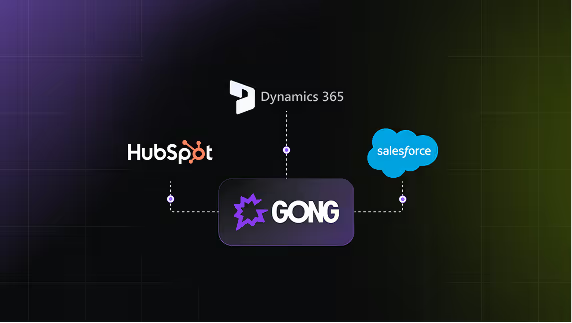
Gong's CRM integration imports accounts, contacts, opportunities, and selected fields from one connected CRM, then exports Gong activities back as CRM objects. Gong supports Salesforce, HubSpot, and Microsoft Dynamics natively, plus a CRM API that imports data only. Gong can only be connected to one CRM at a time. Calls usually land as tasks in Salesforce or meetings in HubSpot [1].
The model Gong was built on
📥 Import rich, export thin
Gong's help center describes two directions. CRM data flows in to give conversations context, so a call knows its account, deal, and stage. Gong activities flow out as objects, such as a task in Salesforce or a meeting in HubSpot [1].
Gong also says imported CRM fields "can be edited in Gong, and instantly synced back to the CRM" [1]. That is two-way for fields a human edits. It is not the same as Gong filling those fields from what the buyer said.
⚠️ The one-CRM rule
Gong states plainly that it "can only be connected to one CRM at a time" [1]. Other systems can use the CRM API, which imports data only and does not support Engage. If your company runs Salesforce in one region and HubSpot in another after an acquisition, Gong sees one of them.
What this cost revenue teams
❌ The log is not the record
This design made sense in the era it came from. A recorder's job was to capture the call and file it in the right place. The rep's job was to read the call and update the deal.
The cost of that split lands on the rep. Salesforce's State of Sales research found reps spend just 28% of their week actually selling [7]. Much of the rest is deal admin and data entry, and an activity log adds to the reading, not the typing.
"limitations of getting data back into salesforce" G2 reviewer, Gong - G2 Verified Review, May 21, 2026
What changed with generative AI
✅ From filing calls to filling fields
Language models can now read a full deal history and answer structured questions about it. Who is the economic buyer? What is the decision criterion? That turns "log the call" into "update the opportunity," which is the job reps actually skip.
Oliv AI was built on that shift. Oliv AI keeps a context graph, a continuously updated map of every account, opportunity, and conversation, and its CRM Agent writes answers into the fields your process tracks. We treat the CRM as the system of record, so Oliv AI sits on top of it rather than beside it.
⭐ What a user sees
"Once the sales call is done, it goes ahead and updates my CRM. It's like an all-in-one revenue agent which makes my life easier." G2 reviewer, Oliv AI G2 - Verified Review, July 2, 2026
Oliv AI's read is that most buyers ask the wrong question. "Does it integrate with my CRM?" gets a yes from every vendor. The better question is which fields change after a call without a human touching them.
Q2. What does Gong sync with Salesforce, and where does it stop? [toc=2. Gong and Salesforce]
Gong imports Salesforce accounts, opportunities, leads, contacts, users, and selected standard and custom fields. Gong exports calls to a custom Gong Conversation object, with optional per-call tasks. Multi-select, address, location, and encrypted fields cannot be imported. Each exported call makes one API call that creates roughly 25 child records [2].
What flows from Salesforce into Gong
📥 Objects and fields
According to Gong's Salesforce FAQ [2], the integration imports:
Accounts, opportunities, leads, and contacts, with the standard and custom fields an admin selects in the Data import tab
Users, including name, email, title, and manager hierarchy, set in team member provisioning
Simple reference fields, such as AccountId on Contact, which are selected automatically
Opportunities are imported only for users who have data capture enabled. Gong also recommends importing "up to 50 fields per object to avoid affecting performance" [9].
❌ Fields Gong cannot import
Gong's documentation lists four field types it cannot import: multi-select, address, location, and encrypted fields [2]. Complex references that point to data tables are ignored.
This matters for qualification. Many teams store MEDDPICC (a qualification framework: Metrics, Economic Buyer, Decision Criteria, Decision Process, Paper Process, Identify Pain, Champion, Competition) answers as multi-select picklists. Those values never reach Gong. Before you connect, list every qualification field and check its type. A multi-select field you rely on for forecast reviews will stay invisible to Gong's search and filters.
What flows from Gong back into Salesforce
📤 The managed package
Gong for Salesforce is a managed package, meaning an installable app with its own objects [2]. It sets up:
The Gong Conversation object and related custom objects for call data
A canvas app that shows highlights and transcripts inside Salesforce
A connected app for API access
Optional tasks that log each call under the relevant contacts
Smart Trackers (Gong's keyword and concept detectors) export with call data unless an admin turns that off [2]. Emails may also export as tasks.
⚠️ API and storage load
Each call generates one API call that creates roughly 25 child records [2]. Historical exports or tracker changes can cause API spikes. Only one Salesforce instance, production or sandbox, can be connected at a time.
Deleting a call in Gong also deletes its Salesforce meeting record [2]. That includes deletions from your retention policy, which surprises teams who treated Salesforce as the archive.
"I cannot download all the data myself unless we upgrade the plan, which isn't ideal and results in me not fully utilizing Gong." G2 reviewer, Gong - G2 Verified Review, October 3, 2025
The simpler path
✅ Fields, not just objects
Gong's Salesforce export is strong at storing calls next to records. It does not fill your qualification fields from the conversation. Oliv AI's CRM Agent updates the opportunity fields you choose after each call, so the record carries the answer, not a link to it.
"It helps in automating and updating our CRM after calls, provides a clear deal summary, and sends follow-up emails." G2 reviewer, Oliv AI G2 - Verified Review, June 26, 2026
Q3. How does Gong's HubSpot integration work, and why do calls go missing? [toc=3. Gong and HubSpot]
Gong imports HubSpot companies, deals, and contacts, plus the built-in and custom fields an admin selects. Gong exports external calls tied to at least one contact, company, or deal as HubSpot meetings, with attendees, a recording link, and action items. Calls go missing mainly because of association rules and the account a contact belongs to [3][4].
What flows from HubSpot into Gong
📥 Objects Gong reads
Gong's HubSpot FAQ lists the objects Gong reads: contacts, companies, deals, pipelines, owners, and engagements [3]. Admins choose which built-in and custom fields to import. Connecting requires read and write permission on the contacts scope.
Field visibility follows HubSpot permissions. If users cannot see a selected field in Gong, they need read access to it in HubSpot, granted by your HubSpot admin [4].
⚠️ The deal rule that drops data
Deals linked to contacts but not to companies are not imported [3]. That one rule explains many "where is my deal?" tickets. A rep who attaches a contact straight to a deal, skipping the company, creates a deal Gong cannot see. Run a HubSpot report on deals with no associated company before launch. Fixing those links first saves weeks of missing-call tickets later.
What flows from Gong back into HubSpot
📤 Calls as meetings
Gong exports every external call associated with at least one contact, company, or deal [3]. Each HubSpot meeting record includes:
Attendees from the call
A link to the Gong recording
Action items pulled from the transcript
API usage is one call per recorded call. Initial setup can cause a temporary spike while historical calls sync [3].
❌ Four reasons calls go missing
Gong's own documentation points to four causes [3][4]:
Contact linked to a deal, not an account. Gong uses the contact's account to attach calls to deals, so the call never reaches the deal.
Calls processed before export was set up. Only newly processed calls are pushed.
One-time export. Gong exports each recorded call to HubSpot once. Later edits do not resend it.
Deletions. Deleting a call in Gong, manually or by retention policy, deletes the HubSpot meeting record.
Duplicates can still appear when calendar meetings also sync through another app. Gong suggests exporting calls as calls or notes to avoid this [3].
"the fact that if you stop working with thew tool you lose the data" G2 reviewer, Gong - G2 Verified Review, March 19, 2026
The simpler path
✅ Deal properties, filled
A meeting record on a timeline helps a human read history. It does not move a HubSpot deal property. Oliv AI's CRM Agent writes call outcomes into the deal properties your team reports on, and Oliv AI resolves which deal a call belongs to from context rather than one association rule.
"I appreciate that it integrates well with platforms like HubSpot and Salesforce, allowing us to capture insights from calls and maintain a complete view of customer interactions." G2 reviewer, Oliv AI G2 - Verified Review, June 23, 2026
Q4. How does Gong integrate with Microsoft Dynamics 365? [toc=4. Gong and Dynamics 365]
Gong connects to Microsoft Dynamics 365 from Admin Center, Settings, CRM, using a Dynamics user with the required permissions and Microsoft sign-in. Gong imports accounts, contacts, leads, and opportunities and exports Gong activities. On May 14, 2025, Gong announced two-way sync with Dynamics 365 Sales for conversations, emails, to-dos, and notes [5][6].
Setup and permissions
🔐 What the connecting user needs
Gong's Dynamics 365 setup guide covers the connection steps [5]:
Open Admin Center, Settings, CRM, then CRM Settings in Gong.
Use a user with the required Dynamics 365 permissions, plus Global Admin rights in Microsoft.
Set permissions for the Account, Opportunity, and Contact objects.
Enter your instance URL and approve the connection through Microsoft login.
If the person setting it up is not a Global Admin, Gong offers an "Ask your admin" option that emails the request. Gong also recommends a dedicated integration user, since deactivating a regular user's account disconnects the integration [1].
📥 What Gong imports
Gong imports contacts, leads, opportunities, and accounts, then associates them with calls and emails [5]. Deal stage and deal value fields are linked once setup is complete. The one-CRM rule still applies [1].
For Microsoft-heavy companies, that rule bites harder. Teams that moved a business unit onto Dynamics while another stays on Salesforce must pick one for Gong. The other can only feed Gong through the import-only CRM API.
The 2025 Microsoft announcement
📤 Two-way sync, scoped
Gong's May 14, 2025 announcement promised "two-way data synchronization between Gong and Dynamics 365 Sales" [6]. Gong described it this way: "every customer conversation, email, To-do, and note is automatically synced from Gong into Dynamics 365 Sales."
Read that list closely. Conversations, emails, to-dos, and notes are activity records. The announcement does not say Gong fills Dynamics opportunity fields, such as qualification answers or next steps, from the conversation.
⚠️ Copilot reads, it does not update
The same announcement covered a Microsoft Graph Connector that brings Gong data into Microsoft 365 Copilot, plus Copilot Studio agents, both marked "coming soon" at the time [6]. Gong Anywhere for Microsoft Outlook was announced as generally available.
Copilot answers questions about your data. Answering is not writing. A manager who asks Copilot about a deal still gets a chat reply, while the Dynamics fields stay as the rep left them.
"Real Time integrations can be time consuming" G2 reviewer, Gong - G2 Verified Review, April 21, 2026
The simpler path
✅ Test field writes in your pilot
Dynamics teams should ask one question in any evaluation: which opportunity fields change after a call, with no rep input? Oliv AI is built around that test, with the CRM Agent updating systems of record and Oliv AI's forward deployed engineers mapping it to your schema.
"It doesn't just record meetings; it automatically captures key insights, updates systems of record, identifies next steps, and helps keep teams aligned." G2 reviewer, Oliv AI G2 - Verified Review, June 23, 2026
Q5. How do Gong's Salesforce, HubSpot and Dynamics 365 integrations compare side by side? [toc=5. Three CRMs Compared]
All three CRMs share one import model; the export side is where they differ.
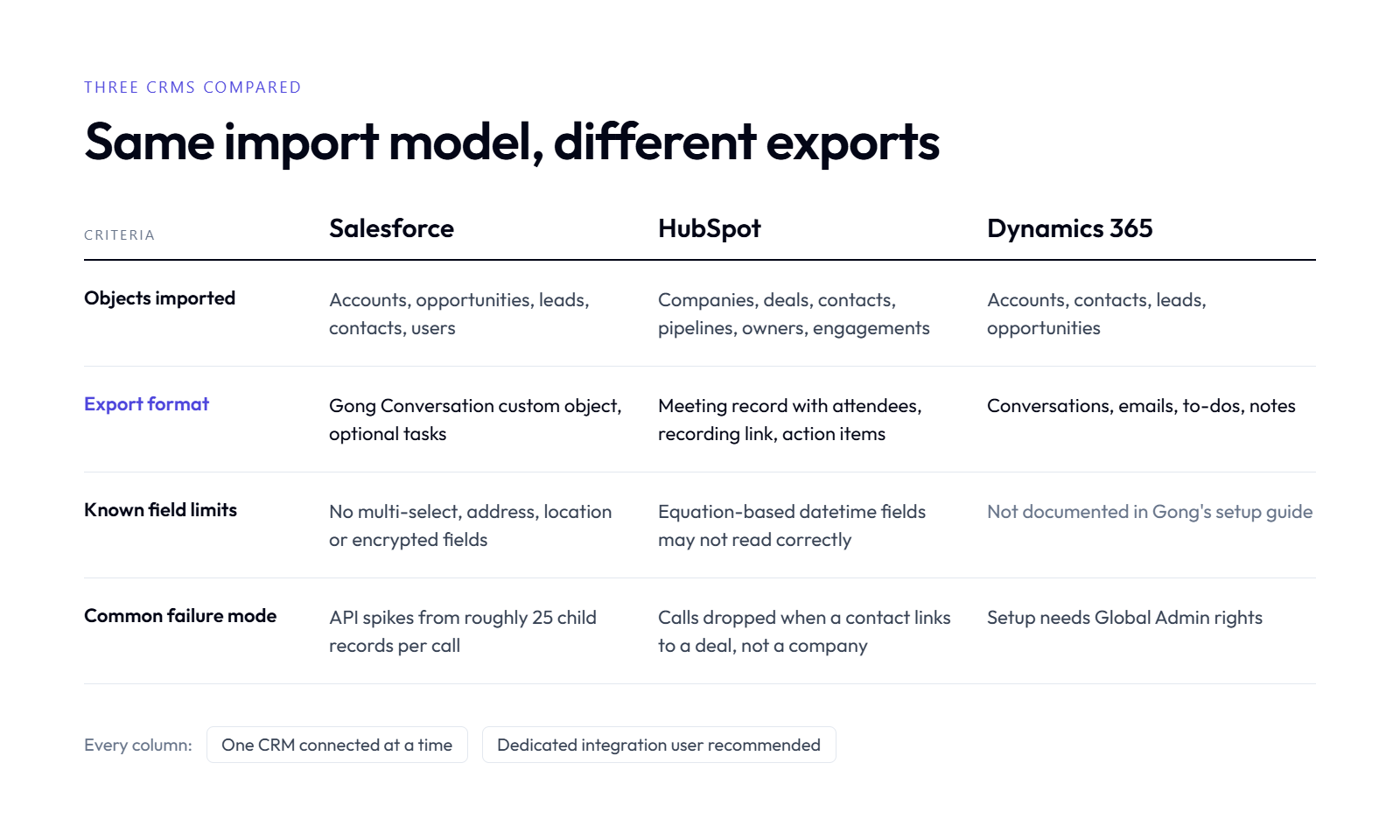
Gong's three native CRM integrations share one model: import CRM records and selected fields, export Gong activities. Salesforce gets the deepest export, a managed package with a custom Gong Conversation object. HubSpot receives calls as meeting records. Dynamics 365 receives conversations, emails, to-dos, and notes through the two-way sync Gong announced in May 2025 [1][2][3][6].
The comparison table
📊 Criteria by CRM
Gong CRM integrations compared: Salesforce, HubSpot, and Dynamics 365
Every column shares the same two rules. Only one CRM connects at a time, and a dedicated integration user is recommended [1].
How to read it
🔍 Depth of export, not breadth of import
The import side looks similar across all three. The export side is where they differ. Salesforce teams get the most structure, because Gong writes into its own custom objects that you can report on with effort.
HubSpot and Dynamics teams get activity records. Those are useful for reading history. They are harder to roll up into a pipeline report or a forecast view.
⚠️ What none of the three columns show
No column says "fills your qualification fields from the call." That is not an oversight in the table. Gong's documentation for each CRM describes logging and association, not field population from conversation content [1][2][3][5].
Every column also shows one CRM. If your company runs HubSpot for a product-led motion and Salesforce for enterprise, Gong's rule forces a choice. The other CRM can only use the import-only CRM API [1].
"Being able to sequence our steps, along with integration with Nooks/Salesforce." G2 reviewer, Gong - G2 Verified Review, May 21, 2026
Choosing your test criteria
✅ Three questions per CRM
Use the table to set pilot criteria before you sign anything:
Which of our fields can it read? Check field types against the limits column.
Where does a call land? A custom object, a meeting, or a note on a timeline.
What breaks association? Find the failure mode for your CRM and count how many records already have it.
Oliv AI connects to 70+ apps, including HubSpot and Salesforce, and Oliv AI's CRM Agent writes call outcomes into the fields your team already reports on. The comparison that matters for us is fields updated per call, not objects created per call.
"Oliv.ai integrates seamlessly with HubSpot, Zoom, and Google Meet, making my workflow smoother." G2 reviewer, Oliv AI G2 - Verified Review, June 17, 2026
Q6. Why does Gong's activity logging still leave reps updating CRM fields by hand? [toc=6. Logging vs Field Updates]
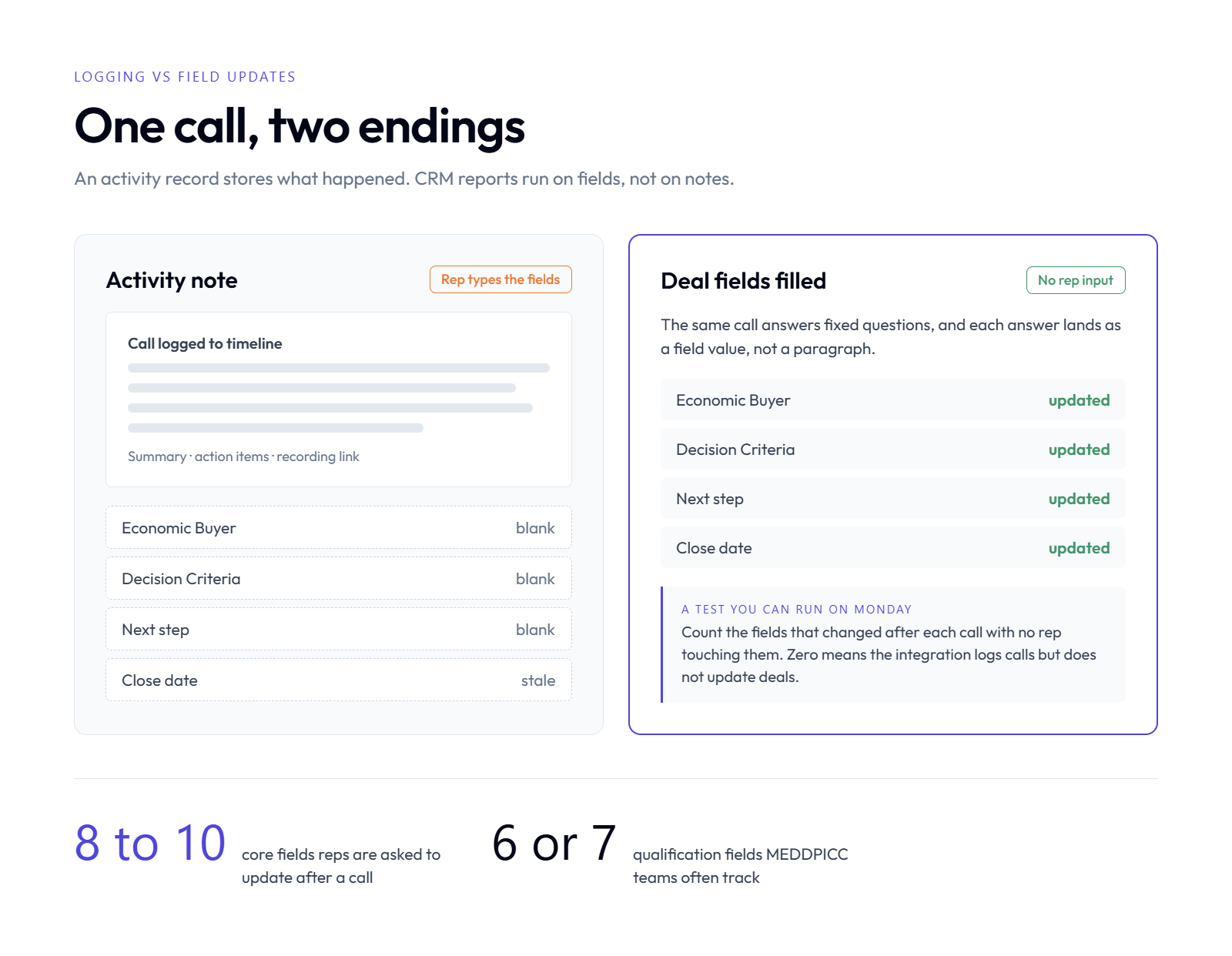
An activity note records the call, but reps still type the 8 to 10 fields reports run on.
Gong's CRM integrations export calls as activity records: tasks, meetings, notes, or custom conversation objects. An activity record stores what happened on a call. It does not fill structured deal fields such as Economic Buyer, Decision Criteria, next step, or close date. Reps still type those fields, and CRM reports run on fields, not on notes [1][2][3].
How it worked before
📝 The Friday afternoon read-through
Picture a sales manager on a Friday with 30 open deals. Each deal has a timeline of Gong calls, summaries, and action items. The forecast review on Monday needs one thing: is Decision Criteria covered on each deal, yes or no?
That answer lives in the notes, not in a field. So the manager reads 30 timelines, or asks 8 reps in a meeting. A revenue operations lead on one of Oliv AI's discovery calls put it bluntly: "if it is logging everything as activities, it's very difficult for me to create a report."
❌ What the activity model costs
Most companies want reps to update 8 to 10 core fields after a call. Teams running MEDDPICC often track 6 or 7 qualification fields, and up to 10 to 15 custom deal properties in total. When the integration logs a note instead, a rep copies answers into those fields by hand.
The rep is busy, so the fields go stale. Gartner research found poor data quality costs organizations at least $12.9 million a year on average [8]. A stale close date is a small version of that cost, repeated across every deal in the forecast.
"The requirement to download snippets one by one using copy and paste is particularly annoying." G2 reviewer, Gong - G2 Verified Review, October 3, 2025
What changed
✅ Models that answer structured questions
The shift is simple to describe. A language model can now read a full deal history and answer a fixed question, such as "who signs the contract?" The answer becomes a field value, not a paragraph in a note.
Oliv AI found that revenue teams ask roughly the same 100 questions, and 70 to 80% of questions asked about an account were identical across companies. That pattern makes field-level answers practical. The questions are universal, and the context is what changes.
What Oliv AI does about it
⭐ The CRM Agent fills the fields
Oliv AI runs 100+ fine-tuned small language models, each trained on one revenue question, over the full history of calls and emails. Oliv AI's CRM Agent then writes those answers into the Salesforce or HubSpot fields your process uses, including custom methodology fields.
We keep the CRM as the record your BI tools read. The Deal Driver Agent watches each deal and flags the ones at risk, and the Forecast Agent prepares weekly and monthly forecasts from the same fields.
"It's incredibly helpful with our custom sales methodologies like MEDIC-BAND, as it helps me fill all of them out." G2 reviewer, Oliv AI G2 - Verified Review, June 15, 2026
🔍 A test you can run on Monday
Pick five deals with calls this week. Count the fields that changed after each call without a rep touching them. If the answer is zero, your integration logs calls but does not update deals.
"Oliv AI eliminates manual note-taking and makes it much easier to capture meaningful sales insights from every meeting." G2 reviewer, Oliv AI G2 - Verified Review, July 8, 2026
Q7. Why do Gong calls land on the wrong account or opportunity? [toc=7. Wrong Record Mapping]
Gong maps calls to CRM records with rules: email domains, contact-to-account links, and deal ownership. When no deal owner joins a call, up to 5 deals are associated. Rule-based mapping breaks on messy CRMs with duplicate accounts, several open opportunities in one account, or changed email domains after an acquisition [1][3].
How mapping worked
🔗 The domain lookup
The classic approach is a static lookup. Take the attendee's email domain, find the account, find the open opportunity, attach the call. Gong's documentation follows this pattern, and it adds rules for edge cases, such as associating up to 5 deals when no deal owner joined [1].
HubSpot shows how rigid the rules are. Gong uses a contact's company to attach calls to deals. A contact linked straight to a deal, with no company, means the call never reaches that deal [4].
❌ Where rules break
Real CRMs are not clean. Here is a pattern I have seen many times. A seller creates an account for a large customer in 2021. In 2023, another seller creates a second account for a different division, without noticing the first.
Now a meeting happens with that customer. The rules see two accounts and three open opportunities, then guess. The call lands on the wrong deal, or on no deal, and RevOps spends hours untangling records.
"there's often a problem with data duplication, where a single contact gets duplicated multiple times or a single company appears under different names in the CRM." G2 reviewer, Agentforce Sales (Salesforce) - G2 Verified Review, July 27, 2026
What changed
🧠 Reasoning instead of lookup
A good seller does not match strings. They look at every open account, recall the last conversation, and work out which deal a call belongs to. AI can now do the same reasoning across the full relationship history.
This matters more as agents start acting on CRM data. An agent that trusts a misfiled call acts on the wrong story with full confidence, and each mistake compounds.
"Sensitivity to "dirty" data: If there are duplicates or chaos in the fields in the CRM, the agent gets confused and makes mistakes." G2 reviewer, Salesforce Agentforce - G2 Verified Review, June 26, 2026
What Oliv AI does about it
⭐ The Object Graph
Oliv AI's Object Graph replaces the domain lookup with AI entity resolution. It weighs every open account and opportunity, relationship history, conversation context, and live M&A news before placing an activity. It also decides when a call is really a new opportunity.
Building this took Oliv AI about 18 months of core infrastructure work. We built it because our customers kept showing us five open opportunities across three accounts. The messier your data, the more this matters, and Oliv AI works with the CRM as it is, with no cleanup sprint first.
⚠️ Where I am still careful
Oliv AI's resolution is strong on duplicates and multi-deal accounts. I would still ask any vendor, us included, to run your 20 messiest accounts in a pilot. Association accuracy on your own data is the only number that counts.
Q8. What does a Gong CRM integration really cost beyond the license? [toc=8. Hidden Integration Costs]
A Gong CRM integration's basic OAuth connection carries no separate fee. Total cost grows through implementation services, custom field mapping, extra Salesforce API capacity, and internal IT hours. Vendr's Gong pricing data reports implementation services of $10,000 to $25,000, and 73% of organizations meeting unexpected expenses during CRM integration [10].
How it used to be bought
💰 License first, integration later
Most teams buy Gong on seat price. The CRM connection looks free in the demo, because the OAuth step takes minutes. The real work starts after signature: field mapping, permissions, association rules, and API planning.
Vendr's data shows where the money goes [10]. Platform fees range from $5,000 to $50,000 a year. Implementation services run $10,000 to $25,000, and ongoing maintenance adds 10 to 15% of annual cost.
💸 The line items nobody quotes
The same Vendr data lists costs that appear later [10]:
Custom mapping: going beyond standard fields or building custom objects costs $2,000 to $5,000, and multi-instance setups $5,000 to $15,000.
API capacity: extra Salesforce API packages cost $300 to $800 a month when sync volume exceeds limits.
Internal hours: 40 to 80 hours of internal IT time on extended rollouts.
Expiring services: migration services must be used within 60 days, or they expire with no refund.
I heard this firsthand from a 20-person team evaluating Gong. Their quote was $50,000, with $10,000 of it for a third-party implementation vendor. The implementation cycle they were told to expect was three to six months.
"It was very hard to find a person that could do the proper integration and onboarding and set up the initial workflows." G2 reviewer, HubSpot Marketing Hub - G2 Verified Review, March 3, 2026
What changed
⏰ Coding agents changed the cost of software
The economics of building revenue apps moved fast. What took a decade of R&D can now be rebuilt at a fraction of the cost, because coding agents made engineering teams far more productive. That pushes app prices down and moves value to the work agents do on top.
It also changes what an integration should cost you. If the connection still needs a partner, a 60-day services window, and API add-ons, the app is absorbing budget that could fund agents. Ask every vendor for the full first-year number, services and add-ons included, before you compare seat prices.
What Oliv AI does about it
✅ No third-party implementation
Oliv AI implements with its own forward deployed GTM engineers, directly on your stack, with no third-party implementation partner. Oliv AI's published timeline is live by week 2 and measurable results by week 4.
We price app surfaces at around 30% of traditional app price points, so the budget moves to agents. Oliv AI can also sit on top of Gong during a contract, then take over at renewal if the numbers hold.
"It's more affordable compared to other options we previously used." G2 reviewer, Oliv AI G2 - Verified Review, June 23, 2026
Q9. How should RevOps set up and test a CRM integration before trusting it? [toc=9. Setup and Pilot Checklist]
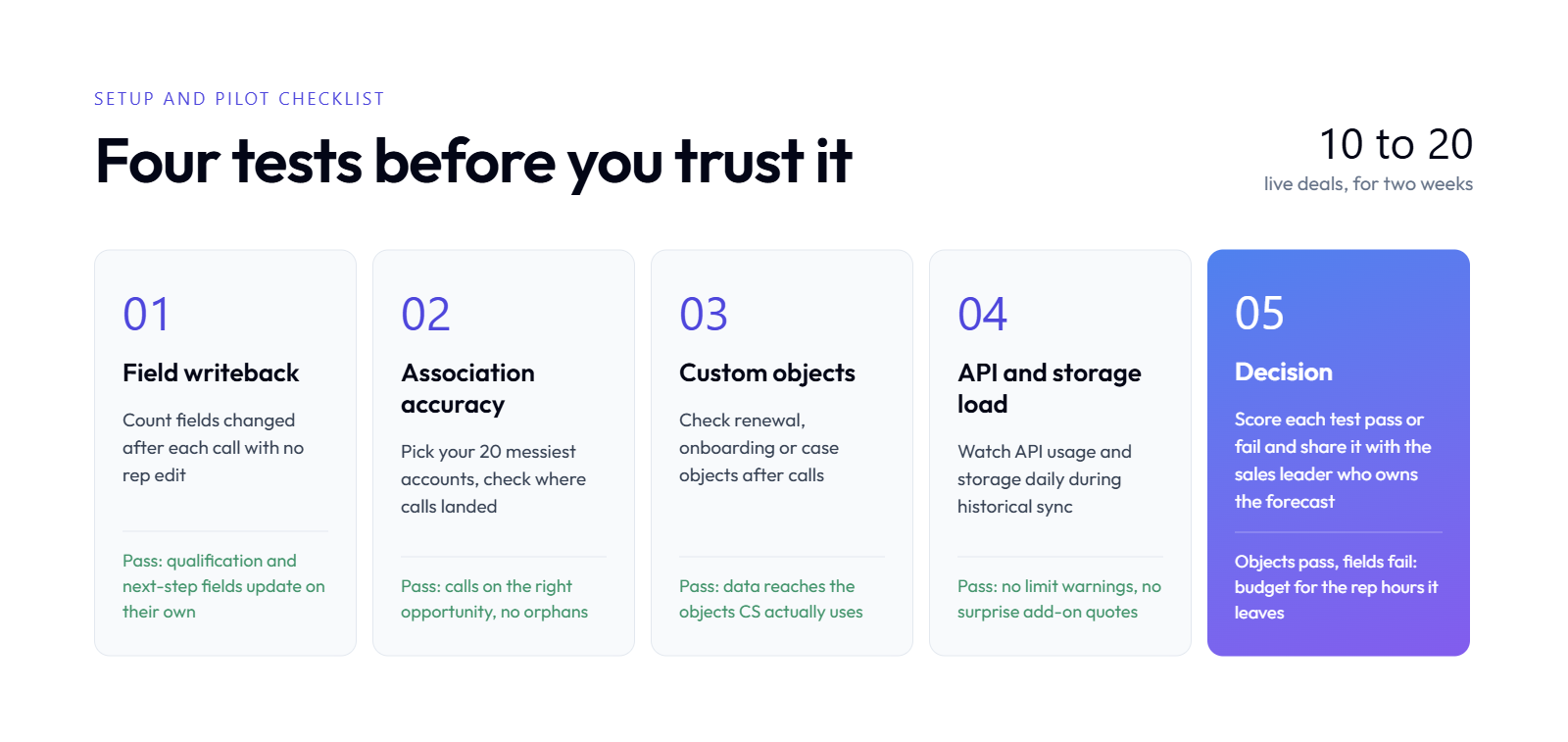
Test four things on real deals for two weeks before trusting a CRM integration.
A CRM integration needs three setup prerequisites: a dedicated integration user, an OAuth connection approved by a CRM admin, and object and field permissions for that user. After setup, a pilot should test four things on real deals: field-level writeback, association accuracy, custom object support, and API and storage load. Gong documents each prerequisite for Salesforce, HubSpot, and Dynamics 365 [1][2][3][5].
Setup prerequisites
🔐 Before you click connect
Gong's documentation lists the same core steps across all three CRMs [1][2][3][5]:
Create a dedicated integration user. If a regular user's account is deactivated, the integration disconnects [1].
Connect through OAuth. Gong stores only the OAuth token, not credentials [2].
Grant object permissions. Salesforce needs read access to Account, Opportunity, Contact, Lead, Opportunity Stage, Opportunity History, and Publisher, plus write access to Task and the Conversation object [2]. HubSpot needs read and write on the contacts scope [3]. Dynamics 365 needs Account, Opportunity, and Contact permissions and a Global Admin approval [5].
Choose fields deliberately. Gong recommends up to 50 fields per object in Salesforce [9].
Pick one CRM and one instance. Gong connects to one CRM at a time, and one Salesforce instance, production or sandbox [1][2].
⚠️ Clean the two records that break sync
Fix two things before launch. In HubSpot, find deals linked to contacts with no company, since Gong will not import them [3]. In every CRM, list multi-select and encrypted fields you rely on, since Salesforce versions of those cannot be imported [2].
The pilot checklist
✅ Four tests on real deals
Run each test on 10 to 20 live deals for two weeks:
CRM integration pilot checklist
Test
How to run it
Pass signal
Field writeback
Count fields changed after each call with no rep edit
Qualification and next-step fields update on their own
Association accuracy
Pick your 20 messiest accounts, check where calls landed
Calls on the right opportunity, no orphans
Custom objects
Check renewal, onboarding, or case objects after calls
Data reaches the objects CS actually uses
API and storage load
Watch API usage and storage daily during historical sync
No limit warnings, no surprise add-on quotes
Gong notes that historical exports and tracker changes can cause API spikes, so time your test window around them [2][3].
🔍 Write the result down
Score each test pass or fail, then share it with the sales leader who owns the forecast. A pass on objects and a fail on fields means you bought a recorder with good filing. That can be fine, as long as you budget for the rep hours it leaves.
"It integrates well with other products, and the migration process is straightforward." G2 reviewer, HubSpot Sales Hub - G2 Verified Review, May 18, 2026
The simpler path
⭐ Setup run for you
Oliv AI runs this checklist with you, using its own forward deployed GTM engineers rather than a third-party partner. Oliv AI's published timeline is connected in week 1, live on real deals in week 2, and measurable ROI by week 4.
"The initial setup was really easy because the team provided FDE engineers who set everything up, and within less than a week, we were good to go." G2 reviewer, Oliv AI G2 - Verified Review, June 17, 2026
Q10. How does Oliv write structured data back into your CRM instead of activity notes? [toc=10. Oliv CRM Automation]
Oliv AI is an AI-native revenue intelligence and revenue orchestration platform that runs on top of Salesforce or HubSpot. Oliv AI builds a context graph of every account, opportunity, and conversation, resolves each activity to the right record, and uses agents such as the CRM Agent to write structured answers into CRM fields. The CRM stays the system of record [1].
How it was
📝 The recorder era
For a decade, revenue intelligence meant recording calls and filing them. Gong did that well: rich imports for context, activity records for export. The rep then typed the fields.
That left three gaps covered above. Fields stay blank, calls land on the wrong record, and costs grow after signature. Off-call channels add a fourth, since Gong does not importshared Slack channels or Telegram threads.
❌ What that cost
Each gap lands on a person. The rep loses selling time to data entry. The manager reads timelines before a forecast call, and RevOps untangles duplicates. The CSM re-listens to hours of discovery calls after handoff, because the case object never got the customer's goals.
"The only downside is that the platform can be a bit glitchy at times, but the support team is always quick to address and resolve any bugs." G2 reviewer, Oliv AI G2 - Verified Review, July 2, 2026
I include that review on purpose. Oliv AI is a younger product than Gong, and users notice rough edges. What they rarely report is a blank CRM field after a call.
What changed
🧠 Synthesis before the question
Agents now do work, not just surface it. For that work to be safe, an agent needs a living map of the business before anyone asks it anything. Oliv AI calls this synthesis, not retrieval: the understanding is built in advance, then kept current.
What Oliv AI does about it
✅ Four layers that reach the CRM
Oliv AI connects the gaps in order:
Context Capture collects five modalities: emails and virtual meetings, mobile calls, in-person meetings, chat conversations, and shared workspaces such as Slack channels.
Object Graph resolves every activity to the right account and opportunity with AI entity resolution, not a domain lookup.
Intent Graph runs 100+ fine-tuned small language models, each answering one revenue question over the full deal history.
Agents act on it. The CRM Agent updates fields, the Deal Driver Agent flags risk, and the Forecast Agent prepares forecasts.
Olivia, Oliv AI's Chief of AI Staff, coordinates these agents and asks before acting.
🔐 Trust and fit
Oliv AI is SOC 2 Type II certified and GDPR and CCPA compliant, with AES-256 at rest and TLS 1.2+ in transit. Oliv AI has a full open export policy, so your data is never locked in. Revenue teams at Sprinto and Triple Whale use Oliv AI daily.
We are not the right fit for everyone. B2C support teams and buyers who only want call recording will be better served elsewhere.
"I love that it automatically updates CRM records after calls and meetings, keeping the data clean and accurate without manual effort." G2 reviewer, Oliv AI G2 - Verified Review, June 23, 2026
⭐ Where this goes next
What I think shifts over the next two years is simple. Software you log into becomes agents that work for you, and the CRM becomes the place they write. If your integration still ends in an activity note, tell us which fields you wish filled themselves. That list is usually where our first conversation starts.
Vendr, Gong pricing data (buyer-side pricing and contract dataset), as reviewed by Oliv AI, 2025.
FAQ's
Does Gong sync two-way with Salesforce?
Partly. Gong imports Salesforce accounts, opportunities, leads, contacts, users, and the fields an admin selects. It exports calls back into a custom Gong Conversation object, with optional tasks under each contact. Gong also lets people edit imported CRM fields inside Gong and sync those edits back.
What it does not do is fill your deal fields from the conversation itself. A few points we see buyers miss:
Human edits sync back. A rep can change a field in Gong and it updates Salesforce.
Call content stays in objects. Summaries, trackers, and transcripts live in Gong's custom objects, not in your qualification fields.
Some fields never arrive. Multi-select, address, location, and encrypted fields cannot be imported.
So the honest answer is two-way for records and edits, one-way for insight. If your forecast depends on fields like Economic Buyer or next step, someone still types them. Oliv AI handles that last step: its CRM Agent writes call outcomes into the Salesforce fields your team reports on. Our guide to Gong's Salesforce integrations goes deeper into the object model and the API load each call creates.
Can Gong connect to two CRMs at the same time?
No. Gong's own documentation states that Gong can only be connected to one CRM at a time. That rule covers Salesforce, HubSpot, and Microsoft Dynamics 365 alike. For Salesforce, it also means one instance, either production or sandbox.
Other systems can feed Gong through its CRM API, but that route has limits:
It imports data only and does not export calls back.
It does not support Gong Engage.
It imports data only for Gong's core product and Forecast.
We see this most after acquisitions. One business unit runs HubSpot for a product-led motion, while enterprise sales runs Salesforce. Gong forces a choice, and the second CRM becomes a read-only source at best. Reps on that side lose the call export entirely.
If you are in that position, map which CRM holds your forecast before you connect anything. That is the one Gong should see. Oliv AI connects to 70+ apps and treats each CRM as a system of record for the teams that use it. We explain how that works across CRM, Slack, and email in our piece on revenue intelligence integrations for RevOps.
Why are my Gong calls not showing up in HubSpot?
Most missing calls come down to association rules, not a broken connection. Gong's HubSpot documentation points to a handful of causes:
Contact linked to a deal, not a company. Gong uses the contact's company to attach calls to deals, so the call never reaches that deal.
Deals without companies. Deals linked to contacts but not to companies are not imported at all.
Calls processed before export was set up. Only newly processed calls are pushed.
One-time export. Each recorded call is exported once, so later edits do not resend it.
Deletions. Deleting a call in Gong, including by retention policy, deletes the HubSpot meeting record.
Our first fix is simple. Run a HubSpot report on deals with no associated company, then repair those links before launch. It saves weeks of tickets.
Duplicates are the opposite problem. They appear when calendar meetings also sync through another app, and Gong suggests exporting calls as calls or notes to avoid them. Oliv AI resolves which deal a call belongs to from conversation context instead of a single association rule. Read more in our breakdown of Gong's HubSpot integration.
Does Gong integrate with Microsoft Dynamics 365?
Yes. Gong offers a native Microsoft Dynamics 365 integration, set up from Admin Center, Settings, CRM. The connecting user needs Dynamics 365 permissions, Global Admin rights in Microsoft, and access to the Account, Opportunity, and Contact objects.
Here is what the integration covers:
Imports: accounts, contacts, leads, and opportunities, associated with calls and emails.
Two-way sync: announced on May 14, 2025, for conversations, emails, to-dos, and notes into Dynamics 365 Sales.
Copilot: a Graph Connector that brings Gong data into Microsoft 365 Copilot, announced as coming soon at the time.
Read that sync list closely. Conversations, emails, to-dos, and notes are activity records. The announcement does not say Gong fills opportunity fields, such as qualification answers or next steps. Copilot answers questions about your data, but answering is not writing.
We suggest one test for Dynamics teams: count which opportunity fields change after a call with no rep input. Oliv AI is built around that test, with its CRM Agent updating systems of record. Our article on the Gong and Microsoft Dynamics 365 integration covers setup in more depth.
Why do reps still update CRM fields by hand after connecting Gong?
Because Gong's CRM integrations export calls as activity records: tasks, meetings, notes, or custom conversation objects. An activity record stores what happened. It does not fill structured fields such as Economic Buyer, Decision Criteria, next step, or close date.
That gap has real costs:
Reporting breaks. CRM reports run on fields, not on notes, so managers read timelines before forecast calls.
Fields go stale. Most teams want 8 to 10 core fields updated per call, and MEDDPICC teams often track more.
Data quality suffers. Gartner research found poor data quality costs organizations at least $12.9 million a year on average.
The shift that fixes this is recent. Language models can now read a full deal history and answer fixed questions, so the answer becomes a field value instead of a paragraph.
Oliv AI runs 100+ fine-tuned small language models, each answering one revenue question over the full history of calls and emails. Oliv AI's CRM Agent then writes those answers into the fields your process uses, including custom methodology fields. We explain the scoring side in our guide to auto-scoring MEDDIC, BANT, and SPICED from calls.
What does a Gong CRM integration cost beyond the license?
The basic OAuth connection carries no separate fee. The total grows after signature, through work the demo does not show. Vendr's Gong pricing data lists the main line items:
Implementation services: $10,000 to $25,000.
Platform fees: $5,000 to $50,000 a year.
Custom mapping: $2,000 to $5,000 beyond standard fields, and $5,000 to $15,000 for multi-instance setups.
API capacity: $300 to $800 a month for extra Salesforce API packages.
Internal time: 40 to 80 hours of IT effort on extended rollouts.
The same data shows 73% of organizations meet unexpected expenses during CRM integration. Migration services must also be used within 60 days or they expire with no refund.
We heard a version of this directly from a 20-person team. Their quote was $50,000, with $10,000 for a third-party implementation vendor.
Oliv AI implements with its own forward deployed GTM engineers, with no third-party partner, and publishes a timeline of live by week 2. Before comparing seat prices, ask every vendor for the full first-year number. Our Gong pricing breakdown walks through the license side in detail.
How should RevOps test a CRM integration before trusting it?
Start with setup, then test on real deals. Gong's documentation lists the same prerequisites for every CRM: a dedicated integration user, an OAuth connection, and object and field permissions for that user.
Then run four tests on 10 to 20 live deals for two weeks:
Field writeback: count fields that changed after each call with no rep edit.
Association accuracy: pick your 20 messiest accounts and check where calls landed.
Custom objects: confirm data reaches renewal, onboarding, or case objects that CS uses.
API and storage load: watch usage daily during historical sync, since exports can cause spikes.
Score each test pass or fail, then share the result with whoever owns the forecast. A pass on objects and a fail on fields means you bought good filing, not automation. That can be fine, if you budget for the rep hours it leaves.
We run this same checklist with every team that pilots Oliv AI. Oliv AI's published timeline is connected in week 1, live on real deals in week 2, and measurable ROI by week 4. Our RevOps implementation guide explains what each week involves.
Enjoyed the read? Join our founder for a quick 7-minute chat — no pitch, just a real conversation on how we’re rethinking RevOps with AI.
Still got questions?
Come discuss this article with me.
Hi, I'm Ishan, Founder and CEO of Oliv.
I'm always up for a conversation about revenue intelligence, AI agents, or what's actually working (and what's not) across revenue teams.
I'd love to hear your perspective.
Thank you! Your submission has been received!
Oops! Something went wrong while submitting the form.