Gainsight Features 2026: Complete Guide to Health Scores, Playbooks & Hidden Costs
Written by
Ishan Chhabra
Last Updated :
February 6, 2026
Skim in :
12
mins
In this article
Revenue teams love Oliv
Here’s why:
All your deal data unified (from 30+ tools and tabs).
Insights are delivered to you directly, no digging.
AI agents automate tasks for you.
Thank you! Your submission has been received!
Oops! Something went wrong while submitting the form.
Meet Oliv’s AI Agents
Hi! I’m, Deal Driver
I track deals, flag risks, send weekly pipeline updates and give sales managers full visibility into deal progress
Hi! I’m, CRM Manager
I maintain CRM hygiene by updating core, custom and qualification fields all without your team lifting a finger
Hi! I’m, Forecaster
I build accurate forecasts based on real deal movement and tell you which deals to pull in to hit your number
Hi! I’m, Coach
I believe performance fuels revenue. I spot skill gaps, score calls and build coaching plans to help every rep level up
Hi! I’m, Prospector
I dig into target accounts to surface the right contacts, tailor and time outreach so you always strike when it counts
Hi! I’m, Pipeline tracker
I call reps to get deal updates, and deliver a real-time, CRM-synced roll-up view of deal progress
Hi! I’m, Analyst
I answer complex pipeline questions, uncover deal patterns, and build reports that guide strategic decisions
TL;DR
Gainsight ships 34 modules in 2026; most teams actively use fewer than 12 after implementation.
Health scores require weeks of admin setup; Insight Agent (paid add-on) automates scoring but needs clean data pipelines first.
Playbooks and Journey Orchestrator are powerful but demand dedicated admin expertise and ongoing maintenance.
Median pricing runs $2,400 to $4,200 per user per year, with implementation adding $30K to $120K.
AI features (Copilot, Insight Agent) bolt onto existing architecture; they enhance but don't simplify configuration overhead.
For leaner CS teams, AI-native platforms like Oliv.ai deliver health monitoring and churn signals on Day 1 without months of setup.
Q1. What Is the Gainsight Customer Success Platform in 2026? [toc=Gainsight Platform Overview]
Gainsight is the enterprise-grade customer success platform that Forrester has named a Leader in the category, calling it a fit for "complex enterprises seeking an end-to-end solution that aligns CS with other go-to-market functions to improve retention and drive growth." In 2026, under new CEO Chuck Ganapathi, the platform continues to anchor the CS tech stack for organizations running large-scale, ops-heavy retention programs.
⭐ The Gainsight Ecosystem
Gainsight isn't a single tool. It's a product family:
Gainsight CS - The flagship customer success platform with 34+ modules covering health scoring, workflow automation, reporting, surveys, and AI-powered intelligence.
Gainsight PX - A product experience module for in-app engagement, product analytics, and user adoption tracking that feeds usage data back into CS health scores.
inSided (Gainsight Communities) - A customer community platform for self-service support, knowledge sharing, and advocacy programs.
Together, these three products form an end-to-end customer lifecycle management ecosystem, from onboarding through renewal and expansion.
✅ Who Gainsight Is Built For
Gainsight excels in environments with dedicated CS-Ops resources and mature processes to codify. The ideal profile includes:
CS teams with 50+ CSMs managing segmented books of business
Organizations with a dedicated Gainsight admin (often a full-time role)
Companies on Salesforce as their primary CRM (Gainsight's deepest native integration)
Teams willing to invest 8-12 weeks in baseline implementation and 6-12 months to reach full maturity
A simple diagram titled “The Gainsight Ecosystem” showing three components: Gainsight CS, Gainsight PX, and inSided. The visual presents them as connected parts of a single ecosystem.
⚠️ Who Gainsight Is NOT Ideal For
Gainsight's power comes with proportional complexity. Teams that typically struggle include:
Lean CS teams (<10 CSMs) without a dedicated admin to configure and maintain the platform
Non-Salesforce organizations (HubSpot, Dynamics, Pipedrive shops face limited integration depth)
Speed-to-value buyers who need actionable intelligence within days, not months
For teams that want customer health insights and churn prevention without months of configuration overhead, AI-native platforms like Oliv.ai offer a fundamentally different approach, surfacing signals through autonomous agents rather than requiring teams to build dashboards and rules from scratch.
Q2. What Are All of Gainsight's Features? (The Complete 2026 Feature Map) [toc=Complete 2026 Feature Map]
Gainsight CS ships with 34 modules spread across two packages: Essentials and Enterprise. Rather than listing features alphabetically, this feature map organizes every module by functional category, availability tier, complexity, primary user, and typical adoption phase, something no other resource provides. For a full breakdown of what each tier costs, see our Gainsight pricing analysis.
Gainsight PX is a separate product (separately licensed) that handles product analytics, in-app guides, and user engagement tracking. PX data flows into CS to power Adoption Explorer and enrich health scores with real product usage metrics, but it requires its own implementation and budget.
Q3. How Do Gainsight Health Scores Actually Work? [toc=Health Scores Deep Dive]
Health scores are the single most important feature in any customer success platform, the vital signs dashboard for your entire customer base. When configured well, they surface churn risk before it escalates and highlight expansion opportunities before they're missed. The challenge: health scores are only as good as the data feeding them and the effort spent configuring them.
⭐ How Gainsight's Traditional Scorecard System Works
Gainsight's Scorecards module lets admins build fully customizable health scores using multiple input measures. Here's how the system breaks down:
Measures - Individual health dimensions like product usage, support ticket volume, survey sentiment (NPS/CSAT), CSM sentiment (manual override), and engagement frequency
Scoring models - Choose between color-based (Red/Yellow/Green), numeric (0-100), or letter grades (A-E) depending on stakeholder preferences
Weighting - Each measure receives a configurable weight (e.g., product usage = 40%, support tickets = 25%, NPS = 20%, CSM sentiment = 15%)
Rules Engine automation - Health score calculations are triggered via the Rules Engine, which pulls data from Connectors, applies transformation logic, and populates Scorecard fields on a scheduled basis
Threshold bands - Admins set cutoff values that determine when an account flips from Green to Yellow or Yellow to Red
✅ This is the most configurable health scoring system on the market. ❌ But it requires weeks of initial setup, clean data pipelines from Connectors, and quarterly recalibration to stay meaningful.
Gainsight's acquisition of Staircase AI introduced automated health scoring that bypasses manual configuration. Now embedded as the Insight Agent, it analyzes emails, meetings, and support interactions to generate four sub-scores, each on a 0-100 scale:
Sentiment - How customers feel based on communication tone
Engagement - Interaction frequency and depth
Open Items - Unresolved issues and pending actions
Response Time - How quickly both sides respond
Gainsight recommends tier-specific rolling windows: 14-30 days for enterprise, 30-60 for mid-market, and 90 days for SMB/tech-touch. This is a meaningful step forward, but Insight Agent is a paid add-on that still sits on top of Gainsight's configuration-heavy ecosystem. If your Connectors and data pipelines aren't properly set up, the AI layer's outputs will be incomplete. Understanding how the future of revenue intelligence is reshaping these tools provides important context for evaluating this shift.
A side-by-side comparison titled “Gainsight Health Scores: Traditional vs. AI-Powered” contrasting Traditional Scorecards (Manual) with Insight Agent or Staircase AI (Automated) across characteristics like data source, scoring, scale, recalibration, and data requirements.
✅ The AI-Native Alternative
For teams that want health intelligence without weeks of scorecard configuration, Oliv.ai takes a fundamentally different approach. Rather than requiring admins to define measures, weights, and thresholds manually, Oliv's Health Monitor and Retention Forecaster agents scan accounts weekly for usage and engagement anomalies, surfacing churn risk proactively by stitching data across calls, emails, Slack, and CRM into a unified 360-degree account view. These agents represent the kind of deal intelligence that works from Day 1.
No Rules Engine setup. No quarterly recalibration. Signals arrive on Day 1.
Q4. What Is Customer 360 and How Does Gainsight's Data Foundation Work? [toc=Customer 360 & Data Foundation]
Customer 360 (C360) is the central nervous system of Gainsight, the single screen where CSMs see everything about an account: health score, engagement history, open CTAs, success plans, product usage, and timeline entries. Without a properly configured C360, every other Gainsight feature underperforms. This section covers the data infrastructure that makes it work.
⭐ What C360 Pulls Together
C360 aggregates data from across the Gainsight ecosystem and external sources:
Connectors - Native bi-directional Salesforce sync (Gainsight's deepest integration), plus S3/SFTP connectors for third-party data ingestion
Data Designer - Custom data objects and joins that let admins create relationships between disparate datasets
Data Management - Field mapping, transformation rules, and data hygiene controls
Unification - Merges person records across multiple sources to create single stakeholder profiles
Gainsight PX data - Product usage analytics, feature adoption metrics, and in-app engagement (requires separate PX license)
Timeline - Manual and automated activity logging that creates a chronological interaction history
"What I appreciate most is having multiple data points, such as usage, support cases, and meetings, all consolidated in one place. Gainsight stands out because it allows us to track trends." — Alberto S., Enterprise, G2 Verified Review
⚠️ Integration Ecosystem: Strengths and Gaps
Gainsight's 2026 integration landscape includes several key touchpoints:
✅ Salesforce - Deep bi-directional sync (strongest native integration)
✅ Slack - AI Agent in Slack surfaces Gainsight data in channel workflows (launched May 2025)
✅ Chrome/Outlook - Gainsight Assist plugins surface C360 data where CSMs work
✅ Sightline Vault - Up to 5 pre-built integrations included in base package
⚠️ HubSpot/Dynamics/Pipedrive - Supported via connectors but with significantly less integration depth than Salesforce
"We are still missing a significant number of data points in our instance, which means we have to rely on several other platforms, ultimately reducing our reliance on Gainsight." — Alberto S., Enterprise, G2 Verified Review
A table-style graphic titled “Customer 360 Data Sources” listing the main sources feeding Customer 360, including CRM connectors, Data Designer, Gainsight PX, Timeline, Unification, and Data Management, with brief descriptions for each.
❌ The Configuration Overhead Reality
Building a functional C360 requires configuring Connectors, creating Data Designer objects, mapping fields, and maintaining clean data flows, work that typically takes a dedicated admin 4-8 weeks to set up properly. And this is foundational work that must happen before health scores, playbooks, or JO programs deliver accurate outputs. Teams evaluating this investment should also explore ways to reduce sales tech stack costs across their revenue tooling.
Instead of requiring weeks of connector configuration and data pipeline architecture, Oliv's AI Data Platform automatically stitches data from calls, emails, Slack, and CRM into a unified 360-degree account view using AI-based object association, resolving duplicate records through LLM reasoning rather than brittle rule-based matching. As a modern revenue orchestration platform, Oliv supports equally deep connectivity across Salesforce, HubSpot, Dynamics, Pipedrive, and Zoho, not just a Salesforce-first architecture.
Q5. How Do Playbooks, Cockpit & Journey Orchestrator Automate CS Workflows? [toc=Playbooks, Cockpit & JO Automation]
Gainsight's workflow automation engine operates as a two-part system: Cockpit + Playbooks handle individual account-level task management, while Journey Orchestrator (JO) handles scaled, automated communications. Together, they're how CS teams move from reactive firefighting to systematic operations.
⭐ Cockpit & Playbooks: The CSM's Daily Command Center
Cockpit is the daily task dashboard where CTAs (Calls to Action) surface for CSMs, each CTA linked to a specific account, trigger, and deadline. Playbooks are the admin-designed task sequences behind those CTAs:
Onboarding playbooks - Triggered when a new customer enters the system
Risk playbooks - Fired when health scores drop to Red/Yellow
Renewal playbooks - Activated 60-90 days before contract expiry
Expansion playbooks - Triggered by CSQL or product usage signals
Escalation playbooks - Launched when stakeholder sentiment shifts
Admins build these in the Rules Engine, defining trigger conditions, task sequences, owners, and due dates. This kind of sales methodology automation is central to scaling any CS operation. ✅ The configurability is unmatched. ❌ But it requires dedicated Gainsight admin expertise and ongoing maintenance as business processes evolve.
"I like that we can track interactions and outreach. It's a very clean interface. Still very manual for CSM though. If there are auto CTAs w/playbooks built that could help to save time and create alerts/triggers for CSMs." — Verified User in Computer Software, Mid-Market, G2 Verified Review
🔄 Journey Orchestrator: Scaled Communication at the Segment Level
JO powers automated multi-step programs for email sequences, survey delivery, lifecycle campaigns, and in-app messages (via PX integration). Key 2026 updates include:
Redesigned Advanced Programs - New drag-and-drop editor with inline action outcomes and conditional wait branching
Evaluate Preview - Simulate participant routing before launching programs
Email Assist - Semi-automated emails where CSMs review and approve before sending
"We value the journey orchestration capabilities, especially with CSM impersonation. Dynamic JO has made it much more flexible, this has been integral to scaling our customer success organization." — Verified User in Computer Software, Enterprise, G2 Verified Review
⚠️ The Configuration-First Limitation
The fundamental model remains: configure the workflow, then let it run. If you haven't pre-built a rule for a specific risk pattern in the Rules Engine, the system won't catch it. Every new scenario requires admin intervention to design, test, and deploy.
For teams that want workflow intelligence without pre-configured playbooks, Oliv.ai's Deal Driver Agent proactively flags accounts needing attention daily based on emergent signals, not pre-defined rules. The MAP Manager Agent automatically creates and updates mutual action plans after every customer interaction, while the Meeting Assistant sends prep notes before calls and drafts follow-ups immediately after. This best-in-class revenue orchestration approach means intelligence is discovered from data patterns, not prescribed by an admin in advance.
Q6. How Do Surveys, Success Plans, Renewal Center & Spaces Work Together? [toc=Surveys, Plans & Renewals]
Gainsight's customer engagement and revenue optimization features form a connected ecosystem, each module feeds data into the others to create a closed-loop system between customer feedback, goal tracking, and revenue outcomes.
⭐ Surveys: NPS, CSAT, CES & Multi-Page
Gainsight's built-in survey engine supports three core types plus flexible custom surveys:
Gainsight Survey Types and Distribution
Survey Type
Purpose
Distribution
NPS
Measure loyalty / likelihood to recommend
Email or in-app (via PX)
CSAT
Measure satisfaction with specific interactions
Email or in-app
CES
Measure effort required to resolve issues
Email
Multi-page
Complex surveys with branching logic
Email
Survey responses automatically flow into health score calculations via the Rules Engine, a detractor NPS response can trigger a risk CTA in Cockpit without manual intervention.
Success Plans let CSMs collaboratively track objectives and milestones with customers, structured as Objective > Milestone > Task hierarchies linked to C360 and Timeline. Customer Goals extend this by tracking measurable outcomes (e.g., "Reduce support ticket volume by 20% in Q2") tied to specific Success Plans.
💰 Renewal Center & CSQL
Renewal Center provides pipeline-style management for upcoming renewals, including forecasting, risk flagging, and manager oversight. It connects directly to playbook triggers so that at-risk renewals automatically generate CTAs. Teams evaluating renewal forecasting capabilities should also explore how AI sales forecasting software is reshaping this space.
CSQL (Customer Success Qualified Leads) is Gainsight's expansion signal framework. When a CSM identifies upsell or cross-sell potential, they create a CSQL that pushes to the CRM as an opportunity for the sales team.
🔄 Spaces: The Customer-Facing Portal
Launched in 2025, Spaces gives customers a shared portal where they can view their Success Plans, mutual action items, and collaborate on documents with their CSM, bringing transparency to the CS relationship.
⚠️ How These Features Connect
The real power emerges when these modules work together:
Survey detractor response > triggers risk CTA in Cockpit
Success Plan milestones > shared with customers via Spaces
CSQL > creates CRM opportunity for sales handoff
Renewal Center risk flag > fires renewal playbook automatically
For teams wanting these engagement loops without months of configuration, Oliv.ai's Health Monitor Agent and Engagement Heatmaps automatically detect which accounts across a 100+ book of business haven't had meaningful engagement recently, surfacing renewal risks and expansion signals proactively.
Q7. What Can You Do with Horizon Analytics, Reporting & Dashboards? [toc=Analytics & Dashboards]
Gainsight's Horizon Analytics is the business intelligence layer that turns accumulated customer data into visual reports and executive-ready dashboards. Launched in 2021 and continuously updated, it aims to put powerful customer analytics into the hands of every stakeholder, from CSMs to board members.
⭐ Core Reporting Capabilities
Horizon Analytics offers a full-featured report builder with multiple visualization types and flexible data sources:
Custom report builder - Create table, bar, bubble, line, and other chart types on any Gainsight standard or custom object
Data source flexibility - Report on data from both Salesforce and Gainsight objects, joined together
Formula fields - Build calculated metrics directly within reports
Chart editor - Fine-grained control over visualizations, color settings, and aliases
Column-line visualization - Combine multiple chart types in a single report
Reports can be built on any Gainsight object, including health scores, CTAs, Timeline entries, survey responses, Success Plans, and custom Data Designer objects.
📋 Dashboards: Role-Based Views
Dashboards aggregate multiple reports into role-specific views:
Gainsight Dashboard Types by Role
Dashboard Type
Primary Audience
Typical Content
Executive
VP CS / CRO
Portfolio health, NRR trends, churn risk
CSM
Individual CSMs
My accounts, open CTAs, renewal calendar
CS-Ops
Admins / Managers
Team performance, playbook effectiveness
Renewals
Renewal Managers
Pipeline forecast, at-risk accounts
Key dashboard features include global filters (slice data across all reports simultaneously), email distribution (send as live links or PowerPoint), and dashboard permissions for access control.
🔄 2026 Updates: What's New
The Q4/January 2026 release added several reporting enhancements:
Copilot Usage Reports - Track AI adoption metrics across your org to measure Copilot engagement
Adoption Explorer enhancements - Multi-question survey response configuration in analytics views
Success Snapshots round out the analytics suite, exportable executive summary slides generated from dashboard data, ideal for QBR preparation. For teams exploring how revenue intelligence platforms handle reporting differently, the contrast in approach is significant.
"Gainsight stands out because it allows us to track trends in our activities and easily report these insights to our leadership, eliminating the need for spreadsheets." — Alberto S., Enterprise, G2 Verified Review
⚠️ Admin vs. End-User Reality
Only administrators (or users granted explicit access) can create reports in the Report Builder. CSMs primarily consume pre-built dashboards. This means your reporting quality is directly dependent on admin capacity to build and maintain the right views.
For teams that need instant analytical answers without pre-built dashboards, Oliv.ai's Analyst Agent lets any user ask strategic questions in plain English across the entire pipeline, no SQL, no report builder, no admin dependency. It represents a new wave of sales intelligence that puts analysis in the hands of every user.
Q8. What AI and Intelligence Features Does Gainsight Offer in 2026? [toc=AI Features in 2026]
Every customer success platform is racing to add AI in 2026, but there's a fundamental architectural divide: platforms that bolt AI onto existing configuration-heavy infrastructure versus platforms built AI-native from the ground up. Where your CS tool falls on this spectrum determines how much value AI actually delivers. Understanding the broader shift from revenue ops to intelligence to orchestration is essential context here.
⭐ Gainsight's Complete 2026 AI Feature Set
Gainsight AI Features in 2026
AI Feature
What It Does
Availability
Copilot
Account summarization, next-action suggestions, email drafting within Cockpit/C360
✅ Base (no extra cost)
Insight Agent (Staircase AI)
Relationship health analysis across emails, meetings, support. Generates sentiment, engagement, open items, response time sub-scores
💲 Add-on
Text Analytics / CX Center
NLP-based sentiment analysis across open-text feedback
💲 Add-on
Company Intelligence
External firmographic/technographic data enrichment
💲 Add-on (Ent. included)
AI Agent in Slack
Surfaces Gainsight data and insights in Slack workflows
✅ Base
Sally (retired)
Original conversational AI bot, deprecated April 2025
❌ Retired
Copilot shipped at no extra cost in May 2025 and now includes Key Definitions (customizable AI context), updated best practices, and dedicated usage reports as of January 2026. Insight Agent detects sentiment shifts, competitive mentions, and relationship changes up to six weeks earlier than usage data alone.
"There is an excessive focus on AI at the expense of addressing basic features, parity issues, and stability problems. The admin community has been requesting basic improvements for years, yet we are repeatedly told that 'AI will solve this.'" — Verified User in Computer Software, Enterprise, G2 Verified Review
⚠️ The Bolt-On AI Limitation
Gainsight's AI features layer onto a platform that still requires Connectors, Rules Engine, Data Designer, and health score configuration to function. ❌ If your data foundation isn't clean and well-configured, AI outputs are compromised. Copilot makes a well-configured Gainsight instance better, but it doesn't fix an under-configured one. The 8-12 week implementation timeline doesn't shrink because Copilot was added.
Oliv.ai is built from the ground up on 100+ fine-tuned LLMs specifically trained for revenue and CS contexts. Agents like the Health Monitor, Retention Forecaster, and Analyst Agent work immediately because the AI is the platform, there's no separate data layer to configure first. As one of the leading AI-native sales tools, Oliv delivers:
⏰ Processed insights within 5 minutes of a customer interaction
⏰ Setup takes 5 minutes for baseline intelligence, with full value in 1-2 days
✅ Understands nuanced context (distinguishing a passing competitor mention from active evaluation)
For teams with a fully built Gainsight infrastructure, its AI is powerful. For teams starting fresh, the time-to-value gap is significant.
Q9. Which Gainsight Features Will Your Team Actually Use? (Honest Prioritization + Base vs. Add-On Breakdown) [toc=Honest Feature Prioritization]
Gainsight has 34 features across 6 categories and no team uses all of them. The #1 implementation mistake is trying to configure everything at once. This section provides a practical adoption framework organized by maturity tier, who actually touches each feature (admin vs. CSM), and what it costs at each stage.
⏰ Tier 1: "Start Here" (Day 1 Essentials, Base License)
These are the features every team should configure during the initial 8 to 12 week implementation:
Gainsight Day 1 Essential Features
Feature
Primary User
Why It's Day 1
Customer 360 (C360)
CSM
The hub everything else connects to
Scorecards (basic)
Admin > CSM
Core health visibility for the portfolio
Cockpit + 2-3 Playbooks
Admin > CSM
Daily task management and priority views
Timeline
CSM
Chronological interaction history
Salesforce Connector
Admin
Foundation data pipeline
People Management
Admin
Stakeholder and contact tracking
Copilot
CSM
Account summarization (free, no extra config)
💰 Estimated cost: $2,400 to $4,200/user/year at median pricing for Essentials through Enterprise packages. For a full breakdown, see our Gainsight pricing analysis.
⏰ Tier 3: "Advanced" (6 to 12+ Months, Add-Ons Required)
💲 Insight Agent / Staircase AI - Automated relationship health scoring
💲 CX Center / Text Analytics - NLP sentiment analysis
Renewal Center - Pipeline-style renewal management (base but complex)
Data Designer (advanced) - Custom objects and joins (admin-only)
⚠️ Honestly: many mid-market teams never reach Tier 3 because operational overhead exceeds CS-Ops capacity. Teams looking to reduce sales tech stack costs should evaluate whether Tier 3 features justify the additional spend and admin hours.
For teams that want Day 1 intelligence without months of configuration, Oliv.ai's agentic model delivers health monitoring, churn risk alerts, and engagement heatmaps out of the box. This isn't "better Gainsight", it's a fundamentally different approach: signals over dashboards, agents over workflows, intelligence over configuration.
Q10. What Are the Best Gainsight Alternatives and How Should You Decide? [toc=Best Alternatives & Decision Guide]
Gainsight isn't the right fit for every team. Implementation complexity, cost, and admin overhead mean organizations should evaluate honestly before committing. This section covers who else is in the market and provides a practical decision framework.
⭐ Established CS Platform Alternatives
Vitally - Earns G2's "Best Results" award in the CSP category for four consecutive quarters. Known for speedy implementation (2 to 3 weeks), modern UI with customizable Hubs, and automation builder with branching logic. Best for scaling mid-market teams that want configuration flexibility without Gainsight-level overhead.
Totango + Catalyst - Merged platforms offering mid-market focus with modular "SuccessBlocs" for faster time-to-value. More affordable than Gainsight, but still configuration-dependent. Automation capabilities are more limited than Vitally's.
ChurnZero - Strong real-time alert system and in-app engagement capabilities. Good Salesforce and HubSpot integration. Mid-market pricing, though users report the UI as clunky compared to newer tools.
⚠️ These are "lighter Gainsights", same workflow-first model, simpler execution, lower cost.
While Vitally and Totango are configuration-lighter versions of the same paradigm, a new category of AI-native revenue intelligence platforms takes a fundamentally different approach, surfacing intelligence proactively instead of requiring teams to build dashboards and rules first.
Is your team 50+ CSMs with mature processes to codify?
Are you on Salesforce as your primary CRM?
Can you invest 8 to 12 weeks before seeing value?
Is your budget $25K+/year for CS tooling?
If yes to 4+: Gainsight. If yes to 2 to 3: Vitally or ChurnZero. If mostly no: an AI-native tool like Oliv.ai that surfaces what matters without months of setup.
Q11. Gainsight Features FAQ: Quick Answers to Common Questions [toc=FAQ]
What is Gainsight used for?
Gainsight is an enterprise customer success platform used to manage post-sale customer relationships at scale. It helps CS teams track account health, automate outreach workflows, run NPS/CSAT surveys, manage renewals, and generate reporting dashboards, all built on top of CRM data (primarily Salesforce).
💰 How much does Gainsight cost in 2026?
Gainsight doesn't publish pricing publicly. Based on market data, median per-user costs range from $2,400/user/year (Essentials, 10 users) to $4,200/user/year (Enterprise, 10 users). A 25-user Essentials deployment typically runs ~$60,000/year at the median. Implementation fees can add $30K to $120K depending on complexity. Annual uplifts of 5 to 10% are standard. For a detailed tier-by-tier breakdown, see our Gainsight pricing guide.
Does Gainsight integrate with HubSpot?
Yes, but with limitations. Gainsight's deepest native integration is with Salesforce (bi-directional real-time sync). HubSpot integration is available via connectors but requires more configuration and offers less depth. Custom object syncing, for example, often needs third-party middleware or custom API work.
What is the difference between Gainsight CS and Gainsight PX?
Gainsight CS manages the customer success workflow (health scores, playbooks, surveys, renewals). Gainsight PX tracks product usage (in-app guides, feature adoption, user engagement analytics). They are separately licensed products that integrate via PX-CS sync to feed product usage data into health scores and Journey Orchestrator programs.
⚠️ Can Gainsight replace Salesforce?
No. Gainsight is not a CRM, it's a customer success layer that sits on top of a CRM. It requires Salesforce (or another CRM) as its foundational data source. Gainsight handles post-sale workflows; Salesforce handles the sales pipeline, contact management, and core data architecture. Understanding how the future of revenue intelligence is reshaping these tool categories provides important context for this distinction.
What is a Gainsight health score?
A health score is a composite metric that aggregates multiple customer signals (product usage, support tickets, NPS responses, CSM sentiment) into a single account-level indicator. Gainsight supports color (Red/Yellow/Green), numeric (0 to 100), and letter grade (A to E) scoring models, configurable via the Rules Engine.
⏰ How long does Gainsight implementation take?
Baseline implementation typically takes 8 to 12 weeks with a dedicated admin. Reaching full maturity (advanced playbooks, JO programs, Insight Agent integration) often takes 6 to 12 months. Teams without a dedicated admin frequently report implementation timelines exceeding 6 months.
Gainsight is purpose-built for enterprise and upper mid-market teams with dedicated CS-Ops resources. Small teams (<10 CSMs) without a dedicated admin often struggle to justify the implementation overhead, cost, and ongoing maintenance. For leaner CS teams, tools like Vitally (faster setup) or AI-native platforms like Oliv.ai (same-day intelligence, no admin required) are typically a stronger fit. Exploring how AI-powered sales forecasting works out of the box can help teams understand the time-to-value difference.
Q1. What Is the Gainsight Customer Success Platform in 2026? [toc=Gainsight Platform Overview]
Gainsight is the enterprise-grade customer success platform that Forrester has named a Leader in the category, calling it a fit for "complex enterprises seeking an end-to-end solution that aligns CS with other go-to-market functions to improve retention and drive growth." In 2026, under new CEO Chuck Ganapathi, the platform continues to anchor the CS tech stack for organizations running large-scale, ops-heavy retention programs.
⭐ The Gainsight Ecosystem
Gainsight isn't a single tool. It's a product family:
Gainsight CS - The flagship customer success platform with 34+ modules covering health scoring, workflow automation, reporting, surveys, and AI-powered intelligence.
Gainsight PX - A product experience module for in-app engagement, product analytics, and user adoption tracking that feeds usage data back into CS health scores.
inSided (Gainsight Communities) - A customer community platform for self-service support, knowledge sharing, and advocacy programs.
Together, these three products form an end-to-end customer lifecycle management ecosystem, from onboarding through renewal and expansion.
✅ Who Gainsight Is Built For
Gainsight excels in environments with dedicated CS-Ops resources and mature processes to codify. The ideal profile includes:
CS teams with 50+ CSMs managing segmented books of business
Organizations with a dedicated Gainsight admin (often a full-time role)
Companies on Salesforce as their primary CRM (Gainsight's deepest native integration)
Teams willing to invest 8-12 weeks in baseline implementation and 6-12 months to reach full maturity
A simple diagram titled “The Gainsight Ecosystem” showing three components: Gainsight CS, Gainsight PX, and inSided. The visual presents them as connected parts of a single ecosystem.
⚠️ Who Gainsight Is NOT Ideal For
Gainsight's power comes with proportional complexity. Teams that typically struggle include:
Lean CS teams (<10 CSMs) without a dedicated admin to configure and maintain the platform
Non-Salesforce organizations (HubSpot, Dynamics, Pipedrive shops face limited integration depth)
Speed-to-value buyers who need actionable intelligence within days, not months
For teams that want customer health insights and churn prevention without months of configuration overhead, AI-native platforms like Oliv.ai offer a fundamentally different approach, surfacing signals through autonomous agents rather than requiring teams to build dashboards and rules from scratch.
Q2. What Are All of Gainsight's Features? (The Complete 2026 Feature Map) [toc=Complete 2026 Feature Map]
Gainsight CS ships with 34 modules spread across two packages: Essentials and Enterprise. Rather than listing features alphabetically, this feature map organizes every module by functional category, availability tier, complexity, primary user, and typical adoption phase, something no other resource provides. For a full breakdown of what each tier costs, see our Gainsight pricing analysis.
Gainsight PX is a separate product (separately licensed) that handles product analytics, in-app guides, and user engagement tracking. PX data flows into CS to power Adoption Explorer and enrich health scores with real product usage metrics, but it requires its own implementation and budget.
Q3. How Do Gainsight Health Scores Actually Work? [toc=Health Scores Deep Dive]
Health scores are the single most important feature in any customer success platform, the vital signs dashboard for your entire customer base. When configured well, they surface churn risk before it escalates and highlight expansion opportunities before they're missed. The challenge: health scores are only as good as the data feeding them and the effort spent configuring them.
⭐ How Gainsight's Traditional Scorecard System Works
Gainsight's Scorecards module lets admins build fully customizable health scores using multiple input measures. Here's how the system breaks down:
Measures - Individual health dimensions like product usage, support ticket volume, survey sentiment (NPS/CSAT), CSM sentiment (manual override), and engagement frequency
Scoring models - Choose between color-based (Red/Yellow/Green), numeric (0-100), or letter grades (A-E) depending on stakeholder preferences
Weighting - Each measure receives a configurable weight (e.g., product usage = 40%, support tickets = 25%, NPS = 20%, CSM sentiment = 15%)
Rules Engine automation - Health score calculations are triggered via the Rules Engine, which pulls data from Connectors, applies transformation logic, and populates Scorecard fields on a scheduled basis
Threshold bands - Admins set cutoff values that determine when an account flips from Green to Yellow or Yellow to Red
✅ This is the most configurable health scoring system on the market. ❌ But it requires weeks of initial setup, clean data pipelines from Connectors, and quarterly recalibration to stay meaningful.
Gainsight's acquisition of Staircase AI introduced automated health scoring that bypasses manual configuration. Now embedded as the Insight Agent, it analyzes emails, meetings, and support interactions to generate four sub-scores, each on a 0-100 scale:
Sentiment - How customers feel based on communication tone
Engagement - Interaction frequency and depth
Open Items - Unresolved issues and pending actions
Response Time - How quickly both sides respond
Gainsight recommends tier-specific rolling windows: 14-30 days for enterprise, 30-60 for mid-market, and 90 days for SMB/tech-touch. This is a meaningful step forward, but Insight Agent is a paid add-on that still sits on top of Gainsight's configuration-heavy ecosystem. If your Connectors and data pipelines aren't properly set up, the AI layer's outputs will be incomplete. Understanding how the future of revenue intelligence is reshaping these tools provides important context for evaluating this shift.
A side-by-side comparison titled “Gainsight Health Scores: Traditional vs. AI-Powered” contrasting Traditional Scorecards (Manual) with Insight Agent or Staircase AI (Automated) across characteristics like data source, scoring, scale, recalibration, and data requirements.
✅ The AI-Native Alternative
For teams that want health intelligence without weeks of scorecard configuration, Oliv.ai takes a fundamentally different approach. Rather than requiring admins to define measures, weights, and thresholds manually, Oliv's Health Monitor and Retention Forecaster agents scan accounts weekly for usage and engagement anomalies, surfacing churn risk proactively by stitching data across calls, emails, Slack, and CRM into a unified 360-degree account view. These agents represent the kind of deal intelligence that works from Day 1.
No Rules Engine setup. No quarterly recalibration. Signals arrive on Day 1.
Q4. What Is Customer 360 and How Does Gainsight's Data Foundation Work? [toc=Customer 360 & Data Foundation]
Customer 360 (C360) is the central nervous system of Gainsight, the single screen where CSMs see everything about an account: health score, engagement history, open CTAs, success plans, product usage, and timeline entries. Without a properly configured C360, every other Gainsight feature underperforms. This section covers the data infrastructure that makes it work.
⭐ What C360 Pulls Together
C360 aggregates data from across the Gainsight ecosystem and external sources:
Connectors - Native bi-directional Salesforce sync (Gainsight's deepest integration), plus S3/SFTP connectors for third-party data ingestion
Data Designer - Custom data objects and joins that let admins create relationships between disparate datasets
Data Management - Field mapping, transformation rules, and data hygiene controls
Unification - Merges person records across multiple sources to create single stakeholder profiles
Gainsight PX data - Product usage analytics, feature adoption metrics, and in-app engagement (requires separate PX license)
Timeline - Manual and automated activity logging that creates a chronological interaction history
"What I appreciate most is having multiple data points, such as usage, support cases, and meetings, all consolidated in one place. Gainsight stands out because it allows us to track trends." — Alberto S., Enterprise, G2 Verified Review
⚠️ Integration Ecosystem: Strengths and Gaps
Gainsight's 2026 integration landscape includes several key touchpoints:
✅ Salesforce - Deep bi-directional sync (strongest native integration)
✅ Slack - AI Agent in Slack surfaces Gainsight data in channel workflows (launched May 2025)
✅ Chrome/Outlook - Gainsight Assist plugins surface C360 data where CSMs work
✅ Sightline Vault - Up to 5 pre-built integrations included in base package
⚠️ HubSpot/Dynamics/Pipedrive - Supported via connectors but with significantly less integration depth than Salesforce
"We are still missing a significant number of data points in our instance, which means we have to rely on several other platforms, ultimately reducing our reliance on Gainsight." — Alberto S., Enterprise, G2 Verified Review
A table-style graphic titled “Customer 360 Data Sources” listing the main sources feeding Customer 360, including CRM connectors, Data Designer, Gainsight PX, Timeline, Unification, and Data Management, with brief descriptions for each.
❌ The Configuration Overhead Reality
Building a functional C360 requires configuring Connectors, creating Data Designer objects, mapping fields, and maintaining clean data flows, work that typically takes a dedicated admin 4-8 weeks to set up properly. And this is foundational work that must happen before health scores, playbooks, or JO programs deliver accurate outputs. Teams evaluating this investment should also explore ways to reduce sales tech stack costs across their revenue tooling.
Instead of requiring weeks of connector configuration and data pipeline architecture, Oliv's AI Data Platform automatically stitches data from calls, emails, Slack, and CRM into a unified 360-degree account view using AI-based object association, resolving duplicate records through LLM reasoning rather than brittle rule-based matching. As a modern revenue orchestration platform, Oliv supports equally deep connectivity across Salesforce, HubSpot, Dynamics, Pipedrive, and Zoho, not just a Salesforce-first architecture.
Q5. How Do Playbooks, Cockpit & Journey Orchestrator Automate CS Workflows? [toc=Playbooks, Cockpit & JO Automation]
Gainsight's workflow automation engine operates as a two-part system: Cockpit + Playbooks handle individual account-level task management, while Journey Orchestrator (JO) handles scaled, automated communications. Together, they're how CS teams move from reactive firefighting to systematic operations.
⭐ Cockpit & Playbooks: The CSM's Daily Command Center
Cockpit is the daily task dashboard where CTAs (Calls to Action) surface for CSMs, each CTA linked to a specific account, trigger, and deadline. Playbooks are the admin-designed task sequences behind those CTAs:
Onboarding playbooks - Triggered when a new customer enters the system
Risk playbooks - Fired when health scores drop to Red/Yellow
Renewal playbooks - Activated 60-90 days before contract expiry
Expansion playbooks - Triggered by CSQL or product usage signals
Escalation playbooks - Launched when stakeholder sentiment shifts
Admins build these in the Rules Engine, defining trigger conditions, task sequences, owners, and due dates. This kind of sales methodology automation is central to scaling any CS operation. ✅ The configurability is unmatched. ❌ But it requires dedicated Gainsight admin expertise and ongoing maintenance as business processes evolve.
"I like that we can track interactions and outreach. It's a very clean interface. Still very manual for CSM though. If there are auto CTAs w/playbooks built that could help to save time and create alerts/triggers for CSMs." — Verified User in Computer Software, Mid-Market, G2 Verified Review
🔄 Journey Orchestrator: Scaled Communication at the Segment Level
JO powers automated multi-step programs for email sequences, survey delivery, lifecycle campaigns, and in-app messages (via PX integration). Key 2026 updates include:
Redesigned Advanced Programs - New drag-and-drop editor with inline action outcomes and conditional wait branching
Evaluate Preview - Simulate participant routing before launching programs
Email Assist - Semi-automated emails where CSMs review and approve before sending
"We value the journey orchestration capabilities, especially with CSM impersonation. Dynamic JO has made it much more flexible, this has been integral to scaling our customer success organization." — Verified User in Computer Software, Enterprise, G2 Verified Review
⚠️ The Configuration-First Limitation
The fundamental model remains: configure the workflow, then let it run. If you haven't pre-built a rule for a specific risk pattern in the Rules Engine, the system won't catch it. Every new scenario requires admin intervention to design, test, and deploy.
For teams that want workflow intelligence without pre-configured playbooks, Oliv.ai's Deal Driver Agent proactively flags accounts needing attention daily based on emergent signals, not pre-defined rules. The MAP Manager Agent automatically creates and updates mutual action plans after every customer interaction, while the Meeting Assistant sends prep notes before calls and drafts follow-ups immediately after. This best-in-class revenue orchestration approach means intelligence is discovered from data patterns, not prescribed by an admin in advance.
Q6. How Do Surveys, Success Plans, Renewal Center & Spaces Work Together? [toc=Surveys, Plans & Renewals]
Gainsight's customer engagement and revenue optimization features form a connected ecosystem, each module feeds data into the others to create a closed-loop system between customer feedback, goal tracking, and revenue outcomes.
⭐ Surveys: NPS, CSAT, CES & Multi-Page
Gainsight's built-in survey engine supports three core types plus flexible custom surveys:
Gainsight Survey Types and Distribution
Survey Type
Purpose
Distribution
NPS
Measure loyalty / likelihood to recommend
Email or in-app (via PX)
CSAT
Measure satisfaction with specific interactions
Email or in-app
CES
Measure effort required to resolve issues
Email
Multi-page
Complex surveys with branching logic
Email
Survey responses automatically flow into health score calculations via the Rules Engine, a detractor NPS response can trigger a risk CTA in Cockpit without manual intervention.
Success Plans let CSMs collaboratively track objectives and milestones with customers, structured as Objective > Milestone > Task hierarchies linked to C360 and Timeline. Customer Goals extend this by tracking measurable outcomes (e.g., "Reduce support ticket volume by 20% in Q2") tied to specific Success Plans.
💰 Renewal Center & CSQL
Renewal Center provides pipeline-style management for upcoming renewals, including forecasting, risk flagging, and manager oversight. It connects directly to playbook triggers so that at-risk renewals automatically generate CTAs. Teams evaluating renewal forecasting capabilities should also explore how AI sales forecasting software is reshaping this space.
CSQL (Customer Success Qualified Leads) is Gainsight's expansion signal framework. When a CSM identifies upsell or cross-sell potential, they create a CSQL that pushes to the CRM as an opportunity for the sales team.
🔄 Spaces: The Customer-Facing Portal
Launched in 2025, Spaces gives customers a shared portal where they can view their Success Plans, mutual action items, and collaborate on documents with their CSM, bringing transparency to the CS relationship.
⚠️ How These Features Connect
The real power emerges when these modules work together:
Survey detractor response > triggers risk CTA in Cockpit
Success Plan milestones > shared with customers via Spaces
CSQL > creates CRM opportunity for sales handoff
Renewal Center risk flag > fires renewal playbook automatically
For teams wanting these engagement loops without months of configuration, Oliv.ai's Health Monitor Agent and Engagement Heatmaps automatically detect which accounts across a 100+ book of business haven't had meaningful engagement recently, surfacing renewal risks and expansion signals proactively.
Q7. What Can You Do with Horizon Analytics, Reporting & Dashboards? [toc=Analytics & Dashboards]
Gainsight's Horizon Analytics is the business intelligence layer that turns accumulated customer data into visual reports and executive-ready dashboards. Launched in 2021 and continuously updated, it aims to put powerful customer analytics into the hands of every stakeholder, from CSMs to board members.
⭐ Core Reporting Capabilities
Horizon Analytics offers a full-featured report builder with multiple visualization types and flexible data sources:
Custom report builder - Create table, bar, bubble, line, and other chart types on any Gainsight standard or custom object
Data source flexibility - Report on data from both Salesforce and Gainsight objects, joined together
Formula fields - Build calculated metrics directly within reports
Chart editor - Fine-grained control over visualizations, color settings, and aliases
Column-line visualization - Combine multiple chart types in a single report
Reports can be built on any Gainsight object, including health scores, CTAs, Timeline entries, survey responses, Success Plans, and custom Data Designer objects.
📋 Dashboards: Role-Based Views
Dashboards aggregate multiple reports into role-specific views:
Gainsight Dashboard Types by Role
Dashboard Type
Primary Audience
Typical Content
Executive
VP CS / CRO
Portfolio health, NRR trends, churn risk
CSM
Individual CSMs
My accounts, open CTAs, renewal calendar
CS-Ops
Admins / Managers
Team performance, playbook effectiveness
Renewals
Renewal Managers
Pipeline forecast, at-risk accounts
Key dashboard features include global filters (slice data across all reports simultaneously), email distribution (send as live links or PowerPoint), and dashboard permissions for access control.
🔄 2026 Updates: What's New
The Q4/January 2026 release added several reporting enhancements:
Copilot Usage Reports - Track AI adoption metrics across your org to measure Copilot engagement
Adoption Explorer enhancements - Multi-question survey response configuration in analytics views
Success Snapshots round out the analytics suite, exportable executive summary slides generated from dashboard data, ideal for QBR preparation. For teams exploring how revenue intelligence platforms handle reporting differently, the contrast in approach is significant.
"Gainsight stands out because it allows us to track trends in our activities and easily report these insights to our leadership, eliminating the need for spreadsheets." — Alberto S., Enterprise, G2 Verified Review
⚠️ Admin vs. End-User Reality
Only administrators (or users granted explicit access) can create reports in the Report Builder. CSMs primarily consume pre-built dashboards. This means your reporting quality is directly dependent on admin capacity to build and maintain the right views.
For teams that need instant analytical answers without pre-built dashboards, Oliv.ai's Analyst Agent lets any user ask strategic questions in plain English across the entire pipeline, no SQL, no report builder, no admin dependency. It represents a new wave of sales intelligence that puts analysis in the hands of every user.
Q8. What AI and Intelligence Features Does Gainsight Offer in 2026? [toc=AI Features in 2026]
Every customer success platform is racing to add AI in 2026, but there's a fundamental architectural divide: platforms that bolt AI onto existing configuration-heavy infrastructure versus platforms built AI-native from the ground up. Where your CS tool falls on this spectrum determines how much value AI actually delivers. Understanding the broader shift from revenue ops to intelligence to orchestration is essential context here.
⭐ Gainsight's Complete 2026 AI Feature Set
Gainsight AI Features in 2026
AI Feature
What It Does
Availability
Copilot
Account summarization, next-action suggestions, email drafting within Cockpit/C360
✅ Base (no extra cost)
Insight Agent (Staircase AI)
Relationship health analysis across emails, meetings, support. Generates sentiment, engagement, open items, response time sub-scores
💲 Add-on
Text Analytics / CX Center
NLP-based sentiment analysis across open-text feedback
💲 Add-on
Company Intelligence
External firmographic/technographic data enrichment
💲 Add-on (Ent. included)
AI Agent in Slack
Surfaces Gainsight data and insights in Slack workflows
✅ Base
Sally (retired)
Original conversational AI bot, deprecated April 2025
❌ Retired
Copilot shipped at no extra cost in May 2025 and now includes Key Definitions (customizable AI context), updated best practices, and dedicated usage reports as of January 2026. Insight Agent detects sentiment shifts, competitive mentions, and relationship changes up to six weeks earlier than usage data alone.
"There is an excessive focus on AI at the expense of addressing basic features, parity issues, and stability problems. The admin community has been requesting basic improvements for years, yet we are repeatedly told that 'AI will solve this.'" — Verified User in Computer Software, Enterprise, G2 Verified Review
⚠️ The Bolt-On AI Limitation
Gainsight's AI features layer onto a platform that still requires Connectors, Rules Engine, Data Designer, and health score configuration to function. ❌ If your data foundation isn't clean and well-configured, AI outputs are compromised. Copilot makes a well-configured Gainsight instance better, but it doesn't fix an under-configured one. The 8-12 week implementation timeline doesn't shrink because Copilot was added.
Oliv.ai is built from the ground up on 100+ fine-tuned LLMs specifically trained for revenue and CS contexts. Agents like the Health Monitor, Retention Forecaster, and Analyst Agent work immediately because the AI is the platform, there's no separate data layer to configure first. As one of the leading AI-native sales tools, Oliv delivers:
⏰ Processed insights within 5 minutes of a customer interaction
⏰ Setup takes 5 minutes for baseline intelligence, with full value in 1-2 days
✅ Understands nuanced context (distinguishing a passing competitor mention from active evaluation)
For teams with a fully built Gainsight infrastructure, its AI is powerful. For teams starting fresh, the time-to-value gap is significant.
Q9. Which Gainsight Features Will Your Team Actually Use? (Honest Prioritization + Base vs. Add-On Breakdown) [toc=Honest Feature Prioritization]
Gainsight has 34 features across 6 categories and no team uses all of them. The #1 implementation mistake is trying to configure everything at once. This section provides a practical adoption framework organized by maturity tier, who actually touches each feature (admin vs. CSM), and what it costs at each stage.
⏰ Tier 1: "Start Here" (Day 1 Essentials, Base License)
These are the features every team should configure during the initial 8 to 12 week implementation:
Gainsight Day 1 Essential Features
Feature
Primary User
Why It's Day 1
Customer 360 (C360)
CSM
The hub everything else connects to
Scorecards (basic)
Admin > CSM
Core health visibility for the portfolio
Cockpit + 2-3 Playbooks
Admin > CSM
Daily task management and priority views
Timeline
CSM
Chronological interaction history
Salesforce Connector
Admin
Foundation data pipeline
People Management
Admin
Stakeholder and contact tracking
Copilot
CSM
Account summarization (free, no extra config)
💰 Estimated cost: $2,400 to $4,200/user/year at median pricing for Essentials through Enterprise packages. For a full breakdown, see our Gainsight pricing analysis.
⏰ Tier 3: "Advanced" (6 to 12+ Months, Add-Ons Required)
💲 Insight Agent / Staircase AI - Automated relationship health scoring
💲 CX Center / Text Analytics - NLP sentiment analysis
Renewal Center - Pipeline-style renewal management (base but complex)
Data Designer (advanced) - Custom objects and joins (admin-only)
⚠️ Honestly: many mid-market teams never reach Tier 3 because operational overhead exceeds CS-Ops capacity. Teams looking to reduce sales tech stack costs should evaluate whether Tier 3 features justify the additional spend and admin hours.
For teams that want Day 1 intelligence without months of configuration, Oliv.ai's agentic model delivers health monitoring, churn risk alerts, and engagement heatmaps out of the box. This isn't "better Gainsight", it's a fundamentally different approach: signals over dashboards, agents over workflows, intelligence over configuration.
Q10. What Are the Best Gainsight Alternatives and How Should You Decide? [toc=Best Alternatives & Decision Guide]
Gainsight isn't the right fit for every team. Implementation complexity, cost, and admin overhead mean organizations should evaluate honestly before committing. This section covers who else is in the market and provides a practical decision framework.
⭐ Established CS Platform Alternatives
Vitally - Earns G2's "Best Results" award in the CSP category for four consecutive quarters. Known for speedy implementation (2 to 3 weeks), modern UI with customizable Hubs, and automation builder with branching logic. Best for scaling mid-market teams that want configuration flexibility without Gainsight-level overhead.
Totango + Catalyst - Merged platforms offering mid-market focus with modular "SuccessBlocs" for faster time-to-value. More affordable than Gainsight, but still configuration-dependent. Automation capabilities are more limited than Vitally's.
ChurnZero - Strong real-time alert system and in-app engagement capabilities. Good Salesforce and HubSpot integration. Mid-market pricing, though users report the UI as clunky compared to newer tools.
⚠️ These are "lighter Gainsights", same workflow-first model, simpler execution, lower cost.
While Vitally and Totango are configuration-lighter versions of the same paradigm, a new category of AI-native revenue intelligence platforms takes a fundamentally different approach, surfacing intelligence proactively instead of requiring teams to build dashboards and rules first.
Is your team 50+ CSMs with mature processes to codify?
Are you on Salesforce as your primary CRM?
Can you invest 8 to 12 weeks before seeing value?
Is your budget $25K+/year for CS tooling?
If yes to 4+: Gainsight. If yes to 2 to 3: Vitally or ChurnZero. If mostly no: an AI-native tool like Oliv.ai that surfaces what matters without months of setup.
Q11. Gainsight Features FAQ: Quick Answers to Common Questions [toc=FAQ]
What is Gainsight used for?
Gainsight is an enterprise customer success platform used to manage post-sale customer relationships at scale. It helps CS teams track account health, automate outreach workflows, run NPS/CSAT surveys, manage renewals, and generate reporting dashboards, all built on top of CRM data (primarily Salesforce).
💰 How much does Gainsight cost in 2026?
Gainsight doesn't publish pricing publicly. Based on market data, median per-user costs range from $2,400/user/year (Essentials, 10 users) to $4,200/user/year (Enterprise, 10 users). A 25-user Essentials deployment typically runs ~$60,000/year at the median. Implementation fees can add $30K to $120K depending on complexity. Annual uplifts of 5 to 10% are standard. For a detailed tier-by-tier breakdown, see our Gainsight pricing guide.
Does Gainsight integrate with HubSpot?
Yes, but with limitations. Gainsight's deepest native integration is with Salesforce (bi-directional real-time sync). HubSpot integration is available via connectors but requires more configuration and offers less depth. Custom object syncing, for example, often needs third-party middleware or custom API work.
What is the difference between Gainsight CS and Gainsight PX?
Gainsight CS manages the customer success workflow (health scores, playbooks, surveys, renewals). Gainsight PX tracks product usage (in-app guides, feature adoption, user engagement analytics). They are separately licensed products that integrate via PX-CS sync to feed product usage data into health scores and Journey Orchestrator programs.
⚠️ Can Gainsight replace Salesforce?
No. Gainsight is not a CRM, it's a customer success layer that sits on top of a CRM. It requires Salesforce (or another CRM) as its foundational data source. Gainsight handles post-sale workflows; Salesforce handles the sales pipeline, contact management, and core data architecture. Understanding how the future of revenue intelligence is reshaping these tool categories provides important context for this distinction.
What is a Gainsight health score?
A health score is a composite metric that aggregates multiple customer signals (product usage, support tickets, NPS responses, CSM sentiment) into a single account-level indicator. Gainsight supports color (Red/Yellow/Green), numeric (0 to 100), and letter grade (A to E) scoring models, configurable via the Rules Engine.
⏰ How long does Gainsight implementation take?
Baseline implementation typically takes 8 to 12 weeks with a dedicated admin. Reaching full maturity (advanced playbooks, JO programs, Insight Agent integration) often takes 6 to 12 months. Teams without a dedicated admin frequently report implementation timelines exceeding 6 months.
Gainsight is purpose-built for enterprise and upper mid-market teams with dedicated CS-Ops resources. Small teams (<10 CSMs) without a dedicated admin often struggle to justify the implementation overhead, cost, and ongoing maintenance. For leaner CS teams, tools like Vitally (faster setup) or AI-native platforms like Oliv.ai (same-day intelligence, no admin required) are typically a stronger fit. Exploring how AI-powered sales forecasting works out of the box can help teams understand the time-to-value difference.
Q1. What Is the Gainsight Customer Success Platform in 2026? [toc=Gainsight Platform Overview]
Gainsight is the enterprise-grade customer success platform that Forrester has named a Leader in the category, calling it a fit for "complex enterprises seeking an end-to-end solution that aligns CS with other go-to-market functions to improve retention and drive growth." In 2026, under new CEO Chuck Ganapathi, the platform continues to anchor the CS tech stack for organizations running large-scale, ops-heavy retention programs.
⭐ The Gainsight Ecosystem
Gainsight isn't a single tool. It's a product family:
Gainsight CS - The flagship customer success platform with 34+ modules covering health scoring, workflow automation, reporting, surveys, and AI-powered intelligence.
Gainsight PX - A product experience module for in-app engagement, product analytics, and user adoption tracking that feeds usage data back into CS health scores.
inSided (Gainsight Communities) - A customer community platform for self-service support, knowledge sharing, and advocacy programs.
Together, these three products form an end-to-end customer lifecycle management ecosystem, from onboarding through renewal and expansion.
✅ Who Gainsight Is Built For
Gainsight excels in environments with dedicated CS-Ops resources and mature processes to codify. The ideal profile includes:
CS teams with 50+ CSMs managing segmented books of business
Organizations with a dedicated Gainsight admin (often a full-time role)
Companies on Salesforce as their primary CRM (Gainsight's deepest native integration)
Teams willing to invest 8-12 weeks in baseline implementation and 6-12 months to reach full maturity
A simple diagram titled “The Gainsight Ecosystem” showing three components: Gainsight CS, Gainsight PX, and inSided. The visual presents them as connected parts of a single ecosystem.
⚠️ Who Gainsight Is NOT Ideal For
Gainsight's power comes with proportional complexity. Teams that typically struggle include:
Lean CS teams (<10 CSMs) without a dedicated admin to configure and maintain the platform
Non-Salesforce organizations (HubSpot, Dynamics, Pipedrive shops face limited integration depth)
Speed-to-value buyers who need actionable intelligence within days, not months
For teams that want customer health insights and churn prevention without months of configuration overhead, AI-native platforms like Oliv.ai offer a fundamentally different approach, surfacing signals through autonomous agents rather than requiring teams to build dashboards and rules from scratch.
Q2. What Are All of Gainsight's Features? (The Complete 2026 Feature Map) [toc=Complete 2026 Feature Map]
Gainsight CS ships with 34 modules spread across two packages: Essentials and Enterprise. Rather than listing features alphabetically, this feature map organizes every module by functional category, availability tier, complexity, primary user, and typical adoption phase, something no other resource provides. For a full breakdown of what each tier costs, see our Gainsight pricing analysis.
Gainsight PX is a separate product (separately licensed) that handles product analytics, in-app guides, and user engagement tracking. PX data flows into CS to power Adoption Explorer and enrich health scores with real product usage metrics, but it requires its own implementation and budget.
Q3. How Do Gainsight Health Scores Actually Work? [toc=Health Scores Deep Dive]
Health scores are the single most important feature in any customer success platform, the vital signs dashboard for your entire customer base. When configured well, they surface churn risk before it escalates and highlight expansion opportunities before they're missed. The challenge: health scores are only as good as the data feeding them and the effort spent configuring them.
⭐ How Gainsight's Traditional Scorecard System Works
Gainsight's Scorecards module lets admins build fully customizable health scores using multiple input measures. Here's how the system breaks down:
Measures - Individual health dimensions like product usage, support ticket volume, survey sentiment (NPS/CSAT), CSM sentiment (manual override), and engagement frequency
Scoring models - Choose between color-based (Red/Yellow/Green), numeric (0-100), or letter grades (A-E) depending on stakeholder preferences
Weighting - Each measure receives a configurable weight (e.g., product usage = 40%, support tickets = 25%, NPS = 20%, CSM sentiment = 15%)
Rules Engine automation - Health score calculations are triggered via the Rules Engine, which pulls data from Connectors, applies transformation logic, and populates Scorecard fields on a scheduled basis
Threshold bands - Admins set cutoff values that determine when an account flips from Green to Yellow or Yellow to Red
✅ This is the most configurable health scoring system on the market. ❌ But it requires weeks of initial setup, clean data pipelines from Connectors, and quarterly recalibration to stay meaningful.
Gainsight's acquisition of Staircase AI introduced automated health scoring that bypasses manual configuration. Now embedded as the Insight Agent, it analyzes emails, meetings, and support interactions to generate four sub-scores, each on a 0-100 scale:
Sentiment - How customers feel based on communication tone
Engagement - Interaction frequency and depth
Open Items - Unresolved issues and pending actions
Response Time - How quickly both sides respond
Gainsight recommends tier-specific rolling windows: 14-30 days for enterprise, 30-60 for mid-market, and 90 days for SMB/tech-touch. This is a meaningful step forward, but Insight Agent is a paid add-on that still sits on top of Gainsight's configuration-heavy ecosystem. If your Connectors and data pipelines aren't properly set up, the AI layer's outputs will be incomplete. Understanding how the future of revenue intelligence is reshaping these tools provides important context for evaluating this shift.
A side-by-side comparison titled “Gainsight Health Scores: Traditional vs. AI-Powered” contrasting Traditional Scorecards (Manual) with Insight Agent or Staircase AI (Automated) across characteristics like data source, scoring, scale, recalibration, and data requirements.
✅ The AI-Native Alternative
For teams that want health intelligence without weeks of scorecard configuration, Oliv.ai takes a fundamentally different approach. Rather than requiring admins to define measures, weights, and thresholds manually, Oliv's Health Monitor and Retention Forecaster agents scan accounts weekly for usage and engagement anomalies, surfacing churn risk proactively by stitching data across calls, emails, Slack, and CRM into a unified 360-degree account view. These agents represent the kind of deal intelligence that works from Day 1.
No Rules Engine setup. No quarterly recalibration. Signals arrive on Day 1.
Q4. What Is Customer 360 and How Does Gainsight's Data Foundation Work? [toc=Customer 360 & Data Foundation]
Customer 360 (C360) is the central nervous system of Gainsight, the single screen where CSMs see everything about an account: health score, engagement history, open CTAs, success plans, product usage, and timeline entries. Without a properly configured C360, every other Gainsight feature underperforms. This section covers the data infrastructure that makes it work.
⭐ What C360 Pulls Together
C360 aggregates data from across the Gainsight ecosystem and external sources:
Connectors - Native bi-directional Salesforce sync (Gainsight's deepest integration), plus S3/SFTP connectors for third-party data ingestion
Data Designer - Custom data objects and joins that let admins create relationships between disparate datasets
Data Management - Field mapping, transformation rules, and data hygiene controls
Unification - Merges person records across multiple sources to create single stakeholder profiles
Gainsight PX data - Product usage analytics, feature adoption metrics, and in-app engagement (requires separate PX license)
Timeline - Manual and automated activity logging that creates a chronological interaction history
"What I appreciate most is having multiple data points, such as usage, support cases, and meetings, all consolidated in one place. Gainsight stands out because it allows us to track trends." — Alberto S., Enterprise, G2 Verified Review
⚠️ Integration Ecosystem: Strengths and Gaps
Gainsight's 2026 integration landscape includes several key touchpoints:
✅ Salesforce - Deep bi-directional sync (strongest native integration)
✅ Slack - AI Agent in Slack surfaces Gainsight data in channel workflows (launched May 2025)
✅ Chrome/Outlook - Gainsight Assist plugins surface C360 data where CSMs work
✅ Sightline Vault - Up to 5 pre-built integrations included in base package
⚠️ HubSpot/Dynamics/Pipedrive - Supported via connectors but with significantly less integration depth than Salesforce
"We are still missing a significant number of data points in our instance, which means we have to rely on several other platforms, ultimately reducing our reliance on Gainsight." — Alberto S., Enterprise, G2 Verified Review
A table-style graphic titled “Customer 360 Data Sources” listing the main sources feeding Customer 360, including CRM connectors, Data Designer, Gainsight PX, Timeline, Unification, and Data Management, with brief descriptions for each.
❌ The Configuration Overhead Reality
Building a functional C360 requires configuring Connectors, creating Data Designer objects, mapping fields, and maintaining clean data flows, work that typically takes a dedicated admin 4-8 weeks to set up properly. And this is foundational work that must happen before health scores, playbooks, or JO programs deliver accurate outputs. Teams evaluating this investment should also explore ways to reduce sales tech stack costs across their revenue tooling.
Instead of requiring weeks of connector configuration and data pipeline architecture, Oliv's AI Data Platform automatically stitches data from calls, emails, Slack, and CRM into a unified 360-degree account view using AI-based object association, resolving duplicate records through LLM reasoning rather than brittle rule-based matching. As a modern revenue orchestration platform, Oliv supports equally deep connectivity across Salesforce, HubSpot, Dynamics, Pipedrive, and Zoho, not just a Salesforce-first architecture.
Q5. How Do Playbooks, Cockpit & Journey Orchestrator Automate CS Workflows? [toc=Playbooks, Cockpit & JO Automation]
Gainsight's workflow automation engine operates as a two-part system: Cockpit + Playbooks handle individual account-level task management, while Journey Orchestrator (JO) handles scaled, automated communications. Together, they're how CS teams move from reactive firefighting to systematic operations.
⭐ Cockpit & Playbooks: The CSM's Daily Command Center
Cockpit is the daily task dashboard where CTAs (Calls to Action) surface for CSMs, each CTA linked to a specific account, trigger, and deadline. Playbooks are the admin-designed task sequences behind those CTAs:
Onboarding playbooks - Triggered when a new customer enters the system
Risk playbooks - Fired when health scores drop to Red/Yellow
Renewal playbooks - Activated 60-90 days before contract expiry
Expansion playbooks - Triggered by CSQL or product usage signals
Escalation playbooks - Launched when stakeholder sentiment shifts
Admins build these in the Rules Engine, defining trigger conditions, task sequences, owners, and due dates. This kind of sales methodology automation is central to scaling any CS operation. ✅ The configurability is unmatched. ❌ But it requires dedicated Gainsight admin expertise and ongoing maintenance as business processes evolve.
"I like that we can track interactions and outreach. It's a very clean interface. Still very manual for CSM though. If there are auto CTAs w/playbooks built that could help to save time and create alerts/triggers for CSMs." — Verified User in Computer Software, Mid-Market, G2 Verified Review
🔄 Journey Orchestrator: Scaled Communication at the Segment Level
JO powers automated multi-step programs for email sequences, survey delivery, lifecycle campaigns, and in-app messages (via PX integration). Key 2026 updates include:
Redesigned Advanced Programs - New drag-and-drop editor with inline action outcomes and conditional wait branching
Evaluate Preview - Simulate participant routing before launching programs
Email Assist - Semi-automated emails where CSMs review and approve before sending
"We value the journey orchestration capabilities, especially with CSM impersonation. Dynamic JO has made it much more flexible, this has been integral to scaling our customer success organization." — Verified User in Computer Software, Enterprise, G2 Verified Review
⚠️ The Configuration-First Limitation
The fundamental model remains: configure the workflow, then let it run. If you haven't pre-built a rule for a specific risk pattern in the Rules Engine, the system won't catch it. Every new scenario requires admin intervention to design, test, and deploy.
For teams that want workflow intelligence without pre-configured playbooks, Oliv.ai's Deal Driver Agent proactively flags accounts needing attention daily based on emergent signals, not pre-defined rules. The MAP Manager Agent automatically creates and updates mutual action plans after every customer interaction, while the Meeting Assistant sends prep notes before calls and drafts follow-ups immediately after. This best-in-class revenue orchestration approach means intelligence is discovered from data patterns, not prescribed by an admin in advance.
Q6. How Do Surveys, Success Plans, Renewal Center & Spaces Work Together? [toc=Surveys, Plans & Renewals]
Gainsight's customer engagement and revenue optimization features form a connected ecosystem, each module feeds data into the others to create a closed-loop system between customer feedback, goal tracking, and revenue outcomes.
⭐ Surveys: NPS, CSAT, CES & Multi-Page
Gainsight's built-in survey engine supports three core types plus flexible custom surveys:
Gainsight Survey Types and Distribution
Survey Type
Purpose
Distribution
NPS
Measure loyalty / likelihood to recommend
Email or in-app (via PX)
CSAT
Measure satisfaction with specific interactions
Email or in-app
CES
Measure effort required to resolve issues
Email
Multi-page
Complex surveys with branching logic
Email
Survey responses automatically flow into health score calculations via the Rules Engine, a detractor NPS response can trigger a risk CTA in Cockpit without manual intervention.
Success Plans let CSMs collaboratively track objectives and milestones with customers, structured as Objective > Milestone > Task hierarchies linked to C360 and Timeline. Customer Goals extend this by tracking measurable outcomes (e.g., "Reduce support ticket volume by 20% in Q2") tied to specific Success Plans.
💰 Renewal Center & CSQL
Renewal Center provides pipeline-style management for upcoming renewals, including forecasting, risk flagging, and manager oversight. It connects directly to playbook triggers so that at-risk renewals automatically generate CTAs. Teams evaluating renewal forecasting capabilities should also explore how AI sales forecasting software is reshaping this space.
CSQL (Customer Success Qualified Leads) is Gainsight's expansion signal framework. When a CSM identifies upsell or cross-sell potential, they create a CSQL that pushes to the CRM as an opportunity for the sales team.
🔄 Spaces: The Customer-Facing Portal
Launched in 2025, Spaces gives customers a shared portal where they can view their Success Plans, mutual action items, and collaborate on documents with their CSM, bringing transparency to the CS relationship.
⚠️ How These Features Connect
The real power emerges when these modules work together:
Survey detractor response > triggers risk CTA in Cockpit
Success Plan milestones > shared with customers via Spaces
CSQL > creates CRM opportunity for sales handoff
Renewal Center risk flag > fires renewal playbook automatically
For teams wanting these engagement loops without months of configuration, Oliv.ai's Health Monitor Agent and Engagement Heatmaps automatically detect which accounts across a 100+ book of business haven't had meaningful engagement recently, surfacing renewal risks and expansion signals proactively.
Q7. What Can You Do with Horizon Analytics, Reporting & Dashboards? [toc=Analytics & Dashboards]
Gainsight's Horizon Analytics is the business intelligence layer that turns accumulated customer data into visual reports and executive-ready dashboards. Launched in 2021 and continuously updated, it aims to put powerful customer analytics into the hands of every stakeholder, from CSMs to board members.
⭐ Core Reporting Capabilities
Horizon Analytics offers a full-featured report builder with multiple visualization types and flexible data sources:
Custom report builder - Create table, bar, bubble, line, and other chart types on any Gainsight standard or custom object
Data source flexibility - Report on data from both Salesforce and Gainsight objects, joined together
Formula fields - Build calculated metrics directly within reports
Chart editor - Fine-grained control over visualizations, color settings, and aliases
Column-line visualization - Combine multiple chart types in a single report
Reports can be built on any Gainsight object, including health scores, CTAs, Timeline entries, survey responses, Success Plans, and custom Data Designer objects.
📋 Dashboards: Role-Based Views
Dashboards aggregate multiple reports into role-specific views:
Gainsight Dashboard Types by Role
Dashboard Type
Primary Audience
Typical Content
Executive
VP CS / CRO
Portfolio health, NRR trends, churn risk
CSM
Individual CSMs
My accounts, open CTAs, renewal calendar
CS-Ops
Admins / Managers
Team performance, playbook effectiveness
Renewals
Renewal Managers
Pipeline forecast, at-risk accounts
Key dashboard features include global filters (slice data across all reports simultaneously), email distribution (send as live links or PowerPoint), and dashboard permissions for access control.
🔄 2026 Updates: What's New
The Q4/January 2026 release added several reporting enhancements:
Copilot Usage Reports - Track AI adoption metrics across your org to measure Copilot engagement
Adoption Explorer enhancements - Multi-question survey response configuration in analytics views
Success Snapshots round out the analytics suite, exportable executive summary slides generated from dashboard data, ideal for QBR preparation. For teams exploring how revenue intelligence platforms handle reporting differently, the contrast in approach is significant.
"Gainsight stands out because it allows us to track trends in our activities and easily report these insights to our leadership, eliminating the need for spreadsheets." — Alberto S., Enterprise, G2 Verified Review
⚠️ Admin vs. End-User Reality
Only administrators (or users granted explicit access) can create reports in the Report Builder. CSMs primarily consume pre-built dashboards. This means your reporting quality is directly dependent on admin capacity to build and maintain the right views.
For teams that need instant analytical answers without pre-built dashboards, Oliv.ai's Analyst Agent lets any user ask strategic questions in plain English across the entire pipeline, no SQL, no report builder, no admin dependency. It represents a new wave of sales intelligence that puts analysis in the hands of every user.
Q8. What AI and Intelligence Features Does Gainsight Offer in 2026? [toc=AI Features in 2026]
Every customer success platform is racing to add AI in 2026, but there's a fundamental architectural divide: platforms that bolt AI onto existing configuration-heavy infrastructure versus platforms built AI-native from the ground up. Where your CS tool falls on this spectrum determines how much value AI actually delivers. Understanding the broader shift from revenue ops to intelligence to orchestration is essential context here.
⭐ Gainsight's Complete 2026 AI Feature Set
Gainsight AI Features in 2026
AI Feature
What It Does
Availability
Copilot
Account summarization, next-action suggestions, email drafting within Cockpit/C360
✅ Base (no extra cost)
Insight Agent (Staircase AI)
Relationship health analysis across emails, meetings, support. Generates sentiment, engagement, open items, response time sub-scores
💲 Add-on
Text Analytics / CX Center
NLP-based sentiment analysis across open-text feedback
💲 Add-on
Company Intelligence
External firmographic/technographic data enrichment
💲 Add-on (Ent. included)
AI Agent in Slack
Surfaces Gainsight data and insights in Slack workflows
✅ Base
Sally (retired)
Original conversational AI bot, deprecated April 2025
❌ Retired
Copilot shipped at no extra cost in May 2025 and now includes Key Definitions (customizable AI context), updated best practices, and dedicated usage reports as of January 2026. Insight Agent detects sentiment shifts, competitive mentions, and relationship changes up to six weeks earlier than usage data alone.
"There is an excessive focus on AI at the expense of addressing basic features, parity issues, and stability problems. The admin community has been requesting basic improvements for years, yet we are repeatedly told that 'AI will solve this.'" — Verified User in Computer Software, Enterprise, G2 Verified Review
⚠️ The Bolt-On AI Limitation
Gainsight's AI features layer onto a platform that still requires Connectors, Rules Engine, Data Designer, and health score configuration to function. ❌ If your data foundation isn't clean and well-configured, AI outputs are compromised. Copilot makes a well-configured Gainsight instance better, but it doesn't fix an under-configured one. The 8-12 week implementation timeline doesn't shrink because Copilot was added.
Oliv.ai is built from the ground up on 100+ fine-tuned LLMs specifically trained for revenue and CS contexts. Agents like the Health Monitor, Retention Forecaster, and Analyst Agent work immediately because the AI is the platform, there's no separate data layer to configure first. As one of the leading AI-native sales tools, Oliv delivers:
⏰ Processed insights within 5 minutes of a customer interaction
⏰ Setup takes 5 minutes for baseline intelligence, with full value in 1-2 days
✅ Understands nuanced context (distinguishing a passing competitor mention from active evaluation)
For teams with a fully built Gainsight infrastructure, its AI is powerful. For teams starting fresh, the time-to-value gap is significant.
Q9. Which Gainsight Features Will Your Team Actually Use? (Honest Prioritization + Base vs. Add-On Breakdown) [toc=Honest Feature Prioritization]
Gainsight has 34 features across 6 categories and no team uses all of them. The #1 implementation mistake is trying to configure everything at once. This section provides a practical adoption framework organized by maturity tier, who actually touches each feature (admin vs. CSM), and what it costs at each stage.
⏰ Tier 1: "Start Here" (Day 1 Essentials, Base License)
These are the features every team should configure during the initial 8 to 12 week implementation:
Gainsight Day 1 Essential Features
Feature
Primary User
Why It's Day 1
Customer 360 (C360)
CSM
The hub everything else connects to
Scorecards (basic)
Admin > CSM
Core health visibility for the portfolio
Cockpit + 2-3 Playbooks
Admin > CSM
Daily task management and priority views
Timeline
CSM
Chronological interaction history
Salesforce Connector
Admin
Foundation data pipeline
People Management
Admin
Stakeholder and contact tracking
Copilot
CSM
Account summarization (free, no extra config)
💰 Estimated cost: $2,400 to $4,200/user/year at median pricing for Essentials through Enterprise packages. For a full breakdown, see our Gainsight pricing analysis.
⏰ Tier 3: "Advanced" (6 to 12+ Months, Add-Ons Required)
💲 Insight Agent / Staircase AI - Automated relationship health scoring
💲 CX Center / Text Analytics - NLP sentiment analysis
Renewal Center - Pipeline-style renewal management (base but complex)
Data Designer (advanced) - Custom objects and joins (admin-only)
⚠️ Honestly: many mid-market teams never reach Tier 3 because operational overhead exceeds CS-Ops capacity. Teams looking to reduce sales tech stack costs should evaluate whether Tier 3 features justify the additional spend and admin hours.
For teams that want Day 1 intelligence without months of configuration, Oliv.ai's agentic model delivers health monitoring, churn risk alerts, and engagement heatmaps out of the box. This isn't "better Gainsight", it's a fundamentally different approach: signals over dashboards, agents over workflows, intelligence over configuration.
Q10. What Are the Best Gainsight Alternatives and How Should You Decide? [toc=Best Alternatives & Decision Guide]
Gainsight isn't the right fit for every team. Implementation complexity, cost, and admin overhead mean organizations should evaluate honestly before committing. This section covers who else is in the market and provides a practical decision framework.
⭐ Established CS Platform Alternatives
Vitally - Earns G2's "Best Results" award in the CSP category for four consecutive quarters. Known for speedy implementation (2 to 3 weeks), modern UI with customizable Hubs, and automation builder with branching logic. Best for scaling mid-market teams that want configuration flexibility without Gainsight-level overhead.
Totango + Catalyst - Merged platforms offering mid-market focus with modular "SuccessBlocs" for faster time-to-value. More affordable than Gainsight, but still configuration-dependent. Automation capabilities are more limited than Vitally's.
ChurnZero - Strong real-time alert system and in-app engagement capabilities. Good Salesforce and HubSpot integration. Mid-market pricing, though users report the UI as clunky compared to newer tools.
⚠️ These are "lighter Gainsights", same workflow-first model, simpler execution, lower cost.
While Vitally and Totango are configuration-lighter versions of the same paradigm, a new category of AI-native revenue intelligence platforms takes a fundamentally different approach, surfacing intelligence proactively instead of requiring teams to build dashboards and rules first.
Is your team 50+ CSMs with mature processes to codify?
Are you on Salesforce as your primary CRM?
Can you invest 8 to 12 weeks before seeing value?
Is your budget $25K+/year for CS tooling?
If yes to 4+: Gainsight. If yes to 2 to 3: Vitally or ChurnZero. If mostly no: an AI-native tool like Oliv.ai that surfaces what matters without months of setup.
Q11. Gainsight Features FAQ: Quick Answers to Common Questions [toc=FAQ]
What is Gainsight used for?
Gainsight is an enterprise customer success platform used to manage post-sale customer relationships at scale. It helps CS teams track account health, automate outreach workflows, run NPS/CSAT surveys, manage renewals, and generate reporting dashboards, all built on top of CRM data (primarily Salesforce).
💰 How much does Gainsight cost in 2026?
Gainsight doesn't publish pricing publicly. Based on market data, median per-user costs range from $2,400/user/year (Essentials, 10 users) to $4,200/user/year (Enterprise, 10 users). A 25-user Essentials deployment typically runs ~$60,000/year at the median. Implementation fees can add $30K to $120K depending on complexity. Annual uplifts of 5 to 10% are standard. For a detailed tier-by-tier breakdown, see our Gainsight pricing guide.
Does Gainsight integrate with HubSpot?
Yes, but with limitations. Gainsight's deepest native integration is with Salesforce (bi-directional real-time sync). HubSpot integration is available via connectors but requires more configuration and offers less depth. Custom object syncing, for example, often needs third-party middleware or custom API work.
What is the difference between Gainsight CS and Gainsight PX?
Gainsight CS manages the customer success workflow (health scores, playbooks, surveys, renewals). Gainsight PX tracks product usage (in-app guides, feature adoption, user engagement analytics). They are separately licensed products that integrate via PX-CS sync to feed product usage data into health scores and Journey Orchestrator programs.
⚠️ Can Gainsight replace Salesforce?
No. Gainsight is not a CRM, it's a customer success layer that sits on top of a CRM. It requires Salesforce (or another CRM) as its foundational data source. Gainsight handles post-sale workflows; Salesforce handles the sales pipeline, contact management, and core data architecture. Understanding how the future of revenue intelligence is reshaping these tool categories provides important context for this distinction.
What is a Gainsight health score?
A health score is a composite metric that aggregates multiple customer signals (product usage, support tickets, NPS responses, CSM sentiment) into a single account-level indicator. Gainsight supports color (Red/Yellow/Green), numeric (0 to 100), and letter grade (A to E) scoring models, configurable via the Rules Engine.
⏰ How long does Gainsight implementation take?
Baseline implementation typically takes 8 to 12 weeks with a dedicated admin. Reaching full maturity (advanced playbooks, JO programs, Insight Agent integration) often takes 6 to 12 months. Teams without a dedicated admin frequently report implementation timelines exceeding 6 months.
Gainsight is purpose-built for enterprise and upper mid-market teams with dedicated CS-Ops resources. Small teams (<10 CSMs) without a dedicated admin often struggle to justify the implementation overhead, cost, and ongoing maintenance. For leaner CS teams, tools like Vitally (faster setup) or AI-native platforms like Oliv.ai (same-day intelligence, no admin required) are typically a stronger fit. Exploring how AI-powered sales forecasting works out of the box can help teams understand the time-to-value difference.
Q1. What Is the Gainsight Customer Success Platform in 2026? [toc=Gainsight Platform Overview]
Gainsight is the enterprise-grade customer success platform that Forrester has named a Leader in the category, calling it a fit for "complex enterprises seeking an end-to-end solution that aligns CS with other go-to-market functions to improve retention and drive growth." In 2026, under new CEO Chuck Ganapathi, the platform continues to anchor the CS tech stack for organizations running large-scale, ops-heavy retention programs.
⭐ The Gainsight Ecosystem
Gainsight isn't a single tool. It's a product family:
Gainsight CS - The flagship customer success platform with 34+ modules covering health scoring, workflow automation, reporting, surveys, and AI-powered intelligence.
Gainsight PX - A product experience module for in-app engagement, product analytics, and user adoption tracking that feeds usage data back into CS health scores.
inSided (Gainsight Communities) - A customer community platform for self-service support, knowledge sharing, and advocacy programs.
Together, these three products form an end-to-end customer lifecycle management ecosystem, from onboarding through renewal and expansion.
✅ Who Gainsight Is Built For
Gainsight excels in environments with dedicated CS-Ops resources and mature processes to codify. The ideal profile includes:
CS teams with 50+ CSMs managing segmented books of business
Organizations with a dedicated Gainsight admin (often a full-time role)
Companies on Salesforce as their primary CRM (Gainsight's deepest native integration)
Teams willing to invest 8-12 weeks in baseline implementation and 6-12 months to reach full maturity
A simple diagram titled “The Gainsight Ecosystem” showing three components: Gainsight CS, Gainsight PX, and inSided. The visual presents them as connected parts of a single ecosystem.
⚠️ Who Gainsight Is NOT Ideal For
Gainsight's power comes with proportional complexity. Teams that typically struggle include:
Lean CS teams (<10 CSMs) without a dedicated admin to configure and maintain the platform
Non-Salesforce organizations (HubSpot, Dynamics, Pipedrive shops face limited integration depth)
Speed-to-value buyers who need actionable intelligence within days, not months
For teams that want customer health insights and churn prevention without months of configuration overhead, AI-native platforms like Oliv.ai offer a fundamentally different approach, surfacing signals through autonomous agents rather than requiring teams to build dashboards and rules from scratch.
Q2. What Are All of Gainsight's Features? (The Complete 2026 Feature Map) [toc=Complete 2026 Feature Map]
Gainsight CS ships with 34 modules spread across two packages: Essentials and Enterprise. Rather than listing features alphabetically, this feature map organizes every module by functional category, availability tier, complexity, primary user, and typical adoption phase, something no other resource provides. For a full breakdown of what each tier costs, see our Gainsight pricing analysis.
Gainsight PX is a separate product (separately licensed) that handles product analytics, in-app guides, and user engagement tracking. PX data flows into CS to power Adoption Explorer and enrich health scores with real product usage metrics, but it requires its own implementation and budget.
Q3. How Do Gainsight Health Scores Actually Work? [toc=Health Scores Deep Dive]
Health scores are the single most important feature in any customer success platform, the vital signs dashboard for your entire customer base. When configured well, they surface churn risk before it escalates and highlight expansion opportunities before they're missed. The challenge: health scores are only as good as the data feeding them and the effort spent configuring them.
⭐ How Gainsight's Traditional Scorecard System Works
Gainsight's Scorecards module lets admins build fully customizable health scores using multiple input measures. Here's how the system breaks down:
Measures - Individual health dimensions like product usage, support ticket volume, survey sentiment (NPS/CSAT), CSM sentiment (manual override), and engagement frequency
Scoring models - Choose between color-based (Red/Yellow/Green), numeric (0-100), or letter grades (A-E) depending on stakeholder preferences
Weighting - Each measure receives a configurable weight (e.g., product usage = 40%, support tickets = 25%, NPS = 20%, CSM sentiment = 15%)
Rules Engine automation - Health score calculations are triggered via the Rules Engine, which pulls data from Connectors, applies transformation logic, and populates Scorecard fields on a scheduled basis
Threshold bands - Admins set cutoff values that determine when an account flips from Green to Yellow or Yellow to Red
✅ This is the most configurable health scoring system on the market. ❌ But it requires weeks of initial setup, clean data pipelines from Connectors, and quarterly recalibration to stay meaningful.
Gainsight's acquisition of Staircase AI introduced automated health scoring that bypasses manual configuration. Now embedded as the Insight Agent, it analyzes emails, meetings, and support interactions to generate four sub-scores, each on a 0-100 scale:
Sentiment - How customers feel based on communication tone
Engagement - Interaction frequency and depth
Open Items - Unresolved issues and pending actions
Response Time - How quickly both sides respond
Gainsight recommends tier-specific rolling windows: 14-30 days for enterprise, 30-60 for mid-market, and 90 days for SMB/tech-touch. This is a meaningful step forward, but Insight Agent is a paid add-on that still sits on top of Gainsight's configuration-heavy ecosystem. If your Connectors and data pipelines aren't properly set up, the AI layer's outputs will be incomplete. Understanding how the future of revenue intelligence is reshaping these tools provides important context for evaluating this shift.
A side-by-side comparison titled “Gainsight Health Scores: Traditional vs. AI-Powered” contrasting Traditional Scorecards (Manual) with Insight Agent or Staircase AI (Automated) across characteristics like data source, scoring, scale, recalibration, and data requirements.
✅ The AI-Native Alternative
For teams that want health intelligence without weeks of scorecard configuration, Oliv.ai takes a fundamentally different approach. Rather than requiring admins to define measures, weights, and thresholds manually, Oliv's Health Monitor and Retention Forecaster agents scan accounts weekly for usage and engagement anomalies, surfacing churn risk proactively by stitching data across calls, emails, Slack, and CRM into a unified 360-degree account view. These agents represent the kind of deal intelligence that works from Day 1.
No Rules Engine setup. No quarterly recalibration. Signals arrive on Day 1.
Q4. What Is Customer 360 and How Does Gainsight's Data Foundation Work? [toc=Customer 360 & Data Foundation]
Customer 360 (C360) is the central nervous system of Gainsight, the single screen where CSMs see everything about an account: health score, engagement history, open CTAs, success plans, product usage, and timeline entries. Without a properly configured C360, every other Gainsight feature underperforms. This section covers the data infrastructure that makes it work.
⭐ What C360 Pulls Together
C360 aggregates data from across the Gainsight ecosystem and external sources:
Connectors - Native bi-directional Salesforce sync (Gainsight's deepest integration), plus S3/SFTP connectors for third-party data ingestion
Data Designer - Custom data objects and joins that let admins create relationships between disparate datasets
Data Management - Field mapping, transformation rules, and data hygiene controls
Unification - Merges person records across multiple sources to create single stakeholder profiles
Gainsight PX data - Product usage analytics, feature adoption metrics, and in-app engagement (requires separate PX license)
Timeline - Manual and automated activity logging that creates a chronological interaction history
"What I appreciate most is having multiple data points, such as usage, support cases, and meetings, all consolidated in one place. Gainsight stands out because it allows us to track trends." — Alberto S., Enterprise, G2 Verified Review
⚠️ Integration Ecosystem: Strengths and Gaps
Gainsight's 2026 integration landscape includes several key touchpoints:
✅ Salesforce - Deep bi-directional sync (strongest native integration)
✅ Slack - AI Agent in Slack surfaces Gainsight data in channel workflows (launched May 2025)
✅ Chrome/Outlook - Gainsight Assist plugins surface C360 data where CSMs work
✅ Sightline Vault - Up to 5 pre-built integrations included in base package
⚠️ HubSpot/Dynamics/Pipedrive - Supported via connectors but with significantly less integration depth than Salesforce
"We are still missing a significant number of data points in our instance, which means we have to rely on several other platforms, ultimately reducing our reliance on Gainsight." — Alberto S., Enterprise, G2 Verified Review
A table-style graphic titled “Customer 360 Data Sources” listing the main sources feeding Customer 360, including CRM connectors, Data Designer, Gainsight PX, Timeline, Unification, and Data Management, with brief descriptions for each.
❌ The Configuration Overhead Reality
Building a functional C360 requires configuring Connectors, creating Data Designer objects, mapping fields, and maintaining clean data flows, work that typically takes a dedicated admin 4-8 weeks to set up properly. And this is foundational work that must happen before health scores, playbooks, or JO programs deliver accurate outputs. Teams evaluating this investment should also explore ways to reduce sales tech stack costs across their revenue tooling.
Instead of requiring weeks of connector configuration and data pipeline architecture, Oliv's AI Data Platform automatically stitches data from calls, emails, Slack, and CRM into a unified 360-degree account view using AI-based object association, resolving duplicate records through LLM reasoning rather than brittle rule-based matching. As a modern revenue orchestration platform, Oliv supports equally deep connectivity across Salesforce, HubSpot, Dynamics, Pipedrive, and Zoho, not just a Salesforce-first architecture.
Q5. How Do Playbooks, Cockpit & Journey Orchestrator Automate CS Workflows? [toc=Playbooks, Cockpit & JO Automation]
Gainsight's workflow automation engine operates as a two-part system: Cockpit + Playbooks handle individual account-level task management, while Journey Orchestrator (JO) handles scaled, automated communications. Together, they're how CS teams move from reactive firefighting to systematic operations.
⭐ Cockpit & Playbooks: The CSM's Daily Command Center
Cockpit is the daily task dashboard where CTAs (Calls to Action) surface for CSMs, each CTA linked to a specific account, trigger, and deadline. Playbooks are the admin-designed task sequences behind those CTAs:
Onboarding playbooks - Triggered when a new customer enters the system
Risk playbooks - Fired when health scores drop to Red/Yellow
Renewal playbooks - Activated 60-90 days before contract expiry
Expansion playbooks - Triggered by CSQL or product usage signals
Escalation playbooks - Launched when stakeholder sentiment shifts
Admins build these in the Rules Engine, defining trigger conditions, task sequences, owners, and due dates. This kind of sales methodology automation is central to scaling any CS operation. ✅ The configurability is unmatched. ❌ But it requires dedicated Gainsight admin expertise and ongoing maintenance as business processes evolve.
"I like that we can track interactions and outreach. It's a very clean interface. Still very manual for CSM though. If there are auto CTAs w/playbooks built that could help to save time and create alerts/triggers for CSMs." — Verified User in Computer Software, Mid-Market, G2 Verified Review
🔄 Journey Orchestrator: Scaled Communication at the Segment Level
JO powers automated multi-step programs for email sequences, survey delivery, lifecycle campaigns, and in-app messages (via PX integration). Key 2026 updates include:
Redesigned Advanced Programs - New drag-and-drop editor with inline action outcomes and conditional wait branching
Evaluate Preview - Simulate participant routing before launching programs
Email Assist - Semi-automated emails where CSMs review and approve before sending
"We value the journey orchestration capabilities, especially with CSM impersonation. Dynamic JO has made it much more flexible, this has been integral to scaling our customer success organization." — Verified User in Computer Software, Enterprise, G2 Verified Review
⚠️ The Configuration-First Limitation
The fundamental model remains: configure the workflow, then let it run. If you haven't pre-built a rule for a specific risk pattern in the Rules Engine, the system won't catch it. Every new scenario requires admin intervention to design, test, and deploy.
For teams that want workflow intelligence without pre-configured playbooks, Oliv.ai's Deal Driver Agent proactively flags accounts needing attention daily based on emergent signals, not pre-defined rules. The MAP Manager Agent automatically creates and updates mutual action plans after every customer interaction, while the Meeting Assistant sends prep notes before calls and drafts follow-ups immediately after. This best-in-class revenue orchestration approach means intelligence is discovered from data patterns, not prescribed by an admin in advance.
Q6. How Do Surveys, Success Plans, Renewal Center & Spaces Work Together? [toc=Surveys, Plans & Renewals]
Gainsight's customer engagement and revenue optimization features form a connected ecosystem, each module feeds data into the others to create a closed-loop system between customer feedback, goal tracking, and revenue outcomes.
⭐ Surveys: NPS, CSAT, CES & Multi-Page
Gainsight's built-in survey engine supports three core types plus flexible custom surveys:
Gainsight Survey Types and Distribution
Survey Type
Purpose
Distribution
NPS
Measure loyalty / likelihood to recommend
Email or in-app (via PX)
CSAT
Measure satisfaction with specific interactions
Email or in-app
CES
Measure effort required to resolve issues
Email
Multi-page
Complex surveys with branching logic
Email
Survey responses automatically flow into health score calculations via the Rules Engine, a detractor NPS response can trigger a risk CTA in Cockpit without manual intervention.
Success Plans let CSMs collaboratively track objectives and milestones with customers, structured as Objective > Milestone > Task hierarchies linked to C360 and Timeline. Customer Goals extend this by tracking measurable outcomes (e.g., "Reduce support ticket volume by 20% in Q2") tied to specific Success Plans.
💰 Renewal Center & CSQL
Renewal Center provides pipeline-style management for upcoming renewals, including forecasting, risk flagging, and manager oversight. It connects directly to playbook triggers so that at-risk renewals automatically generate CTAs. Teams evaluating renewal forecasting capabilities should also explore how AI sales forecasting software is reshaping this space.
CSQL (Customer Success Qualified Leads) is Gainsight's expansion signal framework. When a CSM identifies upsell or cross-sell potential, they create a CSQL that pushes to the CRM as an opportunity for the sales team.
🔄 Spaces: The Customer-Facing Portal
Launched in 2025, Spaces gives customers a shared portal where they can view their Success Plans, mutual action items, and collaborate on documents with their CSM, bringing transparency to the CS relationship.
⚠️ How These Features Connect
The real power emerges when these modules work together:
Survey detractor response > triggers risk CTA in Cockpit
Success Plan milestones > shared with customers via Spaces
CSQL > creates CRM opportunity for sales handoff
Renewal Center risk flag > fires renewal playbook automatically
For teams wanting these engagement loops without months of configuration, Oliv.ai's Health Monitor Agent and Engagement Heatmaps automatically detect which accounts across a 100+ book of business haven't had meaningful engagement recently, surfacing renewal risks and expansion signals proactively.
Q7. What Can You Do with Horizon Analytics, Reporting & Dashboards? [toc=Analytics & Dashboards]
Gainsight's Horizon Analytics is the business intelligence layer that turns accumulated customer data into visual reports and executive-ready dashboards. Launched in 2021 and continuously updated, it aims to put powerful customer analytics into the hands of every stakeholder, from CSMs to board members.
⭐ Core Reporting Capabilities
Horizon Analytics offers a full-featured report builder with multiple visualization types and flexible data sources:
Custom report builder - Create table, bar, bubble, line, and other chart types on any Gainsight standard or custom object
Data source flexibility - Report on data from both Salesforce and Gainsight objects, joined together
Formula fields - Build calculated metrics directly within reports
Chart editor - Fine-grained control over visualizations, color settings, and aliases
Column-line visualization - Combine multiple chart types in a single report
Reports can be built on any Gainsight object, including health scores, CTAs, Timeline entries, survey responses, Success Plans, and custom Data Designer objects.
📋 Dashboards: Role-Based Views
Dashboards aggregate multiple reports into role-specific views:
Gainsight Dashboard Types by Role
Dashboard Type
Primary Audience
Typical Content
Executive
VP CS / CRO
Portfolio health, NRR trends, churn risk
CSM
Individual CSMs
My accounts, open CTAs, renewal calendar
CS-Ops
Admins / Managers
Team performance, playbook effectiveness
Renewals
Renewal Managers
Pipeline forecast, at-risk accounts
Key dashboard features include global filters (slice data across all reports simultaneously), email distribution (send as live links or PowerPoint), and dashboard permissions for access control.
🔄 2026 Updates: What's New
The Q4/January 2026 release added several reporting enhancements:
Copilot Usage Reports - Track AI adoption metrics across your org to measure Copilot engagement
Adoption Explorer enhancements - Multi-question survey response configuration in analytics views
Success Snapshots round out the analytics suite, exportable executive summary slides generated from dashboard data, ideal for QBR preparation. For teams exploring how revenue intelligence platforms handle reporting differently, the contrast in approach is significant.
"Gainsight stands out because it allows us to track trends in our activities and easily report these insights to our leadership, eliminating the need for spreadsheets." — Alberto S., Enterprise, G2 Verified Review
⚠️ Admin vs. End-User Reality
Only administrators (or users granted explicit access) can create reports in the Report Builder. CSMs primarily consume pre-built dashboards. This means your reporting quality is directly dependent on admin capacity to build and maintain the right views.
For teams that need instant analytical answers without pre-built dashboards, Oliv.ai's Analyst Agent lets any user ask strategic questions in plain English across the entire pipeline, no SQL, no report builder, no admin dependency. It represents a new wave of sales intelligence that puts analysis in the hands of every user.
Q8. What AI and Intelligence Features Does Gainsight Offer in 2026? [toc=AI Features in 2026]
Every customer success platform is racing to add AI in 2026, but there's a fundamental architectural divide: platforms that bolt AI onto existing configuration-heavy infrastructure versus platforms built AI-native from the ground up. Where your CS tool falls on this spectrum determines how much value AI actually delivers. Understanding the broader shift from revenue ops to intelligence to orchestration is essential context here.
⭐ Gainsight's Complete 2026 AI Feature Set
Gainsight AI Features in 2026
AI Feature
What It Does
Availability
Copilot
Account summarization, next-action suggestions, email drafting within Cockpit/C360
✅ Base (no extra cost)
Insight Agent (Staircase AI)
Relationship health analysis across emails, meetings, support. Generates sentiment, engagement, open items, response time sub-scores
💲 Add-on
Text Analytics / CX Center
NLP-based sentiment analysis across open-text feedback
💲 Add-on
Company Intelligence
External firmographic/technographic data enrichment
💲 Add-on (Ent. included)
AI Agent in Slack
Surfaces Gainsight data and insights in Slack workflows
✅ Base
Sally (retired)
Original conversational AI bot, deprecated April 2025
❌ Retired
Copilot shipped at no extra cost in May 2025 and now includes Key Definitions (customizable AI context), updated best practices, and dedicated usage reports as of January 2026. Insight Agent detects sentiment shifts, competitive mentions, and relationship changes up to six weeks earlier than usage data alone.
"There is an excessive focus on AI at the expense of addressing basic features, parity issues, and stability problems. The admin community has been requesting basic improvements for years, yet we are repeatedly told that 'AI will solve this.'" — Verified User in Computer Software, Enterprise, G2 Verified Review
⚠️ The Bolt-On AI Limitation
Gainsight's AI features layer onto a platform that still requires Connectors, Rules Engine, Data Designer, and health score configuration to function. ❌ If your data foundation isn't clean and well-configured, AI outputs are compromised. Copilot makes a well-configured Gainsight instance better, but it doesn't fix an under-configured one. The 8-12 week implementation timeline doesn't shrink because Copilot was added.
Oliv.ai is built from the ground up on 100+ fine-tuned LLMs specifically trained for revenue and CS contexts. Agents like the Health Monitor, Retention Forecaster, and Analyst Agent work immediately because the AI is the platform, there's no separate data layer to configure first. As one of the leading AI-native sales tools, Oliv delivers:
⏰ Processed insights within 5 minutes of a customer interaction
⏰ Setup takes 5 minutes for baseline intelligence, with full value in 1-2 days
✅ Understands nuanced context (distinguishing a passing competitor mention from active evaluation)
For teams with a fully built Gainsight infrastructure, its AI is powerful. For teams starting fresh, the time-to-value gap is significant.
Q9. Which Gainsight Features Will Your Team Actually Use? (Honest Prioritization + Base vs. Add-On Breakdown) [toc=Honest Feature Prioritization]
Gainsight has 34 features across 6 categories and no team uses all of them. The #1 implementation mistake is trying to configure everything at once. This section provides a practical adoption framework organized by maturity tier, who actually touches each feature (admin vs. CSM), and what it costs at each stage.
⏰ Tier 1: "Start Here" (Day 1 Essentials, Base License)
These are the features every team should configure during the initial 8 to 12 week implementation:
Gainsight Day 1 Essential Features
Feature
Primary User
Why It's Day 1
Customer 360 (C360)
CSM
The hub everything else connects to
Scorecards (basic)
Admin > CSM
Core health visibility for the portfolio
Cockpit + 2-3 Playbooks
Admin > CSM
Daily task management and priority views
Timeline
CSM
Chronological interaction history
Salesforce Connector
Admin
Foundation data pipeline
People Management
Admin
Stakeholder and contact tracking
Copilot
CSM
Account summarization (free, no extra config)
💰 Estimated cost: $2,400 to $4,200/user/year at median pricing for Essentials through Enterprise packages. For a full breakdown, see our Gainsight pricing analysis.
⏰ Tier 3: "Advanced" (6 to 12+ Months, Add-Ons Required)
💲 Insight Agent / Staircase AI - Automated relationship health scoring
💲 CX Center / Text Analytics - NLP sentiment analysis
Renewal Center - Pipeline-style renewal management (base but complex)
Data Designer (advanced) - Custom objects and joins (admin-only)
⚠️ Honestly: many mid-market teams never reach Tier 3 because operational overhead exceeds CS-Ops capacity. Teams looking to reduce sales tech stack costs should evaluate whether Tier 3 features justify the additional spend and admin hours.
For teams that want Day 1 intelligence without months of configuration, Oliv.ai's agentic model delivers health monitoring, churn risk alerts, and engagement heatmaps out of the box. This isn't "better Gainsight", it's a fundamentally different approach: signals over dashboards, agents over workflows, intelligence over configuration.
Q10. What Are the Best Gainsight Alternatives and How Should You Decide? [toc=Best Alternatives & Decision Guide]
Gainsight isn't the right fit for every team. Implementation complexity, cost, and admin overhead mean organizations should evaluate honestly before committing. This section covers who else is in the market and provides a practical decision framework.
⭐ Established CS Platform Alternatives
Vitally - Earns G2's "Best Results" award in the CSP category for four consecutive quarters. Known for speedy implementation (2 to 3 weeks), modern UI with customizable Hubs, and automation builder with branching logic. Best for scaling mid-market teams that want configuration flexibility without Gainsight-level overhead.
Totango + Catalyst - Merged platforms offering mid-market focus with modular "SuccessBlocs" for faster time-to-value. More affordable than Gainsight, but still configuration-dependent. Automation capabilities are more limited than Vitally's.
ChurnZero - Strong real-time alert system and in-app engagement capabilities. Good Salesforce and HubSpot integration. Mid-market pricing, though users report the UI as clunky compared to newer tools.
⚠️ These are "lighter Gainsights", same workflow-first model, simpler execution, lower cost.
While Vitally and Totango are configuration-lighter versions of the same paradigm, a new category of AI-native revenue intelligence platforms takes a fundamentally different approach, surfacing intelligence proactively instead of requiring teams to build dashboards and rules first.
Is your team 50+ CSMs with mature processes to codify?
Are you on Salesforce as your primary CRM?
Can you invest 8 to 12 weeks before seeing value?
Is your budget $25K+/year for CS tooling?
If yes to 4+: Gainsight. If yes to 2 to 3: Vitally or ChurnZero. If mostly no: an AI-native tool like Oliv.ai that surfaces what matters without months of setup.
Q11. Gainsight Features FAQ: Quick Answers to Common Questions [toc=FAQ]
What is Gainsight used for?
Gainsight is an enterprise customer success platform used to manage post-sale customer relationships at scale. It helps CS teams track account health, automate outreach workflows, run NPS/CSAT surveys, manage renewals, and generate reporting dashboards, all built on top of CRM data (primarily Salesforce).
💰 How much does Gainsight cost in 2026?
Gainsight doesn't publish pricing publicly. Based on market data, median per-user costs range from $2,400/user/year (Essentials, 10 users) to $4,200/user/year (Enterprise, 10 users). A 25-user Essentials deployment typically runs ~$60,000/year at the median. Implementation fees can add $30K to $120K depending on complexity. Annual uplifts of 5 to 10% are standard. For a detailed tier-by-tier breakdown, see our Gainsight pricing guide.
Does Gainsight integrate with HubSpot?
Yes, but with limitations. Gainsight's deepest native integration is with Salesforce (bi-directional real-time sync). HubSpot integration is available via connectors but requires more configuration and offers less depth. Custom object syncing, for example, often needs third-party middleware or custom API work.
What is the difference between Gainsight CS and Gainsight PX?
Gainsight CS manages the customer success workflow (health scores, playbooks, surveys, renewals). Gainsight PX tracks product usage (in-app guides, feature adoption, user engagement analytics). They are separately licensed products that integrate via PX-CS sync to feed product usage data into health scores and Journey Orchestrator programs.
⚠️ Can Gainsight replace Salesforce?
No. Gainsight is not a CRM, it's a customer success layer that sits on top of a CRM. It requires Salesforce (or another CRM) as its foundational data source. Gainsight handles post-sale workflows; Salesforce handles the sales pipeline, contact management, and core data architecture. Understanding how the future of revenue intelligence is reshaping these tool categories provides important context for this distinction.
What is a Gainsight health score?
A health score is a composite metric that aggregates multiple customer signals (product usage, support tickets, NPS responses, CSM sentiment) into a single account-level indicator. Gainsight supports color (Red/Yellow/Green), numeric (0 to 100), and letter grade (A to E) scoring models, configurable via the Rules Engine.
⏰ How long does Gainsight implementation take?
Baseline implementation typically takes 8 to 12 weeks with a dedicated admin. Reaching full maturity (advanced playbooks, JO programs, Insight Agent integration) often takes 6 to 12 months. Teams without a dedicated admin frequently report implementation timelines exceeding 6 months.
Gainsight is purpose-built for enterprise and upper mid-market teams with dedicated CS-Ops resources. Small teams (<10 CSMs) without a dedicated admin often struggle to justify the implementation overhead, cost, and ongoing maintenance. For leaner CS teams, tools like Vitally (faster setup) or AI-native platforms like Oliv.ai (same-day intelligence, no admin required) are typically a stronger fit. Exploring how AI-powered sales forecasting works out of the box can help teams understand the time-to-value difference.
FAQ's
What are the core Gainsight features included in every package?
Both Gainsight Essentials and Enterprise include foundational customer success capabilities that form the platform's core value proposition. These include C360 (Customer 360 dashboard), Scorecards for health scoring, Timeline for activity logging, and People Maps for stakeholder visualization.
On the automation side, both packages include Playbooks and CTAs, Journey Orchestrator (Simple and Advanced programs), Surveys (NPS/CSAT/CES), and Success Plans. Analytics capabilities span Horizon Analytics, Adoption Explorer, and GS Home dashboards.
AI features included in both tiers are Sally (Slack/Teams bot), Write with AI, AI Takeaways, AI Follow-Up, and Renewal Prediction. However, advanced features like Renewal Center, Sponsor Tracking, and multi-source Text Analytics require Enterprise or paid add-ons. For a detailed comparison of what's included, explore our platform features.
How do Gainsight health scores work and what data do they require?
Gainsight's Scorecards module enables multi-dimensional health scoring using numeric values, letter grades (A-F), or color indicators. Administrators configure scores across the DEAR framework: Deployment, Engagement, Adoption, and ROI.
Configuration methods include Rules Engine automation for threshold-based triggers, manual CSM overrides for subjective adjustments, weighted multi-factor models combining usage and survey data, and machine learning predictions leveraging historical patterns.
The critical challenge is data dependency. Health scores are only as accurate as the data feeding them, and CSMs consistently neglect manual entry requirements. This creates "dirty scores" that misrepresent actual account status. We solve this differently by automatically aggregating signals from meetings, emails, and support tickets without manual input. Learn how AI-native platforms approach health scoring.
What is the difference between Gainsight Essentials and Enterprise packages?
Gainsight Essentials includes 10 full user licenses with 1,000 customer records and typically costs $30K-$50K annually. Enterprise includes 20 full users with 4,000 customer records at $75K-$150K+ annually.
The key distinction is feature availability. Essentials requires paid add-ons for Renewal Center, Sponsor Tracking, Company Intelligence, Business Modeler, and multi-source Text Analytics. These features are included in Enterprise. Additionally, Enterprise offers Company Teams, advanced security controls, and expanded custom object limits that Essentials cannot access.
Choose Essentials if your CS team has fewer than 10 users and basic health scoring suffices. Choose Enterprise if you need Renewal Center for pipeline management or require multi-source sentiment analysis. For organizations without dedicated admins, we offer modular pricing without tier restrictions.
What AI features does Gainsight offer in 2026?
Gainsight's 2026 AI suite includes Sally (a Slack/Teams bot for natural language queries), Copilot (contextual in-app assistance), Write with AI (email and content generation), AI Takeaways (meeting summary extraction), and AI Follow-Up (automated next-step suggestions). These are included in both packages.
The Insight Agent (acquired via Staircase AI) provides communication intelligence but costs approximately $15,000/year as an add-on. Gainsight has also announced Atlas AI agents for predictive workflows.
The limitation is architectural: these AI features are bolt-ons to a fundamentally manual platform. Sally answers questions but doesn't autonomously update health scores. Copilot suggests actions but requires human execution. We built our platform differently, with AI agents that execute workflows autonomously. See how AI-native architecture differs.
How much does Gainsight implementation cost?
Gainsight implementation costs vary significantly by company size. SMB organizations (fewer than 25 users) typically pay $10,000-$25,000. Mid-market companies (25-100 users) face $25,000-$50,000 in implementation fees. Enterprise deployments (100+ users) range from $50,000-$100,000.
Beyond implementation, premium support adds 8-12% of Annual Contract Value. Additional integrations cost $2,000-$8,000 each. Add-on features like Insight Agent ($15,000/year) and Renewal Center further increase total cost.
A common scenario: organizations budget $50K for Gainsight but end up paying $80K-$100K when implementation, support, and essential add-ons are included. We eliminate this complexity with configuration that takes 5 minutes and no mandatory implementation fees.
What integrations does Gainsight support?
Gainsight integrates with major CRMs including Salesforce (native, bi-directional, real-time sync), HubSpot, Microsoft Dynamics, and Zoho CRM (scheduled batch updates). Communication integrations include Slack, Microsoft Teams, Gmail, and Outlook.
Data warehouse connectors support Snowflake, Amazon Redshift, Google BigQuery, and Azure Synapse. For organizations using Gainsight PX, the PX-CS integration synchronizes product usage telemetry, feature adoption metrics, and user journey analytics.
Key considerations: non-Salesforce CRMs experience 15-60 minute sync delays. Premium integrations cost $2,000-$8,000 each. Email capture requires separate Einstein or third-party setup. We provide native connectors for all major CRMs with 5-minute setup and no additional integration costs.
How does Gainsight compare to ChurnZero and Totango?
At the $50K+ price point, Gainsight offers the deepest feature set but requires the most administrative overhead. ChurnZero (G2 rating: 4.5) provides better ease-of-use and faster implementation but weaker analytics. Totango (G2 rating: 4.3) offers modular pricing and flexibility but less playbook depth.
All three share a fundamental limitation: they're platforms your team must adopt and maintain. Data entry remains manual, dashboard monitoring requires daily attention, and value extraction demands dedicated admin resources (3-5 for Gainsight).
The emerging alternative is AI-native platforms that consolidate conversation intelligence, health scoring, and forecasting without the treadmill effect. At equivalent spend, these platforms deliver unified capabilities while eliminating admin burden. Compare your options in our platform analysis.
Enjoyed the read? Join our founder for a quick 7-minute chat — no pitch, just a real conversation on how we’re rethinking RevOps with AI.
Revenue teams love Oliv
Here’s why:
All your deal data unified (from 30+ tools and tabs).
Insights are delivered to you directly, no digging.
AI agents automate tasks for you.
Thank you! Your submission has been received!
Oops! Something went wrong while submitting the form.
.avif)
.png)







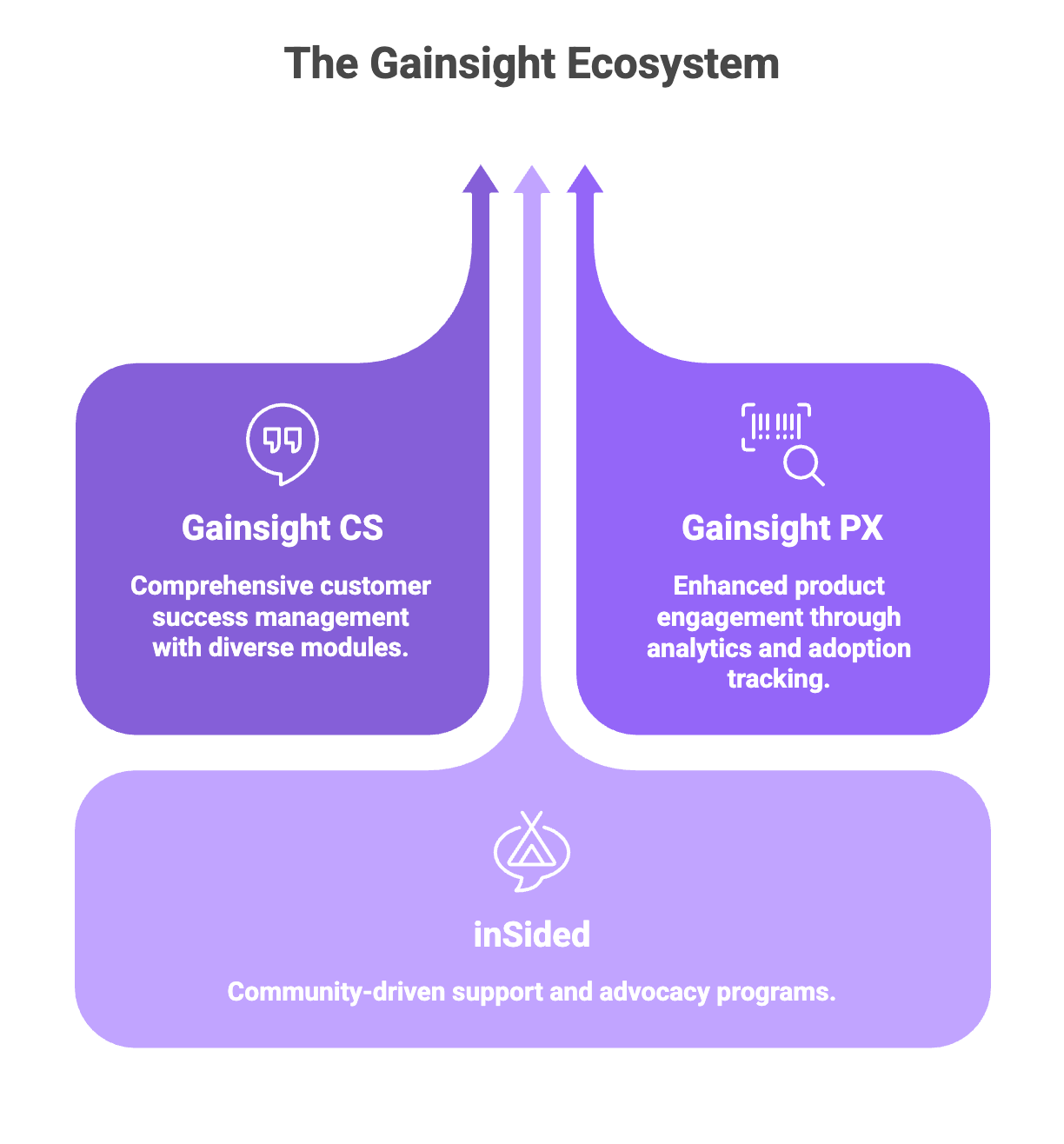
.png)
.png)