Gong Integrations Failing? Fix CRM Sync Issues & Data Engine Problems
Written by
Ishan Chhabra
Last Updated :
November 17, 2026
Skim in :
13
mins
In this article
Still got questions?
Come discuss this article with me.
Hi, I'm Ishan, Founder and CEO of Oliv.
I'm always up for a conversation about revenue intelligence, AI agents, or what's actually working (and what's not) across revenue teams.
I'd love to hear your perspective.
Thank you! Your submission has been received!
Oops! Something went wrong while submitting the form.
Meet Oliv’s AI Agents
Hi! I’m, Deal Driver
I track deals, flag risks, send weekly pipeline updates and give sales managers full visibility into deal progress
Hi! I’m, CRM Manager
I maintain CRM hygiene by updating core, custom and qualification fields all without your team lifting a finger
Hi! I’m, Forecaster
I build accurate forecasts based on real deal movement and tell you which deals to pull in to hit your number
Hi! I’m, Coach
I believe performance fuels revenue. I spot skill gaps, score calls and build coaching plans to help every rep level up
Hi! I’m, Prospector
I dig into target accounts to surface the right contacts, tailor and time outreach so you always strike when it counts
Hi! I’m, Pipeline tracker
I call reps to get deal updates, and deliver a real-time, CRM-synced roll-up view of deal progress
Hi! I’m, Analyst
I answer complex pipeline questions, uncover deal patterns, and build reports that guide strategic decisions
TL;DR
Most Gong sync failures fall into four buckets: export scope, permissions, matching logic, and structural design. The first three are fixable this week.
Check Gong's status page first, then match your Salesforce or HubSpot symptom to its setting, and repush failed calls from Company settings, CRM, Salesforce.
Rule-based matching breaks on duplicate accounts, multiple open deals, changed domains, and CC'd contacts, so activity lands on the wrong record or nowhere.
Gong mainly logs activities rather than updating MEDDPICC and forecast fields, so reps still type 10 to 15 fields per deal.
Hidden costs include field mapping fees, extra API capacity, storage, integration licences, and 40 to 80 IT hours; audit them before renewal.
Oliv AI runs on top of the CRM, resolves activity by context, captures five channels, and lets CRM and Forecast Agents write structured fields.
It is Monday, 9:40 a.m., and the forecast call is ten minutes old. A VP of Sales clicks into a $180,000 opportunity and asks why it shows no calls this month. The AE says they spoke to the buyer twice last week. The RevOps lead opens Gong, finds both calls, and goes quiet. The calls exist. The CRM never got them.
That gap is what most people mean when they search "Gong integrations failing." I'm Ishan Chhabra, founder of Oliv AI, an AI-native revenue intelligence and revenue orchestration platform. I spent about 18 months building the layer that maps calls, emails, and meetings to the right CRM records, so I have seen every way this breaks. Most Gong sync failures fall into four buckets: export scope, permissions, matching logic, and structural design. The first three you can fix this week. The fourth needs a different architecture, and I will be honest about where that line sits in 2027.
Q1: Why Do Gong Integrations Fail, and Is the Problem Gong, Your CRM or Your Data? [toc=1. Why Integrations Fail]
Gong integrations fail for four reasons: export scope, permissions, matching logic, and structural design. Export scope means a workspace, activity type, or team member was never selected for CRM export. Permissions means the integration user cannot read or edit a field or object. Matching logic means Gong could not tie an activity to a CRM contact, account, or opportunity. Structural design covers limits of how Gong writes data, such as activity logs instead of field updates. Oliv AI's deployments show that most "Gong is broken" tickets fall into the first three buckets.
How sync problems used to get handled
⚠️ The ticket that never really closes
The traditional fix loop is familiar to any RevOps lead. A rep flags a missing call. An admin checks the Gong CRM settings, re-saves a permission set, and repushes the call. The ticket closes, and the same symptom returns two weeks later on a different deal.
Gong's own help center splits these fixes by CRM and by object, so admins learn them one ticket at a time [1][2]. Nobody owns the full map of where data can stop. The cost is real. In Validity's 2024 survey, 31% of CRM admins said poor data costs them at least 20% of annual revenue [6].
🔍 Check the status page before you debug
Start with the step most teams skip. Not every failure is yours to fix. IsDown's incident log for Gong records a Salesforce service disruption that delayed Gong CRM updates by about 12.7 hours, with no data loss [4]. If Gong's status shows a CRM incident, wait it out before you touch settings.
Data arrives, but as activity notes nobody can report on
How Gong writes to the CRM
What changed with AI
✅ From rules to reasoning
The first three buckets are configuration. The fourth is design, and AI changed what good design looks like. Gong now lists 400+ integrations through the Gong Collective [5]. More connectors mean more places for rule-based mapping to guess wrong.
Oliv AI's read is that the category treated sync as plumbing when it is really judgment. Deciding which of three open opportunities a call belongs to is a reasoning task. Oliv AI's Object Graph handles it with AI entity resolution, which means matching records by context rather than by email domain. The CRM Agent then writes the outcome into the right fields. I will show how that works in Q5 and Q6, after we fix what can be fixed today.
Q2: How Does Gong's Data Engine Actually Move Calls, Emails and Fields Into Your CRM? [toc=2. How Gong Syncs Data]
A call can stop at export scope, permissions or matching before it reaches the CRM.
Gong moves data into Salesforce in two ways: the Gong for Salesforce app, which writes calls to a custom Conversation object, and task or event export, which logs each call or email under related contacts [8]. HubSpot connects through a native integration that attaches calls to deals through contacts and their accounts [3]. Gong says new activities usually export within 30 minutes; updates to existing activities can take longer [1].
The path a call takes
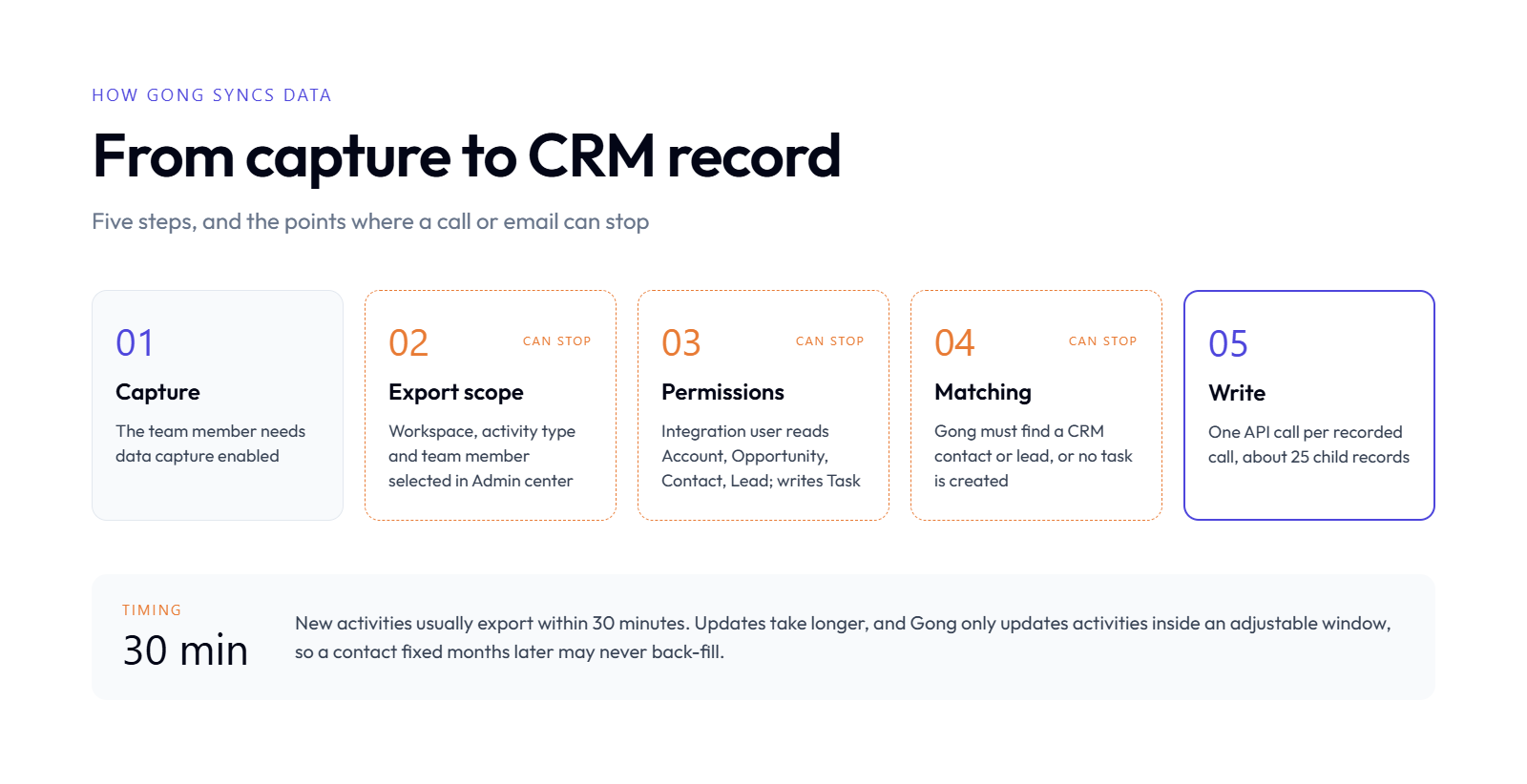
📞 From capture to CRM record, step by step
Gong calls its data engine the Revenue Graph. It captures calls, emails, and meetings, then hands them to the CRM integration. Here is the path, with the four points where it can stop.
Capture. A team member must have data capture enabled. Gong imports opportunities only for users with data capture on [8].
Export scope. The workspace, activity type, and team member must be selected for export in Admin center > Settings > CRM [1].
Permissions. The integration user needs read access to Account, Opportunity, Contact, Lead, and Opportunity Stage, plus write access to Task if you push tasks [8].
Matching. Gong must find a CRM contact or lead. A meeting invite with no external participant known to the CRM creates no task [1].
Write. Gong performs one API call per recorded call, which creates about 25 child records [8].
⏰ Timing and the update window
Timing confuses more admins than any error code. New activities usually land within 30 minutes [1]. Edits to existing activities, such as a tracker added later, can take longer.
There is also an activity update timeframe. Gong only updates existing activities for a limited period after the activity date, and admins can adjust that window [1]. A contact fixed three months later may never back-fill onto old calls.
The integration user, the quiet single point of failure
👤 Why one account can break everything
Gong recommends a dedicated integration user. If the person who set up the integration is deactivated, the integration disconnects [8]. I have seen this happen the week a RevOps lead left, with nobody noticing for days.
Field limits matter too. Gong cannot import multi-select, address, location, or encrypted fields [8]. Only one Gong for Salesforce instance, production or sandbox, can connect at a time [8].
Oliv AI connects to Salesforce and HubSpot through the same kind of integration user, across 70+ integrations. The difference is what happens after capture. Oliv AI resolves each activity to the right record with context, then updates fields instead of only logging tasks.
Q3: How Do You Fix Gong Salesforce Sync Errors Step by Step? [toc=3. Fix Salesforce Sync Errors]
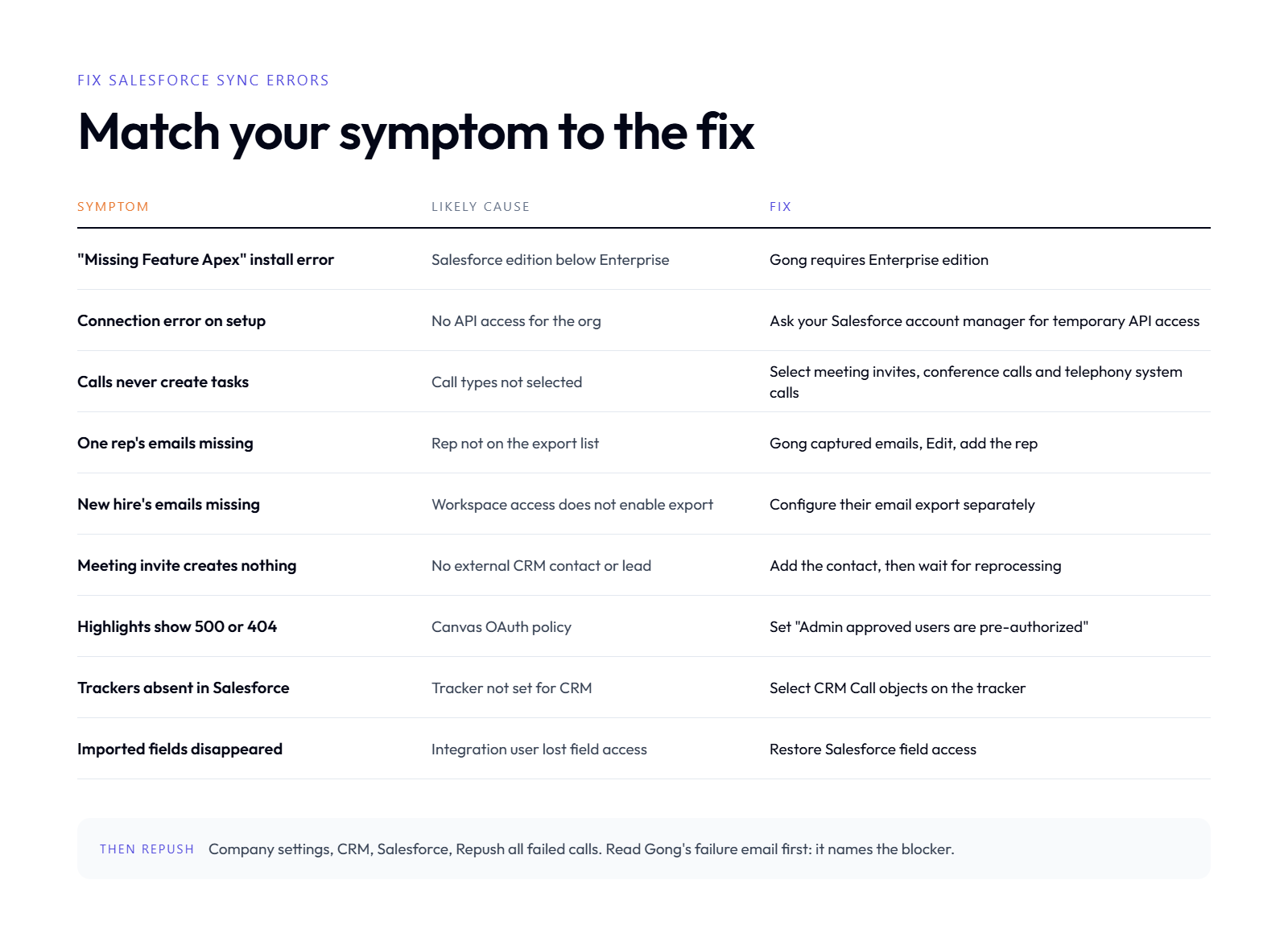
Fix the cause, then repush failed calls from Gong's Salesforce settings.
Gong usually fails to sync to Salesforce because of export scope, permissions, or matching. First, check that the workspace and activity types are selected for export. Next, confirm that the integration user can edit Tasks, Events, and the Gong Conversation object. Then check that the activity has a CRM contact or lead. Finally, repush failed calls from Company settings > CRM > Salesforce [1][7].
Gong checks exports and emails you the reason when they fail [7]. That email names the blocker. Common causes include missing field edit access, a failing trigger or flow, a validation rule, a lookup filter, or a sharing rule [7].
Assigning the Gong API User permission set usually fixes permission errors [7]. For a trigger or validation rule, adjust the rule so it allows saves from the integration user.
🔁 Repush, then clean up duplicates
Once the cause is fixed, repush.
One call: open the call in Gong and select Push to Gong for Salesforce[7].
Many calls: go to Company settings > CRM > Salesforce, then Repush all failed calls[7].
Multiple tasks per activity: choose One task instead of Several tasks in CRM configuration [1].
Dialer double logging: if your dialer and Gong both write the same call, turn off one side's Salesforce sync so a single source logs it.
Community threads show some fixes still need support. One admin reported Gong to-dos not appearing in Salesforce even after creating the required fields [9].
⭐ What reviewers say
"limitations of getting data back into salesforce" Verified User Gong - G2 Verified Review [5/21/2026]
Oliv AI takes the repush step off the admin's list. Oliv AI's CRM Agent writes each update to the matched record and flags the ones it cannot place, so nothing fails silently.
Q4: How Do You Fix Gong HubSpot Sync and Field Mapping Problems? [toc=4. Fix HubSpot Sync]
Most Gong HubSpot sync problems come from field access, contact links, or date formats. Users need read access to HubSpot fields before Gong can show them. Calls attach to deals through contacts and their accounts, so a contact linked only to a deal breaks the match. Formula-based datetime fields may store values Gong cannot read [3]. Rate limits and retries cause the rest.
Three HubSpot fixes from Gong's own docs
🔑 Field access and contact links
Start with access. If users cannot see selected HubSpot fields in Gong, a HubSpot admin must grant them read access to those fields [3].
Then check the contact chain. Gong finds the contact, then the contact's account, then attaches the call to the relevant deal [3]. If a contact is associated directly with the deal and not with an account, the call does not appear. Link the contact to its company record.
📅 Formula datetime fields
A datetime field built on an equation is the quiet one. HubSpot may store its value in a format Gong cannot read as a standard datetime [3]. Either save the value in a recognised datetime format or convert it before import.
Rate limits, retries, and duplicates
💸 When volume becomes the problem
Sync often breaks at scale rather than at setup. Tray.ai notes that unmanaged rate limit errors cause dropped syncs, missing HubSpot activities, and gaps in CRM data [10]. Retries and webhook replays can also create duplicate activity records for the same call [10].
Use this checklist when volume spikes:
Historical exports: exporting old calls or editing a widely used tracker causes an API spike [8]. Run these off-hours.
Retry logic: if you use middleware, make retries check for an existing record first.
Status first: IsDown tracks Gong's HubSpot CRM Sync component, so check it before debugging [11].
Field sprawl: import only fields someone actually reports on.
On the other side, Oliv AI users on HubSpot describe the integration as part of the daily flow.
"I appreciate that it integrates well with platforms like HubSpot and Salesforce, allowing us to capture insights from calls and maintain a complete view of customer interactions." Verified User Oliv AI G2 - Verified Review [6/23/2026]
Oliv AI reads HubSpot deals, contacts, and companies through the same context layer it uses for Salesforce. Contact-to-deal gaps are resolved by context, so a missing company link does not drop the call.
Q5: Why Do Gong Calls and Emails Land on the Wrong Account or Opportunity? [toc=5. Wrong Account Mapping]
Rule-based lookup breaks on messy CRMs; reasoning over context finds the right deal.
Gong calls and emails land on the wrong record when rule-based matching meets a messy CRM. Gong matches activity through contacts, email domains, and account links. Duplicate accounts, contacts copied on email, several open opportunities in one account, and acquired companies with new domains all break that lookup. Oliv AI's Object Graph handles the same cases with AI entity resolution, which weighs open deals, relationship history, and conversation content before placing an activity.
How activity mapping used to work
🗂️ The duplicate account trap
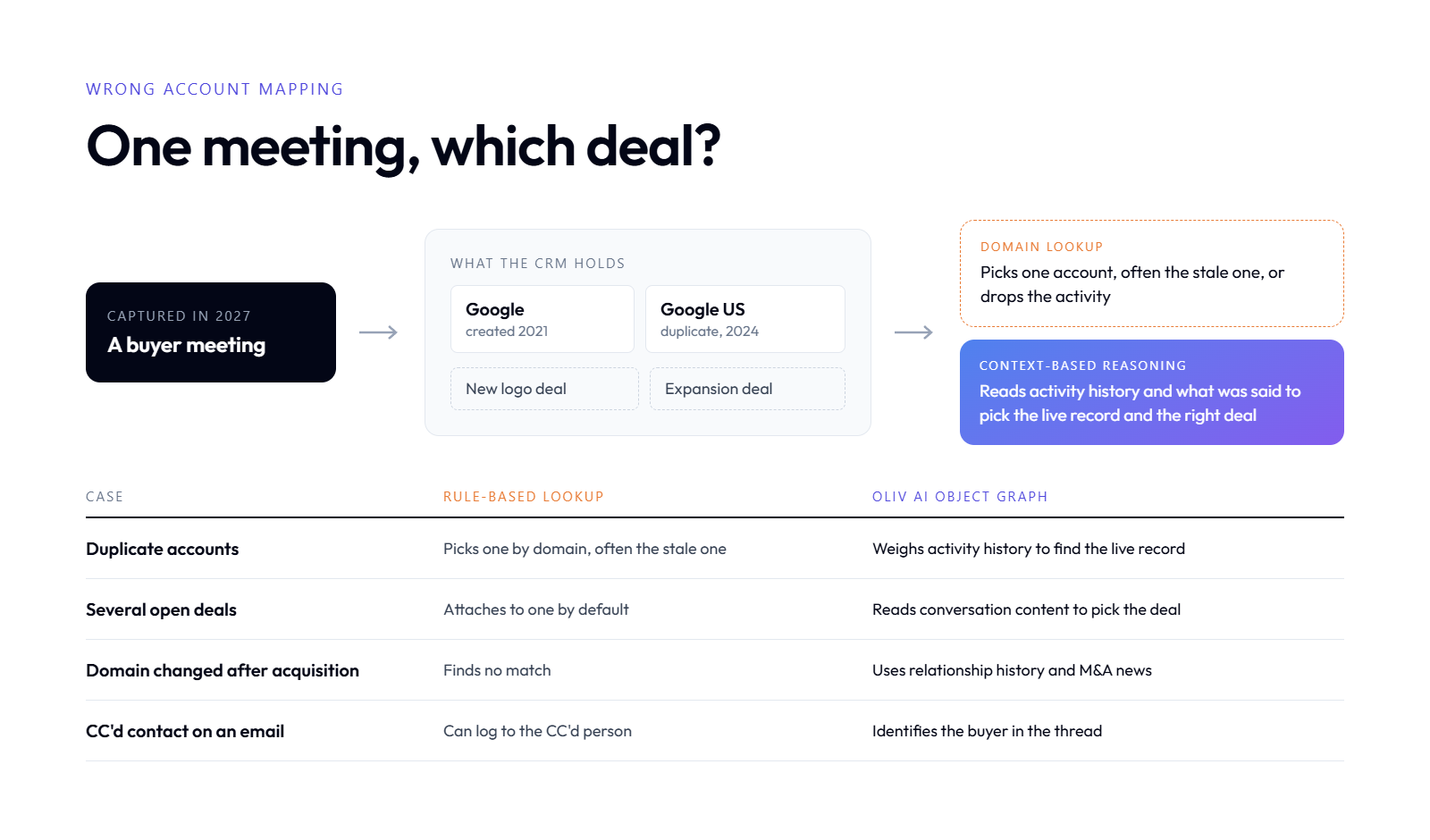
Picture a common setup. A seller created a "Google" account in Salesforce back in 2021. In 2024, a new rep opened a second record called "Google US." A meeting gets captured in 2027, and the rule engine now has two accounts that both match the domain.
A static rule cannot tell which one is live. It picks one, or it drops the activity entirely. The call exists in Gong, and the opportunity your VP is reviewing shows nothing.
❌ Why the rules keep guessing wrong
Rule-based mapping follows a short path: find the email domain, find the account, find the opportunity, done. It assumes one clean account and one open deal. Real CRMs rarely look like that. Oliv AI's Object Graph documents four cases that break the static lookup:
Several opportunities open in the same account, such as a new logo deal and an expansion deal.
One call covering several accounts, such as a partner and an end customer.
An acquired company whose email domain changed.
Duplicate records and stale CRM data.
Small details make it worse. Gong's help center notes that a meeting needs at least one external participant who exists in the CRM as a contact or lead [1]. Gong also does not create contacts in Salesforce [8]. In a Gong community thread, admins describe emails syncing to a CC'd person instead of the main buyer [12].
What changed: matching as a reasoning task
✅ Think like the seller, not the lookup table
I spent most of two years on this problem while building Oliv AI's context graph. Our customers had five opportunities open across three accounts. The question was always the same: which deal does this meeting belong to, or is it a new one?
Oliv AI's answer is that a seller never uses a lookup table. A seller looks at every open account, thinks about who said what, and decides. AI can now do that reasoning at scale. Rules give you low association accuracy on messy data. Context gives you the right deal.
Think like the seller, not the lookup table
Case
Rule-based lookup
Oliv AI Object Graph
Duplicate accounts
Picks one by domain, often the stale one
Weighs activity history to find the live record
Several open deals
Attaches to one by default
Reads conversation content to pick the deal
Domain changed after acquisition
Finds no match
Uses relationship history and M&A news
CC'd contact on an email
Can log to the CC'd person
Identifies the buyer in the thread
💡 What this means on Monday
Oliv AI works with CRM data exactly as it is. There is no cleanup sprint or CRM audit before activity mapping starts. The messier your data, the more value Oliv AI creates, because that is where rules fail most.
If you stay on Gong, run a weekly report of activities with no matched opportunity. Merge duplicate accounts before they multiply. That keeps the rule engine honest, even if it cannot make it smart.
Q6: Why Does Gong Log Activities Instead of Updating the CRM Fields Your Forecast Needs? [toc=6. Activity Logs vs CRM Fields]
Activity logs show that a call happened; forecasts need the fields filled.
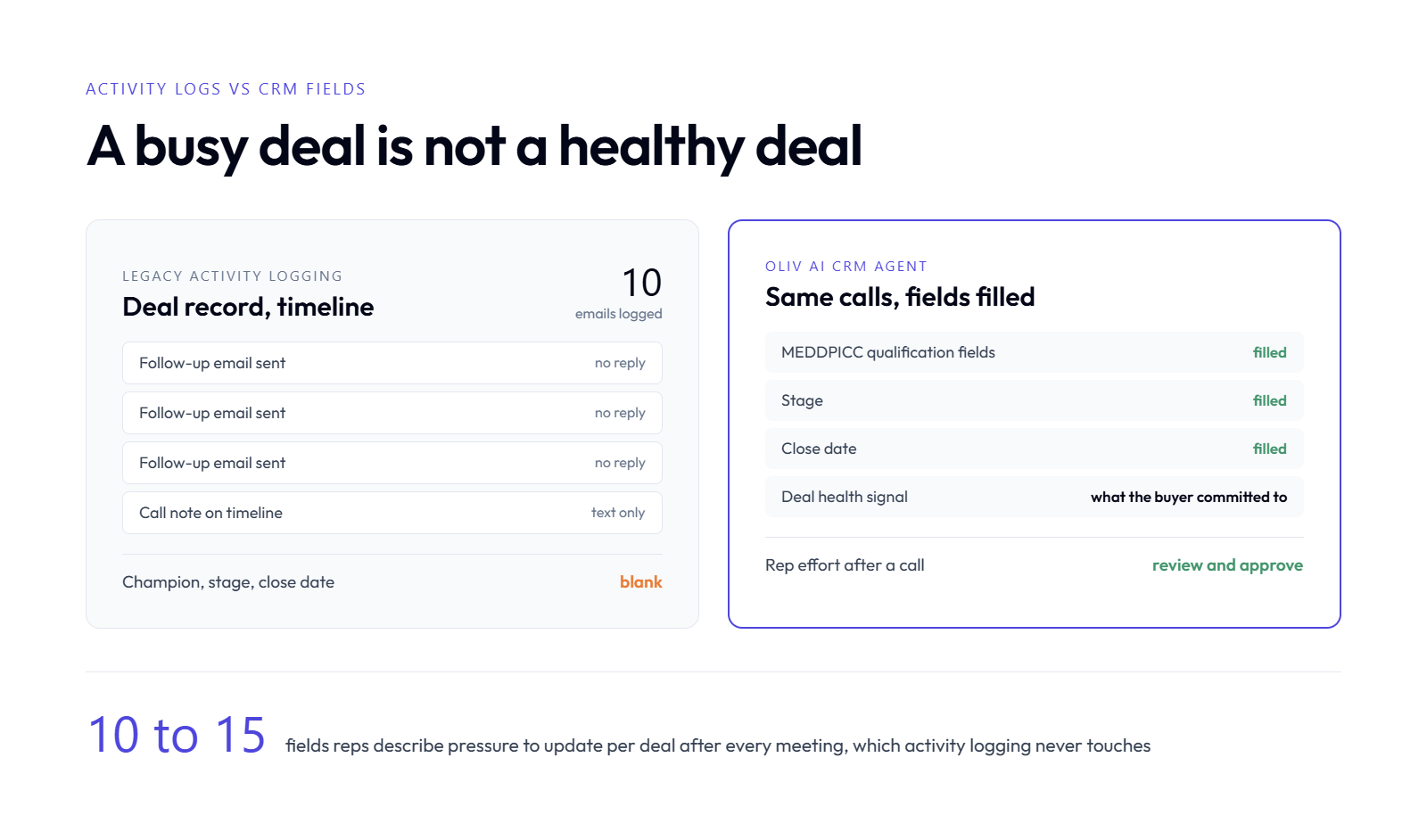
Gong's CRM integration mainly writes activities: tasks, events, and Conversation records linked to contacts and deals [8]. Those records show that a call or email happened. They do not fill qualification, stage, or close-date fields such as MEDDPICC criteria. Oliv AI's CRM Agent reads the same calls and emails, then updates those structured opportunity fields directly, so forecasts and reports run on fields rather than activity counts.
How the CRM got filled before
📋 The 10 to 15 fields nobody fills
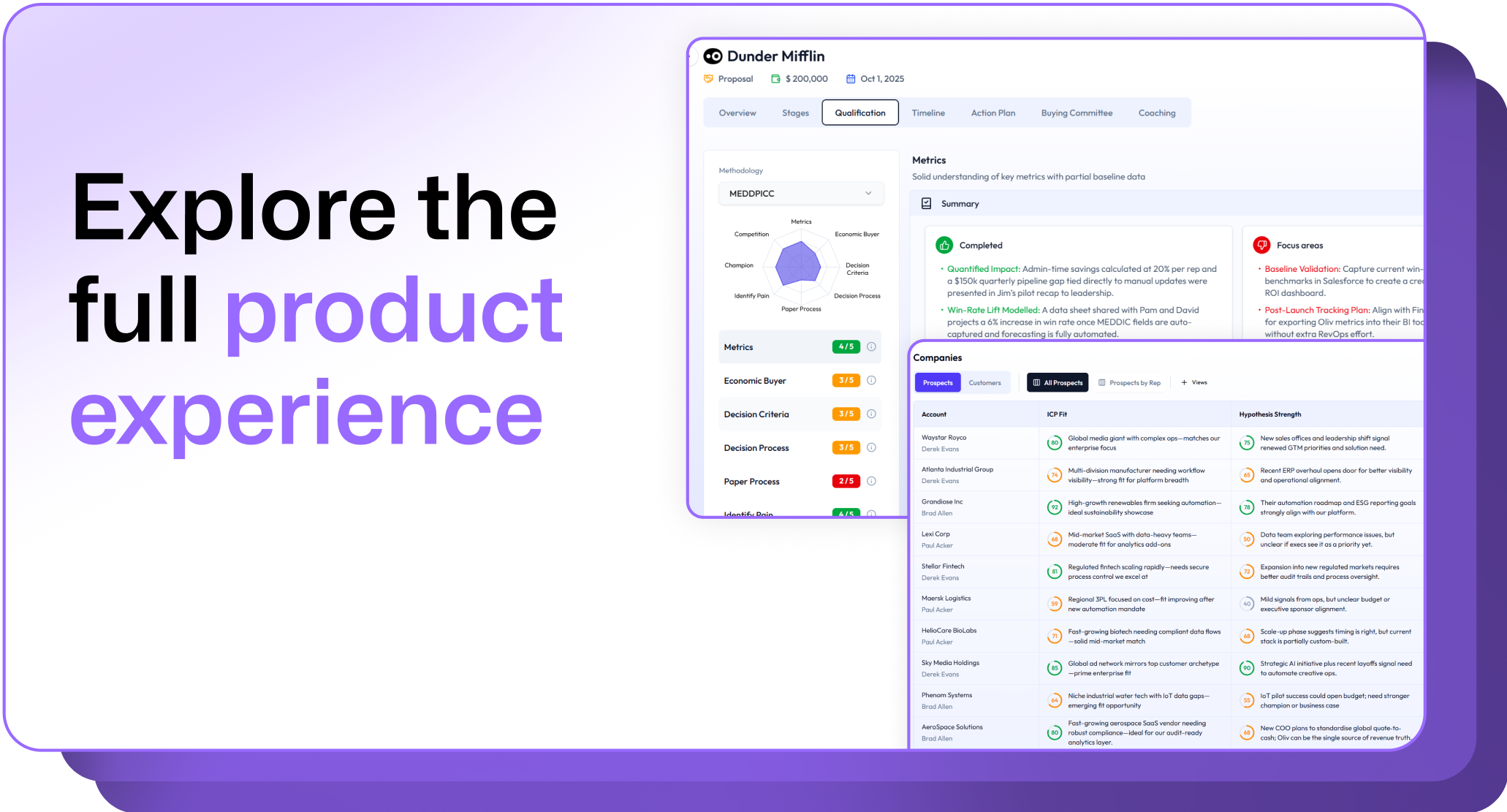
MEDDPICC is a qualification framework. It tracks Metrics, Economic buyer, Decision criteria, Decision process, Paper process, Identify pain, Champion, and Competition. Each of those is a field on the opportunity. On Oliv AI's customer calls, reps describe pressure to update 10 to 15 such fields per deal after every meeting.
Activity logging does not touch those fields. A call note lands on the timeline, and the Champion field stays blank. The rep still types it, or more often, nobody does.
⚠️ The activity-count illusion
Here is the part that hurts forecasts. A rep sends ten follow-up emails to a buyer who has gone silent. Each send is logged as activity. The deal dashboard looks busy and healthy.
A sales leader on a recorded call with Oliv AI in 2025 put it plainly: activity logs show how many emails were sent, but not what is actually happening in them. You cannot build a report on text notes. You can only count them.
That gap costs selling time. Salesforce's State of Sales research found reps spend just 28% of their week selling, with most of the rest going to tasks like deal management and data entry [13].
What changed: agents write fields, not notes
✅ From log to object property
The AI shift is simple to state. Models can now read a full conversation and decide what it means for each field. That moves the CRM from a log of what happened to a record of where the deal stands.
From log to object property
-
Legacy activity logging
Oliv AI CRM Agent
What it writes
Call notes and tasks on the timeline
Values in opportunity fields
Deal health signal
Count of calls and emails
What the buyer actually committed to
Reportable
Hard, text only
Yes, structured fields
Rep effort after a call
Type 10 to 15 fields by hand
Review and approve updates
⭐ How Oliv AI's agents handle it
Oliv AI's CRM Agent fills methodology fields from calls and emails. The Deal Driver Agent watches every deal and flags those slipping. The Forecast Agent prepares the forecast from those fields, so the roll-up reflects real buyer signals.
Users describe the change directly:
"It's incredibly helpful with our custom sales methodologies like MEDIC-BAND, as it helps me fill all of them out. Oliv.ai has agents like the CRM agent, deal driver agent, and forecast agent, which are invaluable." Verified User Oliv AI G2 - Verified Review [6/15/2026]
"I love that it automatically updates CRM records after calls and meetings, keeping the data clean and accurate without manual effort." Verified User Oliv AI G2 - Verified Review [6/23/2026]
I could be wrong about how fast this becomes standard. But I think the forecast built on activity counts will look as dated in 2028 as the one built on rep gut feel does now.
Q7: What Do Gong Integrations Really Cost Once You Add API Limits, Storage and Setup? [toc=7. Hidden Integration Costs]
Gong integration costs go beyond the seat price. Vendr pricing data reports custom field mapping at $2,000 to $5,000 beyond a 25-field standard limit, extra Salesforce API capacity at $300 to $800 a month, and non-native CRM integrations at $10,000 to $25,000 [14]. The same data says 73% of organizations hit unexpected expenses, and complex setups need 40 to 80 internal IT hours [14].
The line items behind the integration
💰 What the setup really costs
These ranges come from Vendr's Gong pricing data [14]. Treat them as market ranges, not a quote.
What the setup really costs
Cost item
Reported range
When it applies
Custom field mapping
$2,000 to $5,000
Beyond the 25-field standard mapping
Complex CRM configuration
$5,000 to $15,000
Multi-instance setups, custom workflows
Non-native CRM integration
$10,000 to $25,000
NetSuite, Pipedrive, or custom CRMs
Extra Salesforce API capacity
$300 to $800 a month
When you exceed standard API limits
Dedicated integration user licence
$25 to $75 a month per CRM
Recommended for every setup
Internal IT time
40 to 80 hours
Complex integration setups
Ongoing maintenance
10% to 15% of annual cost
Every year after go-live
💸 The costs that show up later
API volume is the slow leak. Gong performs one API call per recorded call, which creates about 25 child records [8]. Exporting historical calls or changing a widely used tracker causes a spike [8].
Storage is the other one. Vendr's data cites a Reddit user who said Gong's Salesforce writes consumed their storage quota at 25MB a day [14]. That is one user's report, not a benchmark. Still, every activity record and child record takes space you pay Salesforce for.
API usage: how much of your daily Salesforce API limit does Gong consume?
Storage growth: how fast has data storage grown since go-live?
Field mapping: are you near the 25-field mapping limit, and what did extra fields cost?
Integration users: how many licences exist only to hold an integration?
IT hours: how many internal hours went into sync fixes last quarter?
Middleware: are you paying Workato, Zapier, or a consultant to move data Gong does not write?
⚖️ A simpler alternative
Oliv AI prices its apps as a commodity, at around 30% of incumbent app pricing, and implements with in-house GTM engineers, not third parties. Oliv AI's integrations, 70+ of them, are included rather than sold as mapping projects. Check current pricing on Oliv AI's site, since it changes.
Q8: What Revenue Data Does Gong Miss, Like Shared Slack Channels, Mobile Calls and In-Person Meetings? [toc=8. Data Gong Misses]
Conversation intelligence tools built around scheduled web meetings and connected dialers often miss shared Slack or Teams channels with customers, personal mobile calls, in-person meetings, and product or warehouse data. Gong exports telephony system calls when a dialer is connected [1]. Oliv AI's Context Capture covers five modalities: email and virtual meetings, mobile calls, in-person meetings, chat conversations, and shared workspaces, plus internal databases.
Where deals actually happen now
💬 The shared channel blind spot
B2B buyers and sellers now run deals in shared Slack channels. The champion asks a pricing question there. Legal sends redlines there. The decision often moves there before it shows up on a call.
In my experience, most conversation intelligence stacks treat Slack as a place to push alerts, not a source of deal context. Gong may have moved on this, and I may be behind on their roadmap. But a deal record that ignores the shared channel is missing the most honest signal in the deal.
📱 Mobile calls and the dinner meeting
Field reps call buyers from their phones. Gong captures telephony system calls through a connected dialer [1], but a personal mobile call outside it leaves no record. In-person meetings are the oldest gap of all: the customer visit, the conference hallway, the dinner where the real decision gets made.
How capture used to work, and what it cost
❌ Two or three channels out of five
The first generation of revenue intelligence captured the channels that were easy to record: video calls and email. Everything else became tribal knowledge. Managers asked reps in one-on-ones, and reps answered from memory.
That was tolerable when a human read the deal. It breaks in 2027, when agents act on the deal record. An agent with half the context acts on half the truth, and it acts with full confidence.
What changed, and what Oliv AI captures
✅ Five modalities and three more layers
Oliv AI's Context Capture covers all five ways revenue teams communicate. It adds three layers most tools ignore: internal databases, third-party and web data, and activity through apps.
Five modalities and three more layers
Source
Typical CI coverage
Oliv AI Context Capture
Video meetings and email
Yes
Yes
Shared Slack or Teams channels
Alerts, limited context
Monitored as deal context
Mobile calls
Via connected dialer
Captured
In-person meetings
No
Consent-first capture through Oliv AI's Plaud partnership
Warehouse data
Rare
Snowflake, Databricks, Redshift, and BigQuery
🎙️ The agent that asks
Oliv AI also closes gaps by asking. Each evening, Oliv AI's voice agent calls team members with targeted questions about what it could not see. Reps answer by voice, and the context lands on the deal.
It is not perfect yet. One Oliv AI user was candid about the phone experience:
"The only downside I've noticed is that the mobile app is a bit basic compared to the desktop platform." Verified User Oliv AI G2 - Verified Review [7/8/2026]
That is fair, and it is on our list. The bigger point stands: agents need the whole deal, not just the parts that were easy to record.
Q9: What Do Gong Users Say About Its CRM Integrations and Sync Reliability? [toc=9. User Reviews]
Gong users on G2 praise how Gong centralises calls, emails, and recordings, and how well it tracks deals. Their complaints cluster on getting data back into Salesforce, time spent on integrations and tracker setup, and losing data when they leave. G2 lists 6,679 Gong reviews, with accuracy issues, including multi-tab functionality in Salesforce, raised in 58 of them [15]. Oliv AI groups these themes below using dated, verified reviews.
What works for Gong users
✅ One place for every customer conversation
Gong's strongest praise is about capture. Reviewers like having every client interaction stored and searchable in one place. That matters, and it is a real strength I respect.
"I appreciate how Gong organizes all our chats, videos, and audio with clients into a single source, making it easy to keep track of everything." Verified User Gong - G2 Verified Review [10/3/2025]
"Good for tracking deals, account engagement overall, divided transcript and accurate AI highlights for calls." Verified User Gong - G2 Verified Review [6/9/2025]
🔗 Salesforce connection as a feature
Some users name the Salesforce connection itself as a highlight, especially alongside dialers.
"Being able to sequence our steps, along with integration with Nooks/Salesforce." Verified User Gong - G2 Verified Review [5/21/2026]
Where sync and data access fall short
❌ Getting data out, and keeping it
The same reviewer who liked the Salesforce link flagged its limit. Others raised setup time and data access.
"limitations of getting data back into salesforce" Verified User Gong - G2 Verified Review [5/21/2026]
"I cannot download all the data myself unless we upgrade the plan, which isn't ideal and results in me not fully utilizing Gong." Verified User Gong - G2 Verified Review [10/3/2025]
"if you stop working with thew tool you lose the data" Verified User Gong - G2 Verified Review [3/19/2026]
⚠️ What the themes add up to
What the themes add up to
Theme
What reviewers say
Why it matters for sync
Capture
Strong, centralised
Data reaches Gong reliably
CRM write-back
Limited
Data does not always reach the CRM in usable form
Setup effort
Integrations and trackers take time
Admin hours grow with every connector
Data access
Full export tied to plan, data lost on exit
The CRM cannot be the only source of truth
The last row is the one I would weigh most. Oliv AI's read is that a revenue tool should hold data in your CRM, not around it. Oliv AI keeps a full open export policy with no data lock-in, so leaving does not mean losing your history.
Q10: How Does Oliv Keep CRM Data Accurate Without Rule-Based Sync? [toc=10. The Agentic Alternative]
Oliv AI is an AI-native revenue intelligence and revenue orchestration platform that runs on top of Salesforce or HubSpot. Oliv AI's Object Graph resolves each call, email, and meeting to the right account and opportunity using AI entity resolution. Context Capture gathers five communication modalities. The CRM Agent then writes structured field updates. Oliv AI can run alongside Gong during a contract and connects to 70+ apps.
How it was: the stack RevOps had to babysit
⚠️ The admin layer between the field and the CRM
For a decade, the playbook was to add a tool per team and wire them together. Conversation intelligence for calls, engagement for sequences, forecasting for the roll-up. RevOps became the human glue, fixing sync tickets one by one.
Oliv AI's mission page puts it bluntly: RevOps built the stack, and the stack broke RevOps. Every fix in Q3 and Q4 of this article is a symptom of that design. The data was captured. It just never became truth in the CRM.
💸 What it cost
The cost was not only licences. It was integration users, API packages, mapping fees, and internal IT hours, as Q7 showed. Worst of all, it was a forecast built on activity counts instead of buyer commitments.
What changed: agents that own the CRM update
✅ From syncing records to understanding deals
AI changed the unit of work. A tool no longer has to move a record from A to B and hope the rule matched. It can read the deal, decide what changed, and write that into the right field.
Oliv AI builds that understanding in advance. Its GTM context graph synthesises every account, opportunity, and conversation before anyone asks a question. Synthesis, not retrieval, is how Oliv AI describes it.
⭐ What Oliv AI does about each failure bucket
What Oliv AI does about each failure bucket
Failure bucket from Q1
How Oliv AI handles it
Export scope
Captures five modalities by default, including shared channels
Permissions
One integration set up by Oliv AI's in-house GTM engineers
Matching logic
Object Graph places activity by context, not domain lookup
Structural design
CRM Agent updates fields; Forecast Agent rolls them up
Two super-agents sit on top. Olivia, the Chief of AI Staff, coordinates specialist agents for reps and asks before acting. Oliver, the Chief AI GTM Engineer, maintains the playbook those agents run on.
Running Oliv AI next to Gong
🔄 You do not have to rip anything out
Most teams I talk to are mid-contract with Gong. That is a very common starting point. Oliv AI can sit on top of Gong, pull that data in, and prove value on live deals first.
Oliv AI offers to run its Conversation Intelligence free until a Gong contract ends. Then the team decides at renewal, with real results in hand. Oliv AI targets live by week 2 and results by week 4.
🔒 Trust and fit
Oliv AI is SOC 2 Type II certified and GDPR and CCPA compliant, with AES-256 encryption at rest. It is not built for B2C support teams or buyers who only want call recording. If that is you, Gong's capture may be enough.
"Once the sales call is done, it goes ahead and updates my CRM. It's like an all-in-one revenue agent which makes my life easier." Verified User Oliv AI G2 - Verified Review [7/2/2026]
"The only downside is that the platform can be a bit glitchy at times, but the support team is always quick to address and resolve any bugs." Verified User Oliv AI G2 - Verified Review [7/2/2026]
If your Gong sync breaks every other week, the problem may not be your settings. Tell me what your CRM looks like today. Seven minutes, no pitch, and you can test Oliv AI on your own data in the sandbox first.
It is Monday, 9:40 a.m., and the forecast call is ten minutes old. A VP of Sales clicks into a $180,000 opportunity and asks why it shows no calls this month. The AE says they spoke to the buyer twice last week. The RevOps lead opens Gong, finds both calls, and goes quiet. The calls exist. The CRM never got them.
That gap is what most people mean when they search "Gong integrations failing." I'm Ishan Chhabra, founder of Oliv AI, an AI-native revenue intelligence and revenue orchestration platform. I spent about 18 months building the layer that maps calls, emails, and meetings to the right CRM records, so I have seen every way this breaks. Most Gong sync failures fall into four buckets: export scope, permissions, matching logic, and structural design. The first three you can fix this week. The fourth needs a different architecture, and I will be honest about where that line sits in 2027.
Q1: Why Do Gong Integrations Fail, and Is the Problem Gong, Your CRM or Your Data? [toc=1. Why Integrations Fail]
Gong integrations fail for four reasons: export scope, permissions, matching logic, and structural design. Export scope means a workspace, activity type, or team member was never selected for CRM export. Permissions means the integration user cannot read or edit a field or object. Matching logic means Gong could not tie an activity to a CRM contact, account, or opportunity. Structural design covers limits of how Gong writes data, such as activity logs instead of field updates. Oliv AI's deployments show that most "Gong is broken" tickets fall into the first three buckets.
How sync problems used to get handled
⚠️ The ticket that never really closes
The traditional fix loop is familiar to any RevOps lead. A rep flags a missing call. An admin checks the Gong CRM settings, re-saves a permission set, and repushes the call. The ticket closes, and the same symptom returns two weeks later on a different deal.
Gong's own help center splits these fixes by CRM and by object, so admins learn them one ticket at a time [1][2]. Nobody owns the full map of where data can stop. The cost is real. In Validity's 2024 survey, 31% of CRM admins said poor data costs them at least 20% of annual revenue [6].
🔍 Check the status page before you debug
Start with the step most teams skip. Not every failure is yours to fix. IsDown's incident log for Gong records a Salesforce service disruption that delayed Gong CRM updates by about 12.7 hours, with no data loss [4]. If Gong's status shows a CRM incident, wait it out before you touch settings.
Data arrives, but as activity notes nobody can report on
How Gong writes to the CRM
What changed with AI
✅ From rules to reasoning
The first three buckets are configuration. The fourth is design, and AI changed what good design looks like. Gong now lists 400+ integrations through the Gong Collective [5]. More connectors mean more places for rule-based mapping to guess wrong.
Oliv AI's read is that the category treated sync as plumbing when it is really judgment. Deciding which of three open opportunities a call belongs to is a reasoning task. Oliv AI's Object Graph handles it with AI entity resolution, which means matching records by context rather than by email domain. The CRM Agent then writes the outcome into the right fields. I will show how that works in Q5 and Q6, after we fix what can be fixed today.
Q2: How Does Gong's Data Engine Actually Move Calls, Emails and Fields Into Your CRM? [toc=2. How Gong Syncs Data]
A call can stop at export scope, permissions or matching before it reaches the CRM.
Gong moves data into Salesforce in two ways: the Gong for Salesforce app, which writes calls to a custom Conversation object, and task or event export, which logs each call or email under related contacts [8]. HubSpot connects through a native integration that attaches calls to deals through contacts and their accounts [3]. Gong says new activities usually export within 30 minutes; updates to existing activities can take longer [1].
The path a call takes
📞 From capture to CRM record, step by step
Gong calls its data engine the Revenue Graph. It captures calls, emails, and meetings, then hands them to the CRM integration. Here is the path, with the four points where it can stop.
Capture. A team member must have data capture enabled. Gong imports opportunities only for users with data capture on [8].
Export scope. The workspace, activity type, and team member must be selected for export in Admin center > Settings > CRM [1].
Permissions. The integration user needs read access to Account, Opportunity, Contact, Lead, and Opportunity Stage, plus write access to Task if you push tasks [8].
Matching. Gong must find a CRM contact or lead. A meeting invite with no external participant known to the CRM creates no task [1].
Write. Gong performs one API call per recorded call, which creates about 25 child records [8].
⏰ Timing and the update window
Timing confuses more admins than any error code. New activities usually land within 30 minutes [1]. Edits to existing activities, such as a tracker added later, can take longer.
There is also an activity update timeframe. Gong only updates existing activities for a limited period after the activity date, and admins can adjust that window [1]. A contact fixed three months later may never back-fill onto old calls.
The integration user, the quiet single point of failure
👤 Why one account can break everything
Gong recommends a dedicated integration user. If the person who set up the integration is deactivated, the integration disconnects [8]. I have seen this happen the week a RevOps lead left, with nobody noticing for days.
Field limits matter too. Gong cannot import multi-select, address, location, or encrypted fields [8]. Only one Gong for Salesforce instance, production or sandbox, can connect at a time [8].
Oliv AI connects to Salesforce and HubSpot through the same kind of integration user, across 70+ integrations. The difference is what happens after capture. Oliv AI resolves each activity to the right record with context, then updates fields instead of only logging tasks.
Q3: How Do You Fix Gong Salesforce Sync Errors Step by Step? [toc=3. Fix Salesforce Sync Errors]
Fix the cause, then repush failed calls from Gong's Salesforce settings.
Gong usually fails to sync to Salesforce because of export scope, permissions, or matching. First, check that the workspace and activity types are selected for export. Next, confirm that the integration user can edit Tasks, Events, and the Gong Conversation object. Then check that the activity has a CRM contact or lead. Finally, repush failed calls from Company settings > CRM > Salesforce [1][7].
Gong checks exports and emails you the reason when they fail [7]. That email names the blocker. Common causes include missing field edit access, a failing trigger or flow, a validation rule, a lookup filter, or a sharing rule [7].
Assigning the Gong API User permission set usually fixes permission errors [7]. For a trigger or validation rule, adjust the rule so it allows saves from the integration user.
🔁 Repush, then clean up duplicates
Once the cause is fixed, repush.
One call: open the call in Gong and select Push to Gong for Salesforce[7].
Many calls: go to Company settings > CRM > Salesforce, then Repush all failed calls[7].
Multiple tasks per activity: choose One task instead of Several tasks in CRM configuration [1].
Dialer double logging: if your dialer and Gong both write the same call, turn off one side's Salesforce sync so a single source logs it.
Community threads show some fixes still need support. One admin reported Gong to-dos not appearing in Salesforce even after creating the required fields [9].
⭐ What reviewers say
"limitations of getting data back into salesforce" Verified User Gong - G2 Verified Review [5/21/2026]
Oliv AI takes the repush step off the admin's list. Oliv AI's CRM Agent writes each update to the matched record and flags the ones it cannot place, so nothing fails silently.
Q4: How Do You Fix Gong HubSpot Sync and Field Mapping Problems? [toc=4. Fix HubSpot Sync]
Most Gong HubSpot sync problems come from field access, contact links, or date formats. Users need read access to HubSpot fields before Gong can show them. Calls attach to deals through contacts and their accounts, so a contact linked only to a deal breaks the match. Formula-based datetime fields may store values Gong cannot read [3]. Rate limits and retries cause the rest.
Three HubSpot fixes from Gong's own docs
🔑 Field access and contact links
Start with access. If users cannot see selected HubSpot fields in Gong, a HubSpot admin must grant them read access to those fields [3].
Then check the contact chain. Gong finds the contact, then the contact's account, then attaches the call to the relevant deal [3]. If a contact is associated directly with the deal and not with an account, the call does not appear. Link the contact to its company record.
📅 Formula datetime fields
A datetime field built on an equation is the quiet one. HubSpot may store its value in a format Gong cannot read as a standard datetime [3]. Either save the value in a recognised datetime format or convert it before import.
Rate limits, retries, and duplicates
💸 When volume becomes the problem
Sync often breaks at scale rather than at setup. Tray.ai notes that unmanaged rate limit errors cause dropped syncs, missing HubSpot activities, and gaps in CRM data [10]. Retries and webhook replays can also create duplicate activity records for the same call [10].
Use this checklist when volume spikes:
Historical exports: exporting old calls or editing a widely used tracker causes an API spike [8]. Run these off-hours.
Retry logic: if you use middleware, make retries check for an existing record first.
Status first: IsDown tracks Gong's HubSpot CRM Sync component, so check it before debugging [11].
Field sprawl: import only fields someone actually reports on.
On the other side, Oliv AI users on HubSpot describe the integration as part of the daily flow.
"I appreciate that it integrates well with platforms like HubSpot and Salesforce, allowing us to capture insights from calls and maintain a complete view of customer interactions." Verified User Oliv AI G2 - Verified Review [6/23/2026]
Oliv AI reads HubSpot deals, contacts, and companies through the same context layer it uses for Salesforce. Contact-to-deal gaps are resolved by context, so a missing company link does not drop the call.
Q5: Why Do Gong Calls and Emails Land on the Wrong Account or Opportunity? [toc=5. Wrong Account Mapping]
Rule-based lookup breaks on messy CRMs; reasoning over context finds the right deal.
Gong calls and emails land on the wrong record when rule-based matching meets a messy CRM. Gong matches activity through contacts, email domains, and account links. Duplicate accounts, contacts copied on email, several open opportunities in one account, and acquired companies with new domains all break that lookup. Oliv AI's Object Graph handles the same cases with AI entity resolution, which weighs open deals, relationship history, and conversation content before placing an activity.
How activity mapping used to work
🗂️ The duplicate account trap
Picture a common setup. A seller created a "Google" account in Salesforce back in 2021. In 2024, a new rep opened a second record called "Google US." A meeting gets captured in 2027, and the rule engine now has two accounts that both match the domain.
A static rule cannot tell which one is live. It picks one, or it drops the activity entirely. The call exists in Gong, and the opportunity your VP is reviewing shows nothing.
❌ Why the rules keep guessing wrong
Rule-based mapping follows a short path: find the email domain, find the account, find the opportunity, done. It assumes one clean account and one open deal. Real CRMs rarely look like that. Oliv AI's Object Graph documents four cases that break the static lookup:
Several opportunities open in the same account, such as a new logo deal and an expansion deal.
One call covering several accounts, such as a partner and an end customer.
An acquired company whose email domain changed.
Duplicate records and stale CRM data.
Small details make it worse. Gong's help center notes that a meeting needs at least one external participant who exists in the CRM as a contact or lead [1]. Gong also does not create contacts in Salesforce [8]. In a Gong community thread, admins describe emails syncing to a CC'd person instead of the main buyer [12].
What changed: matching as a reasoning task
✅ Think like the seller, not the lookup table
I spent most of two years on this problem while building Oliv AI's context graph. Our customers had five opportunities open across three accounts. The question was always the same: which deal does this meeting belong to, or is it a new one?
Oliv AI's answer is that a seller never uses a lookup table. A seller looks at every open account, thinks about who said what, and decides. AI can now do that reasoning at scale. Rules give you low association accuracy on messy data. Context gives you the right deal.
Think like the seller, not the lookup table
Case
Rule-based lookup
Oliv AI Object Graph
Duplicate accounts
Picks one by domain, often the stale one
Weighs activity history to find the live record
Several open deals
Attaches to one by default
Reads conversation content to pick the deal
Domain changed after acquisition
Finds no match
Uses relationship history and M&A news
CC'd contact on an email
Can log to the CC'd person
Identifies the buyer in the thread
💡 What this means on Monday
Oliv AI works with CRM data exactly as it is. There is no cleanup sprint or CRM audit before activity mapping starts. The messier your data, the more value Oliv AI creates, because that is where rules fail most.
If you stay on Gong, run a weekly report of activities with no matched opportunity. Merge duplicate accounts before they multiply. That keeps the rule engine honest, even if it cannot make it smart.
Q6: Why Does Gong Log Activities Instead of Updating the CRM Fields Your Forecast Needs? [toc=6. Activity Logs vs CRM Fields]
Activity logs show that a call happened; forecasts need the fields filled.
Gong's CRM integration mainly writes activities: tasks, events, and Conversation records linked to contacts and deals [8]. Those records show that a call or email happened. They do not fill qualification, stage, or close-date fields such as MEDDPICC criteria. Oliv AI's CRM Agent reads the same calls and emails, then updates those structured opportunity fields directly, so forecasts and reports run on fields rather than activity counts.
How the CRM got filled before
📋 The 10 to 15 fields nobody fills
MEDDPICC is a qualification framework. It tracks Metrics, Economic buyer, Decision criteria, Decision process, Paper process, Identify pain, Champion, and Competition. Each of those is a field on the opportunity. On Oliv AI's customer calls, reps describe pressure to update 10 to 15 such fields per deal after every meeting.
Activity logging does not touch those fields. A call note lands on the timeline, and the Champion field stays blank. The rep still types it, or more often, nobody does.
⚠️ The activity-count illusion
Here is the part that hurts forecasts. A rep sends ten follow-up emails to a buyer who has gone silent. Each send is logged as activity. The deal dashboard looks busy and healthy.
A sales leader on a recorded call with Oliv AI in 2025 put it plainly: activity logs show how many emails were sent, but not what is actually happening in them. You cannot build a report on text notes. You can only count them.
That gap costs selling time. Salesforce's State of Sales research found reps spend just 28% of their week selling, with most of the rest going to tasks like deal management and data entry [13].
What changed: agents write fields, not notes
✅ From log to object property
The AI shift is simple to state. Models can now read a full conversation and decide what it means for each field. That moves the CRM from a log of what happened to a record of where the deal stands.
From log to object property
-
Legacy activity logging
Oliv AI CRM Agent
What it writes
Call notes and tasks on the timeline
Values in opportunity fields
Deal health signal
Count of calls and emails
What the buyer actually committed to
Reportable
Hard, text only
Yes, structured fields
Rep effort after a call
Type 10 to 15 fields by hand
Review and approve updates
⭐ How Oliv AI's agents handle it
Oliv AI's CRM Agent fills methodology fields from calls and emails. The Deal Driver Agent watches every deal and flags those slipping. The Forecast Agent prepares the forecast from those fields, so the roll-up reflects real buyer signals.
Users describe the change directly:
"It's incredibly helpful with our custom sales methodologies like MEDIC-BAND, as it helps me fill all of them out. Oliv.ai has agents like the CRM agent, deal driver agent, and forecast agent, which are invaluable." Verified User Oliv AI G2 - Verified Review [6/15/2026]
"I love that it automatically updates CRM records after calls and meetings, keeping the data clean and accurate without manual effort." Verified User Oliv AI G2 - Verified Review [6/23/2026]
I could be wrong about how fast this becomes standard. But I think the forecast built on activity counts will look as dated in 2028 as the one built on rep gut feel does now.
Q7: What Do Gong Integrations Really Cost Once You Add API Limits, Storage and Setup? [toc=7. Hidden Integration Costs]
Gong integration costs go beyond the seat price. Vendr pricing data reports custom field mapping at $2,000 to $5,000 beyond a 25-field standard limit, extra Salesforce API capacity at $300 to $800 a month, and non-native CRM integrations at $10,000 to $25,000 [14]. The same data says 73% of organizations hit unexpected expenses, and complex setups need 40 to 80 internal IT hours [14].
The line items behind the integration
💰 What the setup really costs
These ranges come from Vendr's Gong pricing data [14]. Treat them as market ranges, not a quote.
What the setup really costs
Cost item
Reported range
When it applies
Custom field mapping
$2,000 to $5,000
Beyond the 25-field standard mapping
Complex CRM configuration
$5,000 to $15,000
Multi-instance setups, custom workflows
Non-native CRM integration
$10,000 to $25,000
NetSuite, Pipedrive, or custom CRMs
Extra Salesforce API capacity
$300 to $800 a month
When you exceed standard API limits
Dedicated integration user licence
$25 to $75 a month per CRM
Recommended for every setup
Internal IT time
40 to 80 hours
Complex integration setups
Ongoing maintenance
10% to 15% of annual cost
Every year after go-live
💸 The costs that show up later
API volume is the slow leak. Gong performs one API call per recorded call, which creates about 25 child records [8]. Exporting historical calls or changing a widely used tracker causes a spike [8].
Storage is the other one. Vendr's data cites a Reddit user who said Gong's Salesforce writes consumed their storage quota at 25MB a day [14]. That is one user's report, not a benchmark. Still, every activity record and child record takes space you pay Salesforce for.
API usage: how much of your daily Salesforce API limit does Gong consume?
Storage growth: how fast has data storage grown since go-live?
Field mapping: are you near the 25-field mapping limit, and what did extra fields cost?
Integration users: how many licences exist only to hold an integration?
IT hours: how many internal hours went into sync fixes last quarter?
Middleware: are you paying Workato, Zapier, or a consultant to move data Gong does not write?
⚖️ A simpler alternative
Oliv AI prices its apps as a commodity, at around 30% of incumbent app pricing, and implements with in-house GTM engineers, not third parties. Oliv AI's integrations, 70+ of them, are included rather than sold as mapping projects. Check current pricing on Oliv AI's site, since it changes.
Q8: What Revenue Data Does Gong Miss, Like Shared Slack Channels, Mobile Calls and In-Person Meetings? [toc=8. Data Gong Misses]
Conversation intelligence tools built around scheduled web meetings and connected dialers often miss shared Slack or Teams channels with customers, personal mobile calls, in-person meetings, and product or warehouse data. Gong exports telephony system calls when a dialer is connected [1]. Oliv AI's Context Capture covers five modalities: email and virtual meetings, mobile calls, in-person meetings, chat conversations, and shared workspaces, plus internal databases.
Where deals actually happen now
💬 The shared channel blind spot
B2B buyers and sellers now run deals in shared Slack channels. The champion asks a pricing question there. Legal sends redlines there. The decision often moves there before it shows up on a call.
In my experience, most conversation intelligence stacks treat Slack as a place to push alerts, not a source of deal context. Gong may have moved on this, and I may be behind on their roadmap. But a deal record that ignores the shared channel is missing the most honest signal in the deal.
📱 Mobile calls and the dinner meeting
Field reps call buyers from their phones. Gong captures telephony system calls through a connected dialer [1], but a personal mobile call outside it leaves no record. In-person meetings are the oldest gap of all: the customer visit, the conference hallway, the dinner where the real decision gets made.
How capture used to work, and what it cost
❌ Two or three channels out of five
The first generation of revenue intelligence captured the channels that were easy to record: video calls and email. Everything else became tribal knowledge. Managers asked reps in one-on-ones, and reps answered from memory.
That was tolerable when a human read the deal. It breaks in 2027, when agents act on the deal record. An agent with half the context acts on half the truth, and it acts with full confidence.
What changed, and what Oliv AI captures
✅ Five modalities and three more layers
Oliv AI's Context Capture covers all five ways revenue teams communicate. It adds three layers most tools ignore: internal databases, third-party and web data, and activity through apps.
Five modalities and three more layers
Source
Typical CI coverage
Oliv AI Context Capture
Video meetings and email
Yes
Yes
Shared Slack or Teams channels
Alerts, limited context
Monitored as deal context
Mobile calls
Via connected dialer
Captured
In-person meetings
No
Consent-first capture through Oliv AI's Plaud partnership
Warehouse data
Rare
Snowflake, Databricks, Redshift, and BigQuery
🎙️ The agent that asks
Oliv AI also closes gaps by asking. Each evening, Oliv AI's voice agent calls team members with targeted questions about what it could not see. Reps answer by voice, and the context lands on the deal.
It is not perfect yet. One Oliv AI user was candid about the phone experience:
"The only downside I've noticed is that the mobile app is a bit basic compared to the desktop platform." Verified User Oliv AI G2 - Verified Review [7/8/2026]
That is fair, and it is on our list. The bigger point stands: agents need the whole deal, not just the parts that were easy to record.
Q9: What Do Gong Users Say About Its CRM Integrations and Sync Reliability? [toc=9. User Reviews]
Gong users on G2 praise how Gong centralises calls, emails, and recordings, and how well it tracks deals. Their complaints cluster on getting data back into Salesforce, time spent on integrations and tracker setup, and losing data when they leave. G2 lists 6,679 Gong reviews, with accuracy issues, including multi-tab functionality in Salesforce, raised in 58 of them [15]. Oliv AI groups these themes below using dated, verified reviews.
What works for Gong users
✅ One place for every customer conversation
Gong's strongest praise is about capture. Reviewers like having every client interaction stored and searchable in one place. That matters, and it is a real strength I respect.
"I appreciate how Gong organizes all our chats, videos, and audio with clients into a single source, making it easy to keep track of everything." Verified User Gong - G2 Verified Review [10/3/2025]
"Good for tracking deals, account engagement overall, divided transcript and accurate AI highlights for calls." Verified User Gong - G2 Verified Review [6/9/2025]
🔗 Salesforce connection as a feature
Some users name the Salesforce connection itself as a highlight, especially alongside dialers.
"Being able to sequence our steps, along with integration with Nooks/Salesforce." Verified User Gong - G2 Verified Review [5/21/2026]
Where sync and data access fall short
❌ Getting data out, and keeping it
The same reviewer who liked the Salesforce link flagged its limit. Others raised setup time and data access.
"limitations of getting data back into salesforce" Verified User Gong - G2 Verified Review [5/21/2026]
"I cannot download all the data myself unless we upgrade the plan, which isn't ideal and results in me not fully utilizing Gong." Verified User Gong - G2 Verified Review [10/3/2025]
"if you stop working with thew tool you lose the data" Verified User Gong - G2 Verified Review [3/19/2026]
⚠️ What the themes add up to
What the themes add up to
Theme
What reviewers say
Why it matters for sync
Capture
Strong, centralised
Data reaches Gong reliably
CRM write-back
Limited
Data does not always reach the CRM in usable form
Setup effort
Integrations and trackers take time
Admin hours grow with every connector
Data access
Full export tied to plan, data lost on exit
The CRM cannot be the only source of truth
The last row is the one I would weigh most. Oliv AI's read is that a revenue tool should hold data in your CRM, not around it. Oliv AI keeps a full open export policy with no data lock-in, so leaving does not mean losing your history.
Q10: How Does Oliv Keep CRM Data Accurate Without Rule-Based Sync? [toc=10. The Agentic Alternative]
Oliv AI is an AI-native revenue intelligence and revenue orchestration platform that runs on top of Salesforce or HubSpot. Oliv AI's Object Graph resolves each call, email, and meeting to the right account and opportunity using AI entity resolution. Context Capture gathers five communication modalities. The CRM Agent then writes structured field updates. Oliv AI can run alongside Gong during a contract and connects to 70+ apps.
How it was: the stack RevOps had to babysit
⚠️ The admin layer between the field and the CRM
For a decade, the playbook was to add a tool per team and wire them together. Conversation intelligence for calls, engagement for sequences, forecasting for the roll-up. RevOps became the human glue, fixing sync tickets one by one.
Oliv AI's mission page puts it bluntly: RevOps built the stack, and the stack broke RevOps. Every fix in Q3 and Q4 of this article is a symptom of that design. The data was captured. It just never became truth in the CRM.
💸 What it cost
The cost was not only licences. It was integration users, API packages, mapping fees, and internal IT hours, as Q7 showed. Worst of all, it was a forecast built on activity counts instead of buyer commitments.
What changed: agents that own the CRM update
✅ From syncing records to understanding deals
AI changed the unit of work. A tool no longer has to move a record from A to B and hope the rule matched. It can read the deal, decide what changed, and write that into the right field.
Oliv AI builds that understanding in advance. Its GTM context graph synthesises every account, opportunity, and conversation before anyone asks a question. Synthesis, not retrieval, is how Oliv AI describes it.
⭐ What Oliv AI does about each failure bucket
What Oliv AI does about each failure bucket
Failure bucket from Q1
How Oliv AI handles it
Export scope
Captures five modalities by default, including shared channels
Permissions
One integration set up by Oliv AI's in-house GTM engineers
Matching logic
Object Graph places activity by context, not domain lookup
Structural design
CRM Agent updates fields; Forecast Agent rolls them up
Two super-agents sit on top. Olivia, the Chief of AI Staff, coordinates specialist agents for reps and asks before acting. Oliver, the Chief AI GTM Engineer, maintains the playbook those agents run on.
Running Oliv AI next to Gong
🔄 You do not have to rip anything out
Most teams I talk to are mid-contract with Gong. That is a very common starting point. Oliv AI can sit on top of Gong, pull that data in, and prove value on live deals first.
Oliv AI offers to run its Conversation Intelligence free until a Gong contract ends. Then the team decides at renewal, with real results in hand. Oliv AI targets live by week 2 and results by week 4.
🔒 Trust and fit
Oliv AI is SOC 2 Type II certified and GDPR and CCPA compliant, with AES-256 encryption at rest. It is not built for B2C support teams or buyers who only want call recording. If that is you, Gong's capture may be enough.
"Once the sales call is done, it goes ahead and updates my CRM. It's like an all-in-one revenue agent which makes my life easier." Verified User Oliv AI G2 - Verified Review [7/2/2026]
"The only downside is that the platform can be a bit glitchy at times, but the support team is always quick to address and resolve any bugs." Verified User Oliv AI G2 - Verified Review [7/2/2026]
If your Gong sync breaks every other week, the problem may not be your settings. Tell me what your CRM looks like today. Seven minutes, no pitch, and you can test Oliv AI on your own data in the sandbox first.
It is Monday, 9:40 a.m., and the forecast call is ten minutes old. A VP of Sales clicks into a $180,000 opportunity and asks why it shows no calls this month. The AE says they spoke to the buyer twice last week. The RevOps lead opens Gong, finds both calls, and goes quiet. The calls exist. The CRM never got them.
That gap is what most people mean when they search "Gong integrations failing." I'm Ishan Chhabra, founder of Oliv AI, an AI-native revenue intelligence and revenue orchestration platform. I spent about 18 months building the layer that maps calls, emails, and meetings to the right CRM records, so I have seen every way this breaks. Most Gong sync failures fall into four buckets: export scope, permissions, matching logic, and structural design. The first three you can fix this week. The fourth needs a different architecture, and I will be honest about where that line sits in 2027.
Q1: Why Do Gong Integrations Fail, and Is the Problem Gong, Your CRM or Your Data? [toc=1. Why Integrations Fail]
Gong integrations fail for four reasons: export scope, permissions, matching logic, and structural design. Export scope means a workspace, activity type, or team member was never selected for CRM export. Permissions means the integration user cannot read or edit a field or object. Matching logic means Gong could not tie an activity to a CRM contact, account, or opportunity. Structural design covers limits of how Gong writes data, such as activity logs instead of field updates. Oliv AI's deployments show that most "Gong is broken" tickets fall into the first three buckets.
How sync problems used to get handled
⚠️ The ticket that never really closes
The traditional fix loop is familiar to any RevOps lead. A rep flags a missing call. An admin checks the Gong CRM settings, re-saves a permission set, and repushes the call. The ticket closes, and the same symptom returns two weeks later on a different deal.
Gong's own help center splits these fixes by CRM and by object, so admins learn them one ticket at a time [1][2]. Nobody owns the full map of where data can stop. The cost is real. In Validity's 2024 survey, 31% of CRM admins said poor data costs them at least 20% of annual revenue [6].
🔍 Check the status page before you debug
Start with the step most teams skip. Not every failure is yours to fix. IsDown's incident log for Gong records a Salesforce service disruption that delayed Gong CRM updates by about 12.7 hours, with no data loss [4]. If Gong's status shows a CRM incident, wait it out before you touch settings.
Data arrives, but as activity notes nobody can report on
How Gong writes to the CRM
What changed with AI
✅ From rules to reasoning
The first three buckets are configuration. The fourth is design, and AI changed what good design looks like. Gong now lists 400+ integrations through the Gong Collective [5]. More connectors mean more places for rule-based mapping to guess wrong.
Oliv AI's read is that the category treated sync as plumbing when it is really judgment. Deciding which of three open opportunities a call belongs to is a reasoning task. Oliv AI's Object Graph handles it with AI entity resolution, which means matching records by context rather than by email domain. The CRM Agent then writes the outcome into the right fields. I will show how that works in Q5 and Q6, after we fix what can be fixed today.
Q2: How Does Gong's Data Engine Actually Move Calls, Emails and Fields Into Your CRM? [toc=2. How Gong Syncs Data]
A call can stop at export scope, permissions or matching before it reaches the CRM.
Gong moves data into Salesforce in two ways: the Gong for Salesforce app, which writes calls to a custom Conversation object, and task or event export, which logs each call or email under related contacts [8]. HubSpot connects through a native integration that attaches calls to deals through contacts and their accounts [3]. Gong says new activities usually export within 30 minutes; updates to existing activities can take longer [1].
The path a call takes
📞 From capture to CRM record, step by step
Gong calls its data engine the Revenue Graph. It captures calls, emails, and meetings, then hands them to the CRM integration. Here is the path, with the four points where it can stop.
Capture. A team member must have data capture enabled. Gong imports opportunities only for users with data capture on [8].
Export scope. The workspace, activity type, and team member must be selected for export in Admin center > Settings > CRM [1].
Permissions. The integration user needs read access to Account, Opportunity, Contact, Lead, and Opportunity Stage, plus write access to Task if you push tasks [8].
Matching. Gong must find a CRM contact or lead. A meeting invite with no external participant known to the CRM creates no task [1].
Write. Gong performs one API call per recorded call, which creates about 25 child records [8].
⏰ Timing and the update window
Timing confuses more admins than any error code. New activities usually land within 30 minutes [1]. Edits to existing activities, such as a tracker added later, can take longer.
There is also an activity update timeframe. Gong only updates existing activities for a limited period after the activity date, and admins can adjust that window [1]. A contact fixed three months later may never back-fill onto old calls.
The integration user, the quiet single point of failure
👤 Why one account can break everything
Gong recommends a dedicated integration user. If the person who set up the integration is deactivated, the integration disconnects [8]. I have seen this happen the week a RevOps lead left, with nobody noticing for days.
Field limits matter too. Gong cannot import multi-select, address, location, or encrypted fields [8]. Only one Gong for Salesforce instance, production or sandbox, can connect at a time [8].
Oliv AI connects to Salesforce and HubSpot through the same kind of integration user, across 70+ integrations. The difference is what happens after capture. Oliv AI resolves each activity to the right record with context, then updates fields instead of only logging tasks.
Q3: How Do You Fix Gong Salesforce Sync Errors Step by Step? [toc=3. Fix Salesforce Sync Errors]
Fix the cause, then repush failed calls from Gong's Salesforce settings.
Gong usually fails to sync to Salesforce because of export scope, permissions, or matching. First, check that the workspace and activity types are selected for export. Next, confirm that the integration user can edit Tasks, Events, and the Gong Conversation object. Then check that the activity has a CRM contact or lead. Finally, repush failed calls from Company settings > CRM > Salesforce [1][7].
Gong checks exports and emails you the reason when they fail [7]. That email names the blocker. Common causes include missing field edit access, a failing trigger or flow, a validation rule, a lookup filter, or a sharing rule [7].
Assigning the Gong API User permission set usually fixes permission errors [7]. For a trigger or validation rule, adjust the rule so it allows saves from the integration user.
🔁 Repush, then clean up duplicates
Once the cause is fixed, repush.
One call: open the call in Gong and select Push to Gong for Salesforce[7].
Many calls: go to Company settings > CRM > Salesforce, then Repush all failed calls[7].
Multiple tasks per activity: choose One task instead of Several tasks in CRM configuration [1].
Dialer double logging: if your dialer and Gong both write the same call, turn off one side's Salesforce sync so a single source logs it.
Community threads show some fixes still need support. One admin reported Gong to-dos not appearing in Salesforce even after creating the required fields [9].
⭐ What reviewers say
"limitations of getting data back into salesforce" Verified User Gong - G2 Verified Review [5/21/2026]
Oliv AI takes the repush step off the admin's list. Oliv AI's CRM Agent writes each update to the matched record and flags the ones it cannot place, so nothing fails silently.
Q4: How Do You Fix Gong HubSpot Sync and Field Mapping Problems? [toc=4. Fix HubSpot Sync]
Most Gong HubSpot sync problems come from field access, contact links, or date formats. Users need read access to HubSpot fields before Gong can show them. Calls attach to deals through contacts and their accounts, so a contact linked only to a deal breaks the match. Formula-based datetime fields may store values Gong cannot read [3]. Rate limits and retries cause the rest.
Three HubSpot fixes from Gong's own docs
🔑 Field access and contact links
Start with access. If users cannot see selected HubSpot fields in Gong, a HubSpot admin must grant them read access to those fields [3].
Then check the contact chain. Gong finds the contact, then the contact's account, then attaches the call to the relevant deal [3]. If a contact is associated directly with the deal and not with an account, the call does not appear. Link the contact to its company record.
📅 Formula datetime fields
A datetime field built on an equation is the quiet one. HubSpot may store its value in a format Gong cannot read as a standard datetime [3]. Either save the value in a recognised datetime format or convert it before import.
Rate limits, retries, and duplicates
💸 When volume becomes the problem
Sync often breaks at scale rather than at setup. Tray.ai notes that unmanaged rate limit errors cause dropped syncs, missing HubSpot activities, and gaps in CRM data [10]. Retries and webhook replays can also create duplicate activity records for the same call [10].
Use this checklist when volume spikes:
Historical exports: exporting old calls or editing a widely used tracker causes an API spike [8]. Run these off-hours.
Retry logic: if you use middleware, make retries check for an existing record first.
Status first: IsDown tracks Gong's HubSpot CRM Sync component, so check it before debugging [11].
Field sprawl: import only fields someone actually reports on.
On the other side, Oliv AI users on HubSpot describe the integration as part of the daily flow.
"I appreciate that it integrates well with platforms like HubSpot and Salesforce, allowing us to capture insights from calls and maintain a complete view of customer interactions." Verified User Oliv AI G2 - Verified Review [6/23/2026]
Oliv AI reads HubSpot deals, contacts, and companies through the same context layer it uses for Salesforce. Contact-to-deal gaps are resolved by context, so a missing company link does not drop the call.
Q5: Why Do Gong Calls and Emails Land on the Wrong Account or Opportunity? [toc=5. Wrong Account Mapping]
Rule-based lookup breaks on messy CRMs; reasoning over context finds the right deal.
Gong calls and emails land on the wrong record when rule-based matching meets a messy CRM. Gong matches activity through contacts, email domains, and account links. Duplicate accounts, contacts copied on email, several open opportunities in one account, and acquired companies with new domains all break that lookup. Oliv AI's Object Graph handles the same cases with AI entity resolution, which weighs open deals, relationship history, and conversation content before placing an activity.
How activity mapping used to work
🗂️ The duplicate account trap
Picture a common setup. A seller created a "Google" account in Salesforce back in 2021. In 2024, a new rep opened a second record called "Google US." A meeting gets captured in 2027, and the rule engine now has two accounts that both match the domain.
A static rule cannot tell which one is live. It picks one, or it drops the activity entirely. The call exists in Gong, and the opportunity your VP is reviewing shows nothing.
❌ Why the rules keep guessing wrong
Rule-based mapping follows a short path: find the email domain, find the account, find the opportunity, done. It assumes one clean account and one open deal. Real CRMs rarely look like that. Oliv AI's Object Graph documents four cases that break the static lookup:
Several opportunities open in the same account, such as a new logo deal and an expansion deal.
One call covering several accounts, such as a partner and an end customer.
An acquired company whose email domain changed.
Duplicate records and stale CRM data.
Small details make it worse. Gong's help center notes that a meeting needs at least one external participant who exists in the CRM as a contact or lead [1]. Gong also does not create contacts in Salesforce [8]. In a Gong community thread, admins describe emails syncing to a CC'd person instead of the main buyer [12].
What changed: matching as a reasoning task
✅ Think like the seller, not the lookup table
I spent most of two years on this problem while building Oliv AI's context graph. Our customers had five opportunities open across three accounts. The question was always the same: which deal does this meeting belong to, or is it a new one?
Oliv AI's answer is that a seller never uses a lookup table. A seller looks at every open account, thinks about who said what, and decides. AI can now do that reasoning at scale. Rules give you low association accuracy on messy data. Context gives you the right deal.
Think like the seller, not the lookup table
Case
Rule-based lookup
Oliv AI Object Graph
Duplicate accounts
Picks one by domain, often the stale one
Weighs activity history to find the live record
Several open deals
Attaches to one by default
Reads conversation content to pick the deal
Domain changed after acquisition
Finds no match
Uses relationship history and M&A news
CC'd contact on an email
Can log to the CC'd person
Identifies the buyer in the thread
💡 What this means on Monday
Oliv AI works with CRM data exactly as it is. There is no cleanup sprint or CRM audit before activity mapping starts. The messier your data, the more value Oliv AI creates, because that is where rules fail most.
If you stay on Gong, run a weekly report of activities with no matched opportunity. Merge duplicate accounts before they multiply. That keeps the rule engine honest, even if it cannot make it smart.
Q6: Why Does Gong Log Activities Instead of Updating the CRM Fields Your Forecast Needs? [toc=6. Activity Logs vs CRM Fields]
Activity logs show that a call happened; forecasts need the fields filled.
Gong's CRM integration mainly writes activities: tasks, events, and Conversation records linked to contacts and deals [8]. Those records show that a call or email happened. They do not fill qualification, stage, or close-date fields such as MEDDPICC criteria. Oliv AI's CRM Agent reads the same calls and emails, then updates those structured opportunity fields directly, so forecasts and reports run on fields rather than activity counts.
How the CRM got filled before
📋 The 10 to 15 fields nobody fills
MEDDPICC is a qualification framework. It tracks Metrics, Economic buyer, Decision criteria, Decision process, Paper process, Identify pain, Champion, and Competition. Each of those is a field on the opportunity. On Oliv AI's customer calls, reps describe pressure to update 10 to 15 such fields per deal after every meeting.
Activity logging does not touch those fields. A call note lands on the timeline, and the Champion field stays blank. The rep still types it, or more often, nobody does.
⚠️ The activity-count illusion
Here is the part that hurts forecasts. A rep sends ten follow-up emails to a buyer who has gone silent. Each send is logged as activity. The deal dashboard looks busy and healthy.
A sales leader on a recorded call with Oliv AI in 2025 put it plainly: activity logs show how many emails were sent, but not what is actually happening in them. You cannot build a report on text notes. You can only count them.
That gap costs selling time. Salesforce's State of Sales research found reps spend just 28% of their week selling, with most of the rest going to tasks like deal management and data entry [13].
What changed: agents write fields, not notes
✅ From log to object property
The AI shift is simple to state. Models can now read a full conversation and decide what it means for each field. That moves the CRM from a log of what happened to a record of where the deal stands.
From log to object property
-
Legacy activity logging
Oliv AI CRM Agent
What it writes
Call notes and tasks on the timeline
Values in opportunity fields
Deal health signal
Count of calls and emails
What the buyer actually committed to
Reportable
Hard, text only
Yes, structured fields
Rep effort after a call
Type 10 to 15 fields by hand
Review and approve updates
⭐ How Oliv AI's agents handle it
Oliv AI's CRM Agent fills methodology fields from calls and emails. The Deal Driver Agent watches every deal and flags those slipping. The Forecast Agent prepares the forecast from those fields, so the roll-up reflects real buyer signals.
Users describe the change directly:
"It's incredibly helpful with our custom sales methodologies like MEDIC-BAND, as it helps me fill all of them out. Oliv.ai has agents like the CRM agent, deal driver agent, and forecast agent, which are invaluable." Verified User Oliv AI G2 - Verified Review [6/15/2026]
"I love that it automatically updates CRM records after calls and meetings, keeping the data clean and accurate without manual effort." Verified User Oliv AI G2 - Verified Review [6/23/2026]
I could be wrong about how fast this becomes standard. But I think the forecast built on activity counts will look as dated in 2028 as the one built on rep gut feel does now.
Q7: What Do Gong Integrations Really Cost Once You Add API Limits, Storage and Setup? [toc=7. Hidden Integration Costs]
Gong integration costs go beyond the seat price. Vendr pricing data reports custom field mapping at $2,000 to $5,000 beyond a 25-field standard limit, extra Salesforce API capacity at $300 to $800 a month, and non-native CRM integrations at $10,000 to $25,000 [14]. The same data says 73% of organizations hit unexpected expenses, and complex setups need 40 to 80 internal IT hours [14].
The line items behind the integration
💰 What the setup really costs
These ranges come from Vendr's Gong pricing data [14]. Treat them as market ranges, not a quote.
What the setup really costs
Cost item
Reported range
When it applies
Custom field mapping
$2,000 to $5,000
Beyond the 25-field standard mapping
Complex CRM configuration
$5,000 to $15,000
Multi-instance setups, custom workflows
Non-native CRM integration
$10,000 to $25,000
NetSuite, Pipedrive, or custom CRMs
Extra Salesforce API capacity
$300 to $800 a month
When you exceed standard API limits
Dedicated integration user licence
$25 to $75 a month per CRM
Recommended for every setup
Internal IT time
40 to 80 hours
Complex integration setups
Ongoing maintenance
10% to 15% of annual cost
Every year after go-live
💸 The costs that show up later
API volume is the slow leak. Gong performs one API call per recorded call, which creates about 25 child records [8]. Exporting historical calls or changing a widely used tracker causes a spike [8].
Storage is the other one. Vendr's data cites a Reddit user who said Gong's Salesforce writes consumed their storage quota at 25MB a day [14]. That is one user's report, not a benchmark. Still, every activity record and child record takes space you pay Salesforce for.
API usage: how much of your daily Salesforce API limit does Gong consume?
Storage growth: how fast has data storage grown since go-live?
Field mapping: are you near the 25-field mapping limit, and what did extra fields cost?
Integration users: how many licences exist only to hold an integration?
IT hours: how many internal hours went into sync fixes last quarter?
Middleware: are you paying Workato, Zapier, or a consultant to move data Gong does not write?
⚖️ A simpler alternative
Oliv AI prices its apps as a commodity, at around 30% of incumbent app pricing, and implements with in-house GTM engineers, not third parties. Oliv AI's integrations, 70+ of them, are included rather than sold as mapping projects. Check current pricing on Oliv AI's site, since it changes.
Q8: What Revenue Data Does Gong Miss, Like Shared Slack Channels, Mobile Calls and In-Person Meetings? [toc=8. Data Gong Misses]
Conversation intelligence tools built around scheduled web meetings and connected dialers often miss shared Slack or Teams channels with customers, personal mobile calls, in-person meetings, and product or warehouse data. Gong exports telephony system calls when a dialer is connected [1]. Oliv AI's Context Capture covers five modalities: email and virtual meetings, mobile calls, in-person meetings, chat conversations, and shared workspaces, plus internal databases.
Where deals actually happen now
💬 The shared channel blind spot
B2B buyers and sellers now run deals in shared Slack channels. The champion asks a pricing question there. Legal sends redlines there. The decision often moves there before it shows up on a call.
In my experience, most conversation intelligence stacks treat Slack as a place to push alerts, not a source of deal context. Gong may have moved on this, and I may be behind on their roadmap. But a deal record that ignores the shared channel is missing the most honest signal in the deal.
📱 Mobile calls and the dinner meeting
Field reps call buyers from their phones. Gong captures telephony system calls through a connected dialer [1], but a personal mobile call outside it leaves no record. In-person meetings are the oldest gap of all: the customer visit, the conference hallway, the dinner where the real decision gets made.
How capture used to work, and what it cost
❌ Two or three channels out of five
The first generation of revenue intelligence captured the channels that were easy to record: video calls and email. Everything else became tribal knowledge. Managers asked reps in one-on-ones, and reps answered from memory.
That was tolerable when a human read the deal. It breaks in 2027, when agents act on the deal record. An agent with half the context acts on half the truth, and it acts with full confidence.
What changed, and what Oliv AI captures
✅ Five modalities and three more layers
Oliv AI's Context Capture covers all five ways revenue teams communicate. It adds three layers most tools ignore: internal databases, third-party and web data, and activity through apps.
Five modalities and three more layers
Source
Typical CI coverage
Oliv AI Context Capture
Video meetings and email
Yes
Yes
Shared Slack or Teams channels
Alerts, limited context
Monitored as deal context
Mobile calls
Via connected dialer
Captured
In-person meetings
No
Consent-first capture through Oliv AI's Plaud partnership
Warehouse data
Rare
Snowflake, Databricks, Redshift, and BigQuery
🎙️ The agent that asks
Oliv AI also closes gaps by asking. Each evening, Oliv AI's voice agent calls team members with targeted questions about what it could not see. Reps answer by voice, and the context lands on the deal.
It is not perfect yet. One Oliv AI user was candid about the phone experience:
"The only downside I've noticed is that the mobile app is a bit basic compared to the desktop platform." Verified User Oliv AI G2 - Verified Review [7/8/2026]
That is fair, and it is on our list. The bigger point stands: agents need the whole deal, not just the parts that were easy to record.
Q9: What Do Gong Users Say About Its CRM Integrations and Sync Reliability? [toc=9. User Reviews]
Gong users on G2 praise how Gong centralises calls, emails, and recordings, and how well it tracks deals. Their complaints cluster on getting data back into Salesforce, time spent on integrations and tracker setup, and losing data when they leave. G2 lists 6,679 Gong reviews, with accuracy issues, including multi-tab functionality in Salesforce, raised in 58 of them [15]. Oliv AI groups these themes below using dated, verified reviews.
What works for Gong users
✅ One place for every customer conversation
Gong's strongest praise is about capture. Reviewers like having every client interaction stored and searchable in one place. That matters, and it is a real strength I respect.
"I appreciate how Gong organizes all our chats, videos, and audio with clients into a single source, making it easy to keep track of everything." Verified User Gong - G2 Verified Review [10/3/2025]
"Good for tracking deals, account engagement overall, divided transcript and accurate AI highlights for calls." Verified User Gong - G2 Verified Review [6/9/2025]
🔗 Salesforce connection as a feature
Some users name the Salesforce connection itself as a highlight, especially alongside dialers.
"Being able to sequence our steps, along with integration with Nooks/Salesforce." Verified User Gong - G2 Verified Review [5/21/2026]
Where sync and data access fall short
❌ Getting data out, and keeping it
The same reviewer who liked the Salesforce link flagged its limit. Others raised setup time and data access.
"limitations of getting data back into salesforce" Verified User Gong - G2 Verified Review [5/21/2026]
"I cannot download all the data myself unless we upgrade the plan, which isn't ideal and results in me not fully utilizing Gong." Verified User Gong - G2 Verified Review [10/3/2025]
"if you stop working with thew tool you lose the data" Verified User Gong - G2 Verified Review [3/19/2026]
⚠️ What the themes add up to
What the themes add up to
Theme
What reviewers say
Why it matters for sync
Capture
Strong, centralised
Data reaches Gong reliably
CRM write-back
Limited
Data does not always reach the CRM in usable form
Setup effort
Integrations and trackers take time
Admin hours grow with every connector
Data access
Full export tied to plan, data lost on exit
The CRM cannot be the only source of truth
The last row is the one I would weigh most. Oliv AI's read is that a revenue tool should hold data in your CRM, not around it. Oliv AI keeps a full open export policy with no data lock-in, so leaving does not mean losing your history.
Q10: How Does Oliv Keep CRM Data Accurate Without Rule-Based Sync? [toc=10. The Agentic Alternative]
Oliv AI is an AI-native revenue intelligence and revenue orchestration platform that runs on top of Salesforce or HubSpot. Oliv AI's Object Graph resolves each call, email, and meeting to the right account and opportunity using AI entity resolution. Context Capture gathers five communication modalities. The CRM Agent then writes structured field updates. Oliv AI can run alongside Gong during a contract and connects to 70+ apps.
How it was: the stack RevOps had to babysit
⚠️ The admin layer between the field and the CRM
For a decade, the playbook was to add a tool per team and wire them together. Conversation intelligence for calls, engagement for sequences, forecasting for the roll-up. RevOps became the human glue, fixing sync tickets one by one.
Oliv AI's mission page puts it bluntly: RevOps built the stack, and the stack broke RevOps. Every fix in Q3 and Q4 of this article is a symptom of that design. The data was captured. It just never became truth in the CRM.
💸 What it cost
The cost was not only licences. It was integration users, API packages, mapping fees, and internal IT hours, as Q7 showed. Worst of all, it was a forecast built on activity counts instead of buyer commitments.
What changed: agents that own the CRM update
✅ From syncing records to understanding deals
AI changed the unit of work. A tool no longer has to move a record from A to B and hope the rule matched. It can read the deal, decide what changed, and write that into the right field.
Oliv AI builds that understanding in advance. Its GTM context graph synthesises every account, opportunity, and conversation before anyone asks a question. Synthesis, not retrieval, is how Oliv AI describes it.
⭐ What Oliv AI does about each failure bucket
What Oliv AI does about each failure bucket
Failure bucket from Q1
How Oliv AI handles it
Export scope
Captures five modalities by default, including shared channels
Permissions
One integration set up by Oliv AI's in-house GTM engineers
Matching logic
Object Graph places activity by context, not domain lookup
Structural design
CRM Agent updates fields; Forecast Agent rolls them up
Two super-agents sit on top. Olivia, the Chief of AI Staff, coordinates specialist agents for reps and asks before acting. Oliver, the Chief AI GTM Engineer, maintains the playbook those agents run on.
Running Oliv AI next to Gong
🔄 You do not have to rip anything out
Most teams I talk to are mid-contract with Gong. That is a very common starting point. Oliv AI can sit on top of Gong, pull that data in, and prove value on live deals first.
Oliv AI offers to run its Conversation Intelligence free until a Gong contract ends. Then the team decides at renewal, with real results in hand. Oliv AI targets live by week 2 and results by week 4.
🔒 Trust and fit
Oliv AI is SOC 2 Type II certified and GDPR and CCPA compliant, with AES-256 encryption at rest. It is not built for B2C support teams or buyers who only want call recording. If that is you, Gong's capture may be enough.
"Once the sales call is done, it goes ahead and updates my CRM. It's like an all-in-one revenue agent which makes my life easier." Verified User Oliv AI G2 - Verified Review [7/2/2026]
"The only downside is that the platform can be a bit glitchy at times, but the support team is always quick to address and resolve any bugs." Verified User Oliv AI G2 - Verified Review [7/2/2026]
If your Gong sync breaks every other week, the problem may not be your settings. Tell me what your CRM looks like today. Seven minutes, no pitch, and you can test Oliv AI on your own data in the sandbox first.
It is Monday, 9:40 a.m., and the forecast call is ten minutes old. A VP of Sales clicks into a $180,000 opportunity and asks why it shows no calls this month. The AE says they spoke to the buyer twice last week. The RevOps lead opens Gong, finds both calls, and goes quiet. The calls exist. The CRM never got them.
That gap is what most people mean when they search "Gong integrations failing." I'm Ishan Chhabra, founder of Oliv AI, an AI-native revenue intelligence and revenue orchestration platform. I spent about 18 months building the layer that maps calls, emails, and meetings to the right CRM records, so I have seen every way this breaks. Most Gong sync failures fall into four buckets: export scope, permissions, matching logic, and structural design. The first three you can fix this week. The fourth needs a different architecture, and I will be honest about where that line sits in 2027.
Q1: Why Do Gong Integrations Fail, and Is the Problem Gong, Your CRM or Your Data? [toc=1. Why Integrations Fail]
Gong integrations fail for four reasons: export scope, permissions, matching logic, and structural design. Export scope means a workspace, activity type, or team member was never selected for CRM export. Permissions means the integration user cannot read or edit a field or object. Matching logic means Gong could not tie an activity to a CRM contact, account, or opportunity. Structural design covers limits of how Gong writes data, such as activity logs instead of field updates. Oliv AI's deployments show that most "Gong is broken" tickets fall into the first three buckets.
How sync problems used to get handled
⚠️ The ticket that never really closes
The traditional fix loop is familiar to any RevOps lead. A rep flags a missing call. An admin checks the Gong CRM settings, re-saves a permission set, and repushes the call. The ticket closes, and the same symptom returns two weeks later on a different deal.
Gong's own help center splits these fixes by CRM and by object, so admins learn them one ticket at a time [1][2]. Nobody owns the full map of where data can stop. The cost is real. In Validity's 2024 survey, 31% of CRM admins said poor data costs them at least 20% of annual revenue [6].
🔍 Check the status page before you debug
Start with the step most teams skip. Not every failure is yours to fix. IsDown's incident log for Gong records a Salesforce service disruption that delayed Gong CRM updates by about 12.7 hours, with no data loss [4]. If Gong's status shows a CRM incident, wait it out before you touch settings.
Data arrives, but as activity notes nobody can report on
How Gong writes to the CRM
What changed with AI
✅ From rules to reasoning
The first three buckets are configuration. The fourth is design, and AI changed what good design looks like. Gong now lists 400+ integrations through the Gong Collective [5]. More connectors mean more places for rule-based mapping to guess wrong.
Oliv AI's read is that the category treated sync as plumbing when it is really judgment. Deciding which of three open opportunities a call belongs to is a reasoning task. Oliv AI's Object Graph handles it with AI entity resolution, which means matching records by context rather than by email domain. The CRM Agent then writes the outcome into the right fields. I will show how that works in Q5 and Q6, after we fix what can be fixed today.
Q2: How Does Gong's Data Engine Actually Move Calls, Emails and Fields Into Your CRM? [toc=2. How Gong Syncs Data]
A call can stop at export scope, permissions or matching before it reaches the CRM.
Gong moves data into Salesforce in two ways: the Gong for Salesforce app, which writes calls to a custom Conversation object, and task or event export, which logs each call or email under related contacts [8]. HubSpot connects through a native integration that attaches calls to deals through contacts and their accounts [3]. Gong says new activities usually export within 30 minutes; updates to existing activities can take longer [1].
The path a call takes
📞 From capture to CRM record, step by step
Gong calls its data engine the Revenue Graph. It captures calls, emails, and meetings, then hands them to the CRM integration. Here is the path, with the four points where it can stop.
Capture. A team member must have data capture enabled. Gong imports opportunities only for users with data capture on [8].
Export scope. The workspace, activity type, and team member must be selected for export in Admin center > Settings > CRM [1].
Permissions. The integration user needs read access to Account, Opportunity, Contact, Lead, and Opportunity Stage, plus write access to Task if you push tasks [8].
Matching. Gong must find a CRM contact or lead. A meeting invite with no external participant known to the CRM creates no task [1].
Write. Gong performs one API call per recorded call, which creates about 25 child records [8].
⏰ Timing and the update window
Timing confuses more admins than any error code. New activities usually land within 30 minutes [1]. Edits to existing activities, such as a tracker added later, can take longer.
There is also an activity update timeframe. Gong only updates existing activities for a limited period after the activity date, and admins can adjust that window [1]. A contact fixed three months later may never back-fill onto old calls.
The integration user, the quiet single point of failure
👤 Why one account can break everything
Gong recommends a dedicated integration user. If the person who set up the integration is deactivated, the integration disconnects [8]. I have seen this happen the week a RevOps lead left, with nobody noticing for days.
Field limits matter too. Gong cannot import multi-select, address, location, or encrypted fields [8]. Only one Gong for Salesforce instance, production or sandbox, can connect at a time [8].
Oliv AI connects to Salesforce and HubSpot through the same kind of integration user, across 70+ integrations. The difference is what happens after capture. Oliv AI resolves each activity to the right record with context, then updates fields instead of only logging tasks.
Q3: How Do You Fix Gong Salesforce Sync Errors Step by Step? [toc=3. Fix Salesforce Sync Errors]
Fix the cause, then repush failed calls from Gong's Salesforce settings.
Gong usually fails to sync to Salesforce because of export scope, permissions, or matching. First, check that the workspace and activity types are selected for export. Next, confirm that the integration user can edit Tasks, Events, and the Gong Conversation object. Then check that the activity has a CRM contact or lead. Finally, repush failed calls from Company settings > CRM > Salesforce [1][7].
Gong checks exports and emails you the reason when they fail [7]. That email names the blocker. Common causes include missing field edit access, a failing trigger or flow, a validation rule, a lookup filter, or a sharing rule [7].
Assigning the Gong API User permission set usually fixes permission errors [7]. For a trigger or validation rule, adjust the rule so it allows saves from the integration user.
🔁 Repush, then clean up duplicates
Once the cause is fixed, repush.
One call: open the call in Gong and select Push to Gong for Salesforce[7].
Many calls: go to Company settings > CRM > Salesforce, then Repush all failed calls[7].
Multiple tasks per activity: choose One task instead of Several tasks in CRM configuration [1].
Dialer double logging: if your dialer and Gong both write the same call, turn off one side's Salesforce sync so a single source logs it.
Community threads show some fixes still need support. One admin reported Gong to-dos not appearing in Salesforce even after creating the required fields [9].
⭐ What reviewers say
"limitations of getting data back into salesforce" Verified User Gong - G2 Verified Review [5/21/2026]
Oliv AI takes the repush step off the admin's list. Oliv AI's CRM Agent writes each update to the matched record and flags the ones it cannot place, so nothing fails silently.
Q4: How Do You Fix Gong HubSpot Sync and Field Mapping Problems? [toc=4. Fix HubSpot Sync]
Most Gong HubSpot sync problems come from field access, contact links, or date formats. Users need read access to HubSpot fields before Gong can show them. Calls attach to deals through contacts and their accounts, so a contact linked only to a deal breaks the match. Formula-based datetime fields may store values Gong cannot read [3]. Rate limits and retries cause the rest.
Three HubSpot fixes from Gong's own docs
🔑 Field access and contact links
Start with access. If users cannot see selected HubSpot fields in Gong, a HubSpot admin must grant them read access to those fields [3].
Then check the contact chain. Gong finds the contact, then the contact's account, then attaches the call to the relevant deal [3]. If a contact is associated directly with the deal and not with an account, the call does not appear. Link the contact to its company record.
📅 Formula datetime fields
A datetime field built on an equation is the quiet one. HubSpot may store its value in a format Gong cannot read as a standard datetime [3]. Either save the value in a recognised datetime format or convert it before import.
Rate limits, retries, and duplicates
💸 When volume becomes the problem
Sync often breaks at scale rather than at setup. Tray.ai notes that unmanaged rate limit errors cause dropped syncs, missing HubSpot activities, and gaps in CRM data [10]. Retries and webhook replays can also create duplicate activity records for the same call [10].
Use this checklist when volume spikes:
Historical exports: exporting old calls or editing a widely used tracker causes an API spike [8]. Run these off-hours.
Retry logic: if you use middleware, make retries check for an existing record first.
Status first: IsDown tracks Gong's HubSpot CRM Sync component, so check it before debugging [11].
Field sprawl: import only fields someone actually reports on.
On the other side, Oliv AI users on HubSpot describe the integration as part of the daily flow.
"I appreciate that it integrates well with platforms like HubSpot and Salesforce, allowing us to capture insights from calls and maintain a complete view of customer interactions." Verified User Oliv AI G2 - Verified Review [6/23/2026]
Oliv AI reads HubSpot deals, contacts, and companies through the same context layer it uses for Salesforce. Contact-to-deal gaps are resolved by context, so a missing company link does not drop the call.
Q5: Why Do Gong Calls and Emails Land on the Wrong Account or Opportunity? [toc=5. Wrong Account Mapping]
Rule-based lookup breaks on messy CRMs; reasoning over context finds the right deal.
Gong calls and emails land on the wrong record when rule-based matching meets a messy CRM. Gong matches activity through contacts, email domains, and account links. Duplicate accounts, contacts copied on email, several open opportunities in one account, and acquired companies with new domains all break that lookup. Oliv AI's Object Graph handles the same cases with AI entity resolution, which weighs open deals, relationship history, and conversation content before placing an activity.
How activity mapping used to work
🗂️ The duplicate account trap
Picture a common setup. A seller created a "Google" account in Salesforce back in 2021. In 2024, a new rep opened a second record called "Google US." A meeting gets captured in 2027, and the rule engine now has two accounts that both match the domain.
A static rule cannot tell which one is live. It picks one, or it drops the activity entirely. The call exists in Gong, and the opportunity your VP is reviewing shows nothing.
❌ Why the rules keep guessing wrong
Rule-based mapping follows a short path: find the email domain, find the account, find the opportunity, done. It assumes one clean account and one open deal. Real CRMs rarely look like that. Oliv AI's Object Graph documents four cases that break the static lookup:
Several opportunities open in the same account, such as a new logo deal and an expansion deal.
One call covering several accounts, such as a partner and an end customer.
An acquired company whose email domain changed.
Duplicate records and stale CRM data.
Small details make it worse. Gong's help center notes that a meeting needs at least one external participant who exists in the CRM as a contact or lead [1]. Gong also does not create contacts in Salesforce [8]. In a Gong community thread, admins describe emails syncing to a CC'd person instead of the main buyer [12].
What changed: matching as a reasoning task
✅ Think like the seller, not the lookup table
I spent most of two years on this problem while building Oliv AI's context graph. Our customers had five opportunities open across three accounts. The question was always the same: which deal does this meeting belong to, or is it a new one?
Oliv AI's answer is that a seller never uses a lookup table. A seller looks at every open account, thinks about who said what, and decides. AI can now do that reasoning at scale. Rules give you low association accuracy on messy data. Context gives you the right deal.
Think like the seller, not the lookup table
Case
Rule-based lookup
Oliv AI Object Graph
Duplicate accounts
Picks one by domain, often the stale one
Weighs activity history to find the live record
Several open deals
Attaches to one by default
Reads conversation content to pick the deal
Domain changed after acquisition
Finds no match
Uses relationship history and M&A news
CC'd contact on an email
Can log to the CC'd person
Identifies the buyer in the thread
💡 What this means on Monday
Oliv AI works with CRM data exactly as it is. There is no cleanup sprint or CRM audit before activity mapping starts. The messier your data, the more value Oliv AI creates, because that is where rules fail most.
If you stay on Gong, run a weekly report of activities with no matched opportunity. Merge duplicate accounts before they multiply. That keeps the rule engine honest, even if it cannot make it smart.
Q6: Why Does Gong Log Activities Instead of Updating the CRM Fields Your Forecast Needs? [toc=6. Activity Logs vs CRM Fields]
Activity logs show that a call happened; forecasts need the fields filled.
Gong's CRM integration mainly writes activities: tasks, events, and Conversation records linked to contacts and deals [8]. Those records show that a call or email happened. They do not fill qualification, stage, or close-date fields such as MEDDPICC criteria. Oliv AI's CRM Agent reads the same calls and emails, then updates those structured opportunity fields directly, so forecasts and reports run on fields rather than activity counts.
How the CRM got filled before
📋 The 10 to 15 fields nobody fills
MEDDPICC is a qualification framework. It tracks Metrics, Economic buyer, Decision criteria, Decision process, Paper process, Identify pain, Champion, and Competition. Each of those is a field on the opportunity. On Oliv AI's customer calls, reps describe pressure to update 10 to 15 such fields per deal after every meeting.
Activity logging does not touch those fields. A call note lands on the timeline, and the Champion field stays blank. The rep still types it, or more often, nobody does.
⚠️ The activity-count illusion
Here is the part that hurts forecasts. A rep sends ten follow-up emails to a buyer who has gone silent. Each send is logged as activity. The deal dashboard looks busy and healthy.
A sales leader on a recorded call with Oliv AI in 2025 put it plainly: activity logs show how many emails were sent, but not what is actually happening in them. You cannot build a report on text notes. You can only count them.
That gap costs selling time. Salesforce's State of Sales research found reps spend just 28% of their week selling, with most of the rest going to tasks like deal management and data entry [13].
What changed: agents write fields, not notes
✅ From log to object property
The AI shift is simple to state. Models can now read a full conversation and decide what it means for each field. That moves the CRM from a log of what happened to a record of where the deal stands.
From log to object property
-
Legacy activity logging
Oliv AI CRM Agent
What it writes
Call notes and tasks on the timeline
Values in opportunity fields
Deal health signal
Count of calls and emails
What the buyer actually committed to
Reportable
Hard, text only
Yes, structured fields
Rep effort after a call
Type 10 to 15 fields by hand
Review and approve updates
⭐ How Oliv AI's agents handle it
Oliv AI's CRM Agent fills methodology fields from calls and emails. The Deal Driver Agent watches every deal and flags those slipping. The Forecast Agent prepares the forecast from those fields, so the roll-up reflects real buyer signals.
Users describe the change directly:
"It's incredibly helpful with our custom sales methodologies like MEDIC-BAND, as it helps me fill all of them out. Oliv.ai has agents like the CRM agent, deal driver agent, and forecast agent, which are invaluable." Verified User Oliv AI G2 - Verified Review [6/15/2026]
"I love that it automatically updates CRM records after calls and meetings, keeping the data clean and accurate without manual effort." Verified User Oliv AI G2 - Verified Review [6/23/2026]
I could be wrong about how fast this becomes standard. But I think the forecast built on activity counts will look as dated in 2028 as the one built on rep gut feel does now.
Q7: What Do Gong Integrations Really Cost Once You Add API Limits, Storage and Setup? [toc=7. Hidden Integration Costs]
Gong integration costs go beyond the seat price. Vendr pricing data reports custom field mapping at $2,000 to $5,000 beyond a 25-field standard limit, extra Salesforce API capacity at $300 to $800 a month, and non-native CRM integrations at $10,000 to $25,000 [14]. The same data says 73% of organizations hit unexpected expenses, and complex setups need 40 to 80 internal IT hours [14].
The line items behind the integration
💰 What the setup really costs
These ranges come from Vendr's Gong pricing data [14]. Treat them as market ranges, not a quote.
What the setup really costs
Cost item
Reported range
When it applies
Custom field mapping
$2,000 to $5,000
Beyond the 25-field standard mapping
Complex CRM configuration
$5,000 to $15,000
Multi-instance setups, custom workflows
Non-native CRM integration
$10,000 to $25,000
NetSuite, Pipedrive, or custom CRMs
Extra Salesforce API capacity
$300 to $800 a month
When you exceed standard API limits
Dedicated integration user licence
$25 to $75 a month per CRM
Recommended for every setup
Internal IT time
40 to 80 hours
Complex integration setups
Ongoing maintenance
10% to 15% of annual cost
Every year after go-live
💸 The costs that show up later
API volume is the slow leak. Gong performs one API call per recorded call, which creates about 25 child records [8]. Exporting historical calls or changing a widely used tracker causes a spike [8].
Storage is the other one. Vendr's data cites a Reddit user who said Gong's Salesforce writes consumed their storage quota at 25MB a day [14]. That is one user's report, not a benchmark. Still, every activity record and child record takes space you pay Salesforce for.
API usage: how much of your daily Salesforce API limit does Gong consume?
Storage growth: how fast has data storage grown since go-live?
Field mapping: are you near the 25-field mapping limit, and what did extra fields cost?
Integration users: how many licences exist only to hold an integration?
IT hours: how many internal hours went into sync fixes last quarter?
Middleware: are you paying Workato, Zapier, or a consultant to move data Gong does not write?
⚖️ A simpler alternative
Oliv AI prices its apps as a commodity, at around 30% of incumbent app pricing, and implements with in-house GTM engineers, not third parties. Oliv AI's integrations, 70+ of them, are included rather than sold as mapping projects. Check current pricing on Oliv AI's site, since it changes.
Q8: What Revenue Data Does Gong Miss, Like Shared Slack Channels, Mobile Calls and In-Person Meetings? [toc=8. Data Gong Misses]
Conversation intelligence tools built around scheduled web meetings and connected dialers often miss shared Slack or Teams channels with customers, personal mobile calls, in-person meetings, and product or warehouse data. Gong exports telephony system calls when a dialer is connected [1]. Oliv AI's Context Capture covers five modalities: email and virtual meetings, mobile calls, in-person meetings, chat conversations, and shared workspaces, plus internal databases.
Where deals actually happen now
💬 The shared channel blind spot
B2B buyers and sellers now run deals in shared Slack channels. The champion asks a pricing question there. Legal sends redlines there. The decision often moves there before it shows up on a call.
In my experience, most conversation intelligence stacks treat Slack as a place to push alerts, not a source of deal context. Gong may have moved on this, and I may be behind on their roadmap. But a deal record that ignores the shared channel is missing the most honest signal in the deal.
📱 Mobile calls and the dinner meeting
Field reps call buyers from their phones. Gong captures telephony system calls through a connected dialer [1], but a personal mobile call outside it leaves no record. In-person meetings are the oldest gap of all: the customer visit, the conference hallway, the dinner where the real decision gets made.
How capture used to work, and what it cost
❌ Two or three channels out of five
The first generation of revenue intelligence captured the channels that were easy to record: video calls and email. Everything else became tribal knowledge. Managers asked reps in one-on-ones, and reps answered from memory.
That was tolerable when a human read the deal. It breaks in 2027, when agents act on the deal record. An agent with half the context acts on half the truth, and it acts with full confidence.
What changed, and what Oliv AI captures
✅ Five modalities and three more layers
Oliv AI's Context Capture covers all five ways revenue teams communicate. It adds three layers most tools ignore: internal databases, third-party and web data, and activity through apps.
Five modalities and three more layers
Source
Typical CI coverage
Oliv AI Context Capture
Video meetings and email
Yes
Yes
Shared Slack or Teams channels
Alerts, limited context
Monitored as deal context
Mobile calls
Via connected dialer
Captured
In-person meetings
No
Consent-first capture through Oliv AI's Plaud partnership
Warehouse data
Rare
Snowflake, Databricks, Redshift, and BigQuery
🎙️ The agent that asks
Oliv AI also closes gaps by asking. Each evening, Oliv AI's voice agent calls team members with targeted questions about what it could not see. Reps answer by voice, and the context lands on the deal.
It is not perfect yet. One Oliv AI user was candid about the phone experience:
"The only downside I've noticed is that the mobile app is a bit basic compared to the desktop platform." Verified User Oliv AI G2 - Verified Review [7/8/2026]
That is fair, and it is on our list. The bigger point stands: agents need the whole deal, not just the parts that were easy to record.
Q9: What Do Gong Users Say About Its CRM Integrations and Sync Reliability? [toc=9. User Reviews]
Gong users on G2 praise how Gong centralises calls, emails, and recordings, and how well it tracks deals. Their complaints cluster on getting data back into Salesforce, time spent on integrations and tracker setup, and losing data when they leave. G2 lists 6,679 Gong reviews, with accuracy issues, including multi-tab functionality in Salesforce, raised in 58 of them [15]. Oliv AI groups these themes below using dated, verified reviews.
What works for Gong users
✅ One place for every customer conversation
Gong's strongest praise is about capture. Reviewers like having every client interaction stored and searchable in one place. That matters, and it is a real strength I respect.
"I appreciate how Gong organizes all our chats, videos, and audio with clients into a single source, making it easy to keep track of everything." Verified User Gong - G2 Verified Review [10/3/2025]
"Good for tracking deals, account engagement overall, divided transcript and accurate AI highlights for calls." Verified User Gong - G2 Verified Review [6/9/2025]
🔗 Salesforce connection as a feature
Some users name the Salesforce connection itself as a highlight, especially alongside dialers.
"Being able to sequence our steps, along with integration with Nooks/Salesforce." Verified User Gong - G2 Verified Review [5/21/2026]
Where sync and data access fall short
❌ Getting data out, and keeping it
The same reviewer who liked the Salesforce link flagged its limit. Others raised setup time and data access.
"limitations of getting data back into salesforce" Verified User Gong - G2 Verified Review [5/21/2026]
"I cannot download all the data myself unless we upgrade the plan, which isn't ideal and results in me not fully utilizing Gong." Verified User Gong - G2 Verified Review [10/3/2025]
"if you stop working with thew tool you lose the data" Verified User Gong - G2 Verified Review [3/19/2026]
⚠️ What the themes add up to
What the themes add up to
Theme
What reviewers say
Why it matters for sync
Capture
Strong, centralised
Data reaches Gong reliably
CRM write-back
Limited
Data does not always reach the CRM in usable form
Setup effort
Integrations and trackers take time
Admin hours grow with every connector
Data access
Full export tied to plan, data lost on exit
The CRM cannot be the only source of truth
The last row is the one I would weigh most. Oliv AI's read is that a revenue tool should hold data in your CRM, not around it. Oliv AI keeps a full open export policy with no data lock-in, so leaving does not mean losing your history.
Q10: How Does Oliv Keep CRM Data Accurate Without Rule-Based Sync? [toc=10. The Agentic Alternative]
Oliv AI is an AI-native revenue intelligence and revenue orchestration platform that runs on top of Salesforce or HubSpot. Oliv AI's Object Graph resolves each call, email, and meeting to the right account and opportunity using AI entity resolution. Context Capture gathers five communication modalities. The CRM Agent then writes structured field updates. Oliv AI can run alongside Gong during a contract and connects to 70+ apps.
How it was: the stack RevOps had to babysit
⚠️ The admin layer between the field and the CRM
For a decade, the playbook was to add a tool per team and wire them together. Conversation intelligence for calls, engagement for sequences, forecasting for the roll-up. RevOps became the human glue, fixing sync tickets one by one.
Oliv AI's mission page puts it bluntly: RevOps built the stack, and the stack broke RevOps. Every fix in Q3 and Q4 of this article is a symptom of that design. The data was captured. It just never became truth in the CRM.
💸 What it cost
The cost was not only licences. It was integration users, API packages, mapping fees, and internal IT hours, as Q7 showed. Worst of all, it was a forecast built on activity counts instead of buyer commitments.
What changed: agents that own the CRM update
✅ From syncing records to understanding deals
AI changed the unit of work. A tool no longer has to move a record from A to B and hope the rule matched. It can read the deal, decide what changed, and write that into the right field.
Oliv AI builds that understanding in advance. Its GTM context graph synthesises every account, opportunity, and conversation before anyone asks a question. Synthesis, not retrieval, is how Oliv AI describes it.
⭐ What Oliv AI does about each failure bucket
What Oliv AI does about each failure bucket
Failure bucket from Q1
How Oliv AI handles it
Export scope
Captures five modalities by default, including shared channels
Permissions
One integration set up by Oliv AI's in-house GTM engineers
Matching logic
Object Graph places activity by context, not domain lookup
Structural design
CRM Agent updates fields; Forecast Agent rolls them up
Two super-agents sit on top. Olivia, the Chief of AI Staff, coordinates specialist agents for reps and asks before acting. Oliver, the Chief AI GTM Engineer, maintains the playbook those agents run on.
Running Oliv AI next to Gong
🔄 You do not have to rip anything out
Most teams I talk to are mid-contract with Gong. That is a very common starting point. Oliv AI can sit on top of Gong, pull that data in, and prove value on live deals first.
Oliv AI offers to run its Conversation Intelligence free until a Gong contract ends. Then the team decides at renewal, with real results in hand. Oliv AI targets live by week 2 and results by week 4.
🔒 Trust and fit
Oliv AI is SOC 2 Type II certified and GDPR and CCPA compliant, with AES-256 encryption at rest. It is not built for B2C support teams or buyers who only want call recording. If that is you, Gong's capture may be enough.
"Once the sales call is done, it goes ahead and updates my CRM. It's like an all-in-one revenue agent which makes my life easier." Verified User Oliv AI G2 - Verified Review [7/2/2026]
"The only downside is that the platform can be a bit glitchy at times, but the support team is always quick to address and resolve any bugs." Verified User Oliv AI G2 - Verified Review [7/2/2026]
If your Gong sync breaks every other week, the problem may not be your settings. Tell me what your CRM looks like today. Seven minutes, no pitch, and you can test Oliv AI on your own data in the sandbox first.
Gong calls usually fail to sync to Salesforce for one of three reasons: export scope, permissions, or matching. We see the same pattern across almost every sync ticket we review.
Export scope: the workspace or call type (meeting invites, conference calls, telephony system calls) was never selected in Admin center, Settings, CRM.
Permissions: the integration user cannot edit Tasks, Events, or the Gong Conversation object, or a validation rule blocks its saves.
Matching: the call has no external participant who exists in Salesforce as a contact or lead, so Gong has nothing to attach it to.
Start by checking the export failure email Gong sends, since it names the blocker. Fix the cause, then use Repush all failed calls under Company settings, CRM, Salesforce. If Gong's status page shows a CRM incident, wait before changing settings, because a Salesforce disruption can delay updates for hours.
Oliv AI approaches this differently. Oliv AI resolves each call to the right account and opportunity with AI entity resolution, then flags any record it cannot place instead of failing silently. Our Gong Salesforce integration guide walks through the setup side in more detail.
How long does Gong take to sync activities to the CRM?
Gong says new activities usually export to the CRM within 30 minutes. Updates to existing activities, such as a tracker applied later or a participant's details changing, can take longer.
There is a second timing rule that catches many admins out. Gong only updates existing activities for a limited period after the activity date, called the activity update timeframe. Admins can adjust that window, but if a contact gets fixed months later, older calls may never back-fill onto the right record.
New call or email: usually within 30 minutes.
Edits to existing activities: slower, and only inside the activity update timeframe.
Historical exports or tracker changes: can spike API usage and slow everything else.
Platform incidents: check Gong's status page before assuming a configuration fault.
We recommend running large historical exports off-hours and checking the window setting before you start a cleanup project. Oliv AI processes calls and updates CRM fields on its own schedule, and Oliv AI's agents keep working whether or not anyone opens a dashboard. If you are planning a wider rollout, our Gong implementation timeline breakdown covers where the delays usually come from.
Why do Gong emails log to the wrong contact or opportunity?
Gong emails and calls land on the wrong record when rule-based matching meets a messy CRM. The lookup follows a short path: find the email domain, find the account, find the opportunity. That breaks in four common cases:
Duplicate account records, such as an old Google account and a newer Google US account.
Several open opportunities in the same account, like a new logo deal and an expansion deal.
A company acquired, with its email domain changed.
A CC'd person on an email getting the activity instead of the main buyer.
On Gong, the practical fix is hygiene. Merge duplicate accounts, link contacts to their accounts, and run a weekly report of activities with no matched opportunity so RevOps can reassign them.
Oliv AI was built around this exact problem. Oliv AI's Object Graph weighs every open account and opportunity, relationship history, and conversation content before it places an activity, the way a seller would. We found that the messier the CRM, the more value this creates, because that is where static rules fail most. Read more in our guide to automating CRM data quality for RevOps.
Can Gong update CRM fields like MEDDPICC automatically?
Gong's CRM integration mainly writes activities: tasks, events, and Conversation records linked to contacts and deals. Those records show that a call or email happened. They do not fill qualification fields such as Metrics, Economic buyer, Decision criteria, or Champion.
That leaves the rep with the typing. On Oliv AI's customer calls, reps describe pressure to update 10 to 15 opportunity fields per deal after every meeting. When they skip it, the forecast runs on activity counts, and a deal with ten unanswered follow-up emails looks healthy.
Activity logging: timeline notes that are hard to report on.
Field updates: structured values that forecasts and dashboards can use.
Oliv AI's CRM Agent reads calls and emails and writes values into the opportunity fields directly, including custom methodologies. Oliv AI's Forecast Agent then rolls those fields up, so the forecast reflects what buyers actually committed to. Reps review and approve instead of typing. Our article on auto-scoring MEDDIC, BANT, and SPICED from calls shows how this works on a live opportunity.
What are the hidden costs of Gong integrations?
Gong integration costs go well past the seat price. Vendr's Gong pricing data reports these ranges, which we treat as market ranges rather than a quote:
Custom field mapping beyond the 25-field standard: $2,000 to $5,000.
Complex CRM configurations: $5,000 to $15,000.
Non-native CRMs such as NetSuite or Pipedrive: $10,000 to $25,000.
Extra Salesforce API capacity: $300 to $800 a month.
Dedicated integration user licences: $25 to $75 a month per CRM.
Internal IT time on complex setups: 40 to 80 hours.
The same data says 73% of organizations hit unexpected expenses. API volume and storage are the slow leaks, since Gong performs one API call per recorded call and creates about 25 child records each time.
We suggest a pre-renewal audit 90 days out: API usage, storage growth, mapping limits, integration licences, IT hours, and middleware spend. Oliv AI prices its apps as a commodity and includes its 70+ integrations, implemented by in-house GTM engineers. Compare the full picture in our Gong pricing breakdown.
How do I fix Gong HubSpot integration problems?
Most Gong HubSpot problems come from field access, contact links, or date formats. Here is the order we check them in:
Field access: if users cannot see selected HubSpot fields in Gong, a HubSpot admin must grant them read access to those fields.
Contact links: Gong finds the contact, then the contact's company, then the deal. A contact associated only with a deal, and not with a company, breaks the match, so the call never appears.
Formula datetime fields: a datetime built on an equation may be stored in a format Gong cannot read. Save it in a standard datetime format or convert it before import.
Rate limits: unmanaged rate limit errors drop syncs, and retries can create duplicate activity records.
Run historical exports off-hours and check the HubSpot CRM Sync status before debugging. Oliv AI reads HubSpot deals, contacts, and companies through the same context layer it uses for Salesforce, so a missing company link does not drop the call. Our Gong HubSpot integration guide covers the full setup.
Can I run Oliv AI alongside Gong before my contract ends?
Yes. Oliv AI is an AI-native revenue intelligence and revenue orchestration platform that runs on top of Salesforce or HubSpot, and it can sit on top of Gong during an existing contract. Most teams we talk to are mid-contract, so that is a very common starting point.
Here is how it usually works:
Oliv AI connects to your CRM and pulls in the data Gong already captures.
Oliv AI offers to run its Conversation Intelligence free until your Gong contract ends.
Agents like the CRM Agent and Deal Driver Agent start working on live deals.
At renewal, you decide with real results in hand, not a vendor promise.
Oliv AI targets live by week 2 and results by week 4. It is SOC 2 Type II certified and GDPR and CCPA compliant, with a full open export policy, so you keep your data if you leave. It is not the right fit for B2C support teams or buyers who only want call recording. See how teams plan the move in our guide to migrating from Gong, or compare both directly in Gong vs Oliv.
Enjoyed the read? Join our founder for a quick 7-minute chat — no pitch, just a real conversation on how we’re rethinking RevOps with AI.
Still got questions?
Come discuss this article with me.
Hi, I'm Ishan, Founder and CEO of Oliv.
I'm always up for a conversation about revenue intelligence, AI agents, or what's actually working (and what's not) across revenue teams.
I'd love to hear your perspective.
Thank you! Your submission has been received!
Oops! Something went wrong while submitting the form.