# AI agents for CRM: how Oliv AI sits on top of your CRM and what it reads and writes
How Oliv AI works as a layer on top of Salesforce, HubSpot or Zoho, what it reads and writes back, how updates are approved, and why your CRM stays the system of record.
- Applies to: Workspaces with Salesforce, HubSpot or Zoho
- Status: Live
- Verified: 2026-11-03
- Canonical page: https://www.oliv.ai/product-docs/platform/oliv-and-your-crm/
The first question about AI agents for your CRM is whether they replace it or work with it, and the next is what they read and write. Oliv AI works as a layer on top of your existing CRM, and the CRM stays your system of record. Oliv AI reads your accounts, contacts and opportunities, connects every meeting, call, email and Slack thread to the right record, and writes the updates back. Your reports, dashboards and forecasts keep running where they run today.
## At a glance {#at-a-glance}
| | |
|---|---|
| **What it is** | A layer that reads your CRM and writes conversation insights back to it |
| **Which CRMs** | Salesforce, HubSpot and Zoho out of the box, others on request |
| **System of record** | Your CRM. Oliv AI works on its records and syncs changes back, rather than replacing it |
| **Where you see it** | **Records › Deals**, a grid of your pipeline with a ten-tab drawer for each deal |
| **What reaches the CRM** | Activities, new accounts and contacts, field values, contact roles and meeting notes |
| **How writes are approved** | **Accept** or **Reject** on each AI suggestion, under **Ask First** by default, or **Auto-Pilot** once RevOps confirms |
| **What it needs** | A CRM connection and a calendar connection |
## How Oliv AI sits on your CRM {#what-it-is}
The sync runs both ways: Oliv AI learns from your records and updates them with new insights. Pipeline, fields, owners, close dates, stages and forecast categories all stay in step.
You don't move your pipeline anywhere. Inside Oliv AI, the deals your CRM syncs appear under **Records › Deals**, in five views: **Commit**, **Most Likely**, **Best Case**, **Pipeline** and **Closed**. Each row adds AI signals for **Forecast**, **Risks**, **Health**, **Momentum** and **Relationships**.
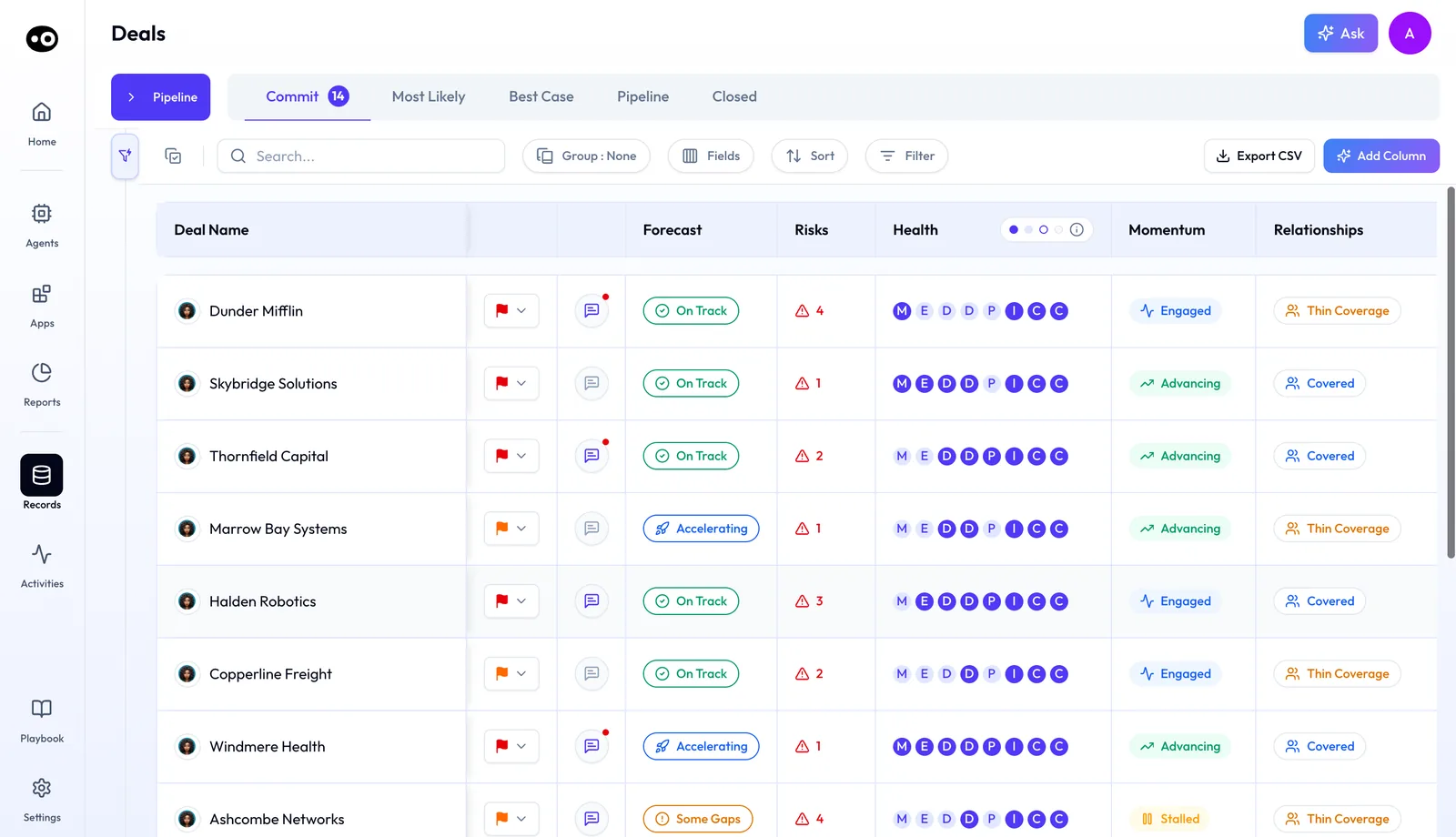
Your CRM pipeline as Oliv AI shows it: the same deals, sorted into forecast views, with a signal column for each question a manager asks about a deal. Every deal and signal in this view is sample data.
Oliv AI [keeps the CRM updated](https://www.oliv.ai/product-docs/workflows/keep-the-crm-updated/) from what customers actually said, so the reports your leaders already trust run on current data. [Oliv AI's CRM Manager agent](https://www.oliv.ai/product-docs/agents/crm-manager/) does the writing.
### One product across the revenue team {#one-product}
Plans build on each other: Sell includes everything in Converse, and Grow includes everything in Sell. Sell adds the Forecast app and Grow adds the Retain app, and every one of them reads the same CRM. The [plans and seat roles](https://www.oliv.ai/product-docs/plans/plans-and-seat-roles/) page shows who gets what.
### Beyond the CRM {#beyond-the-crm}
Account and opportunity context can also go back into Salesforce, Snowflake, Databricks or Redshift. So a team that reports from a warehouse gets the same context as the team working in the CRM.
## Why a CRM layer matters {#why-it-matters}
### What it's for {#what-its-for}
A CRM layer is for revenue leaders who want AI working on their pipeline without a second place to keep it. The CRM stays the record, and Oliv AI fills it from the conversations that never got logged.
### How it helps {#how-it-helps}
- **One system of record.** Updates flow into your existing workflows, reports and dashboards, so nobody reconciles two databases.
- **Every channel counts.** Meeting, phone, email and Slack activity lands on the right account, contact and opportunity.
- **The right deal on busy accounts.** Activity is matched even when one account has several open opportunities.
- **You approve what gets written.** By default every suggested update surfaces for review before anything reaches the CRM.
### What happens without it {#without-it}
Your CRM reflects what got logged, not what happened. Reps type notes when they find time, and pipeline reports run on fields nobody has touched in weeks. Leaders then make calls on a record that is a few conversations behind.
### Why buyers care {#why-buyers-care}
A CRO or VP of Sales usually raises this first, because the board pack and the forecast read from the CRM. Revenue operations owns the data quality and signs off on what may write to it. Account executives and account managers feel it as fewer fields to fill after each call.
## The Oliv AI approach to your CRM {#approach}
{/* 5P */}
Picture a CRO who spent two years folding three regional CRMs into one Salesforce org. Her board pack, the comp plan and every forecast now read from that org. When a vendor pitches an AI tool, her first question is where the data will live.
The usual compromise is a point tool with its own database and a nightly sync. Reps then check two screens, and someone in RevOps reconciles them when the numbers disagree. Trust in the pipeline report drops each time the two drift apart.
The CRO isn't short of a database. What her org lacks is the content of the calls, emails and Slack threads that never reach a record. Those conversations happen outside the CRM, so whatever reads them has to sit beside it and write into it.
Oliv AI reads Salesforce and connects meeting, phone, email and Slack activity to the right accounts and opportunities. Oliv AI's CRM Manager agent then writes the updates back. Reports and the board pack keep running on the same org, and her team has nothing to rip out.
When one account carries several open opportunities, Oliv AI still files the conversation history against the right deal. To test this in a trial, pick an account with several open opportunities and check which deal each call and email lands on. The comparison further down shows how other tools handle that case.
## Connect your CRM {#connect}
1. **Pick your CRM.** Salesforce, HubSpot and Zoho work out of the box. Additional CRMs are available on request.
2. **Install the connection.** A Salesforce admin follows the [Salesforce install steps](https://www.oliv.ai/product-docs/integrations/salesforce/), and a HubSpot admin follows the [HubSpot connection steps](https://www.oliv.ai/product-docs/integrations/hubspot/).
3. **Connect a calendar.** Calendar integration is required for Oliv AI to work, because it's how meetings get captured and notes get taken.
4. **Let the standard fields fill.** Close date, deal amount, stage, next steps and last activity date are mapped when you connect, and populate from day one.
5. **Hand over the custom fields.** Oliv AI's team [maps your custom fields](https://www.oliv.ai/product-docs/agents/crm-manager/field-mapping/) during onboarding as a service.
In the first week, Oliv AI's team maps your workflow, your CRM setup, where deals slip and where reps skip. You don't need a clean CRM to start.
## Decide how Oliv AI writes to the CRM {#write-rules}
By default, every suggested update surfaces for review before anything hits the CRM. You review it on the deal itself, in the **CRM Updates** tab, which has three lists with a count on each:
- **AI Suggestions.** One card per field, with the suggested value above its **Current Value**. You click **Accept** to apply it or **Reject** to drop it.
- **AI Updates.** Changes Oliv AI has already applied to the deal.
- **Updates History.** The record of changes on the deal.
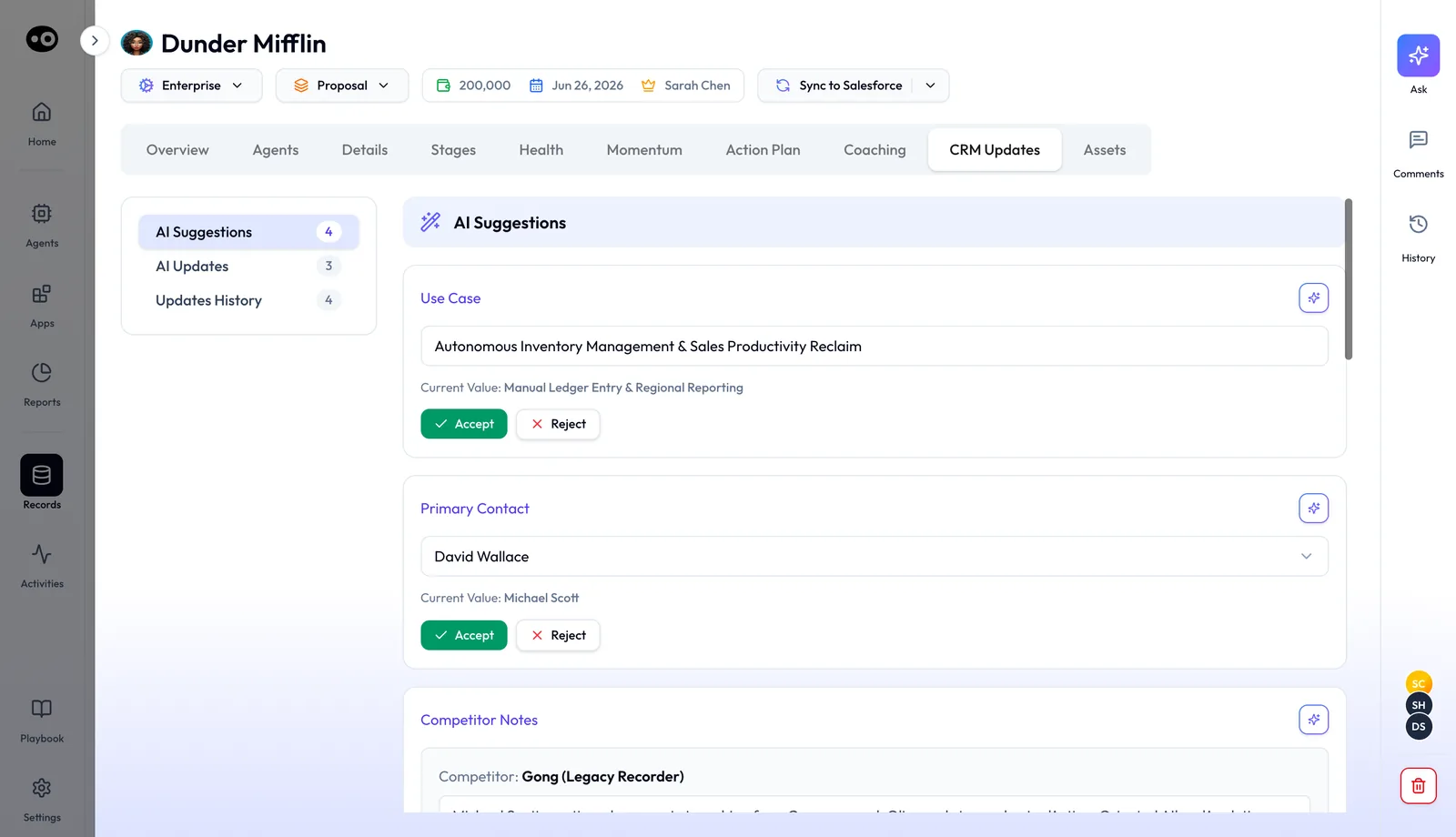
This is where Ask First happens: each proposed field change sits beside the value your CRM holds now, and nothing is written until you accept it. The counts and values come from a demo deal.
You choose between two modes:
- **Ask First.** You review each update before it's written.
- **Auto-Pilot.** Unreviewed updates apply automatically, and the pipeline stays current without anyone acting.
Once accuracy thresholds are met, RevOps confirms the switch to **Auto-Pilot**. When Oliv AI can't resolve which record an activity belongs to, it asks the seller instead of guessing.
## What Oliv AI reads and writes {#reads-and-writes}
| Direction | What it covers |
|---|---|
| **Reads** | Accounts, contacts, opportunities and their fields, messy data included |
| **Writes: activity** | Every meeting, call and email, logged against the account, contact and opportunity |
| **Writes: records** | New accounts and contacts, the moment an activity involves someone not yet in the CRM |
| **Writes: fields** | Standard, methodology and custom fields, plus Opportunity Contact Roles |
| **Writes: notes** | Meeting notes on the record, alongside the AI summary and action items |
For data that's already there, real-time mode resolves issues as new activity arrives and batch mode goes back to clean history. RevOps can ask for jobs such as "Find all duplicate accounts from last quarter" or "Backfill MEDDPICC fields across the pipeline."
## How updates reach your CRM without a rep typing them {#methods}
Before you compare AI agents for your CRM, work out which setup you're being offered. There are four common ones, and each fails in a different way. One of them is probably writing to your records already.
### CRM rules and workflows: what the CRM sets itself {#crm-rules}
Your CRM already changes fields on its own. HubSpot, for example, [sets the close date to today's date](https://knowledge.hubspot.com/properties/hubspots-default-deal-properties) when a deal moves into a closed-won or closed-lost stage, and it fills the last activity date from logged activity. Rules like these catch what the record itself can prove, and they miss anything a customer said that nobody logged. List them before a trial, or you may blame an agent for a change your CRM made.
### A separate tool: its own database and a sync {#separate-tool}
Here the tool stores conversations in its own records and syncs some of them to the CRM on a schedule. It catches what was said. What it misses is one trusted record, because you now have two places to check and they can drift between syncs. When the numbers disagree, someone has to decide which one is right.
### An assistant inside the CRM: no second database {#in-crm-assistant}
An assistant built into the CRM reads records where they already live, so there's nothing to reconcile. What it can work from depends on what reached those records. If a rep never logged a call, ask that vendor how the assistant would learn about it, because this is the gap to test.
### A layer on top: reads, writes and asks first {#layer-on-top}
A layer reads the CRM, captures the conversations around it and writes the results back to the same records. It catches what never got logged, and the CRM stays the only record. The risk moves to the write itself, since a wrong value lands in the system your reports read from. So the approval step is the part to test hardest.
### Which of these Oliv AI is {#which-setup}
Oliv AI is the layer. Oliv AI's CRM Manager agent writes to Salesforce, HubSpot or Zoho and isn't a CRM itself, and by default every suggested update waits for review. All updates flow into your existing CRM workflows, so a rule that watches a written field can fire. Test the agent and your rules together.
## Work a deal from Records {#deal-records}
On the grid, **Group**, **Fields**, **Sort** and **Filter** reshape the list, **Add Column** adds a column and **Export CSV** downloads it. Click any row to open the deal drawer. Its header shows the segment, stage, amount, close date and owner, plus a **Sync to Salesforce** button that pushes the deal to the CRM.
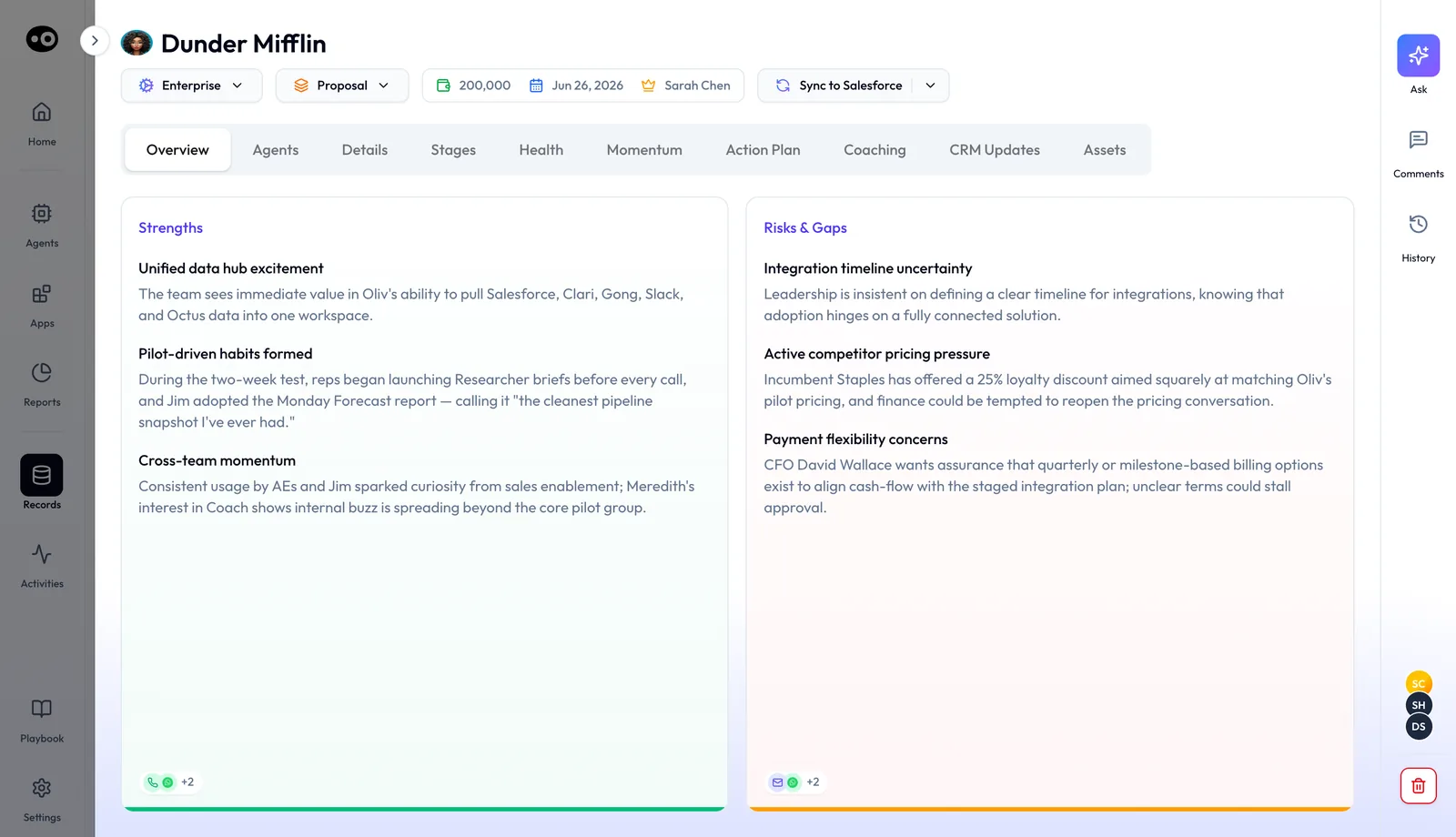
One deal, one drawer: the CRM fields sit in the header, the AI read of the deal sits below, and Sync to Salesforce sends your changes back to the system of record. The amount and close date belong to a made-up deal.
### What each tab holds {#deal-tabs}
| Tab | What you see |
|---|---|
| **Overview** | **Strengths** and **Risks & Gaps** cards, with icons for the activities they draw on |
| **Agents** | **Pending Your Review**: work agents have queued on the deal, with **Send** or **View Progress** |
| **Details** | The deal's fields in sections, from **Overview** and **Next Steps** to **Success Plan** |
| **Stages** | Days spent in each stage, criteria completed per stage, and **Suggested Activities** |
| **Health** | Sub-tabs for **Forecast**, **Risks**, **Qualification**, **Competition**, **Objections**, **Buying Committee** and **POC Health** |
| **Momentum** | An **Activity Map** of meetings, emails, internal and external Slack and agent actions, plus a **Timeline** |
| **Action Plan** | **Next Meeting**, **Next Action**, **Next follow-up**, your task list and a **Mutual Action Plan** |
| **Coaching** | A letter grade for the deal, with a score for each coaching section |
| **CRM Updates** | **AI Suggestions**, **AI Updates** and **Updates History** |
| **Assets** | **Instant Assets**: ready-to-use templates such as an executive summary or ROI calculator |
### Edit the deal's fields {#deal-fields}
**Details** groups the record into **Overview**, **Next Steps**, **Opportunity and Risks**, **Adoption**, **Success Plan** and **Marketing Opportunity**. Jump to a section from the index on the left, change a field, then use **Sync to Salesforce** to send it back.
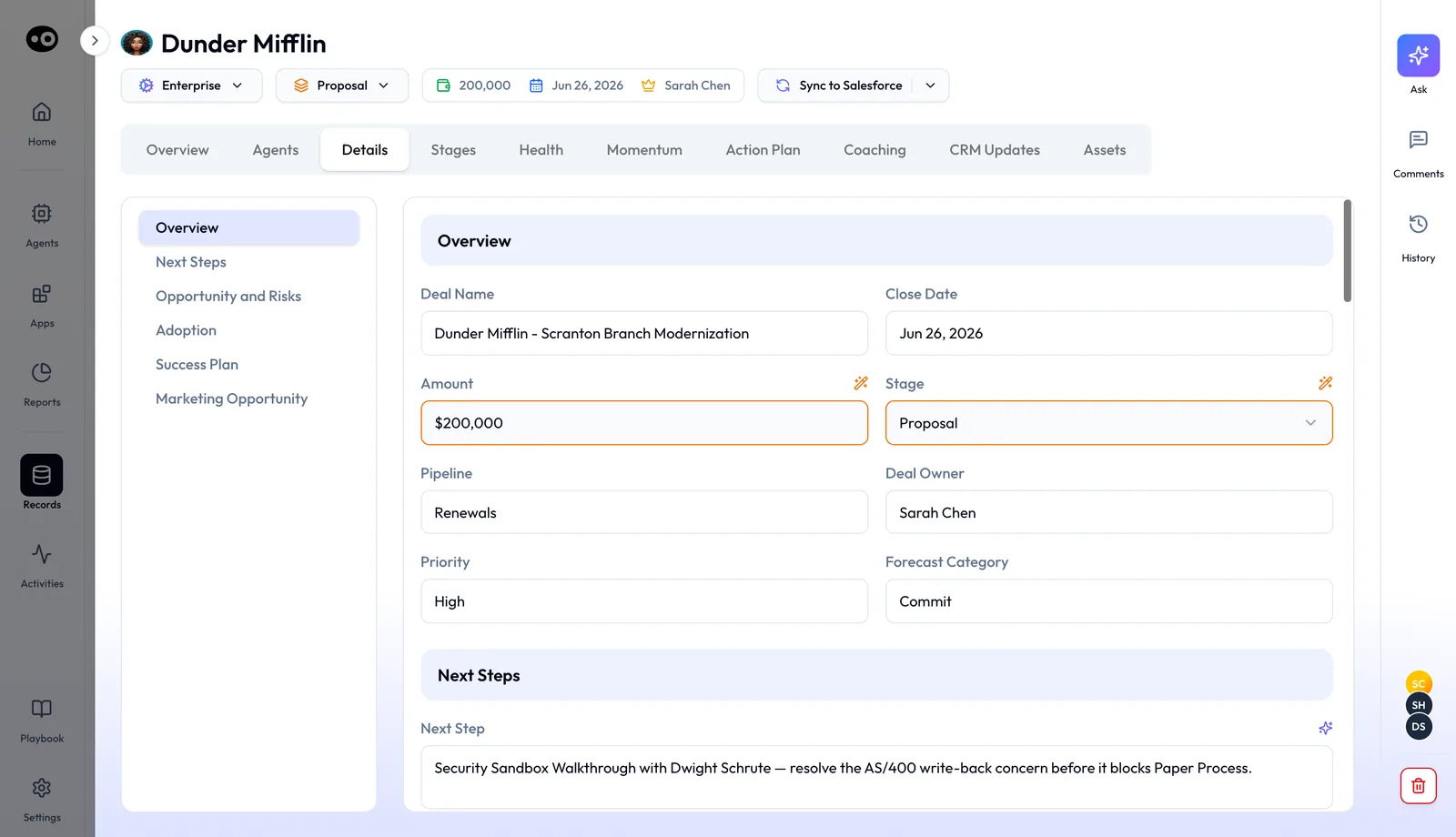
The Details tab is the CRM record in editable sections, so a rep can correct a stage or close date on the deal without opening the CRM itself. These field values are illustrative, not from a real account.
### Talk about the deal with your team {#deal-comments}
The right rail holds **Ask**, **Comments** and **History**. **Comments** opens a dated team thread beside whichever tab you have open. Type a note or dictate it with the microphone, then send.
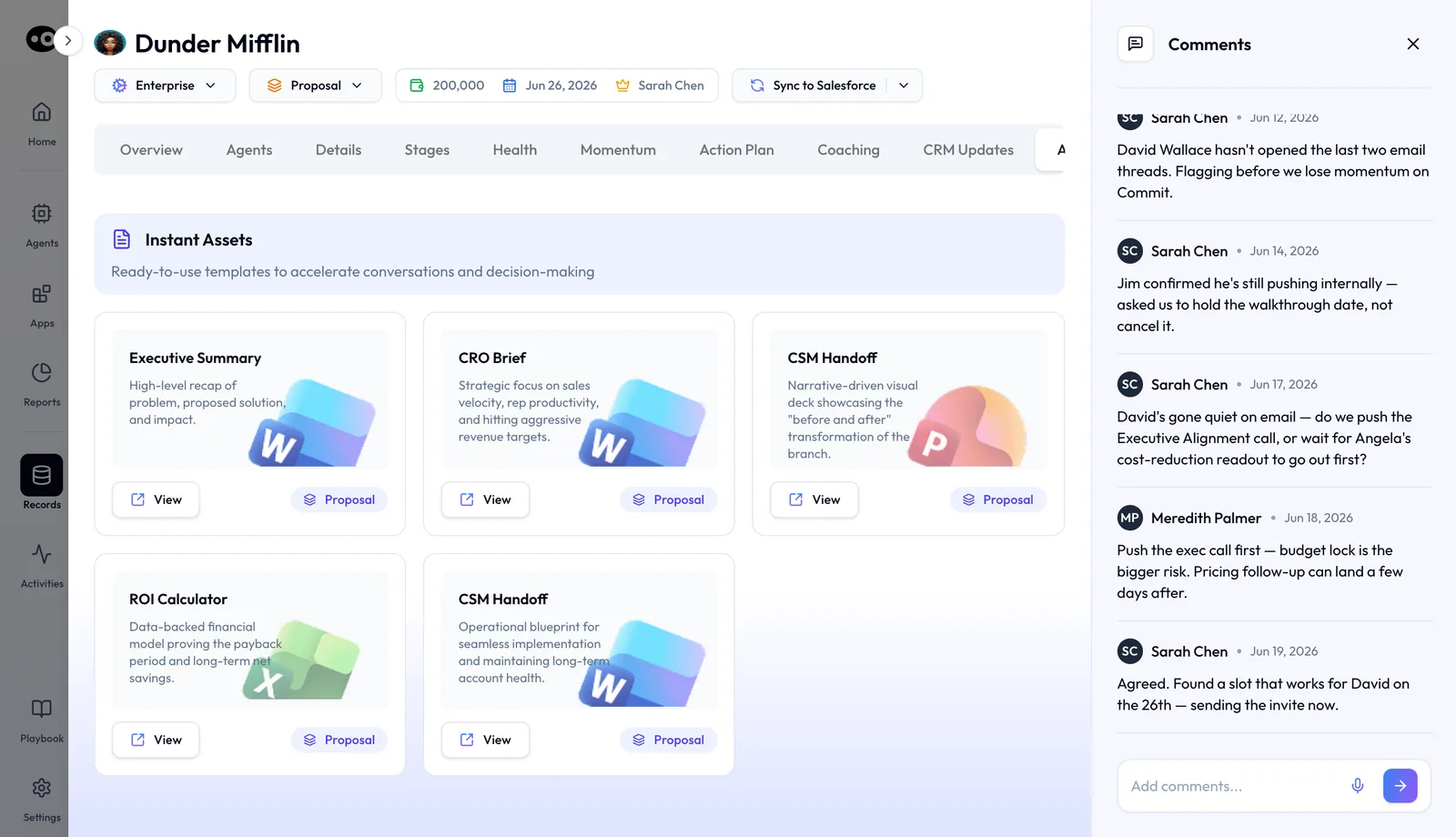
The team's discussion stays on the deal, next to the fields and templates it is about, instead of in a separate chat that never reaches the record.
## How to measure whether agent writes are working {#measure-writes}
Two numbers tell you whether the write mode you chose still fits: review load and acceptance rate. Track both from the first week of a trial.
**Review load** is the time your team spends on suggestions each week. A low number isn't automatically good, because a fast review can also be a careless one. **Acceptance rate** is the share of suggestions your reps accept. A high rate can mean the agent is right, or that reps click **Accept** without reading. So spot check a few accepted values against what the customer actually said.
### Where Oliv AI shows them {#where-oliv-shows-them}
On each deal, **CRM Updates** shows a count beside **AI Suggestions**, **AI Updates** and **Updates History**. Oliv AI's CRM Manager agent also gives RevOps a weekly governance summary with suggestions made, fields updated, reverts and acceptance rate by rep. Use that summary as your evidence before you confirm a move to **Auto-Pilot**. You work out review load yourself from the suggestion count, as the worked example below shows. The wider picture is in [AI quality and accuracy](https://www.oliv.ai/product-docs/platform/ai-quality-and-accuracy/).
### Check the write in the CRM itself {#check-in-crm}
The CRM is the record, so confirm changes there as well as in Oliv AI. On HubSpot, a record's [property history](https://knowledge.hubspot.com/crm-setup/view-property-history) lists past values for one property or for all of them, with **Changed to**, **Date** and **Source** for each change. Don't lean on the deal's last modified date for this. HubSpot [updates it for a change from any source](https://knowledge.hubspot.com/properties/hubspots-default-deal-properties), so it tells you something changed but not who changed it. If you run Salesforce, ask your admin how the org records field changes before your trial starts.
## How to decide by hand what an AI tool may write to your CRM {#decide-by-hand}
Run these steps before you connect any tool that writes to your CRM. All you need is a spreadsheet and one export.
1. **List what reads from the CRM.** Write down the board pack, forecast, comp plan and dashboards, plus the fields each one uses.
2. **Find what already writes to it.** List your workflows, stage rules and integrations, so a change from the new tool is easy to tell apart.
3. **Sort every field into three groups.** Use read only, write after review and write without review. Keep anything your comp plan or board pack reads out of the third group.
4. **Name a reviewer for each group.** Reps usually know next steps and contacts best, and RevOps should own anything that feeds a report.
5. **Export a sample of deals.** Keep a dated copy of the fields you listed, so you can compare them later.
6. **Run a trial with a few reps.** Review every proposed write, and note the ones you reject and why.
7. **Compare and decide.** Check the sample against your export and the CRM's field history, then decide which fields can move to the next group.
Don't skip the second step. If you don't know what already writes to a field, an unexplained change looks like the new tool's fault. Test your stage rules too. HubSpot's conditional stage logic shows properties when users [manually create or move a record](https://knowledge.hubspot.com/object-settings/set-up-and-customize-pipelines), so check what happens when a stage changes any other way.
### The same job with Oliv AI {#same-job-oliv}
Steps 1 and 2 stay with you, though Oliv AI's team [maps your workflow and CRM setup](https://www.oliv.ai/product-docs/getting-started/plan-your-deployment/) in the first week. Step 3 starts from a cautious default: every suggested update waits under **Ask First**, and Oliv AI's Deal Driver agent doesn't write to the CRM at all.
Steps 4 and 6 happen on the deal itself, where each card in **AI Suggestions** gets an **Accept** or a **Reject**. For step 7, compare **AI Updates** and **Updates History** with your CRM's own history, then read the weekly RevOps summary. RevOps makes the final call by confirming any switch to **Auto-Pilot**.
### Worked example: review load before you pick a write mode {#worked-example}
Say a RevOps lead wants to estimate review load before choosing how updates get written. The team has 12 reps with 15 meetings a week each, every meeting produces 3 suggested fields, and each review takes 20 seconds. This is an illustrative calculation with sample figures, not an Oliv AI output, and it claims no saving.
| Step | Arithmetic | Result |
|---|---|---|
| Meetings a week | 12 reps x 15 meetings | 180 meetings |
| Suggestions a week | 180 meetings x 3 fields | 540 suggestions |
| Team review time | 540 suggestions x 20 seconds | 10,800 seconds, or 3 hours a week |
| Time per rep | 3 hours / 12 reps | 15 minutes a week |
At 15 minutes per rep, review under **Ask First** looks affordable, so the lead can keep it on while the team builds confidence. Now run your own numbers, because the inputs move the answer. At 60 seconds a suggestion, the same 540 suggestions take 9 hours, or 45 minutes per rep. At that point, find out which fields take longest before you decide anything about **Auto-Pilot**.
## How the CRM layer works with agents {#works-with}
### CRM Manager {#with-crm-manager}
Oliv AI's CRM Manager agent writes the conversation updates back, so they reach your existing reports. Its page on oliv.ai covers [how it keeps the CRM accurate](https://www.oliv.ai/crm-manager).
### Meeting Assistant {#with-meeting-assistant}
[Oliv AI's Meeting Assistant agent](https://www.oliv.ai/product-docs/agents/meeting-assistant/) proposes field updates from every call. The CRM Manager agent reviews the same call context and pushes the approved changes, as the [record and follow-up workflow](https://www.oliv.ai/product-docs/workflows/record-and-follow-up/) shows.
### Deal Driver and Forecaster {#with-deal-and-forecast}
[Oliv AI's Deal Driver agent](https://www.oliv.ai/product-docs/agents/deal-driver/) reads the CRM but doesn't write to it directly. It surfaces signals for manager action in a [pipeline review](https://www.oliv.ai/product-docs/workflows/run-a-pipeline-review/). [Oliv AI's Forecaster agent](https://www.oliv.ai/product-docs/agents/forecaster/) can sync forecast category and adjusted values back to the CRM, if you configure it.
### Olivia and Oliver {#with-super-agents}
[Oliv AI's Olivia agent](https://www.oliv.ai/product-docs/agents/olivia/) needs a CRM connection for pipeline and deal history, and she reads what's already there. [Oliv AI's Oliver agent](https://www.oliv.ai/product-docs/agents/oliver/) connects to the CRM for schema alignment. It creates or modifies CRM field mappings when new tracking requirements emerge.
### Agents you build {#with-custom-agents}
Agents you set up can act in Salesforce and HubSpot through their tools. The approval choice for each action is covered in [agent tools and run modes](https://www.oliv.ai/product-docs/agents/builder/tools-and-run-modes/).
## Who uses the CRM layer, and how {#who-uses-it}
### Sales leaders {#sales-leaders}
The forecast a CRO presents reads from the same CRM her team updates, so there's no second system to reconcile. The [daily guide for sales managers](https://www.oliv.ai/blog/oliv-ai-sales-manager-daily-use-guide-features) shows how managers use it.
### Revenue operations {#revenue-operations}
RevOps picks the write mode, signs off the move to Auto-Pilot and runs batch clean-up on history. The [RevOps integration blueprint](https://www.oliv.ai/blog/revenue-intelligence-integration-revops-crm-slack-email) shows how calls, email and Slack feed the CRM together.
### Account executives {#account-executives}
An AE opens the deal's **CRM Updates** tab after a call and accepts or rejects each suggestion. New stakeholders are already contacts with roles on the opportunity. The guide to [running deals as an account executive](https://www.oliv.ai/product-docs/use-cases/ae-run-deals/) shows where this fits in the day.
### Customer success and account management {#customer-success}
Renewals, QBRs and check-in calls are logged against the account like any sales call. An account manager opening the record sees this week's conversations, ready for the next [meeting brief](https://www.oliv.ai/product-docs/workflows/prepare-for-a-meeting/).
## How Oliv AI compares for AI agents for your CRM {#compare}
Most conversation tools log calls into the CRM. Oliv AI also links Slack activity to records, matches the right opportunity when an account has several, and fixes records already in the CRM in batch. Oliv AI is the only platform in this table that does all four.
CRM sync features, from each platform's public documentation:
| Platform | Slack activity linked to CRM records | Right opportunity when an account has several | Batch fixes to existing CRM records | Salesforce, HubSpot and Zoho |
|---|---|---|---|---|
| **Oliv AI** | Yes | Yes | Yes | Yes |
| **Gong** | Not in docs | Partly ([falls back to the account](https://help.gong.io/docs/configure-salesforce-tasks-or-events)) | Partly ([reassociates the last 30 days](https://help.gong.io/docs/configure-crm-entity-association)) | Yes ([Zoho CRM integration](https://help.gong.io/docs/monthly-updat)) |
| **Avoma** | Posts alerts only ([cannot read Slack conversations](https://help.avoma.com/slack-integration-setup-guide)) | Partly ([you confirm the associated record](https://help.avoma.com/crm-settings)) | Partly ([notes resynced by hand](https://help.avoma.com/how-to-clean-up-notes-following-a-meeting)) | Yes ([single-click CRM connections](https://help.avoma.com/connecting-to-your-crm)) |
| **Fireflies** | Not in docs | Not in docs | Partly ([On Demand for past meetings](https://guide.fireflies.ai/articles/1729159683-autofill-crm-for-salesforce-automatically-extract-and-sync-meeting-data-to-contacts-accounts-and-opportunities)) | Yes ([notes logged under Zoho](https://guide.fireflies.ai/articles/1251926391-how-to-log-meeting-notes-under-zoho-leads)) |
| **Fathom** | Not in docs | Partly ([deals added or removed by hand](https://help.fathom.video/en/articles/6220097)) | Partly ([manual, per call only](https://help.fathom.video/en/articles/448640)) | Partly ([HubSpot or Salesforce](https://help.fathom.video/en/articles/3741761)) |
| **Outreach** | Not in docs | Partly ([most recent open opportunity](https://support.outreach.io/support/solutions/articles/159000423738-assign-outreach-action-to-an-opportunity)) | Partly ([bulk push of past activity](https://support.outreach.io/support/solutions/articles/159000426202-how-to-force-sync-activities-to-a-crm-retroactively)) | Partly ([Salesforce and Dynamics](https://support.outreach.io/support/solutions/articles/159000425917-enhanced-crm-sync-experience-overview)) |
*Yes: documented and built in. Partly: documented with a limit, shown in brackets. Not in docs: not found in the vendor's public documentation.*
### Why Oliv AI is the stronger choice for AI agents for your CRM {#compare-stronger}
- **Slack threads count as activity.** Oliv AI connects Slack activity to the right accounts, contacts and opportunities, the same way it handles meetings, phone and email. Avoma's guide says it [cannot read Slack conversations or monitor private chats](https://help.avoma.com/slack-integration-setup-guide). Compare [Oliv AI vs Avoma](https://www.oliv.ai/blog/avoma-vs-oliv-ai).
- **The right deal, not just the right account.** Oliv AI matches activity to the right opportunity when one account has several open. Gong documents that with [multiple opportunities, the Related to field gets the account](https://help.gong.io/docs/configure-salesforce-tasks-or-events). Compare [Oliv AI vs Gong](https://www.oliv.ai/blog/gong-vs-oliv).
- **History gets fixed too.** Batch jobs find duplicate accounts, rebuild account hierarchies and backfill methodology fields across the pipeline. Gong's reassociation covers [activities from the last 30 days](https://help.gong.io/docs/configure-crm-entity-association). See [Oliv AI as a Gong alternative](https://www.oliv.ai/gong-alternative).
*Competitor details checked against each vendor's public documentation on 22 October 2026. Features and plans change, so confirm with the vendor before you decide.*
## Limits and things to know {#limits}
- **A CRM comes first.** Oliv AI sits on top of an existing CRM and isn't one itself. The deals in **Records** come from the CRM you connect, and changes go back to it.
- **Three CRMs out of the box.** Salesforce, HubSpot and Zoho connect directly. Any other CRM is a request to Oliv AI's team.
- **A calendar is required.** Without a calendar connection, Oliv AI can't take notes in meetings.
- **Custom fields go through onboarding.** Oliv AI's team maps them as a service, not from a settings screen.
- **Review is the default.** Auto-Pilot starts only after RevOps confirms the switch.
- **Some agents only read.** The Deal Driver agent surfaces signals and leaves the writing to people and the CRM Manager agent.
## Common questions {#common-questions}
#### Do I need to replace Salesforce or HubSpot? {#faq-replace}
No. You connect the org you already have, and it stays the system of record.
#### Do AI agents replace your CRM? {#faq-agents-replace-crm}
Not with a layer like Oliv AI. AI agents need records to read and a place to write, and your existing Salesforce, HubSpot or Zoho org stays that place.
#### Is Oliv AI a CRM? {#faq-is-it-a-crm}
No, so you need one connected first. The deals in **Records** come from the Salesforce, HubSpot or Zoho org you connect.
#### Which CRMs does Oliv AI support? {#faq-which-crms}
Salesforce, [HubSpot](https://www.oliv.ai/product-docs/integrations/hubspot/) and Zoho out of the box. Additional CRMs are available on request.
#### Will our reports and dashboards change? {#faq-reports}
No. All updates flow into your existing CRM workflows, reports and dashboards, so they run on fresher data in the same place.
#### Who decides what gets written? {#faq-who-approves}
You do. Every suggested update surfaces for review by default. RevOps confirms the move to **Auto-Pilot** once accuracy thresholds are met.
#### Can I see what Oliv AI changed on a deal? {#faq-deal-changes}
Yes. Open the deal in **Records › Deals** and go to **CRM Updates**. **AI Updates** lists the changes already applied, and **Updates History** keeps the record of changes on that deal.
#### Does Slack and email activity reach the CRM? {#faq-slack-email}
Yes. Oliv AI connects meeting, phone, email and Slack activity to the right accounts, contacts and opportunities. The [Slack integration](https://www.oliv.ai/product-docs/integrations/slack/) covers the Slack connection itself.
#### What if one account has several open opportunities? {#faq-multiple-opportunities}
Oliv AI still matches each activity to the right deal. It weighs every open account and opportunity, relationship history and conversation context to place the activity.
#### What if a customer gets acquired and emails from a new domain? {#faq-acquisition}
A plain email-domain lookup finds no match and drops the activity. Oliv AI also weighs live M&A news, so it can still place the conversation on the right account.
#### Our CRM data is messy. Can we still connect? {#faq-messy-data}
Yes. Real-time mode resolves issues as new activity comes in, and batch mode cleans what's already there. Duplicates get cleaned up as a byproduct of matching. The [Context Graph post](https://www.oliv.ai/blog/bi-directional-crm-sync-ai) explains why Oliv AI enriches records and never replaces them.
#### Can Oliv AI send context to our data warehouse? {#faq-warehouse}
Yes. Account and opportunity context can go back into Salesforce, Snowflake, Databricks or Redshift.
#### Does every agent write to the CRM? {#faq-which-agents-write}
No. The CRM Manager agent executes writes. The Deal Driver agent doesn't write to the CRM directly, and the Forecaster agent syncs forecast values back only if you configure it.
#### How is Oliv AI priced? {#faq-pricing}
The [Oliv AI pricing page](https://www.oliv.ai/pricing) sets out the current plans.
## Further reading {#further-reading}
- [View a record's property history](https://knowledge.hubspot.com/crm-setup/view-property-history): how HubSpot shows each past value of a property, with its date and source.
- [HubSpot's default deal properties](https://knowledge.hubspot.com/properties/hubspots-default-deal-properties): which deal fields HubSpot sets for you, including close date and last activity date.
- [Set up and manage object pipelines](https://knowledge.hubspot.com/object-settings/set-up-and-customize-pipelines): how HubSpot's stage settings and conditional stage properties work.
## Related {#related}
- [Salesforce](https://www.oliv.ai/product-docs/integrations/salesforce/): the install, review settings and objects for a Salesforce org.
- [Keep the CRM updated](https://www.oliv.ai/product-docs/workflows/keep-the-crm-updated/): the day-to-day routine for reviewing and approving updates.
- [CRM Manager agent](https://www.oliv.ai/product-docs/agents/crm-manager/): the agent that writes conversation updates back to your CRM.
- [Why RAG fails on CRM data](https://www.oliv.ai/blog/rag-for-crm-data): why matching activity to the right object is harder than retrieval.
- [Agentforce and specialized revenue AI](https://www.oliv.ai/blog/salesforce-agentforce-vs-revenue-ai-b2b-limitations): where a CRM's own AI fits next to a layer like Oliv AI.
- [Oliv AI integrations](https://www.oliv.ai/product-docs/integrations/): every tool Oliv AI connects to alongside your CRM.
- [Oliv AI product documentation](https://www.oliv.ai/product-docs/): every documented agent and feature.
*Updated 3 November 2026: added the four setups for updating a CRM, how to measure and check agent writes, a method for deciding what a tool may write, and a review-load worked example.*