# Which Oliv AI plan do I need? Match each person to Converse, Sell, Grow or Amplify
Decide which seat each person on your revenue team needs, using four questions, a sorted example of a 34-person org and what Converse, Sell, Grow and Amplify each add.
- Applies to: Revenue operations and anyone planning an Oliv AI rollout
- Status: Live
- Verified: 2026-11-03
- Canonical page: https://www.oliv.ai/product-docs/plans/plans-and-seat-roles/
You're working out role-based plans for revenue teams, and you have a list of names but no rule for who gets which seat. Ask the four questions below about each person's work, count that person once, and give them the highest plan they say yes to. Then check your sort against the 34-person example and add add-ons only for the people who need them. Prices, including the cost of a credit, aren't on this page, so take your seat counts to [Oliv AI's pricing page](https://www.oliv.ai/pricing) when the sort is done.
## At a glance {#at-a-glance}
| If this person's work is | Give them | What that plan adds | Typical roles |
|---|---|---|---|
| Running customer conversations that should be captured | **Converse** | Online and in-person meeting capture | BDRs and SDRs, Product Marketing, Customer Support |
| Owning, supporting or forecasting opportunities | **Sell** | Email capture, Forecast app, sales methodologies and deal risks | Account Executives, Sales Engineering, Partnerships |
| Looking after live customers through onboarding, renewals, health or expansion | **Grow** | Retain app, customer health scorecards and churn risks | Customer Success, Account Management, Solution Engineering, Onboarding |
| Reading context, asking questions or building agents | **Amplify** | Super agents (Oliver and Olivia), questions and reviews across customer context, and custom agents | C-suite, Product, Operations, Engineering |
Sell includes everything in Converse, and Grow includes everything in Sell. Amplify is listed on its own and has no seat fee. Treat the roles column as a guide, because the work a person does decides the seat.
## Assign a seat to each person {#assign-roles}
Start from your revenue org list, with one row per person. Fill in a seat for each row before you think about add-ons or budget, because add-ons attach to the seat you choose.
### Ask four questions about each person {#questions-per-person}
1. **Do they run customer conversations that should be captured?** If yes, they need at least Converse.
2. **Do they own, support or forecast opportunities?** If yes, they need Sell, which brings the Forecast app.
3. **Do they look after live customers through onboarding, renewals, health or expansion?** If yes, they need Grow, which brings the Retain app.
4. **Do they only read context, ask questions or build agents?** Amplify covers that work.
Take the highest yes among questions 1 to 3 and stop there. A yes to question 3 means Grow, which already includes Sell and Converse, so don't count that person in another group.
Two mistakes undo a sort like this. Buying one plan for everyone puts people on apps they won't work in, so give someone Sell or Grow only when they'll work in the Forecast or Retain app. Sorting by title alone misses the judgment calls: pre-sales Sales Engineering sits under Sell, while post-sales Solution Engineering sits under Grow.
To test a Sell seat against a real working day, walk through [running deals as an account executive](https://www.oliv.ai/product-docs/use-cases/ae-run-deals/).
### Check your sort against a 34-person org {#sorted-example}
Picture a revenue operations lead planning a rollout for a 34-person revenue org. Sales development has five SDRs, and support has two agents who answer customer calls. Sales has nine AEs, two sales engineers and a partnerships manager. Post-sale has five CSMs and two onboarding specialists. Around them sit a CRO, two product managers, two RevOps analysts, two engineers and a product marketer who sits in on customer calls.
Each person lands in one row, following the role examples on the pricing page:
| Group | People in this example | Plan |
|---|---|---|
| Sales development and support | 5 SDRs, 2 support agents | **Converse** |
| Product marketer on customer calls | 1 product marketer | **Converse** |
| Pre-sales | 9 AEs, 2 sales engineers, 1 partnerships manager | **Sell** |
| Post-sales | 5 CSMs, 2 onboarding specialists | **Grow** |
| Leadership, product, operations, engineering | CRO, 2 product managers, 2 RevOps analysts, 2 engineers | **Amplify** |
That sort gives 8 Converse, 12 Sell, 7 Grow and 7 Amplify seats, which adds back up to 34. If your total doesn't match your list, someone is counted twice or missing.
The product marketer is the judgment call. The pricing page lists Product Marketing under Converse, and this one sits in on customer calls, so question 1 puts them there. The CRO and the RevOps analysts sit on Amplify here because they read and review. If either will work in the Forecast app, question 2 moves them to Sell.
### Check the sort in the product {#in-product-views}
Once people are in, open the **Agent Feed** on Home and filter by **Team** (**Sales**, **Sales Development**, **Customer Success**, **RevOps**) and **Role** (**Contributor** or **Manager**). Each combination shows the agents that group uses. These are views, not plans, so use them to check that the seat you picked fits the person's work.
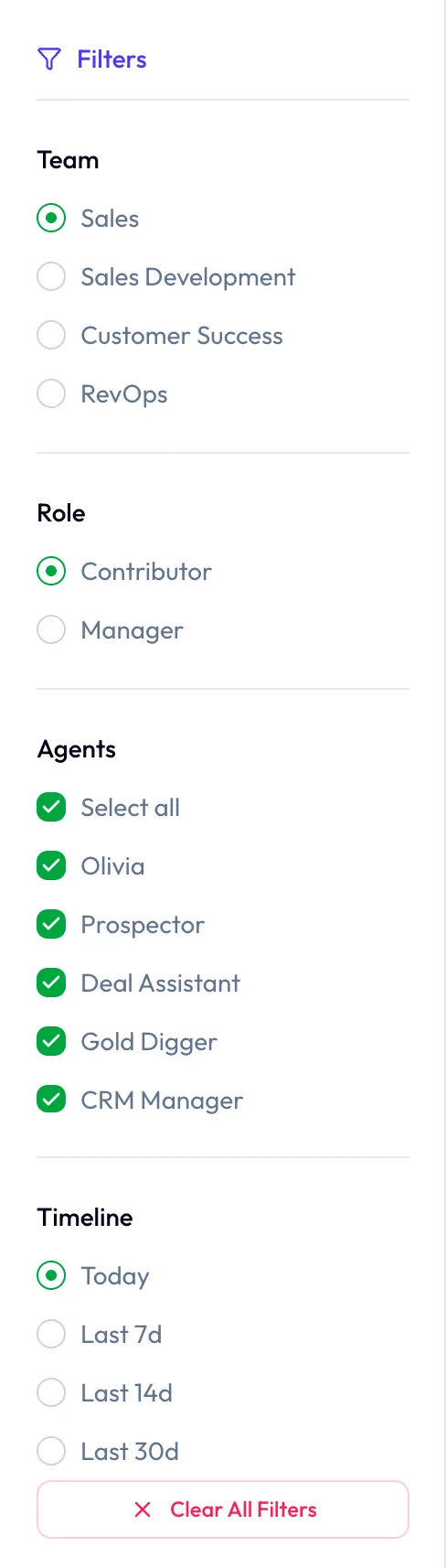
The team and role filters show which agents each group relies on, a quick way to sanity-check the plan you give each person.
## How the plans stack {#how-plans-stack}
If you're unsure between two seats, compare only what the next plan adds. Sell carries everything in Converse, Grow carries everything in Sell, and Amplify is listed on its own:
1. **Converse** gives you conversation capture: online meetings, in-person meetings and phone calls.
2. **Sell** adds email capture with optional Slack capture, the Forecast app, sales methodologies and deal risks.
3. **Grow** adds the Retain app, with customer health scorecards and churn risks.
4. **Amplify** gives you the super agents, [Oliver](https://www.oliv.ai/product-docs/agents/oliver/) and [Olivia](https://www.oliv.ai/product-docs/agents/olivia/), plus questions and reviews across customer context, and building custom agents.
Use all four plans together in one company. Assign each team member by the apps they need, rather than buying one plan for everyone.
## What each seat gives the person in it {#seat-roles}
Use these lists when someone asks what they'll get, or when a person sits between two seats.
### Converse {#converse}
Give Converse to customer-facing people whose conversations should be captured but who don't manage opportunities. If conversation intelligence is all you want, you can buy Converse on its own and deploy it across your customer-facing organization. A Converse seat includes:
- [Online meeting capture, botless or bot-based](https://www.oliv.ai/product-docs/apps/converse/recording-modes/) (bot-based capture is an add-on)
- In-person meeting capture through the mobile app
- Phone call capture, meeting transcription, and [AI summaries and action items](https://www.oliv.ai/product-docs/apps/converse/meeting-details/)
- A [conversation library with search](https://www.oliv.ai/product-docs/apps/converse/meetings/), and meeting notes in the CRM
Email capture and optional Slack capture start at Sell. Read the [Converse page](https://www.oliv.ai/product-docs/apps/converse/) for how the app works day to day. To check what a new Converse seat should see, open **Activities**, where captured conversations sit as **Meetings** and **Calls**. The meetings list has **My meetings** and **Team meetings** views.
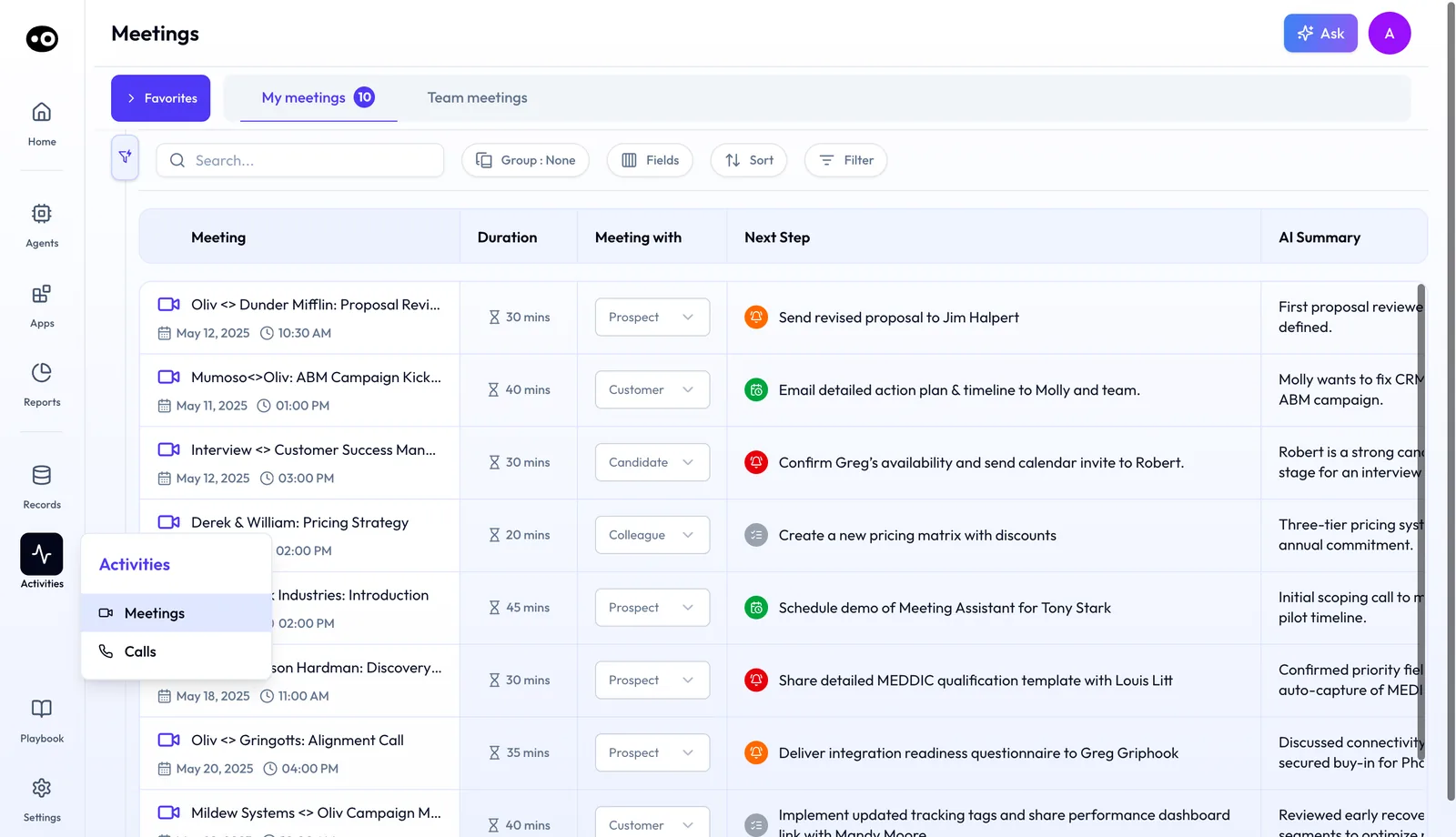
Where a Converse seat's captured conversations land: meetings and calls under Activities, each meeting with an AI-written next step and summary.
### Sell {#sell}
Give Sell to account executives, sales engineering and partnerships, and to anyone else who'll work in the Forecast app. On top of everything in Converse, a Sell seat includes:
- Email capture and optional [Slack capture](https://www.oliv.ai/product-docs/integrations/slack/) (Slack capture is an add-on)
- Opportunity grids and deal health and risks
- Sales methodology tracking against the framework you activate: **MEDDPICC**, **MEDDIC**, **SPICED**, **BANT** or **DRIVE**
- Buying committee tracking
- Revenue forecast boards, forecast submissions and weekly pipeline snapshots, on the Forecast app's **Boards** and **Submissions** tabs
- Deal change history
Open the [Forecast app page](https://www.oliv.ai/oliv-forecast) to see these views, and check the frameworks your team runs against [sales methodology tracking](https://www.oliv.ai/sales-methodology).
### Grow {#grow}
Give Grow to customer success, account management, solution engineering and onboarding. On top of everything in Sell, a Grow seat includes:
- Customer grids and customer health scorecards
- Churn risks and retention forecast boards
- Product usage tracking and support ticket tracking
- White space tracking and customer stakeholder tracking
If you're sorting a post-sale team, read how Oliv AI works for [customer success teams](https://www.oliv.ai/customer-success) and for [account management](https://www.oliv.ai/account-management).
### Amplify {#amplify}
Give Amplify to people who use customer context but don't run calls or own deals. C-suite, Product, Operations and Engineering can use Oliv AI's Oliver and Olivia agents. They can ask questions of customer context, review conversations, opportunities and accounts, and build custom agents. Amplify has no seat fee, but asking questions and building custom agents are credit-based, as the credits section below explains.
Send anyone building or adjusting agents to [Oliv AI's Oliver agent](https://www.oliv.ai/product-docs/agents/oliver/), which configures how agents work. Send anyone who wants tasks coordinated across the team to [Oliv AI's Olivia agent](https://www.oliv.ai/product-docs/agents/olivia/).
## Priced separately: add-ons person by person {#add-ons}
Go back through your list once the seats are set, and mark add-ons only for the people who need them. The pricing page lists them under **Priced separately**, and this section follows its order. Each one is added per person.
### Enable {#enable}
Add Enable for reps you want to evaluate against coaching scorecards, so you can identify where a rep needs help. In the app, its **Library** tab holds clip libraries, each **Public** or **Private**, and its **People** tab shows each rep's pacing for managers.
### Engage {#engage}
Add Engage to Converse, Sell or Grow for team members who connect with prospects and customers through email and LinkedIn outreach. It isn't listed for Amplify, so a person on Amplify needs one of those three seats first. It includes one connected primary mailbox and LinkedIn automation. In the app, Engage has **Inbox**, **Dialer**, **Plays**, **Flows**, **Signals** and **Experiments** tabs. You can add more on top with the Engage add-ons below.
### Capture add-ons {#capture-add-ons}
Add bot-based meeting capture to Converse, Sell or Grow when someone needs a meeting assistant to join the call, including [externally hosted meetings](https://www.oliv.ai/product-docs/apps/converse/recording-modes/) when permitted. Mark the other capture channels separately too, for the people whose customers talk to them there. Slack capture goes on Sell or Grow, while WhatsApp capture and LinkedIn capture go on Converse, Sell or Grow.
### Engage add-ons {#engage-add-ons}
Give these only to people who already have Engage:
- **Dialer.** One US phone number, with calling minutes to the US and Canada. The **Dialer** tab runs **Power** and **Parallel** sessions.
- **WhatsApp, Telegram or Instagram.** Choose the channels you need, priced per channel.
- **Extra mailboxes.** Additional warm email mailboxes to scale outreach.
### Plaud recordings {#plaud}
Check whether anyone in your sort records in-person meetings on Plaud. Converse captures in-person meetings through the mobile app, while Sell and Grow also support Plaud recordings. Budget for the Plaud hardware separately, because it's purchased separately.
## Plan for AI agent actions in credits {#agent-actions}
Don't size credit spend from your seat counts. AI agent actions are billed in credits, and credits are billed separately from app subscriptions. Your total depends on the actions your agents perform. An agent action is a task an agent completes, such as researching an account or updating a CRM record.
The pricing page also marks **Ask AI · Voice of the customer** and **Build custom agents** as credit-based in every plan. The cost of a credit is on the pricing page, so check it there.
| Agent | Example actions |
|---|---|
| [Oliv AI's Forecaster agent](https://www.oliv.ai/product-docs/agents/forecaster/) | Prepare forecast, update forecast category |
| [Oliv AI's Portfolio Manager agent](https://www.oliv.ai/agents/portfolio-manager) | Flag renewal risk, prioritize customers, draft next steps |
| [Oliv AI's Prospector agent](https://www.oliv.ai/agents/prospector) | Rank target accounts, identify contacts, prepare outreach |
| [Oliv AI's Deal Driver agent](https://www.oliv.ai/product-docs/agents/deal-driver/) | Review pipeline, draft follow-ups, flag risks |
| [Oliv AI's CRM Manager agent](https://www.oliv.ai/product-docs/agents/crm-manager/) | Create records, update fields, sync next steps |
Ask for the estimate in a proof of concept. Oliv AI estimates your credit spend at your expected volume, then assesses return on investment against time saved and business value before rollout. [Custom agents you build](https://www.oliv.ai/product-docs/agents/builder/) use credits too, and [agent tools and run modes](https://www.oliv.ai/product-docs/agents/builder/tools-and-run-modes/) covers what an agent can do in connected apps.
## Compare your seat counts against current tools {#cost-calculator}
Take the four counts from your sort to the calculator on the pricing page, and enter the number of people in Converse, Sell, Grow and Amplify. It compares the Oliv AI apps in their plan with named tools, using the same seat counts.
Don't quote its output as a saving your finance team can bank. The figures are comparison assumptions, not vendor quotes, because coverage and contracts differ, and platform fees are excluded. For the case behind putting per-seat budget into agents, read [build versus buy for revenue AI](https://www.oliv.ai/build-vs-buy).
Once the seats are agreed, move to [the 30-day rollout plan](https://www.oliv.ai/product-docs/getting-started/plan-your-deployment/).
## Limits and things to know {#limits}
- **Role examples are a guide.** Assign by the apps a person needs, not by job title alone.
- **Add-ons are priced separately.** That covers Enable, Engage, bot-based capture, the extra capture channels and the Engage add-ons.
- **Credits are separate.** AI agent actions are billed in credits, separately from app subscriptions, and the total depends on the actions your agents perform.
- **Hardware is separate.** Plaud hardware is purchased separately from any plan.
- **Calculator figures are assumptions.** They aren't vendor quotes, and platform fees are excluded.
## Common questions {#common-questions}
#### Can I buy only conversation intelligence? {#faq-ci-only}
Yes. Converse is the conversation intelligence plan, and it can be deployed across your customer-facing organization.
#### Can different people in one company be on different plans? {#faq-mixed-plans}
Yes. Use Converse, Sell, Grow and Amplify together across your company, and assign each team member by the apps they need. Count each person once, in the group that fits their work.
#### Do Oliv AI plans stack? {#faq-cumulative}
Yes. Sell includes everything in Converse, and Grow includes everything in Sell. Amplify is listed on its own. Someone on Grow doesn't need a second seat for the apps in Sell.
#### Which plan does a sales engineer need? {#faq-sales-engineer}
Use Sell for pre-sales Sales Engineering and Grow for post-sales Solution Engineering. If one person does both, the Grow seat already includes everything in Sell.
#### Which plan adds forecasting? {#faq-forecasting}
Sell. It brings the Forecast app, with revenue forecast boards, forecast submissions, weekly pipeline snapshots and deal change history. [Pipeline reviews with the Deal Driver agent](https://www.oliv.ai/product-docs/agents/deal-driver/) build on the same data.
#### Which plan adds customer health and churn risk? {#faq-health}
Grow. It brings the Retain app, with customer health scorecards, churn risks and retention forecast boards.
#### Do viewers and admins need a Sell or Grow seat? {#faq-viewers}
No. Amplify covers C-suite, Product, Operations and Engineering. They can use Oliver and Olivia, ask questions of customer context, review conversations, opportunities and accounts, and build custom agents.
#### What does Engage include? {#faq-engage}
One connected primary mailbox and LinkedIn automation. Dialer, WhatsApp, Telegram, Instagram and extra warm email mailboxes are added separately.
#### How are agent actions charged? {#faq-agent-actions}
In credits, which are billed separately from app subscriptions. During a proof of concept, Oliv AI estimates your credit spend at your expected volume and assesses the return against time saved. The cost of a credit is on the pricing page.
#### Do we need to replace Salesforce or HubSpot? {#faq-crm}
No. Oliv AI works with your existing CRM. It brings the context together and [keeps your systems updated](https://www.oliv.ai/product-docs/workflows/keep-the-crm-updated/).
#### Is in-person meeting capture included? {#faq-in-person}
Yes, through the mobile app from Converse up. Sell and Grow also support Plaud recordings, with the hardware purchased separately.
## Related {#related}
- [Plans overview](https://www.oliv.ai/product-docs/plans/): where this page sits among the other plan documents.
- [Oliv AI pricing](https://www.oliv.ai/pricing): current prices for every plan, add-on and credit.
- [The agent marketplace](https://www.oliv.ai/agents-marketplace): the agents that agent actions run on.
- [Oliv AI for revenue operations](https://www.oliv.ai/revops): how RevOps runs the rollout and the process the agents follow.
- [Oliv AI for sales development](https://www.oliv.ai/sales-development): what Converse seats do for SDR teams.
- [Oliv AI for sales teams](https://www.oliv.ai/sales): how Sell seats support account executives and managers.
- [Oliv AI for onboarding teams](https://www.oliv.ai/onboarding): where onboarding specialists fit under Grow.
- [Prepare for a meeting](https://www.oliv.ai/product-docs/workflows/prepare-for-a-meeting/): one workflow that runs on captured conversations and CRM data.
- [Oliv AI product documentation](https://www.oliv.ai/product-docs/): every documented agent and feature.