# AI sales agents: which Oliv AI agent owns which job, and which workflow to start with
Which AI sales agent to open for the job in front of you: Olivia to ask for work, Oliver to set the rules, a specialist for one job, and the builder pages to see how any agent is set up.
- Applies to: All revenue teams
- Status: Live
- Verified: 2026-11-03
- Canonical page: https://www.oliv.ai/product-docs/agents/
AI sales agents only take work off your reps, managers and RevOps once you know which agent owns which job. Pick the job in front of you and open that page. Open Oliv AI's Olivia agent to ask for work and Oliv AI's Oliver agent to set the rules. For one job, such as pipeline alerts, CRM updates, meeting briefs, forecasts or coaching, open the specialist that owns it.
To see how any agent is set up, open the builder pages. Every agent works as a layer on top of the CRM you already use and keeps it updated, so you keep your CRM and add the agents to it.
## Which AI sales agent does which job {#how-agents-fit}
Find your situation in the table and open that page. You don't need to read the pages in order.
| Your situation | Open | What happens next |
|---|---|---|
| You want help with a deal, a meeting or your pipeline | [Olivia](https://www.oliv.ai/product-docs/agents/olivia/) | She answers, or hands the task to a specialist and reports back |
| You need to change the ICP, methodology or approval rules | [Oliver](https://www.oliv.ai/product-docs/agents/oliver/) | It proposes the change and waits for a person to approve it |
| You want one job off your team's plate | The specialist agent that owns it, listed below | It does the job in the background and delivers where you already work |
| You want to see how any agent is set up | The [agent builder overview](https://www.oliv.ai/product-docs/agents/builder/) | You get the same tabs on every agent's detail page |
### How the agents work together {#work-together}
If a rule you approved isn't showing up in a specialist's work, start with Oliver, because it configures how the agents work. Check **Pending Review** to confirm a person approved the update. If it was approved, open the specialist's [run history](https://www.oliv.ai/product-docs/agents/builder/run-history/) and read what its latest run did. Then ask Oliver about the gap in its chat beside the **Agents** marketplace.
If you don't know which specialist a task needs, ask Olivia. She coordinates tasks across your team and passes focused work to the specialist that owns it.
When you trace an answer back, start from the one record they all share. Oliv AI wires your CRM, calls, email, tickets and product usage into one [context graph](https://www.oliv.ai/context-graph), and every agent and every rep works from that same graph.
## Which AI sales agents you talk to directly {#olivia-and-oliver}
You talk to two agents, and the choice depends on whether you run deals or run the process. Open the agent picker on the **Ask** tab of **Home** and choose one.
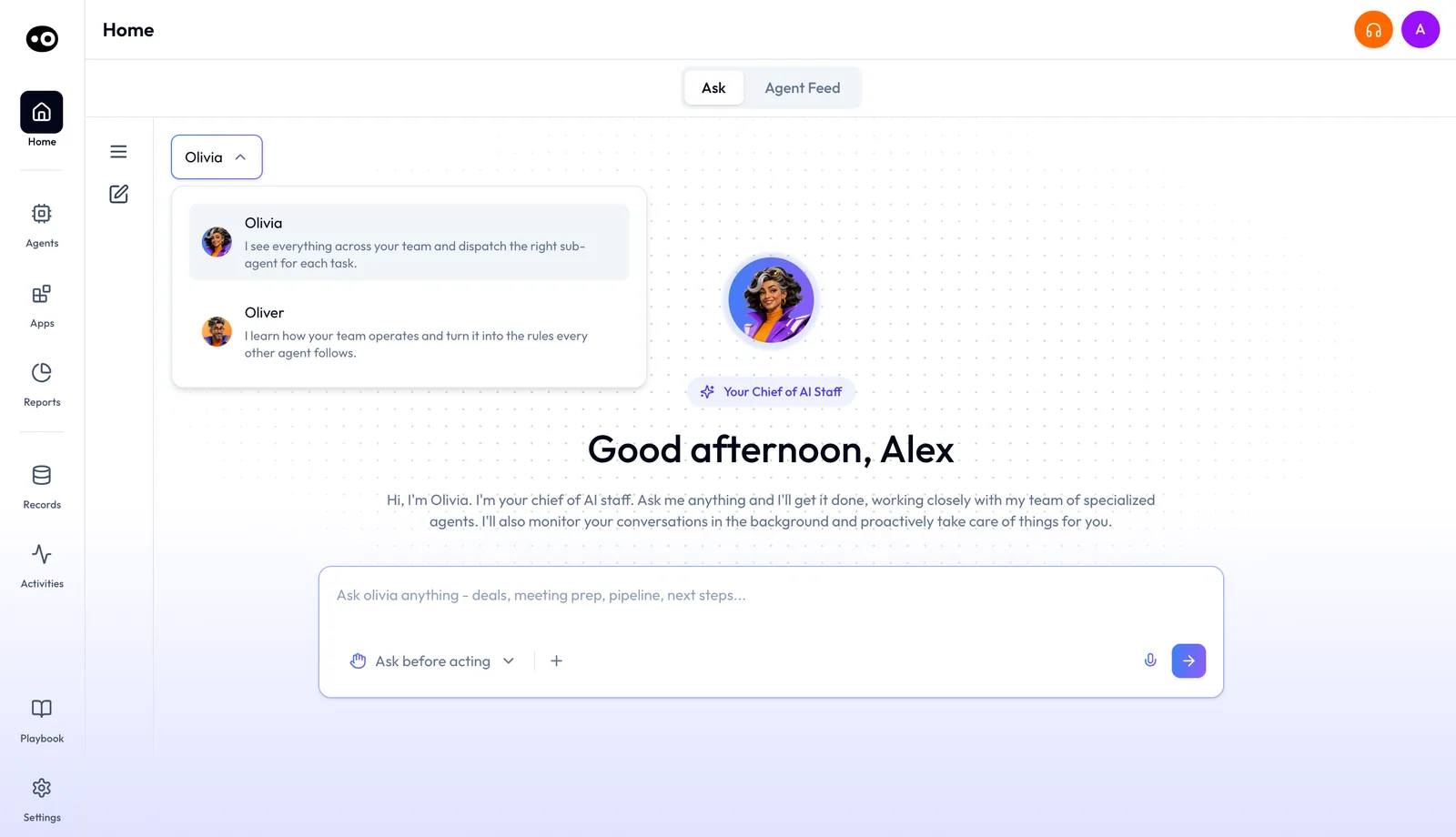
The two agents you talk to share one picker. Choose Olivia for deals and meetings, or Oliver for the process rules.
### Open Olivia to ask for work {#olivia}
If you're a rep, SDR, CSM or account manager with a question about a deal, a meeting or your pipeline, open [Oliv AI's Olivia agent](https://www.oliv.ai/product-docs/agents/olivia/). Ask in plain language, and she answers or hands the task to a specialist agent and reports back. Each conversation is set to **Ask before acting**, the default, or **Act without asking**, so check that setting before you hand her a task that changes something.
### Open Oliver to set the rules {#oliver}
If you're a RevOps manager or revenue leader and your process has changed, open [Oliv AI's Oliver agent](https://www.oliv.ai/product-docs/agents/oliver/). It keeps the process handbook, from your ICP and personas to your methodology and approval rules, and every other agent works inside it. Describe the change in plain language, and Oliver proposes the update as **Pending Review**. The update reaches the other agents only after a person approves it, so check **Pending Review** first if an agent still follows the old rule.
## What each specialist AI sales agent does {#specialist-agents}
If one job keeps taking your team's time, open the specialist that owns it. Each one does its job in the background and delivers the result where you already work, such as Slack, email or the Oliv AI app.
- **Pipeline alerts and 1:1 prep.** [Oliv AI's Deal Driver agent](https://www.oliv.ai/product-docs/agents/deal-driver/) watches the team's pipeline for sales managers. It sends a morning brief, alerts during the day when a deal needs attention, and a summary at the end of the day. Each week it also prepares a 1:1 report for every rep.
- **CRM updates.** [Oliv AI's CRM Manager agent](https://www.oliv.ai/product-docs/agents/crm-manager/) writes what changed after each meeting, call and email to Salesforce, HubSpot or Zoho. Reps accept or reject each suggested field beside its current value, until RevOps switches the agent to **Auto-Pilot**. [Map your custom CRM fields](https://www.oliv.ai/product-docs/agents/crm-manager/field-mapping/) first, or a correct value can land in the wrong field.
- **Meeting briefs and follow-up.** [Oliv AI's Meeting Assistant agent](https://www.oliv.ai/product-docs/agents/meeting-assistant/) sends a one-screen brief 30 minutes before each deal meeting. After the call, it drafts the follow-up email, proposes CRM updates and flags qualification gaps. It works only on meetings linked to active opportunities, so check the deal in your CRM if a brief doesn't arrive.
- **Forecasts.** If reps spend too long building the number, open [Oliv AI's Forecaster agent](https://www.oliv.ai/product-docs/agents/forecaster/). It drafts each rep's forecast from the pipeline before anyone logs in, flags the deals that don't add up and learns from how your deals actually close. Check the risk reason on each flagged deal before you move it to another category.
- **Coaching.** If you want to coach each rep on evidence without listening to every recording, open [Oliv AI's Coach agent](https://www.oliv.ai/product-docs/agents/coach/). It scores every recorded call against your scorecards. Each month it recommends three behaviors per rep, the manager picks one goal, and Coach tracks it weekly. Check **Evaluations (Last 30 days)** in **Settings › Coaching Scorecard** to see which scorecards are in use.
To see agents grouped by the roles they serve, from SDRs to RevOps, open the [public agent marketplace](https://www.oliv.ai/agents-marketplace). If you're still comparing vendors rather than choosing a page here, read our [roundup of AI sales agents](https://www.oliv.ai/blog/ai-sales-agents).
### Find an agent in the app {#marketplace}
If you know the job but not the agent, open **Agents** in the sidebar. Narrow the marketplace with the filter pills **All**, **Our Agents**, **Sales**, **Revenue Operations** or **Customer Success**, or type the job into **Search...**, which matches an agent's name or description. Each card carries **View Agent** or **Clone Agent**, and some carry a **Custom** or **Pre-built** badge.
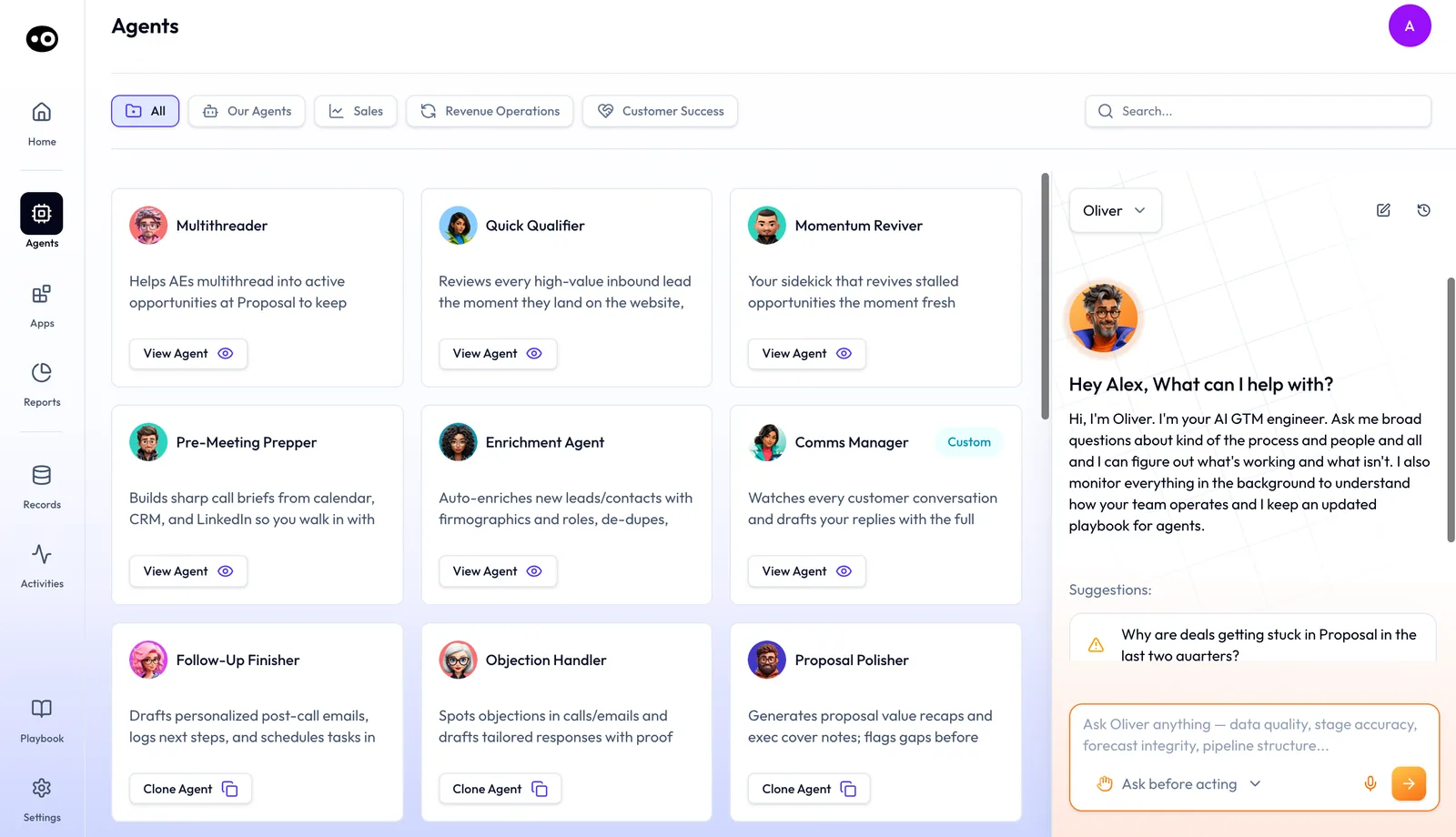
Use the marketplace to find a specialist agent by team. Oliver's chat stays on the right, so you can ask a process question while you browse.
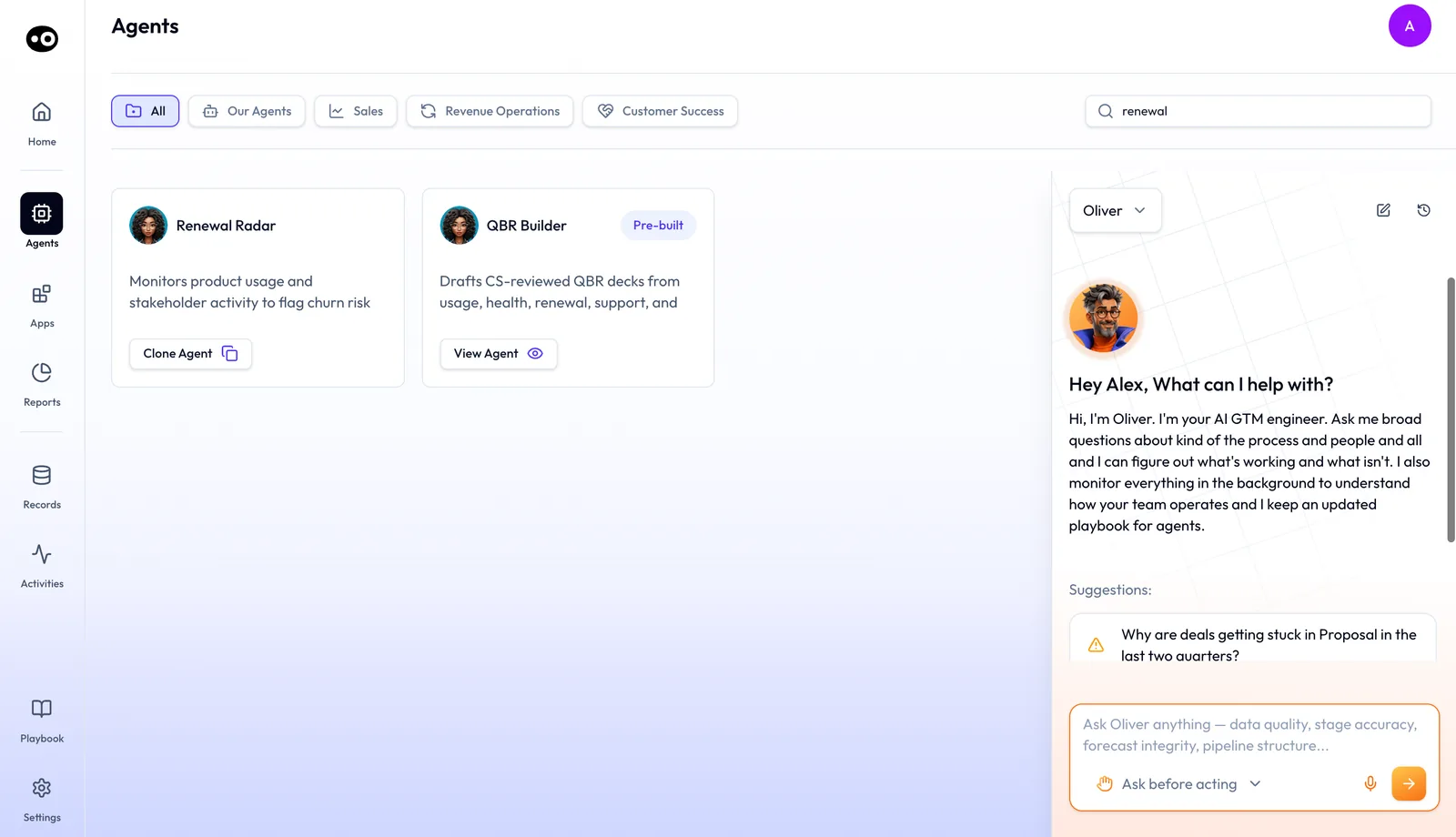
Search by the job you need done. A word that appears only in a card's description still finds that agent.
## Where AI sales agents get their context {#where-context-comes-from}
An agent can only act on what it can read, so if its work looks thin, check these three sources first.
- **Conversations.** The [Converse app](https://www.oliv.ai/product-docs/apps/converse/) captures online meetings, phone calls, email and Slack. Choose [bot or botless recording](https://www.oliv.ai/product-docs/apps/converse/recording-modes/) to decide how each meeting is recorded.
- **Your CRM.** Deals, contacts and fields come from [Salesforce](https://www.oliv.ai/product-docs/integrations/salesforce/) or [HubSpot](https://www.oliv.ai/product-docs/integrations/hubspot/), and agents write updates back.
- **Your tools.** Meetings come in through [the Zoom integration](https://www.oliv.ai/product-docs/integrations/zoom/), and [Slack](https://www.oliv.ai/product-docs/integrations/slack/) is where many agents deliver their work.
You don't need a clean CRM to start. Oliv AI's Olivia agent reads what's already there, messy data included.
## How any agent is set up {#inside-an-agent}
Open an agent's detail page when it does something you didn't expect, or before you rely on it. Every agent with a detail page is built from the same five parts. They sit on tabs: **Overview**, **Instructions**, **Tools**, **Triggers**, **Knowledge**, **Data** and **Runs**, with **Back to Marketplace** above.
- To see the agent's objective, its steps and what it produces, open [agent instructions](https://www.oliv.ai/product-docs/agents/builder/instructions/).
- To see the actions it may take, open [tools and run modes](https://www.oliv.ai/product-docs/agents/builder/tools-and-run-modes/). Each tool is set to **Auto Run**, **Requires Approval** or **Agent Decides**.
- To see the events and fixed times that start it without anyone pressing anything, open [triggers and schedules](https://www.oliv.ai/product-docs/agents/builder/triggers/).
- To see the documents it works against, such as an ICP document or a solution deck, open [knowledge files](https://www.oliv.ai/product-docs/agents/builder/knowledge/).
- To see what it actually did, open [run history](https://www.oliv.ai/product-docs/agents/builder/run-history/), which records every run with each email the agent wrote and each change it made.
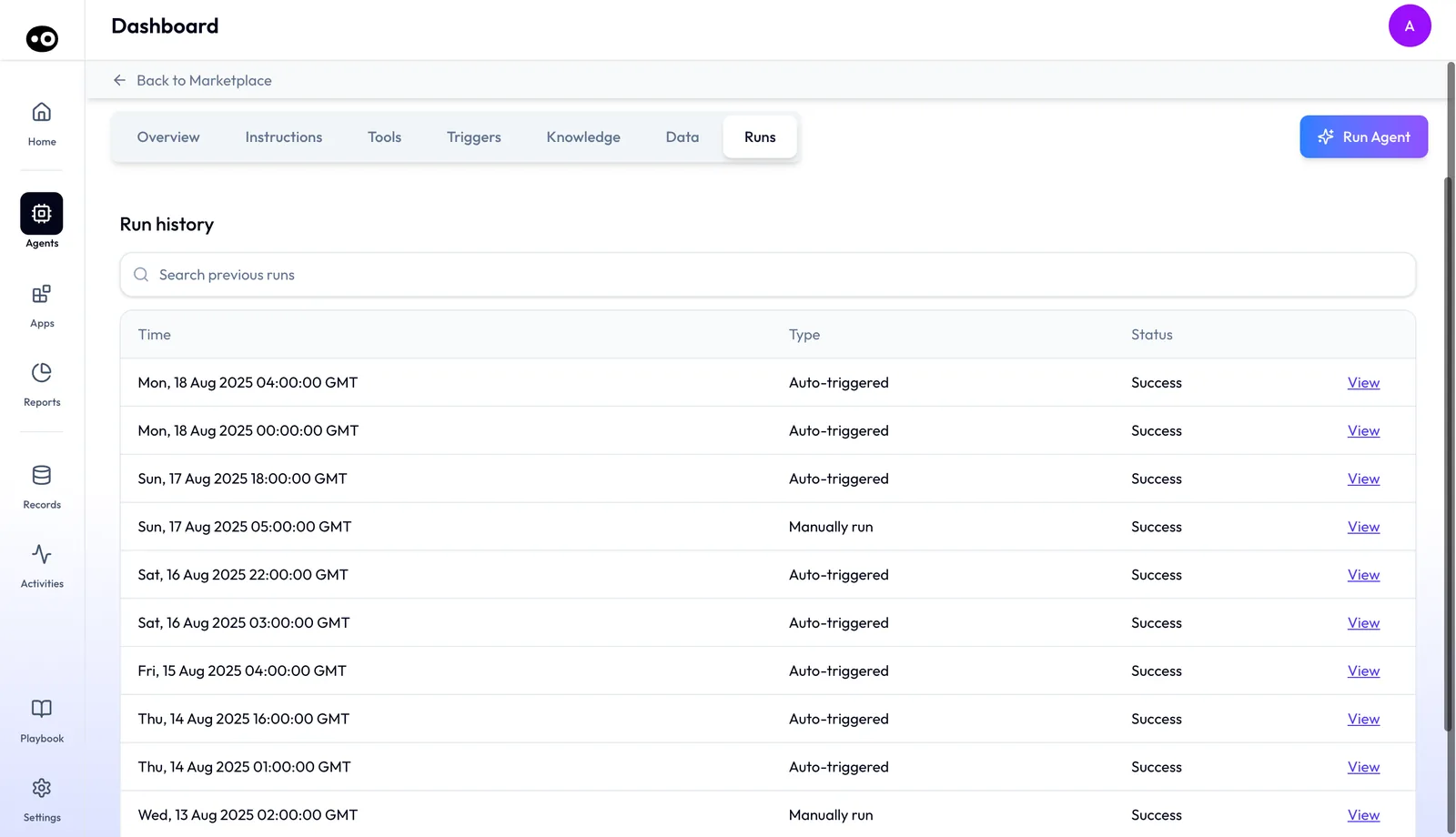
Every agent page uses the same tabs, so once you know one agent you can find the instructions, tools or run history of any other.
## Where to start {#next-steps}
To see the agents do a job from start to finish, open the workflow that matches your week. If your question is who sets the agents up and what to connect first, open the rollout plan at the end of this list.
- [Prepare for a meeting](https://www.oliv.ai/product-docs/workflows/prepare-for-a-meeting/): get the deal brief before each call.
- [Record a meeting and follow up](https://www.oliv.ai/product-docs/workflows/record-and-follow-up/): turn a finished call into a follow-up and CRM updates.
- [Keep the CRM updated](https://www.oliv.ai/product-docs/workflows/keep-the-crm-updated/): move from reviewed updates to automatic ones.
- [Run a pipeline review](https://www.oliv.ai/product-docs/workflows/run-a-pipeline-review/): walk into each 1:1 with a per-rep report.
- [Run deals as an account executive](https://www.oliv.ai/product-docs/use-cases/ae-run-deals/): see how the agents share one AE's week.
- [Plans and seat roles](https://www.oliv.ai/product-docs/plans/plans-and-seat-roles/): match each person on your team to a seat role.
- [Plan your deployment](https://www.oliv.ai/product-docs/getting-started/plan-your-deployment/): map the first 30 days of the rollout.